🐙 Code: https://github.com/AlanRoybal/AILAHack (Booth Brief is in booth/)
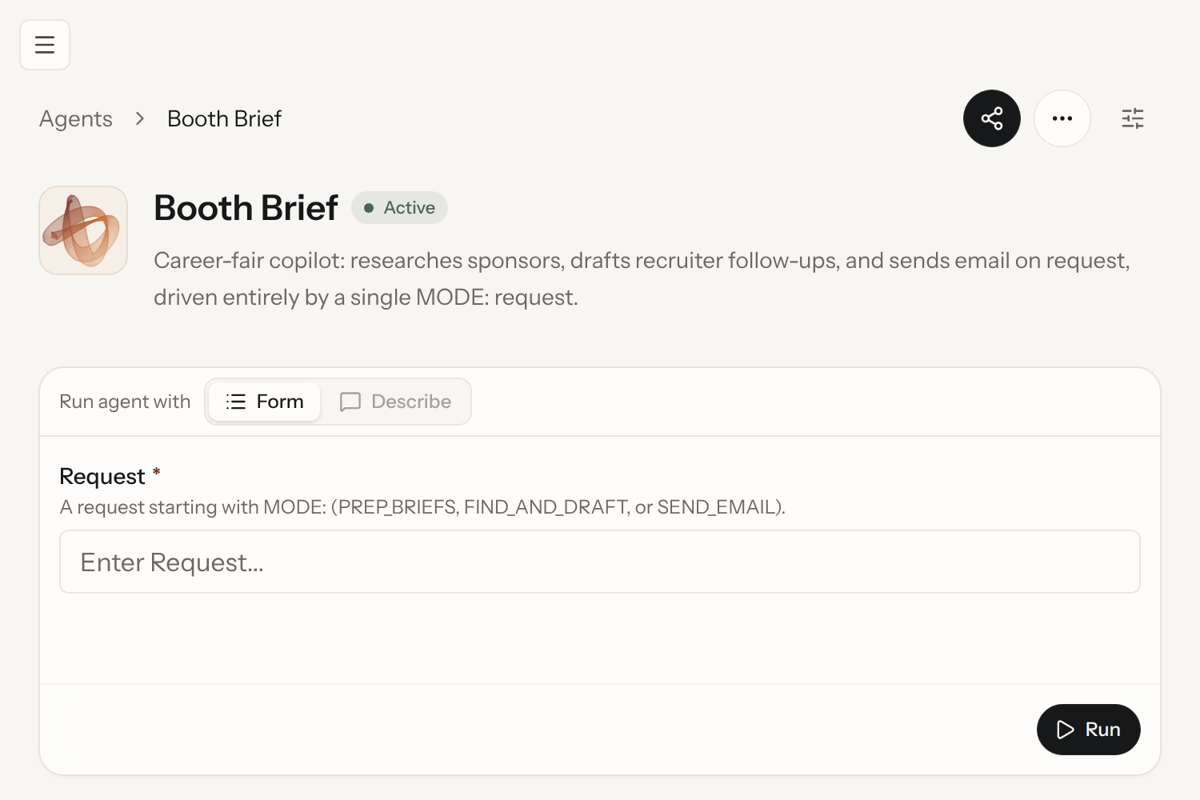
🤖 CREAO agent: Booth Brief on agent.creao.ai, agent ID f98b8927-e54e-4c80-baa1-2183e197d417
🔗 Example run: sponsor research run
📖 Deep dive: For a more technical deep dive, check out https://deepwiki.com/AlanRoybal/AILAHack
Booth Brief: walk up to every sponsor knowing who to ask for and what to say
The challenge and who it's for
A career fair gives you a few minutes per booth and no time to prepare for each one. Most students walk up knowing only the logo, ask "what roles do you have?", and leave without the recruiter's name. The follow-up email that could turn the conversation into an interview goes out days later, or never.
Booth Brief is for any student walking a career fair or a hackathon sponsor hall, starting with the 16 sponsors at the LA Hacks AI Hackathon. It runs on Even Realities G2 glasses, so the brief sits in your line of sight while your attention stays on the person in front of you.
How it works
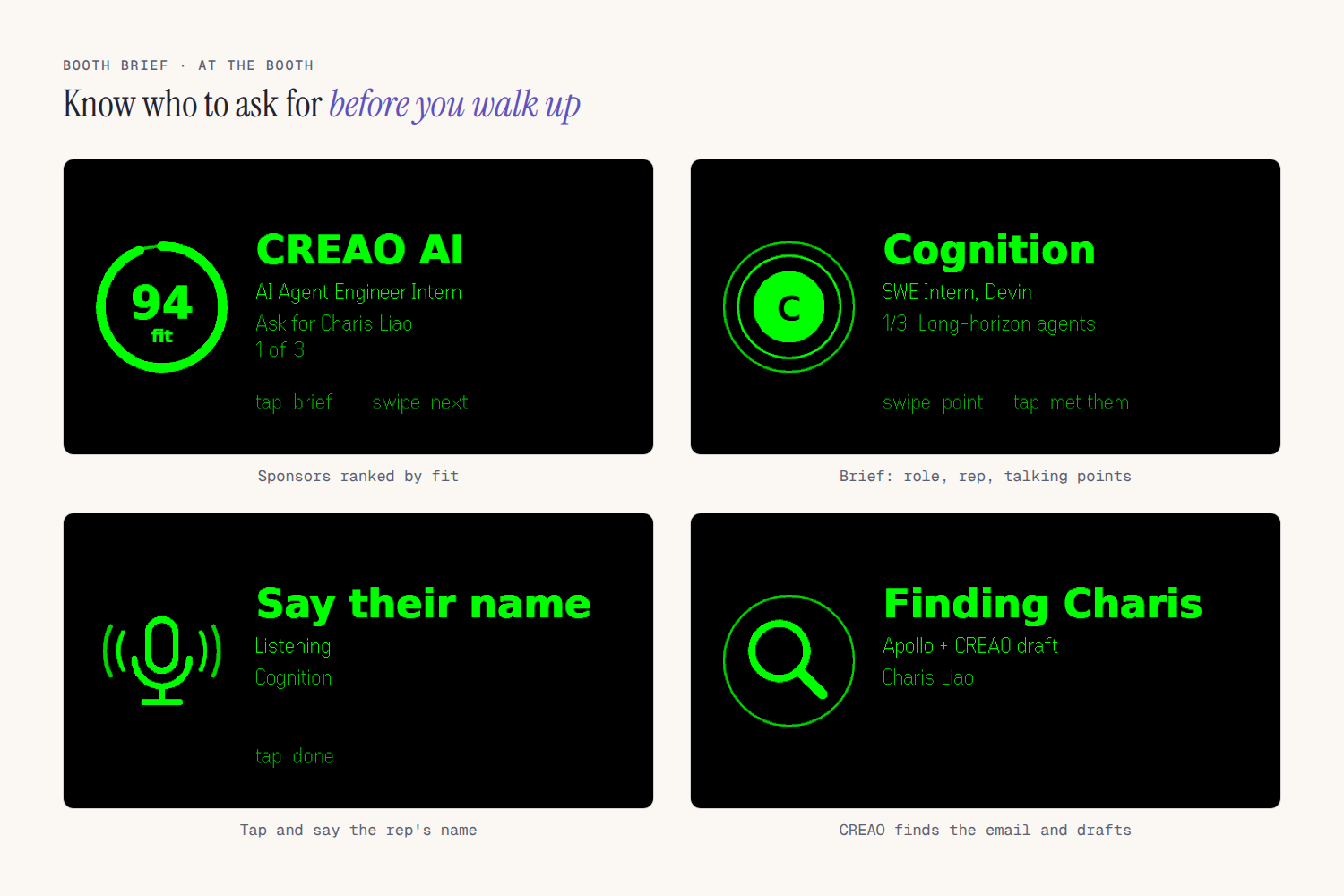
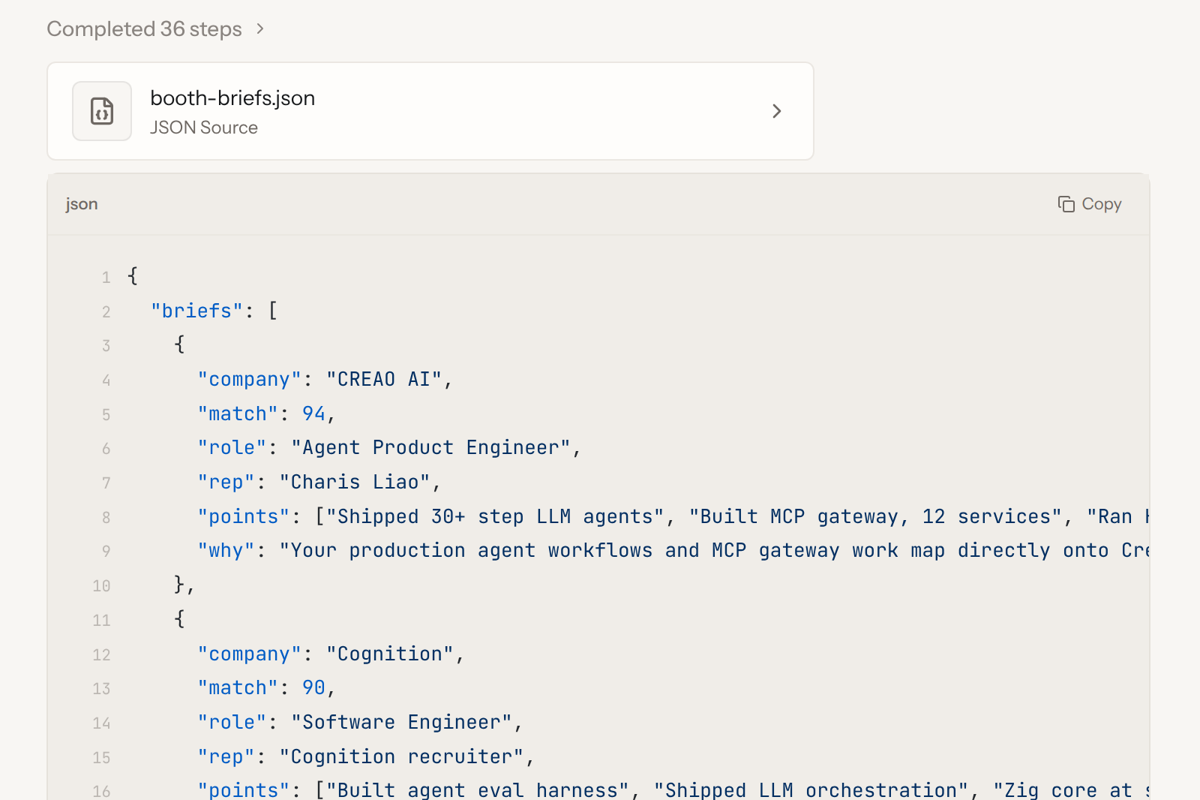
- Before the fair, CREAO does the research. Give it your resume and the sponsor list. The CREAO agent researches every sponsor on the live web (open roles that fit you, recent news, who is staffing the booth), ranks them by fit and writes a brief for each: the role to ask about, who to ask for, and three talking points from your resume. In our run it covered 16 sponsors and ranked CREAO AI first at 94 fit, with Charis Liao as the person to ask for.
- At the booth, glance at the lens. Scroll the ranked list with the R1 ring. Tap a sponsor to open its brief and scroll through the talking points one at a time.
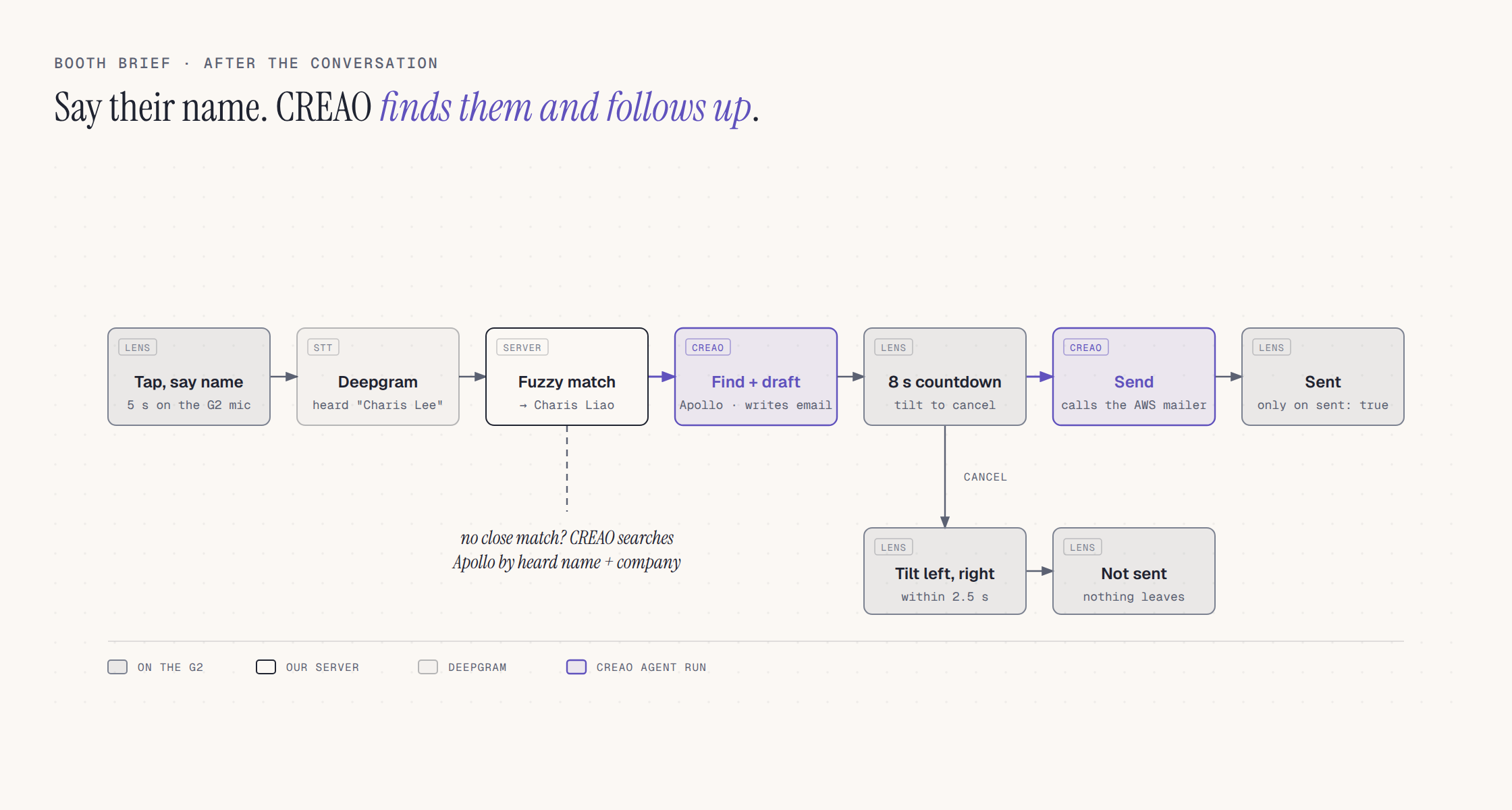
- After the talk, say their name. Tap and say the rep's name. Deepgram transcribes it and the server fuzzy matches it against the known booth staff, so "Charis Lee" still finds Charis Liao. CREAO looks up the rep's work email in Apollo.io and drafts a short follow-up about the role and your background.
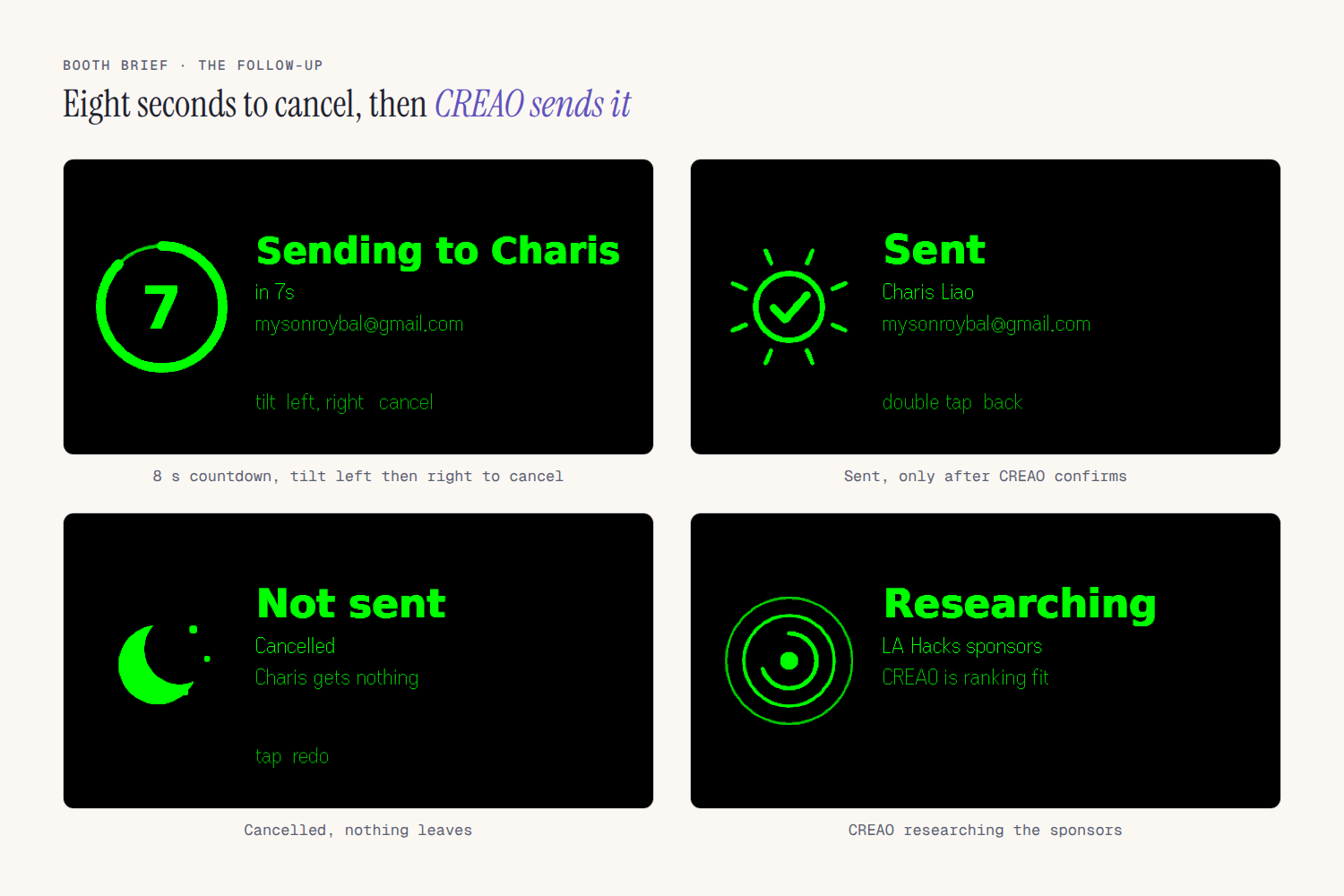
- Eight seconds to change your mind. The lens counts down from 8. Tilt your head left, then right within 2.5 s, to cancel. Otherwise CREAO sends the email, and the lens only shows "Sent" once CREAO's run confirms it.
Built for the Even Realities G2
Even Realities asked for Quiet Tech: an app that appears only when it's useful, puts information in your line of sight, and keeps you present with the person in front of you. Booth Brief is built around one moment, the minute before and after you talk to a recruiter.
Who, what moment, why G2. A student standing at a career fair booth. Checking a phone while a recruiter talks reads as distracted. The G2 puts the rep's name and your talking points where you're already looking.
Made for G2
- Every screen is laid out for the 576x288 display: a 144 px icon tile and a bold title drawn on a canvas and sent as images, with the role, rep and talking point in native text containers at different brightness levels.
- The R1 ring does all the navigation: swipe through the ranked list or the talking points, tap to move forward, double tap to go back or exit.
- The G2 mic records the rep's name (16 kHz PCM) for Deepgram, and the IMU handles the cancel: tilt left, then right within 2.5 s.
- It ships as an Even Hub app, "Booth Brief" (
com.alanroybal.boothbrief), installed as a private build and tested on a physical G2.
Quiet by design
- Nothing appears until you tap. No notifications, no live captions, no transcript of the conversation.
- One talking point at a time, each under 40 characters, so a glance is enough.
- Three taps per booth: tap a sponsor for your points, tap "done" as you walk up so the screen clears to "Talking to Charis Liao?", then tap afterward to say their name.
- The follow-up needs no phone: an 8 s countdown ring, a head tilt to cancel, and "Sent" once CREAO confirms.
Experience and polish
- Each screen shows its actions as outlined buttons (the gesture and what it does), so there are no controls to memorize.
- Every follow-up state has its own screen: listening, finding, countdown, sending, sent, cancelled, and failed with retry.
- Long sponsor names shrink to fit, then end with "…" instead of cutting off mid-word.
Privacy by design
We care about privacy for both people at the booth: the student wearing the glasses and the recruiter they're talking to.
- The mic stays off during the conversation. It turns on only after you tap "say name", listens for 5 seconds, then turns off. Booth Brief never hears the conversation itself.
- Only a name leaves the glasses. That 5-second clip goes to Deepgram to become text and is never saved. The server keeps only the name it heard.
- Work emails only. CREAO asks Apollo for the rep's work email with personal emails turned off.
- Nothing sends without you. Every follow-up waits through an 8 second countdown you can cancel with a head tilt, and the mailer only delivers to addresses on its allowlist.
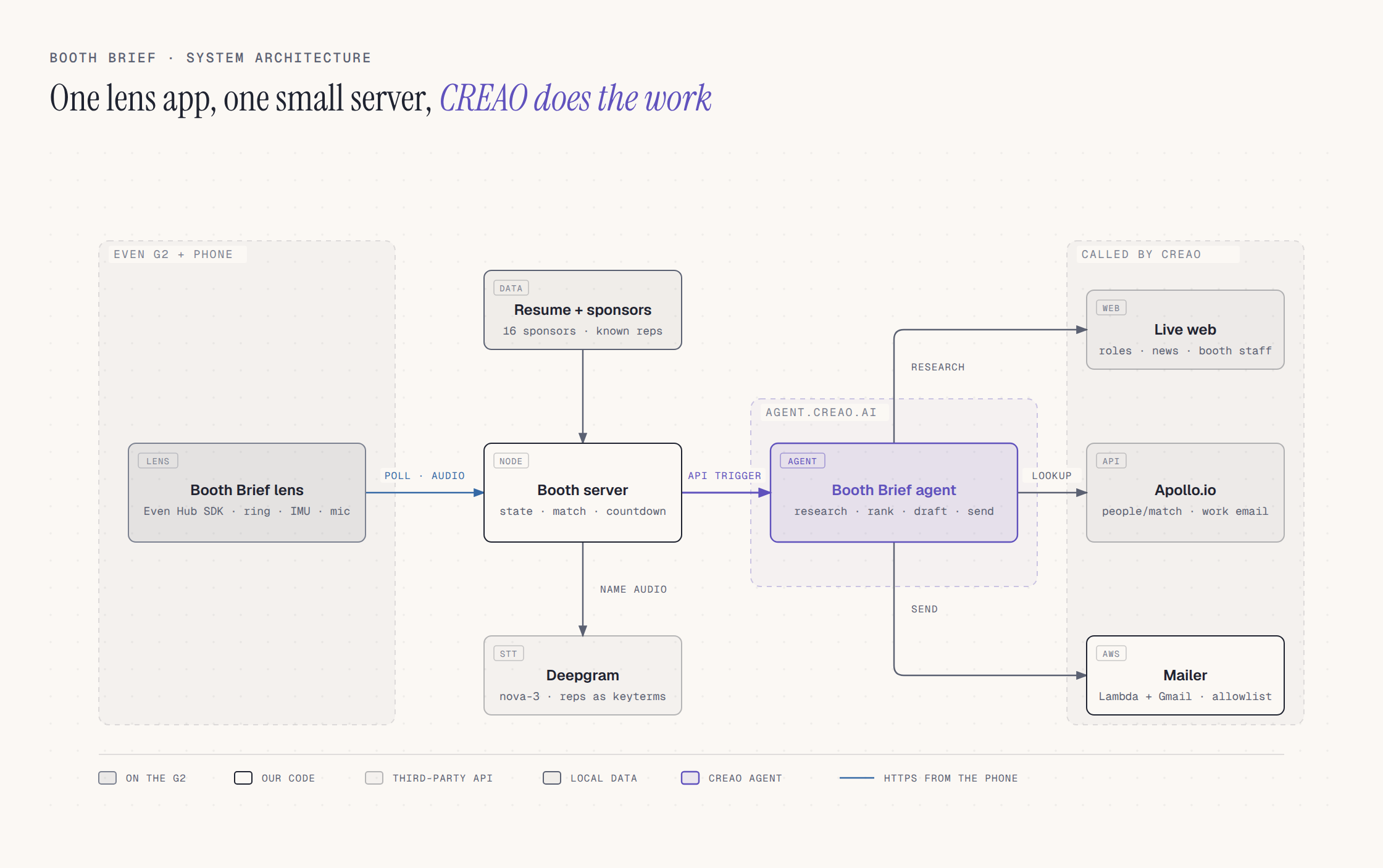
- Keys stay off the glasses. API keys live on our server, never in the lens app, and requests through the public tunnel need a token built into the app.
Why CREAO is essential
Remove the agent and nothing is left. The server and the lens have no sponsor data, no ranking, no email addresses and no way to send. Everything the wearer sees comes out of a CREAO run.
- Research and ranking (
PREP_BRIEFS). CREAO browses each sponsor's careers pages and news, works out who staffs the booth, compares it all against the resume and returns ranked JSON briefs. The example run took 36 steps. - Lookup and draft (
FIND_AND_DRAFT). CREAO calls the Apollo.io REST API from its sandbox (people/match, falling back tomixed_people/api_searchand a match by ID when the heard name is off), then writes the email. It never sends in this mode. - Send (
SEND_EMAIL). CREAO calls our mailer from its sandbox. The server marks the email sent only when CREAO returns"sent": true.
All three modes are one agent on agent.creao.ai with a single request input, driven by our server through the agent's API Trigger. Autonomy is set to Auto because API runs can't stop to ask for approval, and the instructions tell the agent never to repeat or save the API keys it is given.
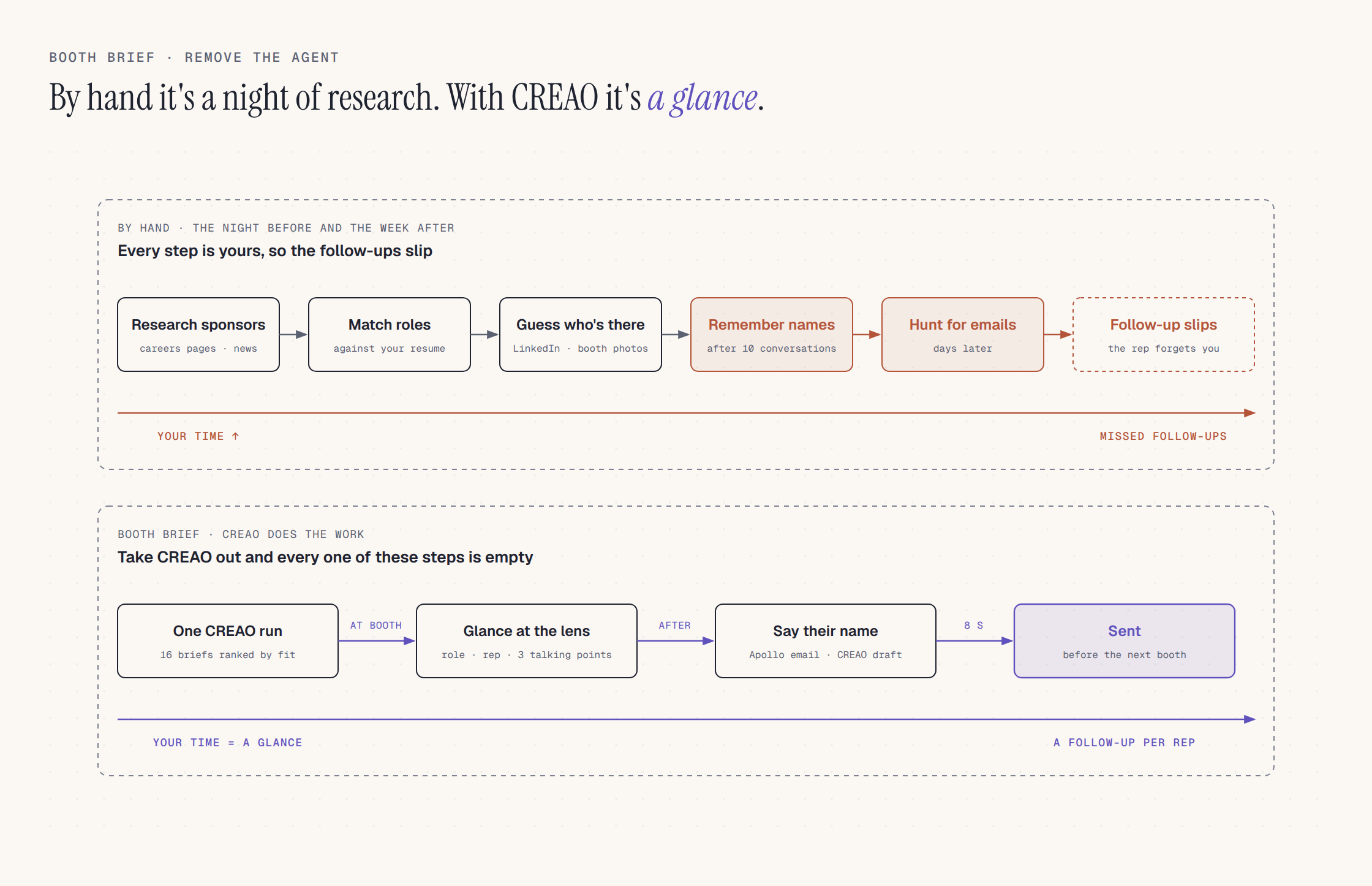
We kept AI out where plain code does the job: name matching is edit distance against the known reps (a match needs 0.6 similarity), the countdown and tilt detection are deterministic, and the mailer only sends to addresses on an allowlist.
Why it's original
The career fair tools we've used are maps and employer lists from the organizer. Email finders help afterwards, but only if you remember who you met and do the lookup yourself. Smart-glasses assistants mostly caption or coach the conversation. Booth Brief covers the whole loop for one booth: who to talk to before you walk up, what to say while you're there, and a sent follow-up before you reach the next booth, without taking out your phone.
- Ranked for your resume. Every brief starts from your background, so the first booth on the list is the best fit for you.
- One spoken name after the talk. That name becomes a verified work email and a written follow-up.
- You stay in control. Nothing sends until the countdown ends, a head tilt cancels it, and in test mode the mailer can only reach our own inbox.
Tools, harnesses, and models
Product stack
| Layer | What | Why it mattered |
|---|---|---|
| Agent | CREAO agent on agent.creao.ai, API Trigger (capi_ key), three modes |
One agent does the research, lookup, drafting and sending, and every run shows up under its Recent runs. |
| Glasses | Even Realities G2, Even Hub SDK 0.0.16, Vite, TypeScript | The 576x288 display holds one idea per screen. Icons and titles are drawn on a canvas and sent as images, details go in native text containers. |
| Input | R1 ring scroll and tap, G2 mic (16 kHz PCM), G2 IMU | Scroll, tap, speak and tilt cover every action without a phone. |
| Speech | Deepgram nova-3 with the known rep names as keyterms | Proper names come back close enough for the fuzzy match. |
| Server | Node, TypeScript | Starts and polls CREAO runs, parses the JSON block at the end of each reply, holds state and runs the countdown. |
| People data | Apollo.io People Enrichment and People API Search | Called by CREAO to turn a name and a company into a work email. |
| AWS Lambda function URL (Node 22) + Gmail API OAuth | CREAO calls it with a token. The allowlist keeps test mail away from real reps. |
Test harnesses
- Even Hub simulator with its automation API drove every lens screen: list, brief, listening, finding, countdown, sending, sent, cancelled and failed. It caught long sponsor names clipping mid-word, which now pan sideways instead.
- Mock CREAO endpoint for testing run parsing and the lens flow without spending real runs.
- On-page fallbacks (typed name, lean buttons) because the Linux simulator has no mic or IMU.
Build-process tools
- Devin built, tested and shipped most of the project (see "How we used Devin" below).
- Figma reference for the lens screens: large icon on the left, bold title, short supporting lines, dim hints.
How we used Devin
Devin was the rest of the team. One person and Devin built and shipped everything here during the hackathon.
- Picking the idea. Devin read the LA Hacks, CREAO and Even Realities rules, and a separate Devin session acted as a strict judge, ranking the candidate ideas against each track's rubric and against what can be demoed at a judging table.
- Building the product. Devin wrote the Node server, the G2 lens app and the AWS Lambda mailer, set up the CREAO agent on agent.creao.ai, and wired in Deepgram, Apollo and Gmail OAuth. It deployed the mailer with the AWS CLI.
- Testing. Devin drove every lens screen through the Even Hub simulator's automation API, used a mock CREAO endpoint, and generated spoken clips with Deepgram to test name and event matching. It also timed full follow-up runs against the test inbox.
- Getting it on the glasses. Devin put the server behind a token-protected Cloudflare tunnel, packaged each Even Hub build and uploaded it as a private build. Between hardware tests, it fixed what we found on the real G2:
- the head tilt waited on a calibration nothing asked for;
- the mic picked up a nearby conversation as a "name";
- a follow-up could get stuck after going back;
- the send took too long.
- The judge view. Devin built the live mirror page, so the screen on the glasses also shows on a laptop at the table.
- The demo video. Devin recorded the simulator and a real CREAO run, wrote the script and generated the voiceover with Deepgram Aura. It split the song's vocals out with Demucs, cut the guitar parts to the edit's beats, animated the lens components frame by frame, and uploaded the result to YouTube.
- Understanding the code. We DeepWiki'd the repo (https://deepwiki.com/AlanRoybal/AILAHack), which made the implementation easier for us to understand as it grew.
- This page and the pitch. Devin wrote this Devpost, drew the diagrams with the diagram-design skill and built the 5-slide pitch deck with Morph transitions.
What's real today, what's next
A full live run works end to end on agent.creao.ai: CREAO researched 16 sponsors, ranked CREAO AI first at 94 fit, found Charis Liao's work email in Apollo, drafted the follow-up and sent it through the mailer. So far every email has gone to our own test inbox. Sending to the real rep is one setting (SEND_TO_REP=1) plus an allowlist entry. Booth Brief runs on a physical G2 as a private Even Hub build, including the mic name capture and the head-tilt cancel, and every screen was also driven through the Even Hub simulator.
Next: import the employer list from any career fair's event page, and add notes from the conversation so the follow-up mentions what you actually talked about.
Built With
- apollo.io
- aws-lambda
- creao
- deepgram
- even-hub-sdk
- even-realities
- gmail-api
- node.js
- typescript
- vite

Log in or sign up for Devpost to join the conversation.