My Inspiration
Cybersecurity threats are on the rise, with attackers employing phishing emails, malware, and deepfakes to steal and misuse personal information. The rise of generative AI has also made it even more challenging to distinguish between real and fake information, increasing risks to online safety. Furthermore, low-income communities often lack a basic understanding of cybersecurity risks, such as phishing or malware, and the skills needed to navigate the digital world safely. Additionally, local governments and non-profits often cannot hire cybersecurity professionals, leaving these communities exposed to scams, identity theft, fraud, misinformation, and other cyber threats. That’s why I created IdentityGuard: to provide an intuitive application that prevents all users from falling for online scams or impersonation and increases their digital literacy.
What IdentityGuard does
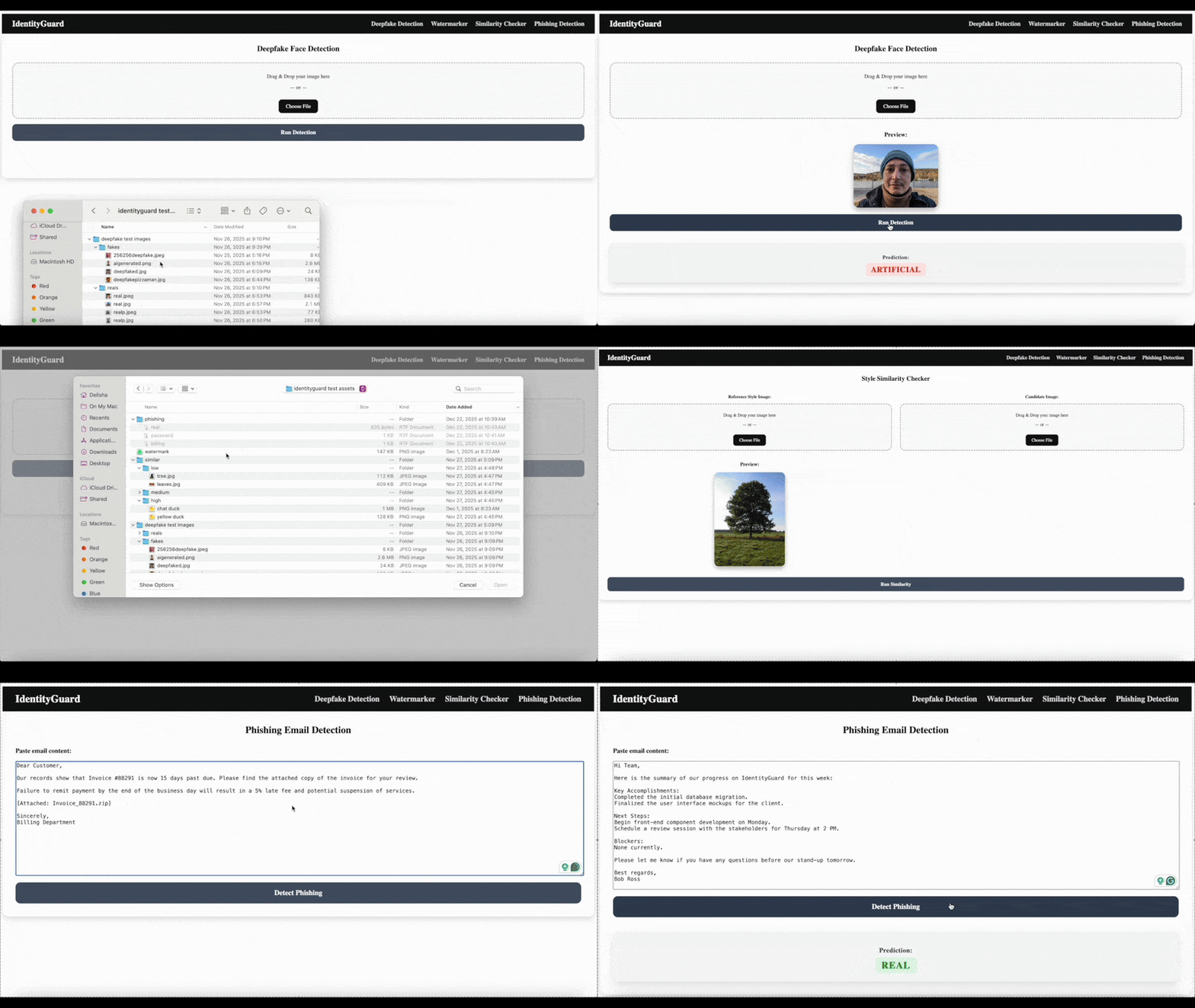
IdentityGuard is a web application with AI-powered tools designed to protect users from online identity threats, including deepfakes, art theft, and phishing attempts. All users have to do is upload suspicious images to the deepfake detector or similarity checker, their own art or photography to the watermark, and suspicious messages to the phishing detector, and press a button to see if they were cybersecurity risks! By combining all of these into one app, IdentityGuard protects users’ digital identities and prevents misuse of their content, helping them stay in control of their online presence.
How I Built IdentityGuard
The deepfake detector uses a Vision Transformer (ViT) model to analyze images and predict if they are real or deepfaked. The watermarker uses the Pillow (PIL) and io libraries to apply a customizable watermark to any image users upload. The similarity checker uses a pre-trained VGG16 Convolutional Neural Network (CNN) to extract an image’s features, calculates the cosine similarity between the features of two uploaded images, and returns their similarity as a percentage. Finally, the phishing detector uses a fine-tuned DistilBERT model to classify text as either a legitimate email or a phishing attempt. I used FastAPI to create the backend of the web app, which connects to the JavaScript/JSX and CSS frontend via API routes.
Challenges I Faced
The biggest challenge I faced was choosing models for each of the tools. For example, I initially planned to use XCeptionNet for the DeepfakeDetector. However, it required extensive preprocessing and resizing for my dataset, which (I hypothesize) led to the loss of subtle facial features and therefore reduced accuracy. Training also required a significant amount of GPU memory, resulting in long times to train on each epoch, fine-tune, and train again. To overcome this, I looked at forums like Stack Overflow, then looked for open-source models on HuggingFace and other community databases that I could train more efficiently.
Accomplishments I’m Proud Of
I’m proud of being able to incorporate all four of these tools smoothly into my app, and that most of them are AI-driven. This was also my first time learning about cosine similarity (for the similarity checker), so I’m glad I was able to leverage the model I found correctly and understand how it worked. Overall, I’m proud I was able to create an accessible and usable tool, ensuring that anyone, regardless of their technical background, can protect their online identity.
What I Learned
I learned how to collect, preprocess, and handle image and text data for AI applications, and gained experience training and fine-tuning neural networks, like Vision Transformers for image classification and DistilBERT for text classification. I also learned how to integrate multiple machine learning models into a web application, connecting the backend (FastAPI) with the frontend (React) to create a smooth, user-friendly experience. Additionally, I learned about deploying AI models in real-world contexts, handling large datasets efficiently, and designing tools that are both accessible and practical for users to protect their digital identities.
What's Next for IdentityGuard
Next, I want to expand IdentityGuard’s capabilities to cover even more types of online threats, including videos, clickbait, and fake accounts. To make the app more accessible, I could also develop a mobile version, making it more convenient for everyday use. Finally, I hope to integrate community-driven features, like a forum to share content that users have found to be safe or malicious, to prevent others in the community from falling for those scams.


Log in or sign up for Devpost to join the conversation.