Inspiration
Seeing my grandmother struggle with Parkinson’s while using a TV remote, and watching my father’s hands cramp from hours at his computer, made us notice a growing problem. As we spend more time using our hands in an increasingly digital world, motor disability statistics are only rising. According to a study released by The Lancet Neurology, in 2021, more than 3 billion people worldwide were living with a neurological condition, many affecting movement and motor function, a staggering number that highlights just how urgent it is to make technology more accessible. We built iClick to make digital devices accessible to everyone, creating a touchless navigation system that meets the needs of a world that’s becoming ever more digital.
What it does
iClick is an app that allows users to control their computer cursor entirely with their eyes. The cursor follows wherever the user looks, and they can set customizable shortcuts for common actions, such as blinking twice to perform a click. The system also includes speech-to-text functionality, enabling users to type and interact with their devices without using their hands at all. By combining eye pupil tracking, intuitive gestures and voice input, iClick provides a completely hands-free way to navigate digital devices, making technology more accessible for people with motor impairments.
How we built it
Cursor Tracking
We built an eye-tracking pipeline using OpenCV and MediaPipe’s Face Mesh model. MediaPipe provided facial and iris landmarks in real time, allowing us to extract geometric features from both eyes.
We then normalized features to improve stability and robustness. These included iris-to-eye-corner ratios (to measure horizontal and vertical gaze direction), eye width and height (for scale normalization), and normalized eye center positions (to compensate for head movement). By using ratios instead of absolute pixel values, we reduced sensitivity to camera distance and face positioning.
We implemented a full-screen calibration process where users followed a moving dot across a structured grid. For each calibration point, we collected multiple stabilized samples. This produced a labeled dataset mapping eye features to true screen coordinates.
We then trained machine learning regression models for cursor prediction using Gradient Boosting Regressors. This allowed us to capture nonlinear relationships between subtle eye movements and screen position. Our trained models achieved an average error of under 10 pixels, enabling precise cursor control.
To ensure smooth and natural movement, we added an overlaying real-time smoothing system. We buffered and combined predictions using a weighted moving average, prioritizing recent frames while limiting sudden jumps. We also implemented a movement threshold to prevent micro-jitters when the user’s eyes are stationary.
Together, calibration, feature normalization, machine learning regression, and intelligent smoothing allowed us to build a responsive and stable eye-controlled cursor that feels natural and accurate in real time.
Gesture Mapping
We implemented eye and hand based gestures that allowed users to perform actions without the need of a trackpad, mouse or keyboard.
For eye based gestures, we implemented blink detection using the Eye Aspect Ratio (EAR), a geometric metric calculated from six eye landmarks. By monitoring changes in eyelid distance across consecutive frames, we were able to detect:
Single blinks
Double blinks (within a time window)
Blink-holds (eyes closed beyond a duration threshold)
To reduce false positives, we required consecutive frames below a calibrated EAR threshold and added cooldown timers between actions. This ensured reliability and prevented accidental clicks from natural blinking.
For hand gestures, we used MediaPipe Hands to extract 21 hand landmarks per frame. We then implemented rule-based geometric heuristics to detect:
Open palm
Peace sign
Wave gesture
Wave detection was implemented by tracking wrist X-coordinates over time and identifying oscillatory motion exceeding a minimum amplitude threshold.
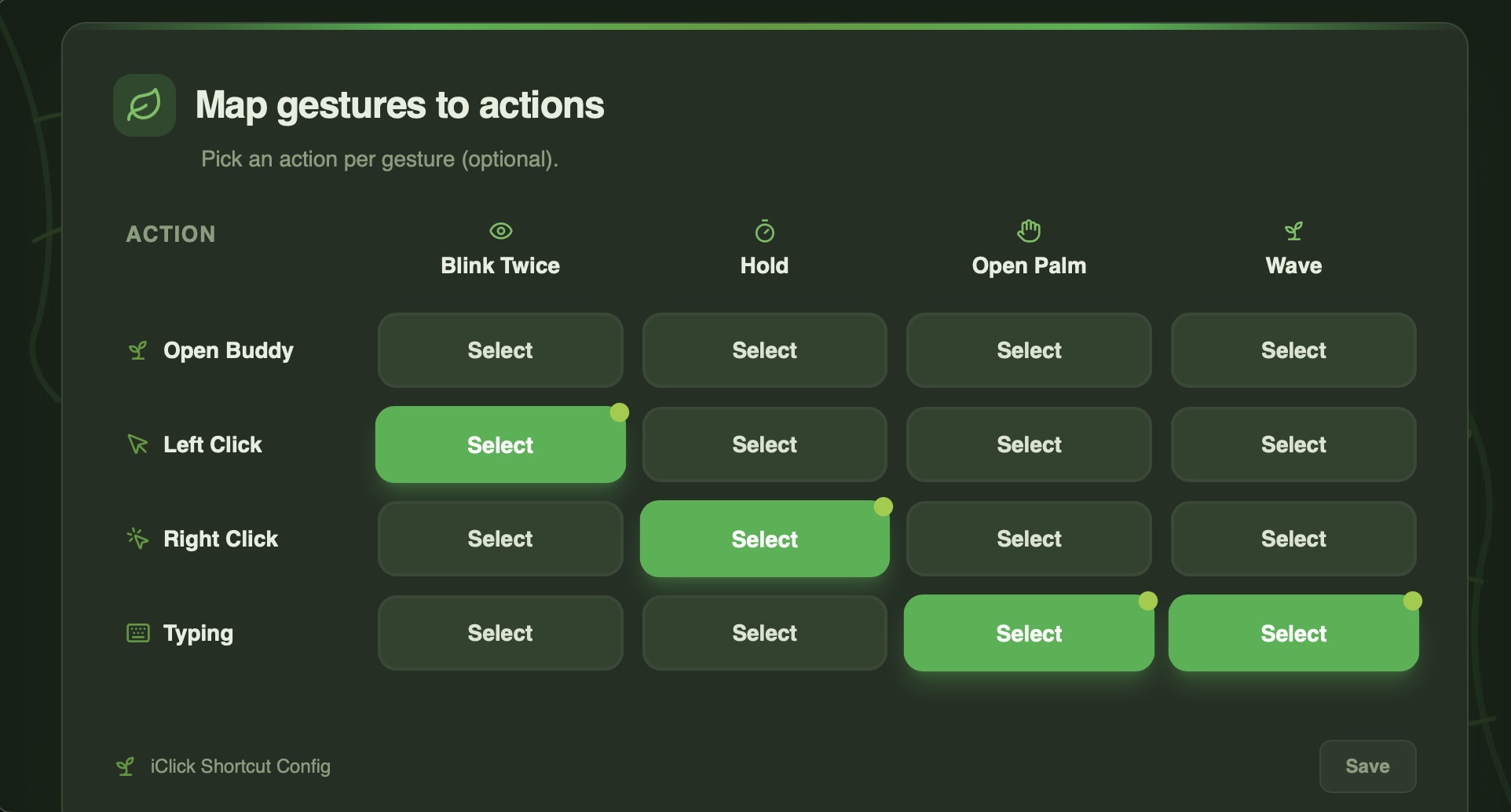
To support personalization, we built a custom gesture recording system that allows users to define and map gestures to actions. Gesture mappings are stored in a configuration file, enabling dynamic reassignment without modifying core code.
All gestures are processed in real time and dispatched through a modular action system, which maps each gesture to system-level functions such as left click, right click, launching speech-to-text, or starting a voice agent assistant pipeline.
This modular architecture allows gestures to be easily reconfigured, extended, or replaced depending on the user’s physical abilities and preferences.
Digital Assistant
To enable fully hands-free interaction, we built a real-time voice control pipeline powered by streaming speech-to-text and a custom intent parser.
Our system connects to ElevenLabs’ real-time transcription API over WebSockets, continuously streaming microphone audio in small chunks. We process both partial and committed transcripts in real time, allowing for responsive interaction without waiting for full speech completion.
To prevent accidental activation, we implemented a wake-word system (“Hey Buddy”). Once detected, the assistant enters an armed state for a limited time window, during which commands can be issued. This reduces unintended triggers while maintaining accessibility.
After transcription, spoken input is cleaned and normalized to remove artifacts and filler words. We then use a custom rule-based intent extraction engine that identifies the last actionable command within the phrase. Supported intents include:
- Opening applications or websites
- Searching queries
- Playing media
- Scrolling
- Opening the calendar
- Setting reminders
Rather than relying on a large language model, we built a lightweight semantic parser that detects command keywords and extracts targets dynamically. This ensures low latency and predictable behavior.
To improve reliability, we implemented:
- Command debouncing to prevent repeated execution
- Silence-based triggering to execute commands after speech pauses
- Wake-word time windows for contextual command acceptance
- “Stop” command replay logic, which safely replays the last valid action before terminating the session
The assistant routes parsed intents into a modular execution layer, which interfaces with system accessibility APIs, search handlers, media controllers, and reminder services.
By combining streaming transcription, wake-word gating, semantic parsing, and system-level execution, we created a responsive digital assistant that works seamlessly alongside eye and gesture controls, completing the fully hands-free experience.
Speech to Text
To enable seamless hands-free typing, we built a real-time speech-to-text pipeline using Gradium’s streaming ASR API over WebSockets.
Audio is captured directly from the user’s microphone using sounddevice at 16kHz mono. Instead of recording large audio files, we stream small 80ms chunks in real time. Each chunk is converted to 16-bit PCM, base64 encoded, and sent immediately over a persistent WebSocket connection. This streaming approach minimizes latency and allows transcription to occur as the user speaks.
To improve usability, we implemented automatic silence detection using RMS amplitude analysis. If speech drops below a configurable threshold for a set duration, the system automatically stops recording. This prevents unnecessary background noise transmission and creates a more natural “speak and pause” interaction.
On the receiving side, we process two types of server messages:
Partial transcripts, which display live recognized text as it is being spoken
Committed transcripts, which signal the end of a phrase
When a phrase is committed, it is appended to the full transcript and can optionally be injected directly into the currently focused application (such as a search bar or document field). We implemented this using pyautogui, allowing text to be typed programmatically wherever the cursor is active. A macOS fallback using AppleScript ensures cross-platform reliability.
The entire system runs asynchronously using asyncio, enabling simultaneous audio streaming and transcript processing without blocking. This architecture ensures low-latency, real-time transcription while remaining lightweight and responsive.
By combining chunked audio streaming, silence-based auto-termination, real-time transcript parsing, and direct system-level text injection, we created a fast and intuitive speech-to-text engine that integrates seamlessly with iClick’s eye-tracking and gesture controls.
Challenges we ran into
Eye Tracking Precision and Stability
One of our biggest challenges was achieving accurate and stable cursor movement using eye tracking alone. Raw iris landmark coordinates from MediaPipe were extremely sensitive to small head movements, lighting changes, and camera positioning. Slight shifts in posture could cause large cursor jumps.
Initially, directly mapping pupil coordinates to screen positions resulted in jittery and unreliable movement. To solve this, we had to redesign our approach by engineering normalized geometric features, such as iris-to-eye-corner ratios and scale-adjusted eye dimensions. This helped reduce sensitivity to distance from the camera and minor head tilts.
Overfitting During Calibration
During calibration, we collected gaze data mapped to known screen coordinates. However, early versions of our regression models performed very well on calibration points but poorly during real usage. The model had effectively overfit to the exact calibration positions rather than learning generalized gaze behavior.
To address this, we:
Increased the number and spread of calibration points
Collected multiple samples per point
Skipped unstable warm-up frames
Chose Gradient Boosting models that handled nonlinear relationships while maintaining robustness
This significantly improved real-world performance and reduced drift.
Jitter and Micro-Movements
Even when users were trying to hold their gaze steady, natural eye micro-movements caused constant tiny cursor shifts. This made clicking difficult and frustrating.
We implemented:
A weighted moving average smoothing system
A movement threshold to ignore micro-adjustments
Frame buffering to stabilize predictions
Balancing smoothness and responsiveness was challenging. Too much smoothing caused lag, while too little resulted in jitter. Finding the right balance required extensive testing.
Accessibility Across Different Users
Another major challenge was ensuring the system worked reliably across users with different eye shapes, glasses, lighting conditions, and camera qualities. A solution that worked perfectly for one person did not always generalize well to another.
This pushed us to build a structured calibration pipeline rather than relying on fixed mappings. Personal calibration became essential to achieving high accuracy across diverse users.
Ensuring Accessibility Across a Wide Range of Users
A core goal of iClick was inclusivity, but designing for accessibility introduced its own set of challenges. Users with motor impairments do not have uniform abilities; some may have limited head mobility, others may struggle with blinking control, speech clarity, or sustained gaze stability. A one-size-fits-all interaction model would not truly be accessible.
We had to carefully consider how different users might interact with the system. For example:
Not all users can reliably perform blink-based gestures
Some users may have speech impairments that affect transcription accuracy
Others may experience fatigue from prolonged gaze fixation
Balancing sensitivity and usability was a unique challenge. If gesture detection was too strict, users would struggle to trigger actions. If it was too lenient, accidental activations increased. Similarly, speech recognition had to handle variations in tone, pace, and clarity without requiring perfect pronunciation.
To address this, we focused on flexibility and modularity. Features like gesture mapping, calibration, and voice input were designed to work independently and complement each other. This allows users to rely on the interaction method that best suits their abilities and preferences.
Designing for accessibility meant continuously asking not just “Does it work?” but “Who might this not work for, and why?” That perspective shaped many of our technical decisions, and resulted in the project we are all proud of.
Accomplishments that we're proud of
Achieving High-Precision Eye Tracking
One of our biggest accomplishments was reaching under 10-pixel average error in cursor prediction. Eye tracking is inherently noisy and sensitive to small movements, yet through calibration design, feature engineering, machine learning regression, and smoothing techniques, we were able to build a system that feels stable and precise in real time. Achieving this level of accuracy without specialized hardware was a major milestone for us.
Building a Fully Hands-Free Ecosystem
Rather than creating isolated features, we successfully integrated eye tracking, gesture mapping, speech-to-text, and a digital assistant into a cohesive system. Each component works independently but also complements the others, allowing users to navigate, click, type, search, and open applications without using their hands at all.
Seeing the entire pipeline operate seamlessly, from gaze detection to cursor movement to voice-triggered commands, was a moment we are incredibly proud of.
Designing with Accessibility at the Core
We are proud that accessibility was not an afterthought, but the foundation of iClick. Every technical decision from calibration design to wake-word gating to silence-based auto-stop was made with usability and inclusivity in mind.
Our goal was to build something meaningful. iClick demonstrates that advanced interaction systems can be built using accessible hardware and thoughtful software design, making assistive technology more attainable.
What we learned
Building for Accessibility is More Complex Than it Seems
We learned that accessibility is not just about adding alternative inputs, it requires rethinking how users interact with technology from the ground up. Designing for people with different motor abilities forced us to consider edge cases we would normally ignore, such as fatigue, involuntary micro-movements, speech variability, and environmental conditions. True accessibility demands flexibility, customization, and constant iteration.
Real-Time Systems Require Careful Balancing
Working with real-time cursor tracking and streaming speech recognition taught us the importance of balancing responsiveness with stability. Too much smoothing caused lag, while too little caused jitter. Aggressive silence detection improved speed but risked cutting users off mid-sentence. Every improvement introduced trade-offs, and we had to tune our system carefully to maintain a natural user experience.
Data Quality Matters More Than Model Complexity
During eye-tracking development, we initially focused on model selection. However, we learned that high-quality calibration data and well-designed features had a much larger impact than simply choosing a more complex algorithm. Feature engineering, normalization, and structured data collection were critical to achieving accuracy.
System Integration is Harder Than Building Individual Features
Each component, whether it be eye tracking, gesture mapping, voice commands, speech-to-text, worked independently at different stages. The real challenge was making them operate smoothly together without conflicts or unintended triggers. We gained experience in modular system design, asynchronous programming, and state management to ensure everything functioned cohesively.
Small UX Decisions Make a Big Difference
We also learned that subtle design decisions, such as adding wake-word gating, auto-stop on silence, or movement thresholds, significantly improved usability and experience. These refinements were not flashy features, but together they made a refined product.
What's next for iClick
Our vision is to make the system fully customizable so that users can define their own gestures and pair them with actions. Right now, we have a set of pre-defined gestures and commands, but every user’s abilities and preferences are different. By allowing users to calibrate gestures themselves, they will be able to create a personalized control scheme that works best for them.
Key goals we will be working towards:
Gesture Creation and Calibration:
Users can record eye or head movements, blinks, or other inputs and assign them to specific actions.
Flexible Action Mapping:
Users can link gestures to system functions like “click,” “scroll,” “open app,” or custom shortcuts.
Adaptive Learning:
The system could suggest gesture refinements based on how consistently a user performs them, making the interface more accurate over time.
Accessibility First:
Ensuring that the customization process itself is intuitive and accessible, so that users of all abilities can set up and update their own gestures without assistance.
Built With
- gradiam
- java
- javascript
- mediapipe
- numpy
- opencv
- pandas
- pyautogui
- python
- scikit-learn
- websockets


Log in or sign up for Devpost to join the conversation.