-
-
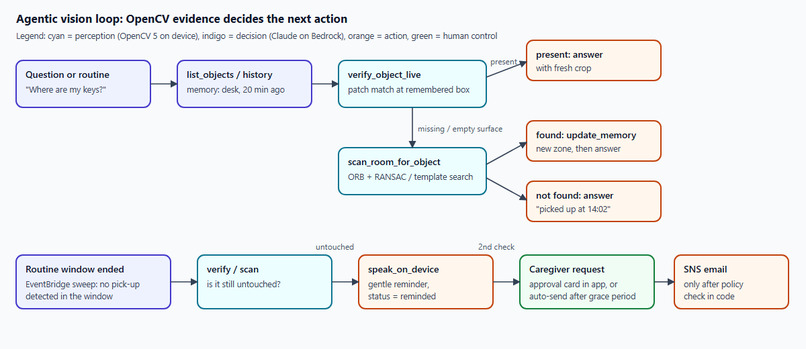
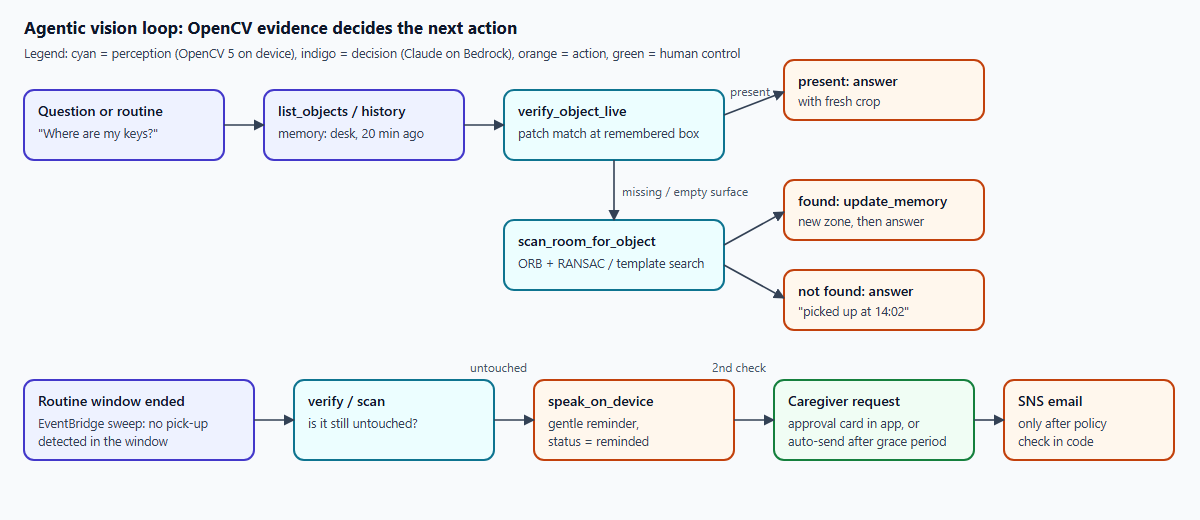
Agentic vision loop: what the camera sees decides the next step; a person approves carer alerts.
-
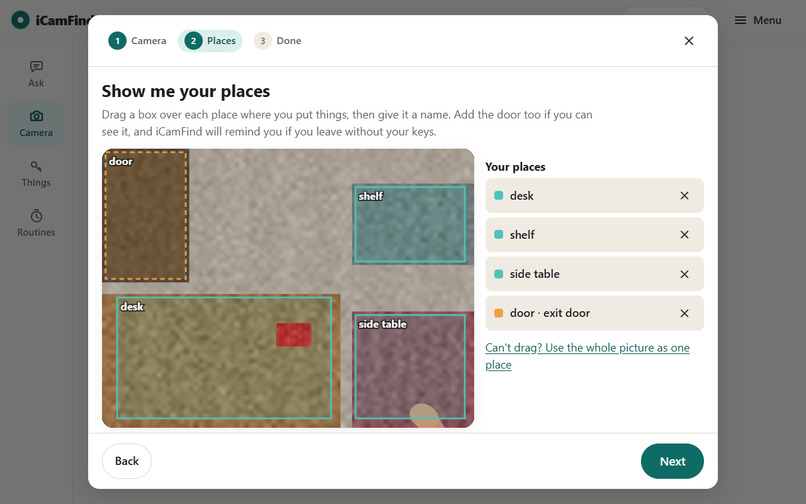
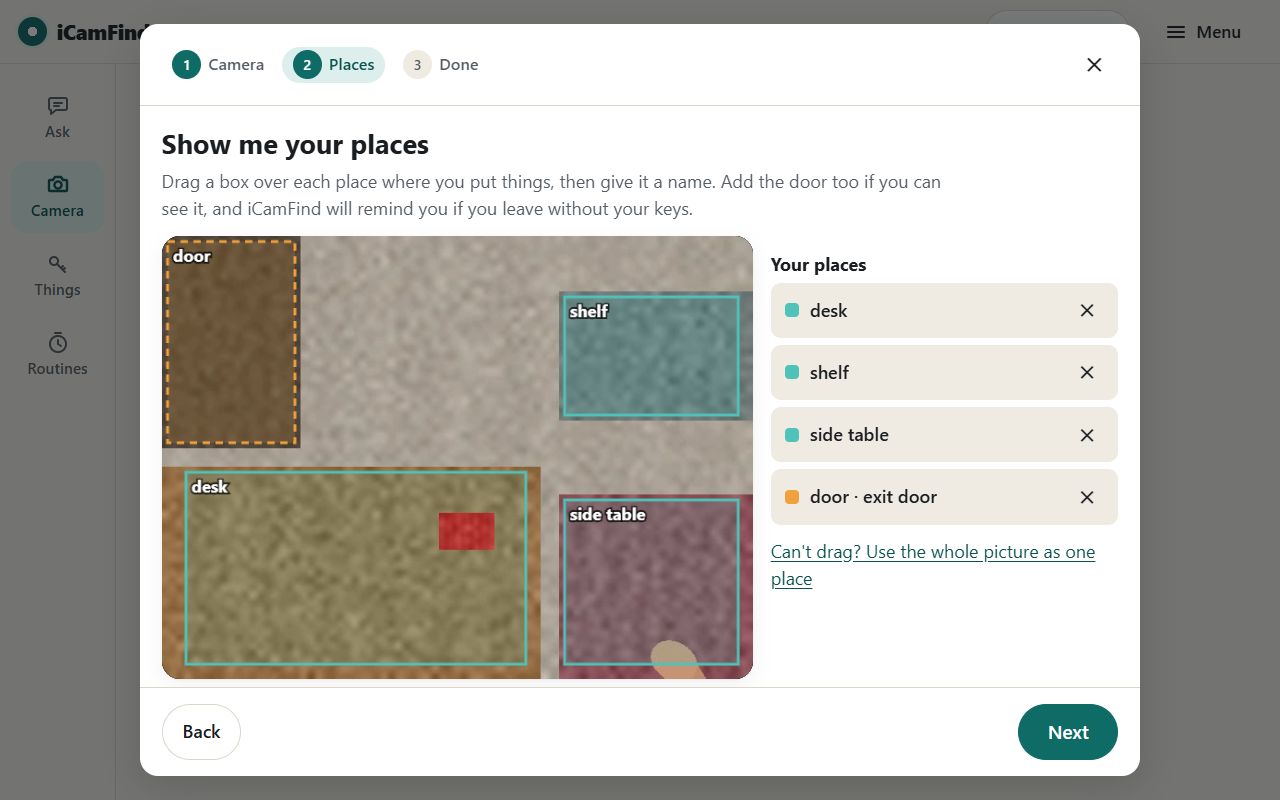
No install: any laptop is the camera. Draw your places once; OpenCV 5 runs in the browser.
-
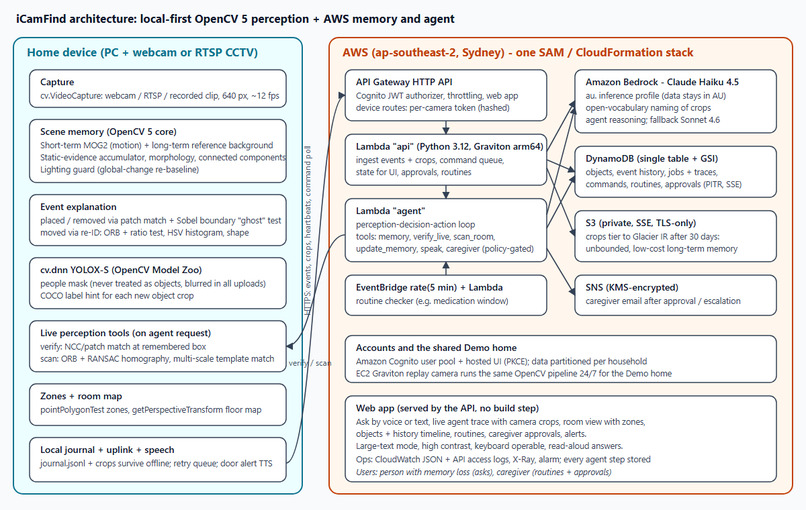
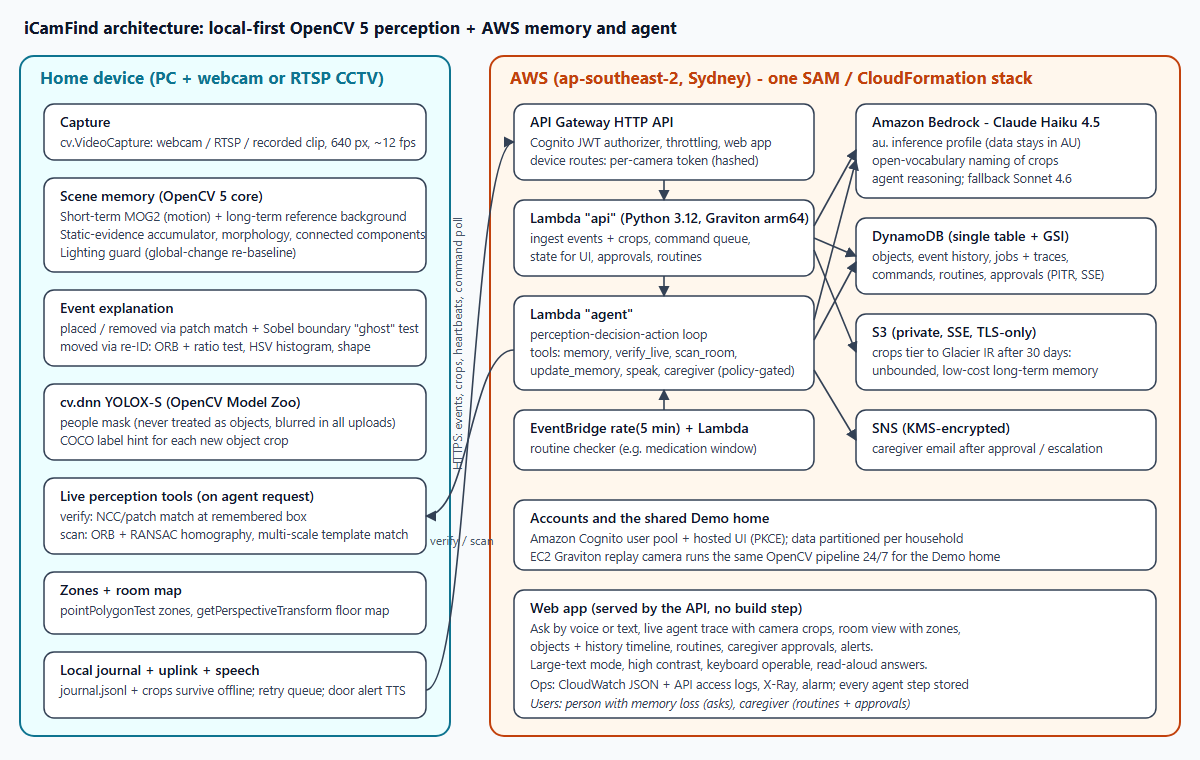
Architecture: OpenCV 5 on the device + Cognito, Lambda (Graviton), DynamoDB, S3/Glacier, Bedrock.
-
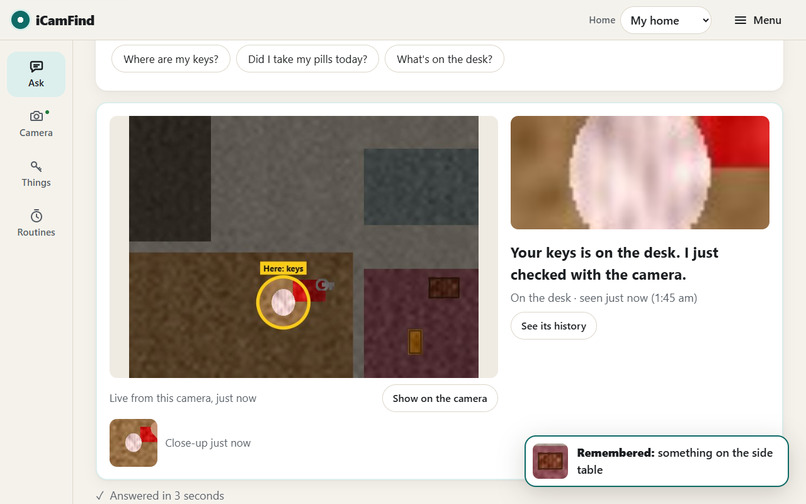
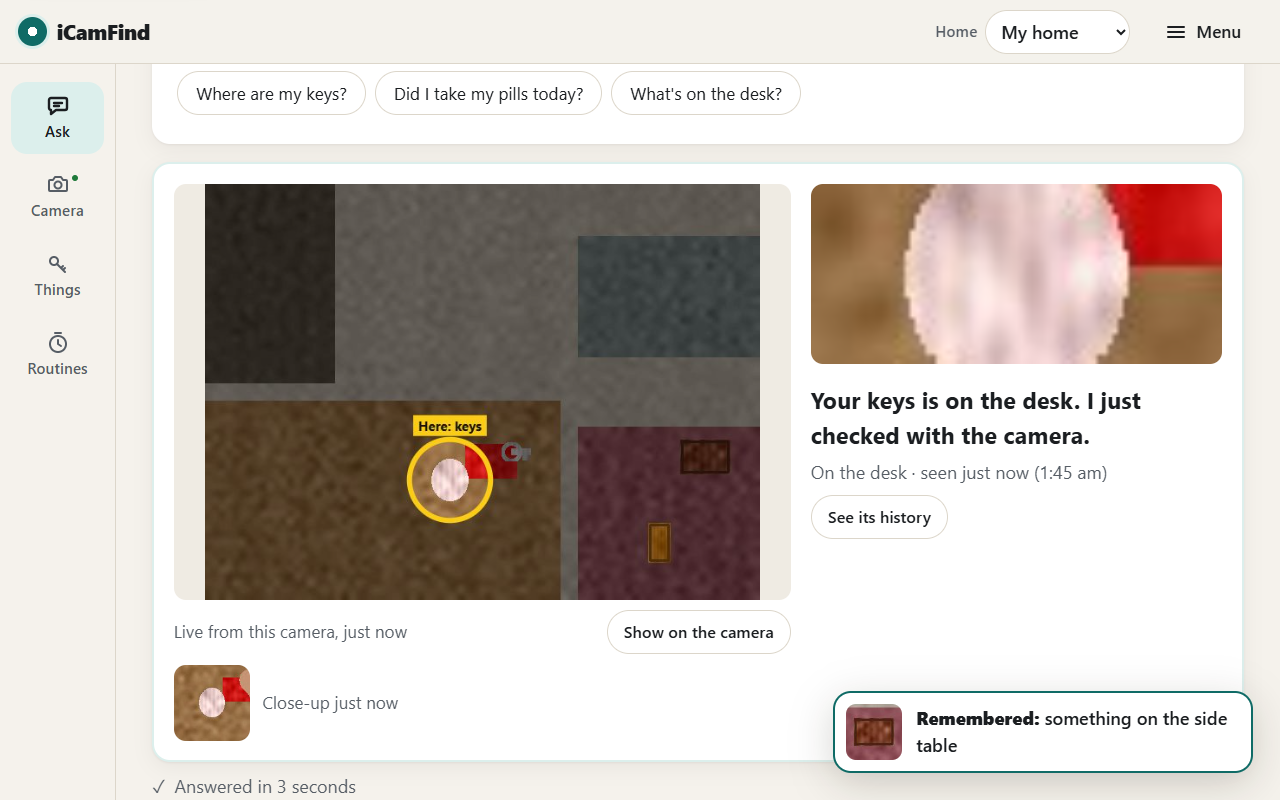
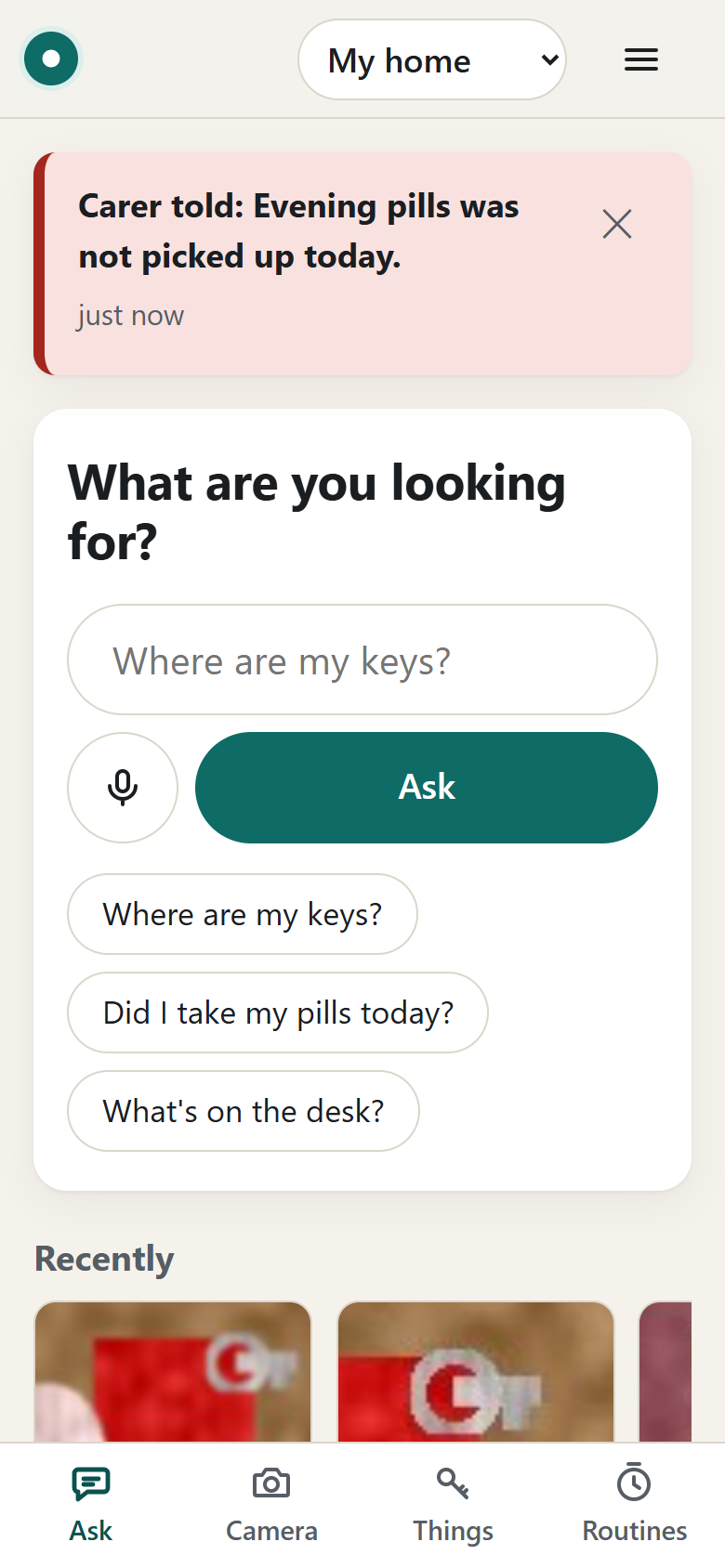
"Where are my keys?" The camera looks again and circles them: memory you can ask.
-
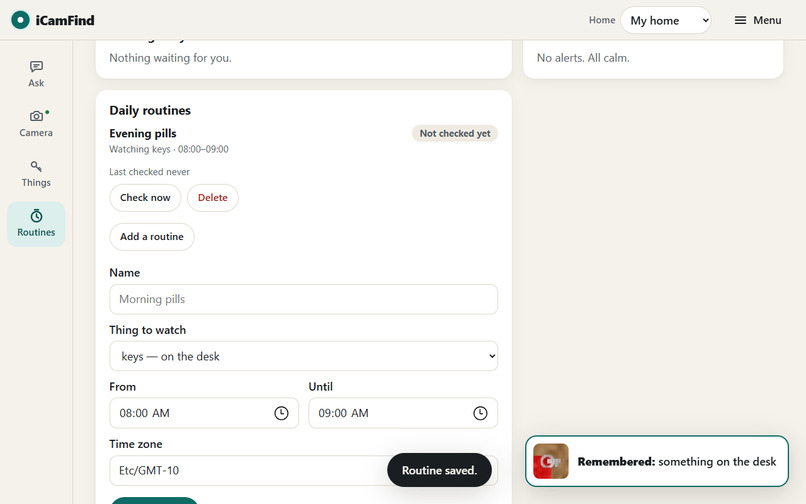
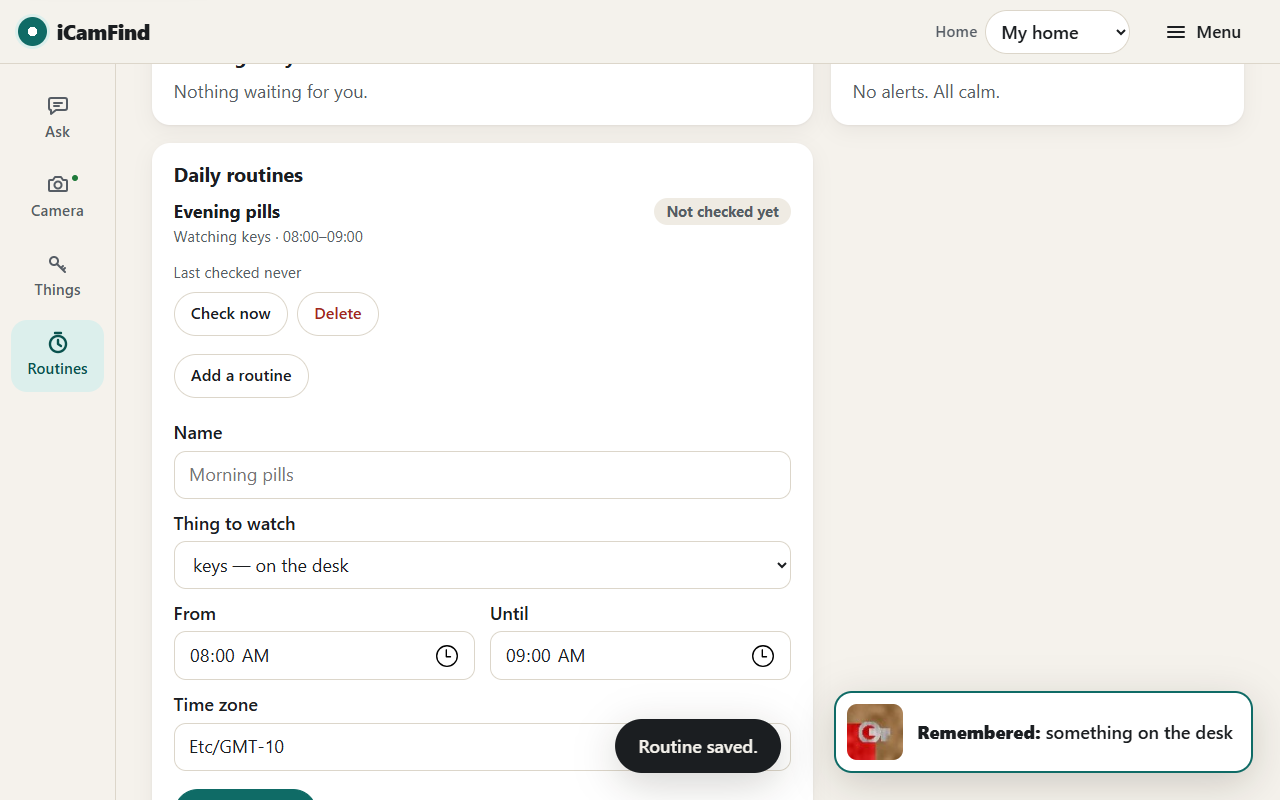
Routines for carers: gentle reminder first, then a carer alert only with a person's approval.
-
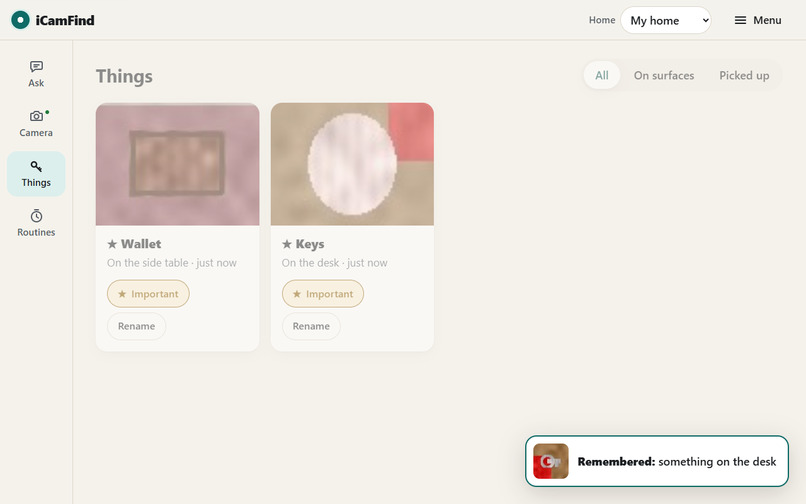
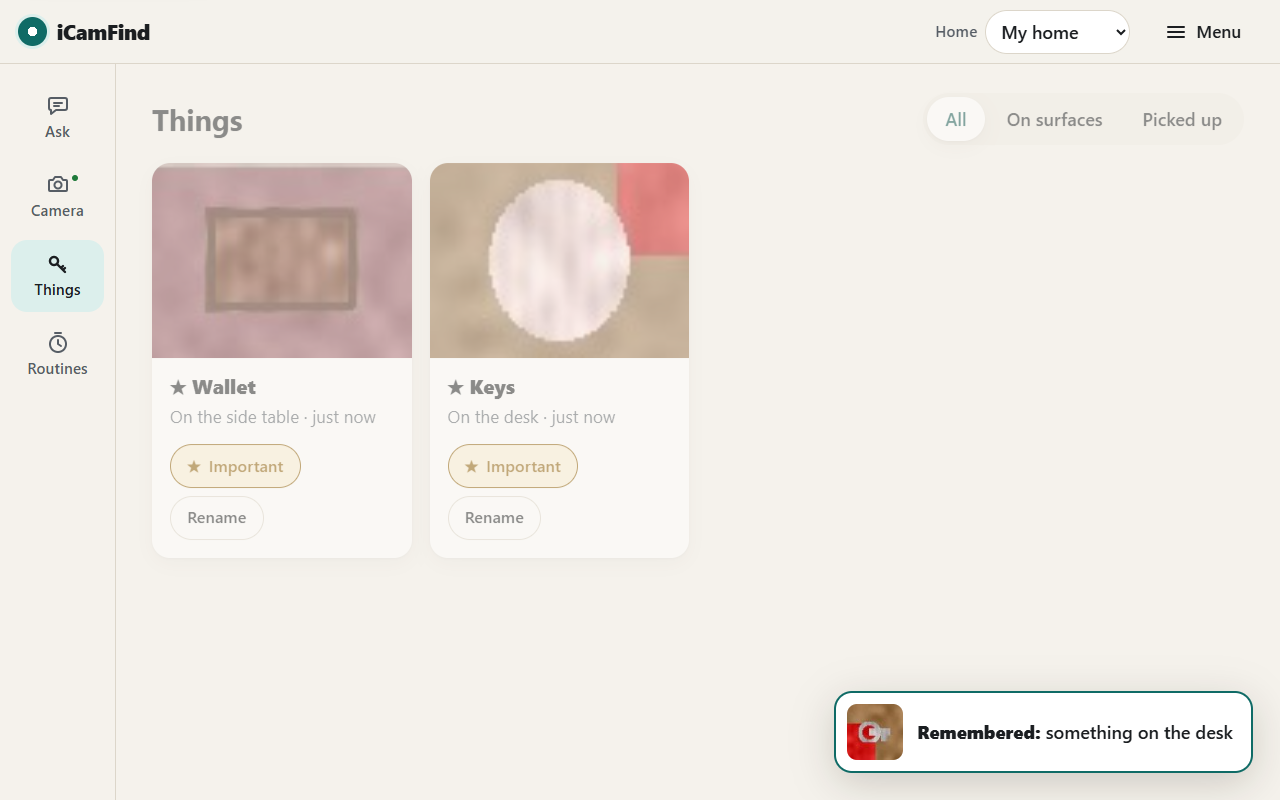
Things: every object with its photo, place and history, named by Claude on Amazon Bedrock.
-
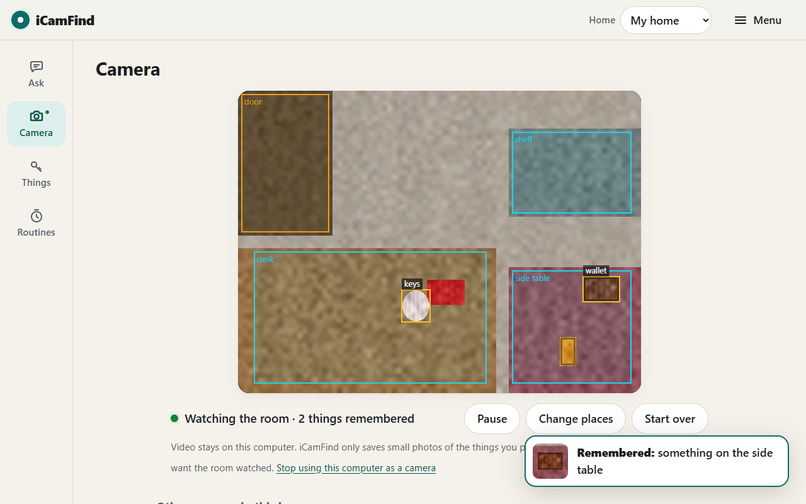
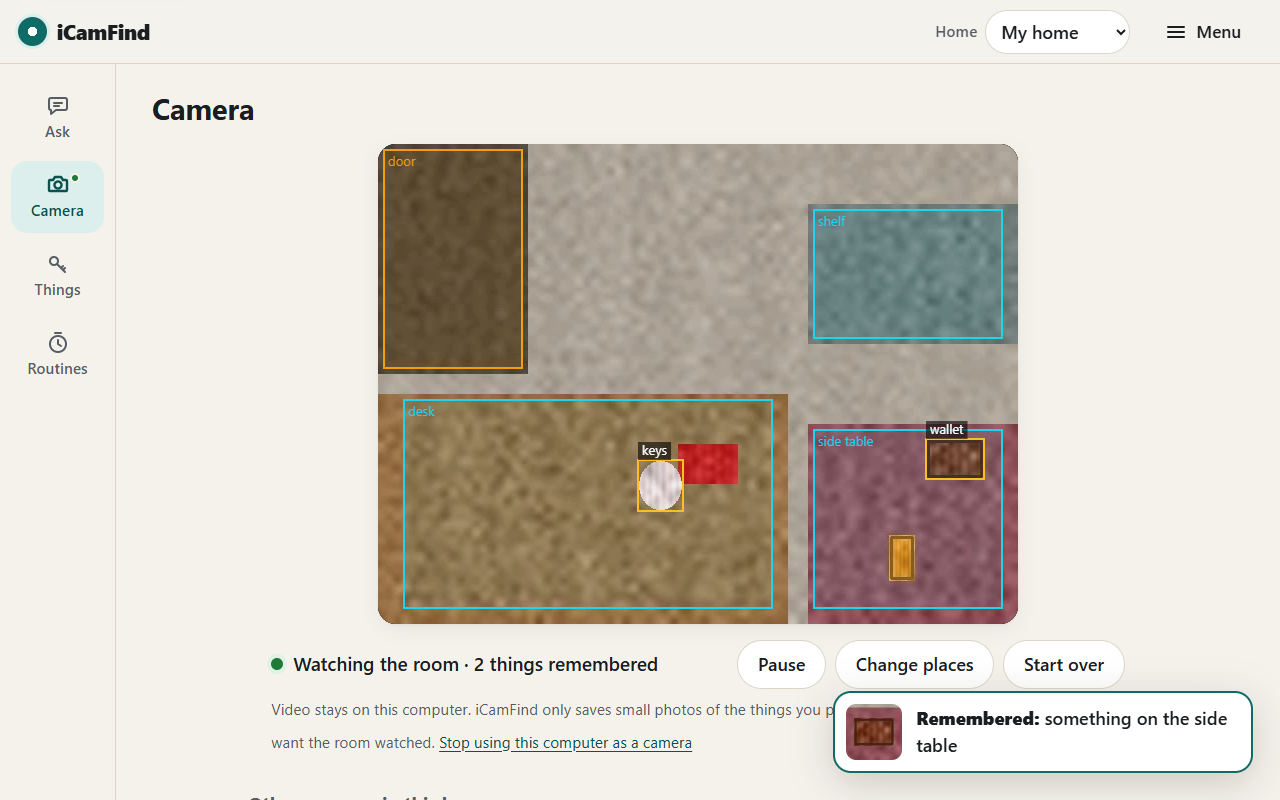
Live camera view: the places you drew, and everything iCamFind is remembering.
-
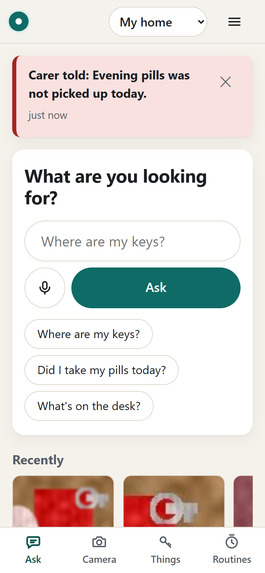
Designed for older adults: large text, plain words, voice questions, works on any phone.
Inspiration
There's a moment we all know. You put something down, and the world moves on without it.
For most of us it's a small annoyance. For someone living with dementia, it's often the moment the day starts to slip: the keys, the glasses, the pill bottle that was right there. Then comes the question every carer hears again and again: "Where did I put it?"
It was never really about the keys. It's about independence, dignity, and trusting your own mind. Trackers only help with the few things you can stick a tag on. A camera already sees everything. It just doesn't remember anything you can ask it about. So we built one that does.
What it does
iCamFind is memory you can ask.
- It remembers. Point any laptop, tablet, phone or existing CCTV camera at the places where things get put down, and draw those places once: desk, shelf, bedside, door. OpenCV 5 notices each time something is put down, picked up or moved, and saves it with the place, the time and a small photo. Claude on Amazon Bedrock gives each photo an everyday name, and can even read titles on books and medicine boxes ("The Hobbit (book)", "Panadol box").
- It looks again before it answers. Ask by voice or text: "Where are my keys?" The agent doesn't just recall. It makes the camera look again right now, then shows you the camera picture with the keys circled. If they aren't where memory says, it scans the whole room, finds them, and corrects its own memory.
- It reminds. Head for the door with your wallet still on the table, and it tells you on the spot.
- It looks after routines. Say the evening pills haven't been picked up by the end of their time window. It first gives a gentle spoken reminder. Only if that's ignored does it ask a carer, and a person approves before anyone is contacted.
- It explains itself. Every step, including what it checked, what the camera saw, and what it decided, appears as "How I found this", with the images.
There's nothing to install: open the web app, click Use this computer's camera, and draw your places. The whole OpenCV pipeline runs inside the browser (OpenCV 5.0 WebAssembly), so video never leaves the room; only small object photos do. Anyone can try it in our shared Demo home, which a replay camera in the cloud watches around the clock.
How we built it
OpenCV 5 perception, the same pipeline in Python (edge PC or CCTV box) and in the browser through WebAssembly:
- Dual-background static-object detection: a short-term MOG2 model tracks motion, a long-term reference background holds memory, and a time-based evidence accumulator commits a region only after the hand has left. It also groups fragments and guards against lighting jumps.
- Placed vs. taken away: a Sobel boundary-gradient "ghost" test tells an object that appeared apart from one that was always there and has now been taken.
- Re-identification: when an object moves, ORB features with Lowe's ratio test, HSV histograms and shape keep its identity ("moved: desk → shelf").
- Live tools for the agent: verify (NCC patch matching at the remembered spot) and scan (ORB + RANSAC homography, plus multi-scale template matching).
- Supporting pieces: YOLOX from the OpenCV Model Zoo via
cv.dnnmasks people on the edge PC; places usepointPolygonTest, and the floor map usesgetPerspectiveTransform.
AWS (one SAM/CloudFormation stack, Sydney region):
- Amazon Cognito accounts, with an API Gateway JWT authorizer.
- Python 3.12 Lambdas on Graviton (arm64).
- DynamoDB memory partitioned per household.
- S3 photos tiering to Glacier Instant Retrieval, so memory grows without limit.
- EventBridge routine checks, and SNS caregiver email.
- CloudWatch logs, X-Ray and alarms.
- Claude on Amazon Bedrock through the Australian inference profile, so data stays in Australia.
- A Graviton EC2 replay camera for the public Demo home.
The agent runs a perception, decision, action loop. Its tools are backed by the camera's own OpenCV routines through a command queue, and the camera sends back fresh crops that the model sees as images. What the camera reports decides the next step: present means answer; an empty surface means scan; found elsewhere means update memory. Caregiver notifications are gated by policy in code, never left to the model.
Challenges we ran into
- Telling "something appeared" apart from "something that was always there is gone." We solved it by checking which image the boundary gradients belong to.
- One object becoming several detections. We now group evidence and commit only when the whole region is stable.
- People in front of a laptop camera. In the browser, only the places you draw are watched, so you never become an "object".
- Getting OpenCV 5 to run in the browser under a strict security policy (WebAssembly + embind), while matching the Python engine exactly.
- Making the answer current, not just remembered. That led to the look-again-then-scan design.
Accomplishments that we're proud of
- Measured, not claimed:
- an F1 score of 0.98 on our reproducible benchmark;
- 100% of places correct;
- about 1.5 s from hand-away to memory;
- every moved object keeps its identity.
- The browser engine scores identically to the Python engine on every benchmark clip.
- 49/49 live checks against the deployed cloud, and 17/17 end-to-end web app scenarios in a real browser with a fake webcam.
- The agent's behaviour truly depends on what the camera sees, and a person stays in control.
What we learned
Classic computer vision (background models, gradients, features) is still the right tool for exactly what changed and where. A language model is the right tool for naming things and deciding what to do next. Together they're far better than either alone. Designing for people with memory loss also changed everything else: big text, plain words, nothing to install, and honesty about uncertainty.
What's next
- Multi-camera homes with re-identification across cameras.
- A small on-device open-vocabulary model.
- A caregiver mobile app.
- Piloting with occupational therapists and memory-care services.
Built With
- amazon-api-gateway
- amazon-bedrock
- amazon-cloudwatch
- amazon-cognito
- amazon-dynamodb
- amazon-ec2
- amazon-eventbridge
- amazon-sns
- amazon-web-services
- aws-cloudformation
- aws-lambda
- claude
- css3
- html5
- javascript
- numpy
- opencv
- playwright
- python
- webassembly

Log in or sign up for Devpost to join the conversation.