Inspiration
I often remember fragments of what I have seen on my computer, but not enough to find them again. I might remember reading an article about a particular topic, seeing an important detail in an email, or working through a technical problem, yet forget the page title, application, or exact wording.
Traditional search expects me to remember where something was stored. General-purpose AI assistants can answer questions, but they normally do not understand the personal context behind my work. I wanted to explore a different idea: what if my computer could build a private, useful memory of my digital activity and let me naturally ask questions about it later?
That idea became iAletheia: a privacy-first personal memory and action assistant for macOS.
The name comes from “Aletheia,” the Greek concept of uncovering or bringing something into truth. My goal was to create an assistant that helps uncover information I have already encountered, understands what is currently on my screen, and helps me act on that context without taking control away from me.
What it does
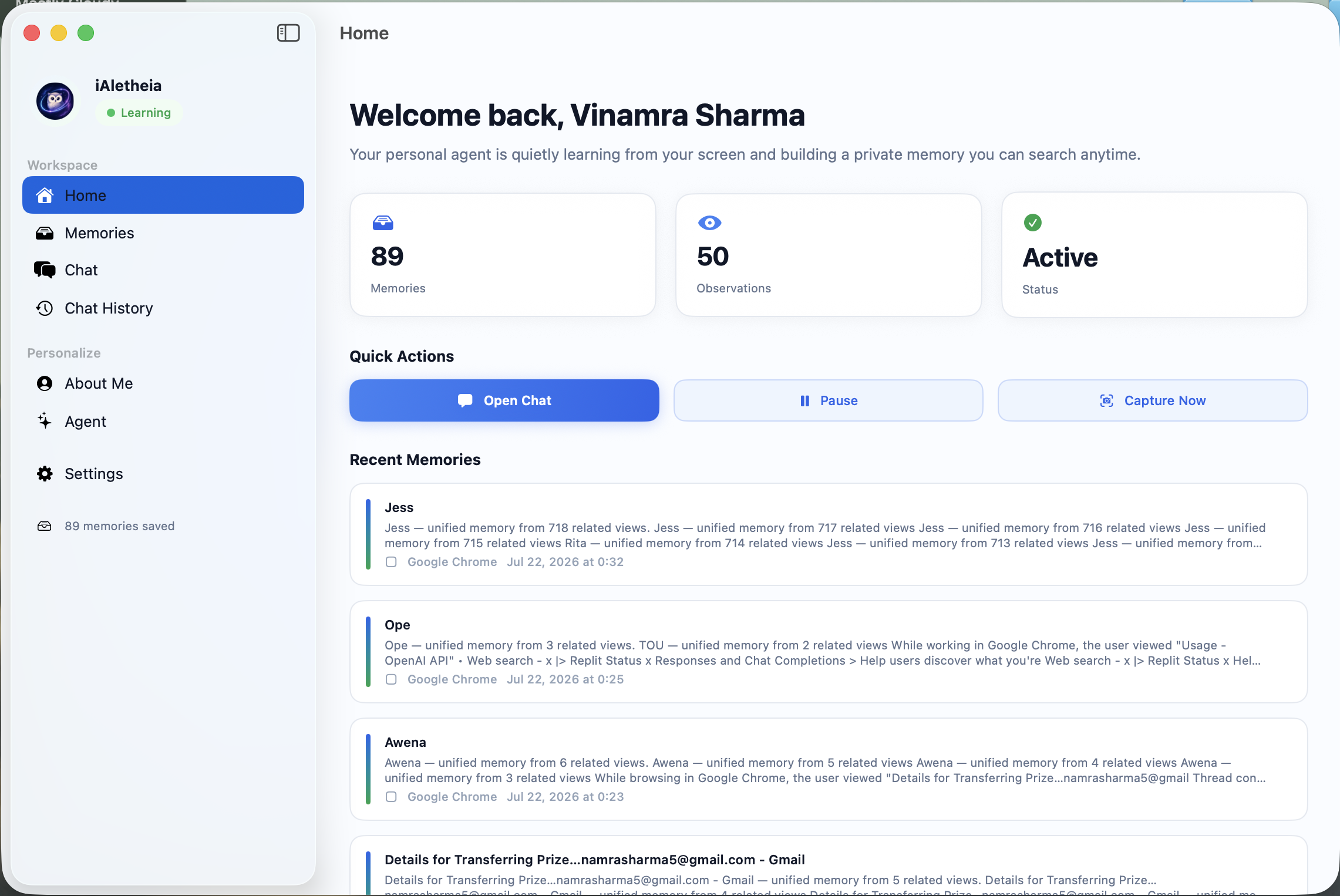
iAletheia learns from useful activity on my Mac and turns it into searchable personal memories.
It observes the active window using macOS Accessibility APIs and local OCR. Before anything becomes a memory, the content passes through local privacy filtering, secret redaction, sensitivity checks, importance scoring, and duplicate detection. Memories that pass these checks are stored locally using SQLite, FTS5 search, and local vector representations.
I can then ask questions such as:
- “What was I researching yesterday?”
- “Where did I see that article about AI infrastructure?”
- “What was the name of the tool I looked at earlier?”
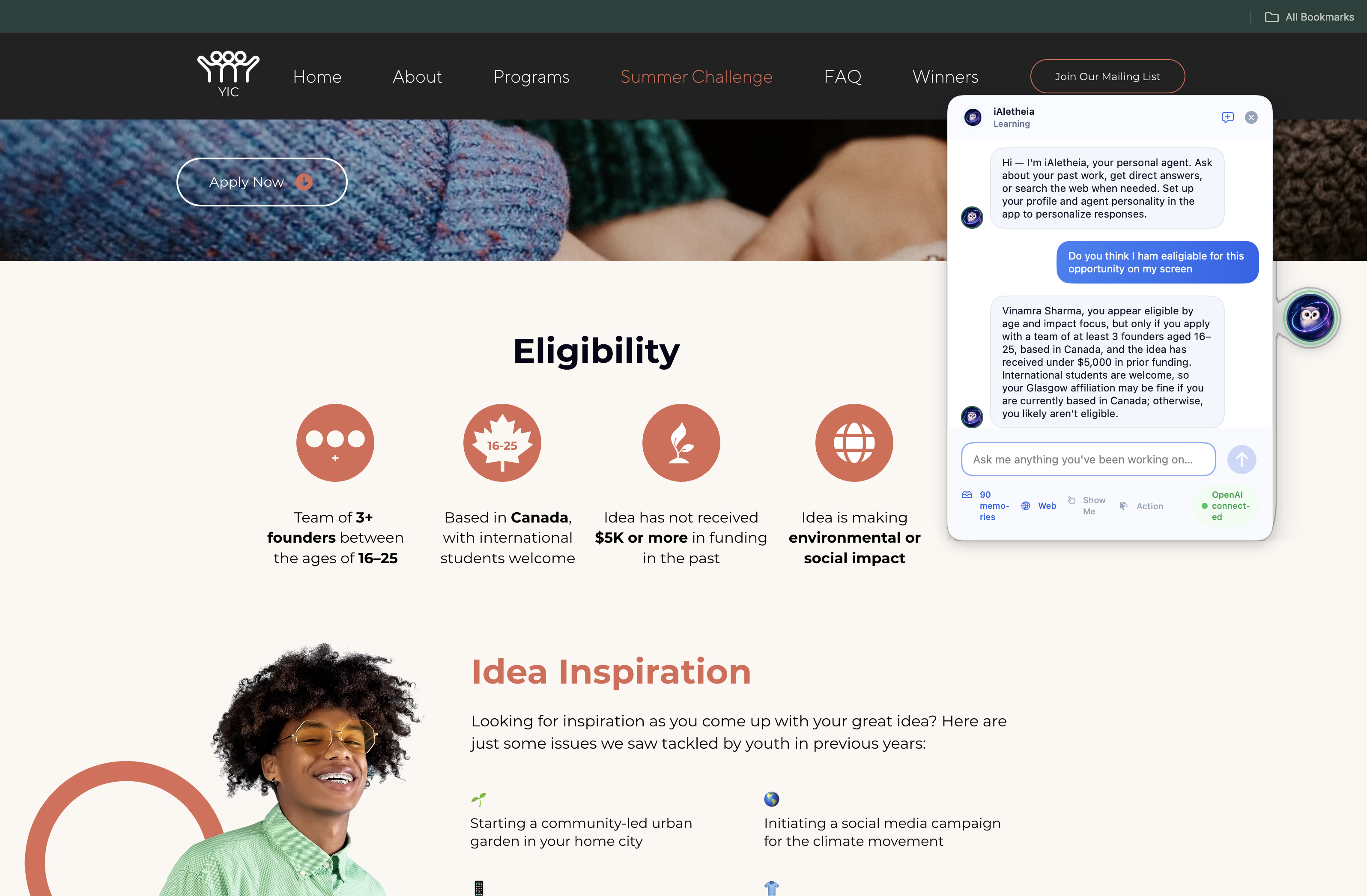
- “Summarize what is currently on my screen.”
- “Review the code visible in this window.”
- “Search the web and compare this with current information.”
The assistant determines whether a question should be answered from general reasoning, personal memory, the current screen, live web information, or a combination of these sources.
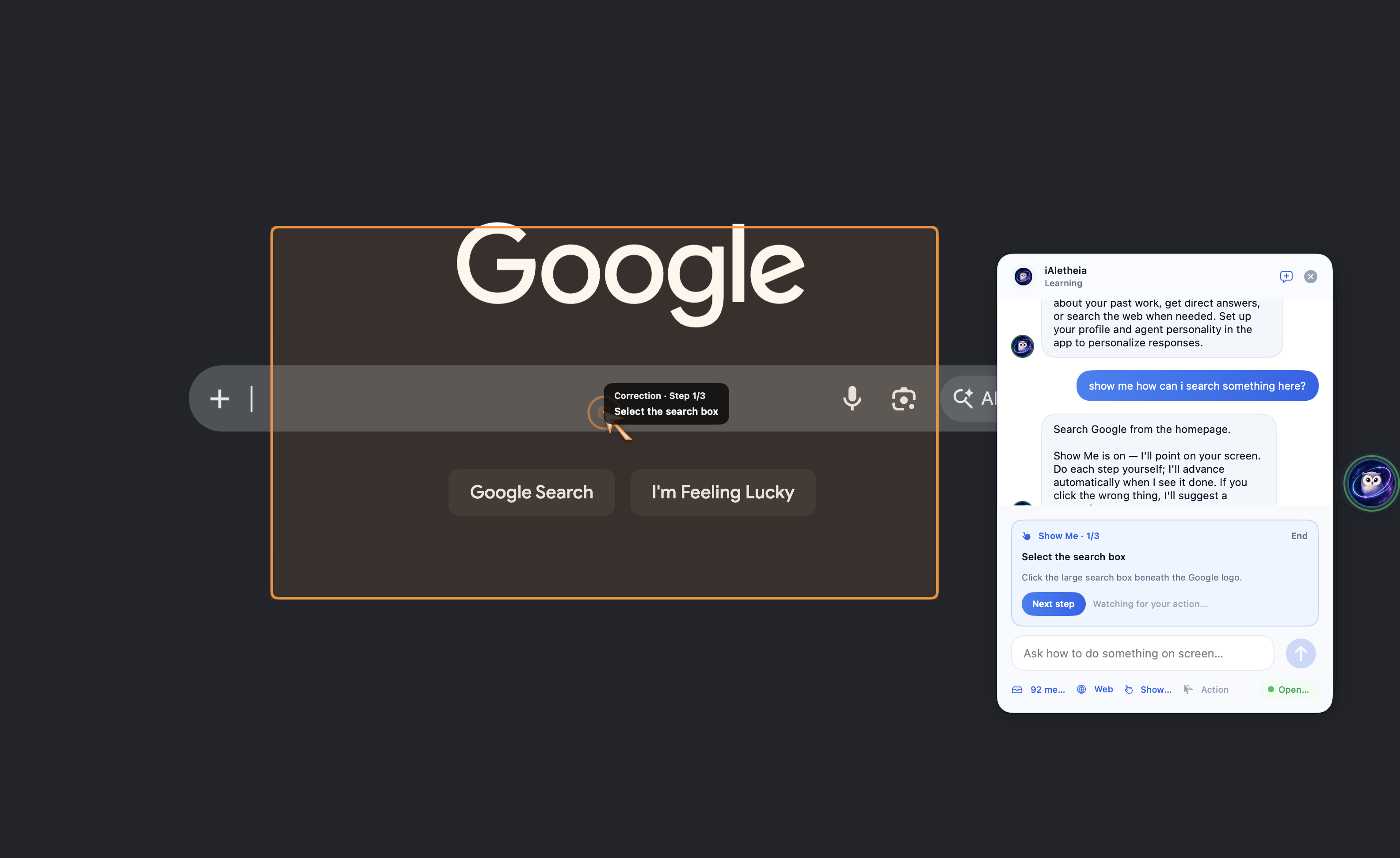
I also built two visual assistance modes. Show Me creates step-by-step instructions and points at the relevant controls on the user’s screen. It does not click anything, allowing the user to remain in control while still receiving visual guidance. Action mode goes one step further. When explicitly enabled, it can prepare drafts inside supported applications. For example, I can ask it to draft a reply to an open email. The agent reasons about the current interface, locates Reply, opens the composer, finds the editable message body, and visibly moves the cursor while typing the response.
Action mode is intentionally draft-only. It cannot send, submit, publish, purchase, delete, or confirm anything. The user must review and perform the final action themselves.
How I built it
I built iAletheia as a native macOS application using Swift, SwiftUI, AppKit, Accessibility APIs, ScreenCaptureKit, Vision OCR, Core Graphics, and SQLite.
The application has a local-first observation pipeline:
- It identifies the active application and exact active window.
- It extracts accessible text and performs local OCR when required.
- It filters sensitive information and redacts secrets locally.
- It calculates whether the observation is valuable enough to remember.
- It deduplicates, links, and stores accepted memories locally.
- It retrieves relevant memories using full-text and local-vector search.
For cloud reasoning, I integrated the OpenAI Responses API and the GPT-5.6 model family. I use structured outputs with strict JSON schemas for query routing, memory enrichment, Show Me planning, action planning, and visual UI grounding.
I use the reasoning model for complex answers, live-screen understanding, web-assisted responses, visual guidance, and multi-step action decisions. Smaller utility workloads such as routing and memory enrichment use a lower-cost model configuration.
For visual cursor grounding, I developed a screenshot grid system. Before asking the model to locate a control, the app places a labeled 12-by-8 grid over a fresh screenshot. Instead of returning an unreliable raw coordinate, the model identifies a grid row, grid column, and a precise offset inside that cell.
The application converts that result into macOS screen coordinates and validates it locally. Coordinates near dangerous controls such as Send, Submit, Publish, Delete, Discard, recipient fields, subject fields, or search boxes are rejected.
The action workflow is closed-loop rather than relying on a single screenshot:
- Capture the current window.
- Locate and click Reply.
- Capture a new screenshot.
- Verify that the composer opened.
- Locate and click the editable message body.
- Capture another screenshot.
- Verify that the editor is focused.
- Type the draft visibly.
- Stop before Send.
I also used OpenAI Codex throughout the development process for architecture review, implementation, debugging, migration from my initial model provider, test creation, safety improvements, and documentation.
Challenges we ran into
The most difficult challenge was accurate interaction with dynamic browser interfaces.
Web applications such as Gmail and Outlook do not always expose their interface consistently through macOS Accessibility APIs. Some controls are clearly available, while others appear only as generic web regions. In one case, Chrome exposed the entire webpage as a writable accessibility element, causing the application to incorrectly believe that an email composer was already open.
OCR introduced another difficulty. A page can contain the same word in many places. For example, “Reply” might appear in an email body, a toolbar, an inbox preview, or the actual Reply button. Selecting the first text match was not reliable enough.
Screen coordinates were also challenging because Vision, ScreenCaptureKit, Accessibility, Cocoa, and Quartz use different coordinate conventions. Multi-window and multi-display configurations made this even more important.
I addressed these problems by combining several signals rather than trusting a single source:
- Exact active-window tracking
- Accessibility roles and geometry
- OCR text with bounding boxes
- GPT visual reasoning
- A labeled screenshot grid
- Fresh screenshots after every important action
- Local coordinate and safety validation
- Explicit UI-state verification before typing
Another major challenge was balancing usefulness, privacy, latency, and API cost. Continuously uploading screenshots would have been expensive and inconsistent with the privacy goals of the project. Instead, most observation, OCR, filtering, indexing, and retrieval happens locally. Cloud reasoning is reserved for tasks where it adds meaningful value.
Accomplishments that I'm proud of
I am proud that iAletheia is more than a standard chatbot interface. It combines long-term personal memory, current-screen understanding, web search, visual guidance, and controlled computer interaction in one native application.
I built a complete local memory lifecycle rather than simply saving screenshots. The system decides what is valuable, rejects sensitive content, extracts useful memories, detects duplicates, links related information, consolidates older memories, and retrieves them using hybrid search.
I am also proud of the safety architecture behind Action mode. The model is not given unrestricted control of the computer. Every proposed action is constrained by a local policy, performed visibly, checked against a fresh screenshot, and stopped before any irreversible operation.
What I learned
The biggest lesson I learned is that building an agent is not only about making the model more intelligent. The surrounding system determines whether that intelligence becomes reliable.
A strong model can reason about what should happen, but the application must still provide accurate context, constrained tools, fresh observations, coordinate conversions, validation, and safe stopping conditions.
I also learned that computer interaction should be treated as a feedback loop. A static plan based on one screenshot quickly becomes outdated after the first click. Capturing and reasoning about the new state after each action substantially improves reliability.
Privacy also needs to be part of the architecture from the beginning. It is not enough to add a privacy setting after building the memory system. I designed local filtering, admission scoring, exclusions, redaction, and storage boundaries directly into the observation pipeline.
Finally, I learned how useful model specialization can be. Not every operation requires the most expensive reasoning configuration. Using local logic first, utility models for structured low-complexity tasks, and deeper reasoning only where required creates a better balance between capability, latency, and cost.
What's next for iAletheia
My next priority is continuing to improve visual grounding and action reliability across more applications.
I plan to add application-specific interaction adapters for Gmail, Outlook, LinkedIn, Slack, and other commonly used tools while retaining the general vision-based fallback. This will combine the reliability of semantic application controls with the flexibility of model reasoning.
I also want to expand Action mode beyond drafting while preserving explicit human approval for consequential operations. Potential workflows include preparing forms, organizing information, creating calendar drafts, and filling structured content without submitting it.
Future improvements include:
- Better multi-monitor and multi-window grounding
- Browser DOM integration where permission is explicitly granted
- Faster local embeddings and semantic retrieval
- A visual memory timeline
- User-controlled memory categories and retention policies
- More detailed explanations of why a memory was stored
- Improved correction learning when the user adjusts a target
- Additional local-model fallbacks
- Exportable and portable encrypted memory stores
- Broader automated UI testing across supported applications
My long-term vision is for iAletheia to become a private intelligence layer for the personal computer: an assistant that remembers what matters, understands the present context, helps the user navigate, and takes carefully constrained actions without removing human control.
Built With
- appkit
- codex
- gpt5.6
- swift


Log in or sign up for Devpost to join the conversation.