Inspiration
Preparing PowerPoint slides for church hymns and worship songs can take a long time, especially when the presentation uses two languages. Every lyric line needs to be arranged clearly, matched with the correct translation, and kept readable on screen.
I created Hymn Slide Maker to make this process faster and more organized. My goal was to help churches spend less time manually formatting slides.
What it does
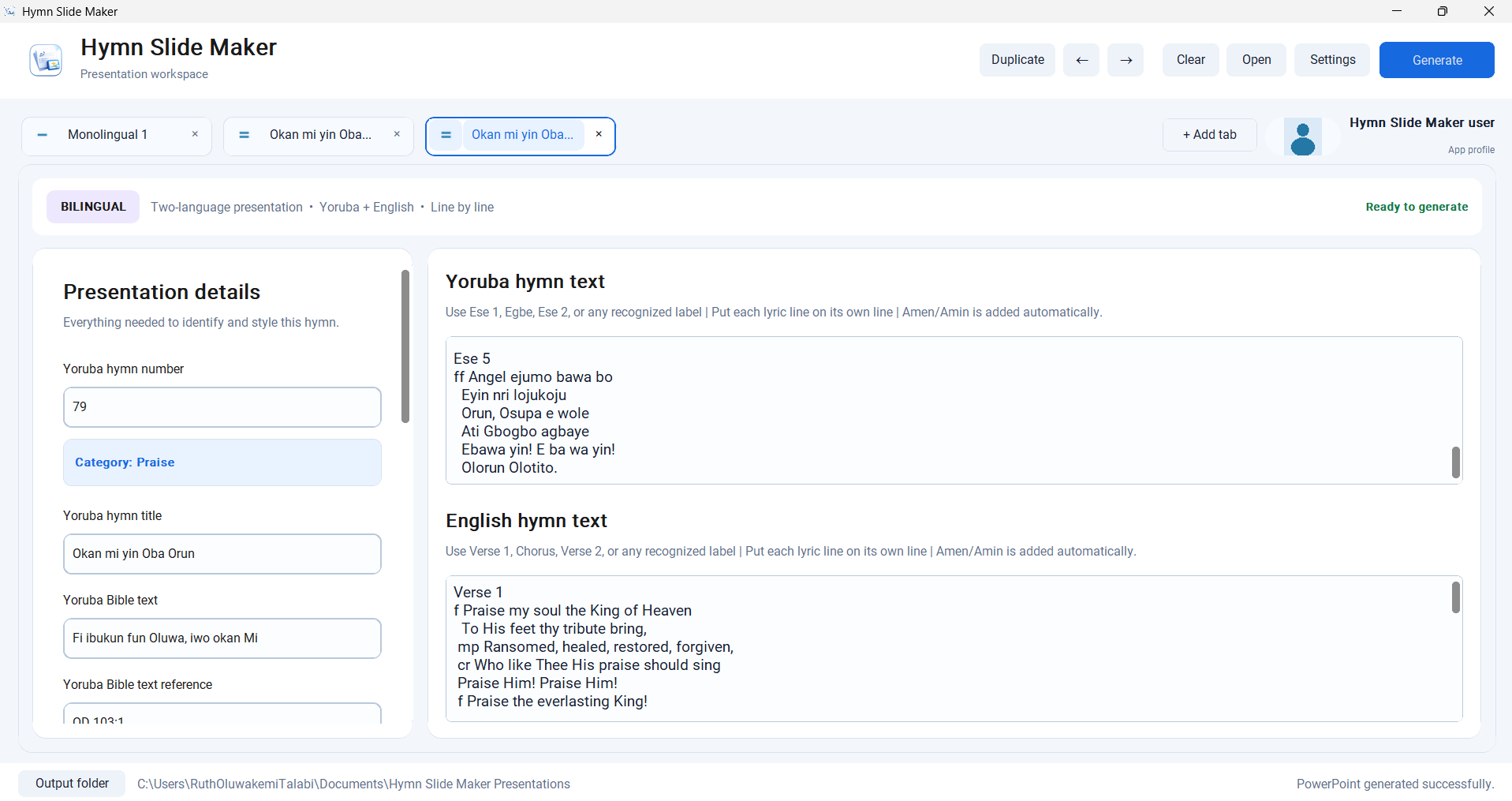
Hymn Slide Maker is a Windows desktop application that generates PowerPoint presentations from hymn or song information entered by the user.
The app currently supports:
- Monolingual and bilingual presentations
- Line-by-line and side-by-side bilingual layouts
- Built-in English, Yoruba, Hausa, French, and Spanish presentation-language profiles
- User-created presentation-language profiles
- Verses, choruses, authors, composers, hymn or song numbers, and copyright information
- Custom backgrounds and background categories
- An optional logo on the title slide
- Hymn mode and Song mode
- Different placement options for Author, Composer, and copyright information
- Dynamic lyric font sizing
- Continuation slides for lyrics that do not fit safely on one slide
- Undo and redo for supported text fields
The app is designed to keep complete bilingual lyric pairs together and to improve the balance of continuation slides when it can do so safely.
How I built it
I designed the product, planned the workflows, wrote detailed implementation requirements, tested the user experience, and directed OpenAI Codex through focused development, debugging, and testing tasks.
The application uses:
- Python
- CustomTkinter for the desktop interface
- python-pptx for generating PowerPoint files
- PyInstaller for packaging the Windows executable
- OpenAI Codex for implementation assistance, debugging, and automated testing
I did not personally write every line of code. My role focused on product design, feature decisions, testing, identifying problems, and directing the development process.
Challenges
One of the biggest challenges was creating slide layouts that remained readable with different lyric lengths, languages, backgrounds, and presentation formats.
Bilingual layouts were especially difficult because both languages needed to remain aligned while avoiding collisions with headings, Amen/Amin, Author, Composer, and copyright information.
Other challenges included:
- Dynamically adjusting lyric font sizes
- Splitting long lyrics across continuation slides
- Preserving bilingual line pairs
- Supporting long copyright and licence notices
- Maintaining compatibility with settings created by earlier versions
- Designing a first-run Setup that was useful without being overwhelming
- Finding bugs that appeared only during manual packaged-app testing
Manual testing was important because some issues were not caught by the automated tests.
What I learned
I learned that building a usable application involves much more than adding features. Small details such as placeholders, button feedback, terminology, safe defaults, keyboard behavior, and preserving user data can significantly affect the experience.
I also learned that passing automated tests does not guarantee that every real-world workflow is perfect. Testing the packaged application manually helped reveal issues that needed further correction.
Accomplishments
I am proud that Hymn Slide Maker can generate usable monolingual and bilingual PowerPoint presentations from structured hymn or song lyrics.
I am especially proud of:
- Supporting multiple presentation languages
- Allowing users to create custom language profiles
- Generating two different bilingual layouts
- Dynamically adjusting lyrics to available slide space
- Supporting custom backgrounds and title-slide logos
- Providing copyright and credits placement controls
- Creating a guided first-run Setup
- Packaging the project as a Windows executable
The project has an automated regression suite with more than 160 tests, although I also rely on manual testing for visual and packaged-app behavior.
Limitations
Hymn Slide Maker is still an actively developed project.
Some workflows involving presentations generated by earlier versions may require additional compatibility testing. Visual results can also vary depending on the amount of text, the selected background, and the available slide space.
The Windows executable is unsigned, so Windows may display a security warning when it is opened.
Responsible use
Hymn Slide Maker does not provide hymn lyrics or grant permission to reproduce copyrighted material.
Users and churches are responsible for confirming that they have permission, an appropriate licence, or a public-domain basis for any lyrics, translations, images, logos, or other material placed in generated presentations.
What's next
Possible future improvements include:
- Additional app-interface languages
- More presentation templates
- Further compatibility improvements for reopened presentations
- Expanded accessibility features
- Additional export options
- Reusable presentation-setting presets
Hymn Slide Maker is an attempt to make multilingual church presentation preparation faster, clearer, and easier to manage.
Built With
- codex
- customtkinter
- microsoft
- openai
- powerpoint
- pyinstaller
- python
- python-pptx
- tkinter
- unittest
- windows


Log in or sign up for Devpost to join the conversation.