
Inspiration
I'm a mother of three. For each of my children, I hand-made a "100-day video" — one photo a day from birth, stitched into a single film. The videos became family treasures: my kids look so alike that they can't even tell themselves apart, and watching them argue "that's me!" is pure joy.
But making them was brutal. With my first, I learned video editing from scratch and aligned 100 mismatched photos by hand. With my second, editing got easier — but I started forgetting to shoot (confession: some "daily" photos were taken on the same day). With my third, I nearly missed the 100th day itself. Each time, the editing got easier and the daily shooting got harder.
When a close friend told me she was pregnant, I wanted to give her this experience — but handing over my editing template felt like homework, and offering to edit her photos felt like pressure. So I asked an AI coding agent: "Can we build an app for this?" That was in late June 2026.
What it does
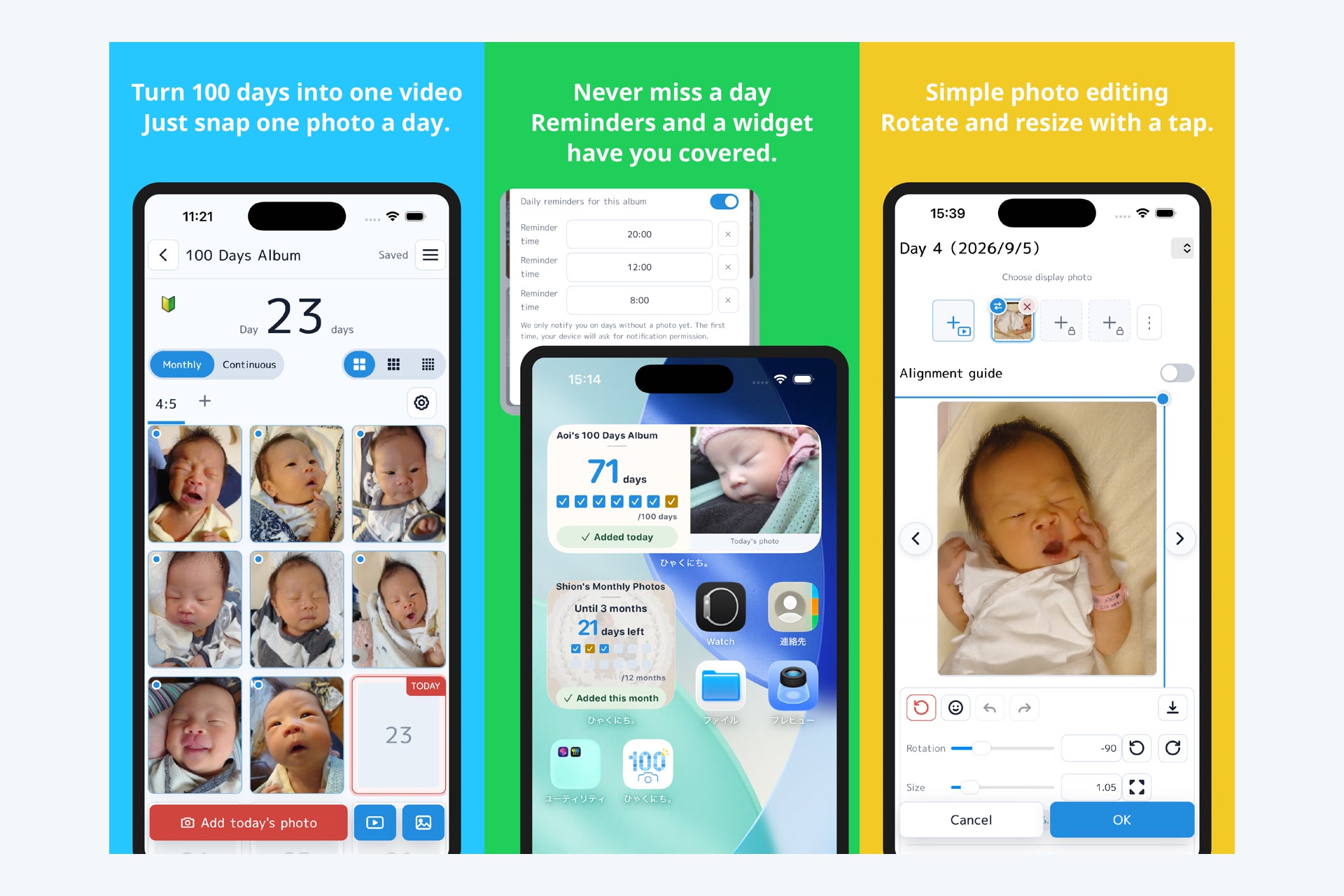
Hyaku (「ひゃくにち。」— "100 days" in Japanese) turns a newborn's first 100 days into a keepsake video or photo collage — by supporting the shooting, not just the editing.
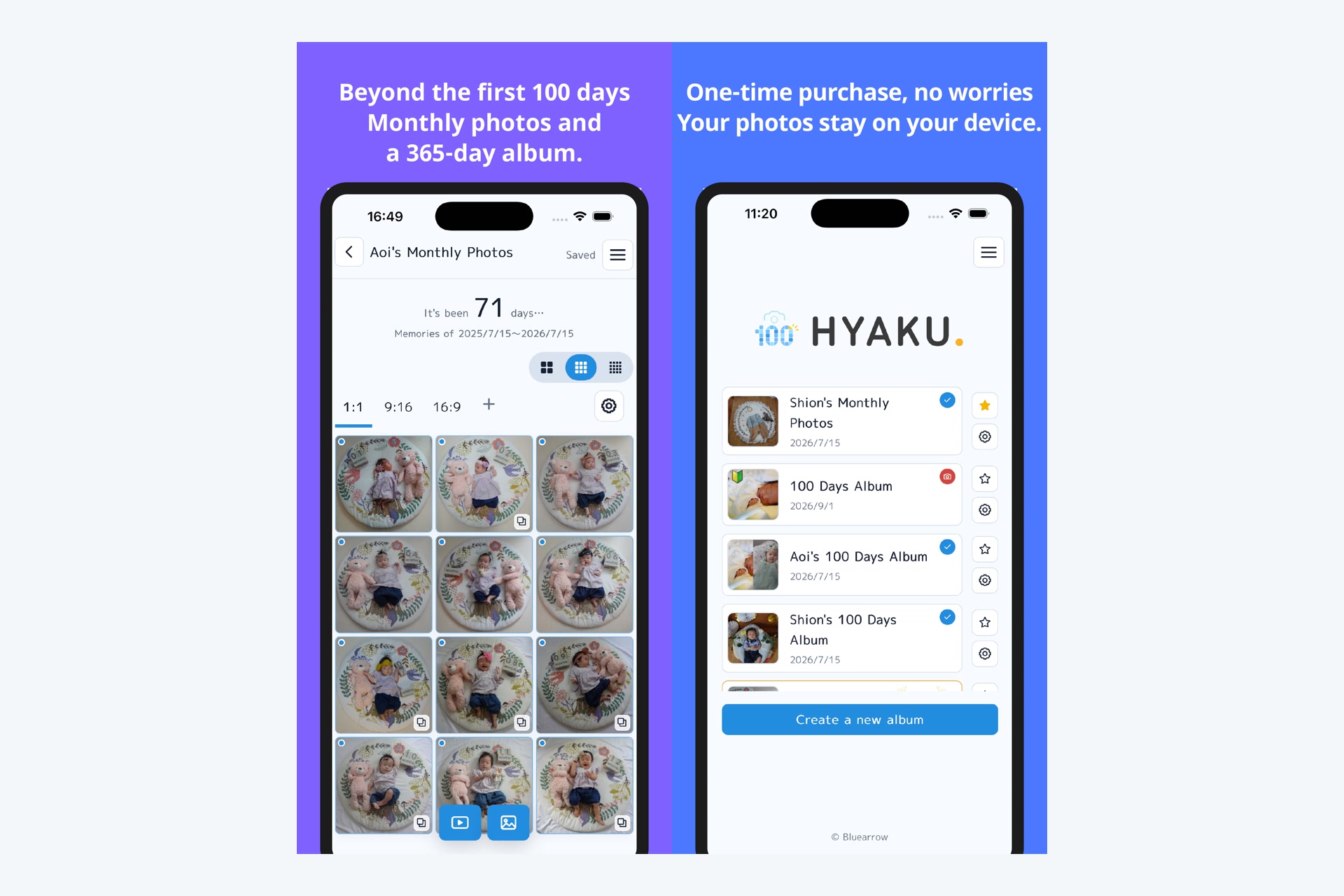
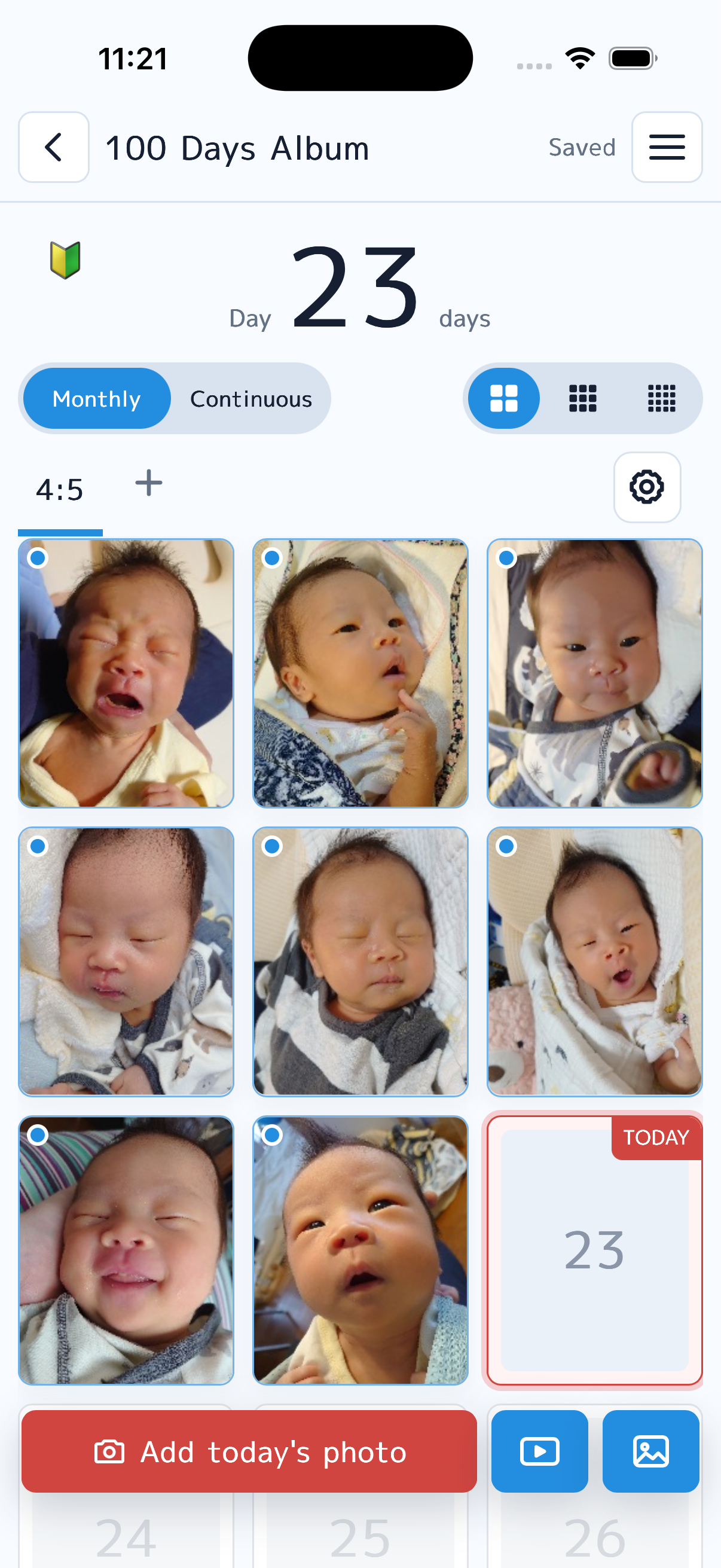
- 100-Day / 365-Day / Monthly (months 1–12) / Countdown albums with a calendar view that always shows today's slot. A 100-day album can be extended into a full year
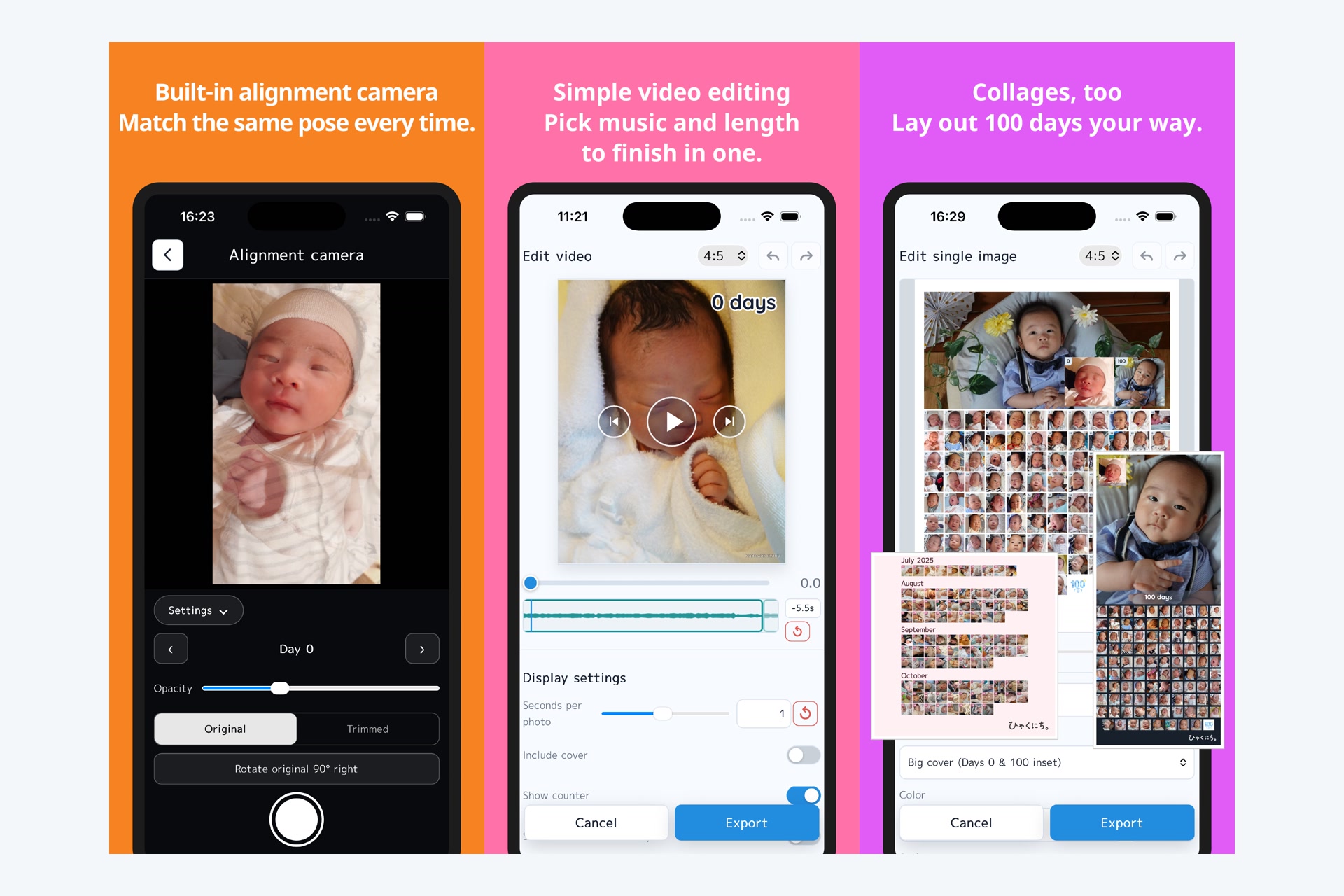
- Alignment-guide camera: overlays yesterday's (or Day 0's) photo semi-transparently, plus AI face detection for automatic framing — so every shot lines up
- Photo or a 1–2 second clip per day (up to 10 seconds for the final day), converted on-device into a small silent clip — the video mixes stills and motion
- Home-screen widget: today's photo, the day count, and the last 7 days (or 12 months) as check marks — one glance tells you whether today is done, one tap adds the photo
- Reminders only on days you haven't shot — no nagging, ever. Milestone notifications (day 100, half-birthday, monthly) arrive the day before and the day of
- Backfill by capture date: pick photos and videos in bulk from your camera roll, already grouped by the day they were taken, and they land on the right days (I built my old "cheat" into an official feature)
- Keepsake cards: shareable photo cards for milestones like day 10, day 100 and the first birthday
- One-tap export: a video (0.5–2s per frame, cover, day counter, captions, bundled royalty-cleared BGM) or a print-ready collage — photos are already in order, so export is the easy part
- Local-first & private: photos stay on the device (IndexedDB); full ZIP export/import for backup and device moves. Works offline
- 5 languages (JA/EN/zh-CN/zh-TW/KO), light/dark themes, a first-time guide, a confetti celebration for every photo, and a recap page that puts your first and last photos side by side
How I built it
- Solo mom + AI pair: I decided, Claude Code wrote. I directed most of the work from my smartphone between feedings and nap times — six weeks from the first prompt (June 25) to the Google Play production release (August 6), then the App Store in September, and v1.2 (365-Day album, widget, keepsake cards) on September 26
- Stack: Vanilla JS single-page PWA (21,000+ lines in the main module alone) wrapped with Capacitor 8 for Android and iOS; Firebase Auth/Firestore/Storage/Hosting + Analytics/Crashlytics; WebCodecs + mp4-muxer for on-device MP4 encoding (OPFS streaming to keep memory flat, WebM MediaRecorder fallback for older WebViews); Web Worker image pipeline; MediaPipe face detection delivered from a CDN and cached on device; native home-screen widgets (Android App Widget in Java, iOS WidgetKit in SwiftUI) fed by the web layer through a Capacitor plugin
- Monetization with RevenueCat (details below): free tier + one-time per-album passes on both stores, with a cloud-backup subscription planned
How I use RevenueCat
Monetization mirrors how parents actually think: you buy an album, not a subscription.
- One-time "Album Passes" (Monthly-photo pass, 100-Day pass, and — new in v1.2 — a 365-Day pass, plus a 100→365 upgrade that charges only the difference) unlock 3 photos/day, high-res export, watermark removal, and custom colors — per album
- Server-authoritative entitlements: RevenueCat webhook → Cloud Functions → Firestore. Clients only read. The webhook is idempotent by store transaction ID (RevenueCat re-delivers events with different event IDs — dedup by
txn_{transaction_id}was a hard-won lesson), and handles TRANSFER so purchases follow the user across devices and logins - Store-independent by design: entitlements live in Firestore keyed to the user, so when the iOS version shipped, passes bought on Android simply worked there — no store-specific entitlement code
- Passes are bound to the album, not the install: after reinstalling, importing an album's ZIP backup re-attaches its pass for free, and the import screen now says so instead of showing a price
- Honest paywall: every premium look is fully usable in preview ("try before you buy"); only exporting asks for the purchase, listing exactly which paid settings you're using — with a one-tap "revert to free settings" option
- Deleting a paid album returns the pass to your inventory for reuse; unused passes are consumed before any new purchase
- Planned: "Cloud Plus" subscription (monthly/annual) for multi-device sync and restore — the subscription pays for ongoing server cost, one-time passes pay for features. Clean story, easy to explain to users
Challenges I ran into
- Notification copy was the hardest engineering. A baby app must never guilt-trip a tired parent. We rewrote every message to be factual and kind — reminders fire only on unshot days, go quiet after 10 untouched days, and celebrate milestones instead of nagging streaks
- Video export on low-end Androids: static frames are encoded as single long frames, registered clips decode at 30fps natively, and output streams to OPFS — a 100-day video exports with a ~40MB JS heap
- Money code correctness: webhook idempotency, refund/transfer edge cases, and a "pass inventory" that survives album deletion took several redesigns (and a real bug found in sandbox testing)
- Shipping from a phone: multi-session AI development needed strict docs-as-ledger discipline — decisions live in versioned markdown, not in chat history
Accomplishments I'm proud of
- A production release on Google Play in six weeks of nap-time development — with in-app purchases, 5 languages, analytics and crash reporting all in place on day one — then iOS, then a v1.2 with a 365-Day album and native widgets on both platforms, all within the Shipaton window. 740+ commits across 60 working days, most of them directed from a phone
- Nothing leaves the device unless the user asks. Photos live in IndexedDB, exports are encoded on-device, and the whole app works offline. "Free" here doesn't mean "we take your family photos"
- A 100-day video exports inside a ~40MB JS heap, so it works on the cheap Android phone a parent actually hands to a toddler — not just on a flagship
- A paywall I'd be happy to show my friend. Every paid look is fully usable in preview, and the purchase sheet lists exactly which paid settings you turned on, with one tap to revert them
What I learned
- Docs are the memory; chat is not. Across 130+ AI coding sessions, anything we "agreed" in conversation was gone by the next session — the next session only reads the repo. So decisions moved into versioned markdown ledgers committed alongside the code, including one dedicated to notification copy that keeps every rejected phrasing and the reason it was rejected. Without it, the same wording came back three times
- Copy was harder than code. The hardest problem in a baby app isn't encoding video, it's making sure a message that fires at 8pm never makes an exhausted parent feel judged. Reminders only appear on days with no photo, go quiet after 10 untouched days, and there are no streaks to break — that constraint shaped the notification scheduler, not the other way around
- Billing correctness is a user-facing feature. RevenueCat re-delivers the same purchase with a different event ID, so deduping by store transaction ID rather than event ID is what stands between a clean ledger and a user's pass silently multiplying. I only found it because I tested refunds and transfers in sandbox instead of just the happy path
- The hard part was never the export. I'd hand-made three of these videos, so I assumed the value was in the editor. Building it taught me the value is in the 100 days before the export button — the alignment guide, the "today" cell that's always in view, and the reminders that stay silent when you've already shot
- AI pair-programming works when the human owns the decisions and the repo owns the memory. I never stopped being the one who decided what "kind" meant, what we wouldn't ship, and what a tired parent should never be told
What's next
- Grow past word of mouth: store-listing work in English and the other supported languages, and outreach to parenting media
- Cloud Plus subscription launch (multi-device sync and restore — implemented, feature-flagged)
- Template/design packs and more milestone cards for the 365-Day year
Built With
- android
- capacitor
- claude
- cloud-functions
- firebase
- firestore
- indexeddb
- ios
- javascript
- mediapipe
- mp4-muxer
- pwa
- revenuecat
- storekit
- swift
- vite
- webcodecs
- widgetkit

Log in or sign up for Devpost to join the conversation.