Inspiration
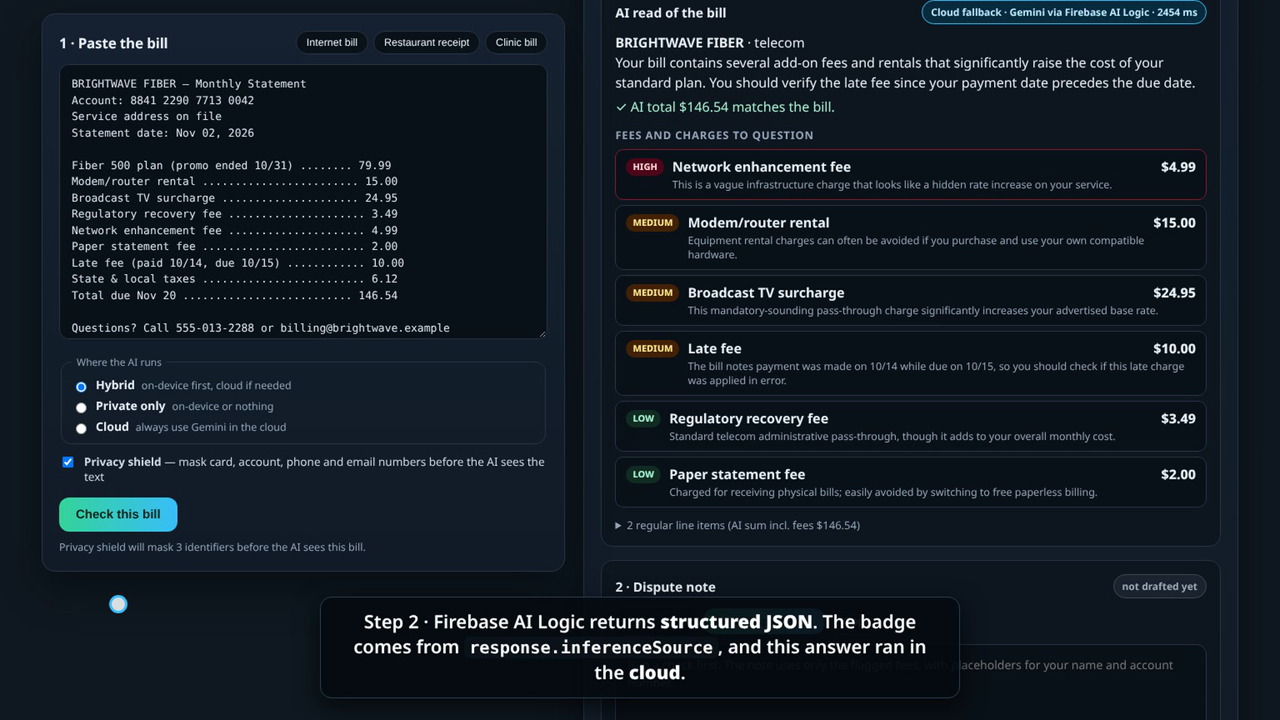
Junk fees are everywhere: "broadcast TV surcharges" on internet-only plans, "regulatory recovery" fees that sound like taxes but aren't, kitchen-appreciation fees, double-billed lab tests. They add up, and most people never question them because reading a bill line by line is tedious.
AI is great at that tedium, but a bill is some of the most private text a person owns. It has account numbers, phone numbers and email addresses, plus what you ate and what your doctor charged. Pasting it into a chatbot feels wrong. Hybrid inference fixes that tension: run the model on the device when it's there, fall back to the cloud only when it isn't, and tell the user which one happened.
What it does
HushLedger is a web app. You paste the text of a bill or receipt and get four things:
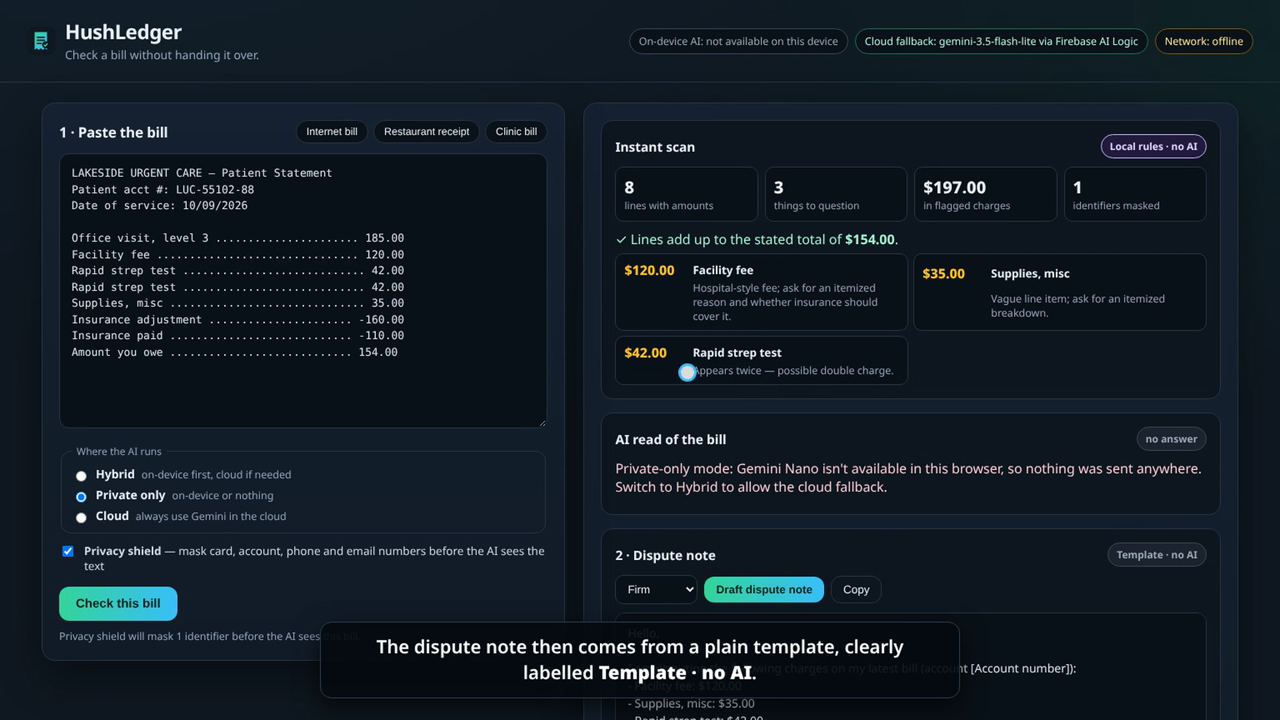
- Instant scan (no AI). Plain JavaScript totals the lines, compares them with the stated total, spots duplicate lines and known junk-fee patterns. It runs in milliseconds and works offline.
- AI read of the bill. Firebase AI Logic with
PREFER_ON_DEVICEreturns structured JSON: merchant, bill type, items, and each fee with a low/medium/high risk and a plain-English reason. A math check compares the AI's total with the bill's own total, so a wrong reading is caught instead of trusted. - Dispute note. A second hybrid request drafts a polite, firm or very brief note asking for the charges to be removed or explained. It uses
[Your name]and[Account number]placeholders, so the user never has to type personal details. - Privacy trail. Every request is logged with where it ran (on-device, cloud or local JS) and exactly how many characters left the page.
Before any prompt is built, a privacy shield masks card numbers, account numbers, phone numbers and emails on the device. That means even the cloud fallback sees less. Three modes let users choose: Hybrid (PREFER_ON_DEVICE), Private only (ONLY_ON_DEVICE, which never touches the network) and Cloud (ONLY_IN_CLOUD).
How we built it
- Firebase AI Logic Web SDK (
firebase13.3.0) with the Gemini Developer API backend (GoogleAIBackend) on the free tier. getGenerativeModel(ai, { mode: InferenceMode.PREFER_ON_DEVICE, inCloudParams, onDeviceParams }). The cloud fallback model isgemini-3.5-flash-lite. On-device inference uses Chrome's built-in Gemini Nano through the Prompt API.- Structured output on both paths: a single
Schema.object(...)bill schema is passed asresponseConstrainton-device and asresponseMimeType: "application/json"+responseSchemain the cloud. initializeDeviceModel()is called from the user's click, with a download progress bar.response.inferenceSource(ON_DEVICE/IN_CLOUD) drives the badges and the privacy trail.- App Check support is built in (reCAPTCHA Enterprise / v3 for hosting, and the debug provider for localhost).
- The front end is vanilla JavaScript and Vite, with no framework. It has a tiny service worker for offline use and is hosted on Vercel.
- Built with AI coding assistance (Grok Bot), as the rules allow.
Challenges we ran into
- Making both paths return the same shape. On-device and cloud models are configured differently. A single shared schema (
responseConstraintvsresponseSchema) kept the UI identical whichever path answered. - Honesty about where the AI ran. We wanted users to see the privacy difference, not just read about it. Wiring
inferenceSourceinto a badge and a per-request trail made it concrete. - Small-model reliability. Smaller models sometimes misread totals or file a duplicate line as a normal item. We added a deterministic math check and pass the local scan's duplicate findings to the model as hints to verify, not copy.
- Not every device has Gemini Nano. We designed every state to stay useful: no model, model downloading, offline, and private-only with no model.
Accomplishments that we're proud of
- A complete, polished product flow, not a demo prompt: scan → AI read → math check → dispute note → privacy trail.
- The privacy shield plus hybrid inference means the cloud fallback never needs raw account or contact numbers.
- It degrades gracefully. Offline or without any AI, users still get the instant scan and a template dispute note, clearly labelled Template · no AI.
What we learned
- Hybrid isn't just "on-device or cloud". It's a product decision you can surface to the user, and they care about it most when the data is personal.
- Structured output on both paths makes a hybrid app much simpler to build.
- Pairing a small model with cheap deterministic checks (math, duplicates) gives far more trustworthy results than the model alone.
What's next for HushLedger
- Photo-of-receipt input (JPEG/PNG works on-device too), so users can snap a bill instead of pasting it.
- Firestore sync (opt-in) for a personal ledger of disputed fees and outcomes.
- Remote Config for updating the junk-fee pattern list without a redeploy.
- A Chrome extension that checks bills right on utility and bank web pages.
- More languages, starting with Spanish.
Built With
- chrome-built-in-ai
- css3
- firebase
- firebase-ai-logic
- gemini
- gemini-developer-api
- gemini-nano
- html5
- javascript
- prompt-api
- service-worker
- vercel
- vite
