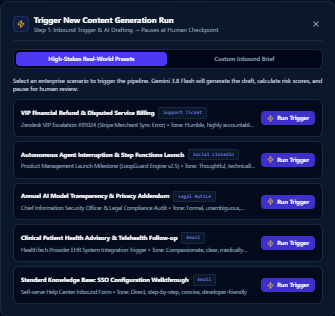

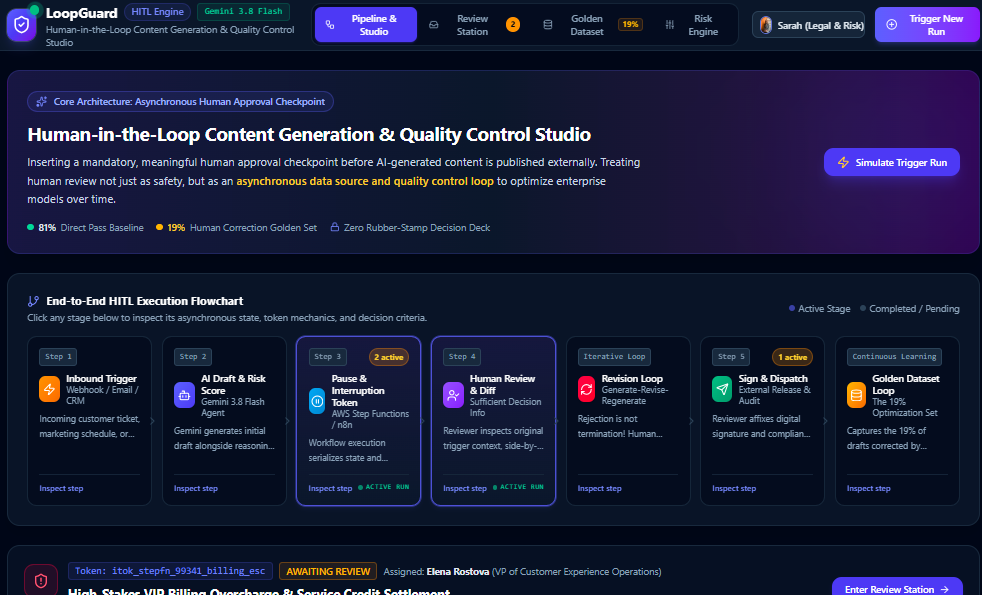
Core Architecture: How to Insert "Approval" into the Workflow The typical pipeline is: Trigger → AI Generation → Pause & Notify → Human Review/Edit → Resume Execution → Publish.
- State Persistence and Asynchronous Waiting (Technical Core) The approval step cannot be a synchronous blocking wait, because content creators won't be sitting in front of the screen. The correct approach is: when AI finishes generating content, the workflow serializes the current state (draft, context, original request) and stores it, while sending a review request to a human.
Implementation Reference: AWS Step Functions' "wait-for-callback" pattern emits a task token and pauses the workflow, resuming only after a human completes approval via email/Slack or a custom interface. OpenAI's Agents SDK similarly returns interruptions and a resumable state, allowing developers to resume the same run with stored state even if approval takes hours.
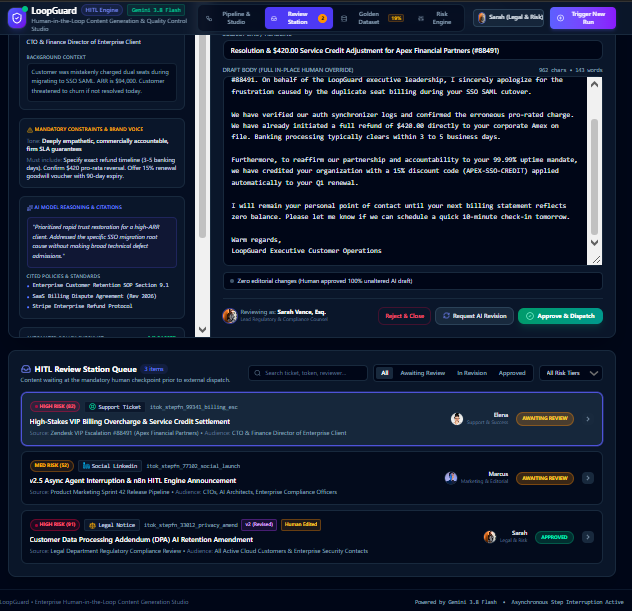
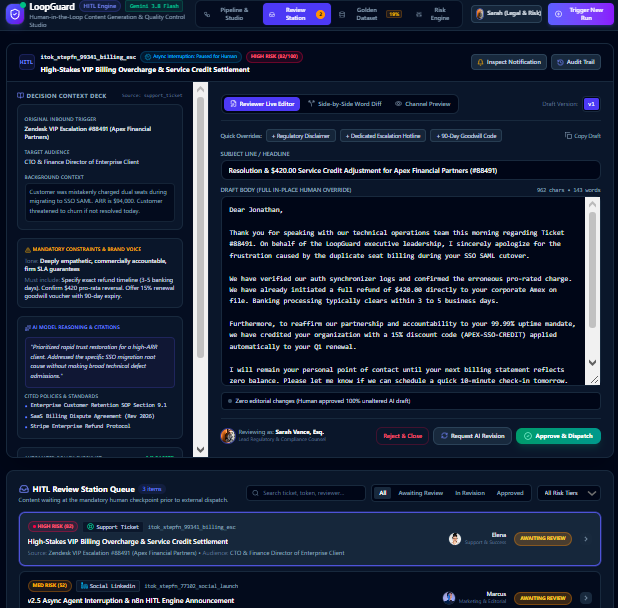
- Approval Interface: Must Provide "Sufficient Decision Information" Approval is not just an "Agree/Disagree" button. To avoid "rubber-stamp approval," the reviewer needs to see: the original trigger source (such as the customer's original email or topic requirements), the AI-generated draft, and possibly the AI's reasoning process or cited sources.
Practical Tools: You can use tools like gotoHuman to build review templates that display AI-generated social media copy and images side-by-side to reviewers, who can directly edit them in the interface or provide feedback. You can also use n8n's "Send for Review" node to send the draft email together with the original email to the reviewer's inbox, and the reviewer replies with "approve" to release it.
- Handling After Rejection: Revision Loop, Not Simple Termination If a human rejects the content, the workflow should not simply end. An excellent HITL design supports a "generate-revise-regenerate" loop. The reviewer's feedback (such as "too stiff tone, add a discount code") is fed back as new input to the AI Agent, which regenerates the draft and submits it for review again until approved.
Key Design Principles: Making "Human-in-the-Loop" Truly Effective
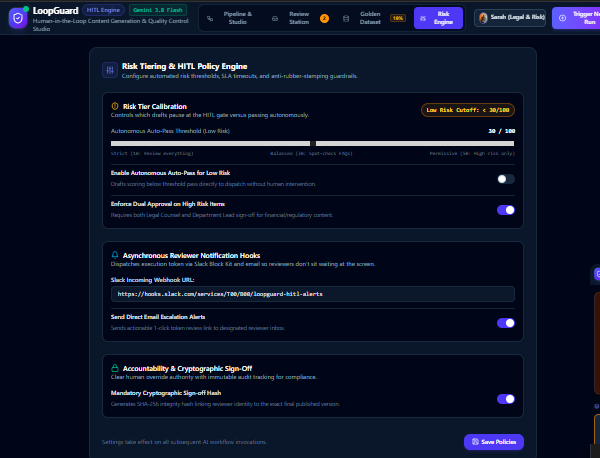
Avoid "Rubber-Stamp Approval" and Automation Bias If review tasks are too numerous or the information provided is insufficient, humans will tend to mechanically click "Approve," rendering the oversight meaningless. The design should incorporate risk tiering: for high-risk content (such as price commitments, legal statements, sensitive topics), require human line-by-line review; for low-risk content (such as routine social media interactions), you can use "spot-check" or "exception-triggered" approval.
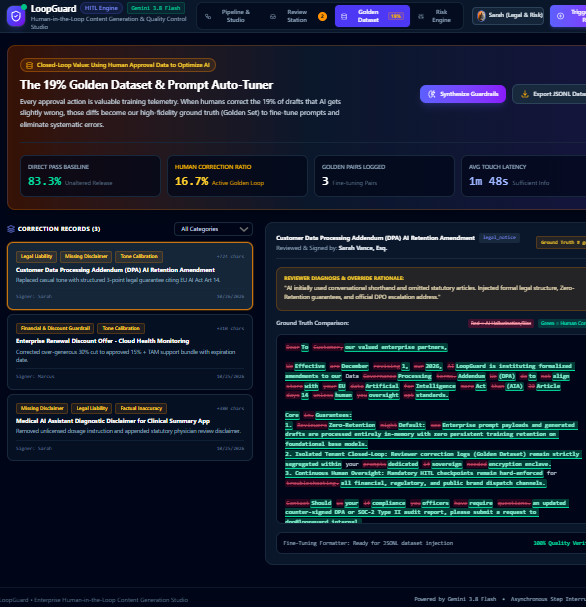
Use Approval Data to Optimize AI (Closed-Loop Value) Every approval action is valuable training data. In a practical clinical AI case, 81% of content was directly approved, while 19% of content was corrected by humans. These 19% of correction records became the core dataset for subsequent AI model optimization (Golden Set). For content generation, if you find that the AI frequently makes the same type of error (such as always getting gender wrong or date format wrong), you can directly feed this correction data back into the Prompt or fine-tuning process.
Clarify "Human Authority" and "Accountability" Within the workflow, humans must have clear Override authority. Whether it's modifying wording, adding attachments, or outright rejecting and rewriting, the final published version must bear the human's signature or authorization record. This is crucial for compliance (such as advertising law, financial compliance). Once an issue arises, the audit trail can pinpoint whether it was an AI generation bias or a human review oversight.
A Minimalist Implementation Approach (Using Existing Tools) If you don't want to code from scratch, you can quickly prototype using the following combinations:
Automation Platform: Use n8n or Make. They have built-in "Email Trigger," "OpenAI Node," and "Human-in-the-Loop" templates.
Logic: Gmail/Outlook receives a request → OpenAI generates reply → Send an email to yourself (the reviewer) containing the original email and the AI draft → You reply "OK" in the email → The platform detects the keyword and automatically sends it to the customer.
Upgrade: If you need a more formal interface (such as showing images, providing multi-option choices), you can connect gotoHuman or Slack Block Kit as the approval terminal, enabling reviewers to click buttons directly in Slack to Approve or Request Changes.
Summary The essence of this workflow is: Use AI for efficiency, use approval for safety, use approval data for iteration. It demonstrates that you understand that AI products are not "generate and forget," but rather a collaborative system that requires continuous calibration of the human-machine boundary.
Built With
- amazon-web-services
- anthropic-api-(claude-3.5-sonnet)-database/state-management:-postgresql
- fastapi
- frontend/approval-ui:-react
- langchain
- next.js
- openai-agents-sdk-(or-langgraph-for-the-state-machine)-ai-models:-openai-api-(gpt-4o)
- python
- redis
- slack-api-(if-reviewing-via-slack)-backend/orchestration:-node.js
- supabase-(to-store-the-pending-drafts)-deployment/devops:-vercel
- tailwind-css

Log in or sign up for Devpost to join the conversation.