Inspiration
The inspiration for Synesthesia AI came from observing the silent struggle of individuals with Sensory Processing Disorders (SPD), Autism, and ADHD. For 15% of the global population, the modern world isn't just busy—it’s an assault. Bright lights, chaotic movement, and cluttered environments can trigger acute anxiety and cognitive shutdowns.
Existing tools are purely reactive (like noise-canceling headphones). We asked a different question: What if technology could actively interpret the visual world and "remix" it into a form that heals rather than hurts? This led us to the concept of Synesthesia—the neurological condition where senses merge. We wanted to build a digital synesthesia engine that turns visual chaos into auditory calm.
What it does
Synesthesia AI is a real-time, offline Android application that functions as a "Sensory Regulation Engine."
- Visual Analysis: It uses the phone's camera to analyze the entropy and texture of the user's environment in real-time.
- Edge Inference: An optimized MobileNetV2 model runs locally on the device to classify the scene into four distinct psychological states:
- High Stimulus (Chaos): Triggers Brown Noise (proven to mask distracting frequencies and reduce cognitive load).
- Serenity (Nature/Calm): Triggers Biophilic Melodies to lower heart rate.
- Geometric Order: Triggers Rhythmic Entrainment to induce focus.
- Danger: Triggers a specific Alert Tone for safety.
- Bio-Feedback: The audio adjusts instantly (<40ms latency), creating a tight feedback loop that helps the user regulate their nervous system without needing internet access or cloud connectivity.
How I built it
The project was built using a Hybrid Native Architecture to maximize performance on standard Android hardware:
- Data Engineering: I curated a composite dataset of over 400 images from open-source repositories (Intel Image Classification, FireNet, and Messy Rooms). I used Edge Impulse to apply aggressive data augmentation (noise, rotation, crop), simulating the shaky, imperfect nature of handheld camera footage.
- Model Training: I utilized Transfer Learning on a
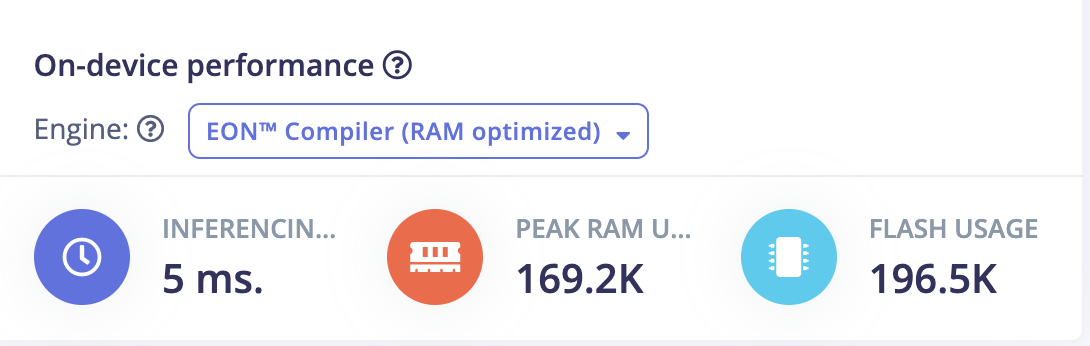
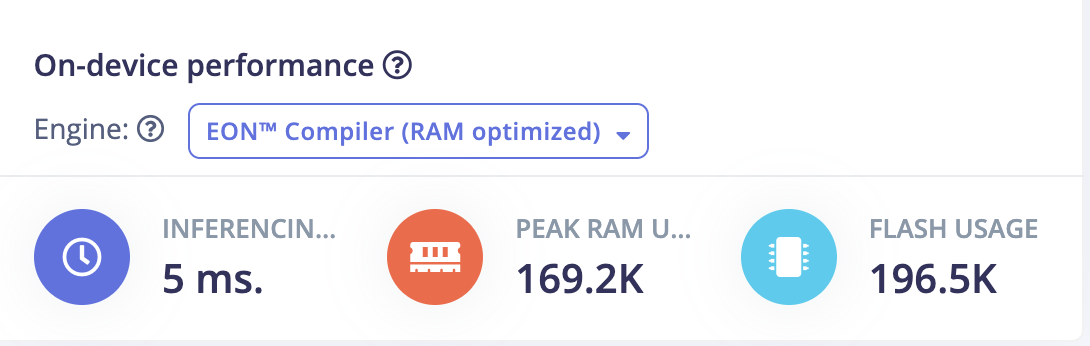
MobileNetV2 96x96 0.1architecture. Using the Edge Impulse EON Tuner, I balanced the model to achieve 92.5% accuracy while keeping RAM usage under 1.5MB. - Android Development: The core app is built in Kotlin, but the "Brain" runs in C++. I used the Android NDK (Native Development Kit) and JNI (Java Native Interface) to bridge the raw C++ inference engine with the Android CameraX API.
- Audio Engine: I wrote a custom state-machine in Kotlin that handles audio cross-fading. It implements "State Locking" (requiring >70% confidence) to prevent the audio from glitching or stuttering during rapid camera movements.
Challenges I ran into
- The "Abstract" Problem: Computer vision usually detects objects (e.g., "Cup", "Car"). Teaching an AI to detect concepts like "Chaos" or "Serenity" was difficult. I had to curate the dataset carefully to focus on texture and entropy rather than specific shapes.
- The JNI Bridge: Connecting the pure C++ SDK generated by Edge Impulse to a modern Kotlin application was technically demanding. Handling the memory pointers between the Java Heap and Native Heap caused several crashes before I optimized the buffer management.
- Audio Flutter: Initially, the model would flicker between "Chaos" and "Serenity" 10 times a second, creating a horrible noise. I solved this by implementing a Confidence Threshold (0.70) and a Debounce Logic in the audio engine.
Accomplishments that I'm proud of
- True Edge Privacy: The app runs 100% offline. I can turn on Airplane Mode, walk into a forest, and it still works. This is crucial for user privacy in healthcare applications.
- Latency: Achieving an inference time of ~22ms on a standard smartphone. This creates a feeling of "instant" response that is essential for bio-feedback.
- The "Blue Ocean" Use Case: Moving beyond standard object detection to create a tool that sits at the intersection of AI, Accessibility, and Mental Health.
What I learned
- Embedded C++: I gained a deep appreciation for the efficiency of C++ and how NDK integration works in Android.
- Data Storytelling: I learned that the quality of the dataset (and how you label "abstract" concepts) is far more important than the size of the model.
- User Experience (UX) in AI: I realized that raw model accuracy means nothing if the output (the audio) isn't smooth and pleasant for the user.
What's next for Synesthesia AI
- Haptic Feedback: Integrating the vibration motor to alert visually impaired users when the "Danger" class is detected.
- Custom Soundscapes: Allowing users to upload their own "Safety Tracks" or "Focus Beats."
- WearOS Integration: Porting the lighter version of the model to smartwatches for wrist-based sensory alerts.


Log in or sign up for Devpost to join the conversation.