GetMarkdown: A Text to Markdown Converter
What does this app do?
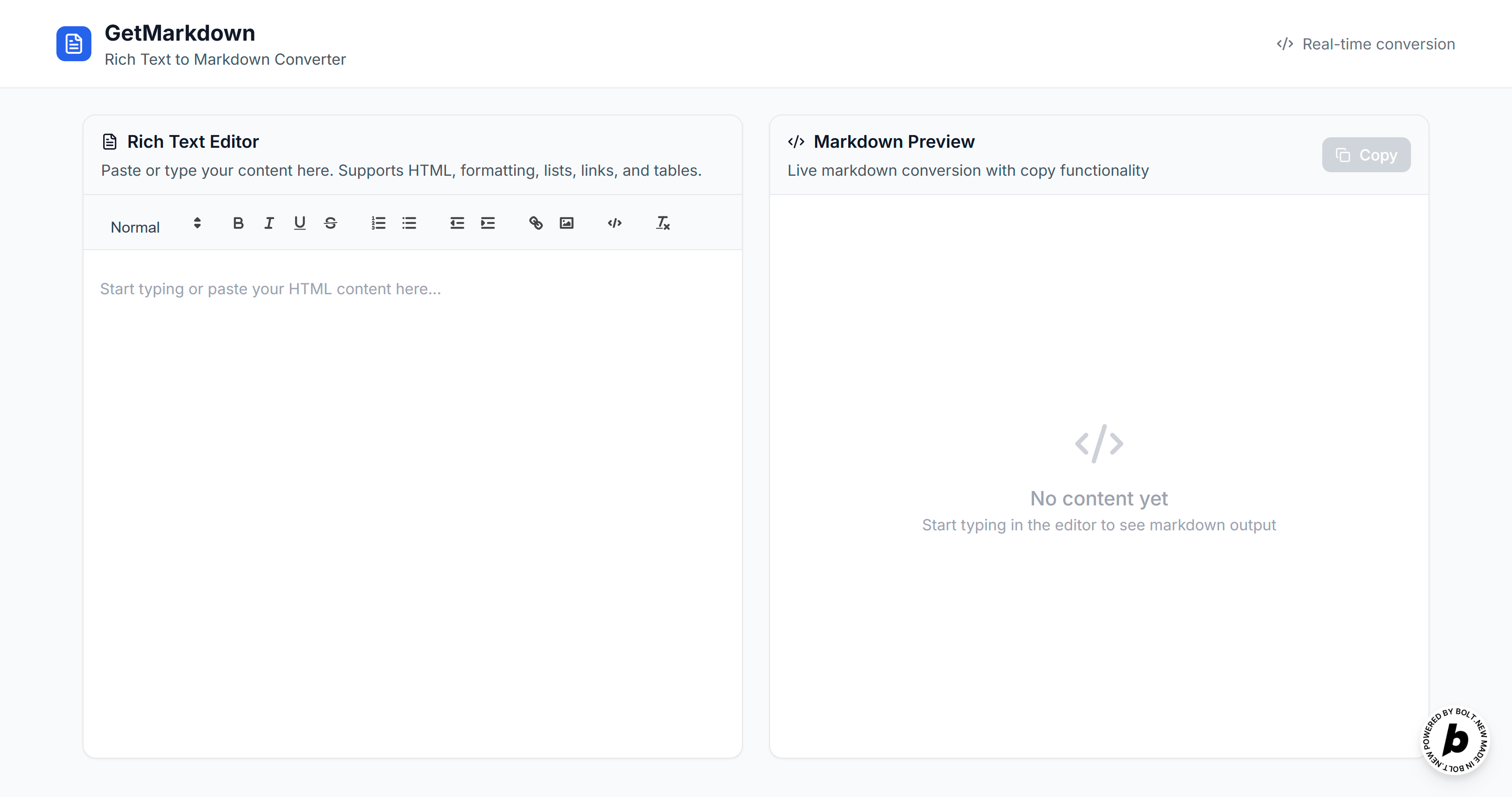
The "Text to Markdown Converter" is a web application that allows users to write or paste rich text (with formatting like bold, italics, lists, etc.) in a user-friendly editor and instantly convert it to clean Markdown format. The app features a real-time preview of the Markdown output and provides a convenient way to copy the resulting Markdown to your clipboard with a single click.
Key Features
- Rich Text Editor: Write or paste your content using a modern, WYSIWYG editor with formatting options (headings, bold, italic, underline, lists, links, etc.).
- Live Markdown Conversion: As you type or edit your rich text, the app automatically converts it to Markdown and displays the result in real-time.
- One-click Copy: A prominent "Copy" button lets you copy the Markdown output directly to your clipboard. A toast notification confirms when copying is successful.
- Clean Output: The app cleans up the Markdown for consistent formatting and removes unnecessary or unsafe HTML tags from pasted content.
- Responsive Design: Works well on desktop and mobile devices.
How to Use (End User Perspective)
- Launch the App:
- Open the web app in your browser.
- Enter Your Content:
- In the Rich Text Editor panel, start typing, or paste content from another source.
- Use the toolbar to add formatting such as headers, bold, italics, lists, or links.
- View Markdown Output:
- As you type or format your text, the Markdown Output panel updates automatically to show the Markdown version of your content.
- Copy Markdown:
- Click the Copy button above the Markdown output area.
- A notification ("Markdown copied to clipboard!") will appear to confirm the action.
- Paste Where Needed:
- Paste your copied Markdown into your documentation, blog, code comments, or wherever Markdown is supported.
Typical User Flow
- Open the app.
- Paste or type formatted text into the left panel.
- Instantly see the Markdown result on the right.
- Click "Copy" to put the Markdown in your clipboard.
- Paste the Markdown anywhere you need.
Who is it for?
- Developers writing documentation or README files
- Bloggers or writers who prefer Markdown for notes and posts
- Anyone needing to convert formatted text to Markdown quickly
In summary:
This app streamlines the process of converting rich text to Markdown, making it easy for anyone to get clean, ready-to-use Markdown with minimal effort.
Built With
- bolt

Log in or sign up for Devpost to join the conversation.