-
-
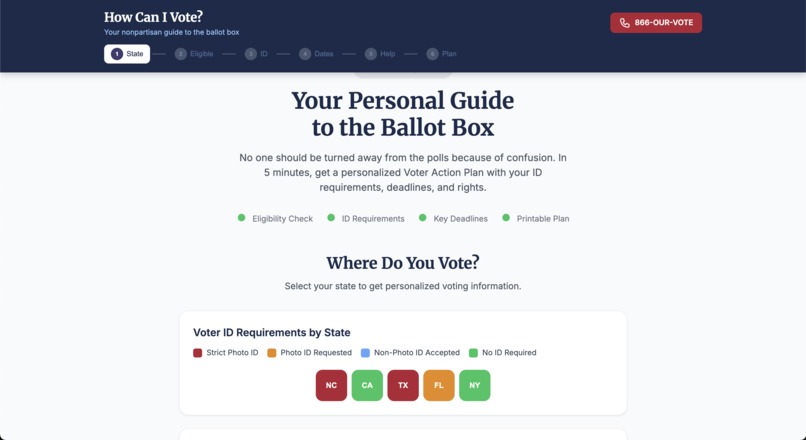
Main Page
-
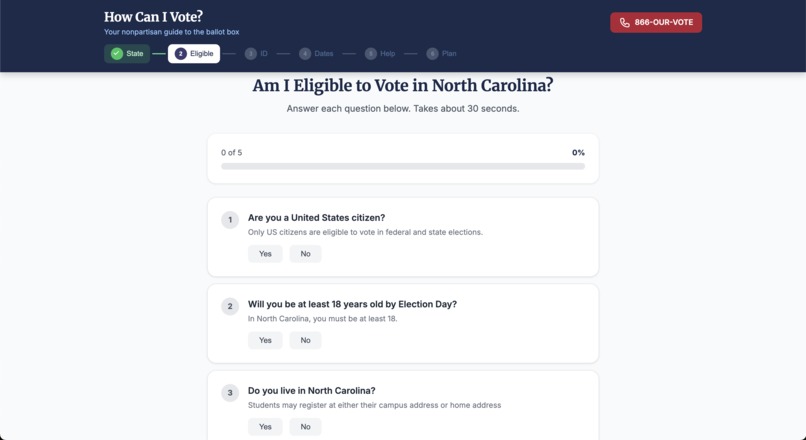
Eligibility
-
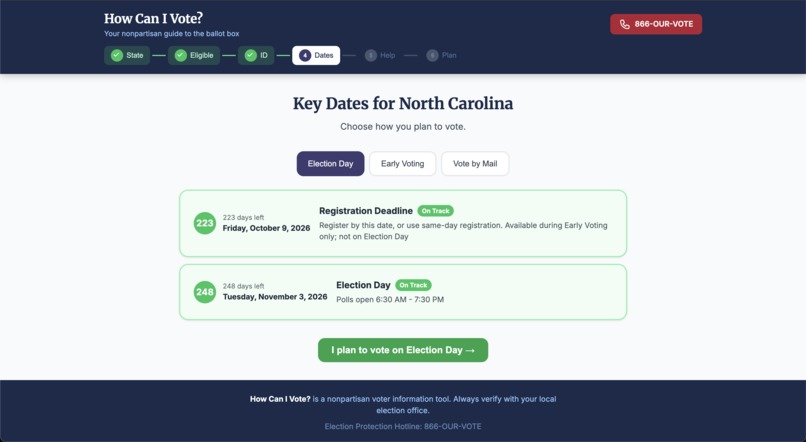
Key Dates
-
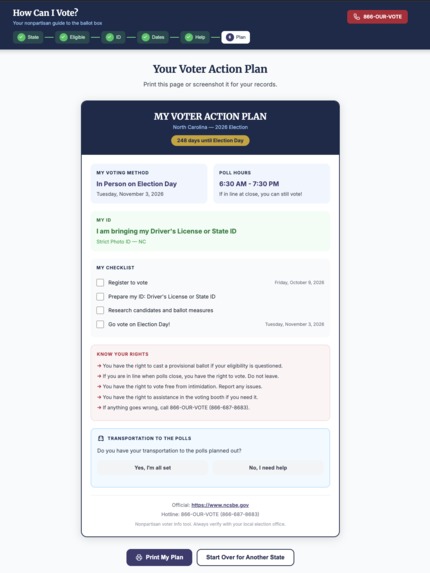
Voter Plan
Inspiration
As you've all seen in the news, new and more voter ID laws are trying to be passed. This is not a joke: many of these proposals change how people access the ballot. Regardless of political stance, one thing is clear: voting rules are changing, and they are becoming more complicated.
For many Americans, particularly in low-income and historically underserved communities, navigating these changes can be especially difficult. Obtaining specific forms of identification may require time off work, transportation to government offices, or paying for supporting documents. When voting procedures become more complex, the burden of understanding them does not fall evenly. Underprivileged communities are most impacted by public policy and are often the ones facing the greatest procedural barriers to participating in the democratic process.
We built How Can I Vote? to address that information gap. We wanted to build a nonpartisan, user-friendly guide that simplifies the voting process into clear, actionable steps - empowering voters with confidence instead of confusion.
What It Does
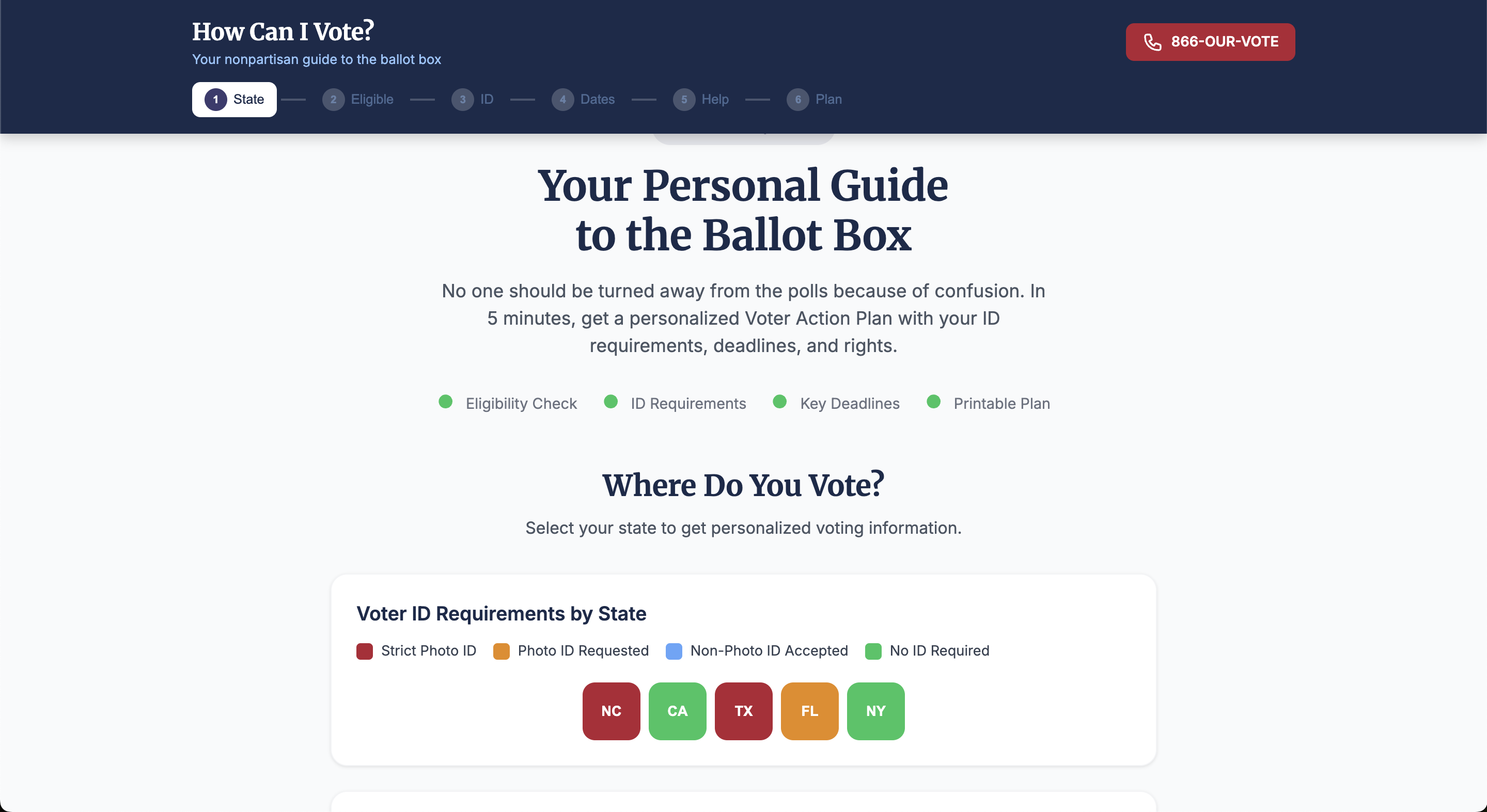
How Can I Vote? is a personalized, state-specific voting guide that walks users through the entire voting process in six structured steps:
- State Selection - Users select their state to receive customized voting rules.
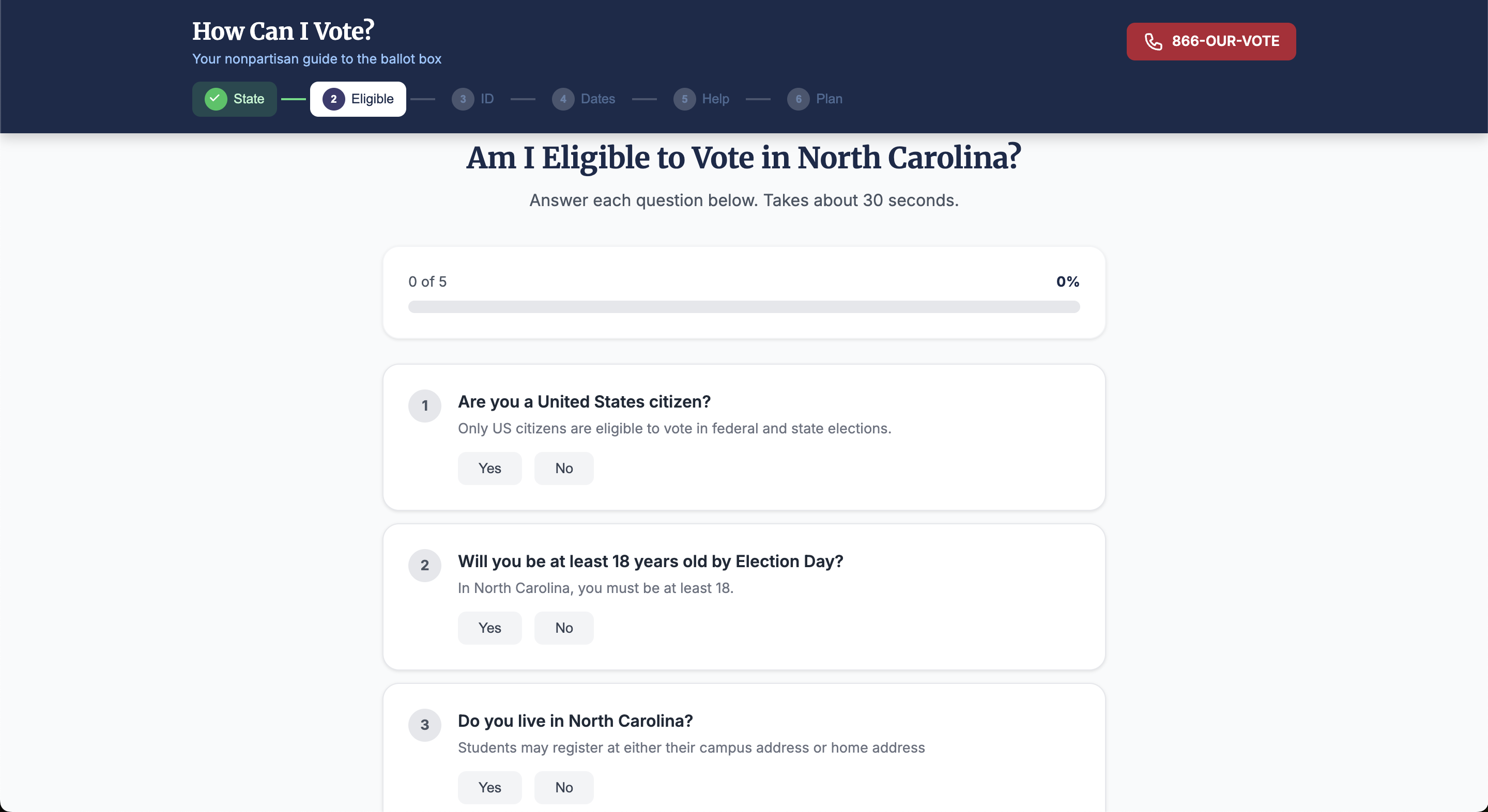
- Eligibility Check - A quick interactive questionnaire determines voting eligibility based on state laws.
- ID Requirements - A visual tool shows accepted IDs and explains alternatives like provisional ballots.
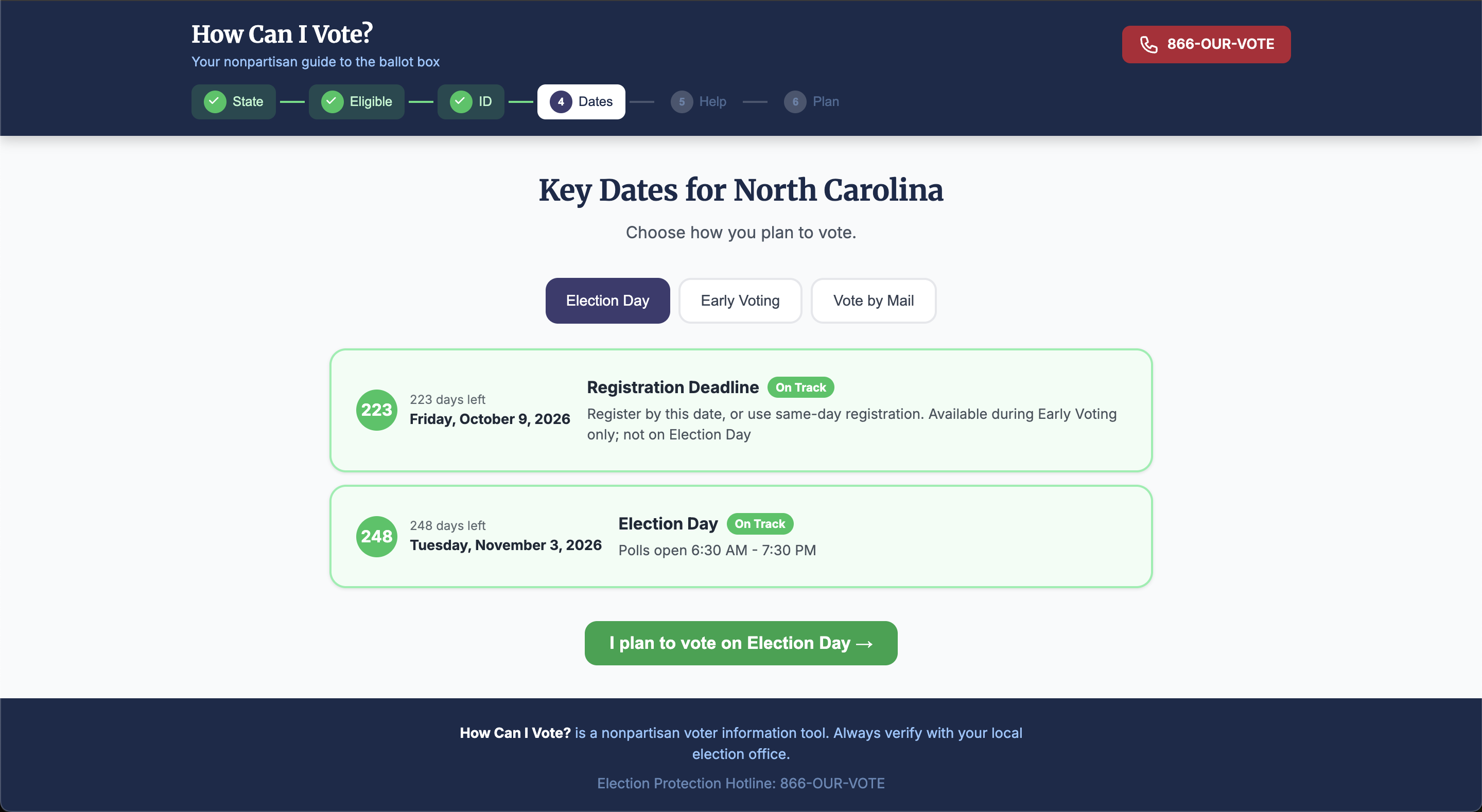
- Key Deadlines - A dynamic timeline highlights registration deadlines, early voting dates, mail ballot deadlines, and Election Day - with urgency indicators.
- Troubleshooter - A searchable FAQ addresses common real-world issues (not on the voter roll, long lines, lost ID, intimidation, ballot rejection, etc.).
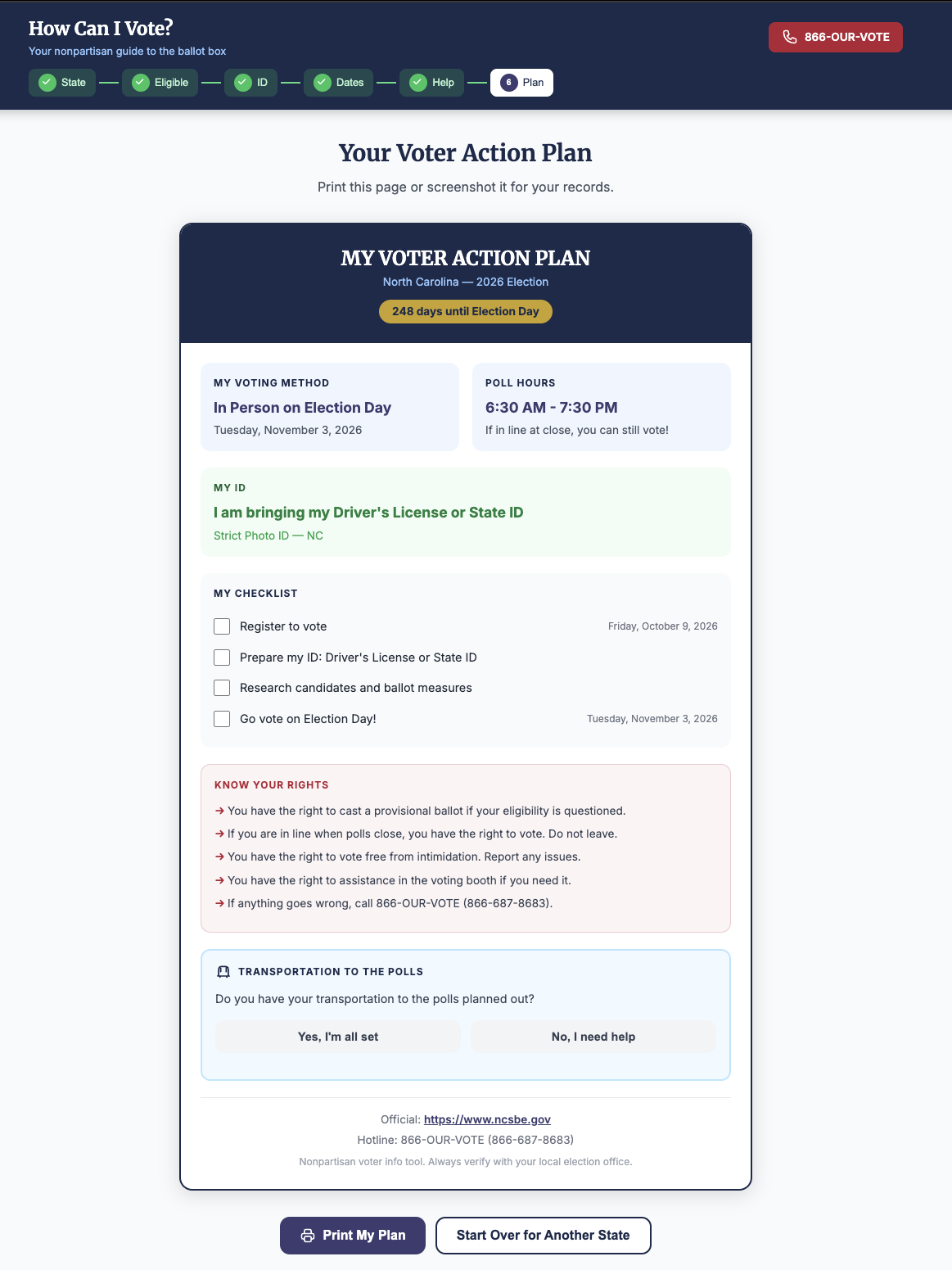
- Voting Plan Builder - Users confirm how and when they plan to vote.
The platform also prominently integrates the 866-OUR-VOTE Election Protection hotline, ensuring users always have access to real-time assistance.
How We Built It
We built the platform as a React-based single-page application, using:
- React (via CDN) for dynamic state management and component-based architecture: We used standalone Babel for in-browser JSX compilation, which allowed us to build a dynamic, state-driven application rapidly without needing a complex build step or bundler. The main App component acts as a state machine, using useState to track the user's current step and aggregate their choices into a final plan object.
- Vanilla CSS with a civic-themed design system for consistent branding and accessibility: We defined a centralized design system using CSS :root variables to maintain consistent branding (civic reds, blues, and grays) across the app.
- A structured state data object (STATES_DATA) that acts as our database, storing:
- ID requirements: Categorized by strictness (e.g., "Strict Photo ID", "No ID Required") alongside arrays of accepted ID types with mapped SVG icons.
- Eligibility rules: Boolean flags and text descriptions for age, residency, and felony voting rights.
- Registration policies: Data on online and same-day registration availability.
- Voting methods: State-specific logic for in-person, early voting, and mail-in voting.
- Deadlines: Hardcoded date strings for registration, mail requests, and election days.
- Cure periods: State-specific grace periods for fixing ballot issues.
- Hotline and Secretary of State information: Official links and the Election Protection Hotline for immediate troubleshooting.
Key architectural decisions:
- Modular components: * EligibilityEngine: Translates the state's minimum requirements into a progressive, boolean-driven questionnaire with a dynamic progress bar.
- IDVisualizer: Filters the state data to display specific, accepted identification types and includes a dropdown for "no ID" fallback options.
- TimelineGenerator: Calculates the exact days remaining until key deadlines, dynamically categorizing them as "Urgent!", "Coming Soon", or "On Track" based on the user's chosen voting method.
- Troubleshooter: A search-enabled FAQ that actively injects state-specific variables (like cure days or poll hours) directly into the generalized answers.
- TransportationPlanner: Evaluates the selected state to surface local public transit agencies, volunteer rideshare programs, and dynamically generates Google Maps transit routing links based on user input.
- Utility functions for calculating deadline urgency and formatting dates: We built custom Javascript date-math functions (daysUntil and getDeadlineUrgency) that compare the user's current local time against the hardcoded election calendar to trigger specific UI color-coding.
- Dynamic rendering based on selected state: Because the entire UI maps directly to the STATES_DATA object, selecting a state instantly re-renders the downstream components with the correct legal parameters, bypassing the need for separate pages.
- Accessibility-conscious design: We used custom inline SVG icons, plain language, and high color contrast to ensure the logic-heavy pathways remain intuitive and readable for all voters.
- Print-friendly formatting: We utilized specific @media print CSS rules in the VoterActionPlan component to strip away navigation and UI clutter, allowing users to physically print a clean, personalized checklist to take to the polls.
The experience is step-based and state-driven, meaning all personalization flows from the state data model.
Challenges We Ran Into
- Untangling State-by-State Complexity: Election laws are highly fragmented. Translating the chaotic web of ID requirements, felony voting rights, and mail-ballot cure periods into a unified, functional data model was a massive logic puzzle.
- Balancing Simplicity with Legal Accuracy: We had to aggressively strip away dense legal jargon without compromising the strict accuracy of the underlying statutes.
- Designing for High-Stress Scenarios: Voters facing intimidation, long lines, or rejection at the polls are under immense pressure. We had to design the Troubleshooter to deliver confident, actionable, and immediate guidance without adding to their cognitive load.
- Dynamic State-Driven Urgency Computation: Handling native JavaScript Date math without heavy external libraries was tricky. We had to write custom utility functions (daysUntil and getDeadlineUrgency) to calculate exact day deltas, meticulously avoiding timezone offset bugs by forcing local midnight evaluations to ensure real-time urgency states updated flawlessly.
- Strict Nonpartisan Framing: Maintaining a completely neutral, informational tone (stripping away any political framing or bias) was critical to establishing trust across a wide user base.
Accomplishments We're Proud Of
- Architecting a seamless 6-step guided flow that translates complex election law into a personalized, printable action plan.
- Engineering a visual ID requirement system that replaces dense paragraphs of policy with an intuitive, icon-driven interface.
- Building a dynamic deadline tracker that calculates real-time urgency based on the user's specific voting method and state calendar.
- Prominently integrating real-time voter protection/accessibility resources, ensuring users are never left stranded if edge-case issues arise at the polls.
- Designing a highly accessible, civic-centered UI that projects authority, neutrality, and trust.
- Most importantly: We successfully built a tool that not only displays vital data, but also builds voter confidence and directly reduces the friction of democratic participation.
What We Learned
- Clarity beats comprehensiveness. Voters don't want to read a law textbook; they want a personalized, actionable answer. Curating exactly what applies to them is far more valuable than showing them everything.
- Visual cues reduce anxiety. Color-coded ID categories and real-time urgency indicators are incredibly effective at making intimidating bureaucratic rules feel manageable.
- Planning drives participation. By guiding users to explicitly commit to a voting method and an ID choice, the platform shifts them from passive reading to active intentionality.
- Edge cases are the real barrier. The biggest friction points happen in the margins-recent moves, student residency confusion, or lost IDs. Proactive, scenario-based troubleshooting is essential, not optional.
- Trust is a byproduct of design. A neutral tone, crisp typography, and structured logic are just as important as the data itself when it comes to making users feel safe relying on the platform.
What's Next for How Can I Vote?
- Expand to All 50 States + Territories: Scale the state data model nationwide.
- Live Data Integration: Connect to official state election APIs where available to keep deadlines and rules automatically updated.
- Personalized Reminders: SMS or email reminders for registration deadlines and Election Day.
- Polling Place Locator Integration: Allow users to find their exact polling location directly in the platform.
- Multilingual Support: Expand full-site translations beyond hotline references.
- Accessibility Enhancements: Screen-reader optimization and enhanced ADA-focused design features.
- Data Dashboard: Aggregate anonymous usage insights to understand voter pain points and improve civic outreach.

Log in or sign up for Devpost to join the conversation.