Inspiration
Small home robots like Pollen's open-source Microduck are coming, but a new robot in a home is lost: We asked a simple question: what if you could just show the robot your home first? Everyone already carries a phone with a camera, and many have LiDAR. So we built a way to film a house once and give any robot a ready-made, measured map it can find itself in. With an agentic loop the robot can decide - follow orders locate itself - dynamcly take decisions and achieve the goal we propose in 98% out of the cases.
What it does
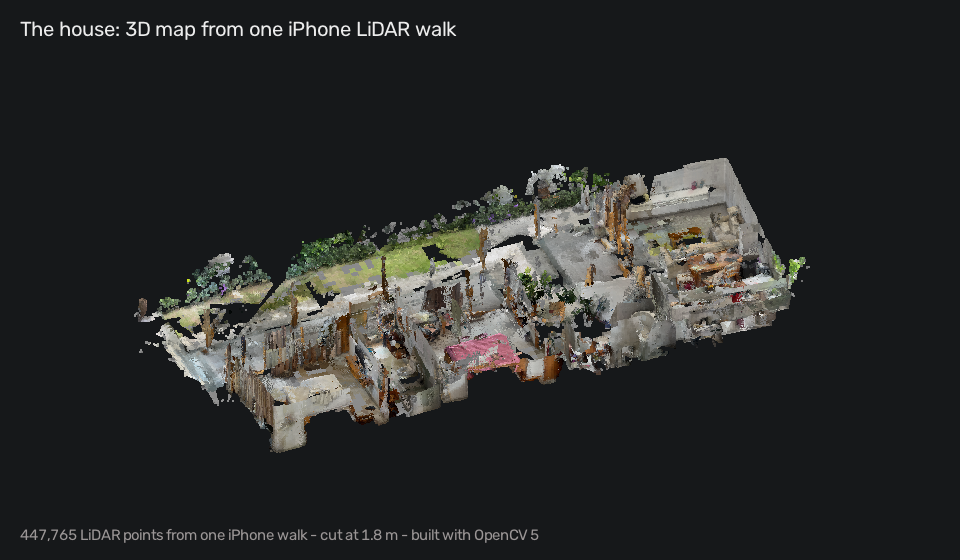
House Twin Patrol turns one iPhone walk into a digital twin of your home, built with OpenCV 5 on AWS, and gives the robot a brain that finds itself, patrols every room and asks a person when it isn't sure.
| What happens | What House Twin Patrol does |
|---|---|
| You walk through your home with the app | Records LiDAR depth, colour and the ARKit pose; you tap each room as you enter |
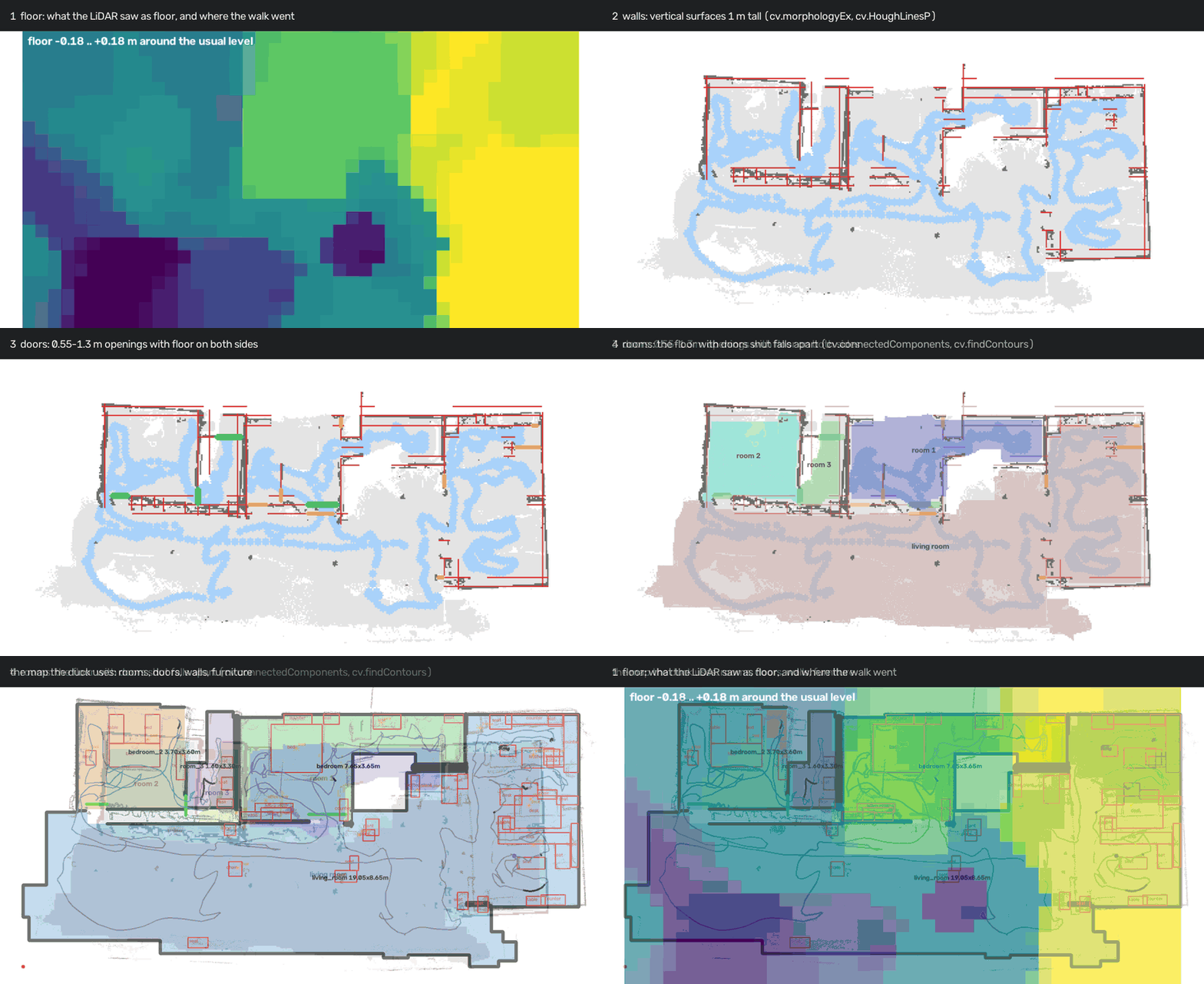
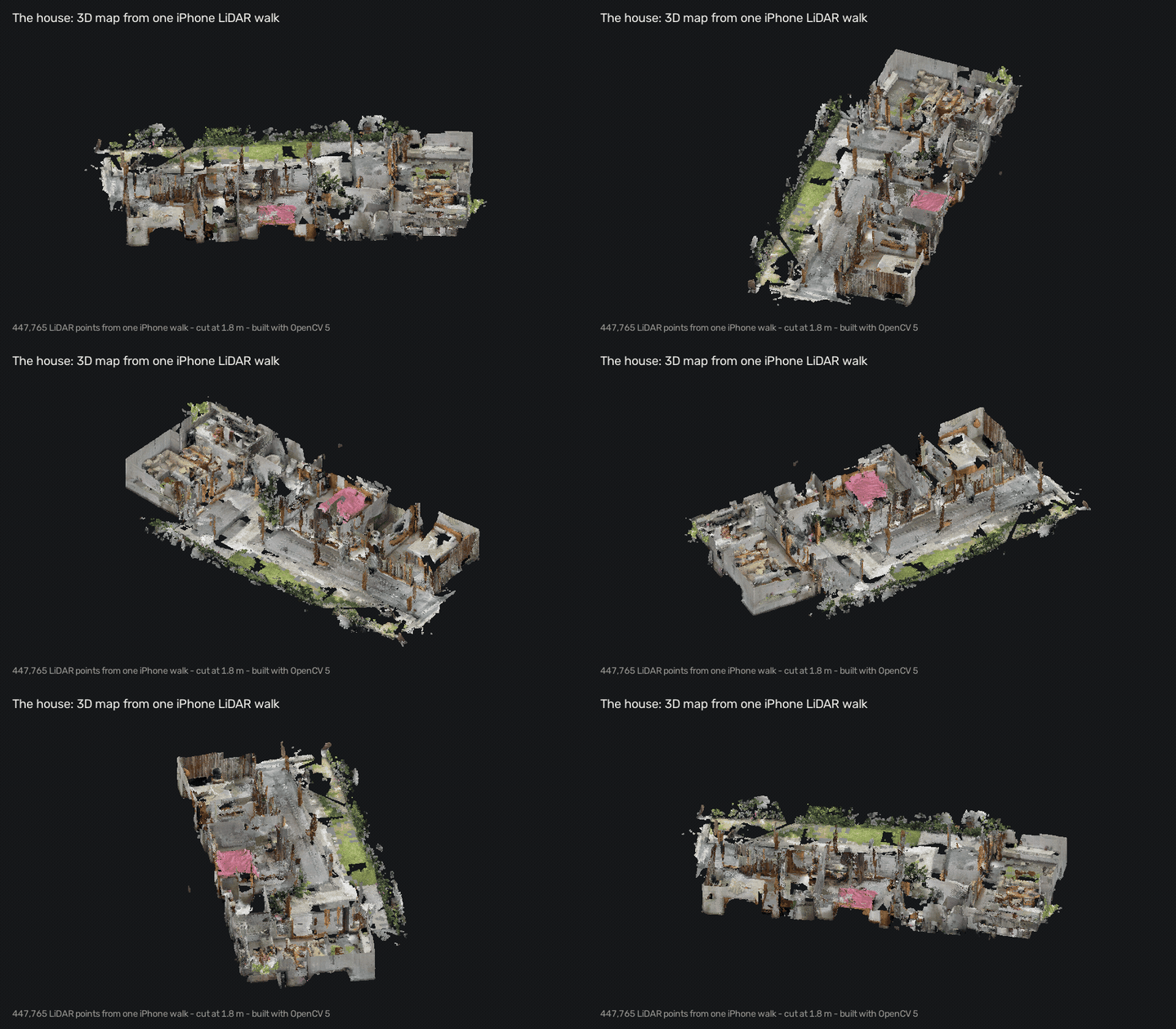
| You tap Upload | The server on AWS Graviton builds the twin with OpenCV 5: floor, walls, doors, rooms, furniture, 3D |
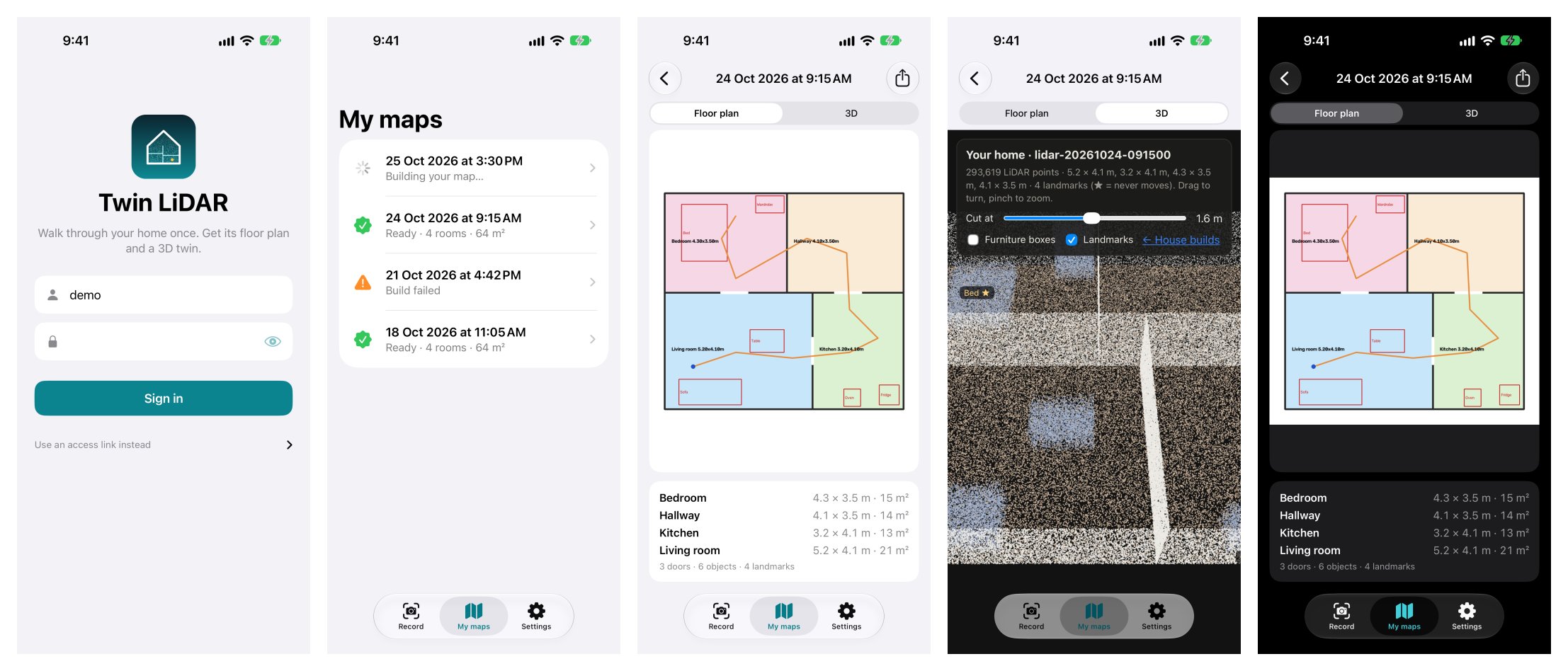
| The map is ready | My maps shows it: floor plan with room sizes, a 3D view, a notification |
| The robot is switched on somewhere unknown | It turns once on the spot and matches that scan against every place in the map, and knows where it is |
| The robot walks to a room | Every belief is checked against the depth sensor; if the walls stop fitting, it stops and looks again |
| A strong guess appears across the house | Treated as a false positive: the robot keeps the position it trusted |
| The camera sees the room | OpenCV votes for the room; if that changes a decision, it is logged and the route is planned again |
| It reaches a goal, but the camera disagrees | "I think I'm in the bedroom, but the camera's colours say kitchen. Say I've arrived?" |
| Someone wants to know why it did that | Every step is in a trace; a film replays it with the robot's eye, the map and the brain in words |
Finding itself with a tiny depth sensor: the spin match
The Microduck sees depth through an 8×8 sensor. One frame says almost nothing; a full turn says a lot. While the duck turns on the spot, its readings are stacked into one 360° scan. After the turn, that scan is compared with what the map says you would see from every free spot in the house, at every heading: roughly first, then precisely around the best places. It only counts as found when the best place clearly beats the runner-up. Directions where the sensor saw nothing are evidence too: "open space this way".
Verify before trust
Being sure fast is easy. Being sure and right is the job.
- Fit check: from where the robot thinks it is, the map predicts what each depth reading should be. If the readings stop fitting, the robot knows it is lost and looks again. A reading shorter than the map is not counted against it: that's a person, a bag, or the floor when the walking head tips down. You can't see through a wall, so only longer readings contradict.
- Jump check: once a position is trusted, a sudden estimate far across the house is a false positive. The guesses near the trusted position stay the answer, and the robot keeps going.
- Arrival needs a fresh check: in the middle of a big room nothing is in range, so the robot may keep driving on what it knows but may not declare "I'm here" until the walls confirm it.
Agentic Vision: OpenCV changes what the robot does
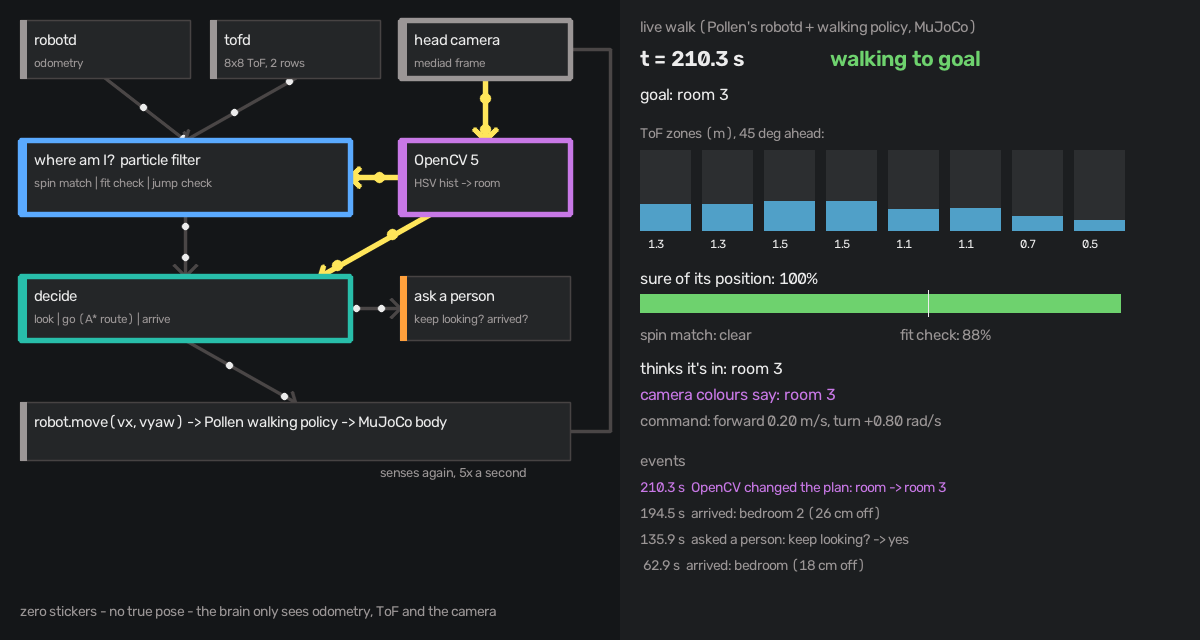
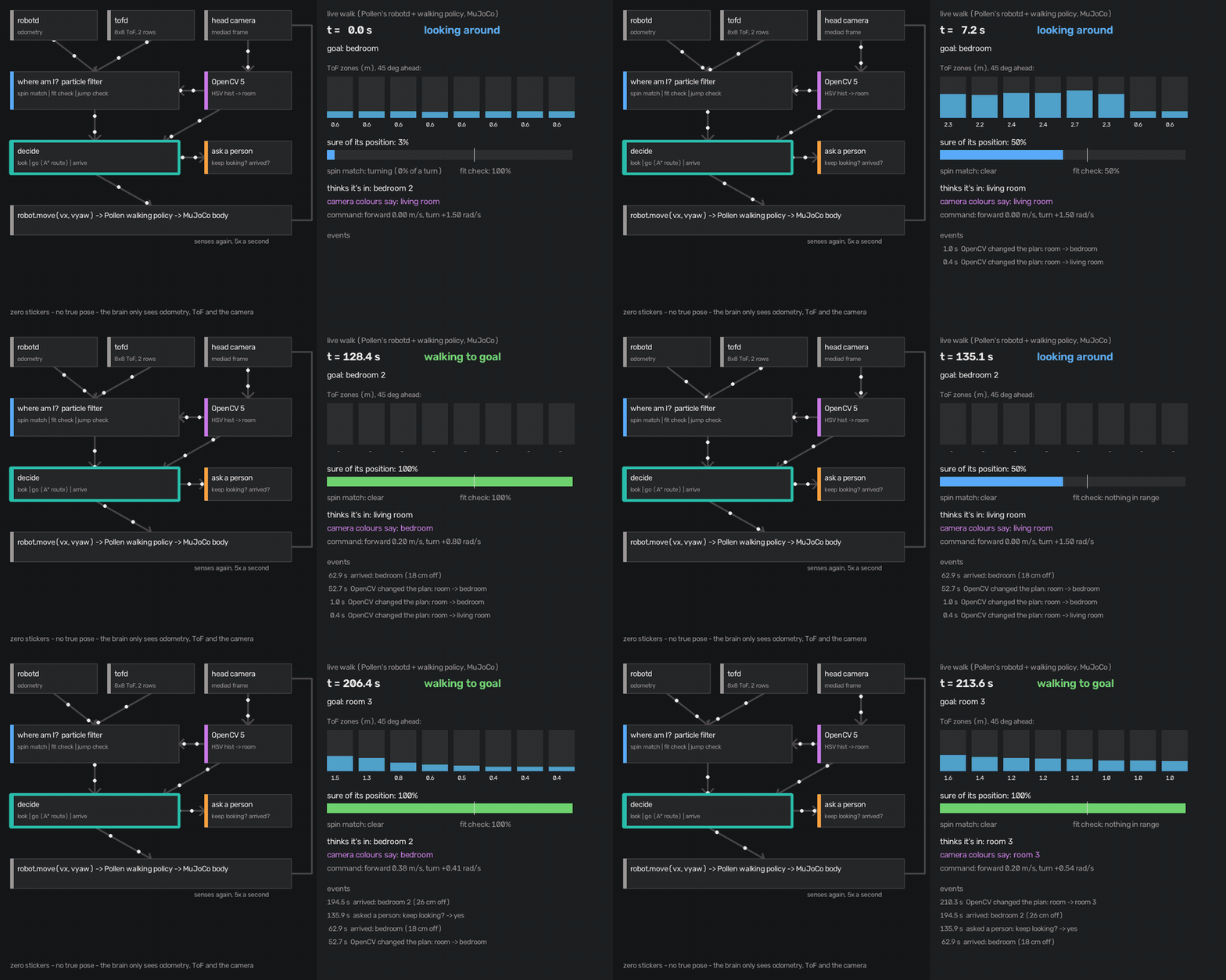
Several times a second: sense → locate → see → decide → ask → act. OpenCV 5 reads every camera frame (cvtColor,
inRange, calcHist): which room do these colours look like? That vote moves the robot's belief, and when a frame
changes the decision, the trace records it. Here, from the live walk, a frame moved its belief to the living room,
where it really was:
{"event": "vision_decision", "cause": "room colour (bedroom)",
 "before": {"mode": "look", "room": "bedroom_2"}, "after": {"mode": "look", "room": "living_room"}}
And when the evidence isn't enough, a person decides: "I'm lost. Keep looking for bedroom 2?" Say no, and it stops. Every question and answer is logged.
Key features
- Zero stickers: no markers, no beacons; the map comes from one walk.
- Real robot software: Pollen's
robotdand its trained walking policy drive the duck; our brain only sends velocity commands and sees what the robot sees. - An app people can use: sign in, record, upload, watch it build, open the floor plan and 3D. Open the Xcode project and press Run.
- Observability: a trace of every step and decision, and a film with the chase camera, the robot's eye, the map (truth vs belief) and banners whenever OpenCV changed the plan or the robot asked.
- An honest test bench: many test homes, a perfect and a rough sensor, the old brain against the new one on the same starts.
How we built it
| Part | What it is |
|---|---|
| iPhone app (SwiftUI, ARKit) | Records the walk, room taps, recording check and review; login with tokens in the Keychain; My maps |
| Server (FastAPI on AWS EC2 Graviton4) | Caddy HTTPS, hashed passwords, signed tokens, rate limiting; runs the twin build per upload; Amazon Bedrock (Claude) for the room-measure agent |
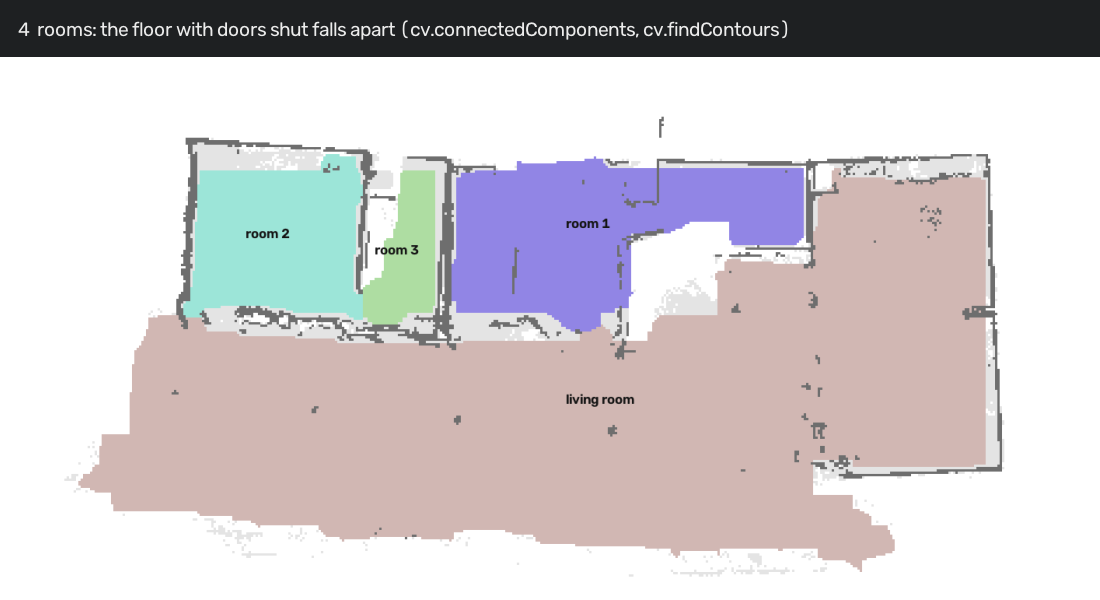
| Twin build (OpenCV 5) | Depth fusion (cv.Volume TSDF, RgbdNormals) → floor → walls (morphologyEx, HoughLinesP) → doors → rooms (connectedComponents, findContours, approxPolyDP) → landmarks (CLIP in cv.dnn) → house.json and a MuJoCo scene |
The brain (agent/loc/) |
One module per job: the map and fast ray casts (distanceTransform), depth reading, spin match, fit check, landmarks |
The agent loop (agent/walk.py) |
OpenCV on the camera, vision_decision events, A* routes, the moments it asks a person |
| Evaluation | A sandbox of test homes (eval/selfloc.py), camera vs no camera (eval/vision_walk.py), fast adversarial tests, live walks, agent/film.py |
Everything runs with one launcher: scripts/demo.sh offline | live | server | app. A built sample home ships in the
repo, so anyone can try it in a minute without a phone.
Challenges we ran into
- The robot kept turning and never left its start. The sandbox was perfect, the live robot wasn't. The trained walking policy sways a lot while turning yet ends where it began, and our scan threw itself away whenever the robot seemed to move. Fix: count where it ends up, not the path it swayed along.
- "Completely wrong" at the right place. Walking tips the head down and the depth sensor sees the floor. The position was right, and the check said it was wrong. Fix: a reading shorter than the map is no evidence.
- Our first jump check made things worse. It reset and turned again on every jump; live, the robot kept second- guessing itself, got lost, and the walking policy fell over mid-turn. We replaced it with "a far estimate is a false positive, keep going".
- Stickers hurt once the brain was good. Letting a marker end the search made the robot trust a guess too early. Markers are now off.
- The camera's room vote is weak live. Colours alone often name the wrong room, so the camera votes and checks; it never decides alone.
- No hardware. Nobody has a Microduck yet, so the live test is Pollen's real software and walking policy on a simulated body inside the twin of a real scanned home.
Accomplishments we're proud of
- The robot finds itself from its tiny depth sensor and the map, with no stickers, and in the live walk it was never confidently in the wrong place.
- It reaches every room of the scanned home and says which room it is in, asking a person when it isn't sure.
- It stopped being confidently wrong across all our test homes: the old brain often locked onto the wrong place; the new one almost never does, even with a rough sensor.
- End to end: from an iPhone walk to a robot patrol, with a working app and a live web endpoint.
- Bugs only the real robot could show, found by recording a live turn and replaying it offline.
What we learned
- A clean simulator is not a working robot. Every live-only bug was physical: sway, head pitch, falls.
- "Verify before trust" beats "be sure fast". The new brain takes a little longer to say "found", and is almost never wrong.
- Not seeing is not evidence against. Open space and short readings say nothing about a wrong position; treating them as evidence made the robot doubt itself constantly.
- Asking a person is a feature only if it's rare. Ask only when the robot is really lost, not every time it looks around.
What's next
- Camera place recognition for rooms that look alike to the depth sensor, and glass walls it sees through
- Room-colour fingerprints from the robot's own camera instead of the twin's
- The real Microduck as soon as it ships
- COOL on Graviton for the twin build, with a measured baseline
- Per-user accounts and S3 storage for scans
- A household mode: "go check the bedroom", patrol schedules, alerts
Built With
- amazon-bedrock
- amazon-ec2
- amazon-web-services
- arkit
- aws-graviton
- boto3
- caddy
- claude-haiku
- duck-sim
- fastapi
- ios
- lidar
- matplotlib
- microduck
- mujoco
- numpy
- onnxruntime
- opencv
- pollen-robotics
- python
- swift
- swiftui
- ubuntu
- yolox

Log in or sign up for Devpost to join the conversation.