-
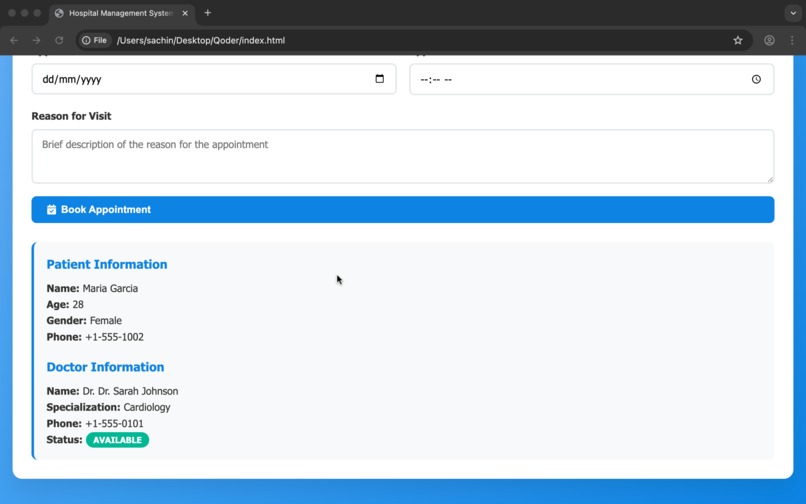
view patients
-
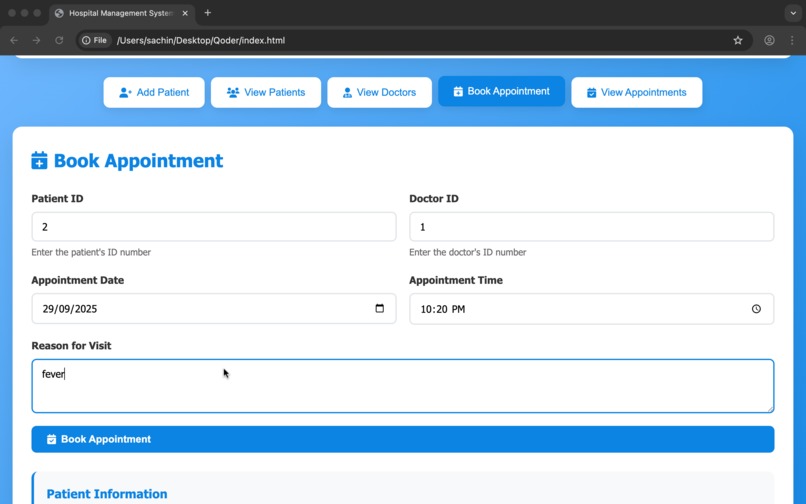
book appointments
-
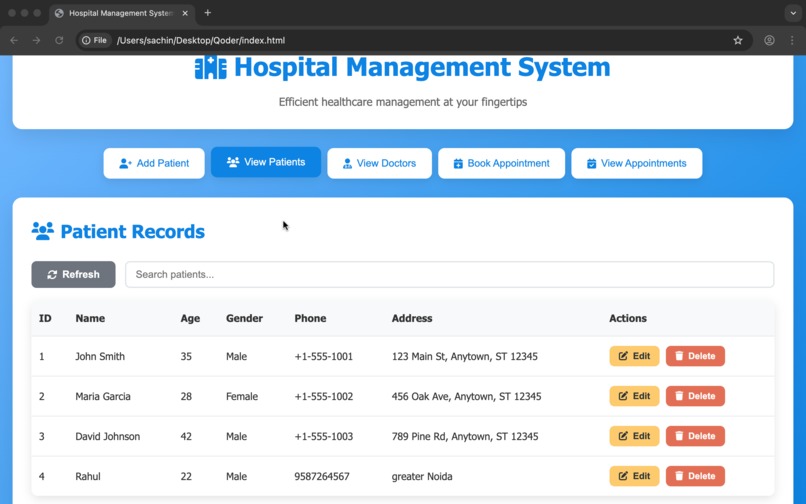
patients records
-
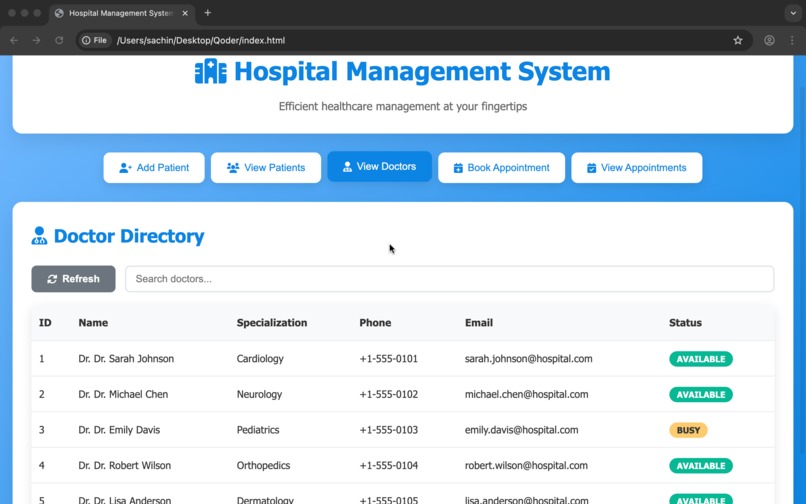
view doctors
-
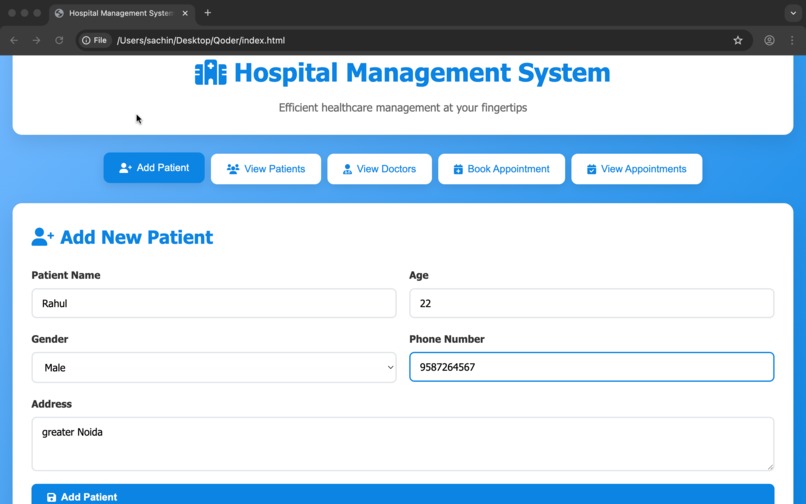
add new patients
-
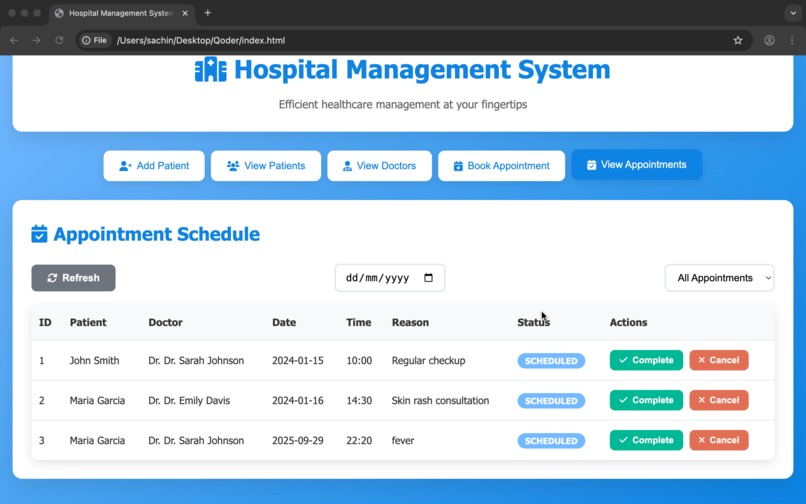
view Appointments


Hospital Management System
A complete Hospital Management System with both backend (Java + MySQL) and frontend (HTML/CSS/JavaScript) components.
🏥 Features
Backend Features (Java)
- Patient Management: Add and view patient records
- Doctor Management: View doctor information and specializations
- Appointment Booking: Schedule appointments with availability checking
- Appointment Viewing: Display all scheduled appointments
- Database Integration: Full MySQL database connectivity
Frontend Features (Web Interface)
- Modern Web Interface: Responsive design for all devices
- Patient Management: Add, view, edit, and delete patient records
- Doctor Directory: View doctor information and specializations
- Appointment Scheduling: Book appointments with real-time validation
- Appointment Management: View, complete, and cancel appointments
- Search & Filter: Find patients, doctors, and appointments quickly
- Real-time Validation: Form validation and error handling
📁 Project Structure
Hospital Management System/
├── Frontend/
│   ├── index.html              # Main web interface
│   ├── styles.css              # Modern responsive styling
│   └── script.js               # Interactive functionality
├── Backend/
│   └── HospitalManagementSystem/
│       ├── HospitalManagementSystem.java  # Main application
│       ├── Patient.java        # Patient management class
│       └── Doctor.java         # Doctor management class
├── Database/
│   └── hospital_setup.sql      # Database schema and sample data
└── README.md                   # This file
🚀 Prerequisites
For Backend:
- Java Development Kit (JDK) - Version 8 or higher
- MySQL Server - Running on localhost:3306
- MySQL JDBC Driver - mysql-connector-java
For Frontend:
- Web Browser - Any modern browser (Chrome, Firefox, Safari, Edge)
- Local Web Server (optional) - For better development experience
🔧 Setup Instructions
1. Database Setup
First, ensure MySQL is running on your system, then execute the database setup:
mysql -u root -p < hospital_setup.sql
Or manually run the SQL commands using MySQL Workbench or command line.
2. Backend Setup (Java)
Download MySQL JDBC Driver
- Visit: https://dev.mysql.com/downloads/connector/j/
- Download the latest version
- Extract the JAR file (mysql-connector-java-x.x.x.jar)
Update Database Credentials
Before running, update the database credentials in HospitalManagementSystem.java:
private static String url = "jdbc:mysql://localhost:3306/hospital";
private static String username = "root";
private static String password = "your_password_here";
Easy Setup with Scripts
For Unix/Linux/macOS:
# This script will download JDBC driver, compile, and run
./compile-and-run.sh
For Windows:
# This script will compile and run (you need to download JDBC driver manually)
compile-and-run.bat
Manual Compilation
# Download MySQL JDBC driver first, then:
# Compile with JDBC driver in classpath
javac -cp ".:lib/mysql-connector-java-8.0.33.jar" HospitalManagementSystem/*.java

# Run with JDBC driver in classpath
java -cp ".:lib/mysql-connector-java-8.0.33.jar" HospitalManagementSystem.HospitalManagementSystem
3. Frontend Setup (Web Interface)
Option 1: Direct Browser Access
Simply open index.html in your web browser by double-clicking it.
Option 2: Local Web Server (Recommended)
# Using Python
python3 -m http.server 8000
# Then visit: http://localhost:8000

# Using Node.js
npx serve .
# Or install globally: npm install -g serve
📊 Database Schema
The system uses three main tables:
Patients Table
CREATE TABLE patients (
    id INT AUTO_INCREMENT PRIMARY KEY,
    name VARCHAR(255) NOT NULL,
    age INT NOT NULL,
    gender VARCHAR(10) NOT NULL
);
Doctors Table
CREATE TABLE doctors (
    id INT AUTO_INCREMENT PRIMARY KEY,
    name VARCHAR(255) NOT NULL,
    specialization VARCHAR(255) NOT NULL
);
Appointments Table
CREATE TABLE appointments (
    id INT AUTO_INCREMENT PRIMARY KEY,
    patient_id INT NOT NULL,
    doctor_id INT NOT NULL,
    appointment_date DATE NOT NULL,
    FOREIGN KEY (patient_id) REFERENCES patients(id),
    FOREIGN KEY (doctor_id) REFERENCES doctors(id)
);
💻 Usage
Backend (Console Application)
- Run the Java application
- Choose from the menu options:
- 1: Add a new patient
- 2: View all patients
- 3: View all doctors
- 4: Book an appointment
- 5: View all appointments
- 6: Exit the system
Frontend (Web Interface)
- Open the web interface in your browser
- Use the navigation buttons to access different features:
- Add Patient: Register new patients with validation
- View Patients: Browse, search, edit, and delete patient records
- View Doctors: Browse doctor directory and specializations
- Book Appointment: Schedule appointments with availability checking
- View Appointments: Manage appointment schedule
✨ Key Features
Backend Features
- Robust Database Integration: Full CRUD operations with MySQL
- Input Validation: Comprehensive data validation and error handling
- Appointment Conflicts: Prevents double-booking of doctors
- Clean Architecture: Separated classes for better maintainability
Frontend Features
- Responsive Design: Works perfectly on desktop, tablet, and mobile
- Real-time Validation: Instant feedback on form inputs
- Search & Filter: Quick search across all data
- Modern UI: Professional healthcare-focused design
- Interactive Tables: Sortable and searchable data tables
- Modal Dialogs: User-friendly edit and confirmation dialogs
🔍 Troubleshooting
Common Backend Issues
MySQL Connection Error:
- Ensure MySQL server is running
- Verify database credentials
- Check if hospital database exists
ClassNotFoundException:
- Ensure MySQL JDBC driver is in classpath
- Download correct version of mysql-connector-java
Access Denied Error:
- Verify MySQL user permissions
- Ensure user has access to hospital database
Common Frontend Issues
Features Not Working:
- Check browser console for JavaScript errors
- Ensure all files are in the same directory
Styling Issues:
- Verify styles.css is properly linked
- Check for browser compatibility
🛡️ Security Features
- SQL Injection Prevention: All queries use PreparedStatements
- Input Validation: Comprehensive client and server-side validation
- Data Integrity: Foreign key constraints maintain data consistency
🎯 Future Enhancements
- User Authentication: Login system for different user roles
- Medical Records: Detailed patient medical history
- Billing System: Generate and manage medical bills
- Reports: Generate various medical and administrative reports
- Notifications: Email/SMS notifications for appointments
- API Integration: RESTful API for mobile app integration
This project is created for educational purposes. Feel free to modify and enhance according to your needs.


Log in or sign up for Devpost to join the conversation.