-
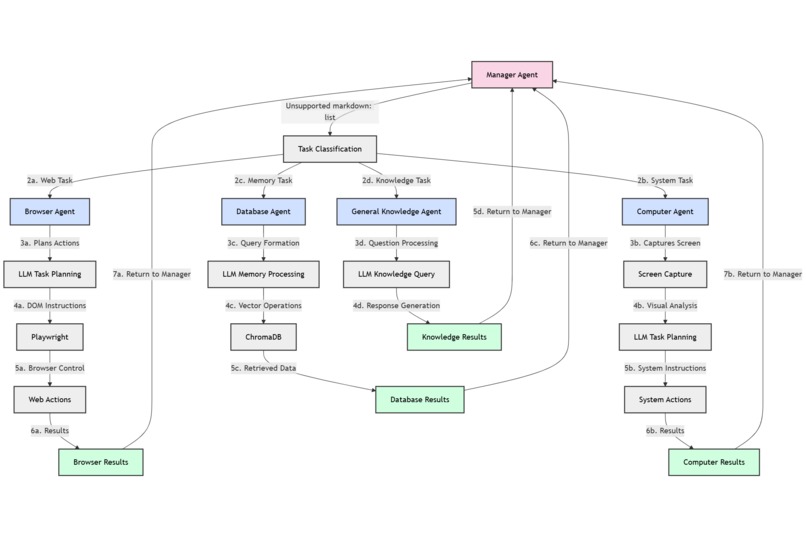
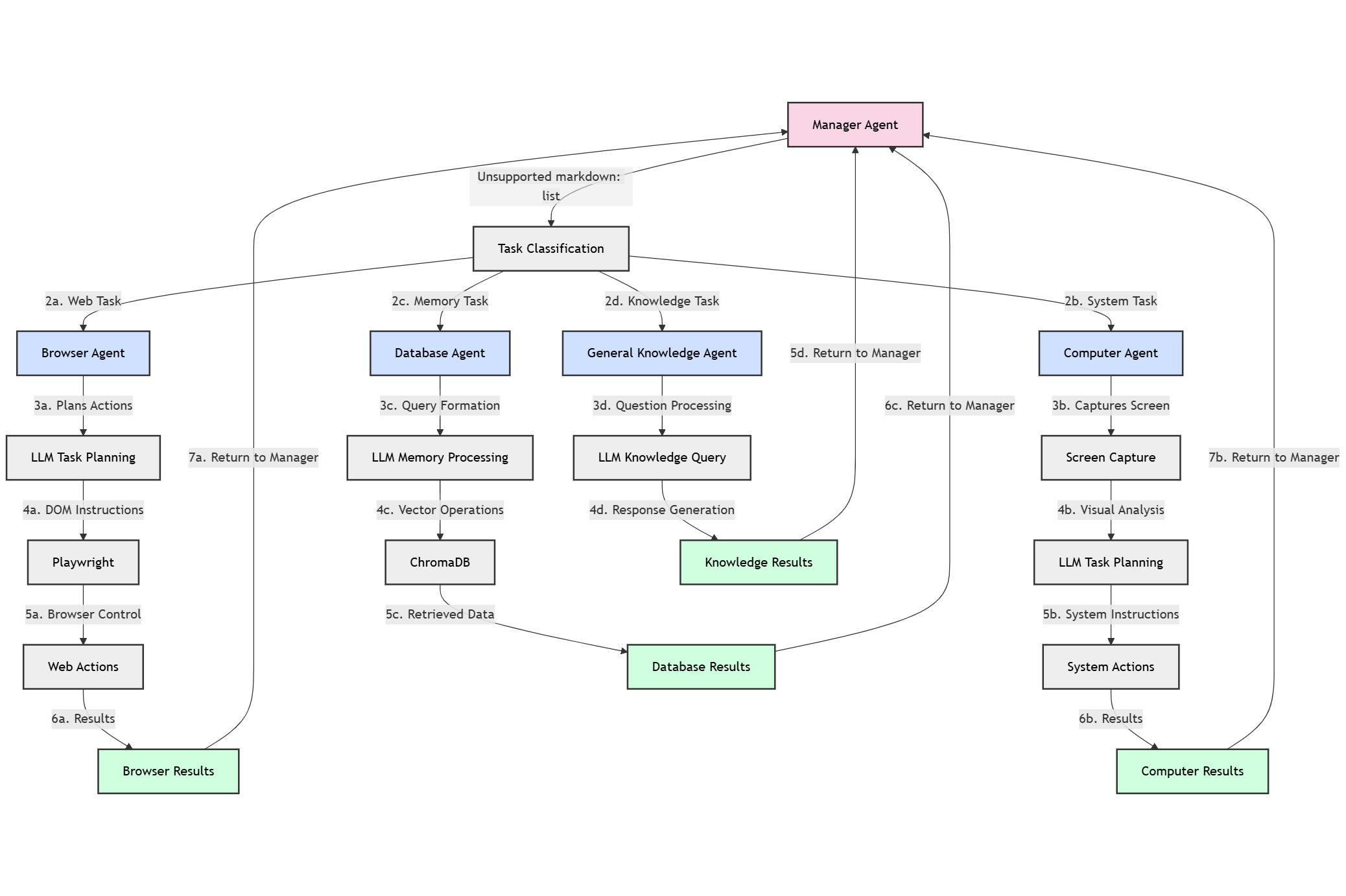
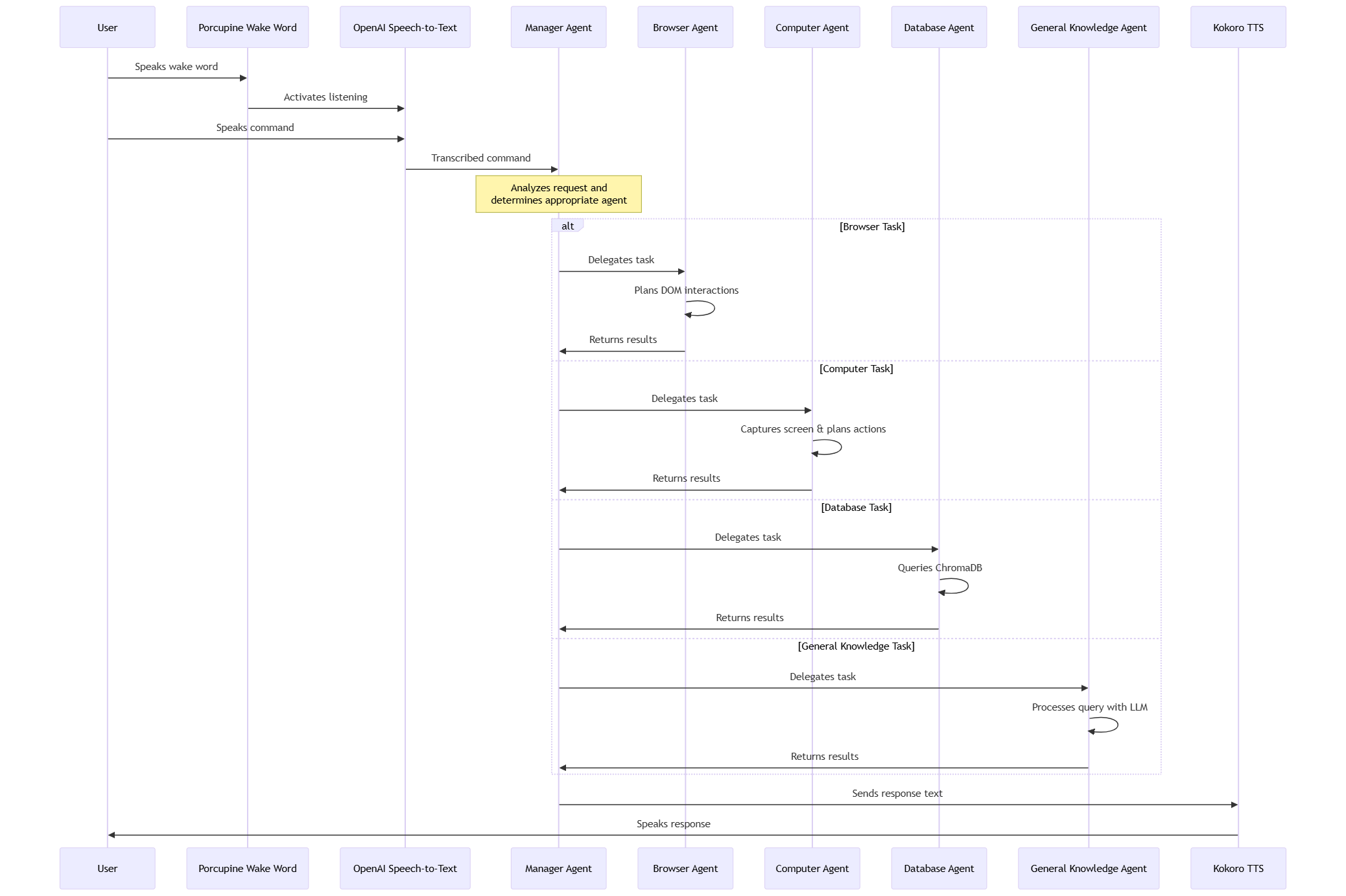
Agent Pipeline
-
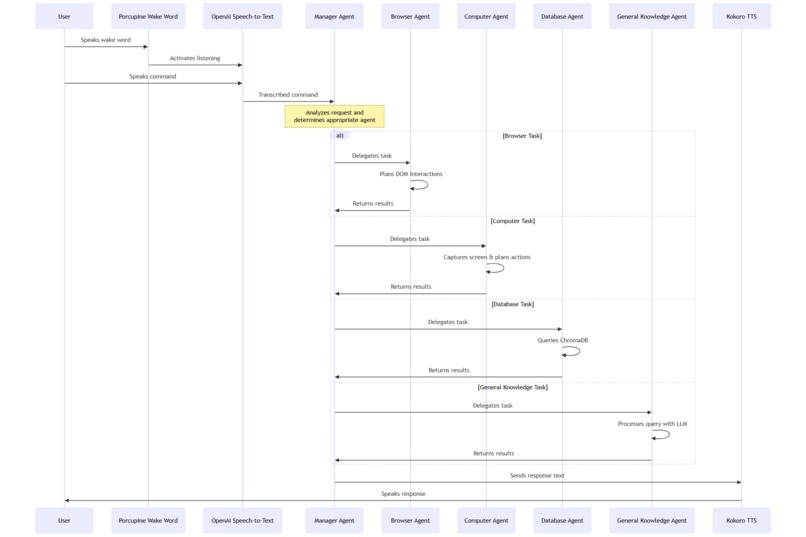
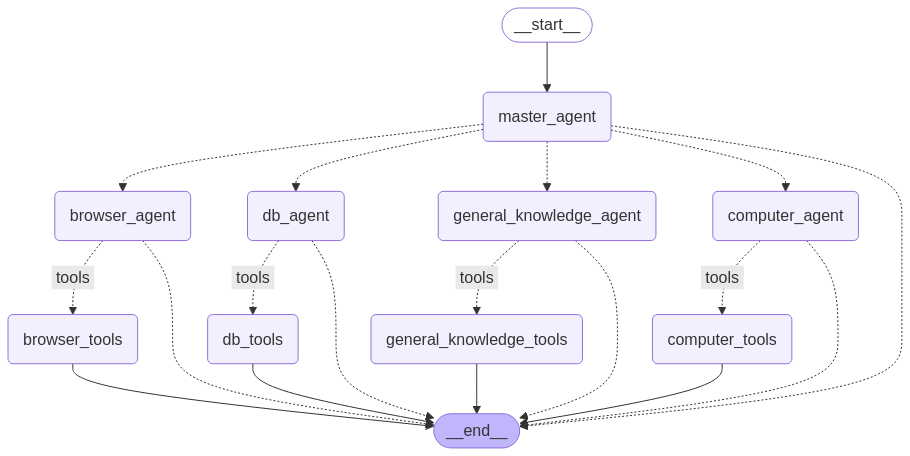
Framework Workflow
-
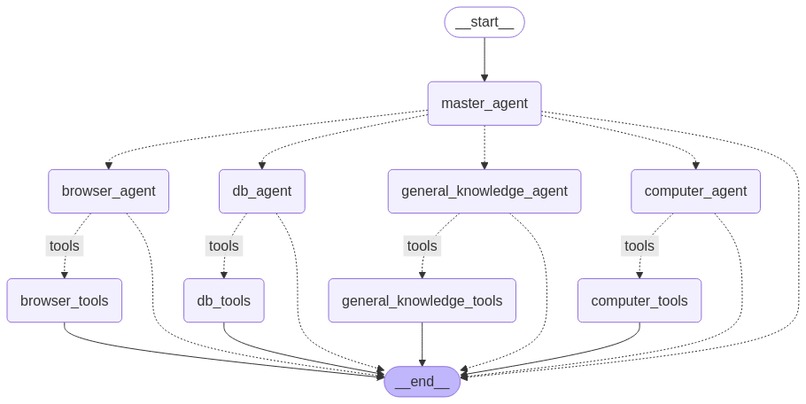
Early Agent Pipeline outline using LangChain
Inspiration
We were inspired by the rising popularity of AI agents and the value they can bring to everyday life via automation. Voice assistants like Alexa offer hands-free convenience, but they are limited when it comes to tasks like navigating the web or retrieving personalized data from external sources due to the fact that they operate as closed systems. Our project aims to solve these gaps using a multi-agent workflow, where each agent is equipped tools to handle user requests. We also wanted to create something more accessible, especially for people who have difficulty using a keyboard or mouse, by enabling more powerful and flexible voice-based interactions. However, everybody could find use in HooNeedsHands.
What it does
HooNeedsHands is a voice-activated, multi-agent personal assistant that lets users control their computer and access information hands-free. The program listens for a wake word, a specific phrase that activates the voice assistant and then processes spoken commands through a smart agent system. This crew consists of five agents: one manager and four worker agents. Spoken commands are transcribed and fed into the manager agent, which then delegates tasks amongst its crew. Whether it’s opening YouTube, checking reminders, or answering random questions, HooNeedsHands connects speech to action in a seamless, intelligent way. Additionally, HooNeedsHands provides multilingual support, being able to understand spoken commands from a variety of languages.
How we built it
Frontend:
- The frontend was built using Electron, React, and TypeScript.
- We built a floating orb GUI that visualizes audio levels in real time
- We built it in such a way where the user can easily tell what the program is doing, yet is unintrusive
- Electron lets us bundle a desktop app with a smooth user interface.
Backend (Agents + Voice)
Agents
The manager agent: This agent decides which specialized agent (browser, database, or general) should handle the current user request.
The browser agent: This agent takes a natural language task and sends it to a Large Language Model (LLM), which returns a structured response describing how to interact with the browser. This response includes detailed actions that reference elements in the DOM (Document Object Model), such as buttons and input fields to extract meaningful features. The agent processes this response, maintains a live representation of the current DOM state, and resolves selectors and element properties as needed. It then passes these instructions to Playwright, which executes them directly in the user’s browser.
The computer agent: This agent takes a natural language task and sends it to a Large Language Model (LLM), which returns a structured plan for interacting with the desktop environment. It begins by capturing a screenshot of the current UI, then uses visual grounding to identify relevant elements like buttons, menus, and input fields.
The database agent: This agent provides long-term memory through a retrieval pipeline powered by ChromaDB. It can insert and query vectorized data, allowing it to store and recall user-specific information like preferences, usernames, passwords, and past commands.
The general knowledge agent: This agent handles open-ended questions and broad problem-solving tasks by leveraging a powerful instruction-tuned LLM. It is capable of understanding natural language prompts and returning informative, coherent responses across a wide range of topics.
All our agents are implemented within the LangGraph framework, which serves as the backbone for orchestrating our multi-agent system. LangGraph lets us modularly connect each specialized agent—manager, browser, computer, database, and general knowledge—into a unified workflow.
Voice
- We use Porcupine to detect the wake word from the raw audio stream.
- PyAudio captures the user’s voice.
- OpenAI APIs handle speech-to-text transcription.
- Kokoro provides text-to-speech output so the assistant can speak back to the user.
Challenges we ran into
Adopting LangChain and LangGraph for the multi-agent crew was very time consuming and difficult. We encountered various unpredictable outputs and edge-case behaviors; debugging these was especially time consuming when the manager agent would hand off off tasks to incorrect agents, and sometimes the LLM logic introduced unexpected loops or incorrect data retrieval. Ensuring the system consistently interpreted, routed, and resolved these outputs required careful prompt engineering, robust error handling, and fine-tuning of our agent workflow. We had to introduce various small steps in between larger ones to achieve many of the key functionalities we had initially envisioned.
Accomplishments that we're proud of
Custom GUI & Overlay Implementation: Instead of defaulting to a browser-based interface, which we were all more familiar with, we challenged ourselves to build a fully functional, native floating overlay using Electron. This decision was critical to supporting the browser agent’s real-time control and gave our assistant a more immersive and intuitive user experience.
Deep Technical Integration: We are also very proud of the technical depth of this project. We had to coordinate multiple agents, real-time audio handling, LLM integration, memory management, which required a lot of cohesion and time spent on integrating individual parts. In the end, the system came together as a tightly integrated product.
What we learned
How to Build with LangChain & LangGraph: We gained hands-on experience developing multi-agent workflows using LangGraph, and learned how to modularize complex systems using LangChain.
Voice Recognition & Audio Processing: We dove deep into working with real-time audio, learning how to capture, process, and transcribe voice input and then utilize that input to trigger agent behavior. This included working with wake-word detection, audio streaming, and integrating speech-to-text and text-to-speech pipelines.
Electron App Development: Building a full Electron app taught us how to handle IPC (inter-process communication), and manage frontend/backend integration in a way that felt seamless. We also learned how to design persistent overlays and real-time UI feedback for audio activity.
What's next for HooNeedsHands?
We want to create support for multi-task requests across different worker agents. We would also like to add even more agents to create a more immersive and comprehensive assistant experience. Language flow is one of our other top priorities, and we think it would be interesting if the user is able to interrupt the agent mid speech without compromising functionality, much like OpenAI's Realtime API.
Built With
- chromadb
- electron
- kokoro
- langchain
- langgraph
- openai
- porcupine
- react
- typescript


Log in or sign up for Devpost to join the conversation.