-
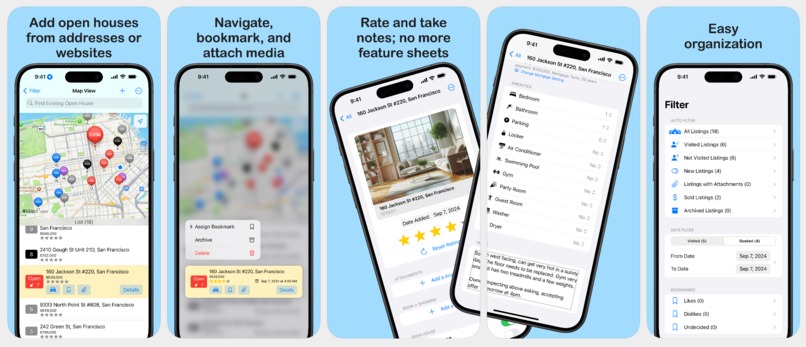
App Store Listing
Inspiration
When my landlord served me the papers to move into my property and asked me to move out, I knew it was time to start looking for a home.
However, after just one weekend of looking at open houses, I realized how awful the process is:
- Research and write down the open houses coming up on the weekend.
- Map the open houses and save the coordinates.
- On the day of, open the saved addresses and enter them into the navigation app.
- Drive to each open house.
- Once you arrive at the site, take a feature sheet, take some videos and pictures, and ask some questions;
- Maybe you bring a pen with you so you can write down some notes on the feature sheet.
- Come home and recall how good each property is; perhaps rank them.
- Try to map the videos and photos you took with your feature sheet.
- Repeat the process for weeks.
- Forget the details about some open houses and try to recall the ones viewed two weeks ago.
What it does
No more! With Homi, the steps are simplified to the following:
- Add the link to your favorite open house.
- See all open houses on a map and plan your visit based on the map view.
- One tap to navigate to the open house.
- Write down the information about the open house in the app and attach videos and images to it.
- Give a star rating or bookmark to express how you feel about the property.
- Repeat the process for weeks.
- Use filter, star rating, and search functionality to recall impressions of previous open houses.
How we built it
It was built using iOS 17 technologies, including Swift, SwiftData, SwiftUI, and MapKit. Each week, I will enhance the app and take it with me to the open houses. If something feels off about the app, I write it down and improve it for the next week.
Challenges we ran into
Building the UI and UX is by far the most complex challenge. I have used a fair share of iOS apps allowing users to browse open houses; however, they all fall short of the purpose of viewing the open house. Either things are too hard to access, or they don’t understand what is important for the people doing the leg work at open houses.
Data is another challenge; I needed to modify the SwiftData model many times as I developed the app. This resulted in crashes and a failure to access the open house I just viewed yesterday, which was very frustrating. Fortunately, I foresaw this coming and wrote my serialization method to back up and restore during development.
Accomplishments that we're proud of
Building a decent UI/UX for both iOS and iPadOS certainly is hard; being able to make it intuitive and far better than the traditional method makes me proud. The app helps me tremendously during my process of looking for open houses, and I believe it will provide an equal amount of value for fellow home seekers to land their dream homes.
What we learned
Backup your data. When Homi is under rapid development, I do not want to do a migration of SwiftData and make my database ugly. So, I wrote my serialization method to backup and restore the data. You should be doing it, too, so you don’t lose anything important during development.
Develop on multiple devices, namely iPad and iPhone, perhaps different size classes of those devices as well. Although it does feel like more work initially, it will be a great way to unblock you from your design challenge. For example, should I put something in the menu or navigation stack? Throw that onto the iPad and see how it works. And often, if it works on iPad, it works well on iPhone and macOS.
What's next for Homi - Open House Planner
More features and polishes are coming! For the immediate future, I want to improve web scraping so users can spend less time entering the open-house information themselves and focus on writing notes and rating the property.

Log in or sign up for Devpost to join the conversation.