Homework Quest
Inspiration
Students already have assignment information available in platforms like Canvas, but checking Canvas constantly can be annoying and easy to forget. Important assignments get buried among course pages, announcements, modules, and long descriptions.
We wanted homework to feel less like repeatedly checking a school website and more like having a quest tracker from a video game always available on your computer.
That idea became Homework Quest.
What it does
Homework Quest is a desktop assignment companion that connects to Canvas and automatically displays upcoming schoolwork as a lightweight floating quest list.
The project has two main components:
Canvas Chrome Extension
The Chrome extension runs while the student is using Canvas and collects relevant assignment information available to the logged-in student.
It normalizes assignment information such as:
- assignment title
- course
- due date
- description
- submission status
- Canvas assignment link
The extension then sends the assignment data as JSON to the Homework Quest desktop application running locally on the student's computer.
Homework Quest Desktop Utility
The desktop application runs as a lightweight Electron utility instead of a traditional large application.
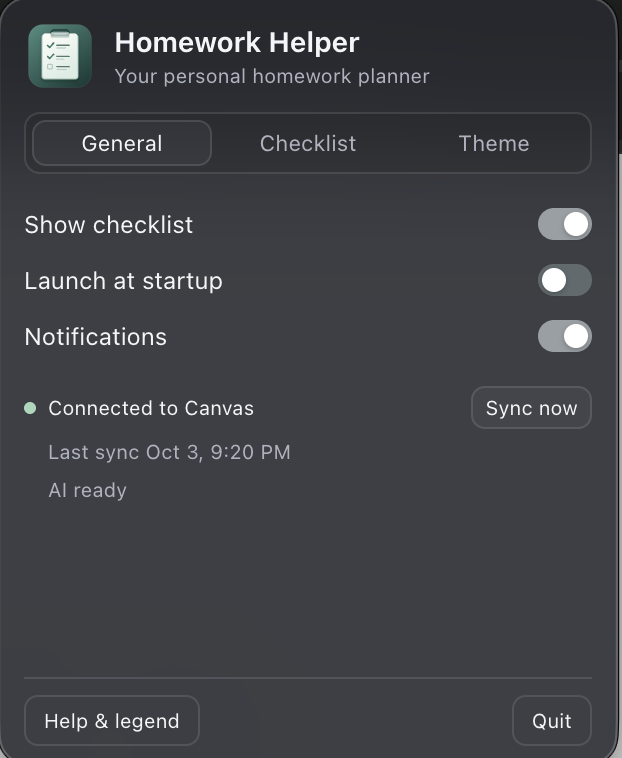
It includes a menu-bar/system-tray interface for configuration and a floating quest list that displays assignments due soon.
The quest list is designed to resemble an objective tracker from a video game rather than another school dashboard.
Students can move the quest list around their screen and configure how it looks and behaves.
Assignments are automatically ordered based on upcoming deadlines and completed assignments are removed from the active quest list.
AI Assignment Understanding
Homework Quest also uses AI to make Canvas assignments easier to understand.
Instead of simply repeating a long assignment description, the AI analyzes the information Canvas provides and creates a shorter explanation of what the student actually needs to do.
For supported assignments, Homework Quest can generate information such as:
- a short assignment summary
- actionable steps
- assignment type
- estimated effort when enough information is available
- a concise instruction suitable for the quest-list interface
The AI does not replace factual Canvas information such as due dates or submission status.
If an assignment does not provide enough information, the system avoids inventing requirements and falls back to the original Canvas data.
How we built it
Homework Quest consists of two connected programs.
The Chrome extension was built using:
- JavaScript
- Chrome Extensions Manifest V3
- Canvas data
- JSON messaging
The desktop application was built using:
- Electron
- Node.js
- JavaScript
- HTML
- CSS
The extension sends normalized assignment information to a localhost endpoint on the student's computer.
The Electron application receives the JSON, processes the assignments, performs AI enrichment when appropriate, and updates the floating quest list.
This architecture keeps the Canvas-reading component separate from the desktop experience.
Privacy
Homework Quest is designed around data the student can already access through their own logged-in Canvas account.
The project does not need the student's Canvas password.
Communication between the Chrome extension and desktop utility occurs locally on the student's computer.
Only assignment information needed for the application's features is processed.
Challenges we ran into
One of our biggest challenges was connecting a browser-based Canvas integration to a desktop application.
Originally, we considered building a traditional native macOS application, but we wanted Homework Quest to work more like a lightweight system utility and eventually support multiple operating systems.
We moved to Electron, which allowed us to use JavaScript across both the extension and desktop application.
Another challenge was designing the project so that it did not simply become another homework dashboard. We experimented with a more ambient interface inspired by video-game quest trackers, allowing assignments to remain visible without requiring students to constantly open another application.
We also had to separate information that should be determined programmatically, such as deadlines, from information AI is appropriate for, such as summarizing complicated assignment descriptions.
Accomplishments that we're proud of
We are especially proud that Homework Quest is not just a mockup.
We built a working connection between Canvas, a Chrome extension, and a desktop utility.
Assignment data can move through the complete pipeline:
Canvas → Chrome Extension → JSON → Local Desktop App → Homework Quest
We also created a desktop experience that does not behave like a normal homework planner. The floating quest-list approach makes assignments feel more immediate while remaining lightweight.
What we learned
This project taught us how several different technologies can work together.
We learned about:
- Chrome extension architecture
- Manifest V3
- browser-to-desktop communication
- local HTTP communication
- JSON data structures
- Electron desktop development
- Canvas assignment data
- AI APIs
- structured AI responses
- application state and synchronization
- privacy considerations when working with student data
We also learned that AI is most useful when it has a clearly defined responsibility. Rather than asking AI to control the entire application, we use it specifically to turn complicated assignment descriptions into useful, concise information.
What's next for Homework Quest
Future versions could include:
- support for additional learning management systems
- Windows and Linux distribution
- more quest-list themes and customization
- improved workload estimation
- smarter notification timing
- assignment completion animations
- additional desktop companion features
- optional gamification
- richer personalization of how assignments are prioritized
Our long-term goal is to make checking homework feel less like opening another school portal and more like having an intelligent school HUD built into your computer.
Technologies Used
- JavaScript
- Electron
- Node.js
- HTML
- CSS
- Chrome Extensions / Manifest V3
- Canvas by Instructure
- JSON
- Local HTTP communication
- OpenAI API
- Git / GitHub
- AI-assisted development tools
AI Use Disclosure
We used AI tools during development for brainstorming, debugging, learning unfamiliar APIs, generating and reviewing portions of code, and improving implementation ideas.
We also integrated the OpenAI API into Homework Quest as a product feature. It analyzes assignment information provided by Canvas and produces concise summaries and actionable information for the quest interface.
AI-generated development output was reviewed, modified, tested, and integrated by our team. We understand the project's architecture and can explain how the Chrome extension, assignment synchronization, Electron application, and AI analysis work together.
Team
Derek Ham Charlie Zhou
Links
Built With
- ai
- electron
- javascript
- vibecode

Log in or sign up for Devpost to join the conversation.