Inspiration
An 80-minute gap between classes sounds like plenty of time. But once you figure out where to go, walk there, and look for a seat, it can feel much shorter.
As students learning our way around Virginia Tech, we wanted an easier way to answer a question we kept coming back to: Where should I go before my next class?
We built HokieGap to help students spend less of their break figuring that out and more of it doing something they actually want to do.
What it does
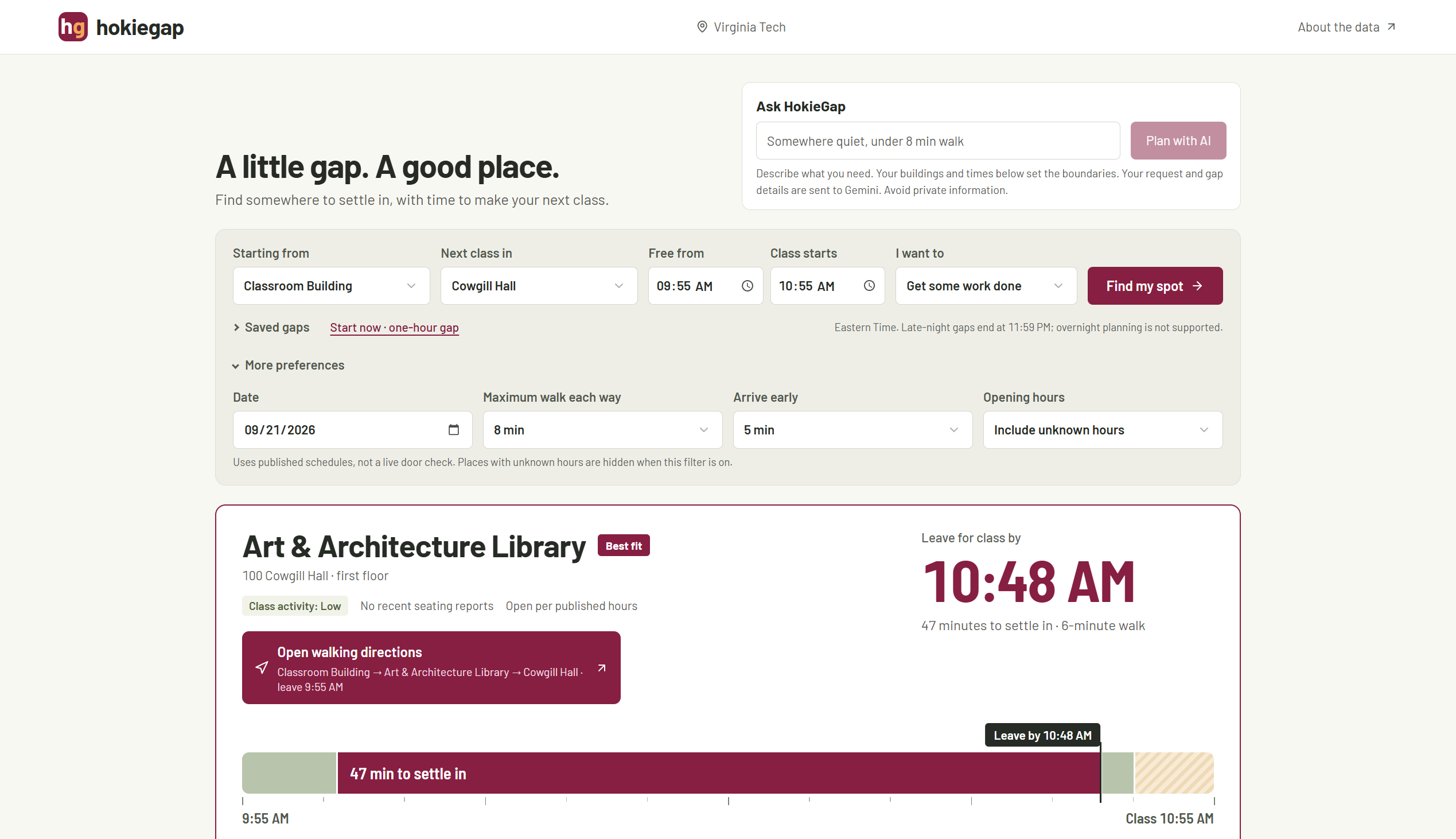
HokieGap helps Virginia Tech students find places to study, eat, work with friends, or take a break between classes.
You enter where you are, where your next class is, and how much time you have. HokieGap compares nearby places and shows how long you could spend at each one after accounting for the walk there, the walk to class, and an arrival buffer.
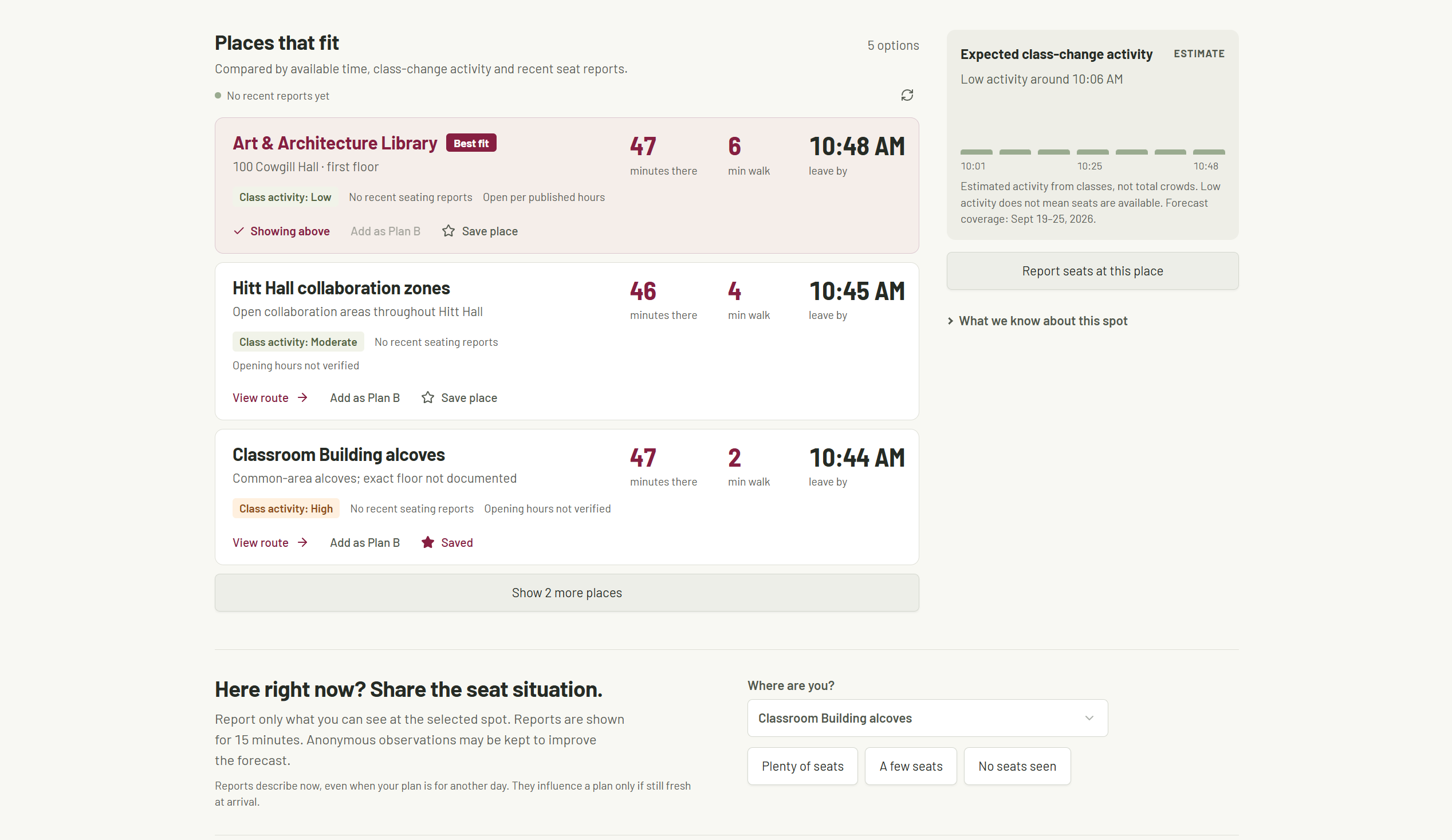
Each plan includes a recommended spot, a timeline, walking directions, and a clear time to leave. You can compare alternatives, choose a Plan B, and save places or recurring gaps.
You can also describe what you need in your own words. A request like “I want somewhere quiet to study with a short walk” goes to our Gemini-powered agent, which uses campus data from Databricks to find and explain a suitable option.
Students already at a location can report whether they see plenty of seats, a few seats, or no seats. Those reports influence recommendations for 15 minutes.
How we built it
We built the interface with React, TypeScript, and Tailwind CSS, using Vinext and Vite. The application runs on Cloudflare Workers, and Cloudflare D1 stores shared seating reports.
We collected and organized public Virginia Tech building coordinates, descriptions of campus spaces, class timetables, and published library hours. The current prototype includes eight buildings and nine destinations. Its timetable snapshot contains 573 meetings across 14 subjects.
Databricks stores the campus datasets and makes them available through a SQL warehouse. Gemini uses function calling to request options from our planner. The planner checks estimated walking time, opening hours where available, and how much time remains before class. Gemini then chooses from the returned options and explains its recommendation.
We also built a class-change estimate to account for activity around nearby class starts and endings. The interface keeps those estimates separate from recent student seating reports.
Challenges we ran into
One of our biggest challenges was working with incomplete campus data.
A timetable tells us when a class is scheduled, but it does not tell us how many people attended or whether there are seats available nearby. We had to be careful about what our estimates meant and how we presented them. HokieGap labels expected class-change activity as an estimate and shows seating reports separately.
Opening hours were another challenge. We found published schedules for some locations, while others remained unknown. We made those gaps visible and gave students the option to filter for places with confirmed published hours.
Connecting the AI planner also took work. We needed recommendations to stay within the student's available time and refer to destinations in our dataset. We used validated planning tools and checked the model's selected destination. We also added handling for model rate limits and service errors.
On the design side, we kept coming back to three questions: Where should I go? How much time do I have there? When do I need to leave? Those questions shaped the final layout.
Accomplishments that we're proud of
We turned a small frustration from student life into a working public app.
The complete flow brings together campus data, Gemini, Databricks, walking estimates, and shared seating reports. A student can go from an open gap in their schedule to a specific place and a plan for getting to class.
We are especially proud of the visual timeline. Seeing walking time, usable time, and the arrival buffer together makes it easier to decide whether a destination is worth the trip.
We also like that students can choose a backup. A recommendation is useful, but having another option matters when you arrive and the space does not work for you.
What we learned
We learned how much of building a useful app comes down to working carefully with data. Collecting information was only the beginning. We also had to understand what it meant, where it was incomplete, and how to explain that to someone making a decision.
We learned how to connect an AI agent to structured campus data and give it tools with clear boundaries. We also learned that a simple explanation and a readable timeline can be just as important to the experience as the recommendation itself.
What's next for HokieGap
We want to test HokieGap with students during real gaps between classes and learn which recommendations are useful in practice.
We would also like to expand campus coverage, verify more indoor locations and opening hours, and use observations to improve the class-change estimates.
The current forecast is a scheduling heuristic with a limited date range. It does not measure occupancy or guarantee a seat. Evaluating its accuracy is an important next step.
Our goal is to make the time between classes a little easier to use, whether someone wants to finish an assignment, grab food, or sit down for a few minutes.
Credits
We used open-source libraries, React/Vinext scaffolding, UI components, and AI coding assistance. Campus data sources are credited in the application and repository.
Our project-specific work includes the gap-planning experience, campus data curation, timing and ranking logic, class-change estimates, seating reports, and AI integration.
Built With
- cloudflare-d1
- cloudflare-workers
- databricks
- drizzle-orm
- google-gemini
- react
- sql
- tailwind-css
- typescript
- vinext
- vite

Log in or sign up for Devpost to join the conversation.