-
-

Hodeum Logo
-
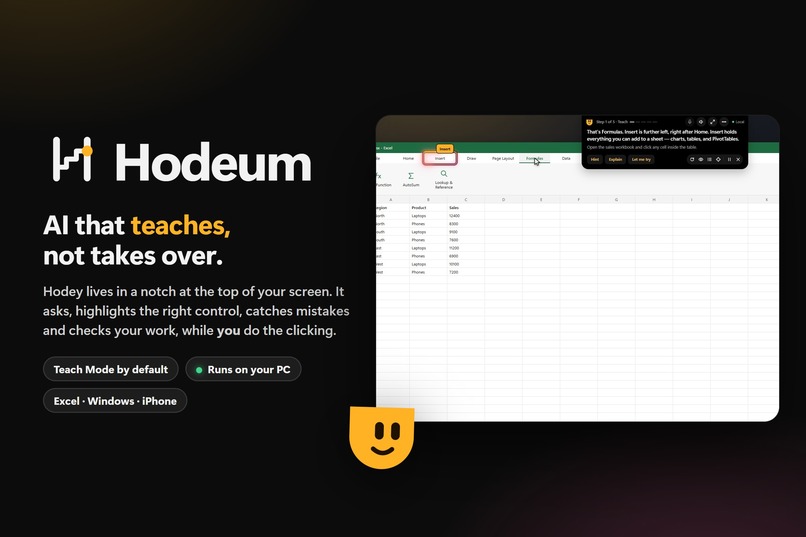
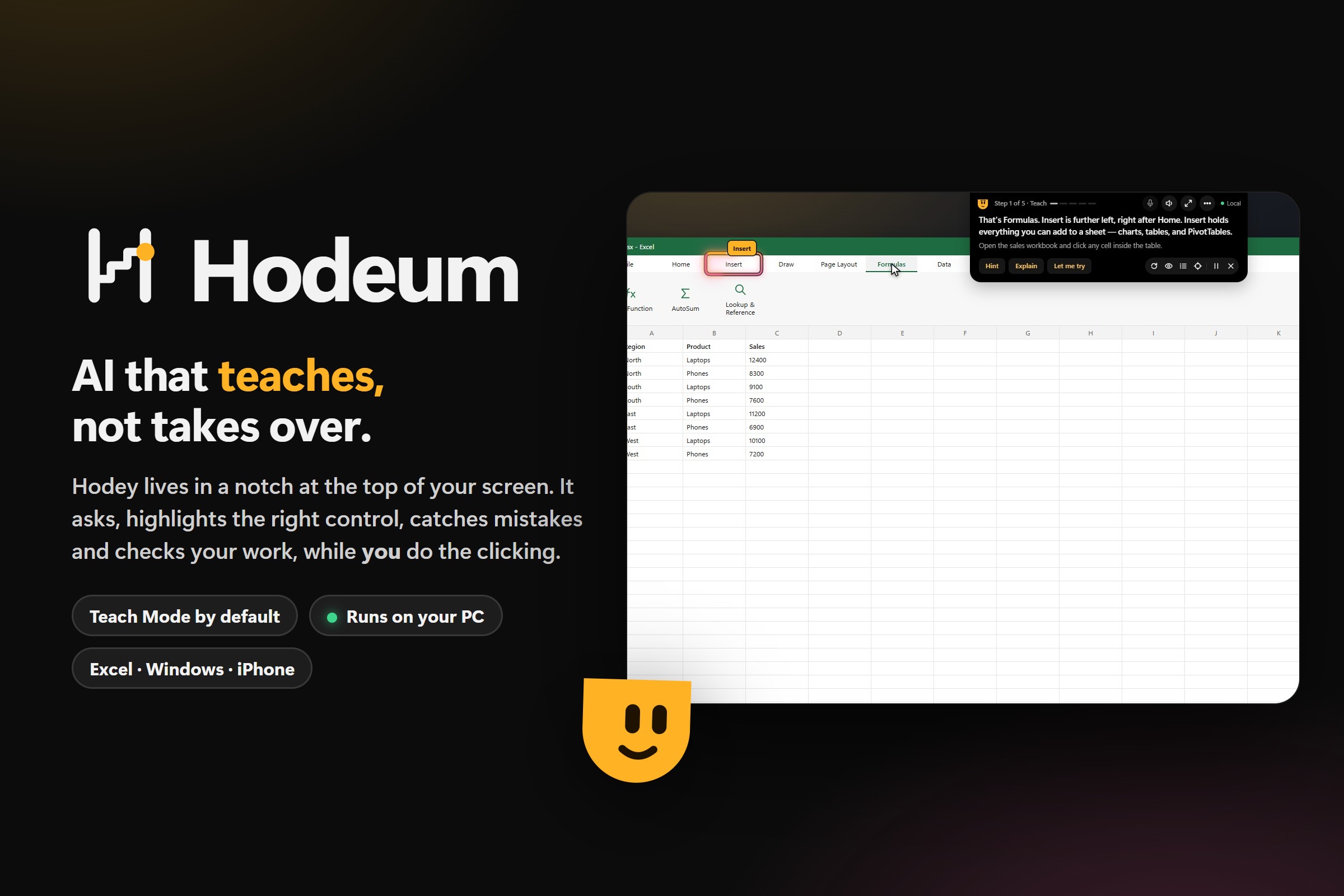
Cover Image
-
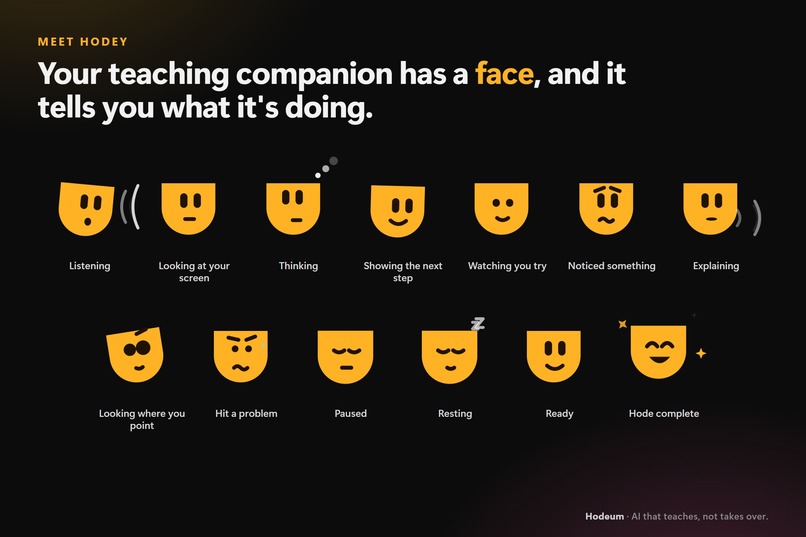
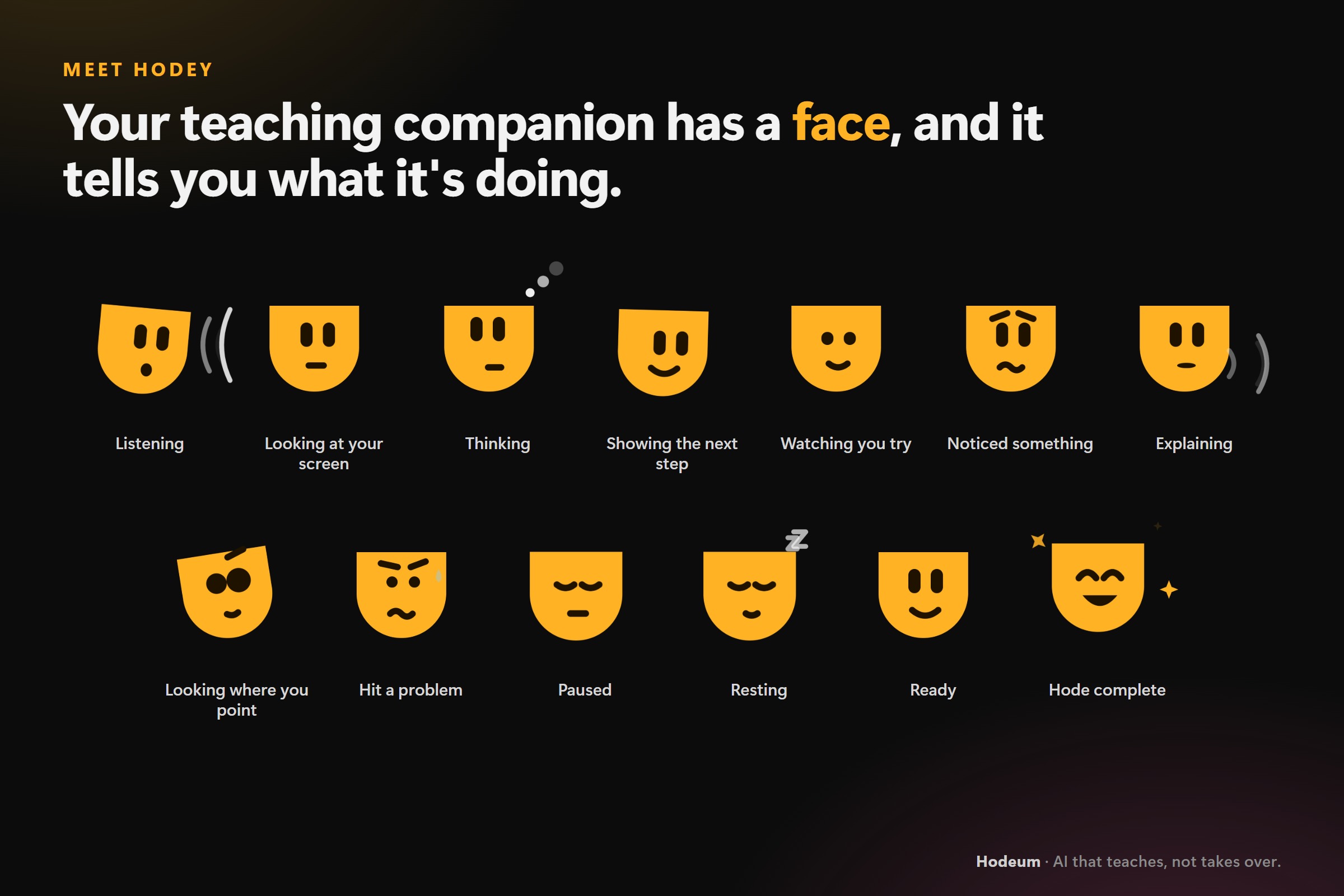
Hodey, AI Agent
-
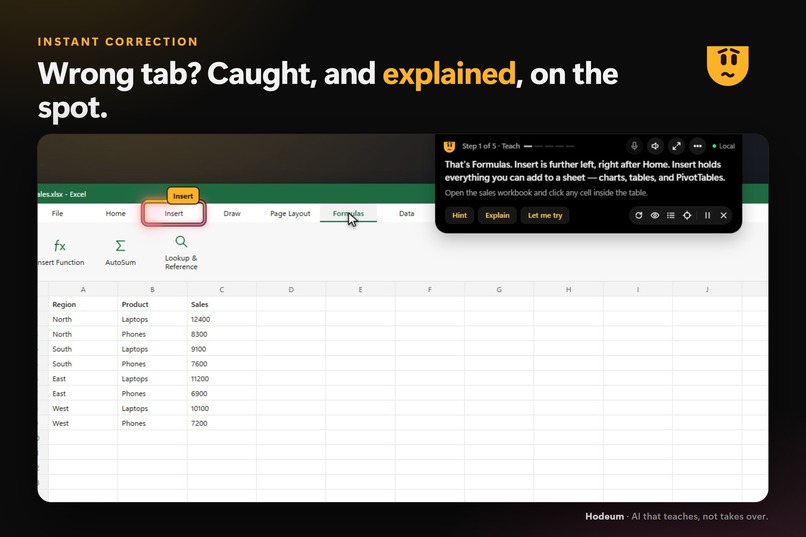
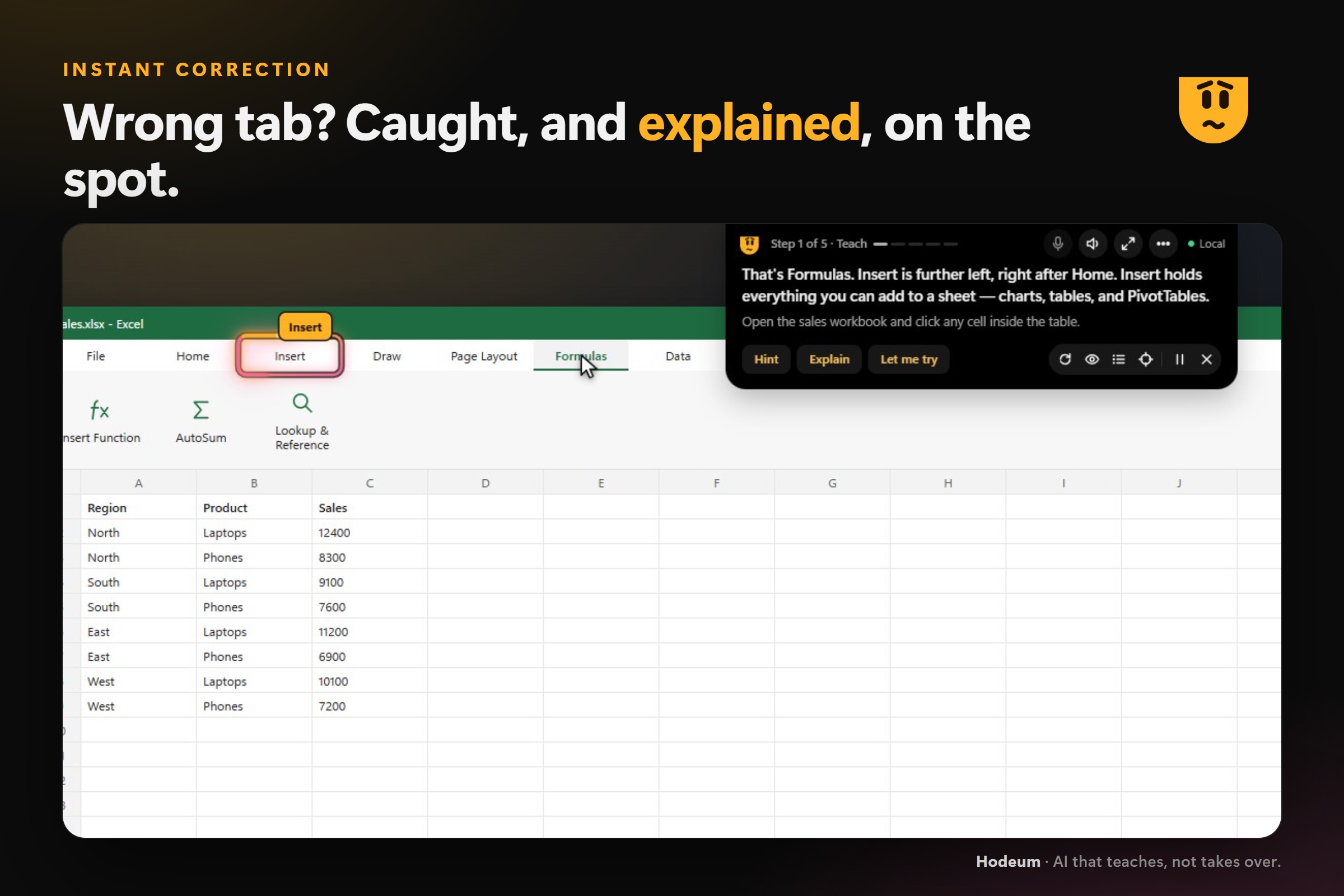
Instant correction
-
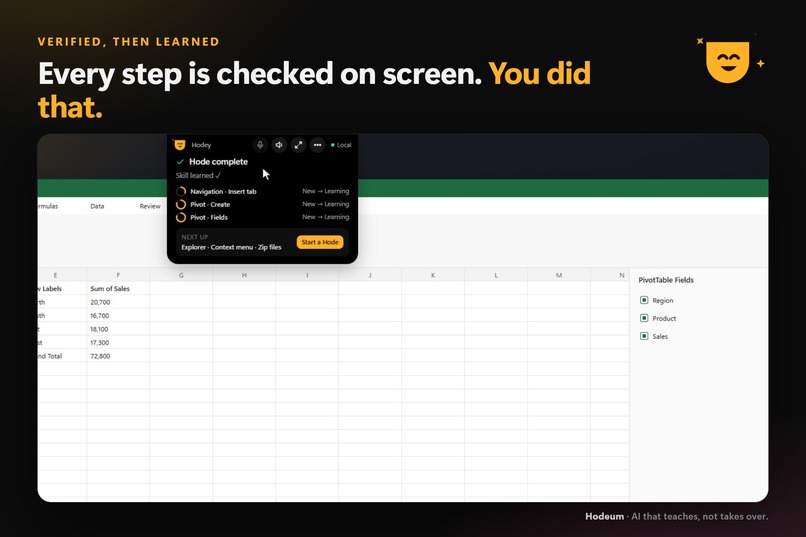
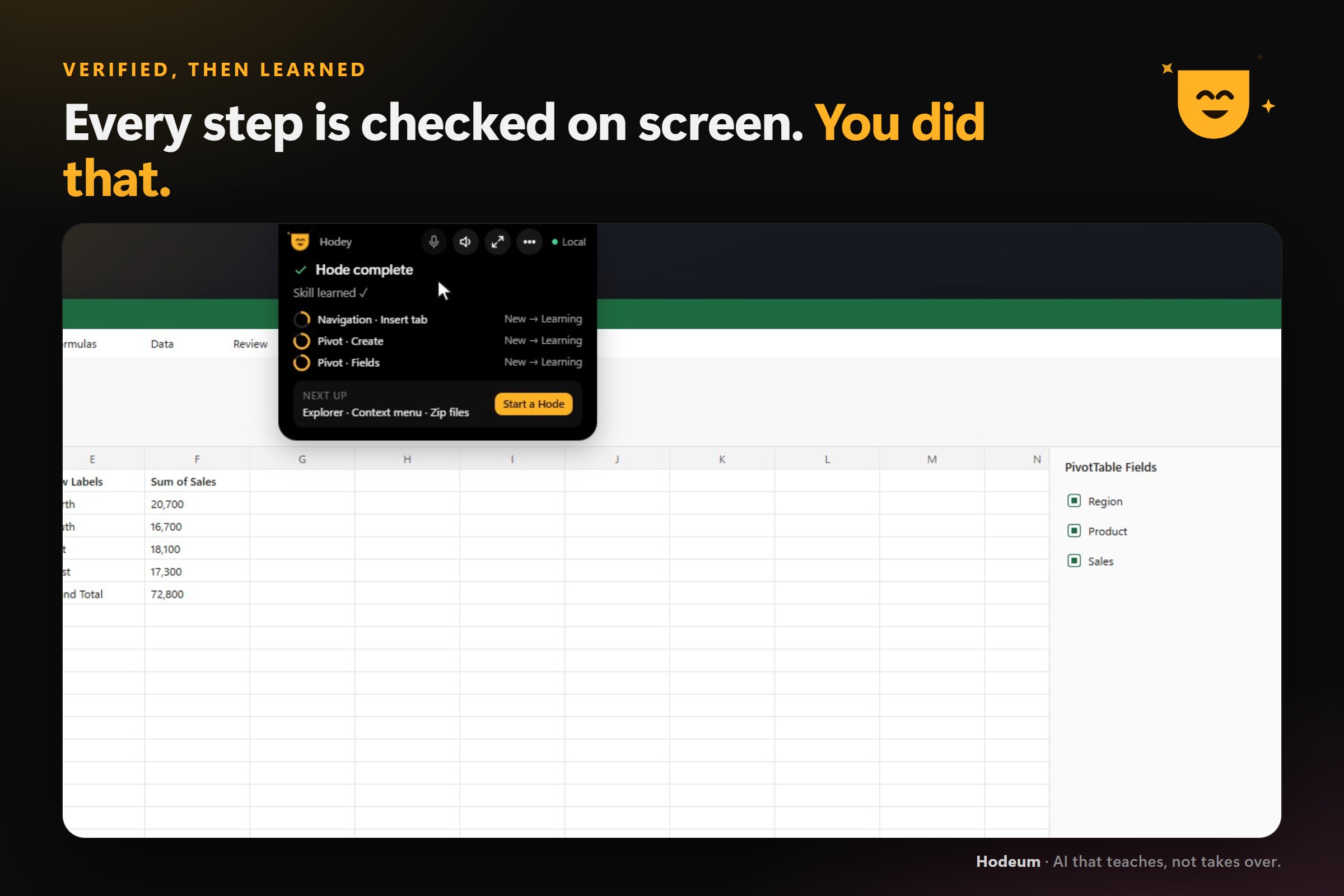
Hode Completion
-
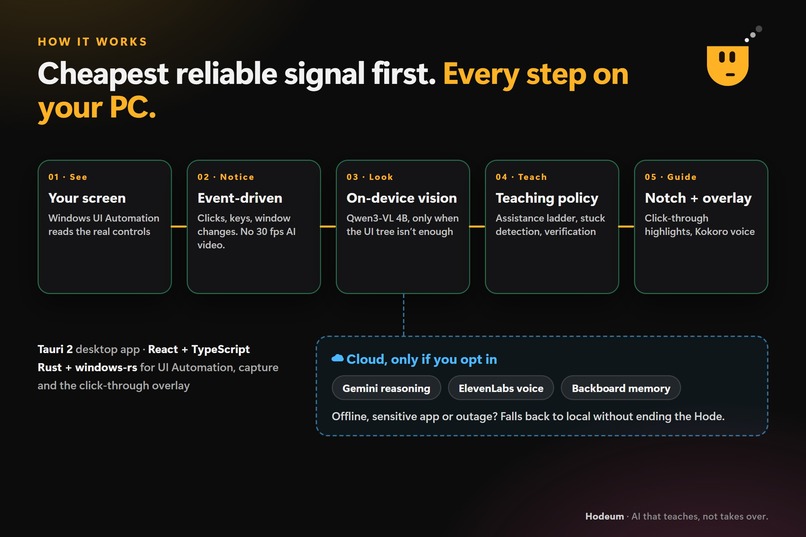
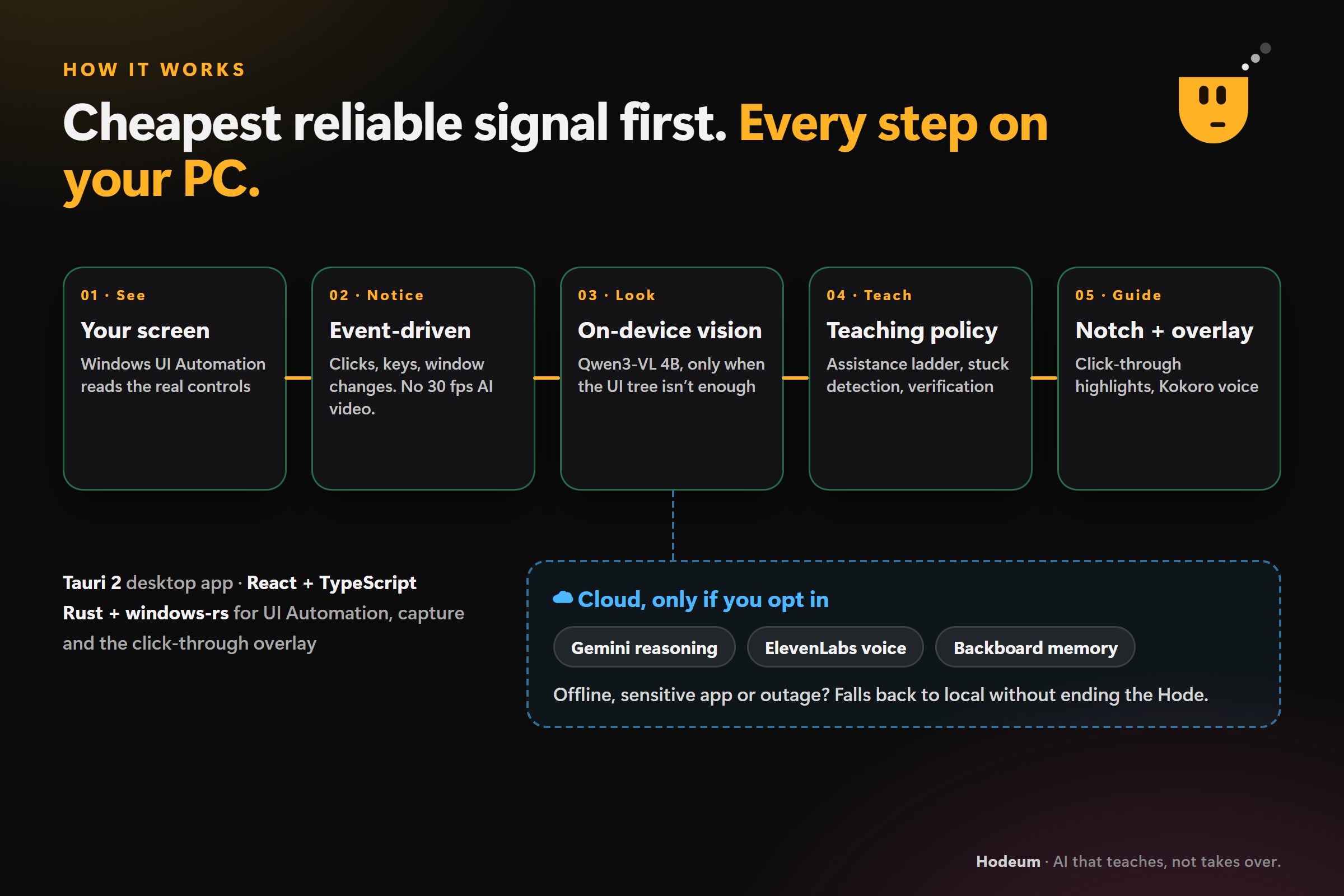
How it works

Inspiration
Learning complex software is still much harder than it should be.
If you want to learn Excel, Photoshop, Blender, VS Code, CAD, or almost any unfamiliar application, the normal workflow is to leave the app, search for a tutorial, watch someone else perform the task, switch back, try to remember the steps, get stuck, and repeat.
The problem is not that we do not have enough tutorials.
The problem is that tutorials cannot see what you are doing.
I wanted to build something closer to having an expert sitting beside you — someone who can see the application you are using, understand what you are trying to accomplish, notice when you make a mistake or get stuck, and give you exactly as much help as you need.
That became Hodeum.
Hodeum is a Windows-first, local-first AI learning companion that teaches inside the software you are already using.
Instead of watching someone else complete the task, you learn by doing it yourself.
What it does
A learning session inside Hodeum is called a Hode.
You can tell Hodey, the AI companion:
"Teach me how to make a pivot table in Excel."
From there, Hodeum follows a continuous loop:
See → Understand → Guide → Act → Verify → Adapt
Hodeum observes the application, understands the current interface state and your learning goal, decides what you should try next, and gives the smallest useful amount of assistance.
You perform the action.
Hodeum then observes the application again and verifies what actually changed before deciding what to teach next.
This makes a Hode fundamentally different from a prerecorded tutorial. If you click the wrong tab, open the wrong menu, hesitate, ask a question, or reach an unexpected interface state, Hodey can react to what actually happened instead of blindly moving to the next instruction.
A tutor that lives inside Windows
Hodey lives in a dynamic notch at the top of the Windows screen.
When idle, it can shrink into a small pill or orb and stay almost invisible. When Hodey needs to listen, think, answer a question, or guide you, the notch expands into a teaching card.
It can also dock as a sidebar, auto-hide at the edge of the screen, and reposition itself so that it does not cover the control it is trying to teach.
Different ways to learn
Hodeum supports several learning modes:
- Teach Mode begins with questions and progressively gives stronger hints only when needed.
- Help Mode stays quiet while you work and steps in when you appear stuck or make a mistake.
- Agent Mode — Guide Me provides direct step-by-step guidance while you perform the actions yourself.
- Agent Mode — Do It For Me can perform tightly constrained actions for structured Hodes, explain what it is about to do, verify the result, and return control to you at checkpoints.
The principle behind every mode is:
The AI should understand more than the learner, but do less than the learner.
Point & Ask
Sometimes you do not know the name of the thing you are looking at.
With Point & Ask, you can mark a button, menu, region, or visual element directly on your screen and ask Hodey about it.
Instead of trying to describe an unfamiliar interface element, you can simply point.
Voice and multilingual interaction
Hodeum supports push-to-talk and hands-free conversations with Hodey.
The implemented local voice pipeline supports:
- NVIDIA Nemotron speech recognition
- Silero voice activity detection
- local Whisper fallback
- Kokoro and Supertonic local speech
- interruption/barge-in while Hodey is talking
- English
- Hindi
- Hinglish
In Auto language mode, Hodey can respond in the language you are speaking and can handle mixed-language interactions naturally.
You can say things like:
"Pivot table banana sikhao."
or
"Hint do."
and continue the Hode without switching interfaces.
Ask Hodey
Hodeum also includes an Ask Hodey experience for questions about the software or screen you are working with.
When enabled, Hodey can perform privacy-conscious web searches for questions that need outside information. The search system generates a compact query locally and removes information such as email addresses, links, file paths, user names, and long identifying numbers before anything is sent.
Without a separate search key, Hodeum can query resources such as Microsoft Learn and Stack Exchange. It can optionally use Brave Search when configured.
Learning history
Hodeum remembers more than whether a Hode was completed.
It tracks things such as:
- skills practiced
- Hode history
- individual steps
- corrections
- hints
- questions
- level of assistance
- skill mastery
As a learner becomes more comfortable with a skill, Hodeum can provide less help.
Google accounts and cross-device sync
Hodeum works completely signed out, but users can optionally Sign in with Google.
Google authentication is connected through Supabase Auth.
When signed in, Hodeum can synchronize learning information such as:
- skills
- Hode history
- settings
- chat text
- linked-device state
The user's screenshots, microphone audio, and voice transcripts are not synced.
Web dashboard
A signed-in Hodian can also use the Hodeum web dashboard.
The dashboard can see a linked Hodeum PC and communicate with the desktop application through Supabase.
This allows a Hode to be started or ended from the web while the actual teaching experience continues on the Windows machine.
iPhone learning
Hodeum also contains an iPhone learning path.
An iPhone screen can be mirrored into Hodeum using supported Windows-side capture methods such as a capture device or AirPlay/UxPlay.
Hodeum reads the mirrored phone interface using Windows OCR, detects screen changes, and can place guidance over the mirrored experience.
This lets the same teaching philosophy extend beyond traditional Windows applications.
How I built it
Hodeum is built as a Windows desktop application using:
Tauri + Rust + React + TypeScript + Vite
Rather than building another chatbot window, I designed the system around a persistent teaching layer that sits on top of the applications you already use.
Under that interface is a complete perception, reasoning, teaching, verification, voice, persistence, and synchronization pipeline.
Seeing the real application
Hodeum primarily uses Windows UI Automation to inspect accessible interface elements.
It can read information including:
- control names
- roles
- buttons
- tabs
- menus
- selected states
- checked states
- screen coordinates and bounding boxes
It also detects learner actions such as clicks and navigation keys.
After an action, Hodeum waits for the interface to settle and reads the screen again.
This gives the teaching system deterministic information about what changed rather than relying entirely on screenshots.
Local visual reasoning
When UI Automation is not sufficient, Hodeum can use Qwen3-VL 4B locally through llama.cpp with CUDA acceleration.
Hodeum launches and manages its own local llama-server.
The deterministic UI information is used first because it is fast and precise. The vision model is invoked when additional visual understanding is useful, such as ambiguous controls or Point & Ask.
This hybrid design avoids sending every frame through an expensive vision model.
The Hode engine
The core teaching experience is implemented as a state-driven system rather than a generated list of instructions.
For each step, Hodeum can:
- Observe the interface
- Determine the learner's current progress
- Decide how much help should be given
- Ask a question, provide a hint, explain, or highlight something
- Wait for the learner to act
- Observe the interface again
- Verify whether the expected state was reached
- Correct mistakes or adapt the next teaching action
Structured task packs provide deterministic goals, expected states, common mistakes, and verification signals.
Open-ended Hodes can use local vision reasoning to handle goals that do not already have a predefined task pack.
Safe Agent actions
For structured Hodes, Agent Mode can optionally perform a step for the learner.
This is deliberately constrained.
Hodey only attempts a click when the expected UI element was found in the latest perception result, the target still belongs to the correct application, and the control is still valid at execution time.
If the system is not confident enough, it falls back to ordinary guidance instead of guessing.
The goal is not unrestricted computer control.
The goal is explainable, verifiable teaching assistance.
Visual overlays
Hodeum can place animated guidance directly over the real application.
Highlights follow windows between monitors and use DPI-aware coordinates.
The notch can also move or collapse when it would otherwise cover the element being taught.
Local voice stack
Voice processing is designed to run locally.
The current pipeline combines:
Silero VAD → NVIDIA Nemotron ASR → local language handling → Kokoro/Supertonic TTS
A local Whisper model acts as an ASR fallback.
Voice workloads run primarily on the CPU so GPU resources remain available for Qwen3-VL.
Audio and transcripts are kept in memory rather than stored as learning history.
Local persistence
Hodeum uses SQLite for its local data layer.
The local database stores information such as:
- skills
- Hode history
- chats
- settings
- learning progress
This means the core experience does not require an account or internet connection.
Google authentication and Supabase
For users who want accounts and synchronization, Hodeum uses:
Google Sign-In + Supabase Auth + Supabase Postgres/Realtime
The desktop authentication flow opens Hodeum's own sign-in page, receives the Google identity token through a protected loopback flow, and allows Supabase to verify the token and nonce.
Supabase is also used for learning synchronization and the web-to-PC command system.
Row Level Security ensures synchronized data is scoped to the authenticated user.
Web experience
The web side of Hodeum is deployed separately and provides:
- Hodeum's public web presence
- Google sign-in
- the learner dashboard
- linked-PC status
- synchronized learning information
- remote Hode commands
This allows the desktop experience to remain the main tutor while still supporting an authenticated web layer.
Optional Gemini reasoning
Hodeum can optionally use the Gemini API as an additional reasoning provider.
The integration is intentionally text-only.
Instead of sending a screenshot, Hodeum can send sanitized teaching context such as:
- the current lesson step
- skill state
- UI Automation labels
- element rectangles
Gemini returns a structured teaching action rather than unrestricted prose.
If Gemini is disabled, unavailable, or too slow, Hodeum continues with its local reasoning pipeline.
Optional ElevenLabs voice
Users can optionally enable ElevenLabs for cloud speech.
Only the sentence Hodey needs to speak is sent to ElevenLabs.
The audio response is streamed back and played locally, with support for interruption so the learner can talk over Hodey naturally.
If the cloud voice fails, Hodeum falls back to its local speech system.
Optional Backboard learning memory
Hodeum also integrates Backboard as an optional persistent-learning memory system.
Rather than uploading complete conversations, Hodeum creates a compact end-of-Hode learning summary describing information such as:
- skills practiced
- where help was needed
- preferred language
- appropriate starting assistance level
Those memories can then help future Hodes adapt to the learner.
SQLite remains the local fallback.
Privacy-first hybrid architecture
The architecture is intentionally hybrid.
The core experience works locally.
Google authentication and Supabase provide optional account synchronization.
Gemini, ElevenLabs, and Backboard are individually opt-in enhancements.
Sensitive raw inputs remain local wherever possible.
That means Hodeum can gain the benefits of cloud services without designing the entire product around uploading the user's screen and microphone feed.
Challenges I ran into
The biggest challenge was discovering that generating instructions is actually the easy part.
Verification is the hard part.
A normal chatbot can tell someone:
"Click the Insert tab."
A teaching agent needs to know whether they actually clicked Insert, whether the interface changed as expected, whether they clicked something else, and what the best teaching response should be after that.
Desktop software is also extremely dynamic.
Menus appear and disappear. Applications behave differently between versions. Windows move between displays. Display scaling changes coordinates. Users reach the same result through completely different paths.
That meant I could not simply generate ten instructions in advance.
Hodeum had to become a feedback system.
Another challenge was balancing several workloads on consumer hardware.
At the same time, Hodeum may be handling:
- UI Automation
- screen capture
- visual reasoning
- speech recognition
- speech synthesis
- overlays
- state tracking
- synchronization
- the learner's actual application
The solution was to use the cheapest reliable signal first.
Deterministic Windows UI information handles most interactions, and expensive visual reasoning is called only when it adds value.
The interface created another major challenge.
An AI tutor that constantly covers the application it is trying to teach quickly becomes more annoying than useful.
That constraint led to Hodey's dynamic notch.
Hodey should be present when needed and almost invisible when it is not.
A final challenge was privacy.
A screen-aware assistant could easily become a system that constantly sends screenshots, microphone input, and application context to external services.
I intentionally designed Hodeum so its core perception and teaching systems can stay on the user's computer, while each cloud capability has a narrow and explicit data boundary.
Accomplishments that I'm proud of
The thing I am most proud of is that Hodeum is not just another chatbot placed beside an application.
I built the experience around a different interaction model:
the learner acts, the AI observes, verifies, teaches, and adapts.
I built Hodeum as a real Windows desktop application rather than limiting the idea to a web prototype.
I built:
- a dynamic Windows notch
- Windows UI Automation perception
- learner-action detection
- adaptive teaching modes
- step verification
- constrained agent actions
- animated on-screen guidance
- Point & Ask
- local Qwen3-VL visual reasoning
- local voice conversations
- Hindi and Hinglish support
- learning history and skill progression
- SQLite local persistence
- Google authentication
- Supabase synchronization
- a web dashboard linked to the desktop app
- remote Hode commands
- privacy-conscious web search
- an iPhone mirroring learning path
- optional Gemini reasoning
- optional ElevenLabs speech
- optional Backboard learning memory
All of this follows one principle:
The AI should understand more than the learner, but do less than the learner.
If an AI completes everything for you, the task may be finished.
But you may not have learned anything.
What I learned
Building Hodeum changed the way I think about AI agents.
Most computer-use agents optimize for one thing:
complete the task as efficiently as possible.
A teaching agent has a fundamentally different objective.
The fastest action is not always the best teaching action.
Sometimes Hodey's best next move is not to show the answer.
It might ask:
"Which tab would you use to add something new?"
If the learner knows, Hodeum stays out of the way.
If they hesitate, it can give a hint.
If they are still stuck, it can highlight the control.
Only after that might it demonstrate the action.
That means Hodeum needs to reason not only about:
What should happen next?
but also:
How much help should be given next?
I also learned that good AI tutoring requires far more than an LLM.
Perception, verification, state management, latency, voice interaction, UI design, persistence, personalization, privacy, and teaching strategy all have to work together before the experience actually feels intelligent.
What's next for Hodeum
My long-term vision is for Hodeum to become a universal learning layer for computers.
Eventually, someone should be able to open an unfamiliar application and simply say:
"Teach me."
I want to expand Hodeum's open-ended teaching capabilities so it can handle increasingly complex applications and workflows without requiring a predefined Hode.
I also want Hodes to become shareable.
A teacher, company, creator, or other Hodian could create an interactive Hode that another learner follows inside the real application instead of consuming the lesson as a static video or document.
Future work includes:
- a larger library and marketplace of Hodes
- creator-built Hodes
- richer skill graphs
- organization-specific onboarding
- deeper accessibility features
- more capable cross-device learning
- broader application support
- improved visual understanding
- collaborative learning experiences
The bigger idea is simple:
Tutorials show you what to do. Hodeum understands what you are doing.
Built With
- artificial-intelligence
- backboard.io
- computer-vision
- elevenlabs
- gemini
- google-oauth
- kokoro
- llama.cpp
- local-llm
- nvidia-nemotron
- postgresql
- qwen3-vl
- react
- rust
- sherpa-onnx
- silero-vad
- speech-recognition
- sqlite
- supabase
- tauri
- text-to-speech
- typescript
- whisper
- windows
- windows-ui-automation


Log in or sign up for Devpost to join the conversation.