-
-
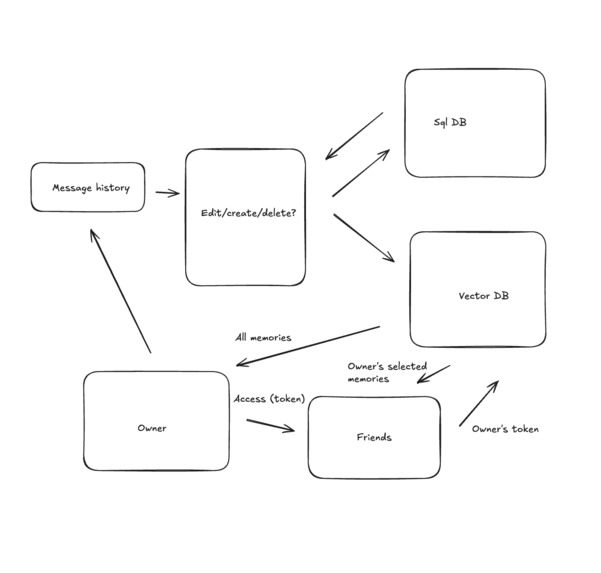
implementation
-
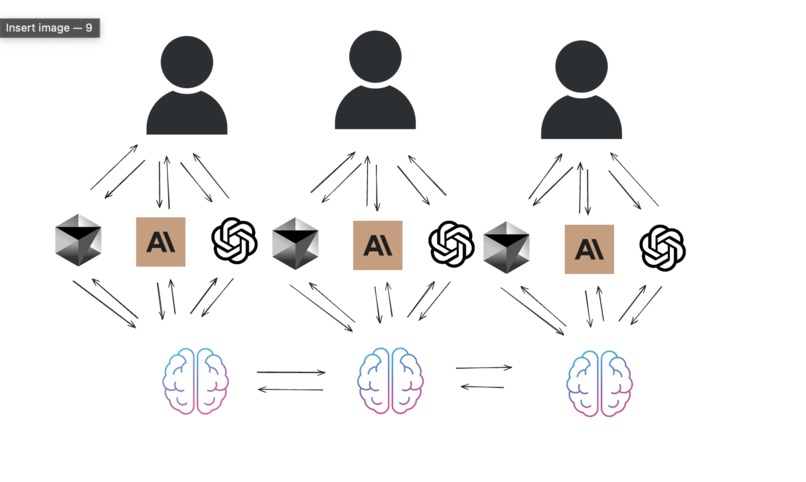
usecases
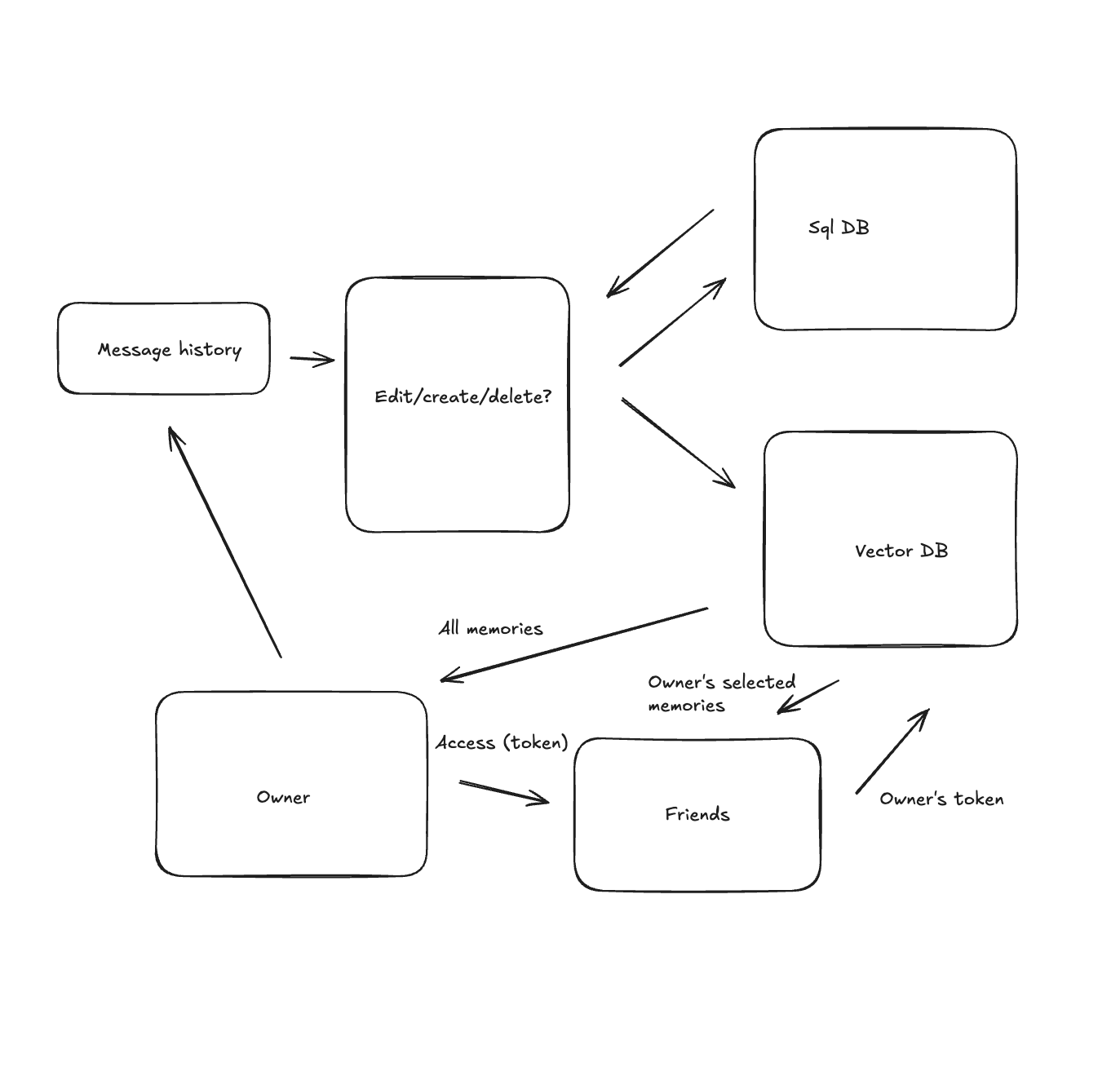
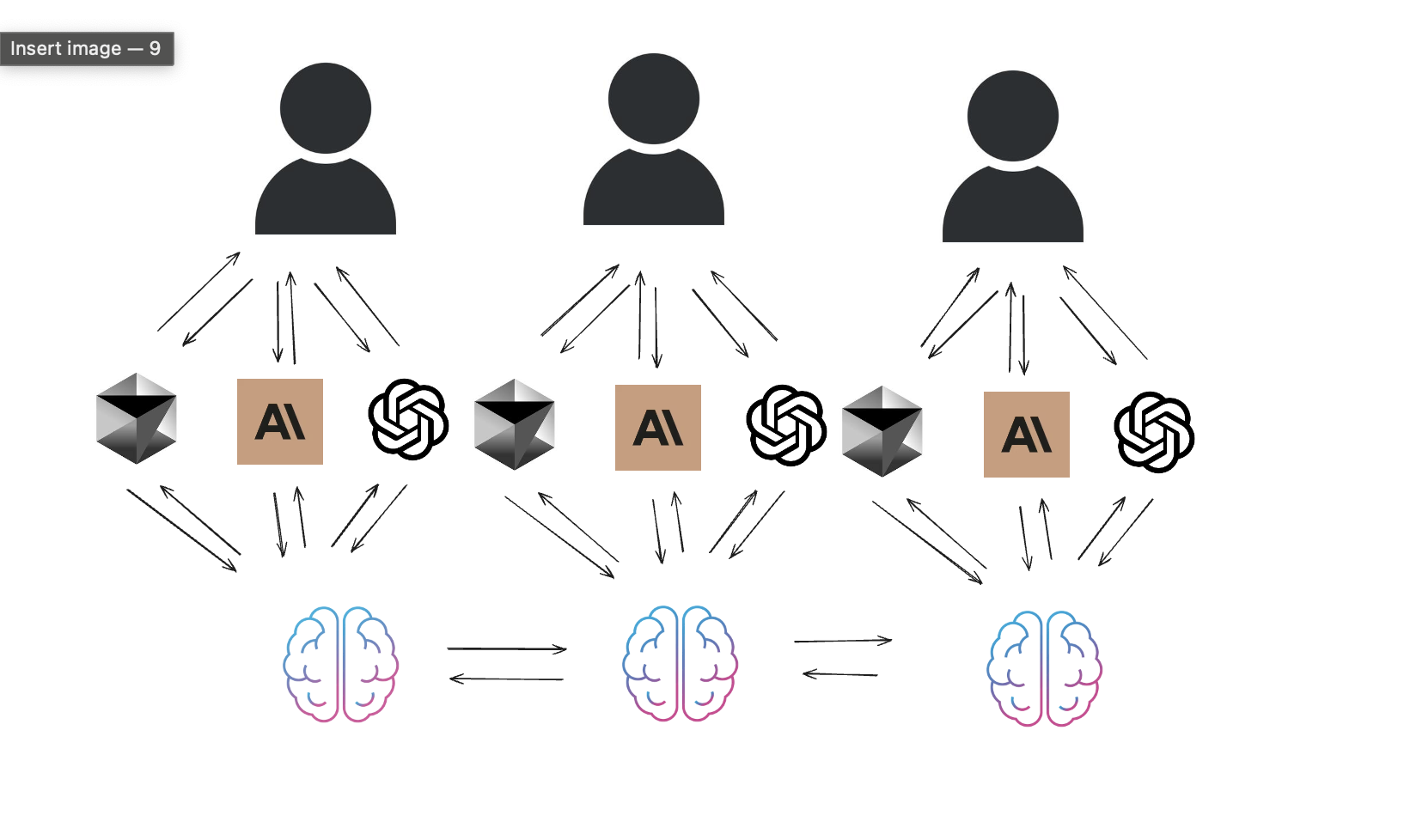
Summary
HiveMind is a shared memory system that leverages the Model Context Protocol (MCP) to allow users to save and retrieve memories across different AI applications. Also, the key innovation is that users can selectively share their memories with other users based on authentication and permission controls. This creates a network of shared context that can make AI assistants more personalized while also enabling collaborative workflows and a global collective intelligence/memory wallet.
Project Goal: HiveMind aims to be a shared memory system using the Model Context Protocol (MCP). It allows AI agents (simulated by users or actual LLMs) to save personal memories and share them with other users through a token-based access control mechanism.
Core Components:
MCP Server (
src/server/index.ts):- Framework: Built using the
@modelcontextprotocol/sdk. It instantiates anMcpServerfrom...@sdk/server/mcp.js. - Transport: Uses
StdioServerTransportfor communication. This means the server is typically launched as a child process by an MCP client and communicates over standard input/output. This is suitable for local development and testing. - Tool Registration: The server dynamically registers all available tools (for memory operations and access control) by calling exported registration functions from the respective tool modules.
- Database Initialization: On startup, it calls
initDb()fromsrc/db/models.tsto ensure the SQLite database and its schema are ready, including seeding default test users. - Logging: Uses
console.errorfor its internal logging to keepstdoutclean for JSON-RPC messages intended for the client.
- Framework: Built using the
Database (
src/db/models.ts&hivemind.db):- Schema: Defined and created by
initDb(). It includes four main tables:-
User: Stores user information (ID, username, a placeholderauth_token).DEFAULT_TEST_USER_ID(default_test_user) andANOTHER_TEST_USER_ID(another_test_user) are automatically created if they don't exist. -
Memory: Stores individual memory entries, linked to auser_id. Includes content and timestamps. -
AccessToken: Stores generated access tokens, including the granter's ID, the token phrase, access level, creation/expiration dates, and a (currently not strictly enforced for retrieval)is_usedflag. -
AccessPermission: Designed to store more persistent, direct grants of access between users (granter, grantee, access level).
-
- Schema: Defined and created by
MCP Tools (Implemented in
src/tools/):
*   **`save_memory` (`src/tools/save-memory.ts`):**
    *   **Purpose:** Allows an authenticated user to save a textual memory.
    *   **Input:** `content` (string).
    *   **Logic:** Inserts a new record into the `Memory` table, associated with the `userIdToUse` (derived from `extra.authenticatedUserId` or `DEFAULT_TEST_USER_ID`).
    *   **Output:** Confirmation message with memory ID.

*   **`retrieve_personal_memory` (`src/tools/retrieve-personal-memory.ts`):**
    *   **Purpose:** Allows an authenticated user to search their own saved memories.
    *   **Input:** `query` (string).
    *   **Logic:** Performs a `LIKE` search on the `content` field of the `Memory` table for records matching the `userIdToUse` and the query. Returns a list of matching memories.
    *   **Output:** Formatted list of retrieved memories or a "not found" message.

*   **`create_access_token` (`src/tools/access-control.ts`):**
    *   **Purpose:** Allows an authenticated user (granter) to generate a shareable, time-limited access token for another user.
    *   **Input:** `access_level` ("read" or "write"), `expiration_hours`.
    *   **Logic:** Generates a unique token phrase and records it in the `AccessToken` table along with the granter's ID, access level, and expiry. The granter is identified by `extra.authenticatedUserId` (or `DEFAULT_TEST_USER_ID`).
    *   **Output:** The generated token phrase, access level, and expiry information.

*   **`use_access_token` (`src/tools/access-control.ts`):**
    *   **Purpose:** Allows a user (grantee) to validate and "activate" a token they received.
    *   **Input:** `token` (the phrase), `granter_username`.
    *   **Logic:** Checks the `AccessToken` table for the token. Validates it against expiry, `is_used` status (though `is_used` isn't strictly blocking retrieval in `retrieve_shared_memory` currently), and verifies the `granter_username` against the user who created the token.
    *   **Output:** Confirmation of token validation, granted access level, granter, and expiry. *Currently does not create a persistent `AccessPermission` record itself.*

*   **`retrieve_shared_memory` (`src/tools/access-control.ts`):**
    *   **Purpose:** Allows an authenticated user (requester/grantee) to search memories belonging to another user (sharer/granter).
    *   **Input:** `shared_by_username`, `query`, and an optional `access_token`.
    *   **Logic:**
        1.  Identifies the requester (`extra.authenticatedUserId` or `ANOTHER_TEST_USER_ID`).
        2.  Identifies the memory owner via `shared_by_username`.
        3.  **Permission Check (Prioritized):**
            *   If `access_token` is provided, it attempts to validate this token against the `AccessToken` table for the `shared_by_username`. If valid and not expired, permission is granted based on the token's access level.
            *   If no token is provided or the token doesn't grant access, it checks the `AccessPermission` table for a direct grant from the memory owner to the requester.
            *   A conceptual (less reliable for `stdio`) check for authorization info in the `extra` object is also present as a fallback.
        4.  If permission is granted, it performs a `LIKE` search on the memory owner's entries in the `Memory` table.
    *   **Output:** Formatted list of retrieved shared memories or a "not found"/"no permission" message.
Authentication & Authorization Flow:
- User Identification: Relies on the
extra.authenticatedUserIdfield passed during tool calls. In thestdiotransport context, this is simulated by theai-test-harness.tsandchatbot-client.ts. A production system with HTTP transport would use proper auth middleware to populate this. - Token Generation (
create_access_token): A user generates a token to grant access to their memories. - Token Usage (
use_access_token): Another user provides the token and granter's username to validate their temporary access. This step validates but currently does not create a persistent permission grant in theAccessPermissiontable. - Shared Memory Access (
retrieve_shared_memory):- Checks for an explicitly passed
access_tokenin the call. - If not, or if the token is invalid for the target user, it checks for a direct grant in the
AccessPermissiontable. - The test harness and chatbot client ensure a direct
AccessPermissionis created foranother_test_userto accessdefault_test_user's data to make the primary test flow work.
- Checks for an explicitly passed
Future additions
While I did not have a lot of time to implement highly granular control over the permissions for each token, let's say only giving access to coding related context, personal context etc, that is easy implementable with my current implementation. Also, in the future, I had planned a way for which before making any changes to the memory, the application will query the current vector db with the context to see what context already exists regarding this matter. It will then edit that memory instead of adding a new memory.

Log in or sign up for Devpost to join the conversation.