-
-
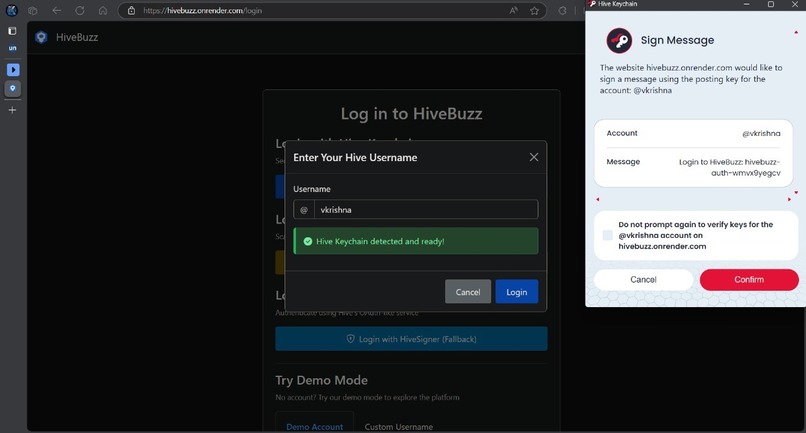
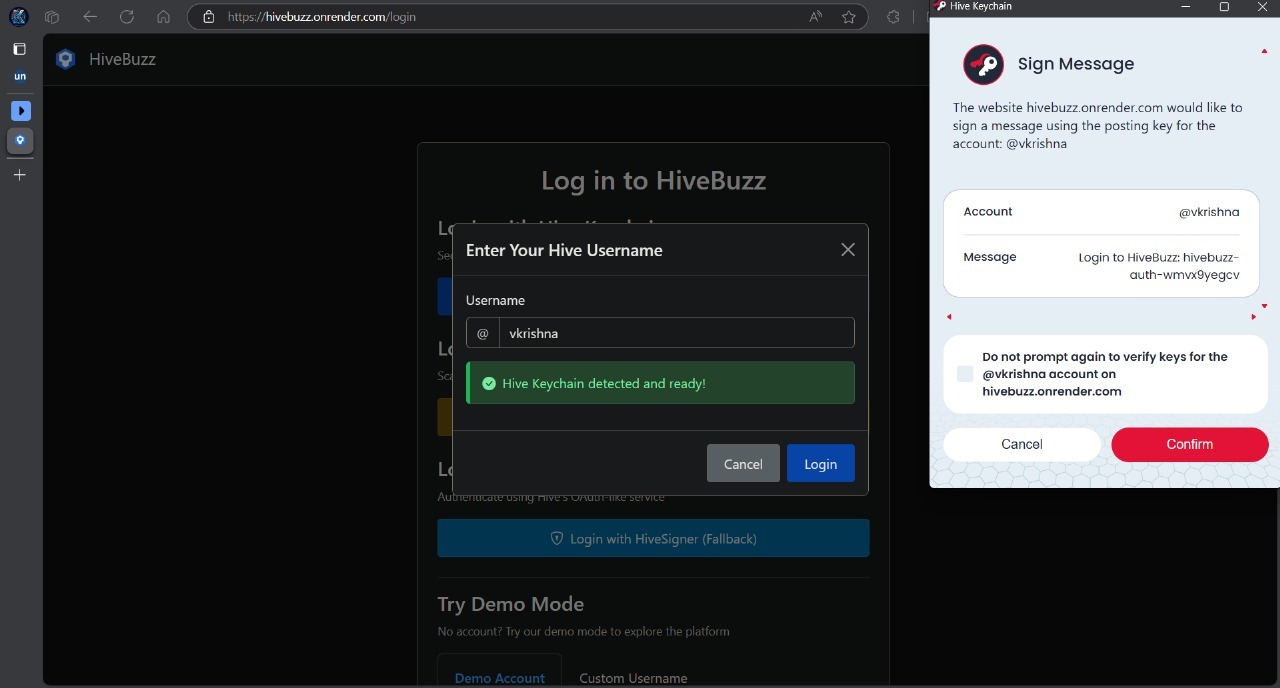
Login using huve keychain extension
HiveBuzz
A modern interface for interacting with the Hive blockchain.
Service Previews
HiveBuzz supports automatic service previews for pull requests using Render. This allows you to preview changes before merging them into the main branch.
How to Use Service Previews
Automatic Previews
By default, all pull requests will generate a service preview. The preview URL will be posted as a comment on your pull request once the deployment is complete.
To skip generating a preview, include one of the following strings in your pull request title:
[skip preview][skip render][preview skip][render skip]
Manual Previews
If manual previews are configured, you need to explicitly request a preview by including [render preview] in your pull request title.
Using the Preview
Each pull request gets its own isolated preview environment with a unique URL. Preview URLs follow this format:
https://pr-{PR_NUMBER}.hivebuzz.onrender.com
Preview environments have the following characteristics:
- They use the same configuration as the main deployment (environment variables, etc.)
- They are automatically updated when you push new commits to the PR
- They are automatically deleted when the PR is merged or closed
For Developers
Preview environments set the IS_PULL_REQUEST environment variable to true, which your code can detect to modify behavior specifically for previews.
Example:
import os

# Check if running in a preview environment
is_preview = os.environ.get('IS_PULL_REQUEST') == 'true'

if is_preview:
    # Use test database or mock services
    DATABASE_URL = os.environ.get('TEST_DATABASE_URL')
else:
    # Use production database
    DATABASE_URL = os.environ.get('DATABASE_URL')
Additional Documentation
For more information about HiveBuzz, please see the following resources:
Overview
HiveBuzz is a decentralized social media application built on the Hive blockchain. It provides multiple secure authentication methods (Hive Keychain, HiveSigner, and HiveAuth), allows users to browse blockchain content, create posts, and manage Hive wallet functions—all through an intuitive interface with customizable themes.
Features
Multi-method Authentication:
- ✅ Hive Keychain browser extension integration
- ✅ HiveSigner OAuth-like authentication flow
- ✅ HiveAuth mobile QR code authentication
Blockchain Data Reading:
- ✅ View trending, hot, and new posts from the Hive blockchain
- ✅ Browse user profiles with reputation and account details
- ✅ Examine wallet balances and transaction history
Transaction Broadcasting:
- ✅ Create and publish posts directly to the Hive blockchain
- ✅ Vote on content using Hive Keychain
- ✅ Power up/down HIVE and transfer funds between accounts
Additional Features:
- Responsive design with light/dark theme toggle
- User preferences stored locally
- Content caching for improved performance
- Post and comment rendering with markdown support
Website for HiveBuzz
- FullFills the Three Main Criteria's:
- Login using Hive Keychain, Hive Signer, or Hive Auth.

- Broadcasting transactions on the Hive chain.

- Reading transactions from the Hive chain.

Hive APIs Used
HiveBuzz leverages multiple Hive blockchain APIs for additional functionality:
condenser_api.get_accounts: Fetches user profile datacondenser_api.get_content: Retrieves post and comment contentcondenser_api.get_discussions_by_trending: Gets trending postscondenser_api.get_discussions_by_created: Gets newest postscondenser_api.get_discussions_by_hot: Gets hot postsdatabase_api.find_accounts: Searches for user accountsaccount_history_api.get_account_history: Retrieves user activity historyrc_api.find_rc_accounts: Gets resource credit informationbridge.get_ranked_posts: Fetches ranked posts (via Hivemind)bridge.get_discussion: Gets full discussion threads
Technology Stack
- Backend: Python with Flask framework
- Frontend: HTML, CSS, JavaScript
- Storage: SQLite for caching and user preferences
- Blockchain Integration: Hive Keychain, HiveSigner API, HiveAuth
- APIs: Hive blockchain API, dbuzz API integration
Project Structure
HiveBuzz/
├── app.py                 # Main Flask application
├── config.py              # Configuration settings
├── database.py            # Database operations
├── session_manager.py     # User session management
├── requirements.txt       # Python dependencies
├── static/                # Static assets
│   ├── css/               # Stylesheets
│   ├── js/                # JavaScript files
│   │   ├── hive-keychain.js  # Keychain integration
│   │   ├── hiveauth.js    # HiveAuth integration
│   │   ├── hivesigner.js  # HiveSigner integration
│   │   └── posts.js       # Post management
│   └── img/               # Image assets
├── templates/             # HTML templates
│   ├── base.html          # Base template
│   ├── login.html         # Authentication page
│   ├── posts.html         # Post listing page
│   ├── wallet.html        # Wallet management
│   └── profile.html       # User profile page
└── utils/                 # Utility modules
        ├── hive_api.py        # Hive blockchain API client
        ├── hivesigner.py      # HiveSigner utilities
        ├── hiveauth.py        # HiveAuth integration
        ├── markdown_utils.py  # Content formatting
        └── posts_cache.py     # Post caching system
Authentication Methods
1. Hive Keychain
Users can securely authenticate using the Hive Keychain browser extension, which signs a challenge without exposing private keys:
window.hive_keychain.requestSignBuffer(
        username,
        `Login to HiveBuzz: ${challenge}`,
        "Posting",
        (response) => {
                if (response.success) {
                        // Authentication successful
                }
        }
);
2. HiveSigner
OAuth-like authentication flow where users are redirected to HiveSigner to approve the application:
// HiveSigner authentication redirect
const authUrl = HiveSigner.getAuthUrl(username, state);
window.location.href = authUrl;
3. HiveAuth
Mobile-friendly authentication via QR code scanning:
// Generate HiveAuth QR code
const authData = await hiveAuthInstance.getAuthData();
QRCode.toCanvas(document.getElementById('hiveauth-qrcode'), authData.login_url);
Reading Data from Hive
HiveBuzz reads data from the Hive blockchain through several methods:
# Get user profile data
hive_api_client = get_hive_api()
user_data = hive_api_client.get_account(username)

# Fetch trending posts
trending_posts = posts_cache.get_posts(
        feed_type="trending",
        tag=tag_filter,
        limit=20
)

# Get account history/transactions
history = hive_api_client.get_account_history(username, limit=20)

# Get wallet balances
wallet_data = hive_api_client.get_wallet_data(username)
Broadcasting Transactions
Users can broadcast various transactions to the Hive blockchain:
// Vote on content
HiveKeychainHelper.requestVote(username, author, permlink, weight)
        .then(response => {
                if (response.success) {
                        // Vote successful
                }
        });

// Create a post
const operations = [
        ["comment", {
                parent_author: "",
                parent_permlink: mainTag,
                author: username,
                permlink: permlink,
                title: title,
                body: body,
                json_metadata: JSON.stringify({ tags: tags })
        }]
];

window.hive_keychain.requestBroadcast(
        username,
        operations,
        "posting",
        response => {
                // Handle response
        }
);
Setup Instructions
Prerequisites
- Python 3.9 or higher
- pip (Python package manager)
- A modern web browser with Hive Keychain extension installed (optional)
Installation Steps
Clone the repository:
 git clone https://github.com/Life-Experimentalist/HiveBuzz
 cd HiveBuzz
Create and activate a virtual environment:
 python -m venv venv
 source venv/bin/activate  # On Windows: venv\Scripts\activate
Install dependencies:
pip install -r requirements.txtCreate a .env file in the root directory:
 SECRET_KEY=your-secret-key
 HIVESIGNER_APP_NAME=your-hivesigner-app-name
 HIVESIGNER_CLIENT_SECRET=your-hivesigner-client-secret
 APP_URL=http://localhost:5000
 ENVIRONMENT=development
Initialize the database:
python -c "import database; database.init_db()"Run the application:
flask runThe application will be available at http://localhost:5000/
Database Management
HiveBuzz uses SQLite for database storage:
# Initialize the database
python -c "import database; database.init_db()"

# Create a database management tool
python db_manager.py init

# Show database statistics
python db_manager.py stats

# Clear expired sessions
python db_manager.py clear-sessions
License
This project is licensed under the MIT License - see the LICENSE file for details.
Acknowledgements
- Hive blockchain developers and community
- dbuzz platform team
- All contributors to this project
Built With
- blockchain
- flask
- hive
- sqllite3

Log in or sign up for Devpost to join the conversation.