-
-
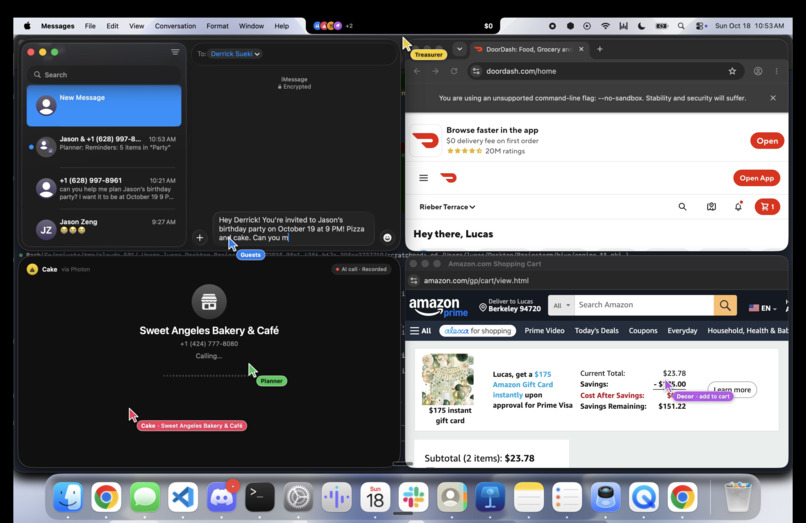
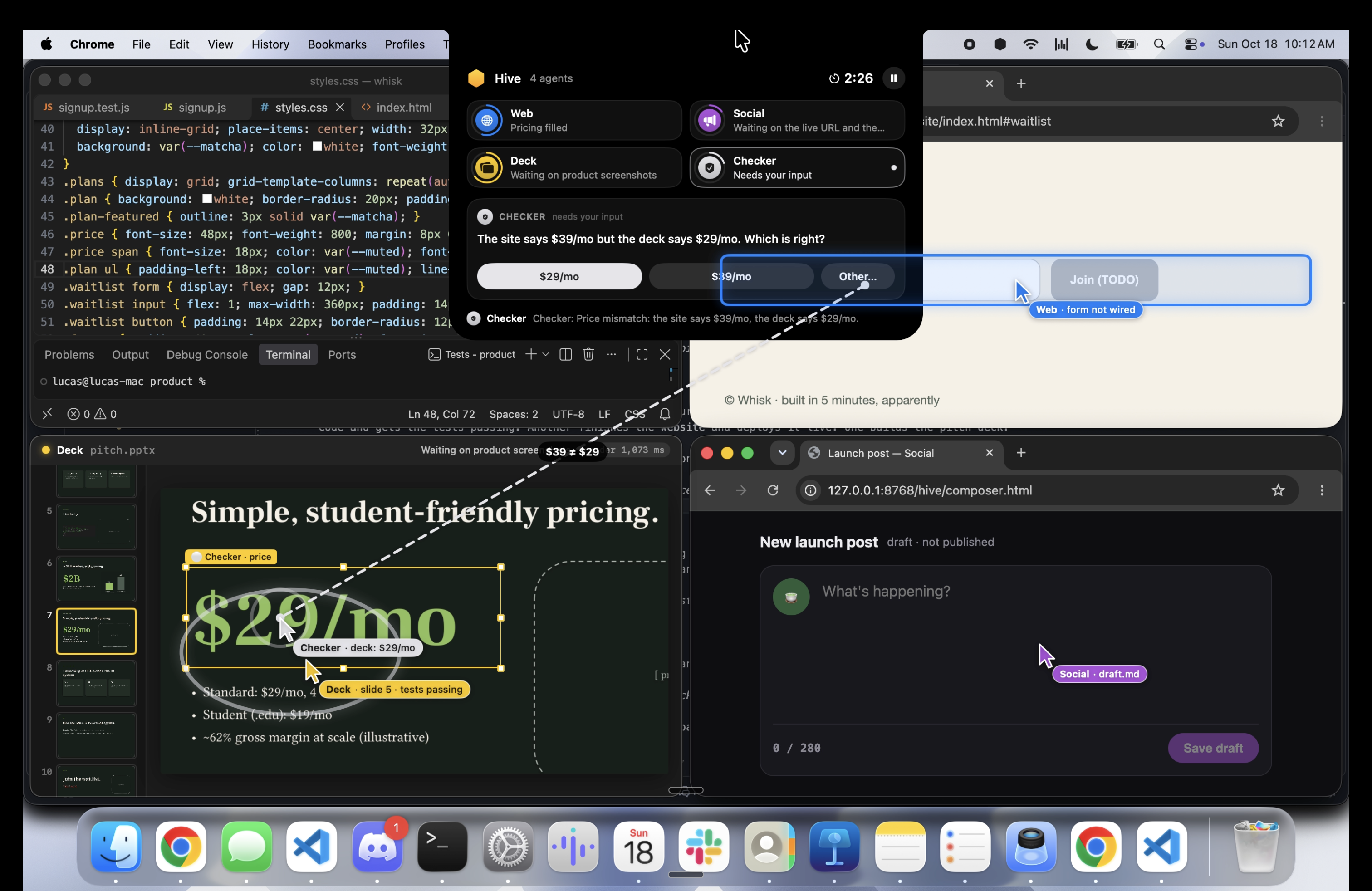
Spawn in an agent swarm w/ multiple cursors
-
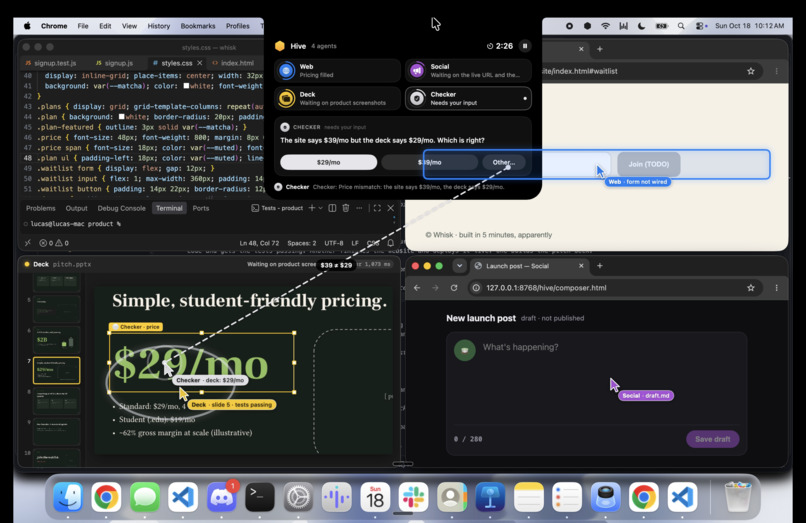
Debug code, create a pitch deck, make social posts at the same time
-
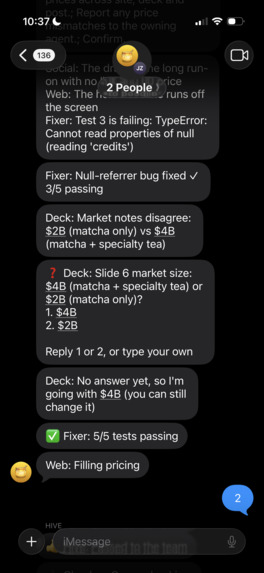
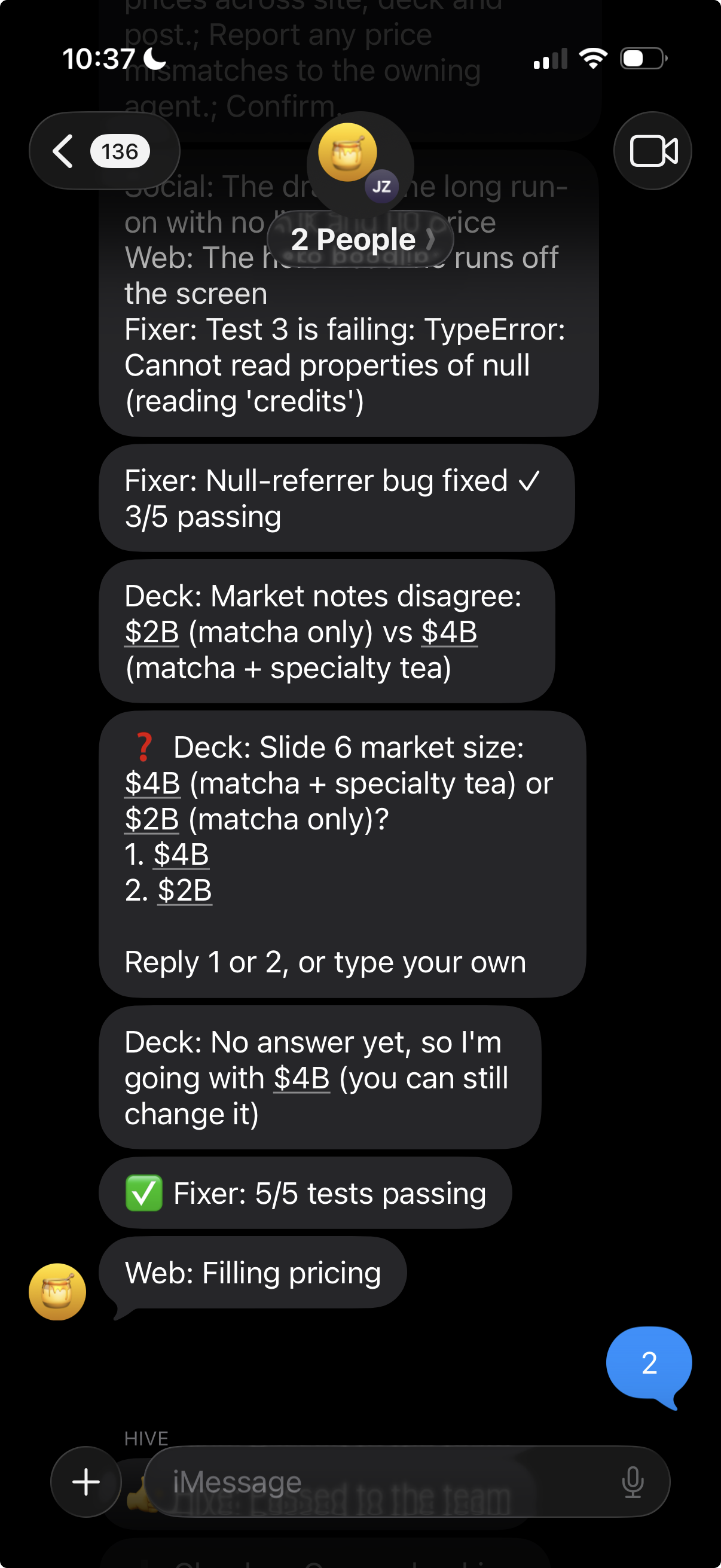
iMessage Native w/ Photon
Inspiration
Every AI agent we've used works the same way: one agent, one chat window, one task at a time, and you sitting there watching it. Real work doesn't look like that. Before a pitch you're fixing a bug, finishing the landing page, polishing the deck and writing the launch post all at once. Planning a birthday means calling a bakery, texting friends, ordering food and buying decorations in parallel. And you're usually not even at your desk.
We wanted to know what it would feel like if your computer had a whole team on it instead of one assistant, and you could manage that team from your phone like a group chat. Why have one cursor when you can have six?
What it does
HIVE is a desktop widget that lives in your Mac's notch. You text it a task in plain language from anywhere, like "investors are here in 5, finish the startup stuff" or "plan Jason's birthday party Oct 19 at 9pm, pizza, invite 3 people", and it builds a team of AI agents to do it on your computer.
- A Conductor plans the team. Claude reads the task and decides how many agents it needs, what each one does, which ones wait on others, and how much each is allowed to spend.
- A group chat per task. HIVE opens an iMessage group for the task and announces each agent as it joins: "➕ Cake: calling the bakery", "➕ Food: ordering pizza".
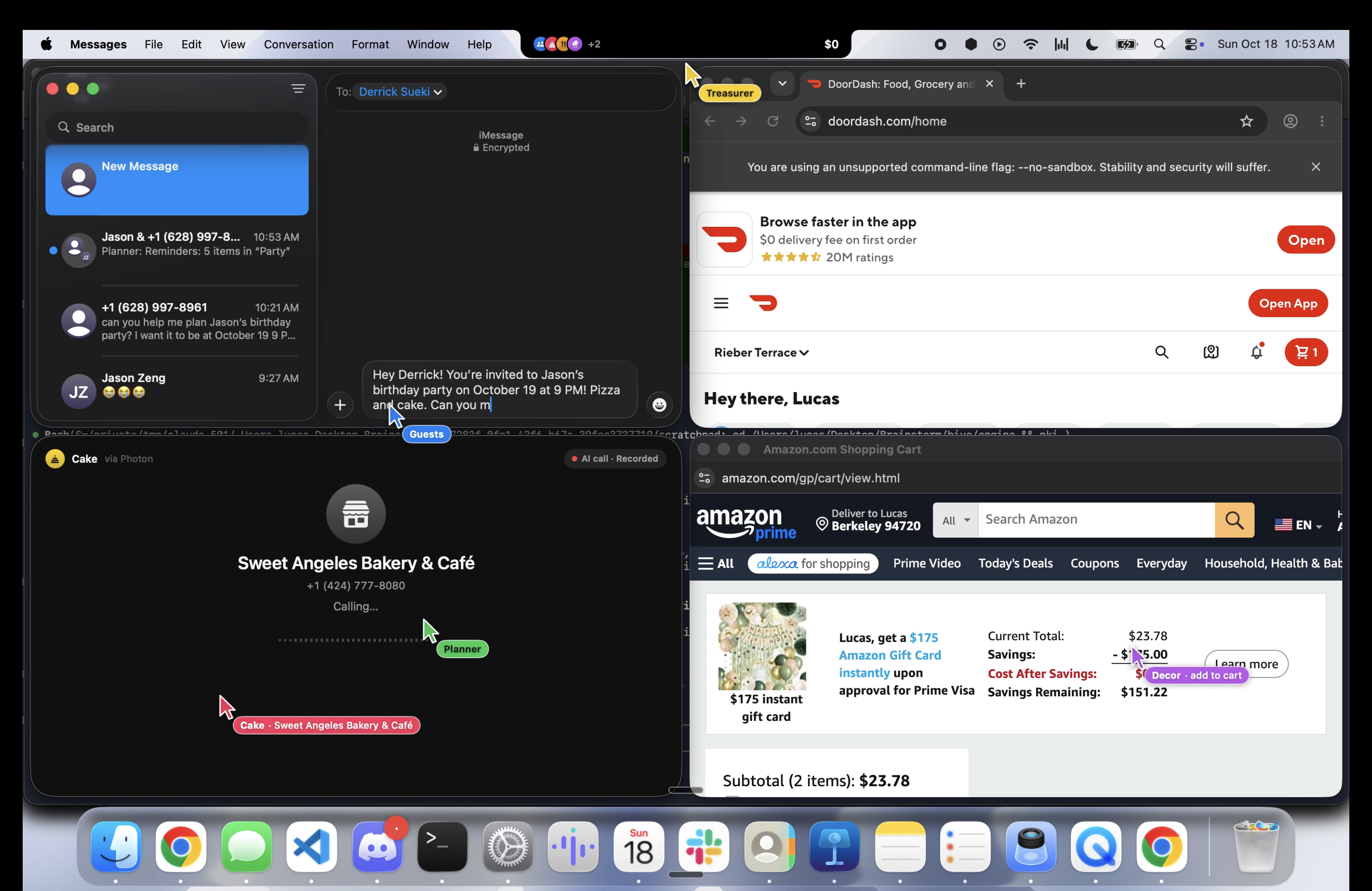
- A swarm on one computer. Every agent gets its own ghost cursor and its own windows, and they all work at the same time without touching your real mouse. The screen is tiled so windows never overlap.
- Real apps, real results. Agents fix code in VS Code and run the tests, finish websites and deploy them live to Vercel, build PowerPoint decks slide by slide, design graphics with Gemini and post them to Instagram, fill DoorDash and Amazon carts, write invites in Messages, add Calendar events, design invitations in Keynote, and find a business on Google Maps and call it with an AI voice.
- You make the critical decisions. When there's conflicting information or money is involved, HIVE texts you numbered options and waits. Reply "1", "YES", your own words, or @mention an agent directly.
- A Treasurer agent holds the budget, gives each agent a spending cap, tracks every cart and asks you to approve or hold before anything is bought.
- A safe word. Text "CANCEL" and every agent stops and their windows close.
Two examples we built around:
- Pitch in 5: a team rushes to fix the product, finish and deploy the landing page, fill the pitch deck, resolve a pricing conflict with you, and post the launch graphic before an investor meeting.
- Surprise party: a team finds an open bakery and calls it to order the cake (trying the next bakery if nobody picks up), writes the invites, orders pizza, fills a decorations cart, puts the party on your calendar and designs an illustrated invitation, all under a budget you approve.
How we built it
- Mac app (Swift, SwiftUI + AppKit): a Dynamic-Island-style panel that grows out of the notch, a transparent click-through overlay that draws one ghost cursor per agent above every app, a native Deck Viewer, and a Call window with live call status.
- Engine (Python, asyncio): a WebSocket event bus that every agent and client talks through. Agents emit "move here, then click" events before every real action, so each ghost cursor lands exactly where the action happens (within about 1 point).
- Conductor and workers (Anthropic Claude): Opus 5.5 plans the team and writes content, Sonnet 5.5 runs the code, deck and checker agents, and Haiku 5.5 drives the browser agents, routes incoming texts and powers the phone agent's conversation.
- Browser agents: Browser Use and Playwright over the Chrome DevTools Protocol, one Chrome window per agent in a dedicated profile.
- Code agents: real VS Code, driven by a small bundled extension that opens files, selects code, types edits live and runs commands in the terminal.
- Mac apps: the macOS Accessibility API and AppleScript drive Messages, Notes, Reminders, Calendar, Keynote and Contacts.
- Messaging (Photon 2.0): a dedicated iMessage line. HIVE creates a group chat per task, sends and receives messages and images, and turns replies into decisions.
- Phone calls (ElevenLabs + Photon): an ElevenLabs conversational agent (Claude Haiku brain, v4 Turbo voice, Scribe Realtime ears) connected to a Photon phone number over SIP.
- Images (Google Gemini): Gemini 3.1 Flash Image paints illustrated launch graphics and party invitations; we set the type on top so it's always spelled right.
- Slides and deploys: python-pptx with LibreOffice renders for live slide updates, Keynote for invitations, and the Vercel CLI for live sites.
Challenges we ran into
- Many cursors, one mouse. macOS has exactly one pointer. We had to drive every app through its own channel (DevTools, a VS Code extension, Accessibility, AppleScript) and draw the cursors ourselves, then keep each drawn cursor perfectly in sync with the real click.
- Fitting a swarm on a 14" screen. Chrome was reporting our screen as 1280×720, and real Mac apps have minimum window sizes, so windows overlapped. We wrote a layout engine that reads the real visible screen from macOS, tiles equal cells, gives some apps shared cells in turn, and verifies there are no overlaps.
- iMessage limits. Group chats need a dedicated line, a group needs at least two people besides HIVE, and the API can't rename groups. We designed the chat experience around what the platform allows.
- Real phone calls. Wiring ElevenLabs to Photon over SIP, getting transcripts back after the call, detecting voicemail and moving on to the next bakery took a lot of iteration.
- Real websites fight back. Bot checks, login walls and menus that change by time of day meant building robust, step-by-step browser flows with timeouts and fallbacks.
- Safety at speed. Making agents fast while making sure nothing irreversible (a purchase, a post, a call) ever happens without a clear YES, and that CANCEL really stops everything, including windows that are still opening.
Accomplishments that we're proud of
- Watching six cursors work one Mac at the same time, in real apps, without fighting over the mouse.
- Texting "get whisk ready" and seeing tests go from failing to 5/5, a site go live on Vercel, a deck fill itself in and a post land on Instagram.
- An AI agent that finds a real bakery, calls it, and tries the next one if nobody picks up.
- A notch widget that feels like it belongs on a Mac.
- Human-in-the-loop that actually feels natural: numbered options, plain-language replies, @mentions, and a Treasurer that never spends without you.
What we learned
- Parallel agents need a shared, visible picture of what everyone is doing. The ghost cursors turned out to be as useful for us while debugging as for the demo.
- The hardest part of agents in the real world isn't the model, it's the edges: windows, focus, bot checks, phone networks, rate limits and messaging-platform rules.
- People trust agents more when the agents ask at the right moments. A small number of well-placed decisions beats either full autonomy or constant confirmation.
- Plain-language routing (just text it what you want) makes a huge difference compared to commands.
What's next for HIVE
- More skills: email, Slack, Figma, spreadsheets and more native Mac apps.
- Scoped payments: the Treasurer issuing a single-use, merchant-locked virtual card for each approved purchase.
- Swarm memory: agents that remember your preferences, favorite stores and contacts across tasks.
- Multiple machines: one group chat directing agents across your laptop, desktop and a cloud Mac.
- Teams: shared group chats where a whole team can steer the same swarm.
Built With
- browseruse
- claude
- elevenlabs
- photon
- swift

Log in or sign up for Devpost to join the conversation.