-
-
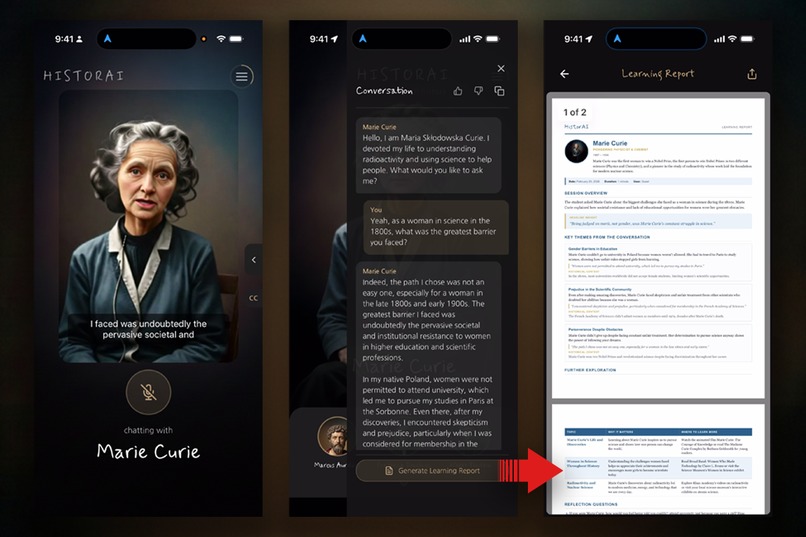
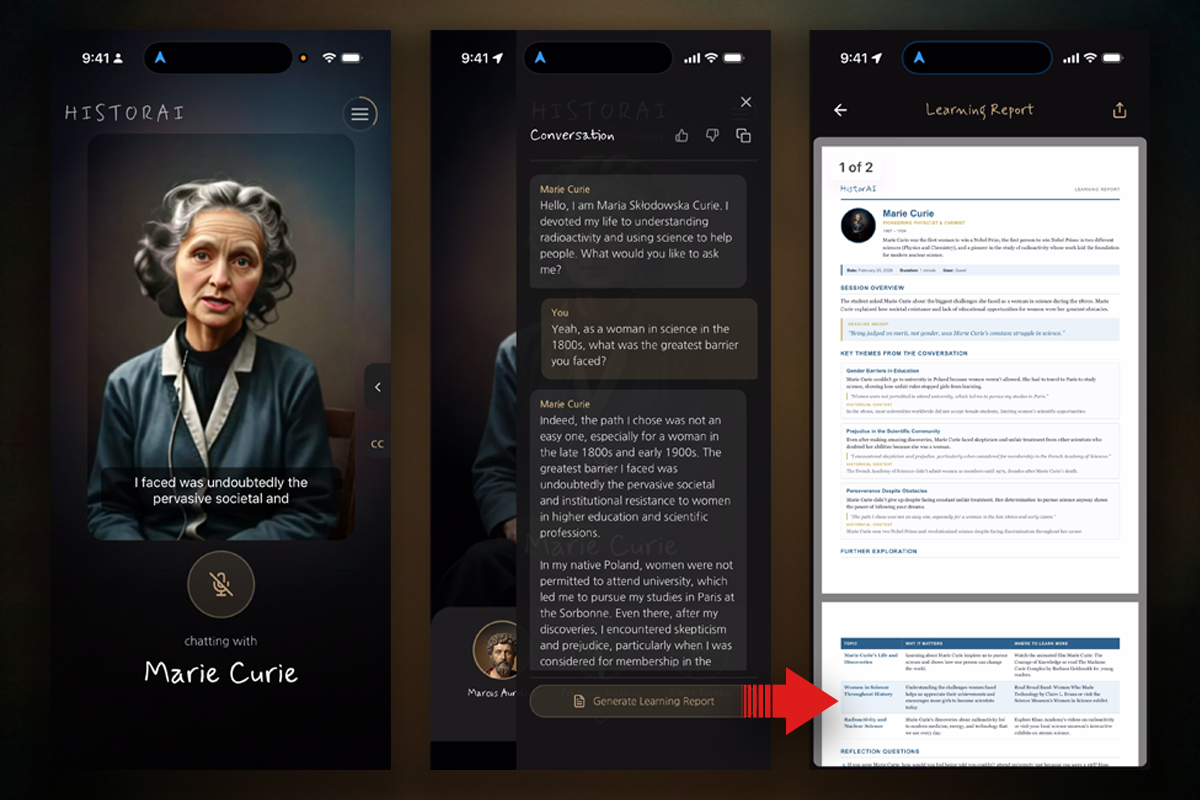
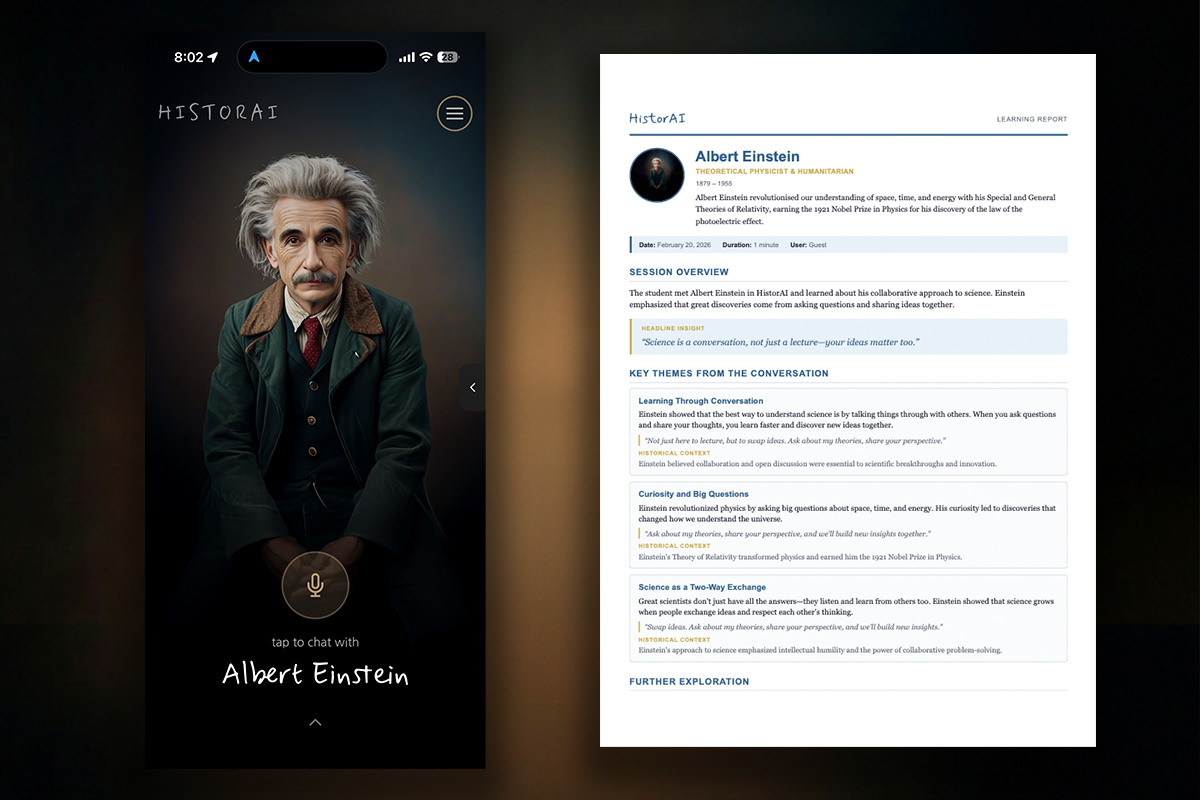
Live video chat transcript is used to generate a a Learning Report with Foxit
-
Live video chat transcript is used to generate a a Learning Report with Foxit
-
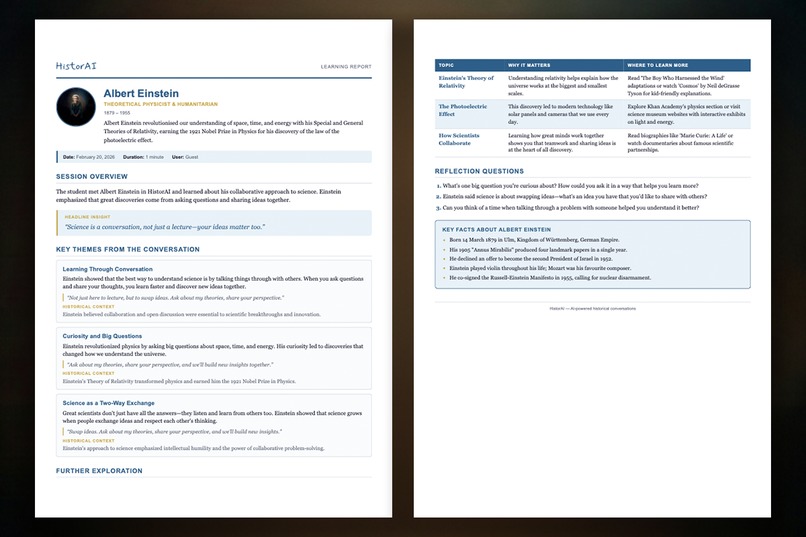
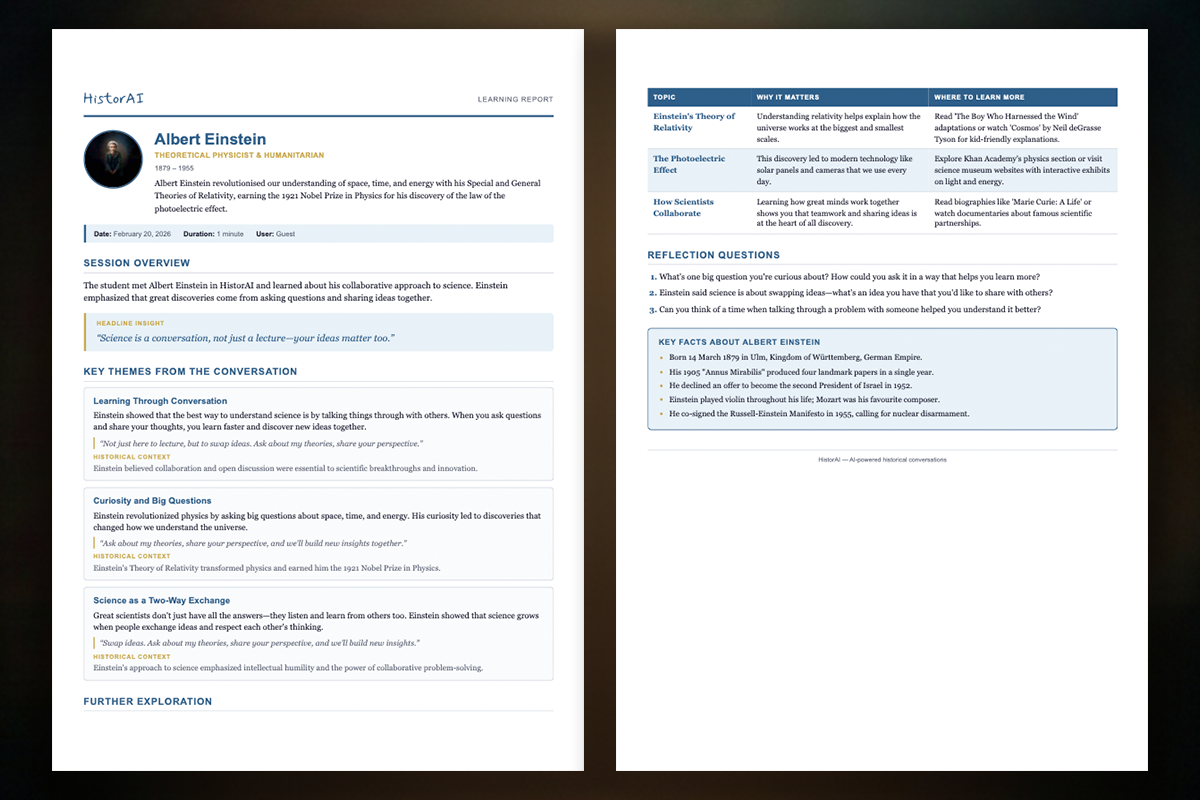
Generated Foxit PDF recapping conversation with additional educational materials
Inspiration
Most people find history fascinating in conversation but boring in textbooks. And while voice-based AI chatbots have made it possible to talk to characters, they still feel like talking to a disembodied voice. I asked myself: what if you could actually see Marcus Aurelius speaking back to you, his expressions matching his words in real time? What if exploring history felt like a face-to-face conversation rather than a phone call?
But a conversation alone isn't enough. People want something to take away from it. That's where the Foxit PDF APIs became central to the vision. I wanted every conversation to produce a beautiful, personalized Learning Report that summarizes what was discussed, highlights historical themes, and gives people something tangible to revisit later. The combination of Foxit's Document Generation API for creating rich, templated PDFs and the PDF Services API for optimizing them for mobile delivery made this possible without building a custom rendering engine.
HistorAI was born from the idea that the best way to connect with history is in two phases: an engaging live conversation, followed by a polished document that captures what you discovered.
What it does
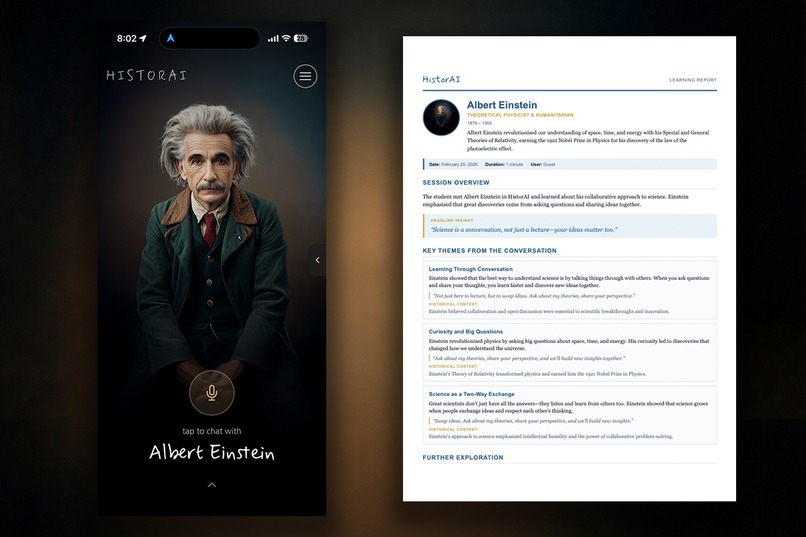
HistorAI is a voice-and-video-first mobile app where anyone can have live video conversations with AI-powered historical figures: Marcus Aurelius, Marie Curie, Frederick Douglass, and Albert Einstein, with more on the way.
Each character has a unique personality, voice, and lip-synced avatar generated from a single image (zero-shot, no training data needed) that responds in real time. Users simply tap a microphone button and start talking. The AI listens, thinks in character, and responds with historically grounded answers, all while a realistic avatar speaks back on screen.
After each conversation, users can generate a personalized Learning Report, a beautifully formatted PDF powered by Foxit Document Generation API and optimized with Foxit PDF Services API. Each report includes:
- A session summary analyzing the conversation
- Historical themes explored during the chat, with educational context
- Key facts referenced by the historical figure
- Follow-up questions to guide further exploration
The complete flow is: conversation → AI analysis → Foxit Document Generation → Foxit PDF optimization → cached delivery to the user's device. Reports are cached server-side so users can instantly re-open them anytime.
Key features include:
- Real-time video chat with lip-synced historical figure avatars
- Multi-character support with distinct AI personas and voices
- Conversation history to save, review, and manage past chats
- AI-powered Learning Reports as personalized PDFs built with Foxit Document Generation API
- Optimized PDF delivery with reports compressed and enhanced via Foxit PDF Services API
- Report caching to instantly re-open previously generated reports
- Anonymous guest authentication so anyone can start chatting immediately with no sign-up required
How I built it
HistorAI has a React Native + Expo frontend, a Node.js + Express backend, and a Python-based real-time voice/video AI agent. The piece most relevant to this hackathon is the Learning Reports pipeline powered by Foxit APIs.
The video chat side uses ElevenLabs Conversational AI for voice and LemonSlice for real-time avatar rendering, connected via LiveKit. But the real workflow design challenge was turning those conversations into polished PDF reports.
Learning Reports Pipeline (Foxit APIs):
AI Content Generation: Claude Haiku analyzes the conversation transcript and produces structured content: a session summary, historical themes with explanations, key facts, and follow-up questions.
Foxit Document Generation API: I designed a custom HTML template (
conversation-report.html) with a profile-focused layout featuring the historical figure's details, theme cards with context, and a key facts section. The API takes this template and the AI-generated content as JSON data, merging them to produce a richly formatted, multi-page PDF. This approach let me iterate rapidly on report designs. Changing the layout, colors, and structure was just an HTML edit, not a rendering engine rewrite.Foxit PDF Services API: The generated PDF is then passed through Foxit's optimization service, which compresses the file for mobile delivery while preserving visual quality. This matters because users are viewing these reports on phones over cellular connections, and every kilobyte counts.
Caching & Delivery: The optimized PDF (as base64) is cached in PostgreSQL alongside the conversation record. When users tap "View Report," it loads instantly from cache. Only the first generation hits the Foxit APIs; subsequent views are free and instant.
The entire app is built and deployed on Replit with a Neon-backed PostgreSQL database.
Challenges I ran into
Designing the PDF template for Foxit Document Generation. Getting the HTML template to produce a clean, professional-looking PDF across different conversation lengths was tricky. Early versions had awkward page breaks splitting theme cards in half. I solved this with CSS break-inside: avoid rules and a continuous-flow layout that lets content wrap naturally rather than forcing hard page breaks.
Mobile PDF handling. Passing large base64-encoded PDFs through React Navigation params caused crashes. I solved this by writing PDFs to temporary files first and passing file URIs through navigation instead.
Network timeouts during report generation. The full pipeline (AI content generation + Foxit Document Generation API + Foxit PDF Services API) takes 32 seconds end-to-end. The default iOS network timeout of 30 seconds would kill requests right before completion. I implemented explicit AbortController timeouts at 120 seconds to give the pipeline room to finish.
ES Module compatibility. The production build compiles TypeScript to ESM format, but CommonJS patterns like __dirname would crash at runtime. I had to systematically replace these with import.meta.url-based equivalents in the Foxit integration code.
Accomplishments that I'm proud of
- The complete Foxit-powered generate → optimize → deliver pipeline. From conversation transcript to AI analysis to Foxit Document Generation to Foxit PDF Services optimization to cached delivery, the entire flow is seamless and produces a document that looks like it was designed by hand.
- The HTML template approach with Foxit Document Generation. By using an HTML template rather than programmatic PDF construction, I could iterate on report designs in minutes. Changing the layout from a two-column sidebar to a continuous-flow profile page was just an HTML/CSS edit.
- Report caching makes Foxit API costs negligible. By caching generated reports server-side, the Foxit APIs are only called once per conversation. Users can re-open reports instantly without additional API calls.
What I learned
- Foxit's Document Generation API is surprisingly flexible. The template-based approach turned what I expected to be a complex PDF rendering problem into a straightforward HTML design task. I could focus on making the report look great rather than wrestling with PDF layout primitives.
- The two-API workflow (generate + optimize) makes sense. Separating document creation from PDF optimization is a clean architectural pattern. It let me focus on content and layout in the generation step, then handle delivery concerns (file size, mobile performance) as a separate optimization pass.
- Mobile PDF delivery has hidden gotchas. React Native can't handle large base64 strings in navigation params, iOS has aggressive network timeouts, and file sizes matter more on cellular. Each of these required a specific workaround in the Foxit integration layer.
- Caching is a feature, not an optimization. Users expect to tap "View Report" and see it instantly. Server-side report caching transformed the UX from "wait 30 seconds every time" to "generate once, view forever."
What's next for HistorAI: Live Historical AI Video Chats & Learning Reports
- Richer PDF reports with Foxit. Adding charts, timelines, and interactive elements to Learning Reports using more advanced Foxit Document Generation features.
- Comparative reports. Generate a single PDF that compares insights across multiple conversations (e.g., "What did Einstein and Curie each say about scientific discovery?"), leveraging Foxit PDF Services to merge multiple generated documents.
- More historical figures. Expanding the roster to include Leonardo da Vinci, Cleopatra, Nikola Tesla, and others.
- Classroom mode. Teachers can assign specific historical figures and topics, then review aggregated learning reports across their class.
- Multi-language support. Converse with historical figures in your native language for global accessibility.
Built With
- anthropic-claude-haiku
- css
- elevenlabs-conversational-ai
- expo.io
- express.js
- foxit-document-generation-api
- foxit-pdf-services-api
- html
- ios
- jwt
- lemonslice
- livekit
- postgresql
- python
- react-native
- react-navigation
- replit
- revenuecat
- tanstack-react-query
- typescript

Log in or sign up for Devpost to join the conversation.