-
-
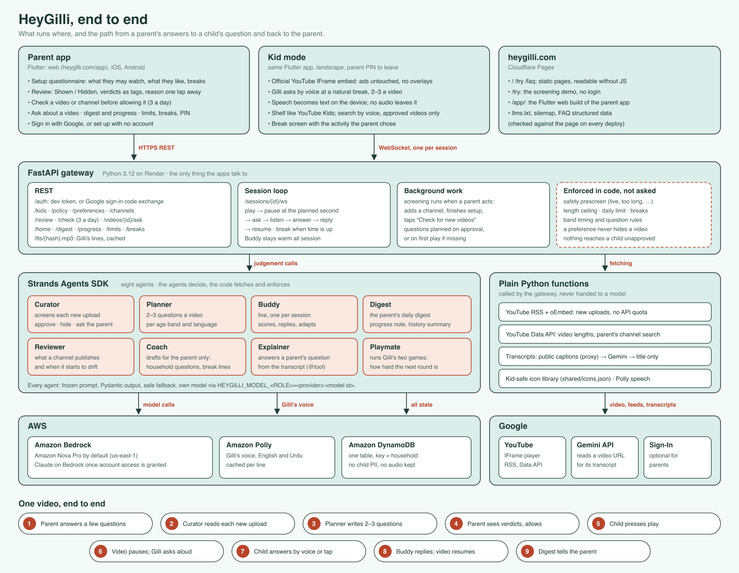
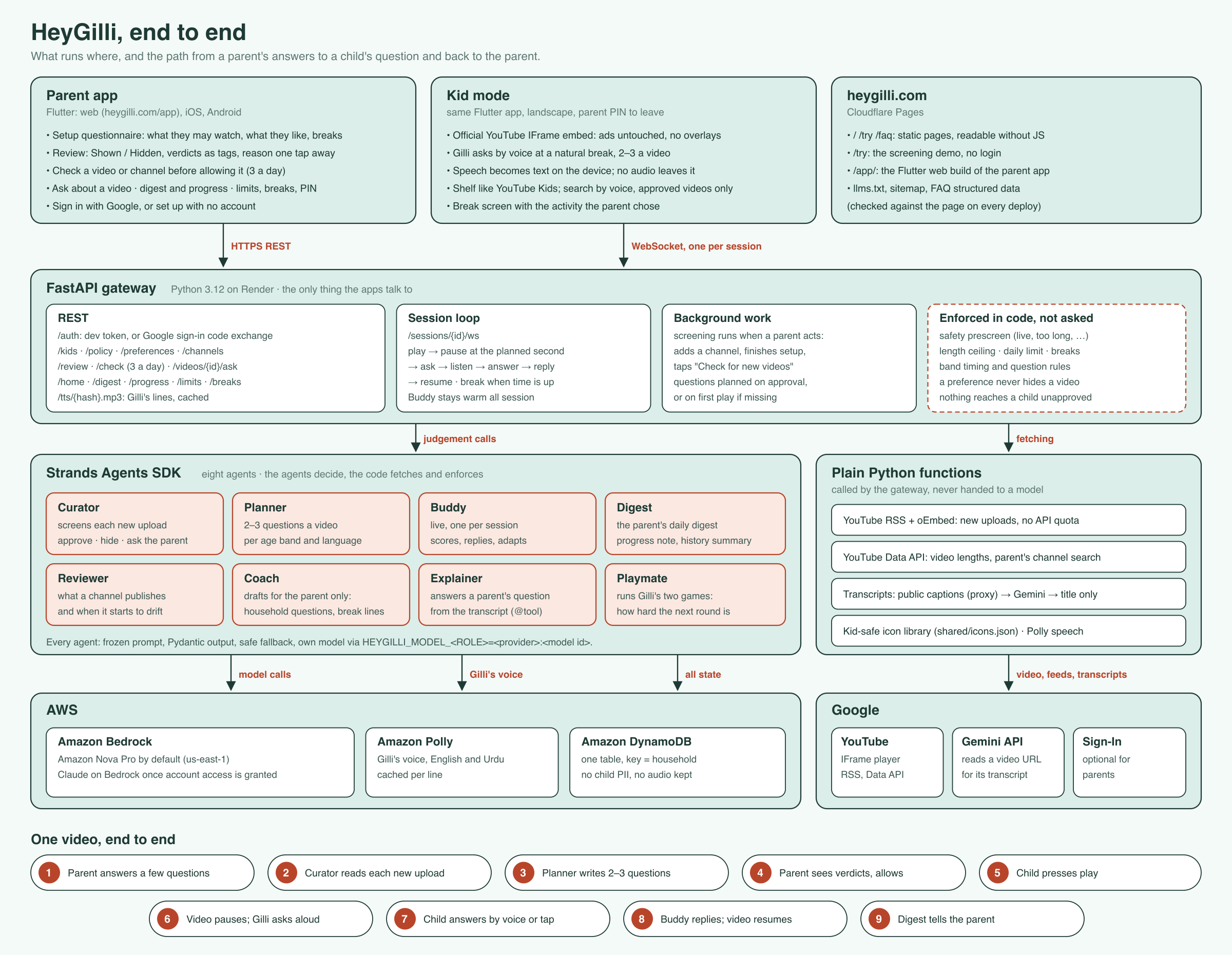
8-Agent Strands Architecture across Fire TV, Ring & AWS Bedrock
-
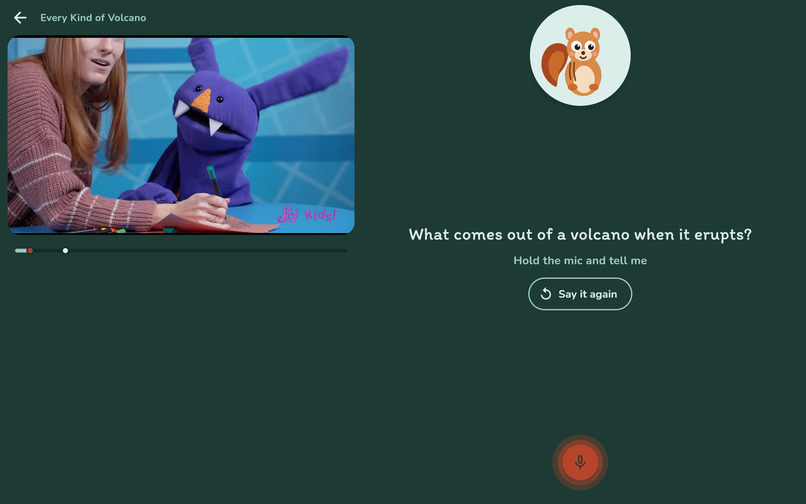
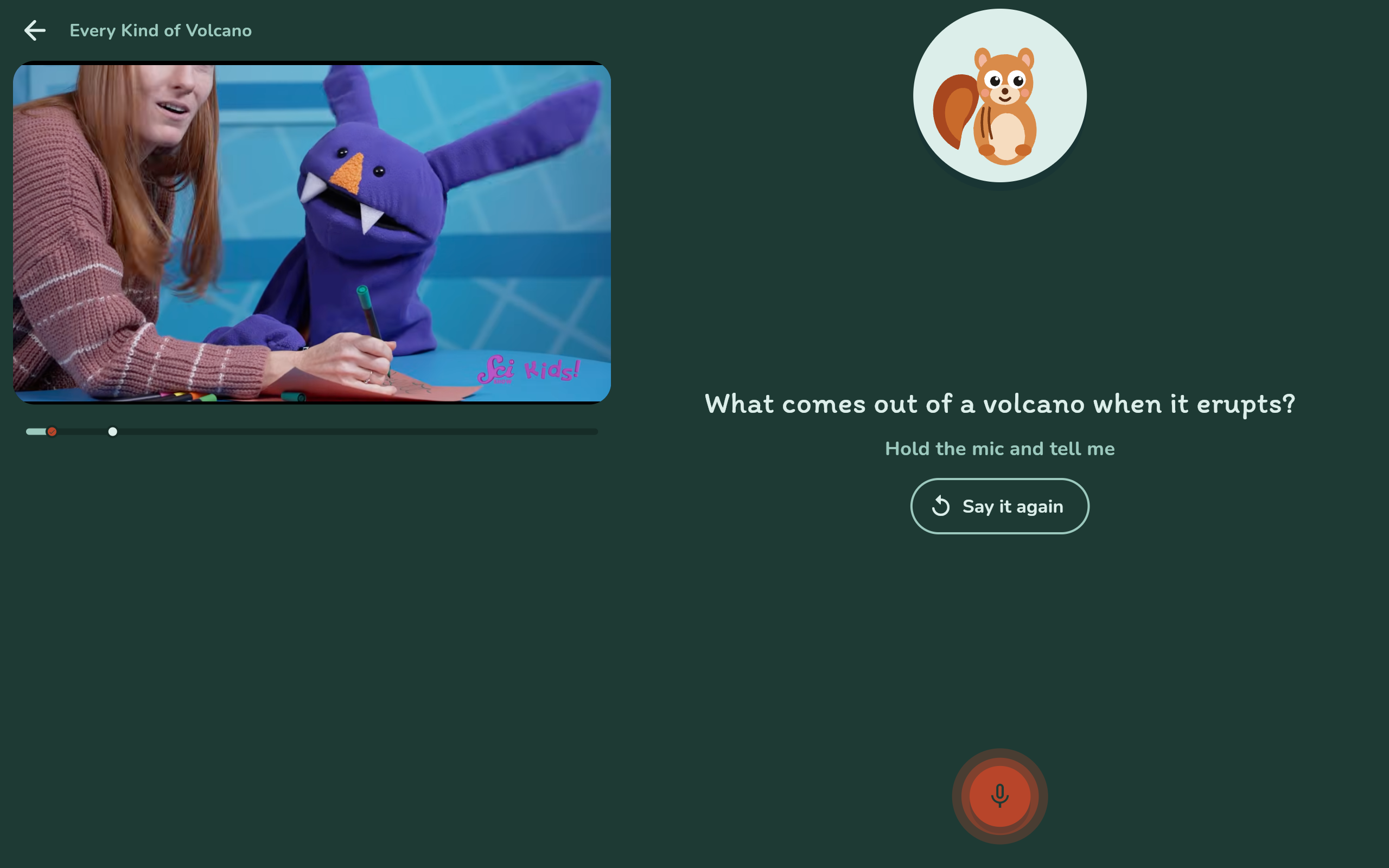
Gilli Asks a Voice Question at a Natural Break
-
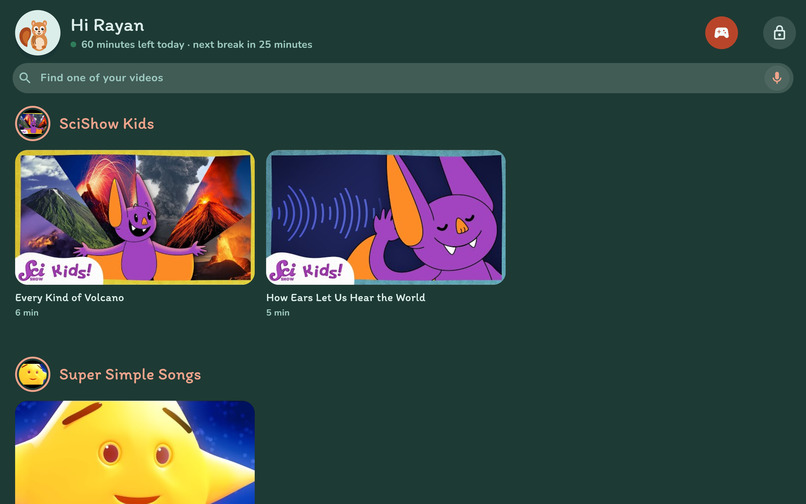
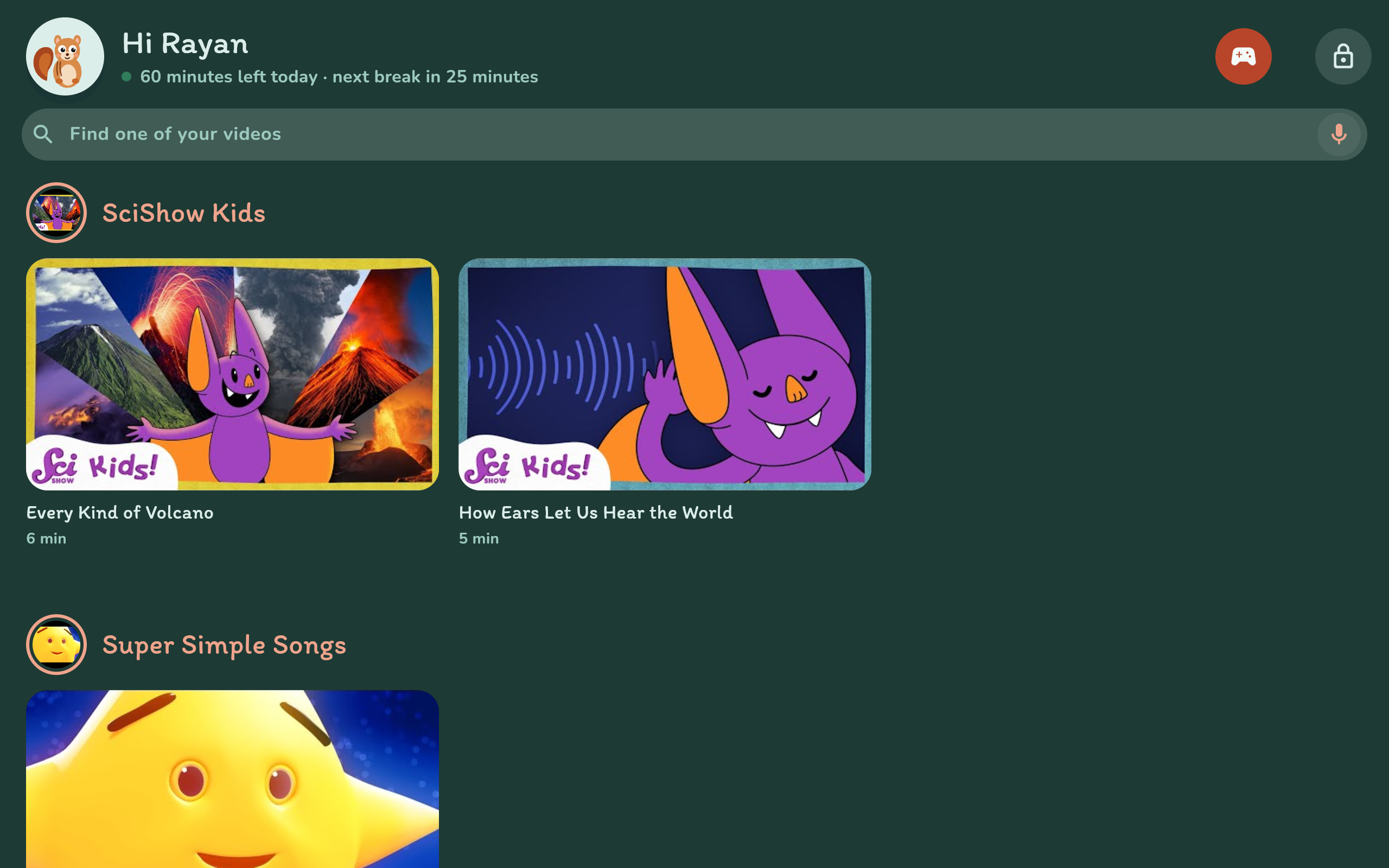
Reader Shelf Layout (Ages 7-12)
-
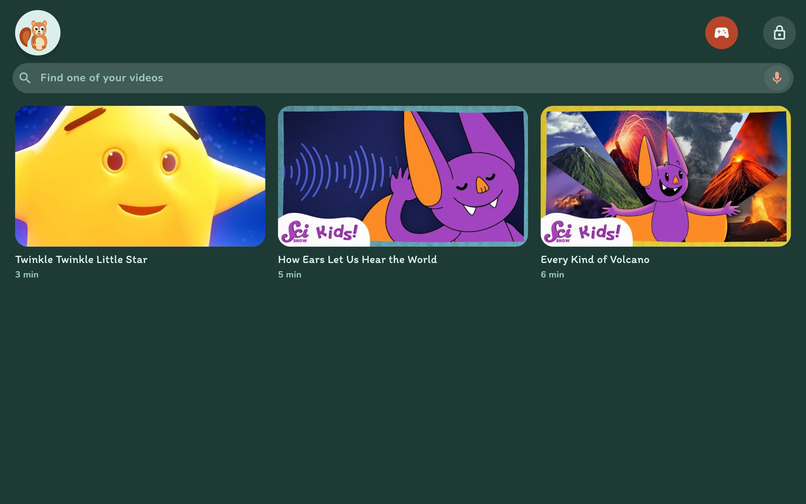
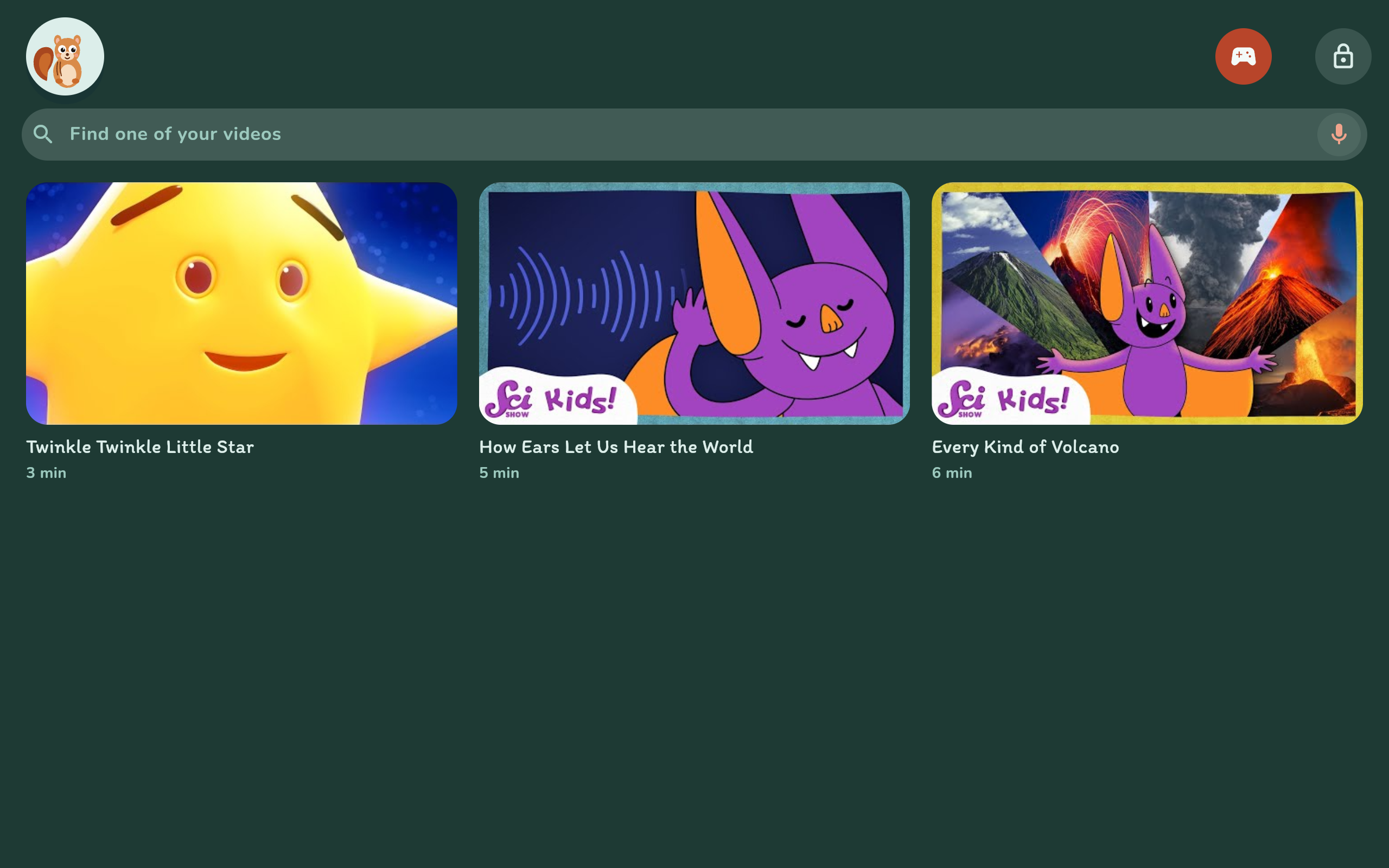
Pre-Reader Picture Grid (Ages 5-6)
-
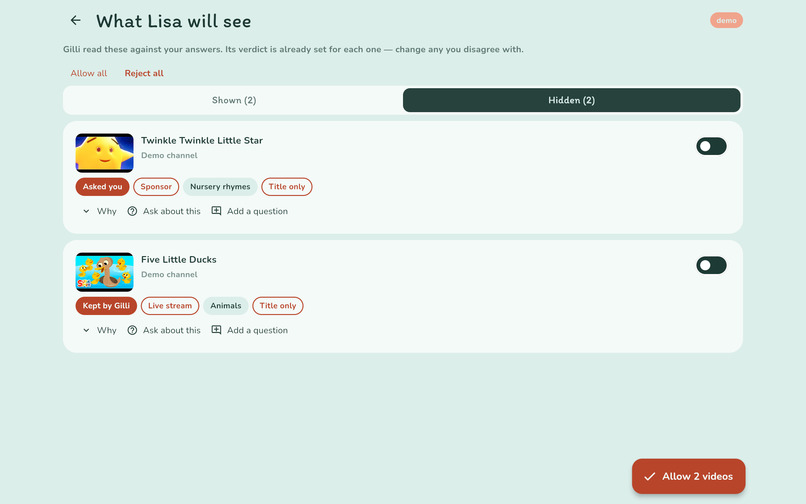
Curator Screening Verdicts: Shown & Hidden with Tags
-
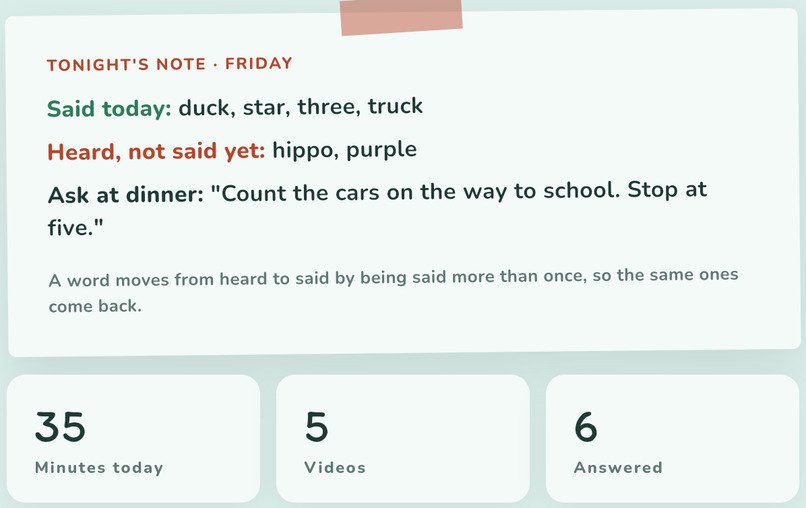
Tonight's Note: Two-Line Parent Digest & Dinner Prompt
-
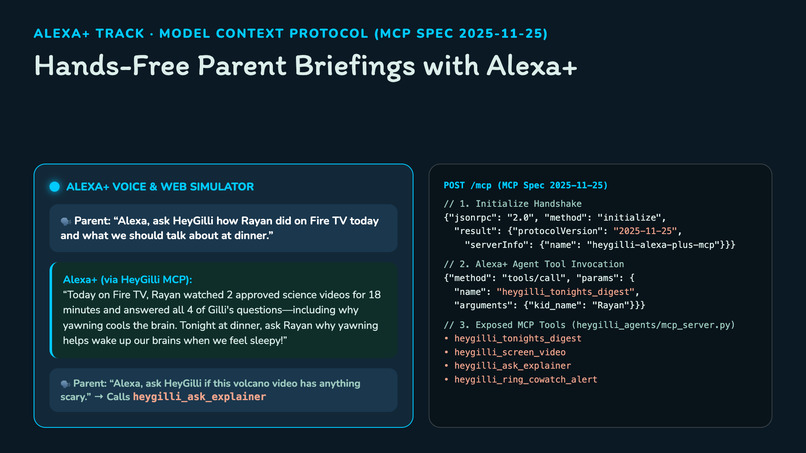
Alexa+ Hands-Free Parent Briefings via MCP 2025-11-25 Server
-
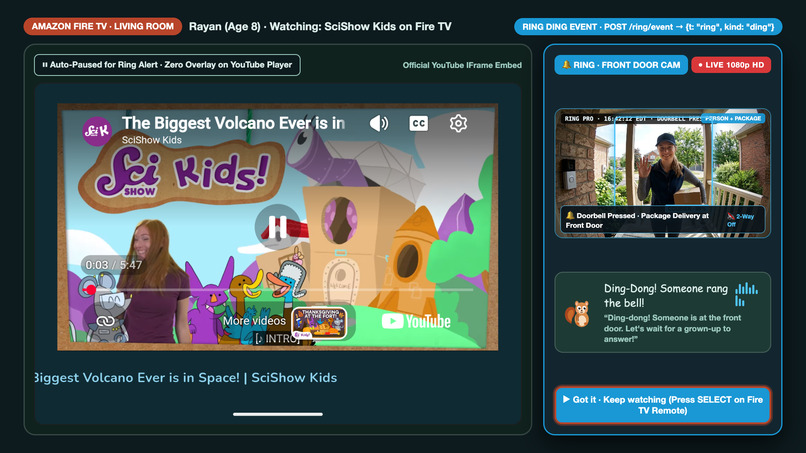
Ring Video Doorbell HD Live Co-Watching Side Panel on Amazon Fire TV
-
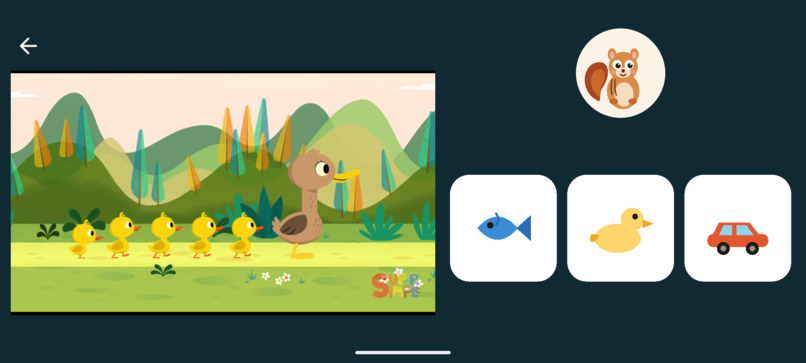
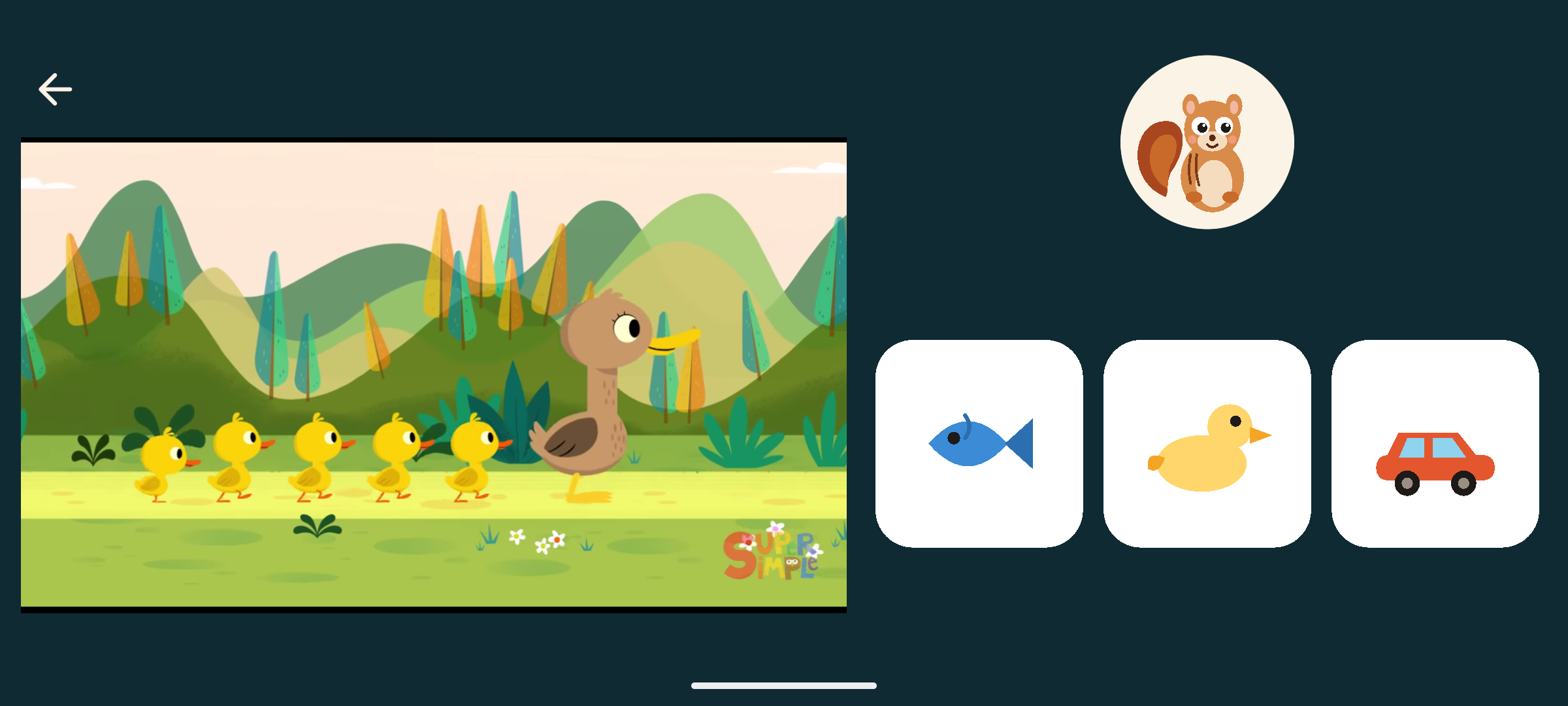
Gilli Picture Card Selection for Pre-Readers (Ages 5-6)
-
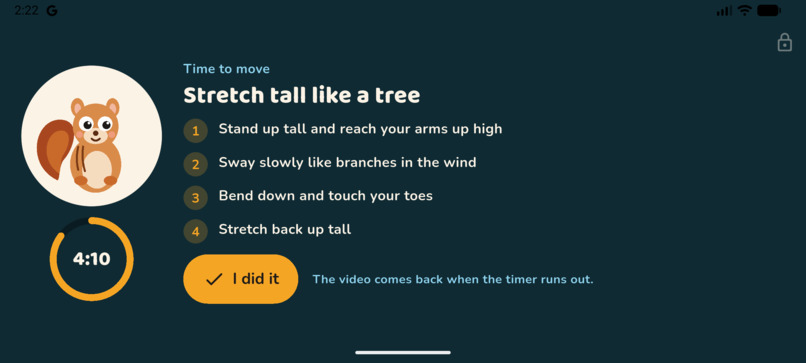
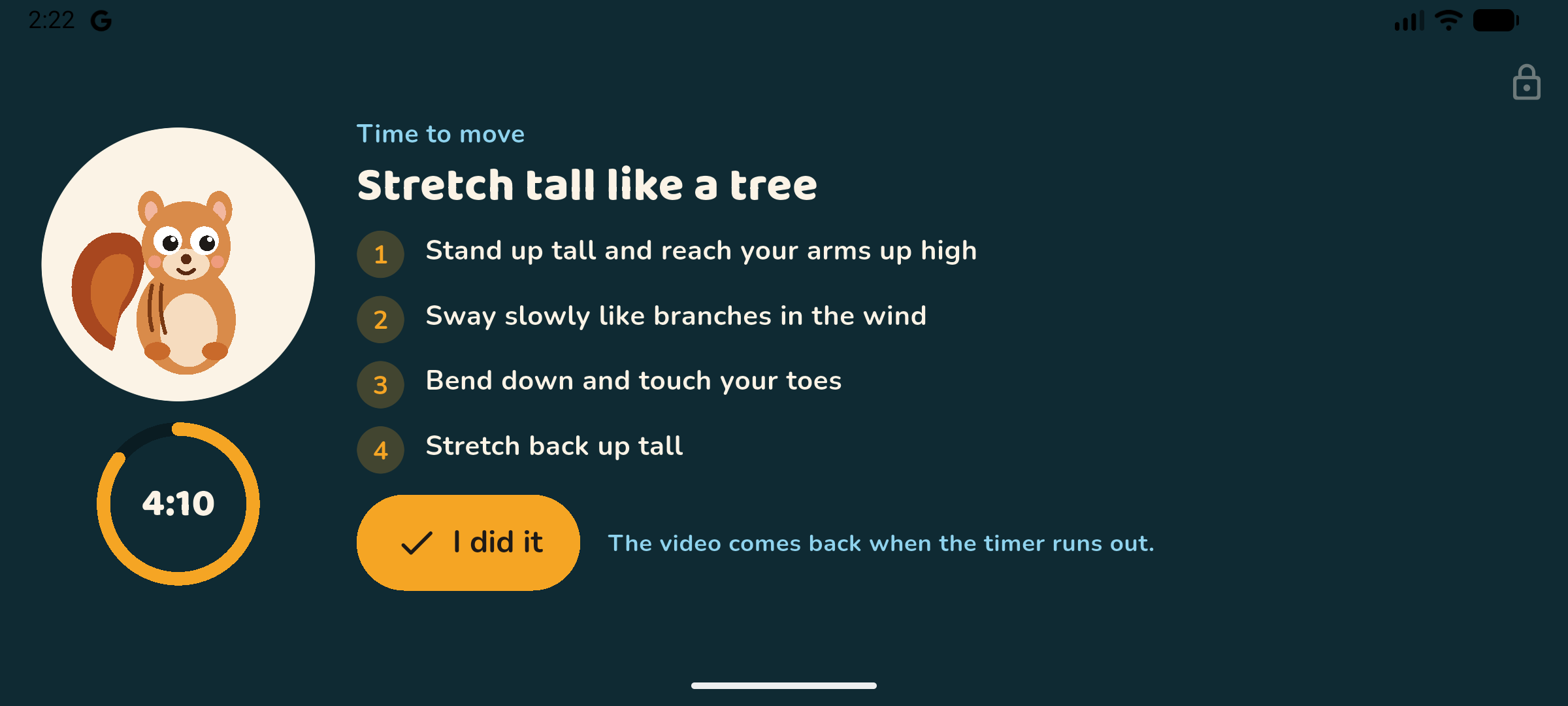
Guided Movement Break Timer on TV & Landscape
-
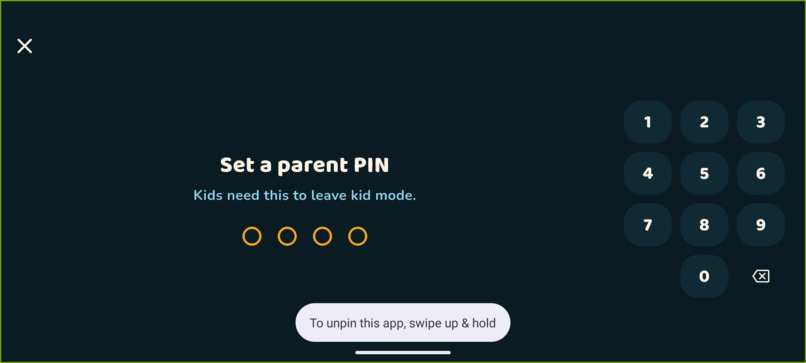
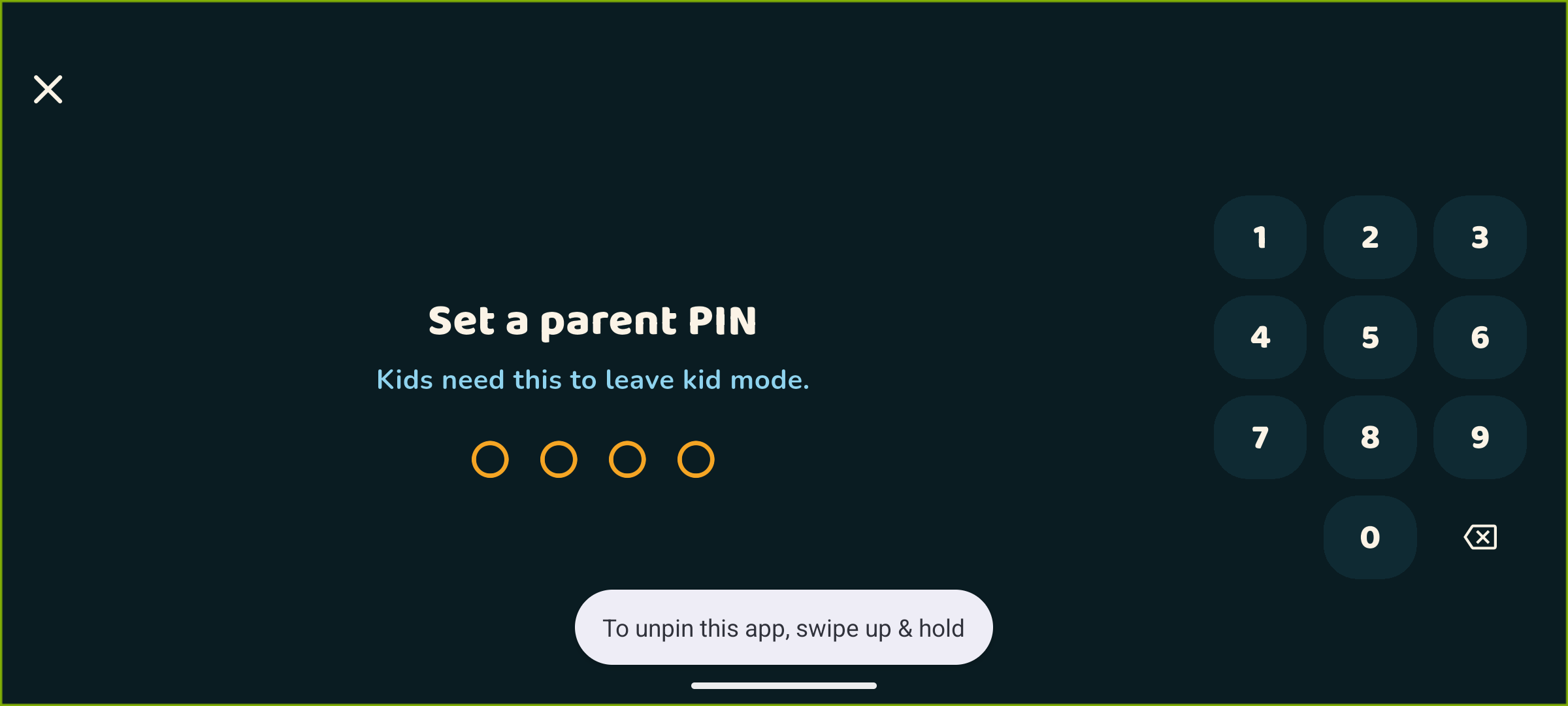
Parent PIN Gate in Landscape & Fire TV Mode
-
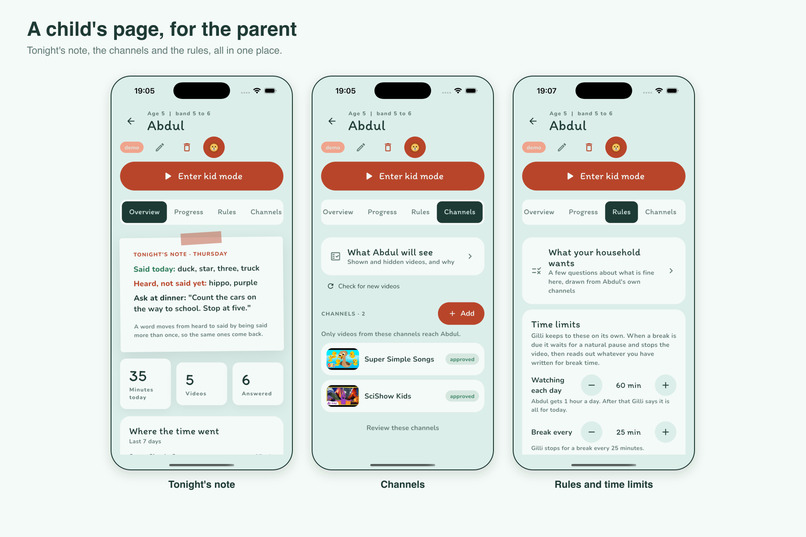
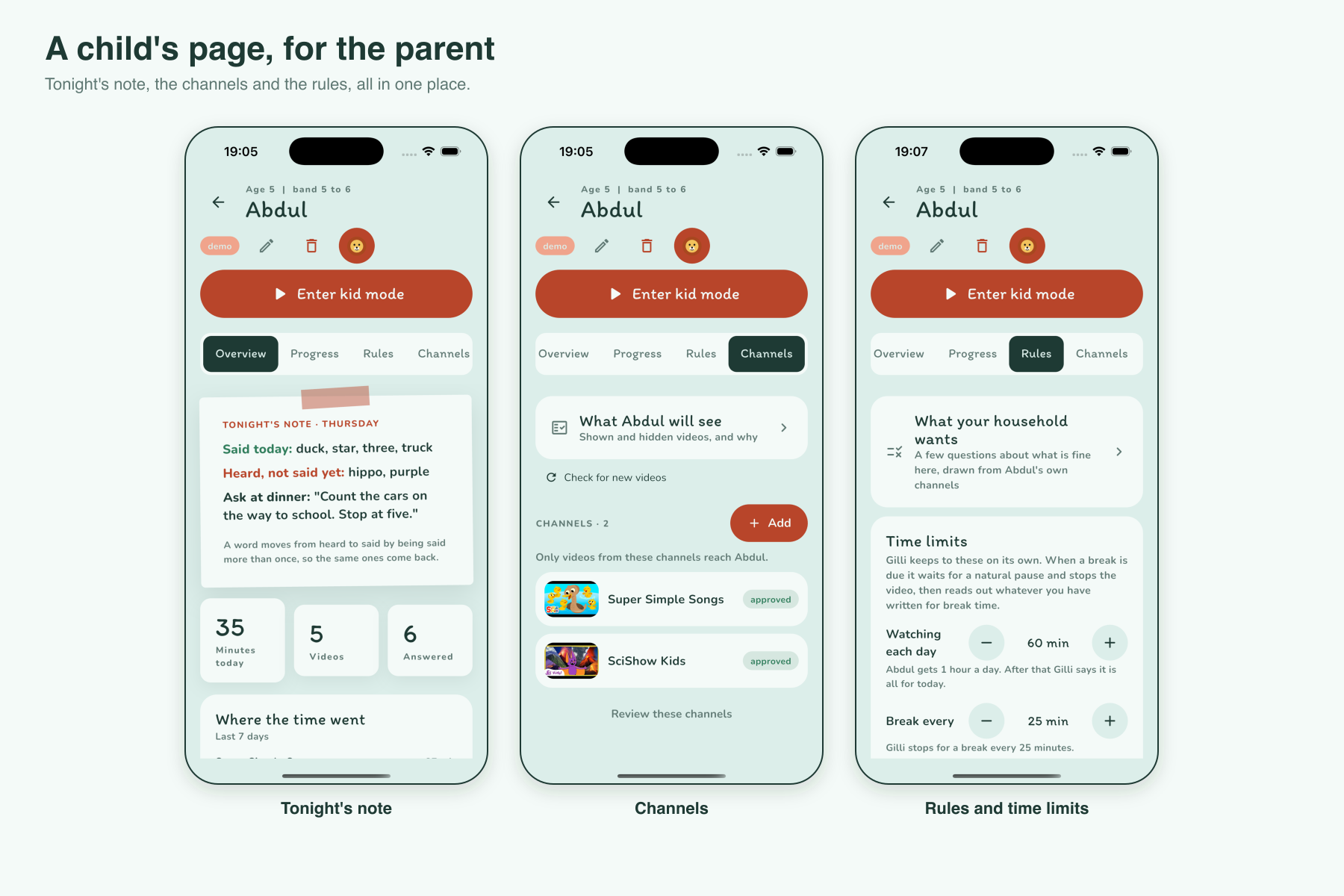
Parent Dashboard: Tonight's Note, Channels & Time Limits
Inspiration
Children aged 5 to 12 watch YouTube for hours on the living-room television and tablet, and most of that time is passive. Nobody asks them anything. Parents filter what plays, then feel guilty about the minutes anyway. At dinner the question is always "What did you watch?" and the answer is always "stuff".
Parental controls solve the wrong problem. They decide what a child can see, and do nothing during the video or after it. We wanted the opposite: an agent that does the tedious part, reading every new upload against what this family actually wants, and then sits in the room while the video plays.
The design floor was a 5-year-old who cannot read. If the youngest band needed text on screen, the design had failed. Everything for older children adds on top of that.
What it does
HeyGilli is a kid-safe YouTube front end with a co-watching buddy, Gilli the squirrel, running on Amazon Fire TV, tablets, phones, and the web, with live Ring Doorbell co-watching alerts and an Alexa+ Model Context Protocol (MCP 2025-11-25) server for hands-free parent briefings.
For the parent (via Alexa+, phone, or browser), the agent does the busywork and asks only when there is a real decision:
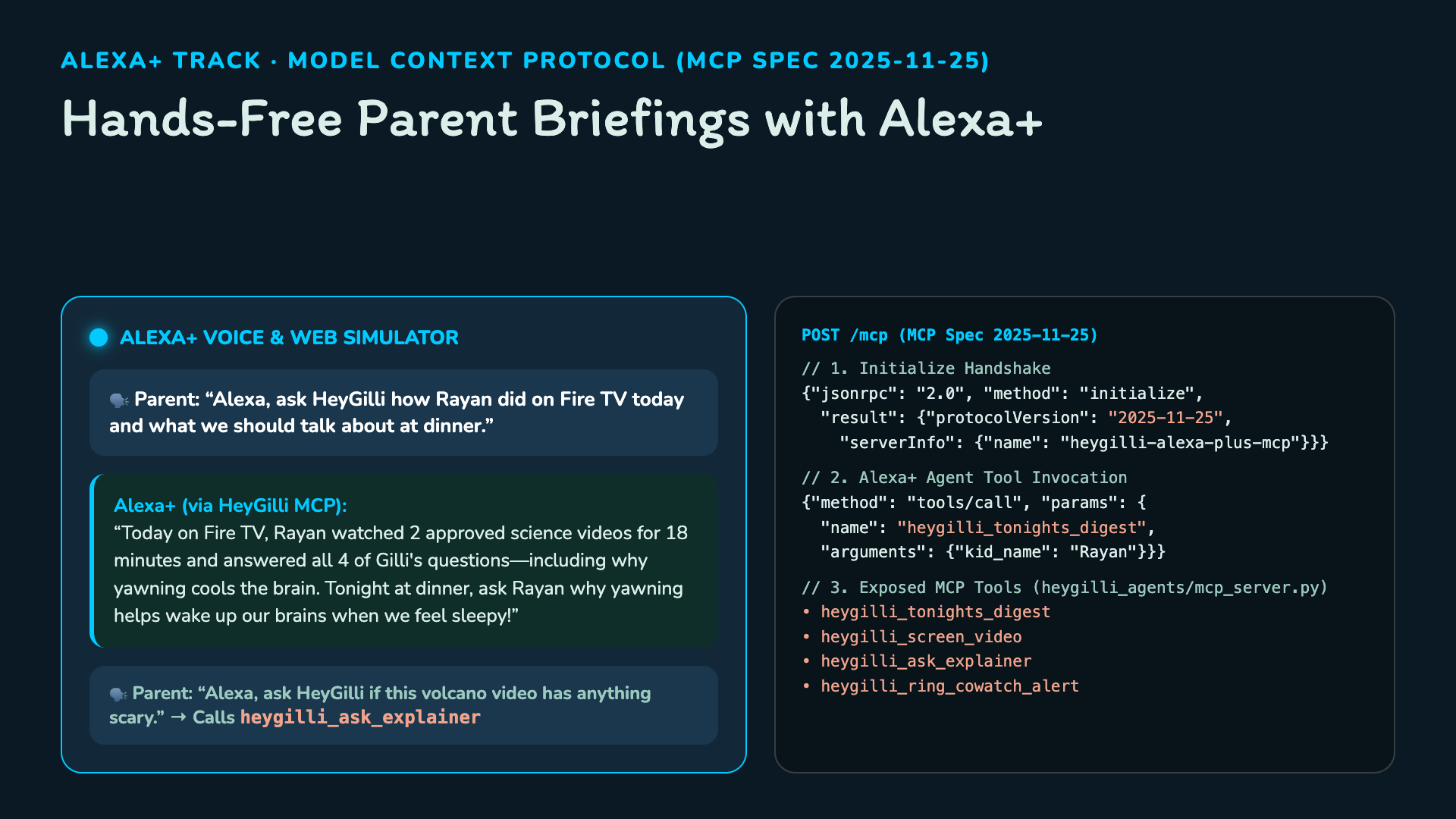
- Alexa+ Hands-Free Briefings & Video Checks (MCP
2025-11-25): HeyGilli runs a self-hosted MCP server (POST /mcpandpython -m heygilli_agents.mcp_server) implementing the2025-11-25MCP specification. Parents can ask Alexa+ "How did Rayan do on Fire TV today?" (heygilli_tonights_digest), "Is this YouTube video safe for Rayan?" (heygilli_screen_video), or "Does this video have anything scary?" (heygilli_ask_explainer), and Alexa+ speaks back the answer grounded in the video's transcript and session summary. - Setup is a short questionnaire. What the child may watch (a handful of questions about what is fine in this house, drawn from their own channels, each skippable), then what they like and what Gilli should suggest at a break. No channel lists to vouch for sight unseen.
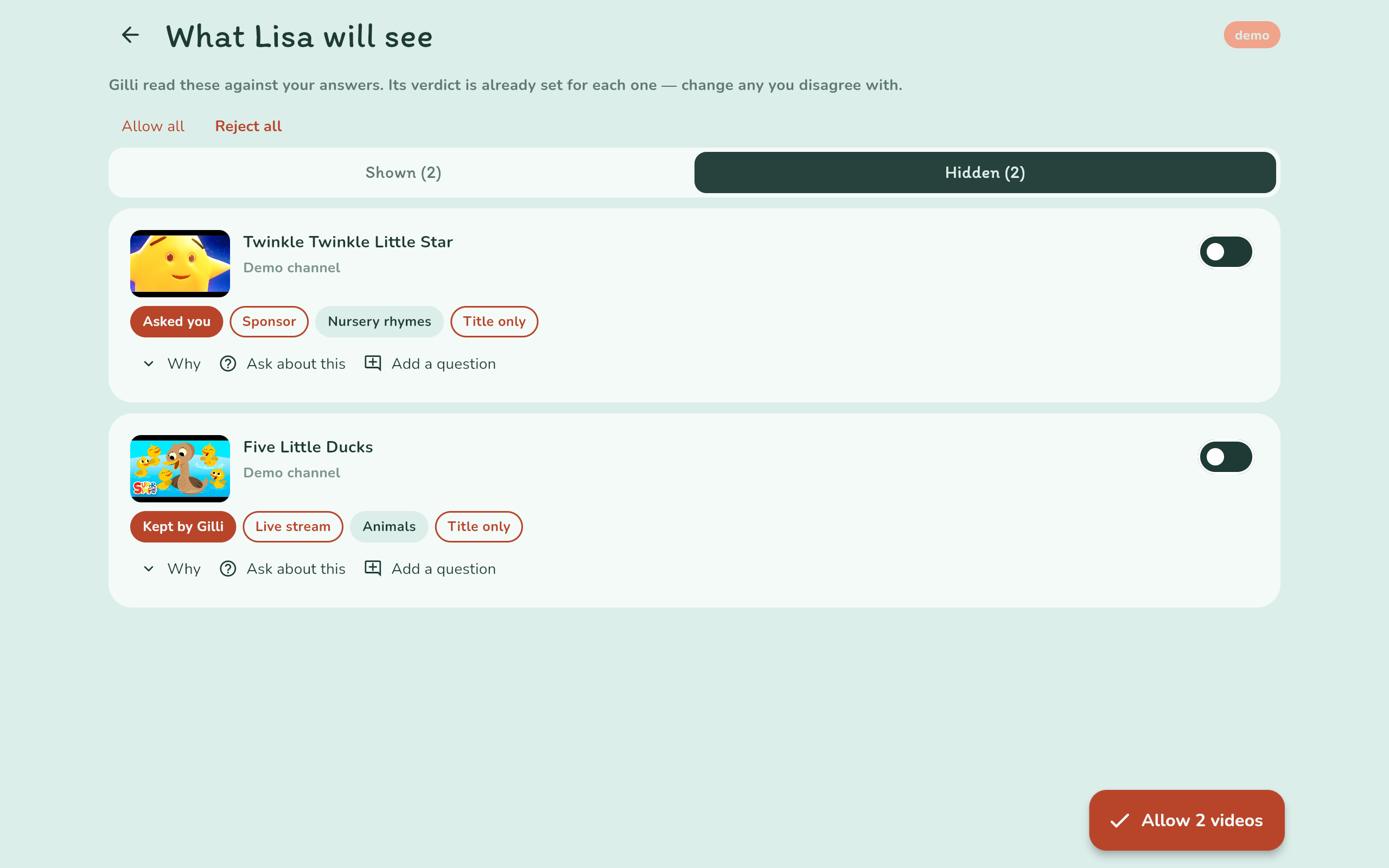
- Every upload is screened in the background against those answers. The Curator approves clear cases alone, keeps back what breaks the safety rules, and asks the parent only about borderline videos. The review screen shows each verdict as skimmable tags, split into Shown and Hidden, with the reason one tap away.
- Check before you allow. A parent who finds a video or channel themselves pastes the link and Gilli reads it against their answers first, then they can allow just that video or add the channel. Three checks a day per household.
- Ask about any video. "Is the dog hurt in it?" is answered from the video's own transcript, and says so when it cannot tell.
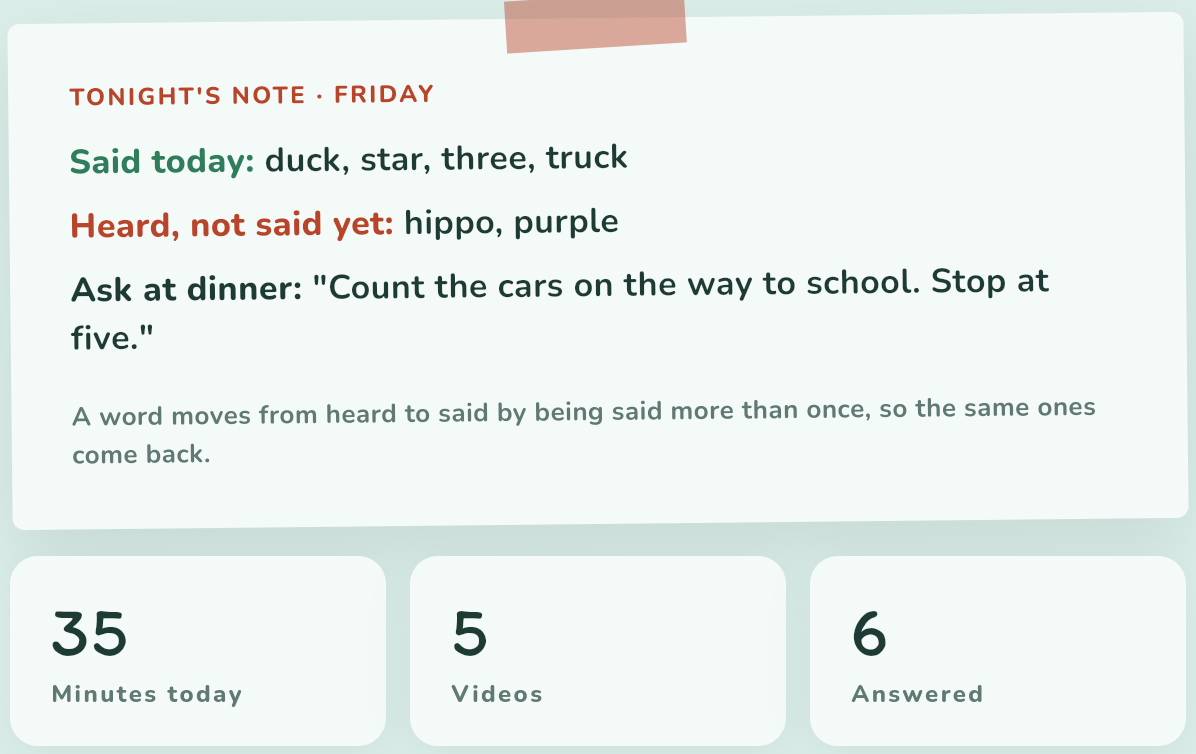
- A daily digest in two lines: minutes, videos, which words a pre-reader said or what an older child understood, and one thing to ask at dinner. A Progress screen shows the week.
- Daily limits, breaks with an activity the parent chose, a parent PIN to leave kid mode, and a card when an approved channel starts publishing something different. HeyGilli never removes a channel on its own.
- See what the agents did. Every agent call is traced in full, every answer passes guardrails before anyone sees it, and a report lists what was caught and what was fixed.
For the child, on Amazon Fire TV (10-foot Leanback UI with D-pad remote control), a phone, tablet or browser:
- Only videos the parent's rules allowed, and no recommendations. A child can search, by typing or by voice, but only among those videos; search never reaches YouTube. Videos play in the official YouTube embed, so ads still play and creators still get paid.
- On Amazon Fire TV, the child navigates the shelf and answers Gilli's questions with the Fire TV directional remote (
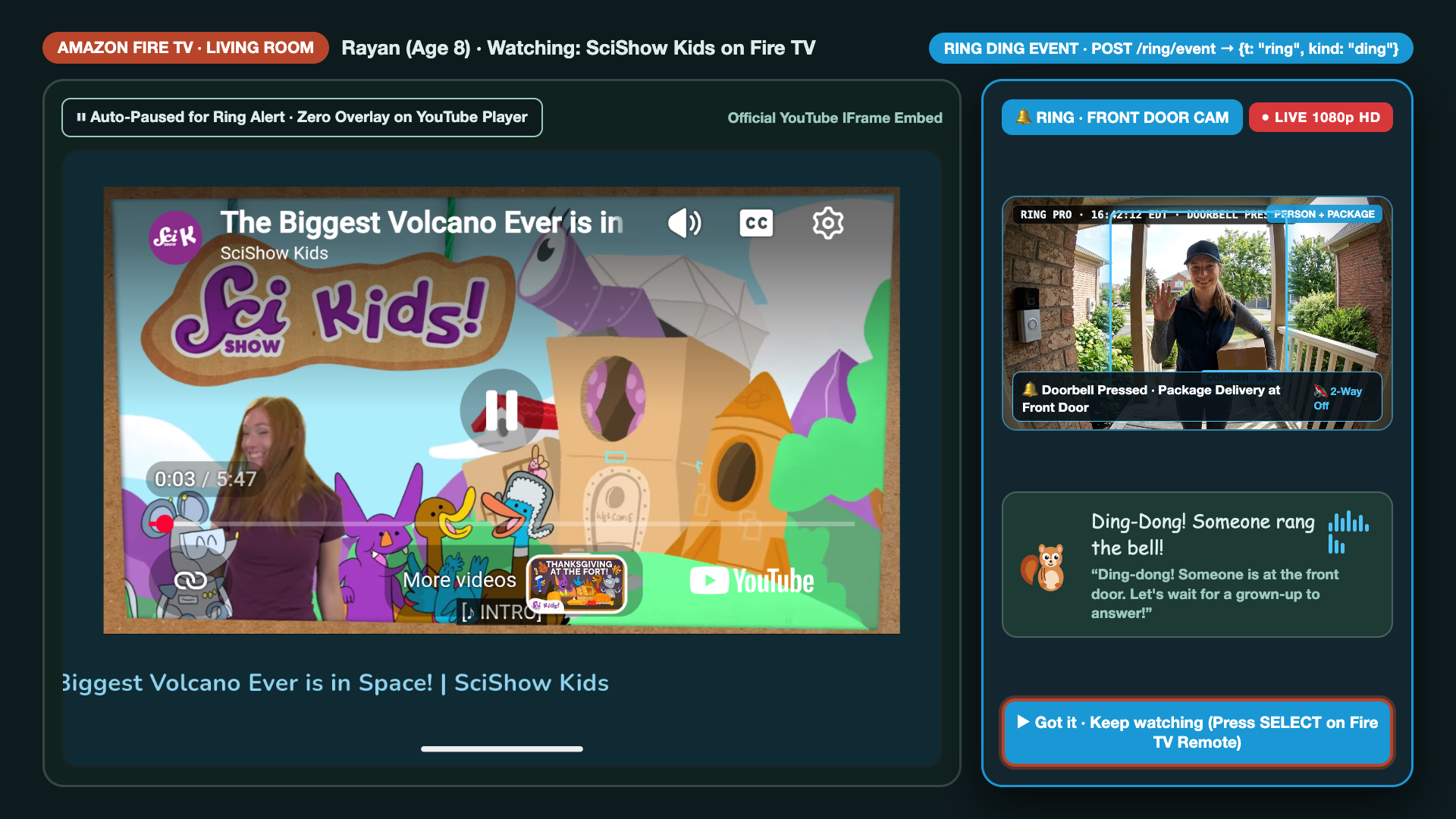
DPAD_UP/DOWN/LEFT/RIGHTandDPAD_CENTER/SELECT) or by voice. Focused cards scale by 1.05× with a high-contrast 3.5px#B8452Afocus ring, and all screens respect TV overscan safe boundaries (48dphorizontal,32dpvertical). Pairing a living-room Fire TV takes a 6-digit code from the parent's phone (TvPairingScreen), or launches directly into demo mode with one press on the remote. - Ring Doorbell Co-Watching Side Panel: Whenever someone rings the front door or triggers a Ring camera while HeyGilli is running, the gateway pushes
{t: "ring"}over the live session WebSocket (POST /ring/event), the video pauses cleanly, a side-docked RING · FRONT DOOR panel opens beside the video (never overlapping the YouTube player), and Gilli calmly speaks a kid-safe reminder: "Ding-dong! Someone is at the front door. Let's wait for a grown-up to answer!" Selecting "Got it · Keep watching" with the Fire TV remote (or waiting 15 seconds) dismisses the panel and resumes playback. - The shelf is laid out like YouTube Kids: a section per channel for a child who reads, and one big grid of pictures, each with its title, for a child who does not yet.
- At a natural break the video pauses and Gilli asks one question by voice about what just happened, written by the Planner from the video's own transcript. Two or three a video, sized to its length, which Gemini reports alongside the transcript.
- A child who goes quiet gets a hint after a few seconds: a nudge back to the moment in the video, never the answer, and the listening window starts again. They can also ask to hear the question again.
- A 5-year-old answers with one word, by selecting one of three pictures (via touch or Fire TV remote D-pad), or yes or no. The questions need no reading: Gilli asks aloud, and always says the answer word back.
- A 10-year-old answers in a sentence, or selects a written card: three short answers taken from the video, one right and two a child who half-watched might believe. Gilli builds on the answer and the video resumes. English or Urdu.
- Three age bands (5 to 6, 7 to 8, 9 to 12) set the question types, the listening window and Gilli's tone.
- Between videos Gilli naps on the shelf. A pinch wakes him: a tap, a click, or two fingers squeezed together. The games have their own button, six of them: find Gilli hiding behind one of the trees, catch him as he pops up, letters (find the big letter, then small letters, then which letter comes after M, then which word starts with it), numbers (count the ducks, then adding and taking away, then times tables and sharing), who am I (an animal from a clue: its sound, what it looks like, then a fact) and spot the animal (find the named one in a crowd of four, six, nine or twelve). The card games are written on the device for the child's age band; the Playmate agent makes each round a little harder or easier from how the last one went; nobody loses a round; and the games follow the same limits as videos.
Nothing a child says is stored. Only a score and a ten-word paraphrase are kept.
How we built it
All agent logic is Python on the Strands Agents SDK. There are eight agents, each a Strands Agent with a frozen system prompt, its own model setting, its own @tool list, and a Pydantic output schema it must fill in. The repo has twelve @tool functions; five are handed to agents, and the rest are called directly by the gateway as the plain functions they still are. No agent returns free text: every call goes through structured(), which asks Strands for structured_output and validates the object before anything uses it.
- Curator: screens each new upload against the household's answers and the safety rules.
@tool:screen_video. Structured outputCuratorDecision: approve, hide or ask the parent, with short topic and concern tags. - Planner: writes the questions for each approved video, per age band and language, as a Pydantic
QuestionPlan, each with a hint that points back to the moment without giving the answer.@tool:icon_lookup,list_icons, so a pre-reader's picture question can only name an icon that exists; a reader's cards may be words. Band and timing rules are enforced in code afterwards, and a plan written while no transcript could be read is re-planned once one can. - Buddy: runs live, one per session over a WebSocket; scores the answer, writes Gilli's reply, and adapts mid-session.
- Digest: writes the nightly parent digest and decides whether anything deserves a notification.
- Reviewer: describes what a channel actually publishes, from its feed; also notices when an approved channel drifts.
@tool:screen_video. - Coach: drafts household questions and break lines for the parent. Nothing it writes reaches a child until the parent saves it.
- Explainer: answers a parent's question about one video from its transcript.
@tool:search_transcript,channel_reputation,screen_video— the agent chooses what evidence it needs, andsearch_transcriptreturnssearched_whole_videoso it knows when "not found" can be trusted. - Playmate: runs Gilli's six games. After each round it decides how hard the next one should be for this child and what Gilli says; the code clamps the numbers per age band, picks where Gilli hides, writes the letter, sum or animal question on the device, checks the line, and caps a game at five rounds.
The agents decide; plain code fetches and enforces. An agent gets a tool where a judgement needs evidence it should go and fetch — the Explainer deciding to search a transcript, the Planner checking an icon exists. Fetching uploads, Polly speech and the length and safety rules stay ordinary functions the gateway calls, because nothing about them is the model's to decide. A @tool is still a plain function, so screen_video has two callers: the agent that may reason about it, and the pipeline that always runs it. The Curator-to-Planner hand-off is a typed Python pipeline rather than a Strands Graph, so the Planner never re-parses the Curator's prose and every plan passes the same rule check.
Every agent call is traced, checked and audited. All eight agents go through one function, and three things happen there:
- Full traces. Each call is a root OpenTelemetry span that Strands' own spans nest under: the agent, each model call with its prompt, answer and token counts, each tool call. The trace is stored with the household's data and can go to any OTLP collector. What a child said is replaced before anything is written.
- Guardrails. Every answer is checked before it is used. Nothing a child hears may contain unsafe words, links or a question about the child; Gilli never says "wrong"; the Curator cannot approve a video whose own title trips a safety rule; the digest cannot claim a child heard a word no question used. A blocked answer goes back to the agent once, saying what was wrong, and a second one falls back to the safe built-in.
- Report and fix. Every call is an event and every violation an incident. After each screening an audit looks back over what the agents already did: it hides approvals that break a safety rule, sends back to the parent the ones that should have been asked about, drops cached questions a child must not hear, and reports any agent whose answers keep ending in the fallback. It never overrules a parent.
The model is a setting: each agent reads HEYGILLI_MODEL_<ROLE>=<provider>:<model id>. Production runs on Amazon Bedrock (Amazon Nova Pro while Anthropic access on the account is pending); Anthropic, OpenAI and Ollama are one-line alternates with the same code. Every feature falls back to a deterministic built-in when a model call fails.
Around the agents: a FastAPI gateway (REST, WebSocket /sessions/{id}/ws, Ring webhook POST /ring/event, and Alexa+ MCP server POST /mcp), Amazon DynamoDB for storage, Amazon Polly for Gilli's voice, public captions and Gemini for reading a YouTube video we do not own, and on-device speech recognition. The client is one Flutter codebase that builds for Amazon Fire TV (HEYGILLI_DEVICE=tv with Android Leanback & Fastlane automation), web, Android and iOS; the web build is live at heygilli.com/app.
Challenges we ran into
(Full technical write-up & Amazon Developer product feedback in FRICTION-LOG.md)
10-Foot D-Pad Focus & Fire OS Leanback. Flutter's touch widgets (GestureDetector, InkWell) do not provide TV-standard focus traversal or visual rings on Fire OS. We built HgTvFocusable (app/lib/core/tv_focus.dart) to manage FocusNode traversal, animate a 1.05× card zoom with a 3.5px #B8452A focus ring, map LogicalKeyboardKey.select / enter / gameButtonA to selection callbacks, and apply 48dp × 32dp TV overscan padding (app/lib/core/responsive.dart). We also configured LEANBACK_LAUNCHER and a 16:9 320×180 @drawable/tv_banner in AndroidManifest.xml.
Reading a video we do not own. YouTube's caption download works only for your own videos, and from a datacenter address the public captions are often refused. Everything goes through one function with a proxy for captions and a video-understanding model as the second path, which also reports the video's length, the one fact a datacenter cannot otherwise get. When neither works, the video is read on its title and description and the parent is told so ("title only") rather than shown a verdict that pretends otherwise, and the plan is written again as soon as a transcript turns up.
A preference is not a safety rule. A channel's topics are the channel's, not each video's: a science channel posts a birthday message, an educational one posts quote compilations. The Curator checks each upload against what the family said they like, but it hides only for the safety rules; a video that merely misses the family's topics goes to the parent as a question, never hidden for that alone.
Child speech. Recognisers are trained on adults. A 5-year-old whispers, mumbles and says "gaffe" for giraffe. The backend scores against the expected word and its variants, partial counts as success for pre-readers, and after two silent turns the questions switch to pictures, which need no speech.
Trusting an agent after the fact. A prompt that says "never say wrong" is a request, not a guarantee. Checking every answer in code, sending a bad one back once with the reason, and then auditing what was already done turned "the model usually behaves" into something we can show: each call's full trace, what was caught, and what was fixed.
A user who cannot read. Every message to the youngest band omits text entirely. The question is voice, the answer is voice or a tap/D-pad press, and the feedback is Gilli saying the word with a gesture. The pictures come from a fixed library of kid-safe icons, so nothing is generated per video and nothing needs a safety review.
Accomplishments that we're proud of
- A working loop across Amazon Fire TV, Ring Doorbell, Alexa+ (MCP
2025-11-25), mobile, and web: parent setup, background screening, living-room kid session with voice questions, D-pad card selection, side-docked Ring camera alerts, and hands-free Alexa+ parent briefings, live at heygilli.com. - The agent pings the parent only when a decision is genuinely theirs; everything else it settles alone and shows its reasons.
- A question path for pre-readers that needs no reading: Gilli asks aloud, and they select a picture with the Fire TV remote or say one word.
- Playing by YouTube's rules throughout: official embed, ads untouched, no overlays during playback, no downloads.
- 724 backend tests and 664 client tests (including Fire TV mode, D-pad focus, Ring co-watch, and Alexa+ MCP 2025-11-25 tests), all passing offline.
What we learned
- Strands makes the model a constructor argument, so "provider-flexible" cost us a config loader, not an abstraction layer. That mattered when the account's Anthropic access was still pending.
- Letting the agent decide and letting code enforce is what makes an agent trustworthy with children: the model makes the judgement call, and the rules it cannot break are code.
- For pre-readers, the learning moment is the buddy saying the word, not the child getting it right. Once we accepted that, scoring got simpler and kinder.
- Latency is a product feature when a child is waiting in front of the TV: pre-generating question plans in the background and keeping the Buddy agent warm keeps live pause-to-speech latency under 1.8 seconds.
What's next
- Amazon Fire TV Remote native Alexa speech button integration once exposed to third-party apps.
- Anthropic models on Bedrock once access is granted, and AgentCore Runtime for the agents.
- Sibling mode on a shared Fire TV screen, with questions pitched to whoever answers.
How to test it
- No-Login Web Demo & Live Simulators (
https://heygilli.com/try): Try the Curator's verdicts on real YouTube uploads, trigger the Ring Doorbell Co-Watching Simulator, or run live JSON-RPC calls against the Alexa+ MCP (2025-11-25) server with zero login required. - Full Web / Mobile App (
https://heygilli.com/app/): Choose Set up without Google to create a household with no account, add a child (ages 5–12), allow videos on the Review screen, and tap Enter kid mode to co-watch with Gilli. - Amazon Fire TV / Android TV APK: Run
cd app && flutter run --dart-define=HEYGILLI_DEVICE=tvon a Fire TV Stick or Android TV Leanback emulator (or build withcd app/android && fastlane android build_tv). PressSELECT/Enteron the Fire TV remote to launch Try Demo Mode on TV, navigate the 3-column shelf with the D-pad, and answer Gilli's questions by remote or voice. - Alexa+ MCP Server (
POST /mcporstdio): Send JSON-RPC 2.0initialize,tools/list, andtools/call(heygilli_tonights_digest,heygilli_screen_video,heygilli_ask_explainer,heygilli_ring_cowatch_alert) toPOST /mcpor runpython -m heygilli_agents.mcp_server.
Third-party integrations & compliance disclosure
HeyGilli plays videos through the official YouTube IFrame Player API in an embedded player. Ads are untouched, nothing is downloaded, and nothing is drawn over a playing video (including the Ring Doorbell panel, which docks in a dedicated 340dp side column beside the player). New uploads are discovered through public channel RSS feeds and oEmbed; a parent's channel search and video lengths use the YouTube Data API under Google's terms. Transcripts come from public captions or the Google Gemini API given a public YouTube URL. Speech recognition runs on the device; nothing a child says is stored. Gilli's voice is Amazon Polly. Agents run on the Strands Agents SDK and Amazon Bedrock. Google Sign-In is optional for parents.
Structured Friction Log Entries (10% Judging Bonus Format)
Full document: FRICTION-LOG.md
Each entry below follows the official Amazon Developer Hackathon friction log schema: Task Attempted → Steps Taken → Expected vs. Actual → Severity Rating → Workaround Used → Actionable Suggestion.
Entry 1: 10-Foot D-Pad Focus Traversal & Visual Rings on Fire OS (Flutter / Android Leanback)
- Task Attempted: Build a 10-foot Amazon Fire TV shelf and co-watching question card interface navigated exclusively with the Fire TV directional remote (
DPAD_UP,DPAD_DOWN,DPAD_LEFT,DPAD_RIGHT,DPAD_CENTER/SELECT). - Steps Taken:
- Compiled the Flutter client for Fire OS (
--dart-define=HEYGILLI_DEVICE=tv) and launched on a 1080p Android TV / Fire TV Leanback emulator. - Wrapped video cards and picture answer cards in standard
InkWell/Focuswidgets and tested directional navigation using hardware key events.
- Compiled the Flutter client for Fire OS (
- Expected vs. Actual:
- Expected: Focused cards should visibly highlight with a TV-standard scale/border ring, and pressing
DPAD_CENTER(LogicalKeyboardKey.select) should trigger the card's tap handler reliably across rows. - Actual: Standard touch widgets showed nearly invisible focus states from 10 feet away,
LogicalKeyboardKey.selectwas ignored by defaultGestureDetectorcallbacks, and focus occasionally got trapped inside nested scroll views.
- Expected: Focused cards should visibly highlight with a TV-standard scale/border ring, and pressing
- Severity Rating: High (Blocks usability on non-touch Fire TV devices).
- Workaround Used: Engineered a custom reusable focus wrapper (
HgTvFocusableinapp/lib/core/tv_focus.dart) that manages a dedicatedFocusNode, animates a $1.05\times$ card zoom with a high-contrast 3.5px#B8452Afocus ring, and explicitly mapsLogicalKeyboardKey.select,enter,numpadEnter,space, andgameButtonAto the selection callback. - Actionable Suggestion: Publish an official Amazon Fire TV Flutter / Web 10-foot UI guidelines package (or interactive D-pad focus overlay inspector in Amazon Appstore Developer Tools) that visualizes focus order and provides standard Fire OS focus-ring tokens out of the box.
Entry 2: Fire OS Leanback Home Screen 16:9 Banner Requirement
- Task Attempted: Register HeyGilli in the Amazon Fire TV / Android Leanback home launcher with a crisp brand tile.
- Steps Taken:
- Added
<category android:name="android.intent.category.LEANBACK_LAUNCHER"/>toapp/android/app/src/main/AndroidManifest.xml. - Installed the debug/release APK on a Leanback TV launcher with only the standard square
@mipmap/ic_launchericon configured.
- Added
- Expected vs. Actual:
- Expected: The launcher should either gracefully frame the app icon or warn during build that
android:banneris missing whenLEANBACK_LAUNCHERis declared. - Actual: Without an explicit
320×180(16:9)android:banner="@drawable/tv_banner"attribute on<application>, the Leanback launcher renders a stretched or blank placeholder tile with no build-time warning.
- Expected: The launcher should either gracefully frame the app icon or warn during build that
- Severity Rating: Medium (Degrades store/home-screen presentation and can fail Appstore TV visual QA).
- Workaround Used: Generated a dedicated 16:9
320×180PNG banner atapp/android/app/src/main/res/drawable-xhdpi/tv_banner.pngand declaredandroid:banner="@drawable/tv_banner",android.software.leanback(required="false"), andandroid.hardware.touchscreen(required="false") inAndroidManifest.xml. - Actionable Suggestion: Add a pre-submission static manifest analyzer in the Amazon Appstore Console / CLI that validates
LEANBACK_LAUNCHER+320×180android:banner+touchscreen=falseas soon as an APK is uploaded or checked locally.
Entry 3: Television Overscan Clipping Edge Controls on 1080p Living-Room Displays
- Task Attempted: Position the Parent PIN lock button, back button, and co-watching status badges along the top and bottom edges of the Fire TV screen.
- Steps Taken:
- Rendered the landscape Kid Home and Session screens at
1920×1080full bleed (EdgeInsets.all(16)). - Inspected the layout under standard 3.5%–5% television overscan boundaries.
- Rendered the landscape Kid Home and Session screens at
- Expected vs. Actual:
- Expected: Edge buttons and badges should remain fully legible and selectable on consumer televisions.
- Actual: Consumer TV overscan clipped the outer 32–48px of the viewport, partially hiding the top-right Parent PIN lock icon and bottom status bar.
- Severity Rating: Medium (Clips peripheral UI controls on physical televisions).
- Workaround Used: Built responsive TV safe-zone helpers (
context.tvOverscanPaddingapplying48dphorizontal and32dpvertical margins inapp/lib/core/responsive.dart) activated wheneverAppConfig.isTvis true. - Actionable Suggestion: Include a toggleable "5% TV Overscan Safe Frame" guide overlay in the Fire TV / Vega simulator so developers immediately spot edge clipping during development.
Entry 4: Capturing Child Speech via Fire TV Remote Microphone in Third-Party Apps
- Task Attempted: Allow a child sitting 10 feet from the television to answer Gilli's spoken comprehension question by speaking into the Fire TV Alexa Voice Remote.
- Steps Taken:
- Integrated standard Android
SpeechRecognizer/speech_to_texton the client. - Tested pressing the microphone button on a Fire TV remote while inside our third-party app.
- Integrated standard Android
- Expected vs. Actual:
- Expected: Pressing the remote microphone button inside an active audio/voice prompt should stream audio or return a speech-to-text transcript to the foreground app.
- Actual: The hardware Alexa/mic button on the Fire TV remote invokes the system-wide Alexa overlay rather than routing audio to the foreground app's
SpeechRecognizerunless a separate Bluetooth/USB mic is active or the user selects an on-screen D-pad option.
- Severity Rating: High (Impacts voice-first child and accessibility interactions on Fire TV).
- Workaround Used: Provided dual-modality answering on Fire TV: children can either speak (when a microphone source is available) OR select one of three visual picture/word cards directly with the Fire TV remote D-pad (
DPAD_LEFT/RIGHT+SELECT), and after two silent turns the Planner/Buddy automatically switches to picture cards. - Actionable Suggestion: Expose an official Fire TV Remote Push-to-Talk Speech API for third-party apps (with explicit user permission) that captures short utterance audio or on-device STT transcripts without leaving the foreground app.
Entry 5: Ring Video Doorbell Co-Watching Interrupts & Sandbox Webhook Simulation
- Task Attempted: Pause an active Fire TV YouTube co-watching session when someone presses the Ring Video Doorbell (
ding) or triggers porchmotion, display the live front-door camera feed, and have Gilli speak a kid-safe reminder—without violating YouTube IFrame API overlay rules. - Steps Taken:
- Designed the live session WebSocket protocol (
{t: "ring", kind: "ding" | "motion"}) and side-dockedRingDoorbellSidePanel. - Looked for a local Ring developer CLI or sandbox simulator capable of emitting synthetic
dingandmotionwebhook events with sample 1080p doorbell camera snapshots on demand during automated tests.
- Designed the live session WebSocket protocol (
- Expected vs. Actual:
- Expected: A Ring developer CLI (
ring-cli trigger ding) or sandbox endpoint that fires realistic webhook payloads and sample camera frames for testing living-room integrations. - Actual: Testing real-time doorbell interrupts during video playback required building our own synthetic webhook endpoint and camera frame simulator (
POST /ring/eventinagents/heygilli_agents/gateway.py) and custom side-by-side layout logic because floating PiP overlays on top of a playing YouTube embed violate YouTube IFrame API terms.
- Expected: A Ring developer CLI (
- Severity Rating: Medium (Adds integration testing overhead for cross-device Ring + Fire TV apps).
- Workaround Used: Built
POST /ring/eventon our FastAPI gateway to broadcast{t: "ring"}over active session WebSockets, pause the YouTube player first, slide open a 340dp side-docked RING · FRONT DOOR panel beside the video (0% overlap on the video surface, two-way mic locked in Kid Mode), and synthesize Gilli's safety reminder via Amazon Polly. - Actionable Suggestion: Provide an official Ring Sandbox Webhook & Snapshot Simulator CLI (similar to
stripe trigger) that emits realisticding,motion, andperson_detectedevents with sample HD porch camera streams for local development and CI tests.
Entry 6: Alexa+ Model Context Protocol (MCP Spec 2025-11-25) Streamable HTTP Transport
- Task Attempted: Expose HeyGilli's parent tools (
heygilli_tonights_digest,heygilli_screen_video,heygilli_ask_explainer,heygilli_ring_cowatch_alert) to Alexa+ via a self-hosted MCP2025-11-25server. - Steps Taken:
- Implemented JSON-RPC 2.0 handlers for
initialize(negotiatingprotocolVersion: "2025-11-25"),notifications/initialized,tools/list,tools/call,resources/list,resources/read, andprompts/listinagents/heygilli_agents/mcp_server.py. - Mounted Streamable HTTP endpoints (
POST /mcpandGET /mcp) on the FastAPI gateway (agents/heygilli_agents/gateway.py).
- Implemented JSON-RPC 2.0 handlers for
- Expected vs. Actual:
- Expected: A drop-in Alexa+ MCP Inspector CLI or web test harness that validates
2025-11-25Streamable HTTP responses, tool input schemas, and natural-language Alexa+ voice prompt routing before skill certification. - Actual: Developers must manually construct JSON-RPC
2025-11-25handshake andtools/calltest suites and build their own voice-turn simulator to preview how Alexa+ summarizes structured MCPstructuredContentfor spoken output.
- Expected: A drop-in Alexa+ MCP Inspector CLI or web test harness that validates
- Severity Rating: Low (Protocol is clean and well-specified, but a dedicated Alexa+ MCP test harness would speed up iteration).
- Workaround Used: Wrote automated pytest suites (
agents/tests/test_mcp_server.py) verifying2025-11-25protocol negotiation and tool execution over both Streamable HTTP (POST /mcp) and stdio. - Actionable Suggestion: Release an
alexa-mcp-inspectorCLI tool that connects to anyPOST /mcp(2025-11-25) endpoint, validates tool schemas against Alexa+ voice constraints, and simulates spoken Alexa+ responses from MCPcontent/structuredContentpayloads.
Entry 7: Multi-Agent Latency on Amazon Bedrock & Strands Agents SDK
- Task Attempted: Run 8 specialized agents on Strands Agents SDK (
strands-agents) and Amazon Bedrock (us.amazon.nova-pro-v1:0) while keeping live pause-to-speech latency on Fire TV under 2 seconds. - Steps Taken:
- Requested Bedrock model access in
us-east-1and configuredBedrockModelin Strands with Pydanticstructured_outputschemas. - Measured end-to-end latency when running transcript screening, question generation, and live answer evaluation.
- Requested Bedrock model access in
- Expected vs. Actual:
- Expected: Sub-2-second response times for live child turns and immediate access to all Bedrock foundation models.
- Actual: Calling transcript analysis and question planning inline during a live video pause took 4–6 seconds (too slow for a 5-year-old waiting at the TV), and Anthropic model access on a newly created AWS account required manual support approval while Amazon Nova Pro worked immediately out of the box.
- Severity Rating: Medium (Requires architectural decoupling to meet real-time conversational UX targets).
- Workaround Used:
- Configured Strands' provider-flexible model loader (
HEYGILLI_MODEL_<ROLE>) to run on Amazon Nova Pro (us.amazon.nova-pro-v1:0), which achieved16/18on our structured evaluation harness with zero account gating. - Split the architecture into an asynchronous Background Tier (Curator + Planner pre-compute verdicts and timestamped
QuestionPlanobjects) and a lightweight Live Tier (Buddy agent over WebSocket + pre-warmed Amazon Polly TTS), cutting live pause-to-speech latency to under 1.8 seconds.
- Configured Strands' provider-flexible model loader (
- Actionable Suggestion: Add first-class partial structured-output streaming in
strands-agents(Agent.stream_structured()) so text-to-speech (Amazon Polly) can begin synthesizing thespoken_textfield of a Pydantic model before the trailing metadata fields finish generating.
Built With
- alexa-plus
- amazon-bedrock
- amazon-dynamodb
- amazon-fire-tv
- amazon-nova
- amazon-polly
- android-tv
- dart
- fastapi
- fastlane
- fire-os
- flutter
- gemini-api
- mcp
- opentelemetry
- pydantic
- python
- ring
- strands-agents
- websockets
- youtube-iframe-api

Log in or sign up for Devpost to join the conversation.