-
-
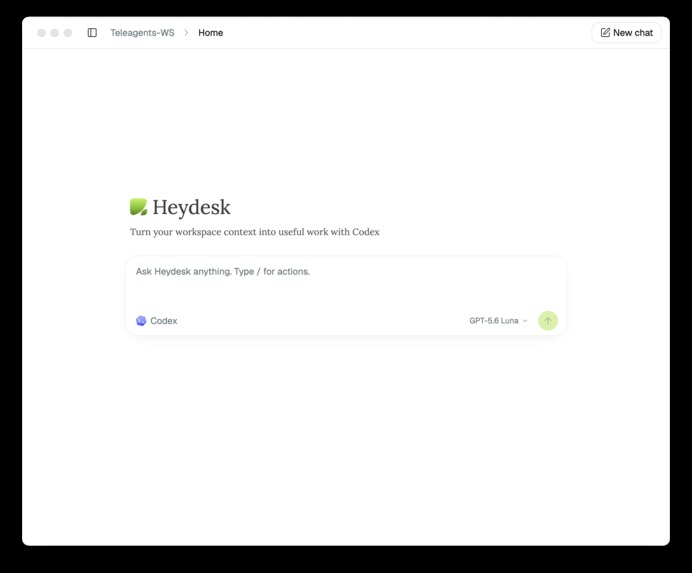
Heydesk Home
-
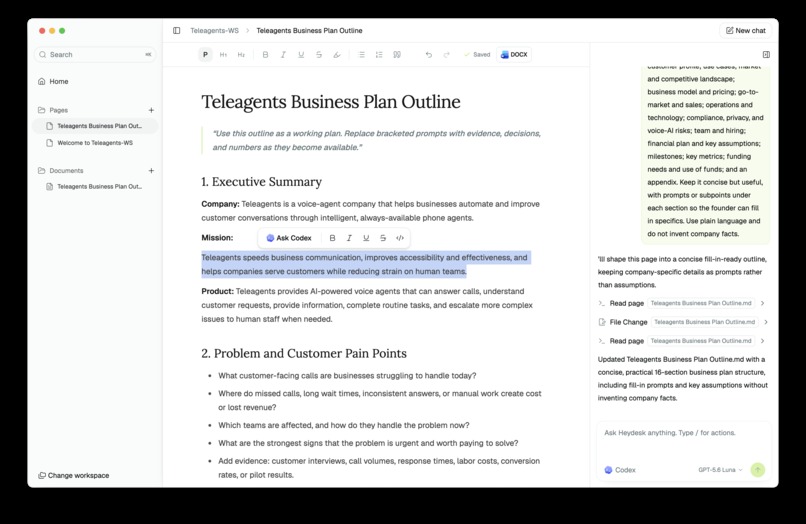
Page Editor
-
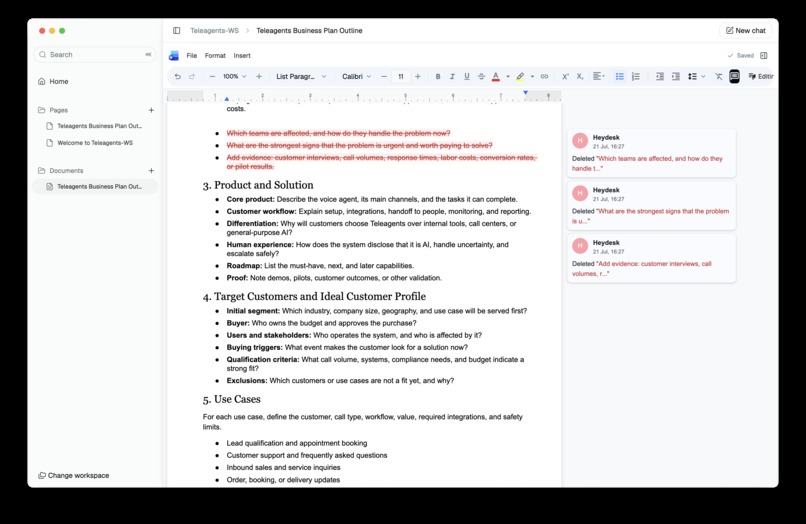
Docx Editor
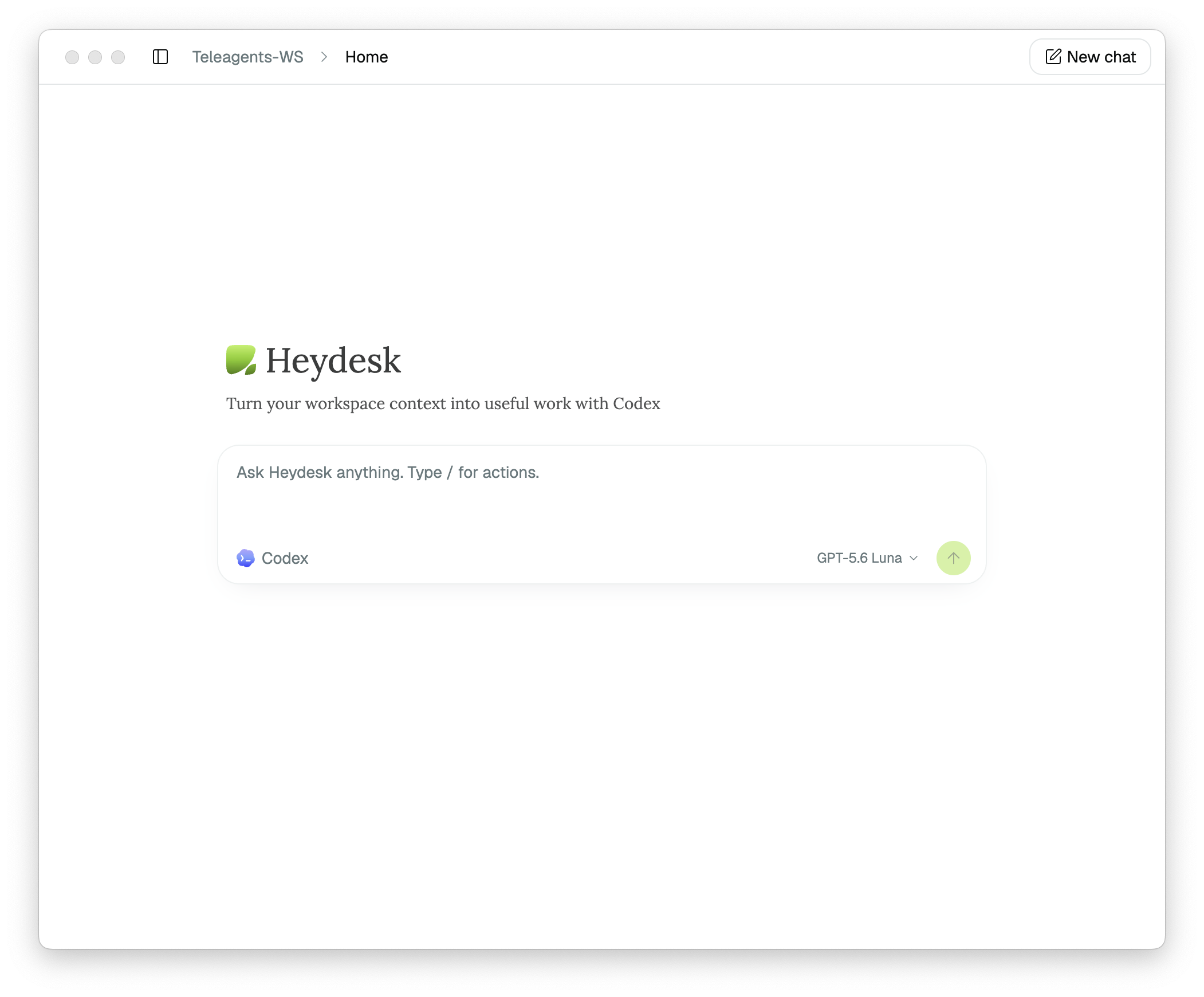
Heydesk
A local-first Documents OS powered by Codex.
Heydesk brings Codex directly into first-class Markdown and Word editors, creating a continuous path from workspace context to polished, editable documents.

Inspiration
AI is very capable at reasoning, drafting, and manipulating files. But some workflows are still not optimal: usually you ask codex to create a document, open the result in another editor, make changes manually, return to the assistant, provide context again, and repeat.
Codex understands the work, but it is not present where the work actually happens.
Having experienced this a lot myself, my north star was:
Can I have a first-class editor experience with Codex as my co-writer whenever I need it?
The Problem
Codex already has powerful filesystem and document capabilities, but users often have to choose between two incomplete experiences:
- A powerful AI agent with file access but no first-class editor.
- A polished editor where the AI assistant is not continuously present.
This creates several problems:
- Context must be copied between applications.
- AI-generated changes are harder to inspect.
- The assistant feels disconnected from the document.
- Important work remains trapped in transient chat output.
- Users lose the continuity between conversation, action, and final artifact.
Heydesk combines both surfaces into one local-first workflow.
What Heydesk Does
Heydesk is a desktop documents OS where Codex works alongside you inside the workspace.
It provides:
- Local workspaces backed by ordinary files.
- Markdown and MDX pages for fast drafting and knowledge work.
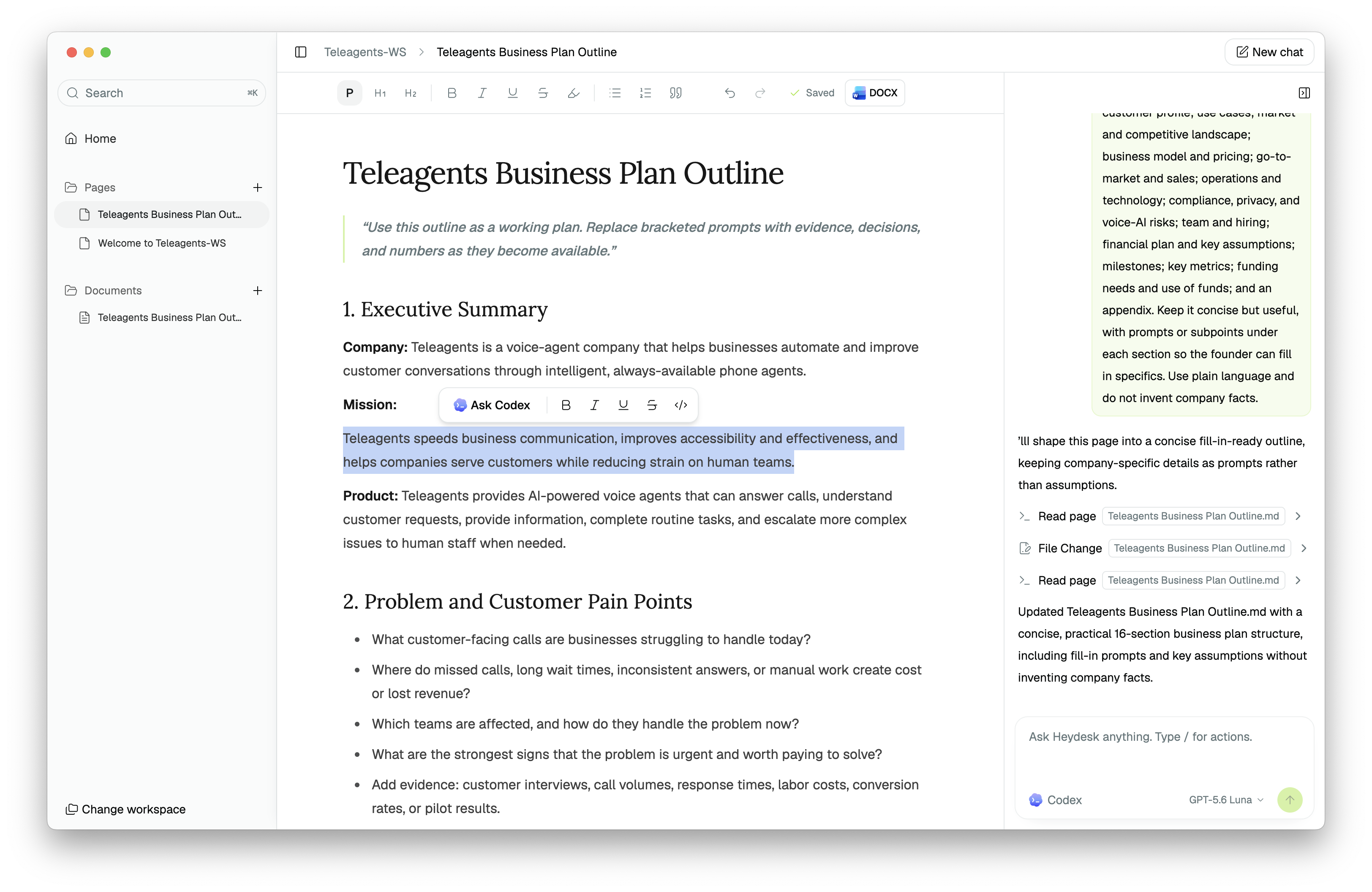
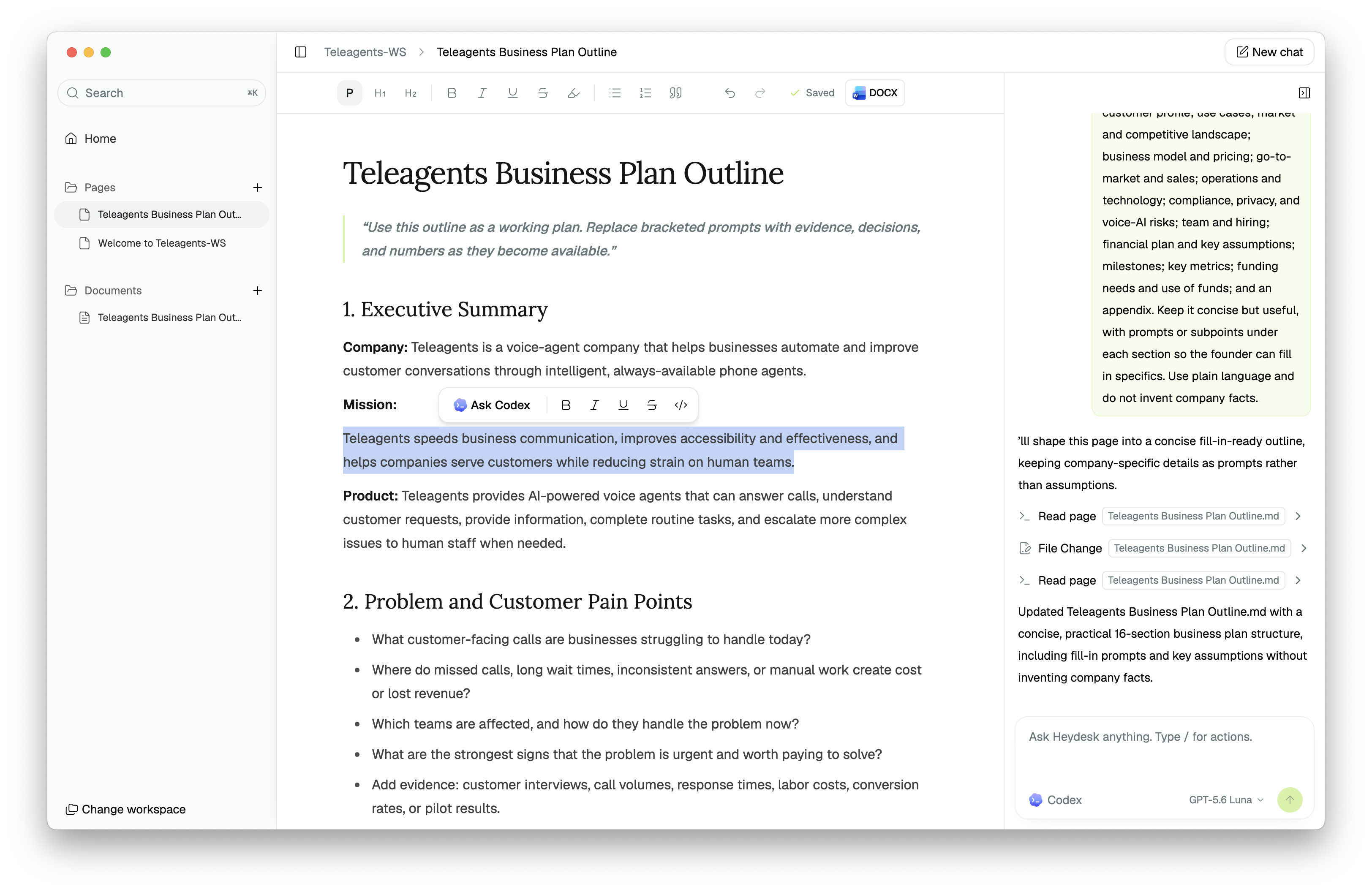
- A rich page editor with contextual assistant actions.
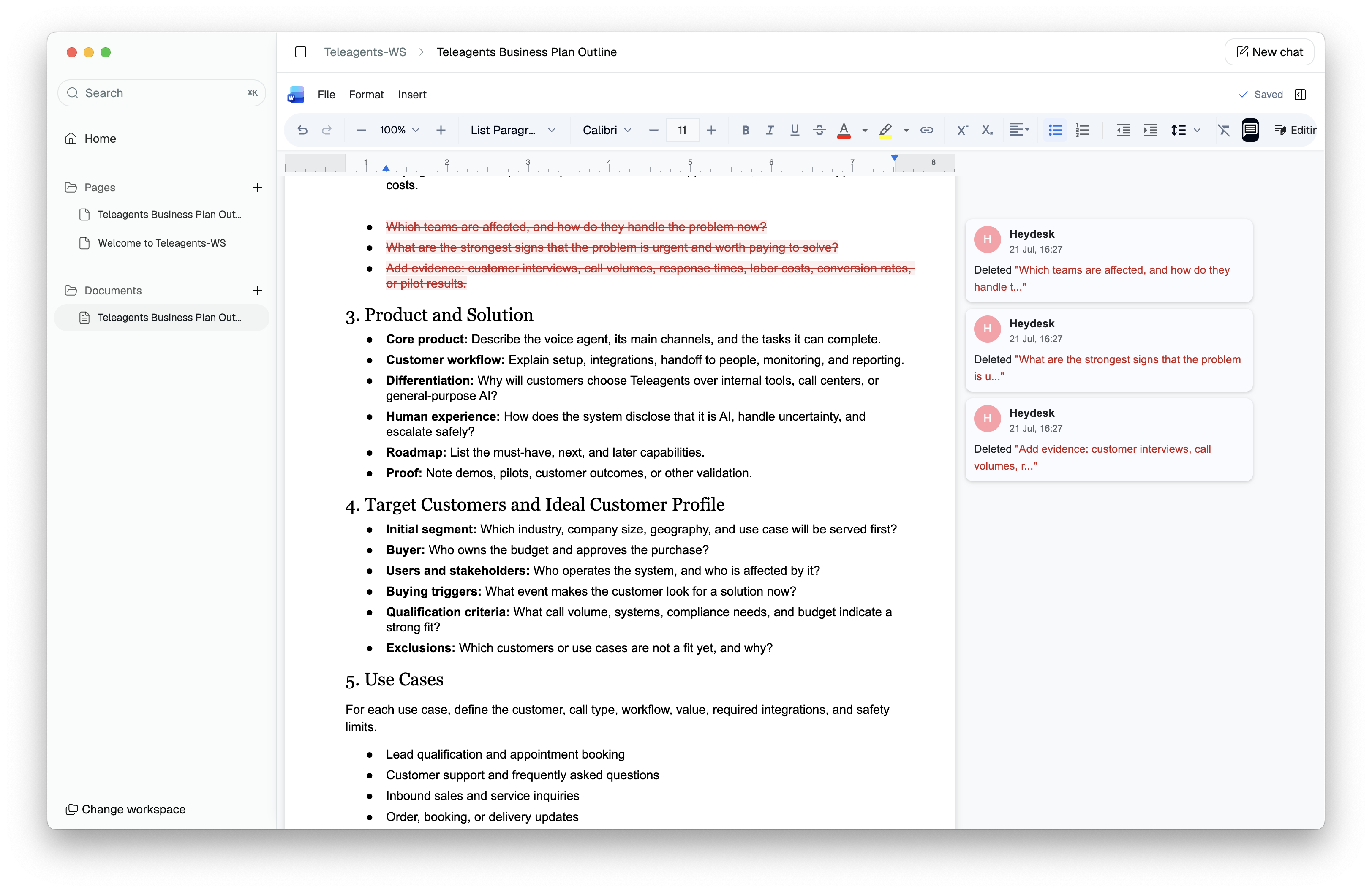
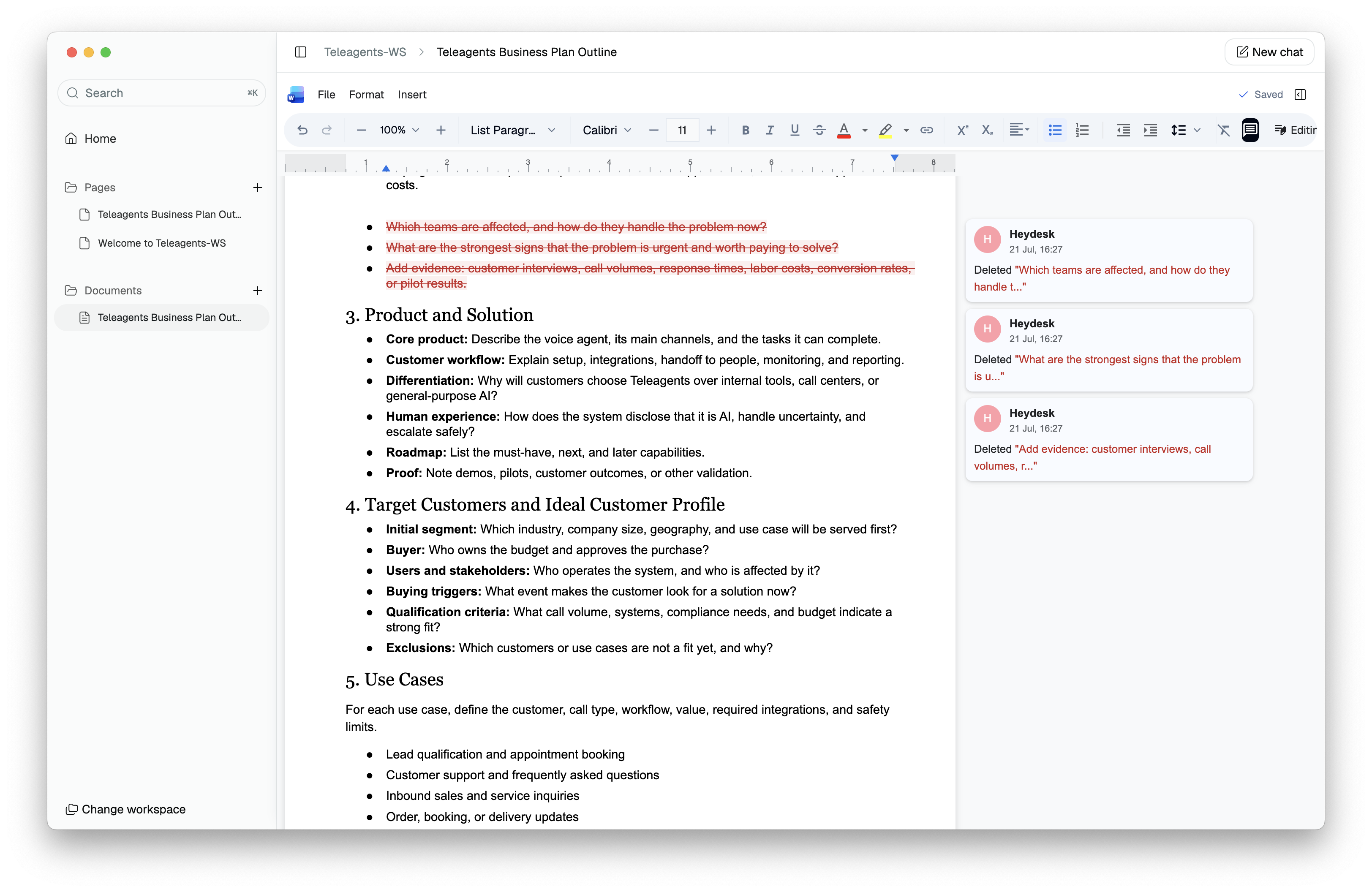
- A Word document editor backed by standard
.docxfiles. - Workspace-aware creation of pages and documents.
- Codex conversations scoped to Home, pages, and documents.
- Streaming assistant activity and progress.
- Suggested changes and approval workflows.
- Revision-aware saves and conflict handling.
- SQLite-backed assistant threads, runs, events, and metadata.
- Explicit, validated filesystem mutations.
The core loop is:
Select context → ask Codex → observe the work → review the result → continue editing.
How It Works
A user creates or opens a workspace. Heydesk keeps content local and portable:
workspace/
  .heydesk/
    workspace.json
    heydesk.sqlite
  pages/
    *.md
    *.mdx
  documents/
    *.docx
From the Home composer, the user can ask Codex to create a page or document using existing workspace context:
Create a business plan template for my startup using the context already in this workspace.
Heydesk routes this through the local server, which supplies the correct scope, validates the action, and commits the result. The user is then taken directly into the appropriate editor.
In pages, Codex can read the active page, rewrite sections, improve content, create pages, and convert Markdown into an independent Word snapshot.
In documents, Codex can inspect the active DOCX, propose structured changes, stream activity, and leave the user with a reviewable document.
Architecture
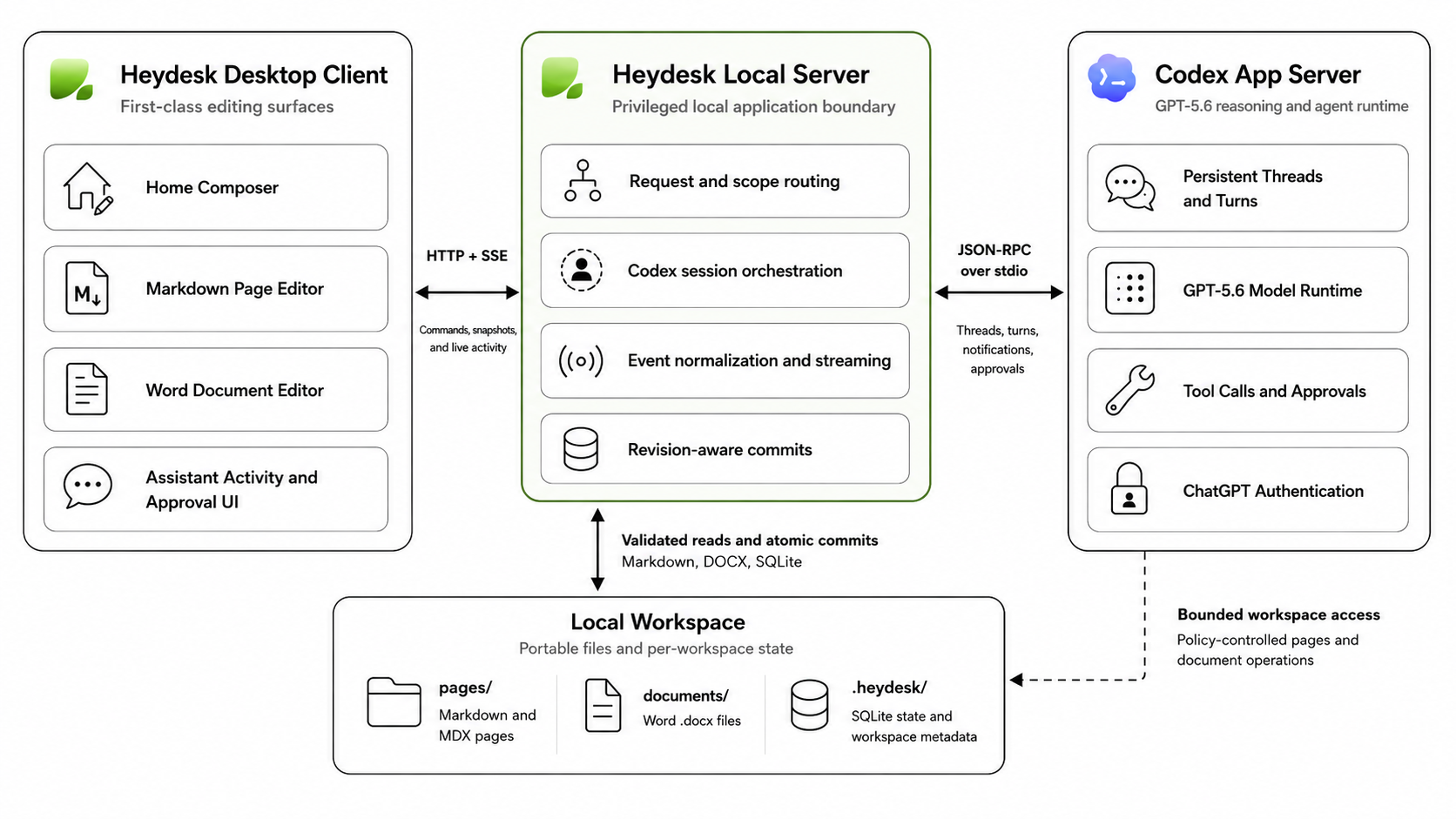
Heydesk has four cooperating layers.
Heydesk Desktop Client
The Electron desktop client renders workspace navigation, the Home composer, Markdown and Word editors, assistant conversations, activity, and approval controls.
Heydesk Local Server
The Hono/Node server is the privileged boundary. It owns filesystem access, SQLite persistence, Codex process communication, scope validation, revision-aware writes, document conversion, and event streaming.
The browser never accesses the filesystem, SQLite, or Codex directly.
Codex App Server
Heydesk uses the long-lived Codex app server rather than treating Codex as a generic text endpoint. It provides persistent threads, GPT-5.6 execution, ChatGPT authentication, tool calls, approval requests, streamed notifications, and lifecycle handling.
Local Workspace
Markdown remains readable outside Heydesk, Word documents remain standard .docx files, and structured assistant state lives in a private per-workspace SQLite database.
How I Built It with Codex and GPT-5.6
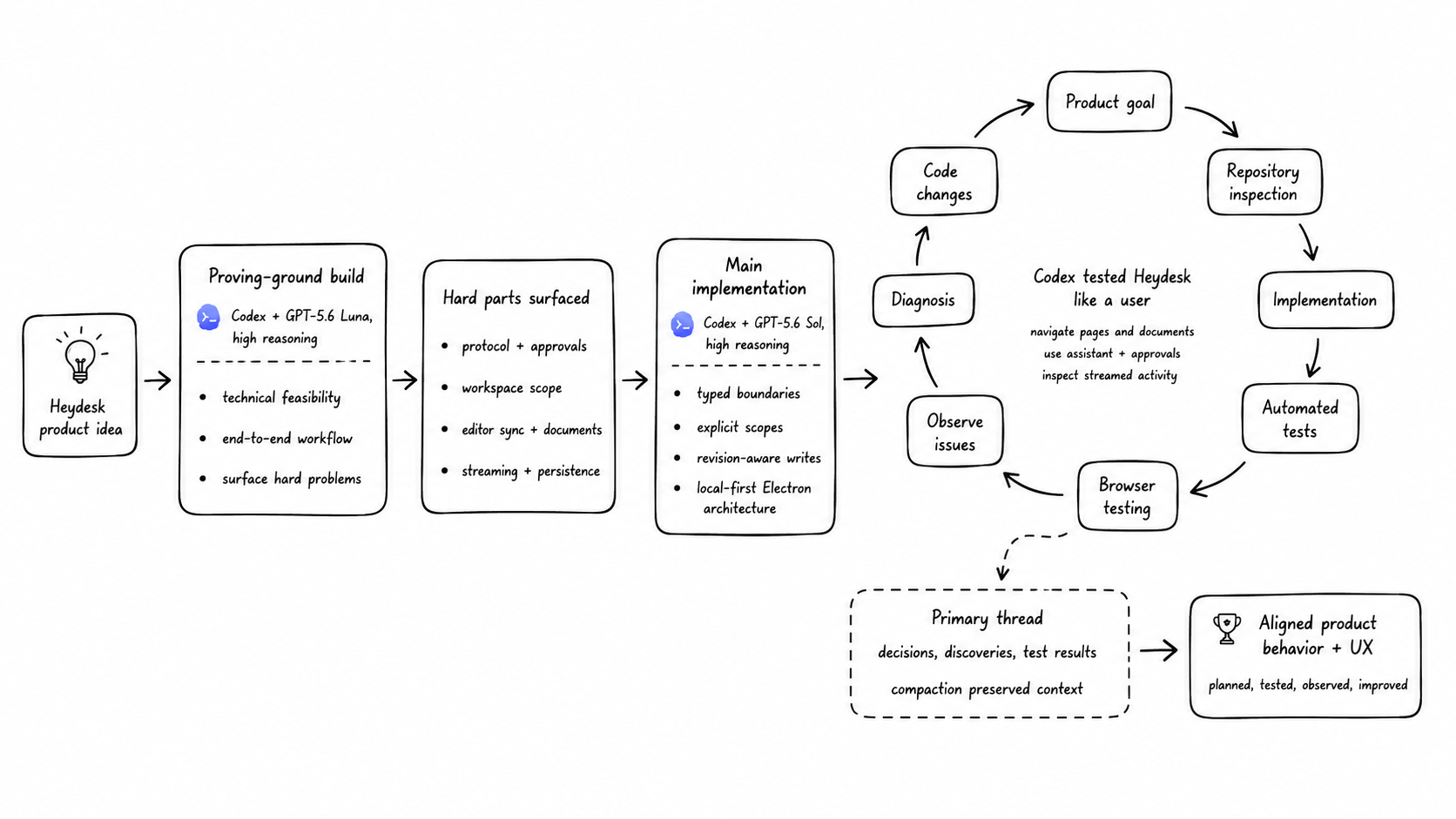
Phase 1: The speed-of-light approach
I began with an intentionally aggressive experiment.
Using GPT-5.6 Luna at high reasoning effort, I used /goal in Codex to implement the entire product idea end to end. The goal was not to produce the final product immediately. I wanted to validate whether the idea was technically possible and expose the hardest integration problems as quickly as possible.
That first implementation revealed:
- How the Codex app-server session needed to be maintained.
- How streamed notifications and approval requests behaved.
- Where filesystem scope needed to be enforced.
- How page and document state should synchronize.
- Which assumptions in the initial product idea were too broad.
- Which editor and packaging constraints would affect the final design.
This “speed-of-light” build acted as a technical feasibility study. It produced a working foundation and a concrete list of difficult problems to solve.
Phase 2: Deliberate implementation
Using those lessons, I began the main implementation with GPT-5.6 Sol at high reasoning effort.
I kept the integration seams that worked, but replaced fragile shortcuts with explicit domain boundaries:
- Treated pages, documents, workspaces, assistant runs, and artifacts as separate concepts.
- Introduced revision checks and atomic filesystem writes.
- Added explicit assistant scopes.
- Separated streaming drafts from durable commits.
- Enforced the browser/server privilege boundary.
I also studied existing projects built on the Codex app server, especially T3 Code and OpenKnowledge. Those projects helped clarify practical patterns for persistent app-server sessions, agentic UI, streaming, and desktop integration. Heydesk is its own implementation and product, but it benefited from standing on the shoulders of these great open-source examples.
Codex as a self-testing development partner
Codex did not stop at writing code. It helped test the application at multiple levels:
- Unit tests for domain behavior.
- Integration tests for the local server and persistence boundary.
- Protocol tests for JSON-RPC framing and Codex lifecycle.
- End-to-end assistant tests against the real local integration.
- Browser-based testing through the in-app browser.
Codex could implement a feature, launch the application, interact with the UI as an end user, observe the result, identify a mismatch, and continue improving the implementation.
Codex implements
    → runs tests
    → uses the application
    → observes issues
    → fixes and retests
This caught problems ordinary tests would miss:
- Loading and transition behavior.
- Streaming presentation.
- Sidebar interactions.
- Editor focus and keyboard shortcuts.
- Approval and navigation flows.
- Whether the product actually felt continuous.
Long-running context and compaction
Most of the development happened in one primary Codex thread. This mattered because the project involved interconnected decisions across the app-server protocol, page scope, document editing, streaming, Electron packaging, persistence, and visual design.
As the thread grew, Codex continued working with accumulated context rather than reconstructing the project from scratch. Compaction preserved important architectural decisions and allowed the implementation to continue at a high level across a long development session.
The result was not a collection of isolated generated features. It was sustained engineering collaboration where decisions accumulated and were refined over time.
Hard Engineering Decisions
A long-lived app-server transport
Heydesk owns a persistent:
codex app-server --listen stdio://
The transport frames split stdout chunks into complete JSON-RPC messages, correlates request IDs, separates notifications from server-initiated requests, handles approvals, preserves thread and turn identity, and rejects pending requests when the process exits.
This is what enables real assistant lifecycle behavior instead of isolated prompts.
Explicit scopes and permissions
Codex can read and modify local files, so Heydesk enforces clear boundaries:
- Home.
- A specific page.
- A specific document.
- The workspace.
The server validates actions before committing them. Safe edits to the selected artifact can proceed through the bounded workflow, while deletes, moves, unrelated changes, hidden state, symlink escapes, and permission expansion are rejected or held for review.
This preserves the filesystem advantage of Codex without granting unnecessary authority to every turn.
Temporary streaming versus durable commits
Streamed output is never treated as durable state.
Heydesk separates:
- Assistant text.
- Activity events.
- Temporary editor drafts.
- Requested actions.
- Validated mutations.
- Filesystem commits.
- Durable assistant history.
A streamed page diff can appear immediately in the editor, but the file is updated only after server validation and a verified commit.
This provides the feeling of live authorship without making every streamed token a filesystem write.
Revision-aware files
Pages and documents remain authoritative on disk.
Each page revision is derived from the exact Markdown bytes. Each Word revision is derived from the exact DOCX bytes. Writes include the revision they expect to replace.
The server:
- Reads the current revision.
- Compares it with the client’s expected revision.
- Writes through a temporary file.
- Atomically renames the file into place.
- Returns the new revision.
A stale write becomes an explicit conflict instead of silently overwriting newer work.
Structured document editing
Word documents remain portable OOXML binaries. Codex does not manipulate raw OOXML directly.
Document-scoped tools allow Codex to request bounded changes, and Heydesk only reports success after the resulting DOCX revision has been validated and committed by the server.
This preserves the native editor experience while making the approval workflow meaningful.
Challenges We Ran Into
Protocol and version compatibility
Early failures came from unsupported approval values, incompatible realtime capabilities, and differences between Codex installations.
The lesson was to treat protocol compatibility as a product concern. Heydesk now surfaces recoverable states such as missing Codex, unauthenticated Codex, unsupported models, and failed app-server processes.
Defining the right assistant boundary
The initial instinct was to let Codex broadly inspect the workspace. That preserved power but created too much ambiguity.
The final design keeps direct local access where it is most valuable: Markdown and document workflows, while adding explicit scopes and server validation around mutations.
Making streaming understandable
Raw agent events do not automatically become good UI. I had to normalize them into readable activity, progress, assistant messages, file references, and review states.
Keeping the editor and filesystem truthful
The editor is not the commit authority. The filesystem and local server are.
That distinction drove the revision model, atomic writes, conflict handling, and durable reload behavior.
What I Learned
The biggest lesson was that an agent becomes much more useful when it is embedded in the user’s real workspace.
Model capability alone is not enough. Reliable agentic products also need:
- Clear context boundaries.
- Typed actions.
- Durable files.
- Revision safety.
- Visible activity.
- Recovery paths.
- Human review at the right moments.
I also learned that the most effective use of Codex is not simply asking it to generate code. It is giving Codex a complete development loop: a goal, a real repository, the ability to run tests, the ability to use the application, and enough continuity to learn from each failure.
Codex as an application platform
The most surprising insight was that the Codex app server is not limited to building developer tools.
It creates an integration point for an entirely new class of local-first applications that use Codex as the intelligence layer through the user’s existing authenticated subscription.
A user does not necessarily need to create a separate model API key, configure another billing relationship, or send their workspace to a hosted service. An application like Heydesk can work with access the user already has.
This suggests a broader category of software:
Local-first applications that combine specialized interfaces with intelligence already available through a user’s Codex subscription.
Heydesk is one example. The same pattern could support personal knowledge systems, research tools, planning environments, creative applications, operations software, and other focused products where intelligence should live inside the user’s existing workflow.
The model provides the reasoning layer. The application provides the context, constraints, interface, permissions, and durable result.
That is the direction I found most compelling while building Heydesk: not another generic chatbot, but a new generation of local applications powered by an intelligence layer users already have.
Accomplishments I’m Proud Of
- Built a local-first documents OS around the Codex app server.
- Created a continuous AI-to-editor workflow.
- Supported Markdown pages and Word documents.
- Added workspace-aware page and document creation.
- Added assistant scopes and bounded filesystem access.
- Added streaming activity and visible progress.
- Added approval-aware document changes.
- Added revision-aware writes and conflict recovery.
- Used Codex to implement, test, operate, and refine the application.
- Built and packaged the desktop experience.
What’s Next
- Richer document operations, including table editing.
- Stronger document templates and export presets.
- Better workspace search and retrieval.
- More structured records and local semantic search.
- Richer review and recovery history.
- Additional local-first productivity applications.
- Collaboration and multi-device synchronization.
Links
- Demo video: https://youtu.be/9f_ZhibG16w
- Repository: https://github.com/manasseh-zw/heydesk
- Try it out on Mac : https://heydesk.dev-manasseh.chatgpt.site/
- Codex feedback session:
019f7140-d5fe-7e32-8785-2e04227a5e44


Log in or sign up for Devpost to join the conversation.