-
-
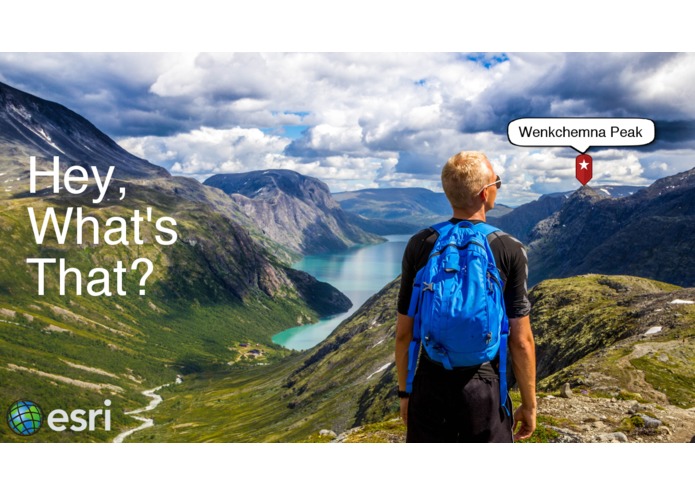
Hey, What's That?

Inspiration
When driving up the 395 in California, my friends and I have lots of fun looking at the majestic peaks of the Eastern Sierra, and guess which peak is which. For example, we end up spending lots of time guessing if that one peak is Mt Muir or if it is actually the Keeler Needle. We wanted to develop an app that would settle the debate once and for all.
What it does
This is an Augmented Reality (AR) app that aims to answer the question, "Hey, what's that?". This could be used for peaks in a mountain range, parks and other points of interest from a vista point, or skyscrapers in the downtown area of a city. A typical use case would be that a user wants to know what something is in the landscape they are looking at, so they:
- Get out their phone and open the app
- They will be presented with a view that displays the camera output
- They tap on the thing they would like to identify
- A screen overlay appears over the camera output, identifying what they tapped on
How we built it
First we create a camera view from the iOS SDK. The camera feed is displayed on the screen. Next, we use an ArcGIS Tiled Elevation Surface to create a 3D Scene, add the scene to a sceneview, and render that behind the camera. Once the scene is created, we need to sync up the camera with the scene's viewpoint so that when you move the phone, the viewpoint of the scene changes along with it. This is achieved through utilizing several of the phone's sensors: including the GPS, Altimeter, Gyroscope, and Compass. The Points of Interest are fed into the scene through feature services, which were created using ArcGIS Pro, and hosted in the cloud with ArcGIS Online. Each feature has a geometry, a name, an address, and an attachment. The attachment allows us to store thumbnail images of the feature. When the user taps on the screen, an identify operation is executed to find all the features in the scene. The returned information is display on the screen. The camera pin overlay stays "glued" to the real world location by using the locationToScreen API.
Challenges we ran into
- Having to render the scene behind the camera display may have caused some performance issues, and it was difficult to determine if an identify failed due to the scene not catching up with the camera movements
- Identifying simple points was difficult. In the future, using 3D polygons or scene layers would likely be easier and more reliable to identify
- Testing in freezing cold
Accomplishments that we're proud of
- Showing the use case of AR with GIS. A GIS stores all of the data that has a real world location, and when using AR, you are looking at the real world, so it is only natural to want to take that information from the GIS, and share it in new and exciting ways
- The fact that the app actually worked. We conceived the idea and were able to get something that roughly did the job in a short amount of time.
What we learned
- While we as a platform could probably do some things to make AR more of a reality, this was a proof of concept (at least to ourselves) that AR and GIS have a future together, and that there are really cool use case opportunities. If done correctly, we feel that this could be a real app, or even a template for people to make their own customized "hey what's that" AR apps.
What's next for Hey, what's that?
- Testing with 3D polygon geometries instead of only points
- Testing it in different geographies (Hawaii would be nice)
- Working to determine how we could support AR better through the platform, so we don't have to render a scene at all. For example, if you could simply pass a Camera object, a Surface object, a layer, and screen coordinates to the API, and perform an identify from this information without rendering anything at all, that would be really cool. This would greatly enhance the performance and reduce the gittering of the app, as there would be no scene to render at all.
- Extending the app or making an additional app that would allow for adding new locations via crowdsource data. For example, users could tap on their camera view and help identify and add new features to the dataset.


Log in or sign up for Devpost to join the conversation.