-
-
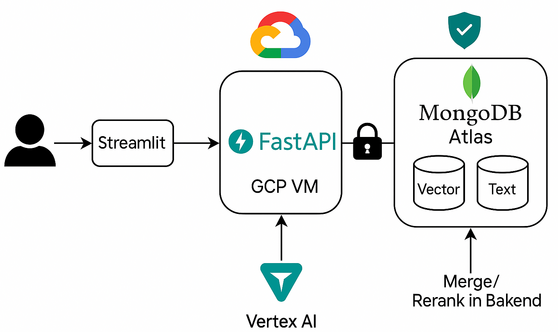
High-Level Architecture
-
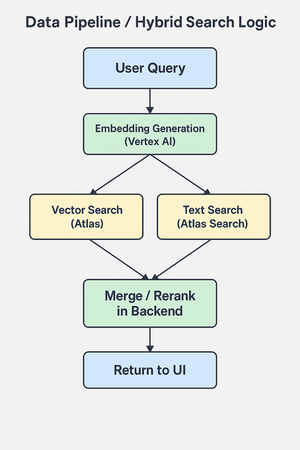
Data Pipeline / Hybrid Search Diagram
-
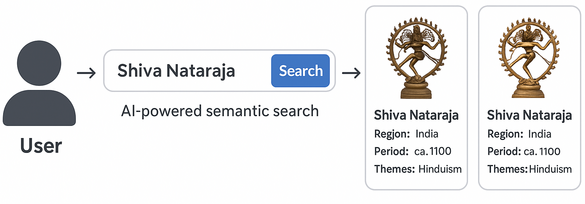
User Experience
-
logo
Heritage Lens - AI-Powered Cultural Explorer
📑 Table of Contents
- Inspiration
- What It Does
- High-Level Architecture
- User Experience
- How I Built It
- Data Pipeline / Hybrid Search Diagram
- What I Learned
- Accomplishments that we're proud of
- Challenges
- What’s Next
- Installation Guide & Code Walkthrough
- Infrastructure Provisioning (Terraform)
- Application Setup
- Running the Backend
- Running the UI
- Data Preparation & Embeddings
- Code Walkthrough
- Application URLs
1. 🌍 Inspiration
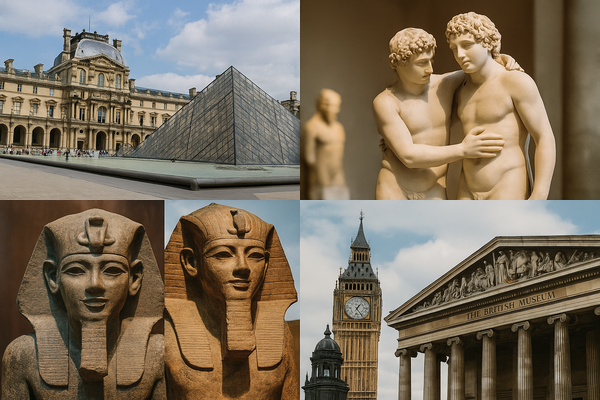
Having travelled to multiple countries and explored some of the world’s most iconic museums—including the Louvre Museum in Paris and the British Museum in London—I’ve always been fascinated by how cultural heritage connects us all. The thrill of wandering through galleries, discovering ancient artifacts, and imagining their stories made me wish for a way to recreate that sense of discovery online, powered by AI.
When I saw the hackathon’s challenge to blend Google Cloud and MongoDB Atlas, I immediately thought: Why not build a tool that brings this global exploration to everyone—no matter where they are? That was the spark behind Heritage Lens.
2. 🔍 What It Does
Heritage Lens lets users discover artifacts from public datasets simply by describing them—just like you’d do when talking to a guide in a museum. It uses:
- Embedding via Vertex AI and semantic search via MongoDB vector search
- Text search via MongoDB Atlas
- A hybrid scoring mechanism to combine both
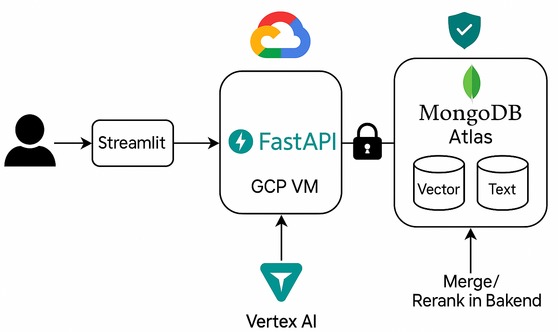
3. 🧭 High-Level Architecture
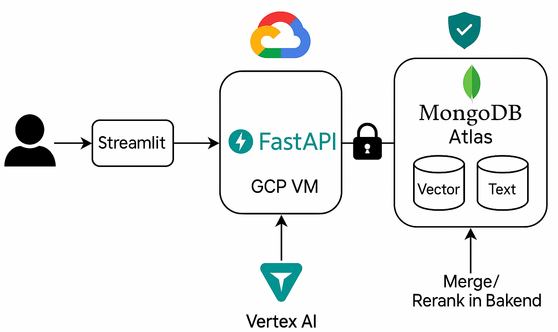
Stack Overview:
- Frontend: Streamlit, Nginx
- Backend: FastAPI
- AI Embeddings: Google Vertex AI
- Database: MongoDB Atlas (text + vector search)
- Infra: Google Cloud Platform (VMs, VM Templates, VM Groups, Cloud DNS, Secret Manager, Storage)
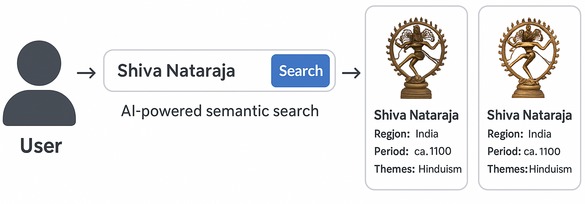
4. 🎨 User Experience
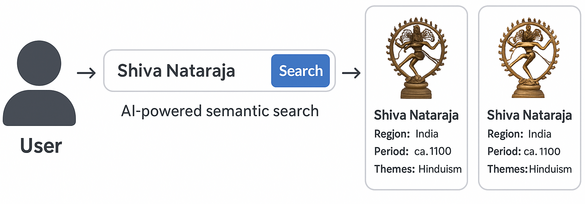
Flow:
User enters a query → AI-powered hybrid search → Artifact results with images/descriptions
5. ⚙️ How I Built It
- Backend: Python & FastAPI for APIs and hybrid search logic
- Frontend: Streamlit for a beautiful, responsive web experience
- AI/Embeddings: Google Vertex AI for semantic embeddings
- Database: MongoDB Atlas, using both vector and text indexes
- Datasets: The MET Museum Open Access & Smithsonian Open Access.
- Hybrid Search: Python merges and reranks vector and text search results for the best user experience
- Deployment: GCP Compute Engine, Nginx as reverse proxy, Certbot & Secret Manager for automated SSL, Terraform for IaC
- CI/CD: GitHub for source control
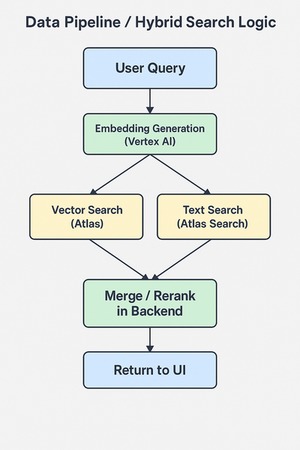
6. 🔁 Data Pipeline / Hybrid Search Diagram
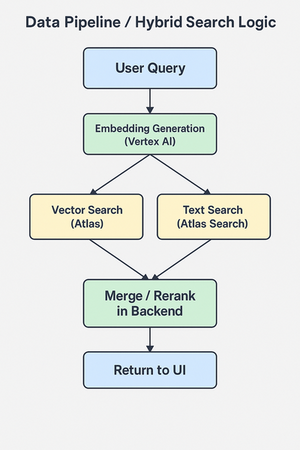
- User query →
- Generate semantic embeddings via Vertex AI →
- Parallel vector + text search in MongoDB Atlas →
- Re-rank and return the results to frontend
7. 🧱 Challenges
- Cleaning and embedding large public datasets
- Optimizing relevance scoring across modalities
- Handling SSL for multiple domains
- Shipping a full AI stack in limited time
8. 🏅 Accomplishments that we're proud of
Full Hybrid Search in Production:
Delivered a seamless hybrid search experience that fuses semantic vector search and classic text search—ranking and reranking results for both intuitive discovery and precision, just like a real museum guide.End-to-End AI Data Pipeline:
Automated embedding generation at scale using Google Vertex AI, and integrated those embeddings into MongoDB Atlas for lightning-fast semantic search on thousands of artifacts.Cloud-Native, Secure & Scalable:
Designed the project from scratch for cloud deployment:- Infrastructure as Code (Terraform)
- Automated SSL/secret handling
- Modular architecture that’s both reproducible and ready for real-world scaling.
- Infrastructure as Code (Terraform)
User Experience & Accessibility:
Created a responsive Streamlit web app that lets anyone—regardless of background or expertise—explore cultural heritage collections with natural language, images, and location-based cues.Rapid, End-to-End Delivery:
Built and launched the full stack (UI, backend, ML pipeline, data pipeline, cloud infra, and security) in a short hackathon window, all while deploying to two public domains.Open Source & Reproducible:
The codebase is fully open, reusable, and documented, making it easy for others to build upon or adapt for new datasets and domains.Personal Touch:
The project combines my passions for travel, culture, and technology—bringing together inspiration from real-life museum visits with state-of-the-art AI and cloud.
9. 🧠 What I Learned
- Semantic AI unlocks true exploration: Vertex AI and MongoDB vector search allow natural language queries, not just keywords.
- Hybrid search is a superpower: Combining classic and semantic search brings both intuition and precision.
- Cloud automation: Using Secret Manager, Certbot, and Terraform made the stack robust and reproducible.
- Adaptability: On the last hackathon day, I bought the new domain heritage-lens.org. While the domain is very new and may be blocked in organisations due domain age criteria, I also deployed the project on my main domain for redundancy: heritage.mayurpawar.com.
10. 🚀 What’s Next
- Add image search and multilingual capabilities
- Expand artifact datasets and allow public curation
- Usage analytics for curators and educators
11. 🛠️ Installation Guide & Code Walkthrough
This project is open source and can be deployed on Google Cloud using Terraform. Make sure that you have terraform installed on your system or have terraform image if you are using K8S hosted provisioning pipelines.
11.1 Infrastructure Provisioning (Terraform)
Terraform scripts are in infra/
They provision:
- Compute Engine VM
- VM Template with VM Group so that zero downtime deployments can be achieved
- Network/firewall rules
- Installing all OS and python dependencies
- Secrets integration
Update terraform.tfvars.example file with your actual values such as CIDR range, VM image type, domain if available. If domain is not available, you still can acces your app using public IP of your VM.
To deploy:
git clone https://github.com/mayurpawar/heritage-lens.git
cd heritage-lens/infra
mv terraform.tfvars.example terraform.tfvars
terraform init
terraform apply
11.2 Application Setup
✅ These steps are executed during step 1 when VM startup script runs and hence no need to execute. Adding it here for info and debugging if required. SSH into the provisioned VM and set up the application:
git clone https://github.com/mayurpawar/heritage-lens.git
cd heritage-lens
Create and activate a Python virtual environment:
python3 -m venv venv
source venv/bin/activate
pip install -r requirements.txt
11.3 Running the Backend
✅ These steps are executed during step 1 when VM startup script runs and hence no need to execute. Adding it here for info and debugging if required. Start the FastAPI backend server:
cd app
uvicorn app.main:app --host 0.0.0.0 --port 8000
Key endpoints:
/api/explorer/search— Hybrid semantic+text search endpoint/docs— Interactive OpenAPI documentation (Swagger UI)
11.4 Running the UI
✅ These steps are executed during step 1 when VM starup script runs and hence no need to execute. Adding it here for info and debugging if required. Start the Streamlit frontend:
cd ui
streamlit run app.py --server.port 8501
Nginx (configured via the Terraform startup script) will automatically route traffic from ports 80/443 to FastAPI and Streamlit services. SSL is handled by Certbot.
11.5 Data Preparation & Embeddings
Run the embedding script to process artifact data using Vertex AI:
python ai_loader/load_artifacts_to_mongo.py // This will load data to mongoDB. You can keep data files in ../data directory.
python ai_loader/batch_embed_vertex.py      // This will add embedding to your mongoDB database in batches.
⚠️ Ensure your Google Cloud service account has the following permissions:
- Vertex AI (for embedding generation)
- Cloud Storage (if needed)
- Secret Manager (if you're loading secrets)
This script:
- Fetches artifacts from MongoDB
- Sends text to Vertex AI for embedding
- Updates MongoDB documents with embeddings
11.6 Code Walkthrough of Important files
heritage-lens/
├── app/                # FastAPI backend
│   ├── main.py
│   ├── routes/
│   │    └── explorer.py   # Hybrid search endpoint
│   ├── services/
│   │    ├── db.py         # MongoDB client
│   │    └── vertexai.py   # Vertex AI interface
├── ui/                 # Streamlit UI
│   └── app.py
│   └── assets          # Holds required media files
├── ai_loader/          # Embedding & data scripts
│   └── batch_embed_vertex.py
├── infra/              # Terraform infrastructure
│   └── main.tf
├── requirements.txt
└── README.md
Notable Files:
app/routes/explorer.py— Main hybrid search routeapp/services/vertexai.py— Embedding logic via Vertex AIapp/services/db.py— MongoDB Atlas connectorui/app.py— Streamlit user interface logicai_loader/batch_embed_vertex.py— Embedding generation scriptinfra/main.tf— Provision VM, SSL, and setup scripts
11.7 Application URLs
- Primary Domain: https://heritage-lens.org
- Backup Domain: https://heritage.mayurpawar.com
Built With
- fastapi
- gcp-vertexai
- google-cloud
- google-cloud-dns
- google-cloud-secret-manager
- google-cloud-vertexai
- google-compute-engine
- mongodb
- mongodb-vector-search
- python
- streamlit
- vector-search
- vertexai


Log in or sign up for Devpost to join the conversation.