-
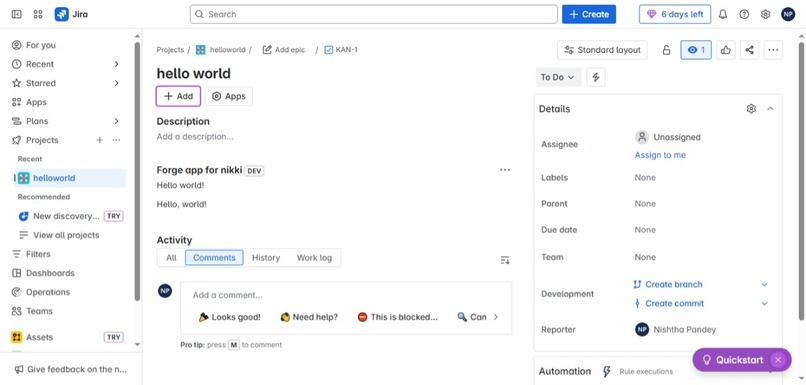
screen shot of hello world jira app
Inspiration
I’ve always been the kind of person who gets excited about making work less complicated, especially with tech. I’ve admired tools like Jira , Confluence because they just make teamwork and app management smoother. So, when I heard about Atlassian Forge Quest, I thought, “Why not actually try building something inside Jira for once?” It felt like the perfect excuse to jump in and see what all the hype was about. What really sold me was the idea that I could build and run an app right inside Jira, without having to mess around with servers or authentication headaches. I went for the Novice level because, to be fair, I just wanted to dip my toes in and see how Forge apps actually work from the inside.
What it does
My app is super simple: it adds a “Hello World” panel to every Jira issue page. Nothing fancy, but seeing that panel pop up felt like a big win. Now, whenever I open an issue in any Jira project, there’s this friendly “Hello World” box that proves my app is alive and kicking. It’s basic, but it’s built just like any real Forge app—fully integrated and cloud-ready.
How I built it
I went through the documentations thoroughly and followed the steps . I started off with the @forge/cli, using the Jira:issuePanel template to get things rolling. The app itself just uses the Forge UI Kit to drop a “Hello World” message into every Jira issue. Here’s what I did, step by step: Ran forge create to get the starter files Used forge deploy to send the app up to the cloud using forge install ,Installed it on my Jira cloud site (yep, https://nishthap1410.atlassian.net) with forge install After the install, I opened up a Jira issue and—boom—there was my custom panel, right in the interface. I can’t lie, seeing that for the first time was pretty satisfying.
Challenges I ran into
It wasn’t all smooth, though. I got tripped up at first by some errors—mostly missing runtime stuff and the app id being in the wrong format in manifest.yml. Took a bit of poking around and re-reading docs to get that sorted. I also hit a weird install error because Jira wasn’t even turned on for my Atlassian account yet (rookie mistake, I know). Once I enabled Jira and created a test project with an issue, things finally started working. All these little hiccups made me realize how much the tiny details matter when you’re working with tools like this. Forge is strict, but I get it—it keeps everything stable and secure. Accomplishments that I'm proud of This was my first ever Forge app, and I managed to get it running solo. I deployed and installed it on a real, live Jira instance. Most importantly, I figured out how to hook up a custom panel right into the Jira UI—something that honestly seemed way out of reach before.
What I have learned
How to use the Forge CLI to build and manage cloud apps for Atlassian products The ins and outs of the manifest.yml file How Forge quietly handles all the hosting, security, and deployment stuff Basics of Forge UI Kit, and how it helps apps fit right into Jira’s look and feel The modular approach to app development—defining exactly what your app does, like adding panels or web triggers This whole project really opened my eyes to how much Atlassian has thought about the developer experience. Forge makes it surprisingly easy to create secure, powerful apps without a ton of setup or infrastructure.
What's next for Hello World
Now that I’ve got my feet wet with Forge, I’m itching to try more: Building smart automations for Jira issues Creating custom analytics dashboards using Forge UI and maybe some external APIs Making productivity tools that help teams save time and get useful insights, right inside Atlassian products
Honestly, this is just the start. I’m curious to play with more modules, experiment with storage APIs, and maybe even try building Forge apps for Confluence or Slack in the future.

Log in or sign up for Devpost to join the conversation.