-
-
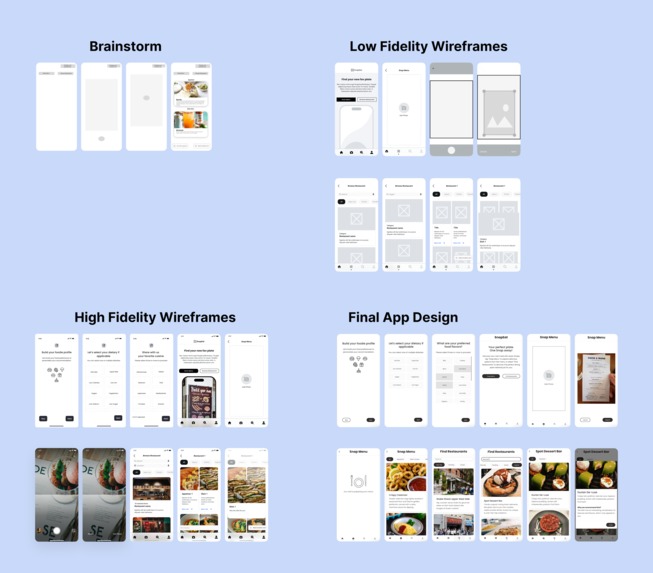
Progress
-
Inspiration
On average, people spend 20 minutes deciding where to eat, sometimes even more. But the struggle doesn’t stop at the restaurant’s door. Remember the last time you dined out with friends and couldn’t figure out what to order?
So long the menu text, but not so clear the description. So many choices, but who knows which choice is best for you? It even gets worse when you have to consider everyone’s dietary and allergies.
Eating out should be fun and enjoyable - not going through the paradox of choices. Imagine having a foodie bestie who could understand you and the menu to give meal recommendations?
That’s why we are proud to introduce SnapEat - Your foodie bestie where you can get answers for the two most difficult questions: “Where to eat” and “What to eat”.
What it does
We develop SnapEat as an application that everyone can use to get personalized recommendations of the best matched dishes for their dietary restrictions and taste references through a simple menu scan or a quick restaurant search.
Here’s a recap of SnapEat main functionalities:
1. Dietary Preference Integration
- During the onboarding process, users are presented with different prompts to input their dietary preferences and restrictions for the app
- Users can also make changes to this information within the app through the profile tab as their preference grows.
- The app accommodates a wide range of dietary needs, including but not limited to
- Dietary (Optional): Soft Diet, Liquid Diet, Low Calories, Low Fat, Low Sodium, Low Carb, Vegan, Vegetarian, Pescatarian, etc.
- Allergies (Optional): Nut Allergy, Shellfish Allergy, Soy Allergy, Gluten-Free, Lactose Intolerance, etc.
- Cuisine: Accommodate all cultural cuisines within these regions: Asia, Americas, Europe, Africa, Oceania, as well as Religious and Fusion.
- Flavor: Spicy, Salty, Sweet, Sour, Umami, Fatty, Herbal, Smoky, etc.
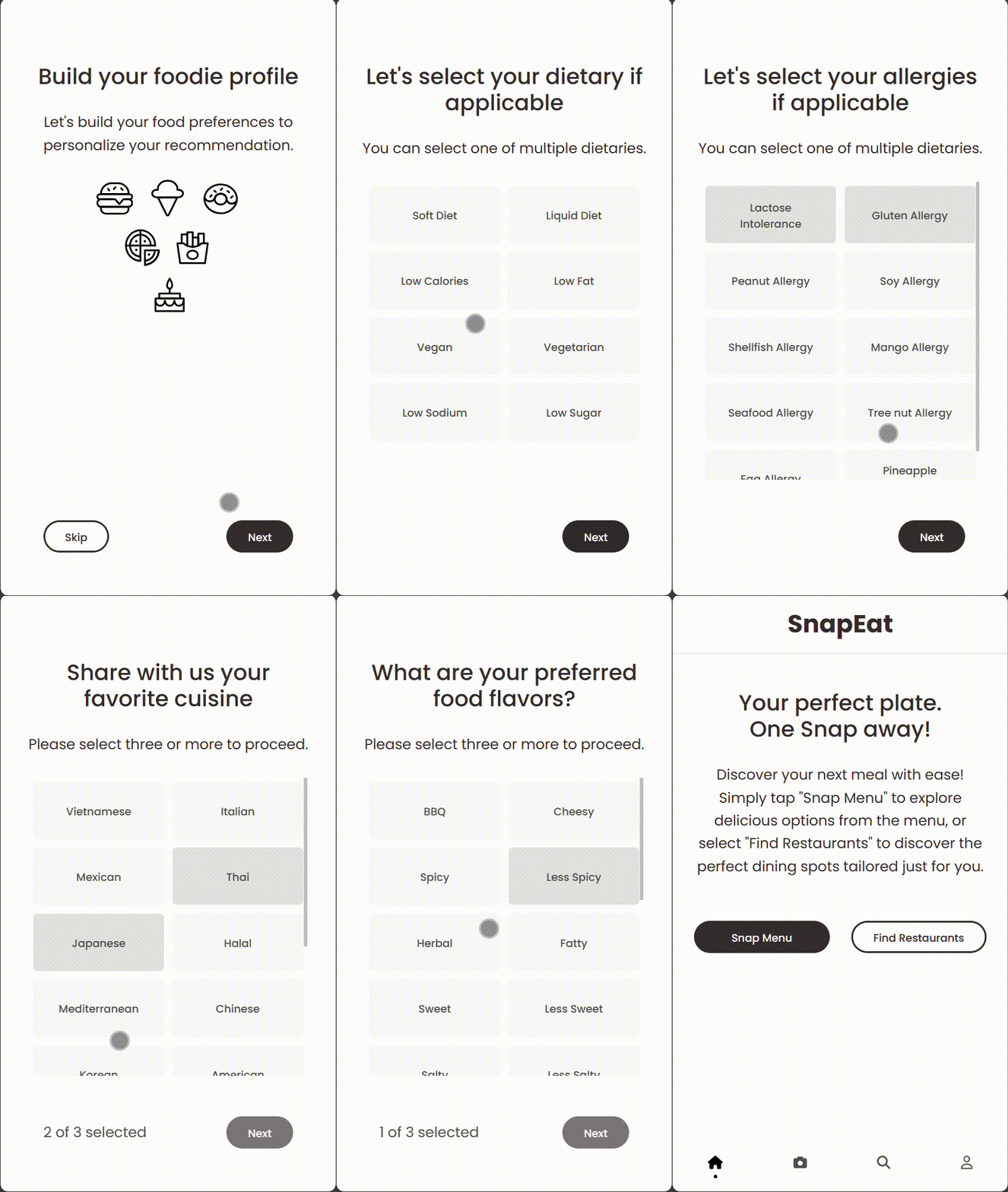
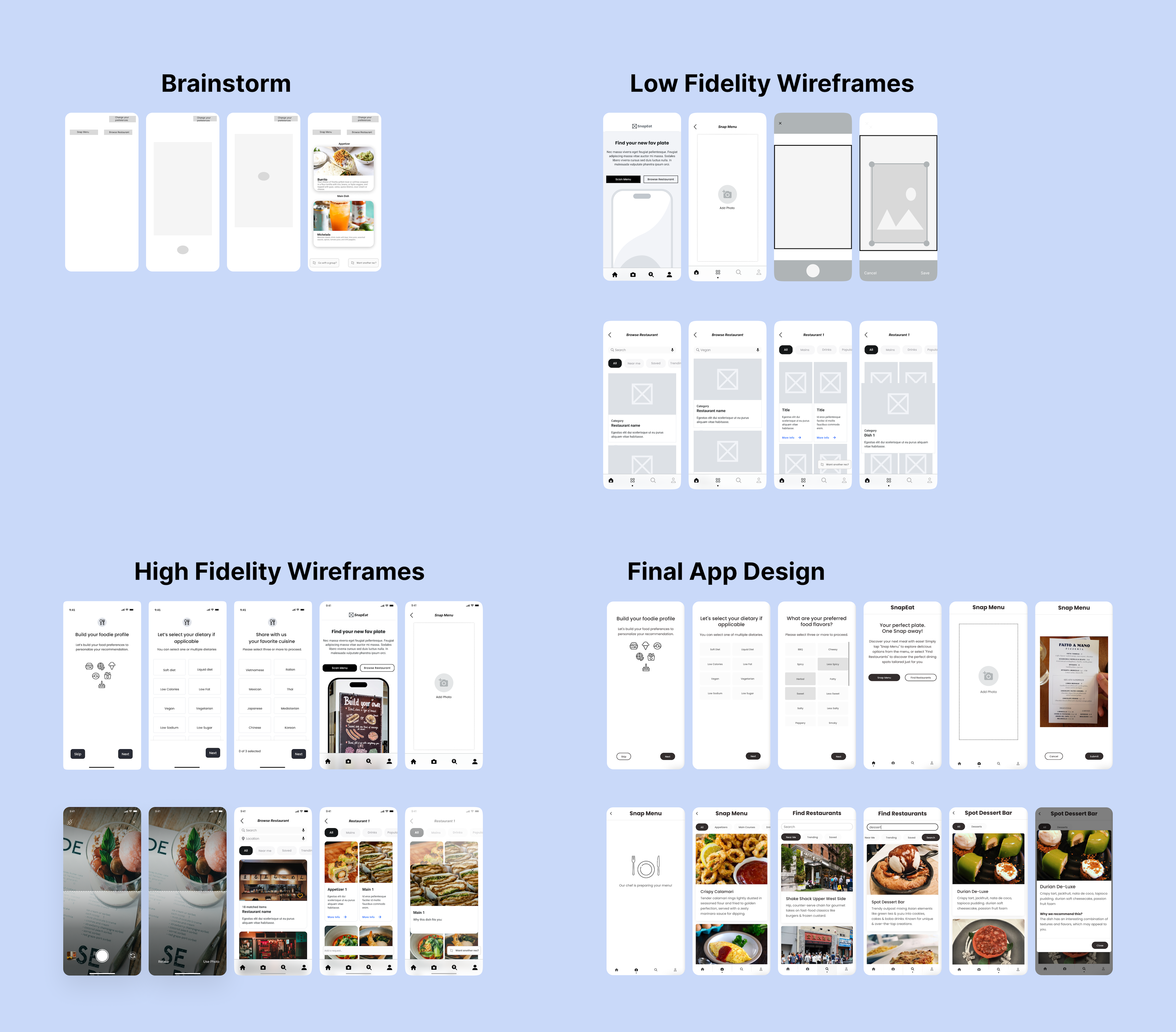
During onboarding, user can choose their dietary preferences and restrictions.
2. Snap Menu (menu photo capture)
- The app enables users to take pictures of extended menus of any restaurant using their smartphones’ camera.
- Utilizing Gemini AI advanced image recognition technology, it swiftly processes the menu items captured in the photo and collect these information:
- Name
- Price
- Description (Optional)
- Category (Optional: Appetizer/Main/Dessert/Drink)
- Ingredients (Optional)
- Chef Recommendation (Optional)
- Additionally, the app also asks for a search of Google pictures, user ratings and reviews of the dish if available.
3. Personalized Recommendations
- Based on the menu items detected and the users’ dietary preferences, the app incorporates Gemini AI to generate tailored suggestions that align with their needs.
- SnapEat provides users with holistic descriptions of recommended dishes together with Google pictures, user ratings and reviews found throughout the web.
- The recommendations are presented in the default view of a well balanced meal including 1 appetizer, 1 main, 1 dessert and 1 drink.
After snapping the menu, user will receive a list of recommendations based on their food preferences.
4. Find Restaurants (restaurant discovery and food recommendation experience)
- In addition to meal recommendations through Snap Menu, the app offers restaurant discovery features, helping users find eateries that cater to their dietary needs within their chosen location with the Find Restaurants feature.
- Users can simply put information into the search bar and browse the suggestions. This will help with streamlining the dining experience and ensuring a seamless transition from menu exploration to making the final decision.
- Personalized recommendations for users are available with this feature if the restaurant menu data is available.
User can also find restaurants that match their dietary needs.
How we built it
1. Design Choices
We built SnapEat using React for quick front-end development and Django for the back-end to isolate API logics from the front-end app. Both apps are hosted on Azure using a Static Web App for front-end and Azure App Service for back-end.
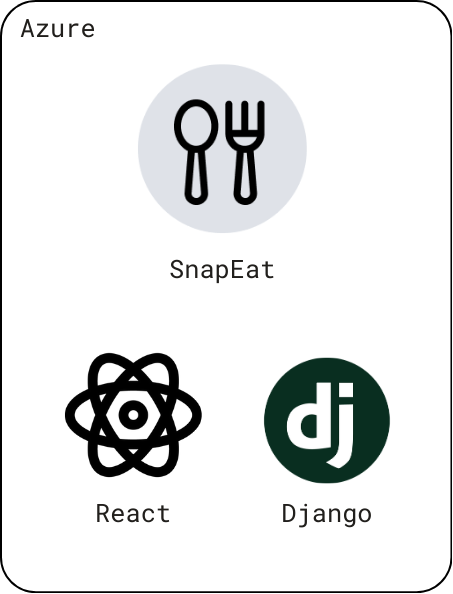
SnapEat is built with React and Django, both hosted on Azure.
The React web app provides a responsive design, enabling users to seamlessly interact with our dynamic and intuitive application directly from their web browsers. We deliberately chose a web app over a mobile app for several reasons:
Cross-Platform Compatibility: A web app is platform-agnostic, meaning it works consistently across various devices and operating systems. Whether users access it from a desktop, laptop, tablet, or smartphone, they’ll experience the same functionality. This compatibility ensures that SnapEat reaches a broader audience without requiring separate development efforts for different platforms.
Rapid Development: Web apps allow us to swiftly develop and iterate on features. Unlike native mobile apps, which often involve complex setup and approval processes (such as app store submissions), web apps can be deployed instantly.
Accessibility: Our app is accessible via standard web browsers, making it available to a wide range of users, including those who might not have access to specific app stores or mobile devices. Our goal was to create a product that reaches as many people as possible, and a web app aligns perfectly with this objective for the current stage of development.
The Django back-end server serves as the central engine driving our app. Leveraging Google Gemini 1.5 Pro and other Google API products, it powers essential features like the Snap Menu and Find Restaurants functionalities. Django’s robust ecosystem of pre-built components and its adherence to the DRY (Don’t Repeat Yourself) principle allowed us to focus on validation and core functionality. Furthermore, Django grants us flexibility in security implementation as we can fine-tune access controls, authentication mechanisms, and data validation. Specifically, we limit the number of requests originating from the web app to prevent abuse, enhance performance, and safeguard against potential security threats.
Now, let’s delve into the main functionalities.
2. Snap Menu Feature
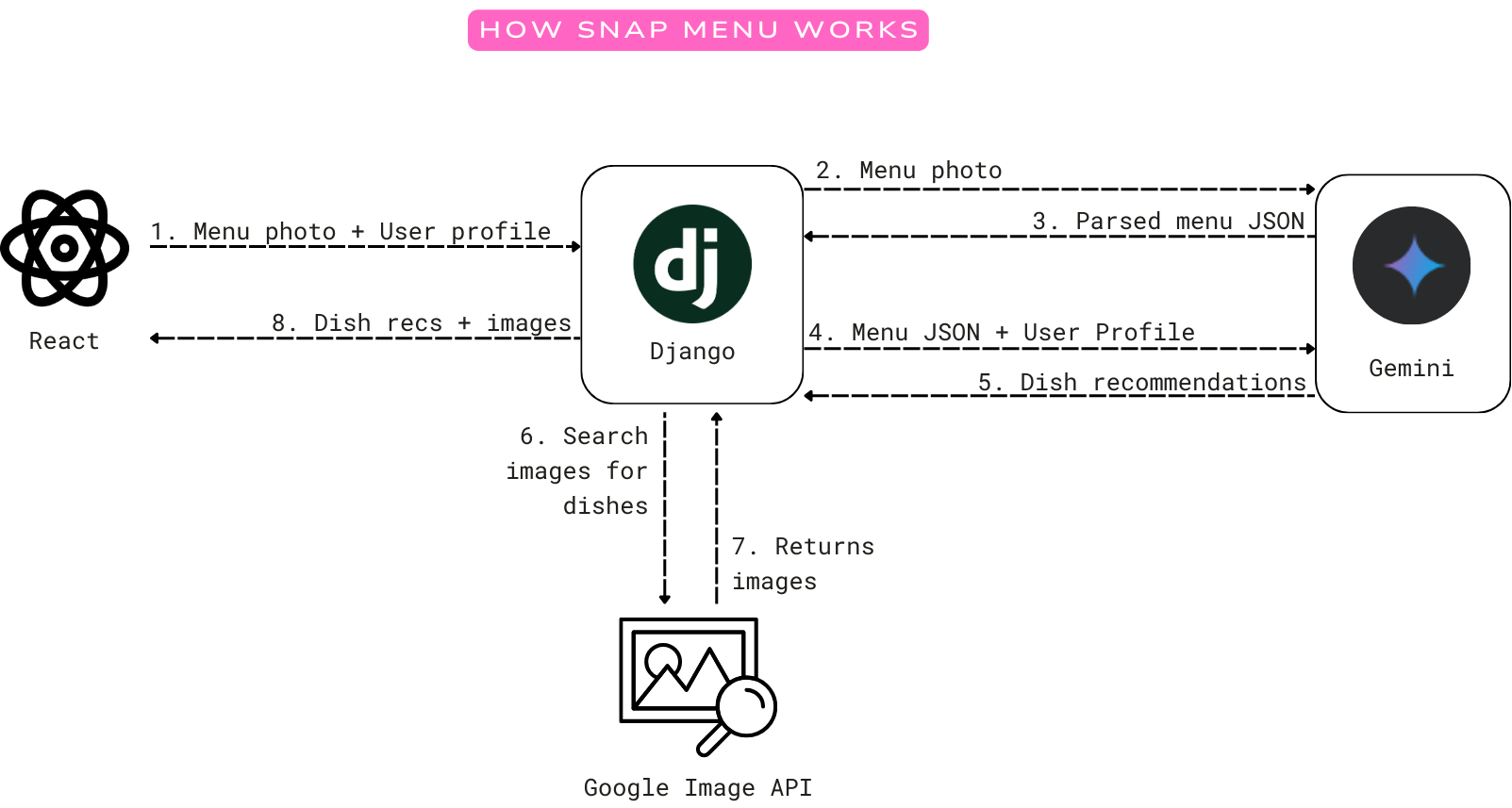
Once the user onboards to the app and snaps the menu photo:
- The web app will send the photo and the user’s food profile to our back-end.
- Our back-end will validate the request and forward the menu image to Google Gemini 1.5 Pro to parse the menu text into a JSON format. We also prompt Google Gemini to improve the menu description to help users better understand the dishes. In the same prompt, we also ask it to classify the menu items into 5 different categories: Appetizers, Main Courses, Desserts, Drinks, and Other.
- Next, our back-end will ask Google Gemini to look at the parsed JSON menu and the user's preference profile to evaluate each dish in the menu. During the evaluation, each dish is assigned a score between 0 and 100, with 0 indicating the dish is unsuitable for the user and 100 indicating a perfect match with the provided inputs. Additionally, Google Gemini must offer explanations for the assigned match scores. We iteratively designed the prompt to make sure Gemini understands the assignment and consistently returns good match scores with reasonable explanations.
- From the result, the back-end filters out items unsuitable for the user (with a match score of 0) and sorts the result by match score from highest to lowest.
- Then, the back-end will call Google Image Search API to find an illustrative image for each of the recommended menu items to help users visualize the dishes.
- Finally, the full result of recommended items accompanied by images is sent back to the front-end interface, where it is beautifully presented to the user.
3. Find Restaurants Feature
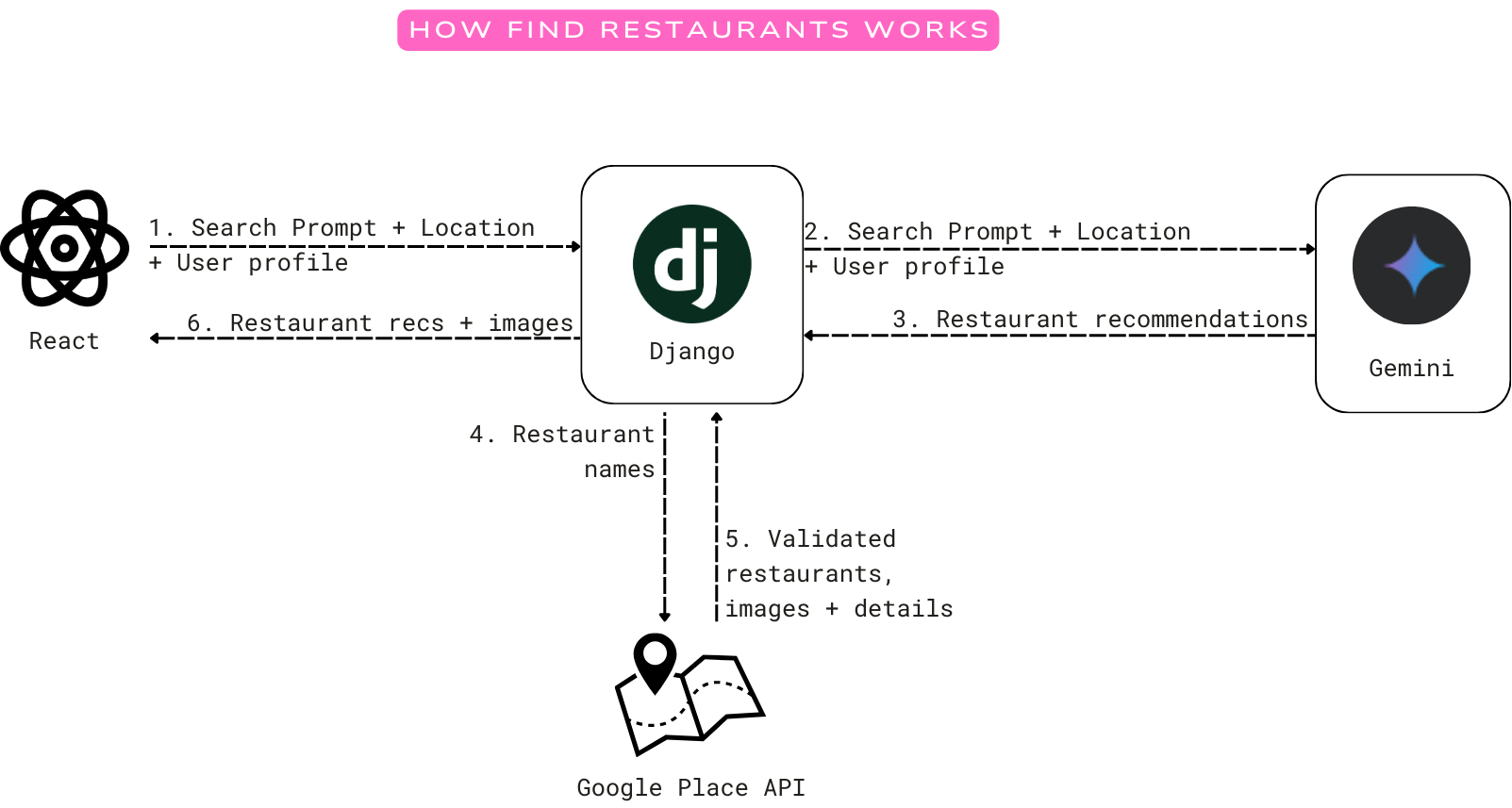
- When the user types in the Search bar to find restaurants, the web-app will send the prompt, the user location (if location access is granted) and user’s food profile to the back-end.
- The back-end will 1) search the restaurant by name and location using Google Place Search API and 2) ask Google Gemini for restaurant recommendations from the user prompt and their food profile. These combined request calls are to ensure that the user can either find the restaurant by name or receive restaurant recommendations from Gemini.
- If Google Gemini returns a result, we will then search these recommended places using Google Place Search API. If these places exist, we begin to get restaurant details.
- After getting all the Google Place Search results, we will then find the restaurant details using Google Place Details API to enrich the data with restaurant images, user rating and reviews before returning the results to the user.
Note: some of the functionalities related to Google Place API are not fully implemented.
4. Recommend from an Existing Menu in Our Database for a Restaurant
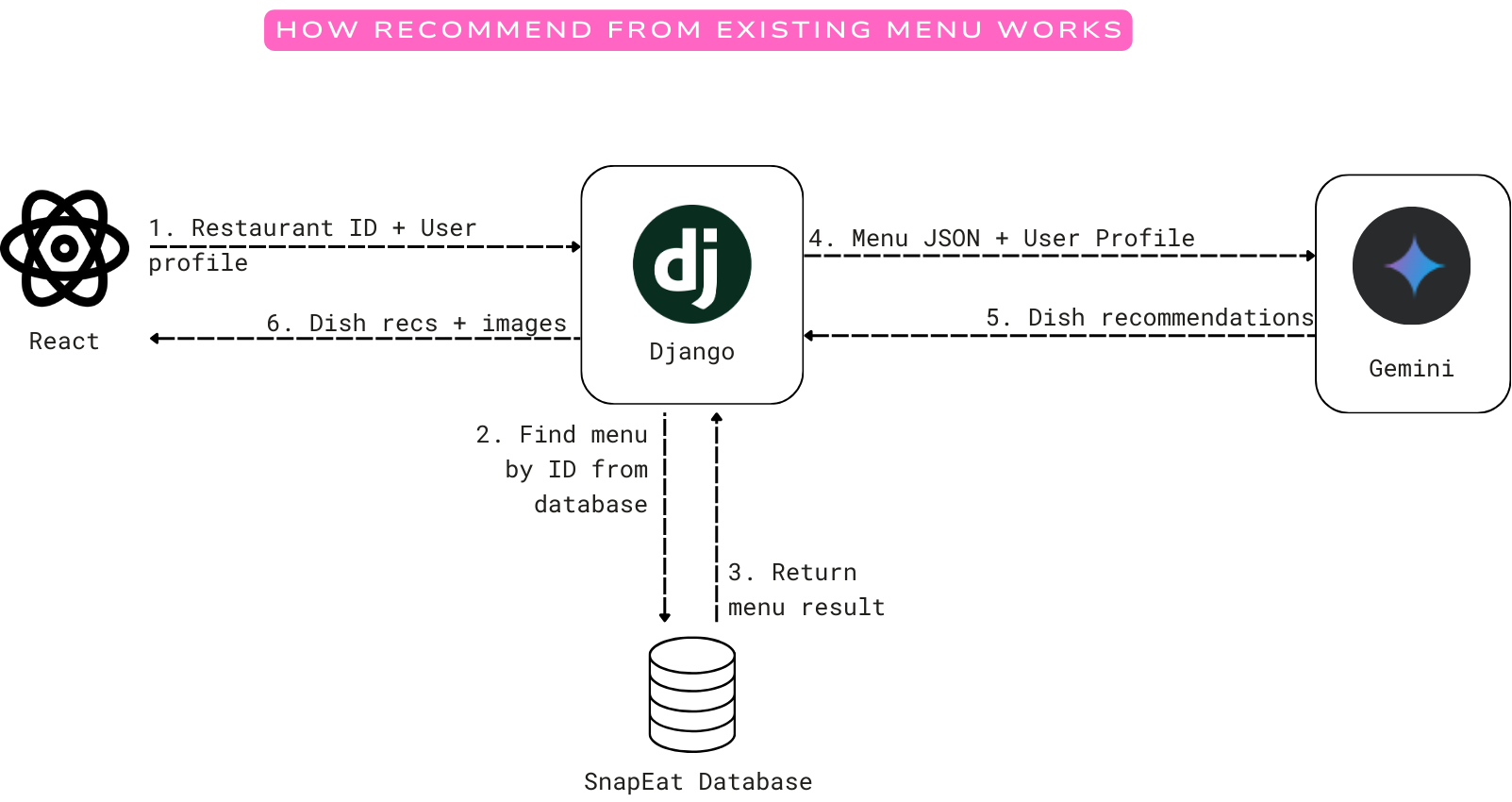
When a user clicks on a restaurant, two things can happen:
- If we have the restaurant menu, we will ask Gemini to recommend what to eat from the user’s food profile and the menu stored in our database. This is quite similar to the Snap Menu flow except that the menu is provided as text.
- If we don’t have the restaurant menu (due to no public API providing menu data), we will ask the user to contribute menu image(s) and store these images in our database. We’ll need some sort of validation workflow that utilizes Google Gemini and human validation to parse the menu images and dynamically maintain our menu database.
Above is just an idea and has not been implemented yet. However, we did utilize Gemini to parse some restaurant menus for our static menu database. The menus shown in the app are the real outputs from Gemini.
Challenges we ran into:
1. Distracting Context From The Input
Our model focuses on a narrow set of features extracted from the menu and user preferences. In this case, the model might only consider keywords from the description and might miss the bigger picture (e.g. Golden Toast might not be flagged as a Japanese dish despite having matcha). In addition, if user preferences are not clearly defined or have conflicting information, the system might struggle to make accurate recommendations. For example, if a user likes "sweet" but is not in the mood for "chocolate," the model might not know how to weigh these preferences. As a result, we introduce options that are carefully tailored to the user when they onboard so as to increase control.
2. Low Quality Image
It is inevitable that the snapped photo can be blurry or there might be some prints overlapping with the text in the menu. This makes it more difficult for Gemini to recognize the text correctly. We plan to develop a feature to ask the user to retake the photo if the image’s quality is not qualified for our recommendation system to recognize with confidence.
3. Inconsistent Results
Some recommendation systems introduce randomness to avoid always recommending the same items. This can lead to slight variations in output and match scores even for the same inputs. Furthermore, simple recommendation models might not be able to provide detailed explanations for their outputs. This can make it difficult to understand why the score changes and lead to repetitive explanations. Realizing this problem, we are very specific with our prompt and quantify the weights of inputs as much as we can.
4. Diverse Menu Formatting and Language Ambiguity
Menus come in all shapes and sizes, with varying levels of structure and organization. Some menus might have clear section headers like "Appetizers" or "Main Courses," while others might use more ambiguous terms or even omit section headers altogether. This inconsistency can make it difficult for our app to definitively identify the category of a dish. Secondly, the language used to describe menu items can be subjective and open to interpretation. For example, the word "soup" could indicate an appetizer, a light lunch option, or even a side dish depending on the context. Similarly, terms like "bites" or "plates" could refer to anything from small appetizers to full-fledged entrees. While not addressed as of now, we plan to train our model on a more diverse dataset of menus and allow for user feedback on misclassified items, which can improve the accuracy of our model over time.
5. Menu API Unavailable
There is no public API providing menu data, leading us to rely on Gemini to generate sample menu data for the Find Restaurants feature. This actually helped us realize that Gemini would be a vital component in our future app for menu parsing and validation. If we could implement a robust validation mechanism, users can submit menus, and Gemini will determine whether to update its database based on user feedback loops.
Accomplishments that we're proud of
- Successfully developed both the front-end and back-end apps, achieving a functioning minimum viable product.
- Implemented the Snap Menu feature, ensuring its full functionality.
- Created a proof-of-concept for the Find Restaurants feature.
- Assembled a team of 5 talented individuals with diverse skill sets, many of whom are newcomers to the AI/Machine Learning field.
What we learned
1. Iterative Prompt Tuning
- We can test our recommendation prompt with various inputs with images to see how well the model generalizes to different formats and styles. Moreover, the studio allows iterating on the recommendation system. This was helpful for us to try different algorithms and inputs to see how they affect recommendations based on the recognized menu items.
- Once we got the recommendations working reliably, we started to modify the tone of recommendations so that the outputs sound more natural and user friendly. For example, in our first iterations, the model used repeating sentence structures and unfriendly words like “the user” or “the user’s preferences”. After changing the prompt, Gemini began to use a more diverse set of sentences for recommendations and refer to the user as “you/your”.
2. Divide and Conquer
- We split the Scan Menu process into 2 separate Gemini requests: the initial request parses the image to comprehend the menu, while the second request provides recommendations. This division allows Gemini to deliver better results in terms of format accuracy and recommendation quality.
- This approach of divide and conquer also enabled us to allocate our team members to work on individual components of the Scan Menu feature, thereby accelerating the development process.
3. Optimization Strategies
- As Gemini will time out after 60 seconds, our menu recommendation requests usually fail when the menu is too long. As a result, we split the menu json into smaller batches, allowing Gemini to successfully recommend dishes for almost all the time.
- We also fetch photos for our menu items in parallel in order to speed up the process and improve user experience.
What's next for SnapEat
We will continue to address the challenges we encountered during development and add new features aimed at fostering a dynamic community, enhancing user interaction, and refining personalized recommendations.
1. Community Engagement and Sharing
- We vision the app to foster a vibrant community of users passionate about healthy eating and personalized dining experiences.
- Users can share their menu photo captures, favorite dishes, restaurant discoveries, and dining experiences with friends and fellow community members, enhancing social interaction and culinary exploration.
- User-contributed contents can also help improve the recommended results to be more accurate and unique by providing new relevant information not included in restaurant provided menus or the web.
2. Restaurant Crowdsourcing Database
- With the help of Gemini Pro Vision, we can build a crowdsourcing restaurant database from users’ menu contributions. Gemini can significantly reduce the workload associated with the manual extraction and parsing of menu images by working with humans and getting feedback from the end users.
- Currently, users are limited to submitting one menu photo at a time. In forthcoming iterations, we aim to enable users to upload multiple photos. This enhancement will allow Gemini to have a more comprehensive perspective of the menu, enabling the construction of a more precise database of restaurants.
3. Modifying Generated Results
- If the user is unhappy with the recommendations, they can request new recommendations or set their preference of an ideal balanced meal with different combinations of dishes through the app quick filter.
- Additionally, the app can generate different sets of results if users are not satisfied with initial choices. They can simply click on the “Want another rec” button and new suggestions are presented in seconds.
4. Nutritional Information and Health Ratings
- The app provides detailed nutritional information for each recommended dish, including calorie count, macronutrient breakdown, and allergen information.
- It assigns health ratings to menu items, indicating how well they match the user's dietary requirements and overall health goals.
5. User Feedback and Learning
- Users can rate and review recommended dishes, providing feedback on taste, portion size, and adherence to dietary preferences.
- The app utilizes machine learning algorithms through Gemini AI to refine its recommendations over time, learning from user feedback to improve the accuracy and relevance of suggestions.


Log in or sign up for Devpost to join the conversation.