-
-
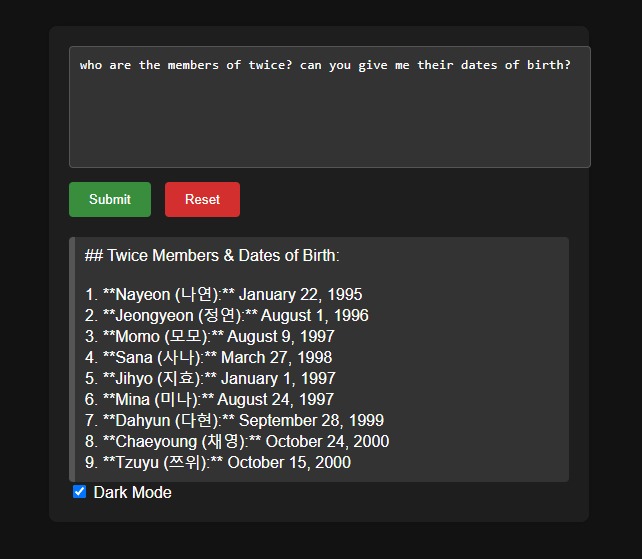
who are the members of twice? can you give me their dates of birth?
Inspiration
My inspiration is to stay up to date with the latest updates in how to use Gemini nano. I am ecstatic to see there is progress in offline, privacy friendly models.
What it does
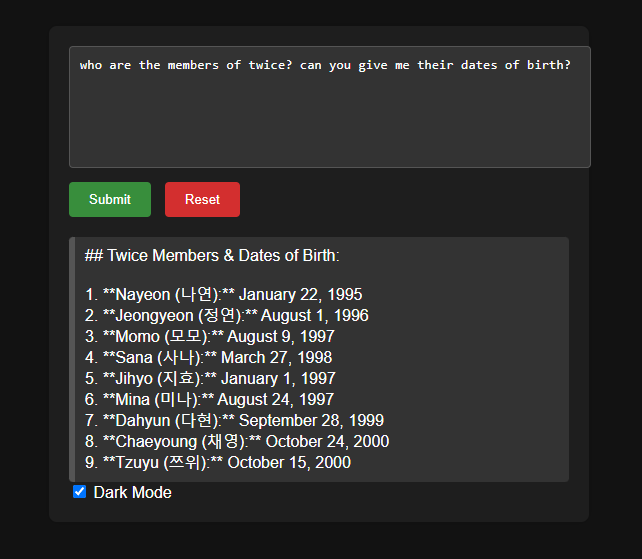
It is just a simple demo to try out Gemini nano
How we built it
I built it with a lot of help from the Chrome team, specifically Tom. Thank you, Tom.
Challenges we ran into
I had difficulty getting Chrome Canary to work properly with ai but with Tom's help and this document I was able to get through this hurdle. https://docs.google.com/document/d/1VG8HIyz361zGduWgNG7R_R8Xkv0OOJ8b5C9QKeCjU0c/edit?tab=t.0&usp=gmail#heading=h.opavs8dwyfke
Accomplishments that we're proud of
I was able to ask a simple question that tripped Gemini Nano.
What we learned
This is still an experimental work in progress kind of thing. Also, if I were to use this in real life, I will want to add some disclaimer on the page somewhere. This is a legal question and I don't know for sure.
What's next for Hello, AI
Next is to see if there is some way to make this cross platform. This will probably take a while.
<!DOCTYPE html>
<html lang="en">
<head>
    <meta charset="UTF-8">
    <meta name="viewport" content="width=device-width, initial-scale=1.0">
    <title>Hello, AI</title>
    <style>
        body {
            font-family: Arial, sans-serif;
            background-color: #f0f0f0;
            display: flex;
            justify-content: center;
            align-items: center;
            height: 100vh;
            margin: 0;
            transition: background-color 0.3s, color 0.3s;
        }
        .container {
            background-color: #fff;
            padding: 20px;
            border-radius: 8px;
            box-shadow: 0 0 10px rgba(0, 0, 0, 0.1);
            max-width: 500px;
            width: 100%;
            transition: background-color 0.3s, color 0.3s;
        }
        textarea {
            width: 100%;
            height: 100px;
            padding: 10px;
            margin-bottom: 10px;
            border: 1px solid #ccc;
            border-radius: 4px;
            resize: none;
            transition: background-color 0.3s, color 0.3s;
        }
        button {
            padding: 10px 20px;
            margin-right: 10px;
            border: none;
            border-radius: 4px;
            cursor: pointer;
            transition: background-color 0.3s, color 0.3s;
        }
        #submitBtn {
            background-color: #4CAF50;
            color: white;
        }
        #resetBtn {
            background-color: #f44336;
            color: white;
        }
        #result {
            margin-top: 20px;
            padding: 10px;
            background-color: #e7f3fe;
            border-left: 6px solid #2196F3;
            border-radius: 4px;
            transition: background-color 0.3s, color 0.3s;
        }
        .dark-mode {
            background-color: #121212;
            color: #ffffff;
        }
        .dark-mode .container {
            background-color: #1e1e1e;
            color: #ffffff;
        }
        .dark-mode textarea {
            background-color: #333333;
            color: #ffffff;
            border: 1px solid #555555;
        }
        .dark-mode #result {
            background-color: #333333;
            border-left: 6px solid #555555;
        }
        .dark-mode #submitBtn {
            background-color: #388e3c;
        }
        .dark-mode #resetBtn {
            background-color: #d32f2f;
        }
        @media (max-width: 600px) {
            .container {
                padding: 15px;
            }
            button {
                width: 100%;
                margin-bottom: 10px;
            }
            button:last-child {
                margin-right: 0;
            }
        }
    </style>
</head>
<body>
    <div class="container">
        <textarea id="promptInput" placeholder="Enter your prompt here"></textarea>
        <button id="submitBtn">Submit</button>
        <button id="resetBtn">Reset</button>
        <div id="result"></div>
        <label>
            <input type="checkbox" id="darkModeToggle"> Dark Mode
        </label>
    </div>
    <script type="module">
        async function checkAi() {
            if (window === undefined || window === null) {
                return false;
            }
            if (window.ai === undefined || window.ai === null) {
                return false;
            }
            if (window.ai.languageModel === undefined || window.ai.languageModel === null) {
                return false;
            }
            const myAiStatus = await window.ai.languageModel.capabilities();
            console.info({ myAiStatus });
            if (myAiStatus === undefined || myAiStatus === null) {
                return false;
            }
            if (myAiStatus.available === undefined || myAiStatus.available === null) {
                return false;
            }
            console.info({ x: myAiStatus.available.toLowerCase()});
            if (myAiStatus.available.trim().toLowerCase() !== "readily") {
                return false;
            }
            return true;
        }

        const myAi = await checkAi();
        if (myAi === false) {
            alert("Sorry, unable to use artificial intelligence at this time");
        }

        if (myAi) {
            document.getElementById('submitBtn').addEventListener('click', async () => {
                const prompt = document.getElementById('promptInput').value;
                const { available, defaultTemperature, defaultTopK, maxTopK } = await ai.languageModel.capabilities();

                if (available !== "no") {
                    const session = await ai.languageModel.create();
                    const result = await session.prompt(prompt);
                    console.log(result);
                    document.getElementById('result').innerText = result;
                }
            });

            document.getElementById('resetBtn').addEventListener('click', () => {
                document.getElementById('promptInput').value = '';
                document.getElementById('result').innerText = '';
            });

            document.getElementById('darkModeToggle').addEventListener('change', (event) => {
                document.body.classList.toggle('dark-mode', event.target.checked);
            });
        }
    </script>
</body>
</html>

Log in or sign up for Devpost to join the conversation.