-
-
-
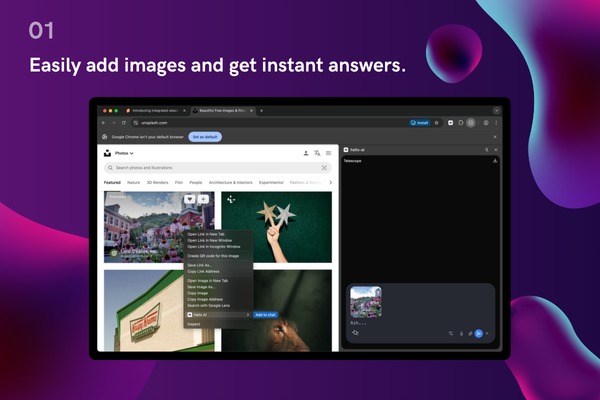
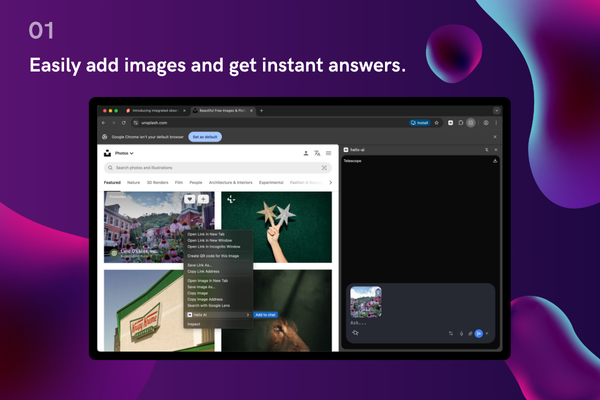
Easily add images and get instant answers.
-
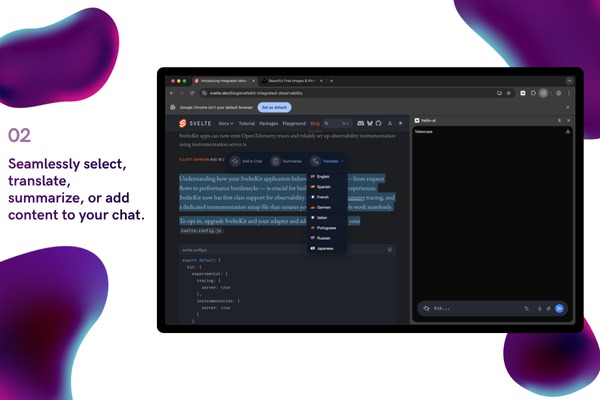
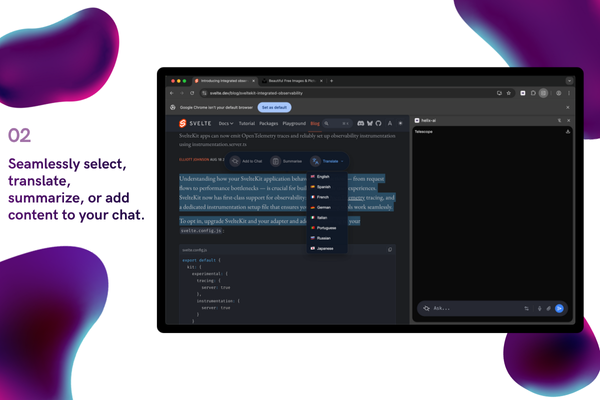
Seemlessly select translate, summarize or add to context to your chat
-
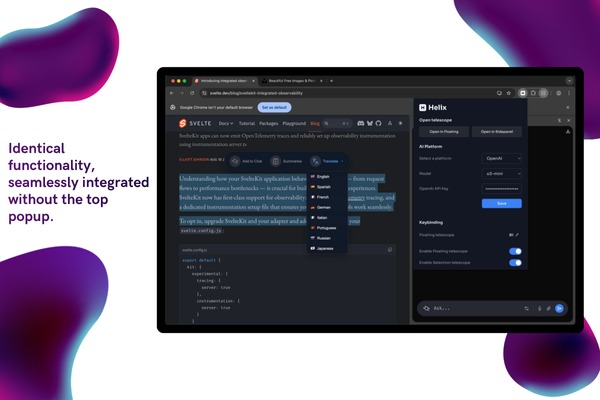
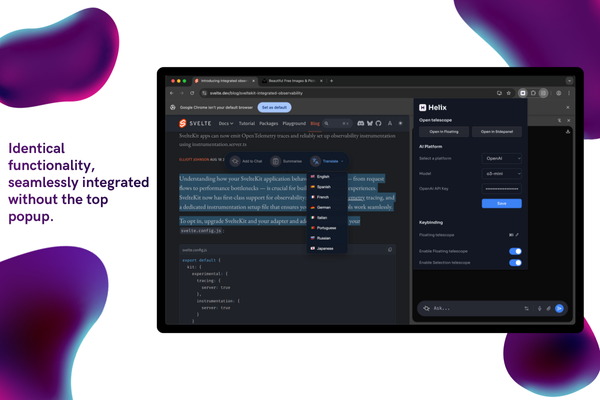
Options for more customization in the popip
-
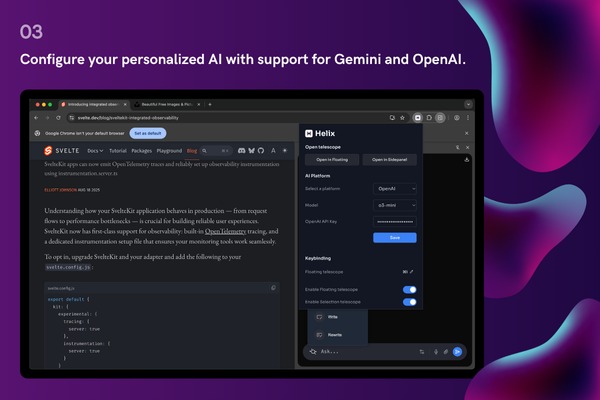
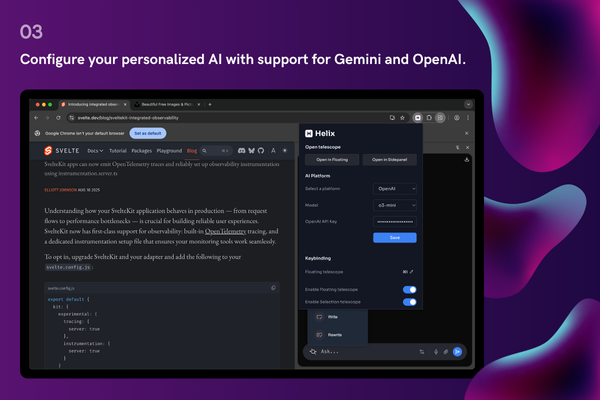
Support Open AI and Gemini for complex task other than built-in
-
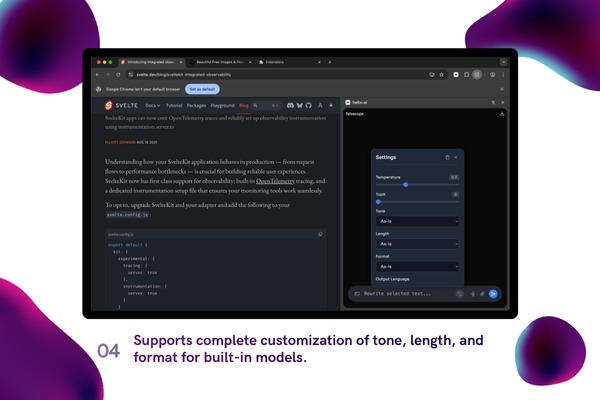
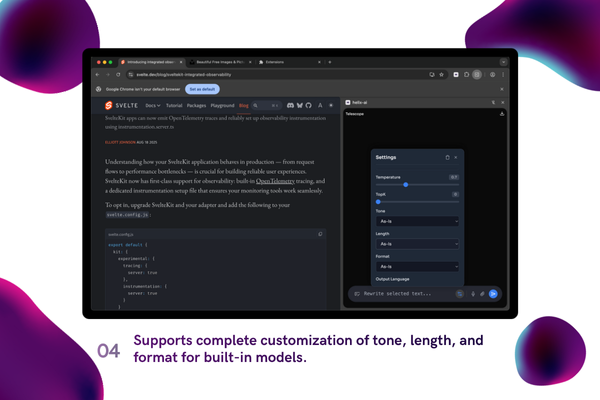
Support complete customization of tone, length and format for built-in models
🌟 Helix AI - AI Sidebar Chatbot Extension
💡 Inspiration
When we started we had a narrow scope to help specific type of user. User who are blind or elders who struggle to navigate complex site on day to day life. This is a quick prototype to help all type of user to summarise, ask questions and chat with their site. We made Helix as easy to use just by selecting text or right clicking you can attach text or image. Helix AI also get the page context if needed based on the user question. This help the user and AI to be on the same page (no pun intended). This is seems to be a good milestone towards our goal to help User who and reach web to people who are not just tech savvy.
⚙️ What it does
AI Sidebar Chatbot which connects with websites to prompt, write, and summarize.
API used - Prompt, Write, ReWrite, Summarize, Translate, Detect Language APIs, Proof reader api (including their config).
🔭 Telescopes:
- Selection Popup: Act instantly on highlighted text - summarize, prompt, rewrite, explain, translate.
- Floating Telescope: A movable mini console for quick prompts, snippets, and iterative tweaks without leaving your flow.
- Sidepanel Telescope: A persistent workspace with multiple option access with its settings.
- Writer Popup: A focused drafting space to write emails, blog posts, and also rewrite content.
- Settings popup: Select different AI models, enable/disable telescopes and keybinding, etc.
✨ Key Features:
- Hybrid AI Model: Choose from free built-in Chrome AI or use ChatGPT to prompt and generate content.
- Attach Images: Right-click image, click Add to chat, and also attach images in sidepanel.
- Voice input: Ask question directly using the mic button and continue the conversation.
- Prompt: Text, attach images in chat with models built-in, Gemini, OpenAI.
- Write: Write content, emails with tone options and specify expected output language—works in all input and textarea fields.
- Translate: Auto-detect language and translate to required output language.
- Summarize: Extract sectioned content with points and summarize based on tone and length.
🎯 Where it fits best (Practical scenarios):
- Quick prompt (Floating Telescope): Search and immediately prompt anything from floating Telescope.
- Works on any site (Selection Popup): Select a paragraph and add it to the chat window.
- Focused sessions (Sidepanel Telescope): Clean design that has context for the current active tab and answers questions related to it.
- Writing moments (Writer Popup): Draft emails and contact forms, social posts and replies, craft concise tweets.
- Research and reading: Summarize long articles, compare sources, extract key points, and ask follow-up questions about the current page.
- Marketing and SEO: Rewrite headlines/meta, generate outlines, improve readability, and localize landing-page copy in context.
- Product and UX writing: Craft UI microcopy, empty states, tooltips, and release notes directly on the page you're designing.
- Learning and explainers: Break down technical blogs, visualize concepts, translate jargon, and produce step-by-step guides.
- E-commerce and catalogs: Normalize product details, generate descriptions/specs, and compare items side-by-side.
🛠️ How we built it
We designed, selected the proper tech stack, and thought about features like page context sharing, sidebar, attaching images, etc.
- Modern Extension Architecture with WXT: Built using WXT, a modern framework for cross-browser extensions, with TypeScript throughout for type safety and maintainability, and Svelte 5 runes for reactive UI and streamlined state management, ensuring compatibility.
- Modular Entrypoint System: Implemented separate modules for each surface including background service worker for lifecycle and command handling, content scripts with Shadow DOM injection for page-isolated UI, sidepanel for persistent chat, and selection popup, floating telescope, and writer popup as context-specific overlays.
- Multi-Provider AI Integration: Leveraged Vercel AI SDK to abstract multiple providers (OpenAI, Anthropic, Google Gemini) behind a unified interface, employing a hybrid approach with on-device processing (Chrome Writer API with Gemini Nano) for privacy-sensitive tasks and cloud models for deeper analysis, plus real-time streaming with abort controllers and timeout handling for reliable UX.
- State Management and Context Awareness: Utilized Svelte stores for chat state, feature flags, and global settings, combined with content extraction from active pages and DOM analysis for accurate prompts, plus secure storage abstraction for API keys and user preferences to maintain intelligent context throughout user sessions.
- Privacy-First Development with Robust Build System: Emphasized privacy through hybrid AI that keeps sensitive operations on-device with minimal data collection and user control, while WXT handles manifest generation, hot reload, and production builds with TypeScript strict checking, Svelte component stories for isolated development, optimized streaming with chunk processing, lazy loading for UI components, and minimal permissions for security and user trust.
🚧 Challenges we ran into
- Page Context Integration with Svelte: Extracting and maintaining accurate page context while rendering it in Svelte components proved complex. We had to parse DOM content from active tabs, sanitize HTML to prevent XSS attacks, convert content to markdown for consistent formatting, and inject it into Shadow DOM-isolated Svelte components. Balancing performance with real-time updates as users navigated pages required careful debouncing and efficient state management across extension boundaries.
- Different API Technicalities and Provider Inconsistencies: Each AI provider (OpenAI, Gemini, Chrome Built-in AI) had their own unique API structures, streaming formats, authentication methods, and rate limits. We tackled inconsistent response formats, varying error handling patterns, and provider-specific features. Creating a unified abstraction layer with Vercel AI SDK while preserving each provider's capabilities required extensive testing and fallback strategies for reliability.
- Making UI and UX Intuitive with Multiple APIs and Features: Designing an intuitive interface that seamlessly handles prompt, write, rewrite, summarize, translate, and image attachment across four different telescopes was challenging. We had to prevent feature overload, maintain consistent behavior across surfaces, provide clear visual feedback for streaming responses, handle model switching gracefully, and ensure users could quickly access the right tool without confusion despite the wealth of options available.
🏆 Accomplishments that we're proud of
- Multiple AI API integration: Integrated multiple AI APIs along with their config so users can leverage Chrome's built-in Gemini Nano for on-device tasks like prompting, summarization, writing, etc.
- Hybrid AI Integration: Successfully implemented a flexible system allowing users to choose between free built-in Chrome AI or ChatGPT, enabling seamless model switching based on preferences and use cases.
- Multi-Modal Functionality: Developed comprehensive multi-modal capabilities supporting both text, audio and image inputs, with the ability to attach images directly from any webpage through right-click integration Or ask question directly using microphone.
- Universal AI Access: Created versatile Telescopes that work contextually across any website, providing free and accessible AI assistance without requiring users to switch tabs or disrupt their workflow.
- Context-Aware: Built AI functionality that understands and maintains context for the current active tab, delivering relevant and intelligent responses based on the user's browsing activity.
- Seamless User Experience: Achieved instant, in-context interactions through multiple access points including Selection Popup for highlighted text, customizable tone options, language specification, and a persistent movable interface that integrates naturally into browsing.
📚 What we learned
- Working with AI via API: Built a multi-provider AI integration using Vercel AI SDK to abstract OpenAI, Anthropic, and Google Gemini behind a unified interface. Implemented hybrid processing with on-device Chrome Writer API (Gemini Nano) for privacy-sensitive tasks and cloud models for deeper analysis, featuring real-time streaming with abort controllers and robust timeout handling for reliable user experience.
- Managing context: Implemented intelligent context awareness through Svelte stores for chat state and global settings, combined with active page content extraction and DOM analysis. The system maintains conversation context across telescopes, securely stores API keys and preferences, and automatically shares current tab context in sidepanel for relevant prompts and accurate responses throughout user sessions.
- Using Sidebar: Created a persistent sidepanel telescope workspace that serves as the primary AI interface with access to all features including prompt, write, summarize, and translate. Features clean design with automatic context from the active tab, supports image attachments via right-click menu, enables multi-turn conversations, and provides quick access to settings for model selection and telescope configuration.
- Building Cross-Browser Extension Architecture: Leveraged WXT framework with TypeScript for type-safe, cross-browser compatible extensions. Implemented modular entrypoint system with separate modules for background service workers, content scripts using Shadow DOM injection for page-isolated UI, and multiple context-specific overlays. Handled manifest generation, hot reload during development, and production builds with strict TypeScript checking for maintainability.
🚀 What's next for Helix AI
- We are planning to complete voice support that can help users not only ask questions related to the active tab but also navigate the site. This will help people who are color blind and elderly. This is one of the crucial things we wanted to add when we started this project. We aim to convert all the images on the site and help users who are visually impaired to know what the site is about.
- We are also planning to add agentic browsing support in the next major release. This allows all users to automate repeated boring tasks and use the built-in AI as a virtual assistant.
Built With
- aisdk
- chrome
- languagedetectorapi
- openai
- promptapi
- proofreaderapi
- rewriterapi
- summarizerapi
- svelte
- translatorapi
- writerapi
- wxt


Log in or sign up for Devpost to join the conversation.