Inspiration
Extreme-heat response is a coordination problem disguised as a map. A coordinator must balance neighborhood risk, cooling-center capacity, shuttle routes, budget, accessibility, bridge conditions, and facts that often live only in people's heads. Traditional dashboards make humans compare every option manually. A chat assistant, meanwhile, can suggest ideas but cannot reliably see or change the live planning state.
HeatGrid explores a better pattern: the human pins local reality; the agent handles the combinatorics; the human keeps authority.
What it does
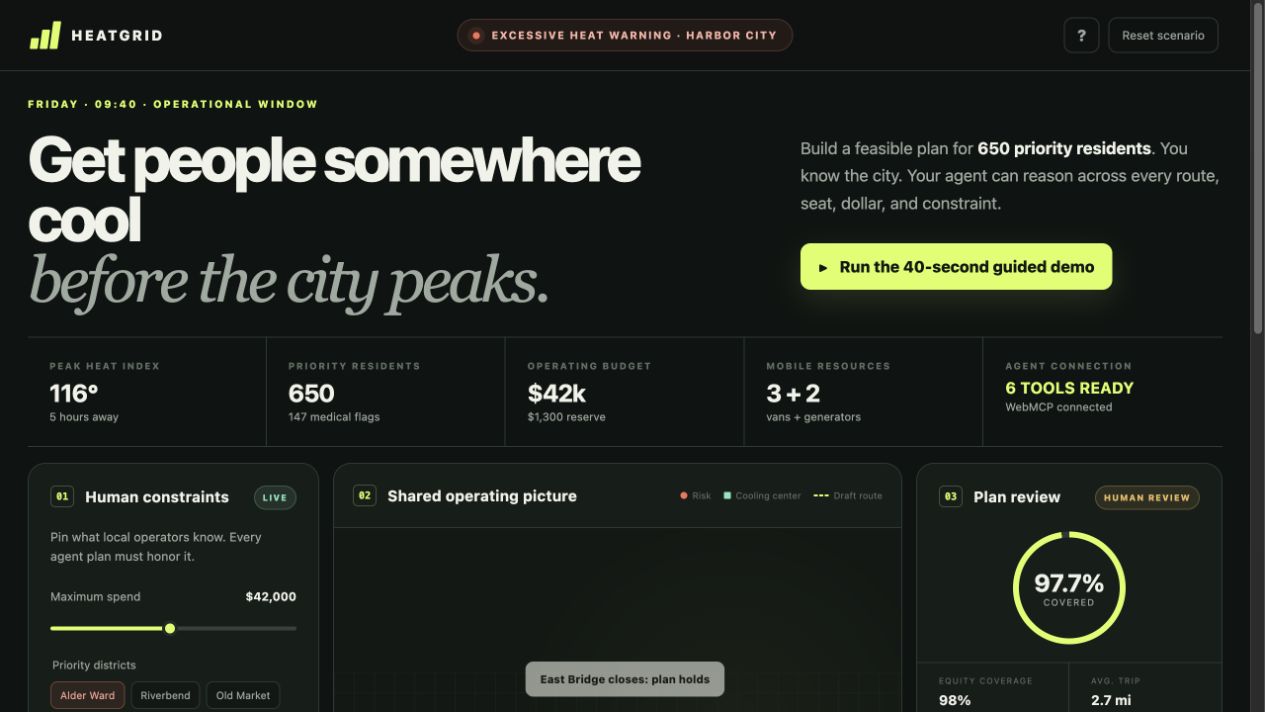
HeatGrid is a shared human-agent operations board for the fictional Harbor City. It is a planning prototype—not a live dispatch or medical system—and all data is synthetic.
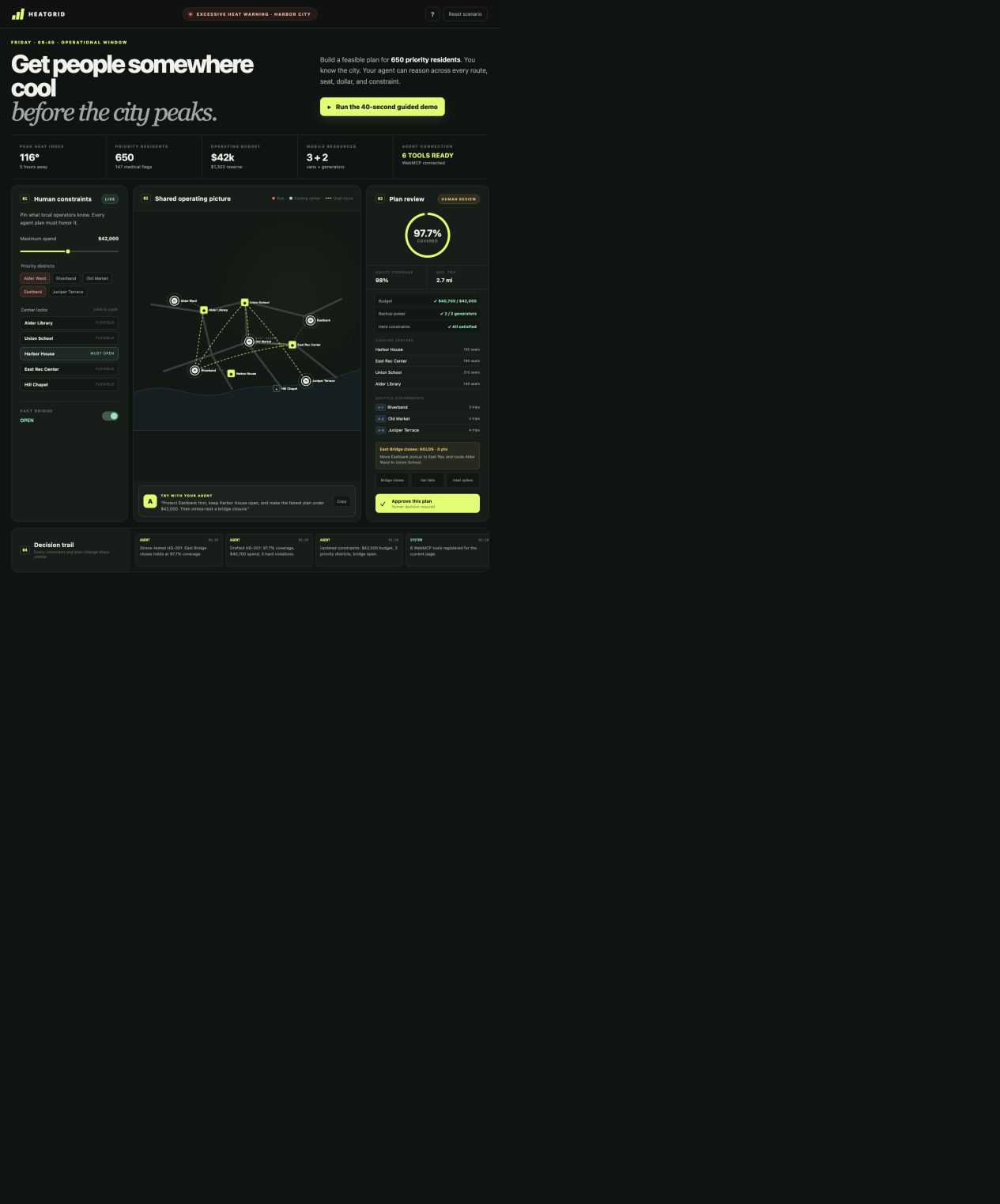
A coordinator can set the budget, choose priority districts, lock cooling centers, and mark the North Bridge open or closed. A WebMCP-capable agent can then use six focused tools to:
- read the same operational context visible to the human,
- inspect individual centers and shuttle routes,
- apply explicit planning constraints,
- draft a deterministic allocation plan,
- stress-test that plan against disruptions, and
- request human review.
The resulting plan appears immediately on the map and dashboard, with allocations, route usage, cost, coverage, equity, constraint checks, and a visible audit trail. The agent can prepare and test a decision, but only the human can approve it; HeatGrid deliberately exposes no approval tool.
In the demo scenario, the planner produces plan HG-001 with 97.7% coverage, 98% equity coverage, a $40,700 spend, a 2.7-mile average trip, and zero constraint violations. It then survives a bridge-closure stress test before stopping at human review.
Why WebMCP matters
HeatGrid is not a chatbot attached to a dashboard. WebMCP turns the website itself into a structured, agent-ready workspace:
- Tools operate on the live state the coordinator sees, not a stale copy.
- Typed inputs reduce ambiguity around budgets, districts, locks, and disruptions.
- Small, non-overlapping tools let an agent inspect before it changes anything.
- Structured results are concise enough for model use and rich enough for UI updates.
- Every consequential action remains visible and attributable in the audit trail.
- The missing approval tool is intentional: tool design is also permission design.
Without WebMCP, an agent would have to infer controls from pixels, scrape the page, or work in a separate chat disconnected from the operator. With WebMCP, the page publishes a purpose-built operational interface while remaining fully usable by a person.
How I built it
HeatGrid is a dependency-light Node.js and browser JavaScript application. The WebMCP layer uses the imperative navigator.modelContext.registerTool() API and exposes:
read_heat_contextinspect_heat_optionset_heat_constraintsdraft_heat_planstress_test_heat_planrequest_plan_review
Each tool has a narrow responsibility, JSON Schema inputs, concise descriptions, appropriate read-only and untrusted-content annotations, strict validation, and abort-signal handling. Tool actions update the same in-memory state model used by the visible interface. A deterministic local planner scores feasible allocations against coverage, equity, travel distance, capacity, budget, route availability, locks, and priority districts.
The interface is built with semantic HTML, responsive CSS, an SVG operations map, and accessible form controls. The server adds origin isolation, a restrictive Permissions Policy for WebMCP, a Content Security Policy, and other security headers. The UI also works normally when WebMCP is unavailable.
Automated tests cover default planning, tight budgets, locked centers, bridge closures, and invalid constraints. I additionally exercised the complete six-tool flow against the deployed site through a WebMCP-capable browser.
Challenges
The biggest challenge was designing tools that are useful without being dangerously broad. A single “optimize everything” tool would hide important choices; dozens of tiny tools would burden selection. The six-tool sequence became a legible planning protocol: observe, inspect, constrain, draft, stress-test, review.
A second challenge was making agent actions trustworthy. HeatGrid treats every tool call as a visible state transition, returns validation failures instead of silently relaxing constraints, and makes approval explicitly human-only.
The third challenge was working against an emerging browser API while preserving a graceful non-WebMCP experience and a small, auditable codebase.
Accomplishments
- A real, live WebMCP implementation rather than a mocked tool transcript
- Six composable tools with typed schemas and safety annotations
- Deterministic, reproducible planning and stress testing
- Immediate shared-state UI updates and a complete audit trail
- A hard human-approval boundary encoded in the tool surface
- Five passing planner tests and a deployed public demo
- Zero runtime dependencies in the application itself
What I learned
The best agent tool APIs are also good interaction design. Names, schemas, outputs, and missing capabilities all teach an agent how to collaborate. I also learned that “human in the loop” is strongest when it is architectural—not a warning in a prompt, but an action the agent literally cannot perform.
Collaboration
This is a solo submission by SSHDotCodes, developed with Codex as an AI implementation and testing partner. The demo narration uses Qwen Audio 3.0 TTS Plus. Product direction, safety boundaries, tool design, verification, and final submission decisions remained human-controlled.
What's next
The next step is to connect validated municipal data sources such as center inventories, GTFS transit feeds, and OpenStreetMap travel times; add signed scenario imports and multi-user incident rooms; and evaluate the workflow with emergency managers. The longer-term idea is a reusable pattern for accountable human-agent operations—not only heat response, but shelter planning, supply distribution, and other high-stakes coordination work.
Built With
- accessibility
- css3
- html5
- javascript
- node.js
- svg
- webmcp

Log in or sign up for Devpost to join the conversation.