Inspiration
Joshua - My mother is a nurse practitioner, so she's running to multiple clinics daily to meet her patient quota. Since she works the day shift, she leaves home around 7 am and returns at 8 pm. I have noticed her eating habits changing as she consumes more processed snacks and fast food so she doesn't starve. Moreover, making healthy meals (meal prepping) is not possible with the strenuous hours she works. This is a common issue with every worker, especially those who work long shifts. The health of the human body depreciates as people work long hours, and because they need more time to prepare quality meals, they end up eating unhealthy foods that lead to improper sources of energy and can lead to health issues.
What it does
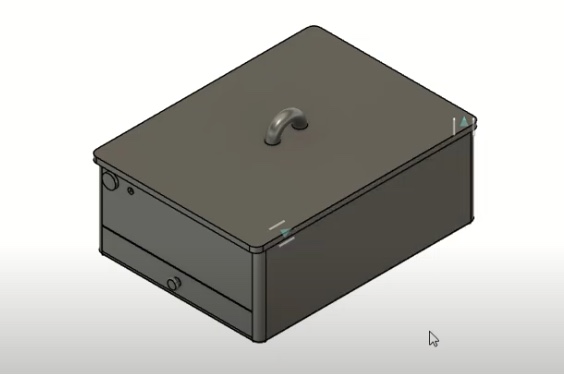
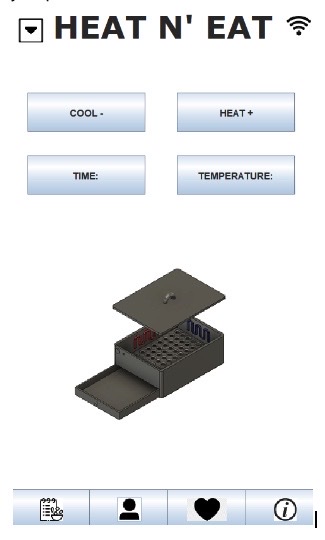
The Heat N’ Eat follows a lunch box build that serves as an all-in-one, on-the-go cooking, refrigeration, and lunch storage. Our connected mobile app lets users heat or cool their Heat N’ Eat for a set temp and time from a range using its Wi-Fi connection. The heat and cool feature use their respective red and blue coils to control the temperature inside itself so that food can be cooked or preserved to the user's desired temperature. Additionally, the reusable pull-out tray is used to catch any waste from food, like crumbs or excess oil. The Heat N’ Eat runs on a rechargeable battery-powered pack.
The mobile app also holds more features, such as profile, model information, favorite recipes, and usage history, so the user can better track and understand the product and its abilities.
How we built it
The 3D model was built by utilizing Auto Desk Fusion 360. We started by building the outer shell of the heat and eat, then focused on the actual work with the inside. The most significant part of the heat we eat is keeping food ready and being able to eat fresh food, so we moved on to the eating and cooling elements. To do this, we added heating and cooling coils inside the box. The heating for cooking fresh food wherever you go is like an air fryer. The cooling for keeping food refrigerated at any time. We also needed an easy clean-up method when you are done cooking, so we created a drainage system for the waste. The idea behind this was to let all the scraps fall through holes at the bottom into a tray that is easily accessible. You can dump the waste from the tray in the trash can, and everything will be clean. We then moved on to the power source. We needed something to start the heat and eat, so we added a power button to turn it on and connect to the phone. The box also needs a power source, and we decided batteries are wasteful, so we went with a resourceful design of a rechargeable box. We also added the charging port, and all the electronics for the heating and cooling would be in the box's walls.
Challenges we ran into
The biggest challenge we faced was space. The whole point of the project was to keep it simple and small for anyone to use on the go, but doing this and including all the elements is notisn't easy. For one, you need enough space to cook but have to keep it safe not to burn your hands. We also needed to find a material for the cooling and heating systems. Both of these problems were solved by spending some time doing some research to find optimal materials and dimensions. We found that using a material similar to stainless steel would be efficient for the heating and cooling part, and a 6X8X6 inch box would have enough space to cook while not hurting anything. We put the materials through testing on fusions testing software to find that stainless steel would be able to hold the temperature.
The problems did not stop there; they continued to the software. Initially, we wanted to use Swift to create a mobile app and possibly publish it, but we quickly realized that 2 of us needed the Macbook for it, and the others' Mac could not support it. So we then shifted to CustomTkinter, a Python library for app development; this started severely and then worsened. The download process took an hour, and the code library files were corrupted and no longer worked. This made us switch languages to Java for the final time. We ended up using their awt and wing libraries. This was not easy, though, as we had to learn a whole new API. A key issue we faced was loading images. Because of this, we had to restructure the code, which brought us back to square one, but once this problem was solved, we could create a smooth design.
Accomplishments that we're proud of
In a day and a half, we created a whole model of our device and a structure of our mobile application. We became well-researched on how to create the program, from little to no background knowledge on the process.
What we learned
CAD - learned how to make 3d models that represent our product. Learned how to use Fusion’s testing software to test heat and cooling
What's next for Heat N' Eat
Our next plans for Heat N’ Eat would be to publish our mobile application, and eventually build the model in terms of cost effectiveness.

Log in or sign up for Devpost to join the conversation.