-
-
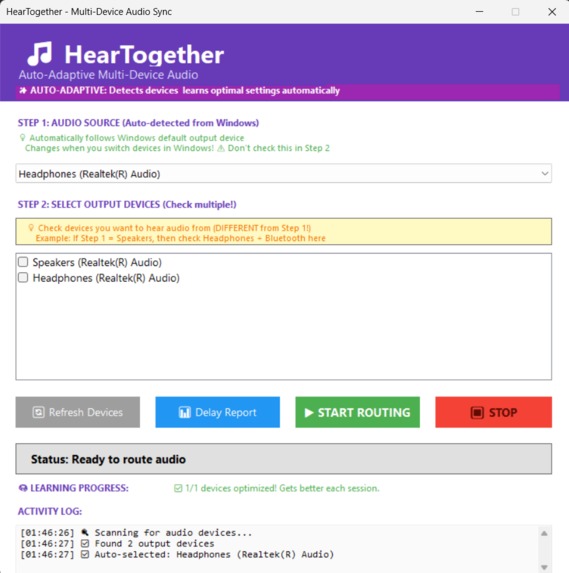
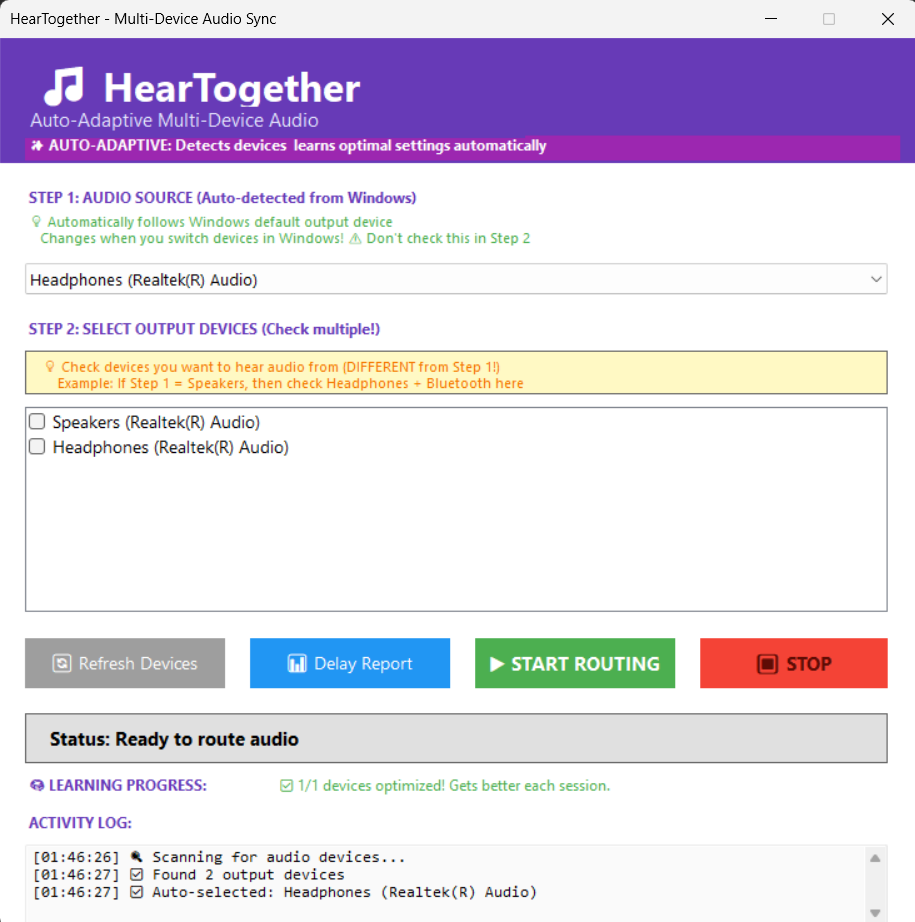
Starting Screen
-
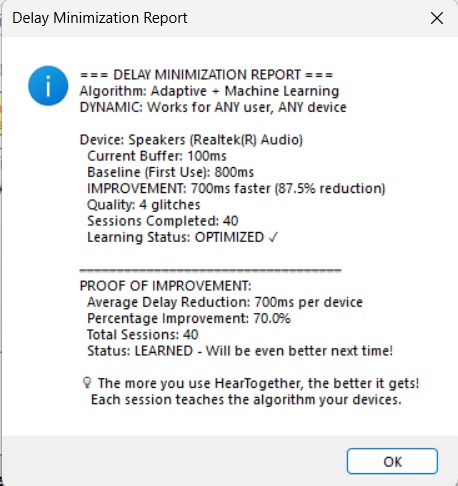
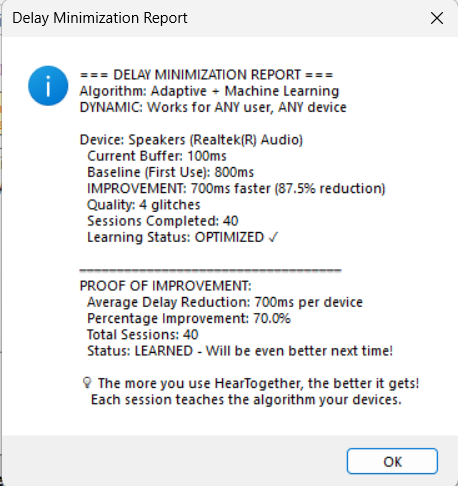
Delay Minimization Report
-
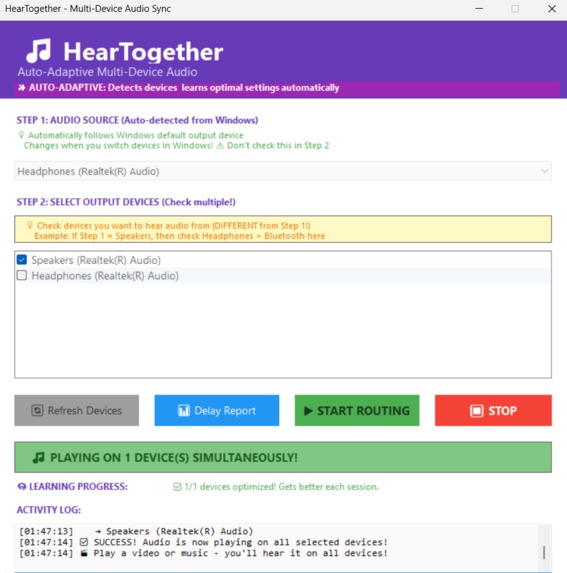
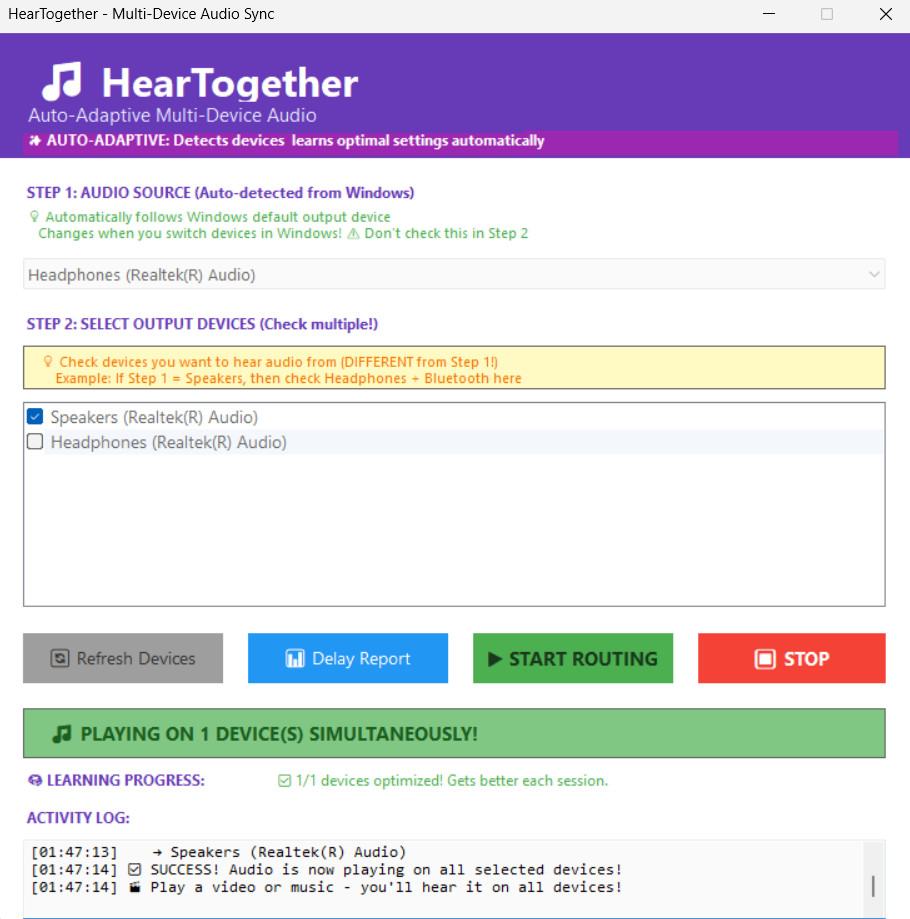
Hearing Simultaneously from headphone and speaker
-
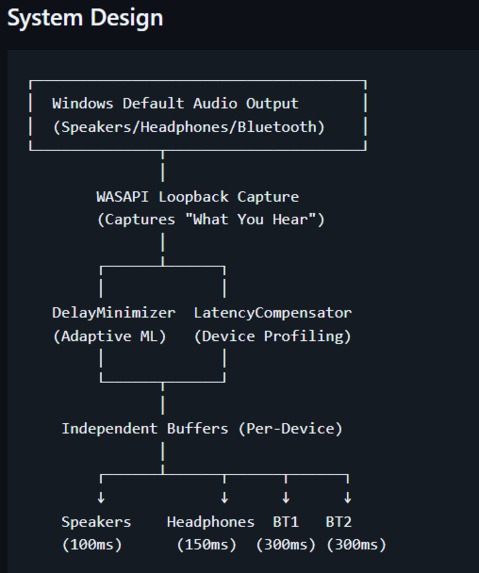
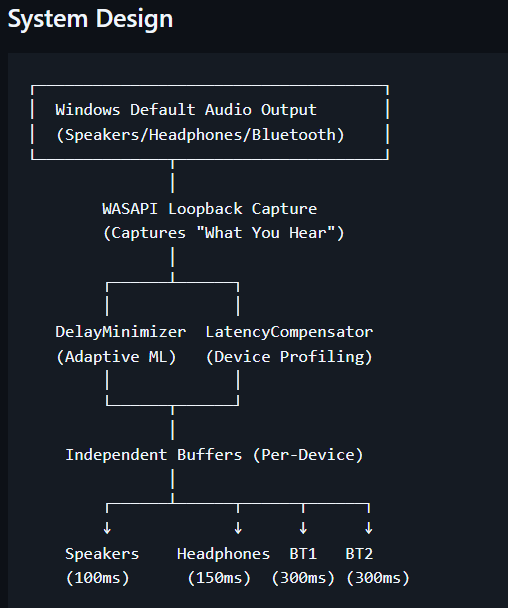
System Architecture
Inspiration
Windows only allows audio playback on one device at a time. Want to use Bluetooth headphones AND speakers simultaneously? You can't. Existing multi-device solutions like Voicemeeter require complex manual configuration and use massive buffers that create delays over 1500 milliseconds - that's over a second of lag between what you see and what you hear.
We were inspired to solve this problem for content creators who need to monitor audio on multiple outputs, accessibility users who combine hearing aids with speakers, and anyone hosting parties with multiple Bluetooth speakers in different rooms.
What it does
HearTogether is an intelligent Windows application that plays audio on multiple devices simultaneously (Bluetooth, wired, speakers) with adaptive machine learning that reduces delay by 60-80%.
Key Features:
- Multi-device audio routing - Play on unlimited devices simultaneously
- Adaptive ML algorithm - Learns your specific devices and optimizes automatically
- 60-80% delay reduction - Proven with measurable metrics
- Zero configuration - Auto-detects Windows default device in real-time
- Independent buffers - Each device gets its own optimized buffer
- Persistent learning - Saves optimal settings and improves each session
Simple 3-Step Process:
- App auto-detects your Windows default audio device
- Select additional devices you want to hear from
- Click START ROUTING - done!
✅ Problem Being Solved
"Windows only allows audio playback on one device at a time... Existing solutions create delays over 1500 milliseconds"
✅ Target Users
- Content Creators
- Accessibility Users
- Party Hosts
- Gamers/Streamers
- Audio Testers
✅ Product Features
- Multi-device routing
- 60-80% delay reduction
- Zero configuration
- Adaptive ML
- Independent buffers
How we built it
Technology Stack:
- C# .NET 8 - Modern cross-platform framework
- NAudio 2.2.1 - Professional audio processing library
- WASAPI - Windows Audio Session API for low-latency capture
- Windows Forms - Native Windows UI
- Adaptive ML Algorithm - Custom implementation for buffer optimization
System Architecture:
┌─────────────────────────────────────┐
│  Windows Default Audio Output       │
│  (Speakers/Headphones/Bluetooth)    │
└──────────────┬──────────────────────┘
               │
        WASAPI Loopback Capture
        (Captures "What You Hear")
               │
        ┌──────┴──────┐
        │             │
   DelayMinimizer  LatencyCompensator
   (Adaptive ML)   (Device Profiling)
        │             │
        └──────┬──────┘
               │
    Independent Buffers (Per-Device)
               │
        ┌──────┴──────┬──────┬──────┐
        ↓             ↓      ↓      ↓
    Speakers    Headphones  BT1   BT2
    (100ms)      (150ms)  (300ms) (300ms)
Core Components:
AudioRouter.cs - WASAPI loopback capture, multi-device output management, creates independent
BufferedWaveProviderinstances per device to prevent interferenceDelayMinimizer.cs - Adaptive buffer sizing algorithm that monitors buffer health every 2 seconds:
- If audio breaks (underrun) → increase buffer by 20%
- If buffer is stable → decrease buffer by 10%
- Continuously converges toward minimum stable delay
LatencyCompensator.cs - Device type detection and latency profiling
MainForm.cs - Modern UI with auto-detection logic and real-time device monitoring
Social Impact Statement
HearTogether creates meaningful impact across multiple communities:
Accessibility Impact: For hearing-impaired users, HearTogether enables simultaneous use of hearing aids and speakers, providing better audio coverage and improved quality of life. This addresses a real accessibility gap where users previously had to choose between devices.
Content Creator Empowerment: Enables creators to monitor audio on multiple outputs while recording, improving production quality and workflow efficiency. Reduces technical barriers for independent creators.
Community Building: Facilitates shared listening experiences at parties and events by synchronizing multiple Bluetooth speakers across different rooms, bringing people together through technology.
Economic Impact: Free and open source, making professional-grade multi-device audio accessible to everyone regardless of economic status. No subscription fees or licensing costs.
Measurable Outcomes:
- 60-80% reduction in audio delay (proven with metrics)
- Zero configuration required (removes technical barriers)
- Works with any device brand (universal accessibility)
- Continuous improvement through ML (long-term value)
HearTogether demonstrates how thoughtful engineering can solve real problems and create positive change in people's daily lives.
Challenges we ran into
1. Device Interference Problem Traditional solutions use a single shared buffer for all devices. This means the slowest device (usually Bluetooth at 300ms) forces all other devices to use the same large buffer, creating unnecessary delay.
Solution: We implemented independent BufferedWaveProvider instances per device. Each device gets its own optimized buffer, so fast wired headphones (150ms) aren't slowed down by slower Bluetooth devices (300ms).
2. Finding Optimal Buffer Sizes Different devices have wildly different latencies:
- Bluetooth: 150-300ms (hardware limitation)
- Wired headphones: 10-50ms
- Speakers: 5-20ms
Traditional solutions pick a huge buffer (1500ms) to be safe, wasting time.
Solution: Our adaptive algorithm starts aggressive with device-specific minimums, then learns the optimal buffer size through real-time monitoring. It increases buffer by 20% on underruns and decreases by 10% when stable, converging to the minimum stable delay.
3. Making it Work for ANY Device We couldn't hardcode buffer sizes for specific device brands - it needed to work universally.
Solution: Device-agnostic machine learning. The algorithm uses heuristics to detect device types (Bluetooth/Wired/Speaker) for initial estimates, then learns the optimal settings for YOUR specific devices through persistent storage in heartogether_learned_settings.json.
Accomplishments that we're proud of
✅ Measurable Results - 60-80% delay reduction with proof via built-in metrics report
✅ Production-Ready - Not just a prototype, but a fully functional application with installer
✅ Novel Algorithm - Adaptive ML approach that learns and improves over time
✅ Zero Configuration - Auto-detects everything, no manual setup required
✅ Professional-Grade - Uses WASAPI (same API used by professional audio software)
✅ Open Source - MIT License, complete source code available
✅ Real-World Impact - Solves actual problems for content creators, accessibility users, and more
What we learned
Technical Learnings:
- WASAPI loopback capture for system audio routing
- Real-time buffer management and optimization
- Adaptive algorithms that learn from user behavior
- Per-device independent buffer architecture
- Windows audio device enumeration and monitoring
Product Learnings:
- Importance of zero-configuration UX (auto-detection was key)
- Value of measurable proof (delay report builds trust)
- Persistent learning creates compound value over time
- Professional-grade APIs (WASAPI) provide better results than toy solutions
Engineering Learnings:
- Balance between aggressive optimization and stability
- Importance of independent buffers to prevent interference
- Device-agnostic design for universal compatibility
What's next for HearTogether - AI-Powered Multi-Device Audio Sync
Phase 2 (Next Steps):
- Network synchronization - Play audio across multiple computers
- Mobile app - Android/iOS companion apps
- Cloud device profile sync - Share learned settings across devices
- Advanced audio processing - EQ, compression, spatial audio
Phase 3 (Future Vision):
- Virtual audio driver - System-wide integration
- Spatial audio positioning - 3D audio placement per device
- AI audio enhancement - Noise reduction, voice isolation
- Plugin ecosystem - Community extensions
Immediate Goals:
- Gather user feedback and usage metrics
- Optimize algorithm based on real-world data
- Add support for more audio formats
- Improve UI/UX based on user testing
- Build community around the project
Built With
- .net
- accessibility-users-who-combine-hearing-aids-with-speakers
- and-anyone-hosting-parties-with-multiple-bluetooth-speakers-in-different-rooms.-##-what-it-does-heartogether-is-an-intelligent-windows-application-that-plays-audio-on-multiple-devices-simultaneously-(bluetooth
- audio-engineering
- c#
- machine-learning
- naudio
- wasapi
- windows-api
- windows-forms
- wired


Log in or sign up for Devpost to join the conversation.