Inspiration
This project started when a friend of mine shared how heartbroken he was after losing his dog. He was really sad, and I didn’t know what to say to comfort him. This made me realize there aren’t many ways to help people deal with the loss of a loved one, whether it’s a family member or a pet. I wanted to create something that could help people talk to those they’ve lost and feel a little better.
What it does
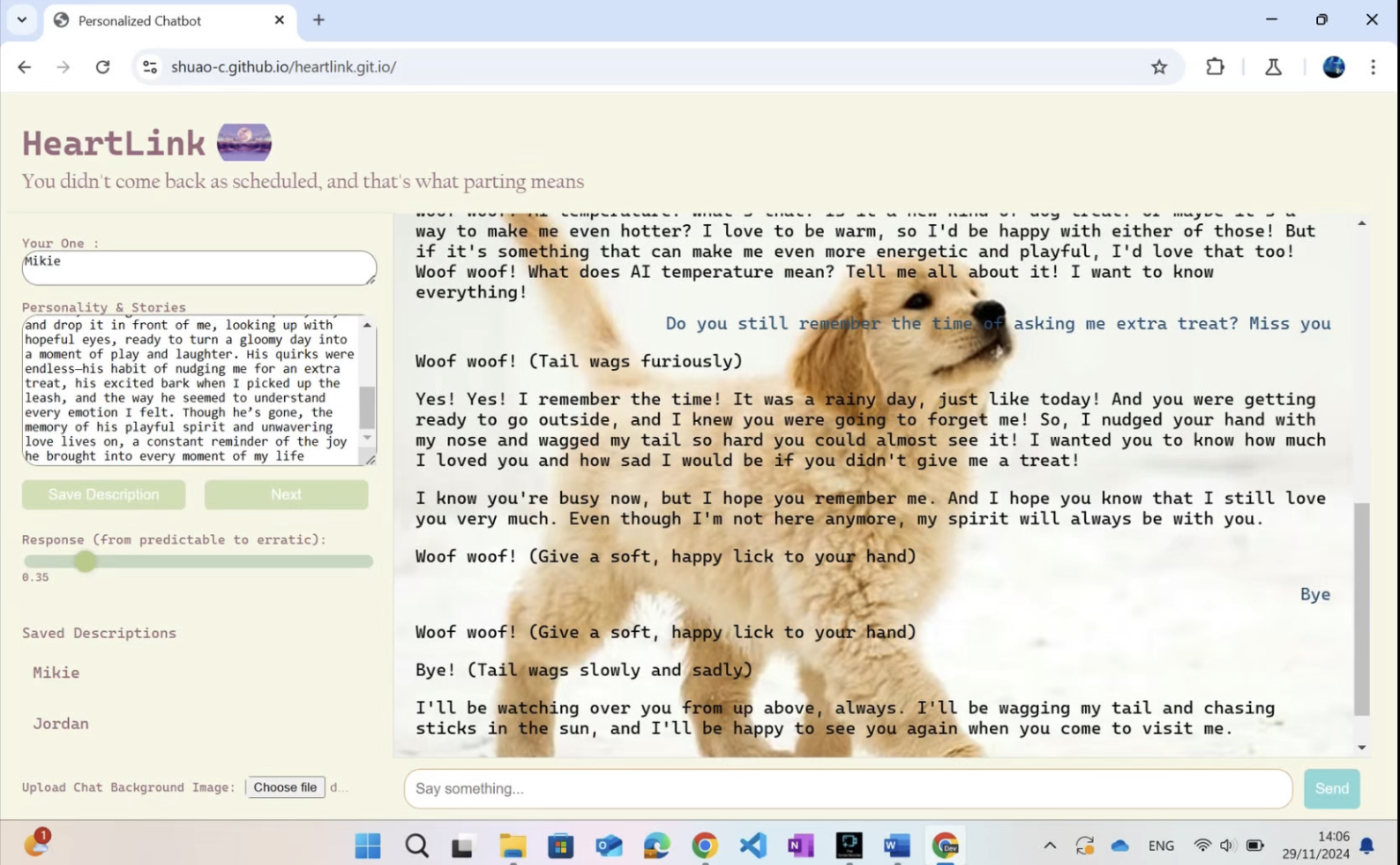
The project is based on creating a chatbot that allows users to interact with the memories of their lost loved ones or pets. I used Google’s Built-in Prompt API to handle the conversations.
How we built it
To build the chatbot, I began by designing the user interface (UI) of the webpage. I wanted it to be visually comforting, with soft colors and simple layouts, so users would feel at ease when using the bot. I used HTML and CSS to structure and style the webpage. The main challenge in this phase was making the design appealing while ensuring it was also responsive across different devices.
For the chatbot's personality, I designed it so that users could define the tone and style of responses based on their preferences. Users could specify the chatbot’s "personality" settings, such as whether they wanted the bot to be more empathetic, formal, or casual. Additionally, I allowed users to set the level of response accuracy, enabling them to choose between concise or detailed replies depending on their needs.
Another important feature I implemented was streaming responses, ensuring that the chatbot could reply in real-time, creating a more natural conversation flow. However, this led to a challenge where the chatbot would occasionally repeat its responses. To address this, I fine-tuned the settings and logic to reduce redundancy and improve response quality.
I also introduced a history feature, allowing users to create multiple chatbot profiles with distinct personalities. Whenever a user wanted to update a profile with new information, the chatbot would refresh and read all the personality data from scratch, ensuring it maintained consistency and coherence in ongoing conversations.
Challenges we ran into
One of the biggest challenges I faced was figuring out how to get the chatbot to respond correctly. The idea was to have the chatbot speak in the tone and personality of the lost loved one or pet, but I initially didn’t know how to set the character and perspective.
For example, when users would input a description of their lost pet or family member, I expected the chatbot to reply from that person's or pet's point of view. However, the chatbot started responding from the user's own perspective, as if the chatbot was taking on the user’s persona instead of the deceased’s. This completely broke the flow of the conversation and made the interaction feel unnatural.
I spent a lot of time adjusting the code, learning how to properly set the AI’s perspective based on the information the user provided, and ensuring that the chatbot would respond as if it were the person or pet that was lost, not the user themselves. It took a lot of trial and error to get the chatbot to understand how to adopt the right persona and tone, but eventually, I got it working.
Another challenge was figuring out how to use Google’s development tools to integrate the Built-in Prompt API effectively. It took some time to get everything working smoothly, but once I understood the setup, it became easier.
Accomplishments that we're proud of
In the end, I was able to solve the key challenges. While there are still areas to improve, such as user interface design and some additional features, I believe that the webpage and its functionalities are now fully operational and capable of meeting the intended needs. I’m proud to have created a meaningful tool that can provide comfort and support to people in their emotional journeys. It’s rewarding to know that this software can make a difference in people’s lives by offering a unique way to care for their mental well-being.
What we learned
Through this project, I learned a lot about web development. I realized how important it is to make a website not only functional but also visually appealing and easy to use. As a beginner, it was challenging to know where to start, but I picked up the basics of HTML, CSS, and JavaScript along the way.
The most important lesson I learned was how to make the chatbot respond in a way that felt natural and comforting. Since the chatbot was meant to help people grieving, I needed it to have the right tone. I used Google’s Built-in Prompt API to build the chatbot and spent a lot of time adjusting the responses so they were kind and supportive.
What's next for HEARTLINK
One idea for future development is to introduce a timeline feature. After a user has interacted with the chatbot for a certain period, the bot’s responses would gradually become more neutral and detached, ultimately transitioning to a point where it no longer responds. This approach would simulate the concept of the chatbot "leaving" the user’s life, helping them to move on rather than remain stuck in the virtual world. By incorporating this gradual disengagement, I hope to provide a gentle but firm way to encourage emotional healing and prevent users from becoming overly reliant on the chatbot as a source of comfort.


Log in or sign up for Devpost to join the conversation.