-
-
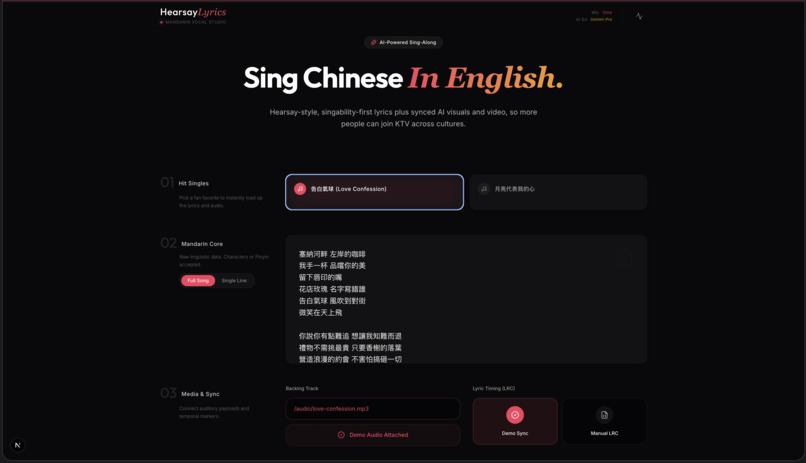
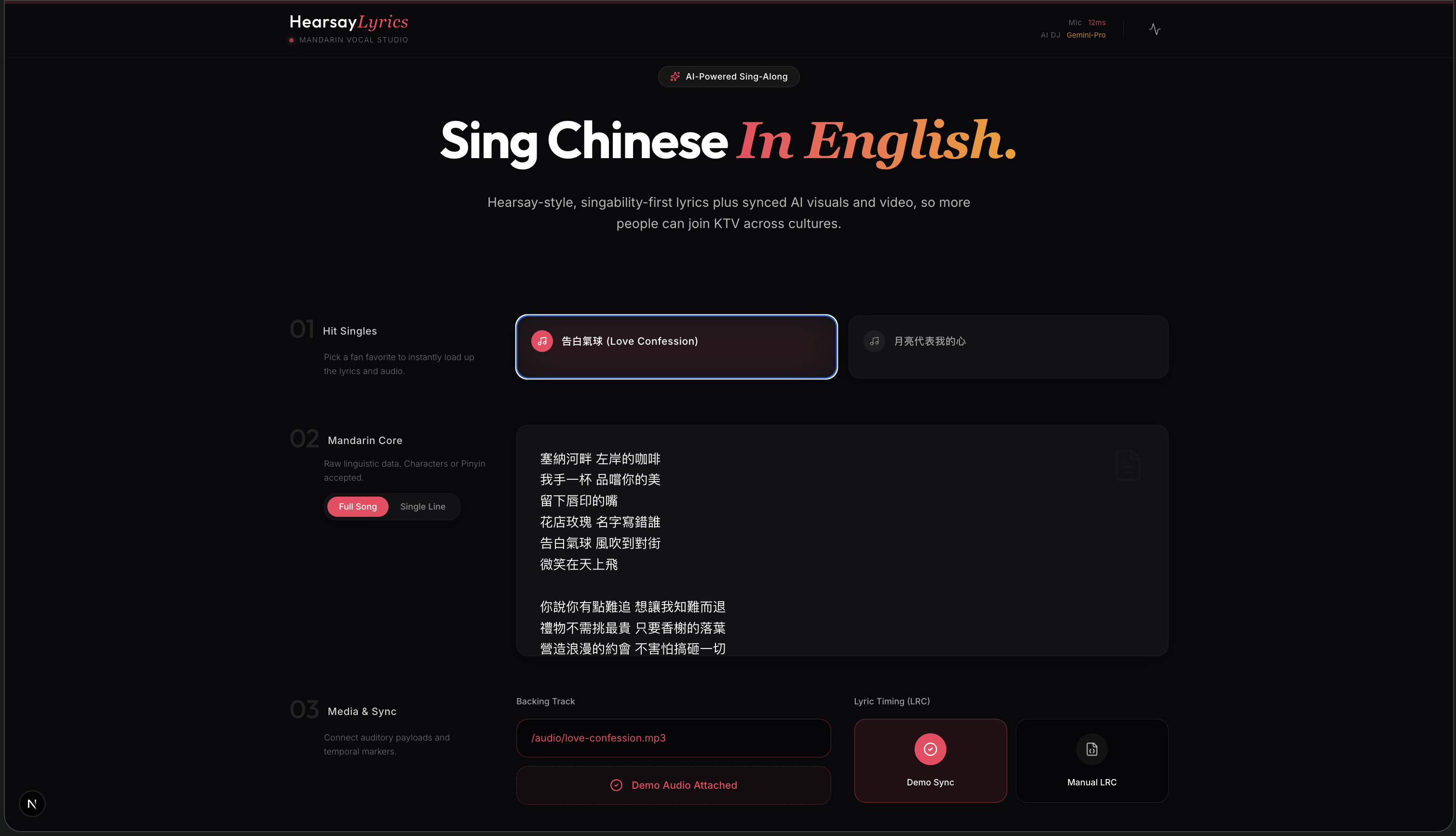
Landing Page - Add your inputs
-
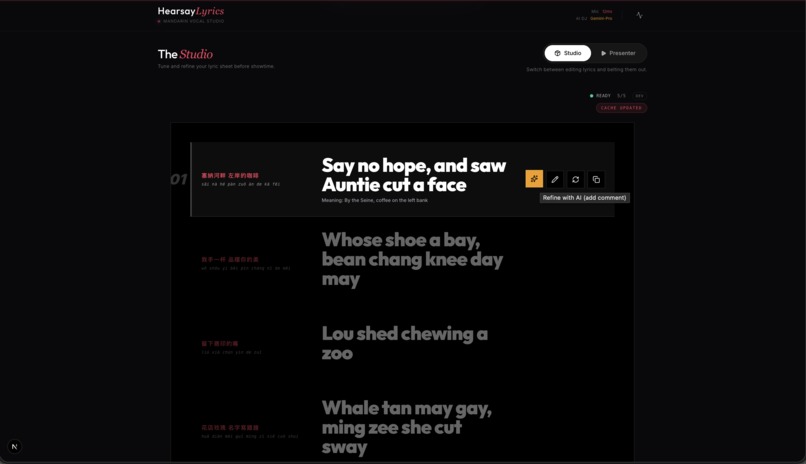
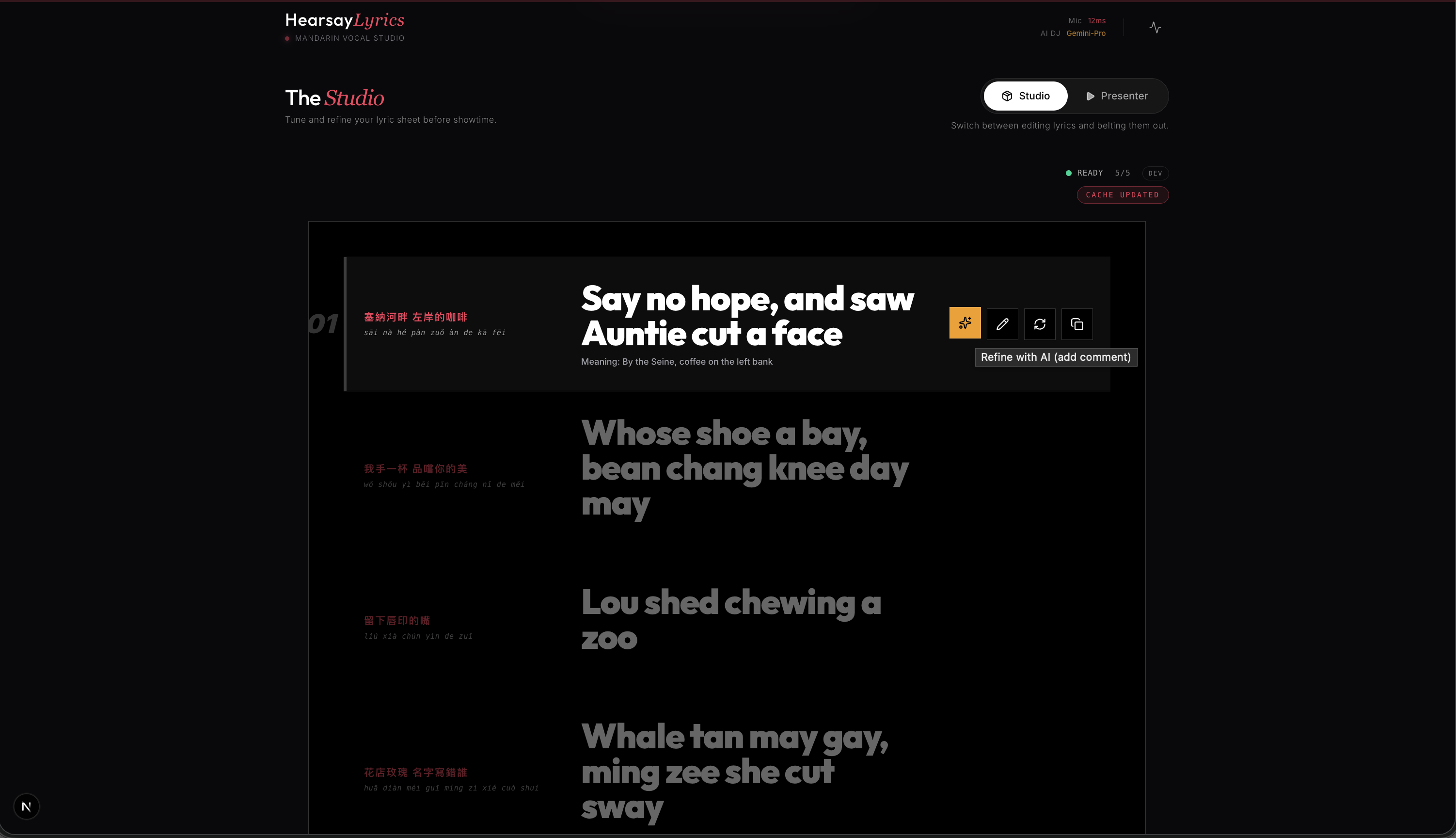
Studio Mode - Creatively direct the final MV (refine, edit, recycle)
-
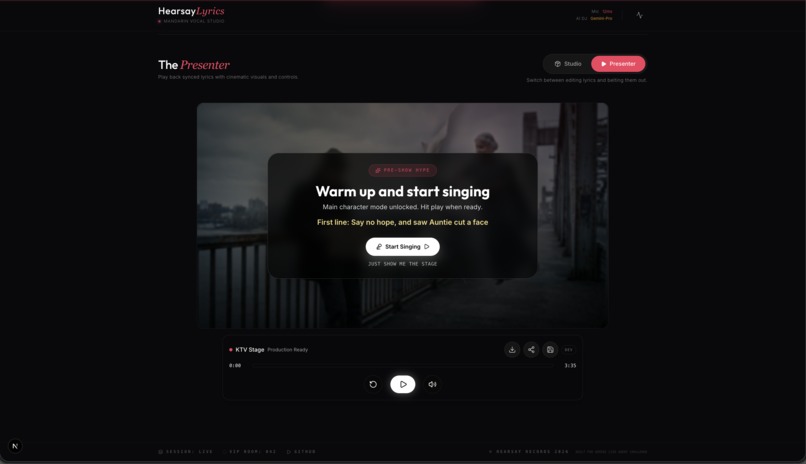
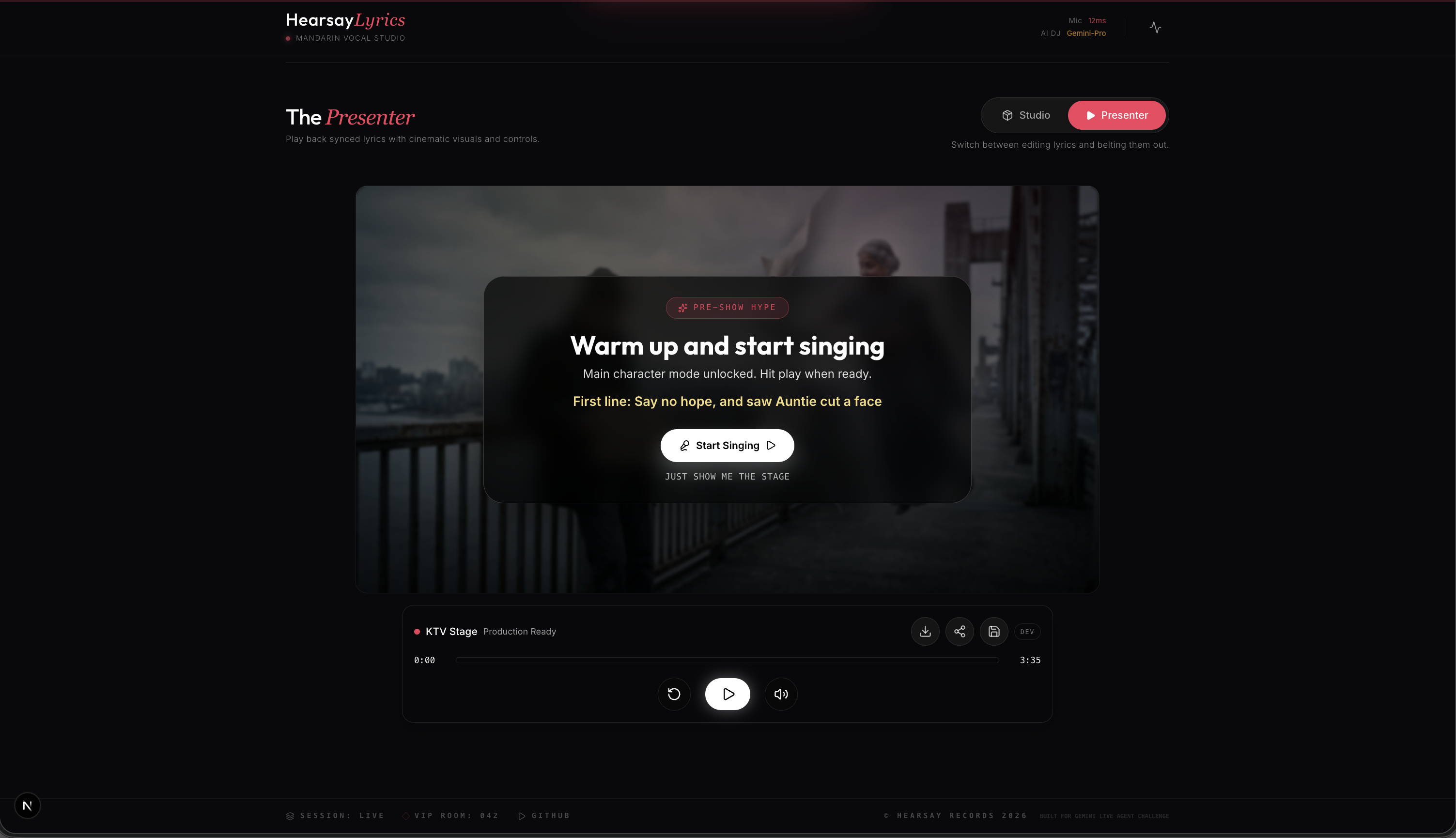
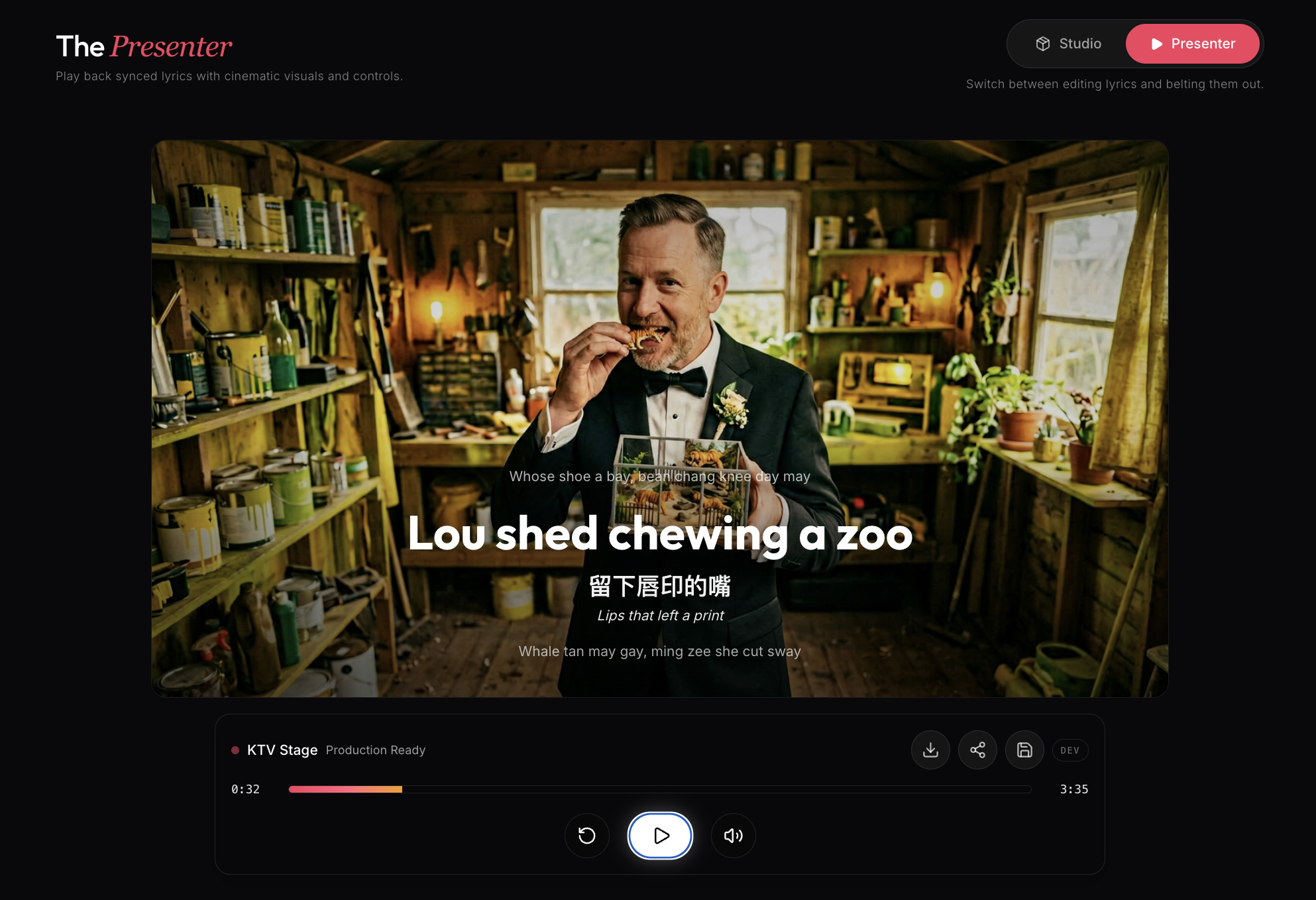
Perform Mode - Get ready to sing with ease!
-
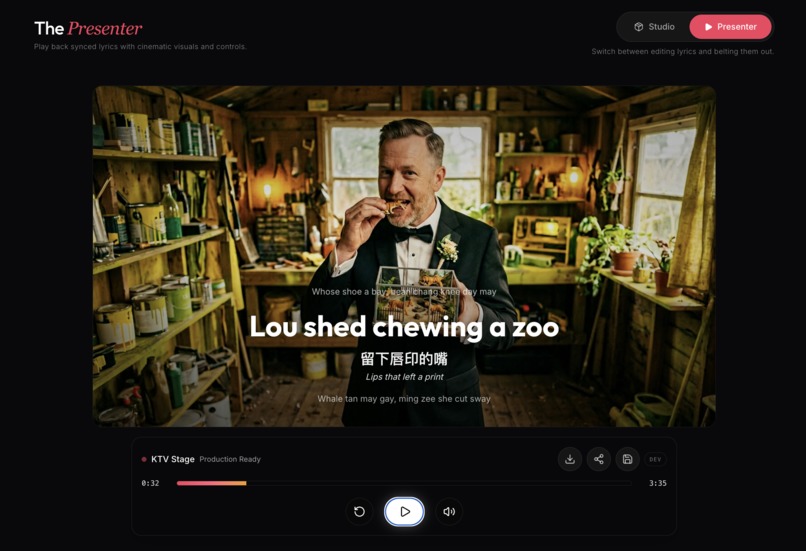
Music Video - Interleaved visual images and videos with fun lyrics text
-
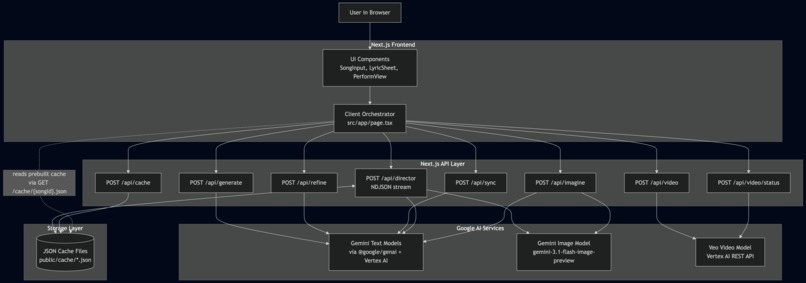
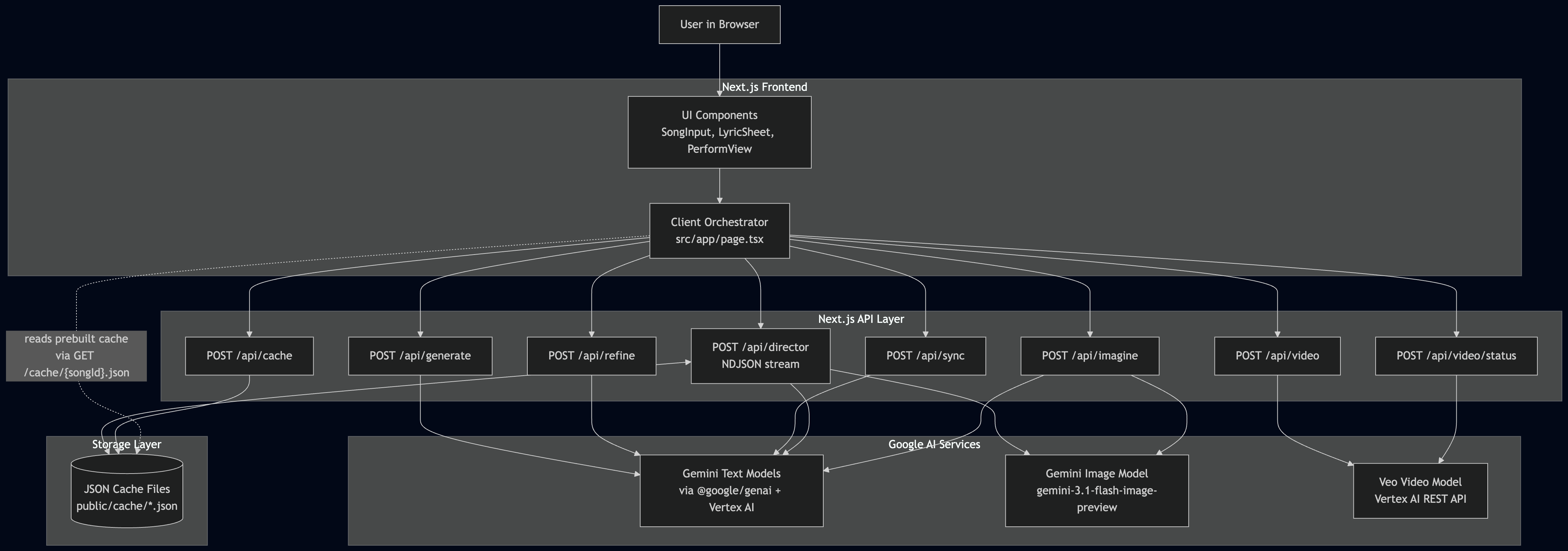
Architecture Diagram
Hearsay Lyrics
Edutainment across cultures.
AI-powered KTV companion that converts Mandarin lyrics into singable English "hearsay" lines and stages them as a shareable music-video experience, generating per-line visuals and short video clips that come together like a full music video.
Inspiration
Inspired by short-form social videos and the user-generated "misheard lyrics" phenomenon. See the project brief in docs/PRD.md for background and the hackathon framing.
Pitch
A Gemini-powered web app that generates singable English "hearsay" lyrics for Mandarin songs, preserving syllable counts and rhythmic structure. It combines real-time audio sync, per-line personalization, and generative visuals to make foreign-language karaoke inclusive, fun, and shareable.
Use Cases
- Karaoke inclusion: enable non-Chinese speakers to sing along at KTV nights.
- Live demos & events: showcase low-latency generation and sync for presentations and hackathons.
- Social content: create short-form, shareable lyric videos that resonate on social platforms.
- Language practice: pronunciation guides and incidental learning through singing.
- Fan engagement: localized, singable lyric experiences for international audiences.
Current Capabilities
- Mandarin lyrics input (paste or demo catalog)
- Per-line hearsay generation with pinyin and meaning
- Personalization slider and per-line variants
- Inline editing, variant selection, and refine actions
- Audio input by URL or local upload with AI-generated timestamps
- Progressive NDJSON Director endpoint for streaming per-line updates
- Per-line generated image backdrops and slideshow mode
- Video clip generation flow (start + poll status)
- Cache-first demo mode for reproducible runs (
love-confession)
Interleaved Text + Image + Video Flow
- Studio sends lyrics to
POST /api/director. - Director returns NDJSON lines progressively, each containing lyric text fields and (when generated) image bytes.
- Perform mode overlays active lyric text over generated visual backdrops.
- Optional slideshow uses per-line visual prompts/images.
- Optional video flow starts via
POST /api/videoand pollsPOST /api/video/statusuntil a clip is ready.
Tech Stack
- Next.js App Router (TypeScript)
- React + Framer Motion
- Tailwind CSS
- Gemini models via
@google/genai - Vertex AI auth flow for Veo long-running video operations
Architecture
High-level architecture and diagram: see docs/architecture.md.
Prerequisites
- Node.js 20+
- pnpm 9+
Environment Variables
Create .env.local in the repo root.
Required for text/image/sync flows:
VERTEX_AI_API_KEY=your_vertex_api_key
Required for video generation endpoints (/api/video, /api/video/status):
GCP_PROJECT_ID=your_gcp_project_id
GCP_SERVICE_ACCOUNT_JSON={"type":"service_account",...}
Notes:
GCP_SERVICE_ACCOUNT_JSONmust be valid JSON (single-line string in.env.local).- If video credentials are missing, text/image features can still run.
Run Locally
pnpm install
pnpm dev
Quick UI Repro (recommended)
Follow these steps to reproduce the core demo in the UI (fastest path):
- Open the app at http://localhost:3000.
- Select a catalog song (e.g., 告白氣球 — "Love Confession") from Hit Singles.
- Keep the cache toggle ON (recommended for fast, demo-friendly runs).
- Click "Direct MV" to generate per-line visuals and hearsay lyrics.
- Wait for Studio output to appear, then switch to
Performmode. - Press Play — lyrics will highlight in sync with the visuals.
- Use the Faithful ↔ Funny slider to change variants; tap Copy to share.
Optional: paste lyrics or upload audio to test any-song flows.
Optional: Reproducible Testing (developer)
There is currently no dedicated unit/integration test runner in this repo. The tests below are optional developer checks you can run to validate build and deterministic director behavior.
1) Baseline Build + Lint
pnpm lint
pnpm build
Expected: both commands exit successfully.
2) Deterministic Cache-Backed Director Test (No Live Generation)
This verifies the interleaved director output path deterministically using cached assets.
curl -sS \
    -D /tmp/hearsay-headers.txt \
    -o /tmp/hearsay-cache.ndjson \
    -H "Content-Type: application/json" \
    -X POST http://localhost:3000/api/director \
    -d '{"text":"smoke","songId":"love-confession","cacheMode":"prefer-cache"}'

grep -i "X-Hearsay-Cache" /tmp/hearsay-headers.txt
wc -l /tmp/hearsay-cache.ndjson
rg '"hearsay"|"imageBase64"' /tmp/hearsay-cache.ndjson | head
Expected:
- Header includes
X-Hearsay-Cache: hit - NDJSON has multiple lines
- Output includes hearsay text fields and cached image payload fields
3) Live Interleaved Text+Image Director Test
This verifies real generation and progressive NDJSON content.
cat > /tmp/hearsay-live.json <<'JSON'
{
    "text": "塞納河畔 左岸的咖啡\n留下唇印的嘴\n告白氣球 風吹到對街",
    "cacheMode": "bypass-cache",
    "generateImages": true
}
JSON

curl -sS \
    -D /tmp/hearsay-live-headers.txt \
    -o /tmp/hearsay-live.ndjson \
    -H "Content-Type: application/json" \
    -X POST http://localhost:3000/api/director \
    --data-binary @/tmp/hearsay-live.json

grep -i "X-Hearsay-Cache" /tmp/hearsay-live-headers.txt
wc -l /tmp/hearsay-live.ndjson
rg '"hearsay"' /tmp/hearsay-live.ndjson
rg '"imageBase64"' /tmp/hearsay-live.ndjson
Expected:
- Header includes
X-Hearsay-Cache: bypassed - NDJSON contains generated line objects
- At least some lines include
imageBase64unless image quota/rate-limit is hit
4) Video Generation API Test (Optional)
Requires GCP_PROJECT_ID + GCP_SERVICE_ACCOUNT_JSON.
Start operation:
curl -sS \
    -H "Content-Type: application/json" \
    -X POST http://localhost:3000/api/video \
    -d '{
        "lines": [
            {
                "chinese": "留下唇印的嘴",
                "pinyin": "Liú xià chún yìn de zuǐ",
                "meaning": "The mouth that left a lip print",
                "candidates": [{"text":"Lose ya shorn in the sway","phonetic":0.85,"humor":0.8}]
            }
        ]
    }'
Poll status using returned operationName:
curl -sS \
    -H "Content-Type: application/json" \
    -X POST http://localhost:3000/api/video/status \
    -d '{"operationName":"<paste-operation-name-here>"}'
Expected when complete:
done: true- one of
videoBase64orvideoUri
5) UI Repro Path
- Open app at http://localhost:3000.
- Select
告白氣球 (Love Confession)from Hit Singles. - Keep cache toggle ON.
- Click "Direct MV".
- Confirm output appears in Studio, then switch to Perform.
- Press Play and verify lyric progression + background visuals.
Expected:
- Fast cache-backed run
- Stable playback against
/audio/love-confession.mp3 - Interleaved lyric + visual experience in Perform mode
Useful Docs
- Product plan:
docs/plan.md - PRD:
docs/PRD.md - UI revamp notes:
docs/UI_REVAMP_PLAN.md - Audio integration notes:
docs/audio-integration.md
Built With
- gcp
- gemini
- nanobanana
- nextjs
- tailwind
- veo
- vertexai

Log in or sign up for Devpost to join the conversation.