-
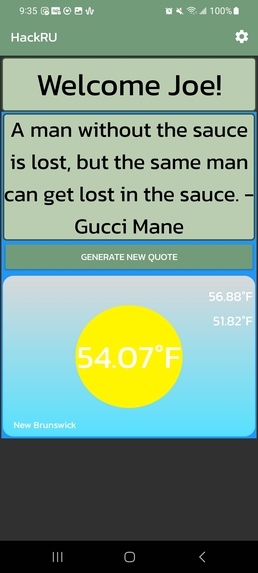
Dual weather and inspirational quote screen.
-
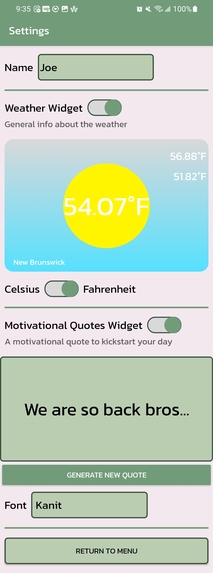
User account modification screen


Inspiration
Our group members were inspired to try app development and utilize APIs.
What it does
Our app generates random inspirational quotes, and uses live locational data to display a weather report for the day.
How we built it
We build this app using AndroidStudio as our IDE. The main screen was a Java Activity file comprised of embedded fragment activities: weather and quote services. We used the Android SDK version 29 as the run time environment. We pulled live weather data using the OpenWeatherMap API, where we deserialized the data into a Weather object and displayed it on the XML Text and Image views. We then serialized user data for later use in different screen Activities.
Challenges we ran into
Most of the sources we used to learn the documentation for Fragments in Activity screens were very outdated, and we had to scrap some ideas due to the software documentation not being comprehensive enough.
Accomplishments that we're proud of
We were able to dynamically implement the weather services API into our Fragment view and both call and send requests to the API to retrieve and deserialize JSON data into our weather object.
What we learned
We learned how to send API calls in Android Studio, and how to implement fragment files in Android Studio screens.
What's next for HealthyApp
Fixing the settings functionality so that we can hide and show different Fragment views based on switch input.


Log in or sign up for Devpost to join the conversation.