
Inspiration
Scrolling on short-form media platforms like TikTok and Instagram Reels can be extremely addictive and interfere with motivation, sleep, and mental health. Many college students have tried to delete the apps only to end up re-downloading them a few weeks later. Some of our team members have used apps to limit the time we spend doomscrolling, but it is hard to stay consistent.
These apps are designed to keep us watching: the more time you spend on Instagram Reels, the more opportunities Meta has to show you ads. What if there was a way to take more control over what you watch, and spend less time on content that doesn’t align with your goals? Millions of people enjoy watching Reels -- is there a way to make that experience healthier?
Project
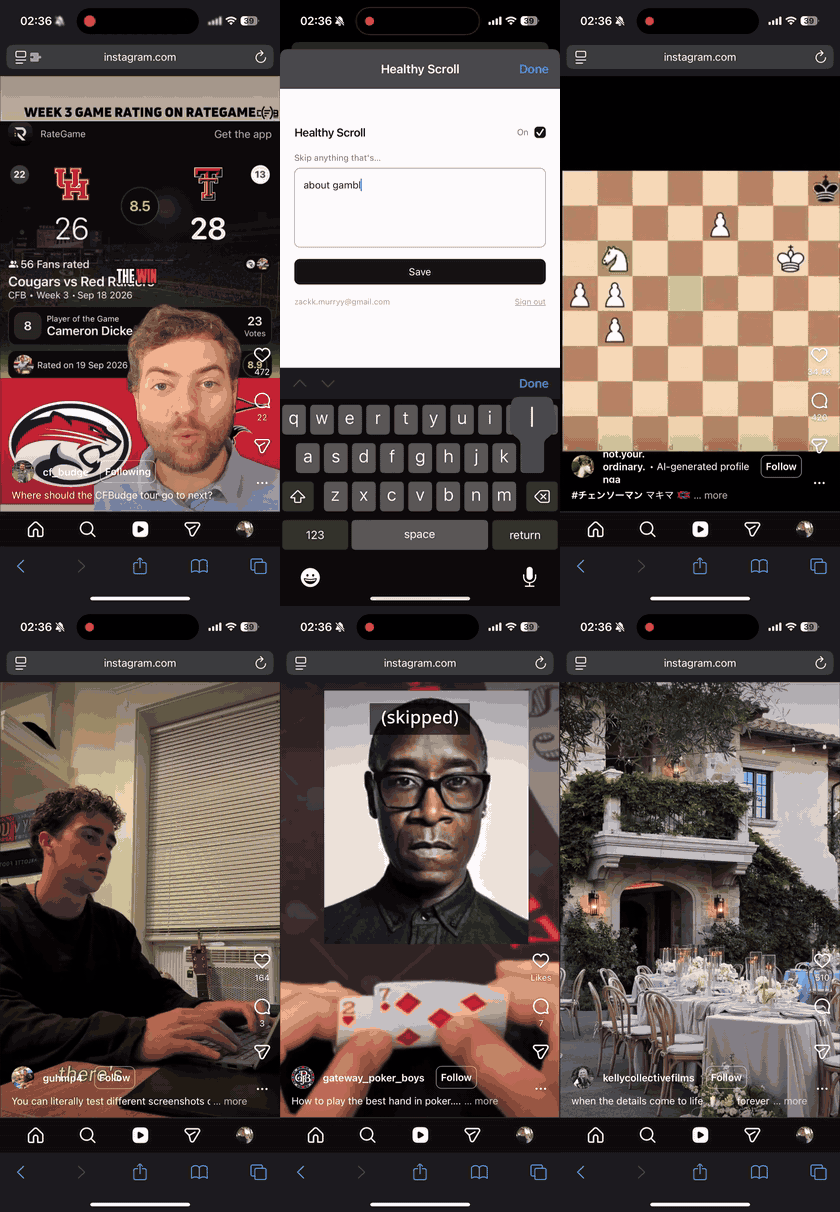
Healthy Scroll helps you filter your social media feed according to your intentional preferences. First, you input what types of videos you’d like to avoid: gambling content, thirst traps, brainrot, or even something subjective like “videos that make me compare myself to other people.” Then, the Healthy Scroll browser extension automatically scrolls past videos it confidently identifies as matching your filter. Instead of trying to limit the time spent scrolling, our project addresses the issues in the content itself.
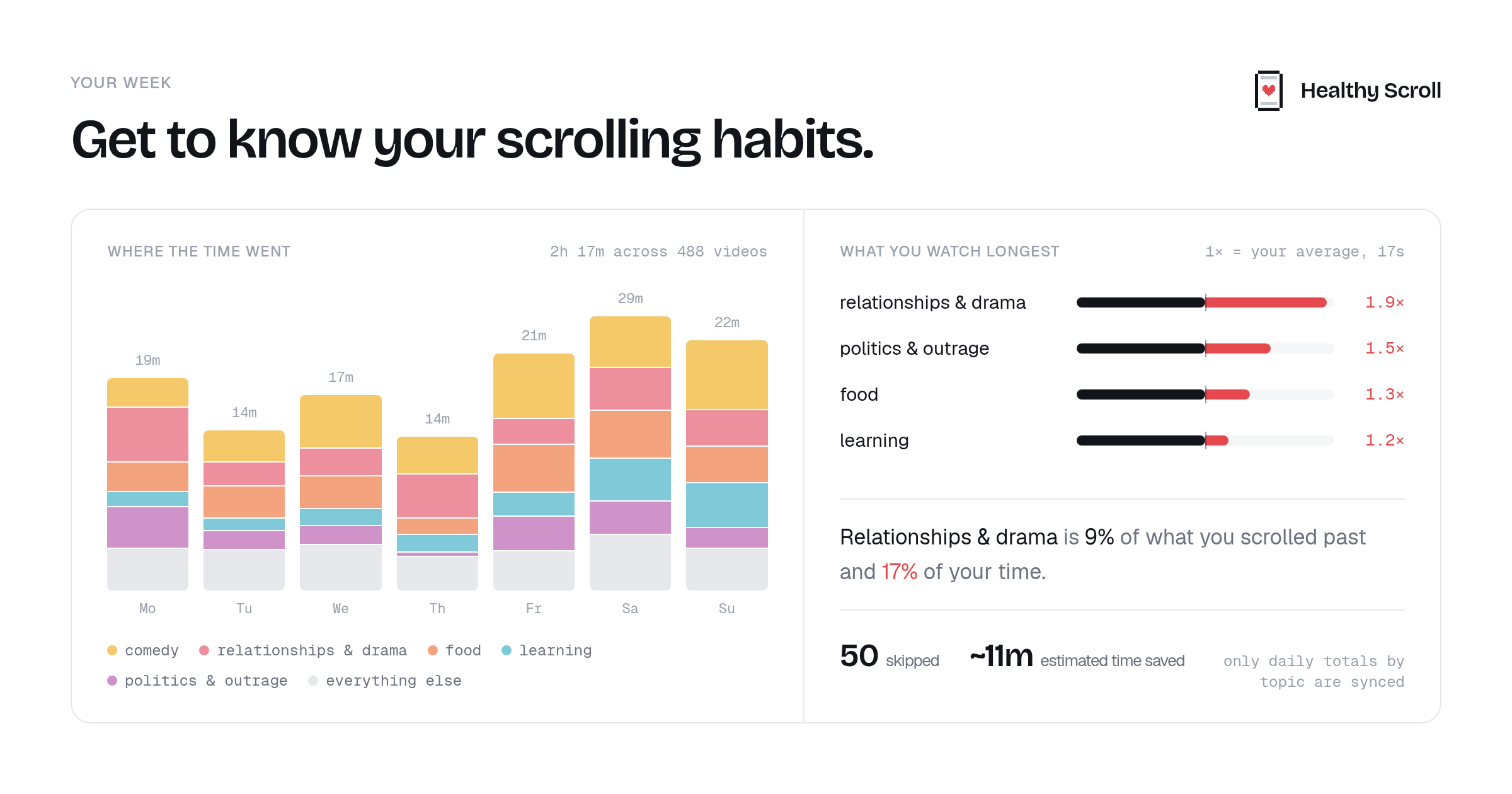
You can also view analytics about how much time you spend watching each video category and what percentage of videos were skipped. These summaries keep daily totals by topic rather than a history of individual videos you watched.
Our prototype supports Instagram Reels on Safari on iPhone and Chrome on desktop. We plan to expand to TikTok and YouTube Shorts across more browsers and platforms.
How we built it
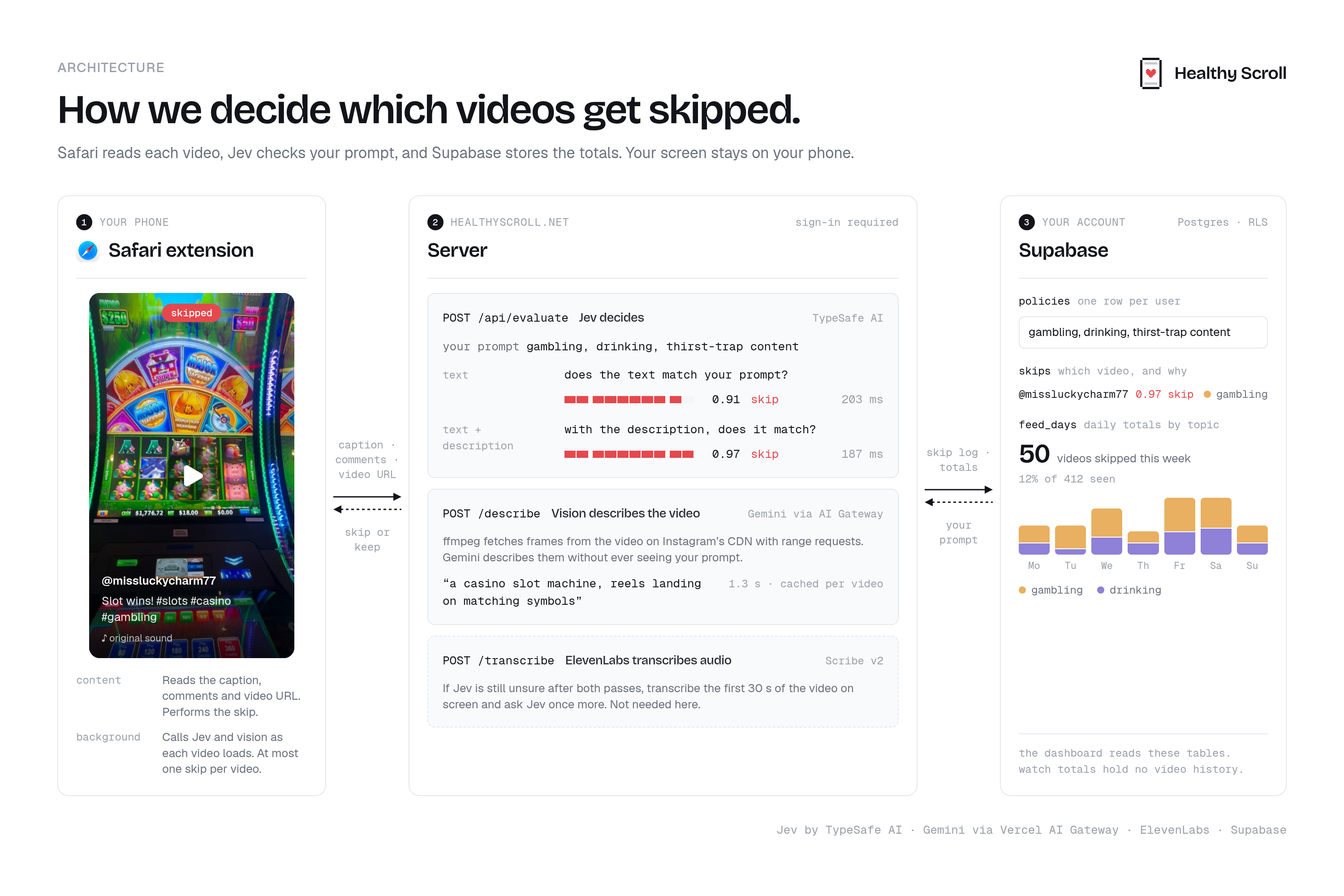
Under the hood, Healthy Scroll uses Jev, a new model by TypeSafe AI, to make decisions. Instead of generating a conversational response, Jev returns structured answers with probabilities in a fraction of the time and cost of traditional LLMs. In this case, it decides whether to skip a video based on your preferences and the available context, such as the creator, caption, and audio title.
A confident text-only decision can skip the video immediately; otherwise, Jev refines its decision as new information is processed. For example, our vision service uses Gemini 2.5 Flash-Lite to describe the video’s cover image and sampled video frames. Jev is not multimodal, so these descriptions give it visual context in a form it can evaluate.
The crux of the user experience is latency -- even a few seconds of AI thinking time can hurt the experience. Hence, we greedily extract video frames for Gemini analysis using FFmpeg from Instagram’s Content Delivery Network (CDN) without downloading the entire video. We start with the cover image, then add descriptions from sampled frames. We also evaluate up to 10 upcoming videos as Instagram loads them, so decisions are usually ready before the user sees the video.
In uncertain cases, we call ElevenLabs’ Scribe speech-to-text API to provide Jev with the video transcript for a final decision. This step only runs for the video currently on screen, keeping unnecessary calls and costs down.
We use a Hetzner VPS to run the backend and Supabase for authentication and the database. To reduce latency, we relocated our server mid-hackathon from Europe to the western US to reduce the physical separation between our backend, our users, and the Instagram CDN serving their videos.
Challenges we ran into
Picking an architecture was one of our biggest challenges: what models to use, what information to provide, what social media platform to target, and what device to build for. We pivoted on these choices a couple of times, including experimenting with several vision language models (VLMs) before settling on the current system.
Balancing latency, cost, and accuracy was another challenge. Text is fast but can miss what is happening visually. Video frames provide more context but take longer to process. Audio is important, but adds cost and latency. We had to decide when each source of information was worth using.
Making the extension work in Safari on iPhone also required adapting our Chrome implementation to Safari’s different background-script and sign-in behavior.
Accomplishments that we’re proud of
- Building a simple, understandable UI around a filter users write in their own words.
- Getting the Instagram filtering loop working end to end on iPhone.
- Learning how to integrate new AI models and combine text, visual descriptions, and audio.
- Dividing ownership between teammates, then combining everything into a working project.
- Setting up continuous deployment from the start so we could iterate quickly.
What’s next for Healthy Scroll
- Testing with real users to understand which filters are useful and where the system makes mistakes.
- Finding a better balance between cost, latency, and accuracy before a wider release.
- Expanding to TikTok, YouTube Shorts, and more browsers and platforms
Built With
- ai-sdk
- chrome
- crxjs
- docker
- fastapi
- ffmpeg
- ios
- jev
- next.js
- postgresql
- python
- react
- safari-web-extensions
- supabase
- swift
- tailwindcss
- typescript
- vercel-ai-gateway
- vite
- xcode


Log in or sign up for Devpost to join the conversation.