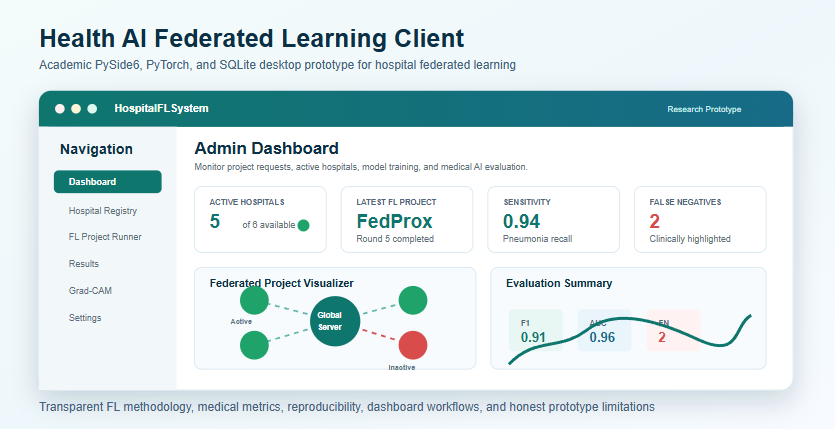
Health AI Federated Learning Client

Download Windows Demo Installer
Academic PySide6 + PyTorch + SQLite desktop prototype for studying federated learning workflows across hospitals for chest X-ray pneumonia classification.
This project is a research and teaching prototype. It is not a clinical device and must not be used for real patient diagnosis.
For the main academic master report, see docs/ACADEMIC_MASTER_REPORT.md.
For supporting technical documentation, see docs/PROJECT_DOCUMENTATION.md.
Project Objective
The project demonstrates how hospitals can participate in a federated learning workflow without centralizing raw chest X-ray images. It focuses on a binary classification task:
NORMALPNEUMONIA
The application emphasizes:
- clear hospital/admin workflows
- reproducible dataset preparation
- local and federated training simulation
- FedAvg and FedProx comparison
- medical AI evaluation metrics
- visual project monitoring
- Grad-CAM explanation outputs
- result reporting and Docker demo export
Desktop Application Overview
The application is a Windows desktop GUI built with PySide6. It contains two main roles:
- Admin / Ministry user
- Hospital user
The GUI is designed around real project workflows rather than a single training script. Users can register hospitals, request FL projects, approve/reject requests, select participating hospitals, run FL rounds, inspect results, and export completed project artifacts.
Main GUI Pages
| Page | Main Purpose |
|---|---|
| Dashboard | Shows role-specific project status, hospital availability, latest completed FL project, activity summary, and visual FL network state. |
| Hospital Registry | Admin view for managing hospital profiles and active/inactive availability. |
| Project Requests | Admin approval workflow for hospital-submitted FL project requests. |
| Request Project | Hospital workflow for requesting a new federated learning project. |
| Project Invitations | Hospital view for accepted/available projects. |
| FL Project Runner | Select hospitals, configure FL settings, run simulated FL rounds, and generate final results. |
| Dataset | Register chest X-ray folders, validate class structure, summarize distributions, and create reproducible splits. |
| Local Training | Train a local DenseNet121 pneumonia classifier and save best checkpoints. |
| Prediction | Run image-level predictions using the available local model. |
| Grad-CAM | Generate original, heatmap, overlay, and comparison images for model explanation. |
| Results | View project metrics, confusion matrices, false negatives, false positives, completed projects, and Docker export options. |
| Profile | View current user/hospital identity, status, and role information. |
| Settings | Configure local paths, hospital identity, dataset folder, model folder, and report folder. |
Dashboard And Workflow Features
Admin Dashboard
The admin dashboard focuses on network-level supervision:
- total registered hospitals
- active vs inactive hospitals
- pending project requests
- latest completed FL project
- selected/participating hospitals
- project status summaries
- visual FL network canvas
- inactive hospitals shown as unavailable/red
- completed project access through the results area
The admin does not run predictions directly from the dashboard because prediction is a hospital/model workflow.
Hospital Dashboard
The hospital dashboard focuses on local participation:
- hospital identity and status
- local dataset availability
- joined project status
- local training readiness
- prediction and Grad-CAM access
- project invitation/request workflow
- completed project outputs
Inactive hospitals are blocked from new FL participation until reactivated.
FL Project Runner
The project runner is the main workflow for simulated federated training:
- choose project name and settings
- select active hospitals
- skip inactive/unavailable hospitals
- configure number of communication rounds
- choose FedAvg or FedProx
- show project progress round by round
- animate model movement between the central aggregator and participating hospitals
- generate final project metrics after completion
- mark completed projects for result review and Docker export
The animation is a visualization of the simulated FL workflow. It does not replace metric reporting.
Results Page
The results page is designed for academic reporting:
- completed FL projects
- final accuracy/loss where available
- precision, recall/sensitivity, specificity, F1-score, ROC-AUC
- false negative and false positive counts
- confusion matrix display
- per-round performance summaries
- client/hospital-level results
- Docker export availability for completed projects
False negatives are highlighted because missing pneumonia is clinically serious.
Docker Export
Completed FL projects can generate a prototype Docker deployment package for each joined hospital. The export contains:
- final model artifact or placeholder artifact
- project metadata
- selected FL settings
- hospital metadata
- final metrics
DockerfileREADME_DEPLOY.mdrun_container.bat- ZIP archive of the package
Export location:
exports/docker/<project_id>/<hospital_name>/
In the installed Windows app, generated exports may be written under the app data folder depending on packaging/runtime path handling.
System Architecture
| Area | Main Files | Purpose |
|---|---|---|
| App entry point | app.py |
Launches the PySide6 desktop application. |
| UI shell | ui/main_window.py, ui/pages/*.py |
Role-based navigation and GUI pages. |
| Dashboard visualizer | ui/widgets/fl_network_canvas.py |
Draws the federated project network and active/inactive hospital status. |
| Dataset handling | core/dataset_manager.py, core/non_iid.py |
Validates folders, summarizes distributions, creates reproducible splits, and simulates hospital skew. |
| Model/training | core/model_loader.py, core/trainer.py |
DenseNet121 binary classifier, BCEWithLogitsLoss, class weighting, threshold tuning, and checkpoints. |
| Federated simulation | core/fl_engine.py |
Weighted FedAvg, FedProx, partial participation, local metrics, and round tracking. |
| Evaluation | core/metrics.py, core/experiment_runner.py, core/report_generator.py |
Medical metrics, CSV/JSON reports, and experiment summaries. |
| Persistence | core/db.py |
SQLite schema for users, hospitals, requests, projects, rounds, metrics, exports, and activity logs. |
| Docker export | core/docker_exporter.py |
Creates prototype Docker deployment packages for completed projects. |
| Packaging | HospitalFLSystem.spec, build_exe.bat, installer/HospitalFLSystem.iss |
Builds the Windows executable folder and installer. |
Dataset Format
Datasets must follow this folder structure:
dataset_root/
  NORMAL/
  PNEUMONIA/
The dataset manager records:
- total image count
- class distribution
- train/validation/test split counts
- imbalance ratio
- invalid image warnings
- missing class warnings
- small dataset warnings
Training transforms may use augmentation. Validation and test transforms do not use augmentation.
Federated Learning Methodology
The project simulates federated learning inside the desktop application. Each selected hospital trains locally on its own partition and contributes an update with its local sample count.
Weighted FedAvg
w_global = sum_k ((n_k / sum_j n_j) * w_k)
where n_k is the number of local samples for hospital k.
FedProx
Loss = BCEWithLogitsLoss + (mu / 2) * ||w_local - w_global||^2
FedProx is useful when hospital datasets are heterogeneous or non-IID.
Non-IID Hospital Simulation
core/non_iid.py supports:
- balanced IID split
- label-skew split
- quantity-skew split
- configurable number of hospitals
- configurable imbalance severity
Non-IID simulation matters because real hospitals can differ in scanner type, patient demographics, disease prevalence, and labeling behavior.
Model And Training
The project uses DenseNet121 for binary pneumonia classification:
- optional ImageNet pretrained weights
- classifier head replaced with one output logit
BCEWithLogitsLoss- sigmoid only during inference/evaluation
- class weighting / imbalance handling
- early stopping
- best checkpoint saving
- threshold tuning on validation set
- checkpoint metadata with architecture, classes, metrics, threshold, and training config
Evaluation Metrics
The project avoids relying on accuracy alone. Reports can include:
- accuracy
- precision
- recall / sensitivity for pneumonia
- specificity for normal cases
- F1-score
- ROC-AUC
- false negative count
- false positive count
- confusion matrix
- per-round global metrics
- client-level metrics
Grad-CAM
Grad-CAM is available as an explanation aid for DenseNet121. It can save:
- original image
- heatmap
- overlay
- side-by-side comparison
Grad-CAM is not clinical proof and does not replace radiologist review.
Privacy And Security Limitations
This is an academic prototype. It does not provide a formal privacy or security guarantee.
Important limitations:
- raw images are intended to remain local during the simulated FL workflow
- model updates may still leak information
- no production secure aggregation is implemented
- no formal differential privacy accounting is implemented
- no clinical validation has been performed
Running The App From Source
pip install -r requirements.txt
python app.py
Building The Windows App
Build the executable folder:
pyinstaller --noconfirm --windowed --onedir --name HospitalFLSystem app.py
or:
.\build_exe.bat
Then test:
dist\HospitalFLSystem\HospitalFLSystem.exe
To build the installer, open:
installer/HospitalFLSystem.iss
in Inno Setup Compiler and click Compile.
Reproducibility
The project includes reproducibility support for:
- random seed
- deterministic PyTorch settings where possible
- environment information
- package versions
- exported experiment configuration
- run ID for experiment tracking
Current Limitations
- This is a desktop academic prototype, not a deployed hospital system.
- FL behavior is simulated within the application workflow.
- The centralized baseline uses locally registered data, not a real central hospital warehouse.
- No formal privacy guarantee is provided.
- No clinical validation has been performed.
- Results depend strongly on dataset size, label quality, and split protocol.
Future Work
- stronger experiment tracking
- formal differential privacy accounting
- real secure aggregation
- external validation sets
- calibration analysis
- multi-label chest X-ray classification
- DICOM support
- real hospital network deployment study
Download Windows Demo Installer
The Windows demo installer is available from the latest GitHub Release:
Download HospitalFLSystem_Setup.exe
Release page:
This installer is for academic demonstration only. The application is not a clinical device and is not intended for real patient diagnosis.
Built With
- batchfile
- inno-setup
- python
