Requirements Document
- Application Overview Application Name: Security Utility Web App
Description:
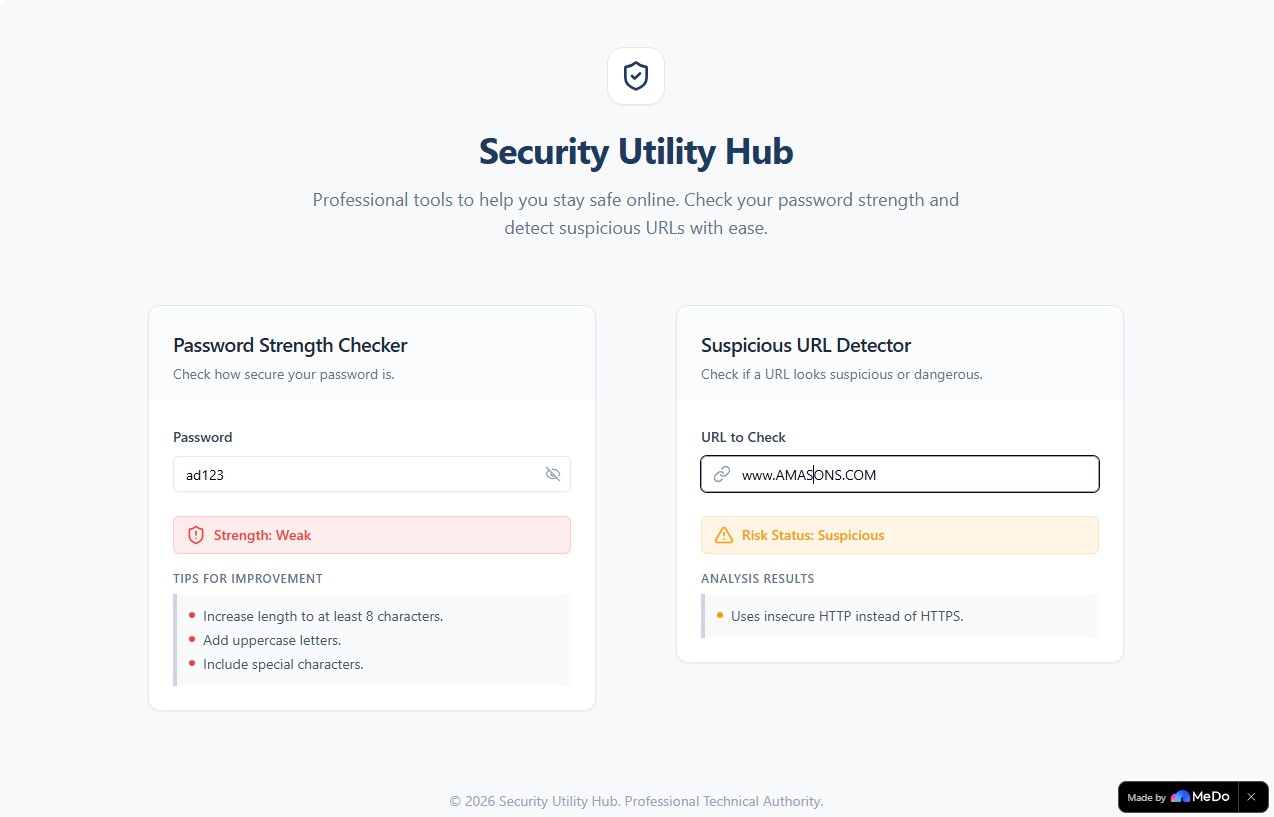
A web-based security utility application that provides two core tools to help users assess password strength and detect suspicious or phishing URLs. The application features a clean, modern, and responsive user interface.
- Page Structure and Functionality Page Hierarchy Security Utility Web App ├── Password Strength Checker Tool └── Suspicious/Phishing URL Detector Tool 2.1 Password Strength Checker Tool Purpose: Allow users to evaluate the strength of their passwords and receive improvement suggestions.
Core Functionality:
Password Input Field
Text input field for users to type a password Show/hide password toggle button to switch between masked and visible text Strength Evaluation Display
Display password strength as one of three levels: Weak, Medium, or Strong Color indicator corresponding to strength level: Weak: Red Medium: Yellow Strong: Green
Improvement Tips
Display tips on how to improve the password based on current strength evaluation
2.2 Suspicious/Phishing URL Detector Tool Purpose: Allow users to check URLs for suspicious patterns that may indicate phishing or malicious intent.
Core Functionality:
URL Input Field
Text input field where users can paste a URL Risk Assessment Display
Show a risk score with one of three levels: Safe, Suspicious, or Dangerous Color coding for risk levels: Safe: Green Suspicious: Yellow Dangerous: Red Risk Explanation
Display explanation of why the URL is flagged with the given risk level Highlight specific suspicious patterns detected
- Business Rules and Logic 3.1 Password Strength Evaluation Rules Strength Classification:
Weak: Password fails to meet basic security criteria Medium: Password meets some security criteria but has room for improvement Strong: Password meets comprehensive security criteria Evaluation Criteria:
Password length Presence of uppercase letters Presence of lowercase letters Presence of numbers Presence of special characters Absence of common patterns or dictionary words Improvement Tips Generation:
Tips are generated based on missing criteria in the current password Examples: "Add uppercase letters", "Include special characters", "Increase length to at least 12 characters" 3.2 URL Risk Detection Rules Detection Patterns:
Misspelled domains (common brand names with typos) Unusual characters in domain (e.g., numbers replacing letters) Use of http instead of https Suspicious TLDs (top-level domains) Excessive subdomains IP addresses instead of domain names URL shorteners Risk Classification:
Safe: No suspicious patterns detected Suspicious: One or more minor suspicious patterns detected Dangerous: Multiple suspicious patterns or critical security issues detected Explanation Generation:
Provide specific reasons for the risk classification List all detected suspicious patterns Examples: "Domain uses http instead of https", "Domain contains unusual character substitutions", "Misspelled version of a known brand"
- Exception and Boundary Cases Scenario Handling Empty password input No strength evaluation displayed until user enters text Empty URL input No risk assessment displayed until user enters text Invalid URL format Display error message indicating invalid URL format Very long password (>100 characters) Evaluate normally, no length restriction Very long URL (>2000 characters) Evaluate normally, no length restriction URL with special encoding Decode and evaluate the actual URL
- Acceptance Criteria User opens the Security Utility Web App and sees both tools available User enters a password in the Password Strength Checker tool User sees the password strength displayed as Weak, Medium, or Strong with corresponding color indicator User views improvement tips for the password User pastes a URL in the Suspicious/Phishing URL Detector tool User sees the risk score displayed as Safe, Suspicious, or Dangerous with corresponding color coding User reads the explanation of why the URL received its risk classification
- Out of Scope for Current Release Password generation functionality Password storage or management features User accounts or login system History of checked passwords or URLs Batch URL checking Integration with external threat intelligence databases Email or notification features Export or sharing of results Multi-language support Dark mode or theme customization Advanced analytics or reporting API access for third-party integrationspiration

Log in or sign up for Devpost to join the conversation.