Here is a complete, polished submission draft for your hackathon project page (like Devpost or GitHub). It frames Hawkins.OS as a fully immersive web experience rather than just a dashboard.
Inspiration
We grew up loving the nostalgia of 80s sci-fi and the gripping atmosphere of Stranger Things. We wanted to answer a simple question: "What would it feel like to sit at a terminal in the Hawkins National Laboratory moments before a breach?"
We were inspired by the "analog horror" aesthetic and the challenge of recreating imperfect, physical technology (like CRT monitors) using pristine, modern web code. We wanted to build a website that isn't just a tool, but a storytelling device—a digital prop that exists within the movie's universe.
What it does
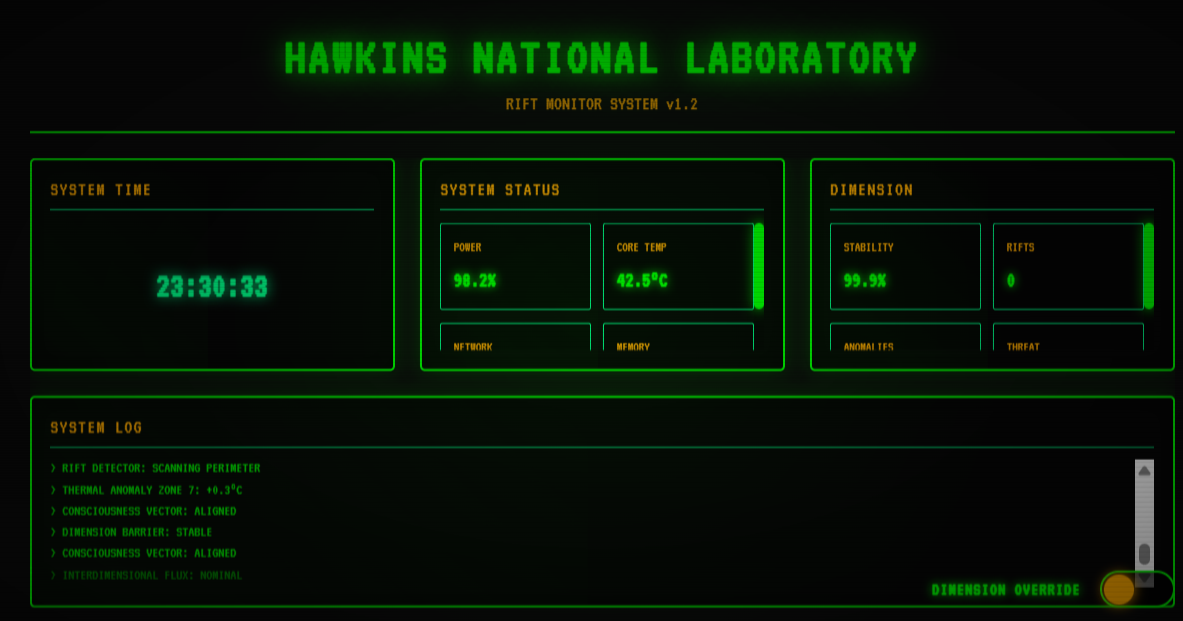
Hawkins.OS is an immersive, browser-based operating system simulation that puts the user in the seat of a 1980s lab technician.
- The "Surface" State: It begins as a functional, secure government terminal. Users can browse logs, view facility status, and read classified entry data, all rendered in a monochromatic amber glow with realistic scanlines and curvature.
- The "Upside Down" State: With the toggle of the "DIMENSION OVERRIDE" switch, the website undergoes a terrifying transformation. The code itself seems to corrupt: colors shift to a cold, desaturated blue, the screen shakes violently, particles (spores) float across the viewport, and text dynamically scrambles into gibberish.
It is a dual-state web experience that tells a story through UI interaction.
How we built it
We prioritized a "Vanilla" approach to ensure high performance and total control over the DOM.
- HTML5 Structure: We built a semantic grid layout that acts as the container for the "OS" windows.
- Advanced CSS3: This was the heavy lifter.
- CRT Simulation: We used
box-shadowinsets for the vignette,linear-gradientoverlays for scanlines, and@keyframesfor the phosphor flicker. - Theming: We utilized CSS Custom Properties (Variables) to define two distinct palettes (
--theme-labvs.--theme-upside-down). - Glitch Effects: We used
clip-pathandtransform: translate()animations to create the tearing/distortion effects.
- CRT Simulation: We used
- JavaScript Logic:
- The JS handles the state machine. When the toggle is triggered, it swaps the root class of the document.
- It recursively iterates through text nodes during the "breach" to randomly invert or scramble characters using a custom algorithm.
/* Example of our CRT Scanline implementation */
.crt::before {
  content: " ";
  display: block;
  position: absolute;
  top: 0;
  left: 0;
  bottom: 0;
  right: 0;
  background: linear-gradient(rgba(18, 16, 16, 0) 50%, rgba(0, 0, 0, 0.25) 50%), linear-gradient(90deg, rgba(255, 0, 0, 0.06), rgba(0, 255, 0, 0.02), rgba(0, 0, 255, 0.06));
  z-index: 2;
  background-size: 100% 2px, 3px 100%;
  pointer-events: none;
}
Challenges we ran into
- The "Uncanny Valley" of CSS: Making a modern LCD screen look like an old CRT tube is difficult. If the scanlines are too thick, text becomes unreadable. If the flicker is too fast, it causes eye strain. Tuning these values for realism without sacrificing usability was a major design hurdle.
- Performance: Animating text scrambling on the fly can be CPU intensive. We had to optimize our JavaScript loops to ensure the "glitch" transition felt instantaneous and smooth, rather than laggy.
- Responsiveness: Old monitors were 4:3 aspect ratio. Modern screens are ultra-wide or mobile. Adapting a strict grid-based console layout to work on a mobile phone without breaking the immersion required complex media queries.
Accomplishments that we're proud of
- Zero Dependencies: We built the visual effects entirely from scratch without relying on heavy UI libraries.
- The Transition: The moment the "Override" button is clicked feels genuinely visceral. The combination of color theory and animation timing creates a genuine "jump scare" moment using only code.
- Authenticity: We successfully sourced and implemented the 'VT323' font and mimicked the exact hex codes used in 80s monochrome displays.
What we learned
- CSS Variables are powerful: They aren't just for light/dark mode; they can be used to completely overhaul the atmosphere of a site in milliseconds.
- Imperfect is hard: It takes more effort to make a website look "broken" and "old" intentionally than it does to make it look clean and modern.
- Narrative UI: We learned that user interfaces can be a form of storytelling. The way a button clicks or a screen flickers can convey as much plot as a paragraph of text.
What's next for Hawkins.OS (Stranger Things)
- Audio Integration: Adding a Web Audio API layer to introduce synth-wave drones and static noise that reacts to user input.
- Easter Eggs: Implementing the Konami Code to unlock a secret "Eleven" file.
- Backend Connection: Connecting the mock terminal to a real API to fetch live GitHub commits or server stats, turning this fiction into a functional developer tool.
Built With
- next.js

Log in or sign up for Devpost to join the conversation.