-
-
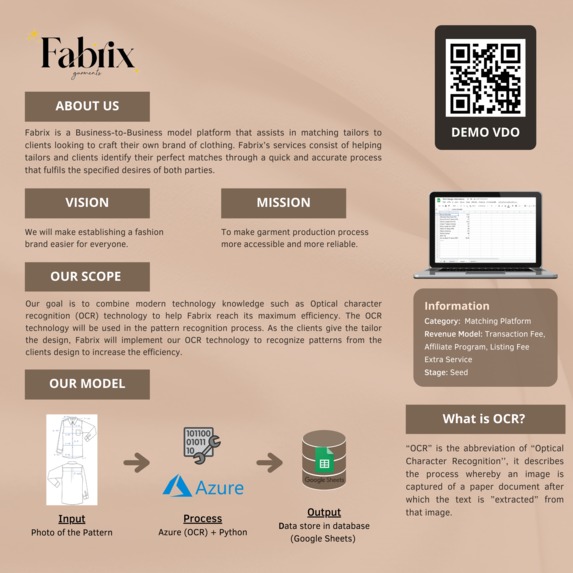
Fabrix's Project Summary Poster
Inspiration
Our goal is to combine modern technology knowledge such as Optical character recognition (OCR) technology to help Fabrix reach its maximum efficiency. The OCR technology will be used in the pattern recognition process. As the clients give the tailor the design, Fabrix will implement our OCR technology to recognize patterns from the clients' design to increase efficiency.
What it does
This program utilises OCR technology to recognize patterns from designers as well as input handwritten designs into the Fabrix database in order to further make it easier for tailors to customize clothes while automatically generating quotations.
The program will start off in a Google spreadsheet, possessing only the initial sheet (sheet 0) as the starting point. After this, we will need one picture for the program to recognize. The tailor either defines the variables as an acronym-based measurement (size, B = 18.5, I = 1.75) or defines the parameters using actual fully-worded measurements and sizes (Across Shoulder = 18.5, Shoulder drop from HPS = 1.75). After running the code, it will generate a database in a new spreadsheet (sheet n) that contains the fully-worded measurements and size.
How we built it
In summation, our team split the process into four simple steps in order to create an algorithm that effectively identifies handwriting and transforms the written words into text on a spreadsheet. The following paragraphs will illustrate each step in detail.
First of all, the medium that we decided to use to read the handwriting from the picture is “Microsoft Azure: Cognitive Service - Computer Vision”. After installing the necessary aforementioned Python libraries, the next step is to create an Azure handwriting extraction script.
Before starting the second step, we needed to give Azure’s API and key to the programme in order to connect to the Azure server.
The second step was to have Azure analyze the photo and produce the desired results. After attaining the result, we split Azure's results into 2 segments, fully-worded measurements or acronym-based measurements as well as the measurement values. After we split the data into 2 parts, we must cross-check with the designer’s decision; whether or not they used acronym-based measurements or fully-worded measurements. If they used acronym-based measurements, we ensured that they are converted into fully-worded measurements before storing them into our database.
For our demo, there are 2 photos that we had our program analyze. The measurements of the first picture were defined as an acronym-based measurement while the second picture was defined as a fully-worded measurement, both included the size as inches.
After the picture had been extracted, we had to match those words with the dictionary-based definitions we had established in the second step. The acronyms in the picture would subsequently be matched with their fully-worded counterpart using Python dictionary.
The third step involved creating a new sheet in the initial google spreadsheet. Since each picture had its own unique details, we decided to create a new sheet per each picture’s specific pattern. We did this by connecting our code with Google Sheets’ API.
The last step was to put the data into a newly-created sheet. The text that we extracted from the respective picture was linked with the API of the Google Sheet and resulted in the printing out of the data into a new separated sheet.
Challenges we ran into
In the beginning, we decided to use OCR and trained the model by ourselves. However, we found that there was a complexity regarding the spacing and letter location that would be more tedious for us to fix and the outcome would not be as desirable in Azure. In addition to this, Azure has a vast amount of data as well as a better data model than ours due to their need to monetize their OCR; therefore in order to remain competitive within their industry, they must provide high-quality standards. If we did it by ourselves, there would be many variables that would have needed adjustment. For instance; activation functions and learning rate. In addition to this, it would take a long time to adjust and optimise the model. As students, we did not have enough resources (Processing Unit) to process such high-level quantities and quality of data. As a result of this scarcity and limitation, we decided to use Microsoft Azure.
When using Azure, we also encountered some problems:
- The program detected the alphabet ‘I’ as the number ‘1’
- The program detected ‘=’ as ‘:’
- The program detected details on the clothes and converted it into data, for example, the embroidery line
- Due to handwriting being inherently unique to the user, distinguishing and identifying hard-to-read variables were difficult and almost impossible to account for
Accomplishments that we're proud of
We can successfully extract the alphabets from photos using Azure and store it in the database which can be further utilized.
What we learned
This project gave us the opportunity to apply Azure in an innovation-development context. Due to its easy-to-learn API, we learned how to optimally make use of ‘computer vision’ in Azure. To clarify the computer vision process, developers can use the cloud-based Computer Vision API to access complex algorithms for processing photos as well as returning data. Microsoft Computer Vision algorithms can analyze visual content in many ways based on user inputs and user selections by uploading a picture or specifying an image’s URL.
With the help from the YouTube video “Getting Started with Microsoft Azure Computer Vision API in Python” by Jie Jenn, we learned how to extract information from handwritten images, converting them into a script and printing the results. With the help of two other videos, we learned how to add the data into a google sheet file with google sheet API, using python to create our database and list our references.
What's next for haven't decided yet
In the future, we might need to consider that we'll create our own OCR algorithm or still using Azure since if there is much information, it could be costly for the business.

Log in or sign up for Devpost to join the conversation.