-
-
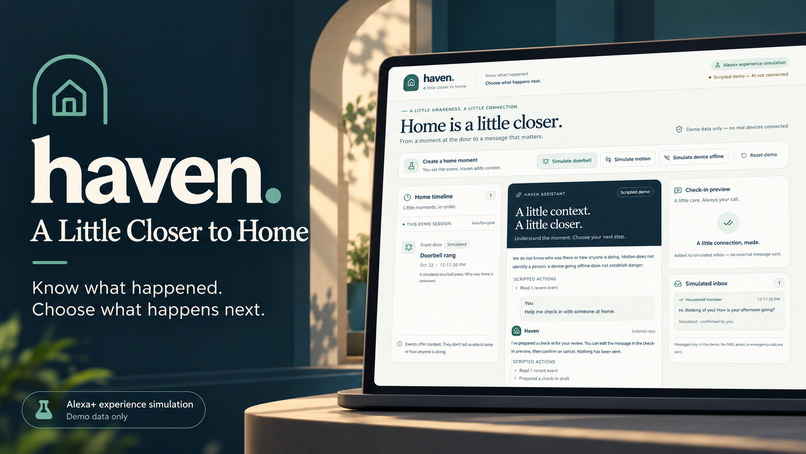
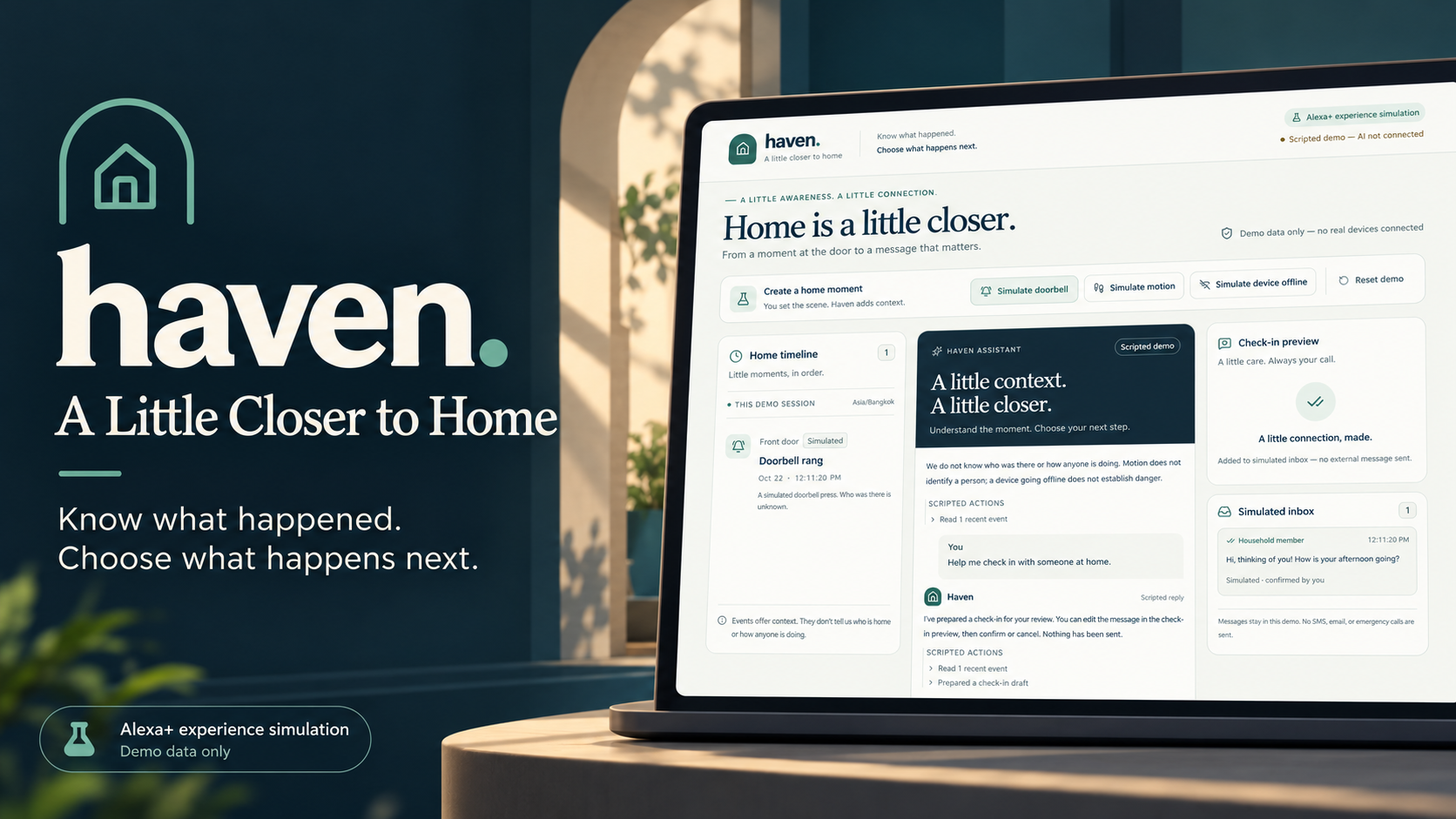
Haven — A Little Closer to Home. A simulated Alexa+ experience that turns home-event context into thoughtful check-ins.
-
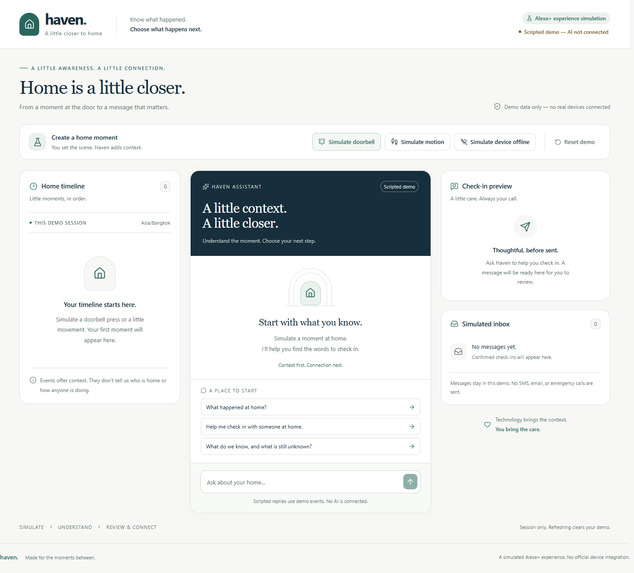
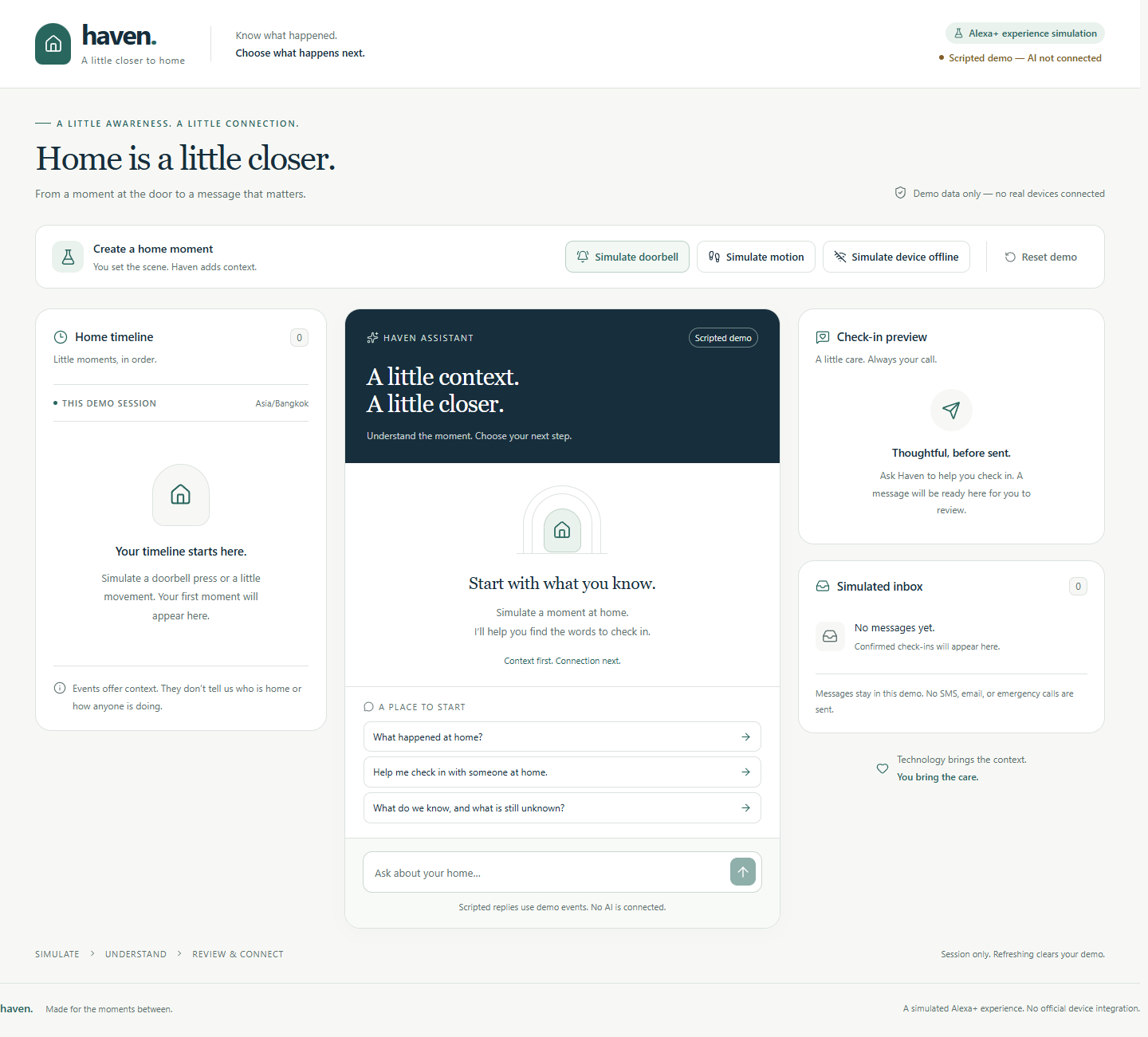
Start with an empty timeline. Create simulated home events and explore the clearly labeled scripted demo.
-
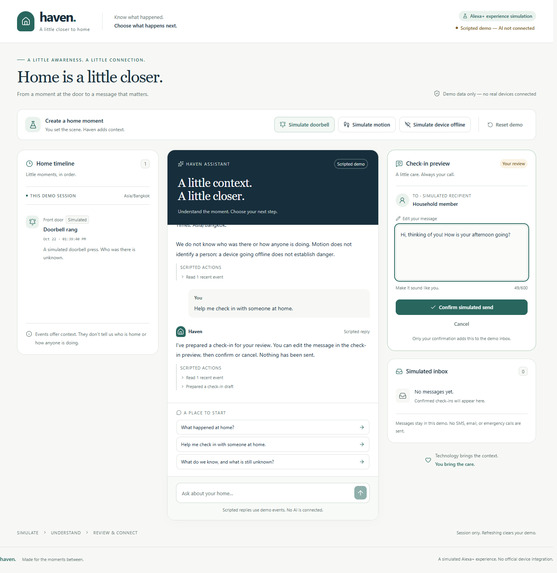
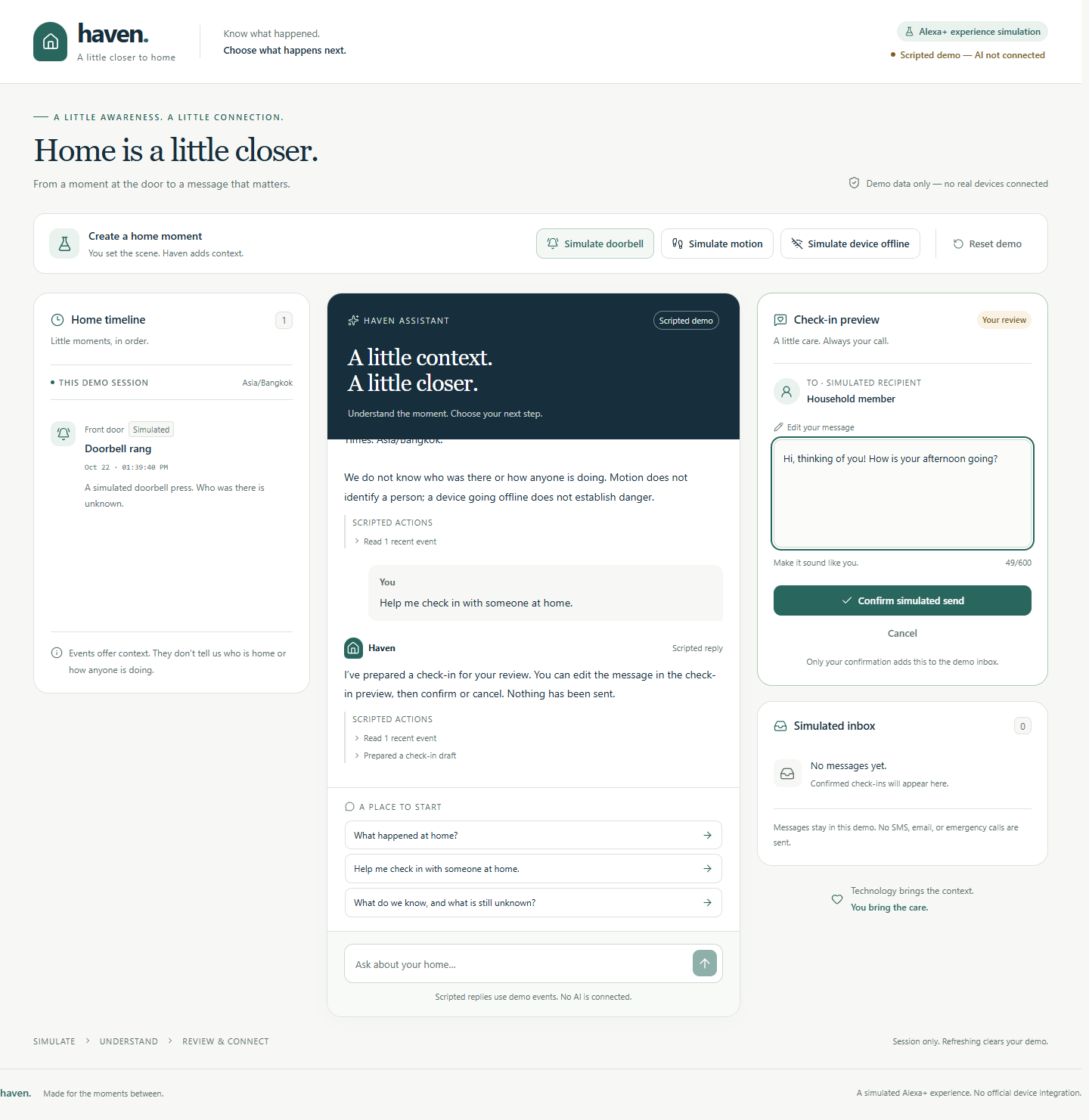
Review and edit a check-in before confirming. Preparing a draft does not add a message to the simulated inbox.
-
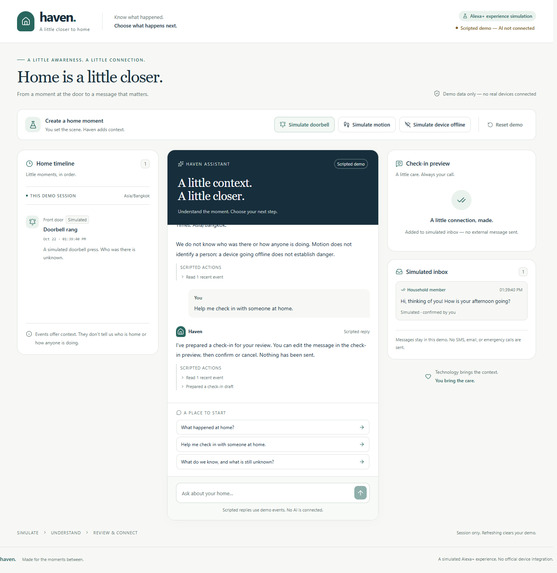
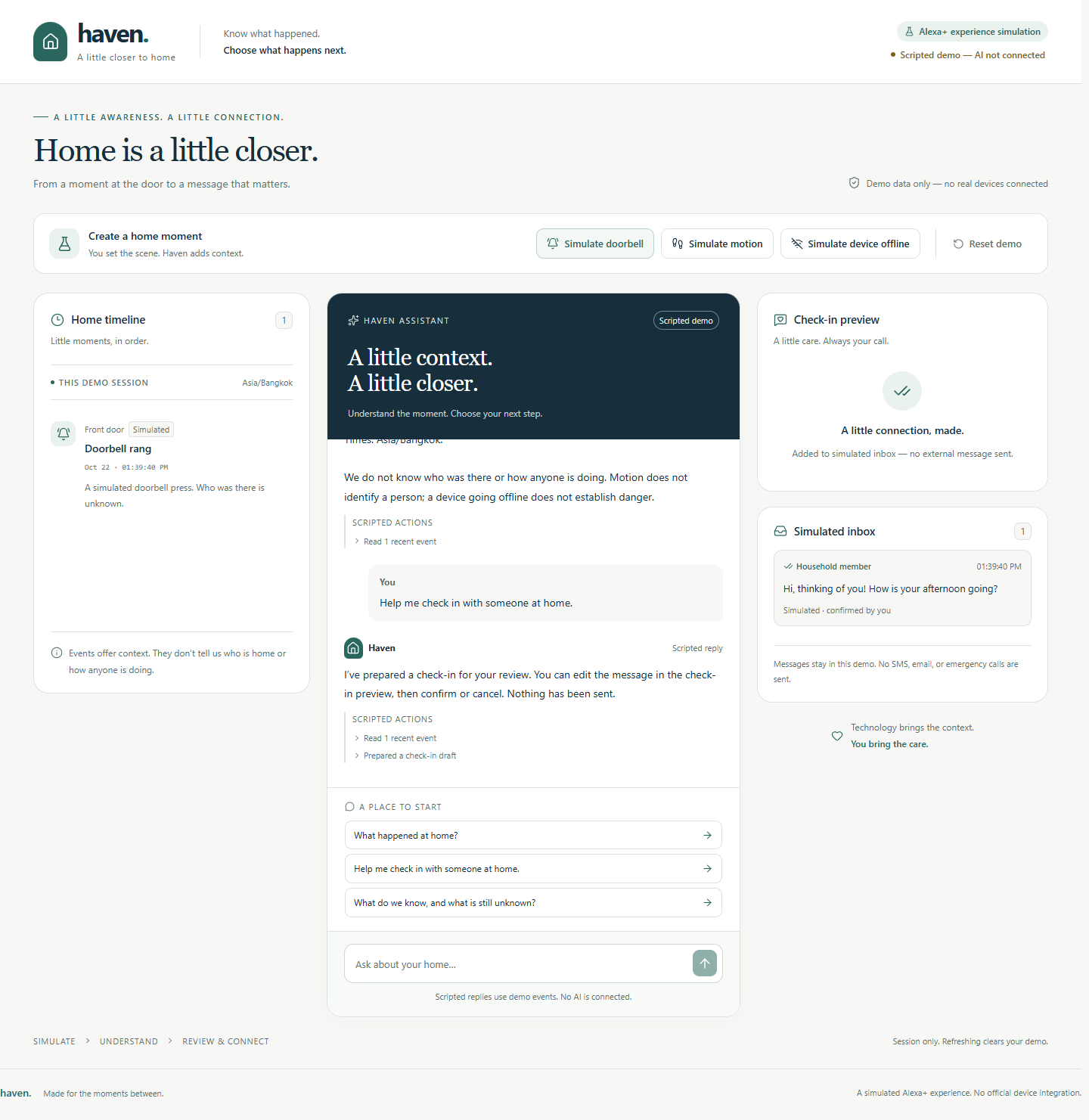
Only explicit confirmation adds the reviewed message to the simulated inbox. No external message is sent
Inspiration
Being away from home often means receiving fragments of information: a doorbell notification, a motion alert, or a device that has gone offline. Those fragments can raise more questions than they answer. What actually happened? What can we reasonably conclude? Is there a simple way to check in without making the situation sound more serious than the evidence supports?
Haven started with that gap between a notification and a meaningful connection. We wanted to explore an assistant experience that helps people understand limited observations and decide what to do next. The idea was to make a small interaction feel calmer and more personal: see a moment, understand its context, and choose whether to reach out.
We were particularly interested in keeping human judgment visible. An assistant can help organize information and suggest words, while the person using it should still decide whether a message is appropriate and what it should say. That became the central idea behind Haven: know what happened, then choose what happens next.
What it does
Haven is a web-based, simulated Alexa+ experience built around one complete workflow. A presenter creates a simulated home event, asks Haven about the current timeline, requests help with a check-in, reviews an editable draft, and explicitly confirms before a message appears in a simulated inbox.
The demo supports three manually triggered events: a doorbell press, motion, and a device going offline. Each event receives a unique ID and a timestamp from the actual moment the button is pressed. Times are displayed in the viewer’s browser timezone, with that timezone clearly labeled.
The assistant experience separates observations from unknowns. A doorbell event does not identify a visitor. Motion does not establish who is present. A device going offline does not, by itself, establish danger. Haven keeps those limits visible instead of turning incomplete information into unsupported conclusions about someone’s condition or safety.
When the user asks for a check-in, Haven prepares a message for the fictional recipient “Household member.” The draft is editable and can be cancelled. Creating it does not add anything to the inbox. Only the user’s Confirm simulated send action commits the reviewed message, and repeated confirmation cannot create duplicate entries.
The application includes a clearly labeled scripted mode that works without credentials. It uses deterministic responses based on the current demo events and states that AI is not connected. A separate server-side OpenAI integration is implemented for Live AI, with visible errors, retry, and an explicit choice to switch to the scripted backup. Live model calls have not yet been verified with credentials.
All events, recipients, and inbox entries are simulated. No Alexa+, Ring, or physical devices are connected, and no SMS, email, or emergency calls are sent.
How we built it
We built Haven as a single Next.js App Router application using React, TypeScript, Tailwind CSS, and Lucide icons. The interface uses deep navy, warm white, and muted teal to create a calm, readable workspace. Desktop users see the timeline, conversation, and check-in preview side by side; smaller screens stack those panels in workflow order.
A browser-local reducer owns each tab’s demo state, including events, conversation, the current draft, and inbox entries. We deliberately avoided a database and shared global session state for this prototype. Each tab begins independently, and refreshing or resetting the demo clears its transient data.
The API routes run in Node.js. Zod validates request bodies, conversation limits, event data, timezone values, and tool arguments.
The live integration uses the OpenAI JavaScript SDK and the Responses API. Its tool loop is bounded to four provider requests, with a deadline and no automatic SDK retries. The model is required to read the current event snapshot through get_recent_events before returning an event-grounded answer. It can also call draft_check_in to prepare a message for review.
There is no send tool. Confirmation is implemented separately in application state, so a model response cannot bypass the user’s decision.
Codex assisted with implementation, testing, and documentation. We used Vitest for logic tests, Playwright for production-browser workflows, axe-core for automated accessibility scans, and ESLint, TypeScript, and Prettier for code checks. The project thumbnail was created with image generation using an actual application screenshot as a reference.
Challenges we ran into
The most important challenge was making the boundary between a suggestion and an action real in the code. A confirmation label would not be enough if a model response could also add an inbox message. We kept draft creation and confirmation separate, checked draft identity and status, and tested rapid repeated clicks.
Reset introduced a related concurrency problem: an old response could arrive after the interface had been cleared. We combined request cancellation, a current-request token, and a state generation check so a stale result cannot restore an old conversation or pending draft.
Another challenge was representing the scripted backup honestly. It needed to demonstrate the entire interaction without pretending a model was connected. We made its supported prompts explicit, used current demo state, labeled its actions as scripted, and redirected unsupported questions instead of simulating unlimited understanding.
Production-browser testing also caught an origin-check issue. Next.js normalized an internal request URL to localhost while the browser was using 127.0.0.1. That initially caused a legitimate request to be rejected. We corrected the comparison to use the incoming host and added a regression test while retaining foreign-origin rejection.
Accomplishments that we're proud of
We completed a workflow that can be demonstrated from an empty state all the way to a reviewed inbox entry. The demo does not require a database, real devices, or an API key to show its core interaction.
We are proud that the important product boundaries have automated coverage. The current project passes 34 unit and orchestration tests and 11 production-browser tests, alongside lint, TypeScript, and the production build. The checks cover draft cancellation, duplicate prevention, reset races, session isolation, request validation, and explicit recovery from an unavailable AI connection.
The browser suite also checks keyboard operation, visible focus, narrow viewport overflow, and automated accessibility scans in empty and editable-draft states. These checks provide a practical foundation for improving the prototype, while leaving room for deeper assistive-technology and usability testing.
Most of all, we finished a demo that is clear about what it does. Its simulated data, scripted mode, and lack of external messaging are visible parts of the experience.
What we learned
We learned that an assistant experience is shaped as much by its action boundaries as by its responses. A draft, a confirmed action, and a cancelled action need distinct states and behavior. That separation should remain reliable even when a request fails or a user clicks twice.
We also learned that uncertainty belongs in the interface. Limited event data can provide useful context without answering every question about a home or the people in it. Saying what remains unknown makes the interaction easier to interpret responsibly.
A clearly labeled scripted mode helped us develop and verify the workflow independently of provider access. It is a useful backup for a presentation, but it cannot establish that a live model integration works. We have kept that distinction explicit in the application and documentation.
These lessons come from building and testing the prototype. We have not yet conducted user studies, measured family outcomes, or validated real-device integrations.
What's next for Haven — A Little Closer to Home
Our first next step is an authorized live-model evaluation with valid credentials. We want to check grounding across different event combinations, more varied check-in requests, ambiguous questions, and attempts to override the assistant’s constraints. We also want to measure real response latency and examine failure recovery under actual provider conditions.
We would then gather feedback from intended users to understand whether the timeline, uncertainty wording, and confirmation step are clear and useful. That work should include accessibility testing with assistive technologies and careful attention to how people interpret the assistant’s suggestions.
Future real-device or messaging integrations would be separate engineering projects with explicit permissions, privacy controls, authentication, retention decisions, and reliable delivery behavior. The current prototype does not implement those integrations or promise emergency assistance.
For now, Haven demonstrates one focused idea: technology can bring the context, while people bring the care.
Built With
- axe-core
- eslint
- github
- lucide
- next.js
- node.js
- npm
- openai-sdk
- playwright
- prettier
- react
- tailwind-css
- typescript
- vitest
- zod

Log in or sign up for Devpost to join the conversation.