-
-
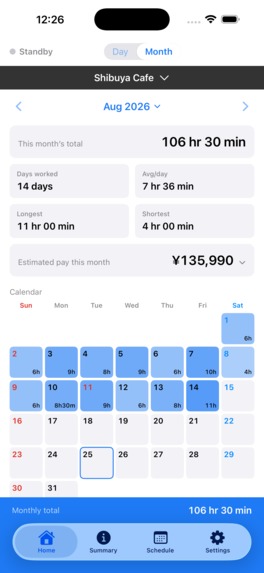
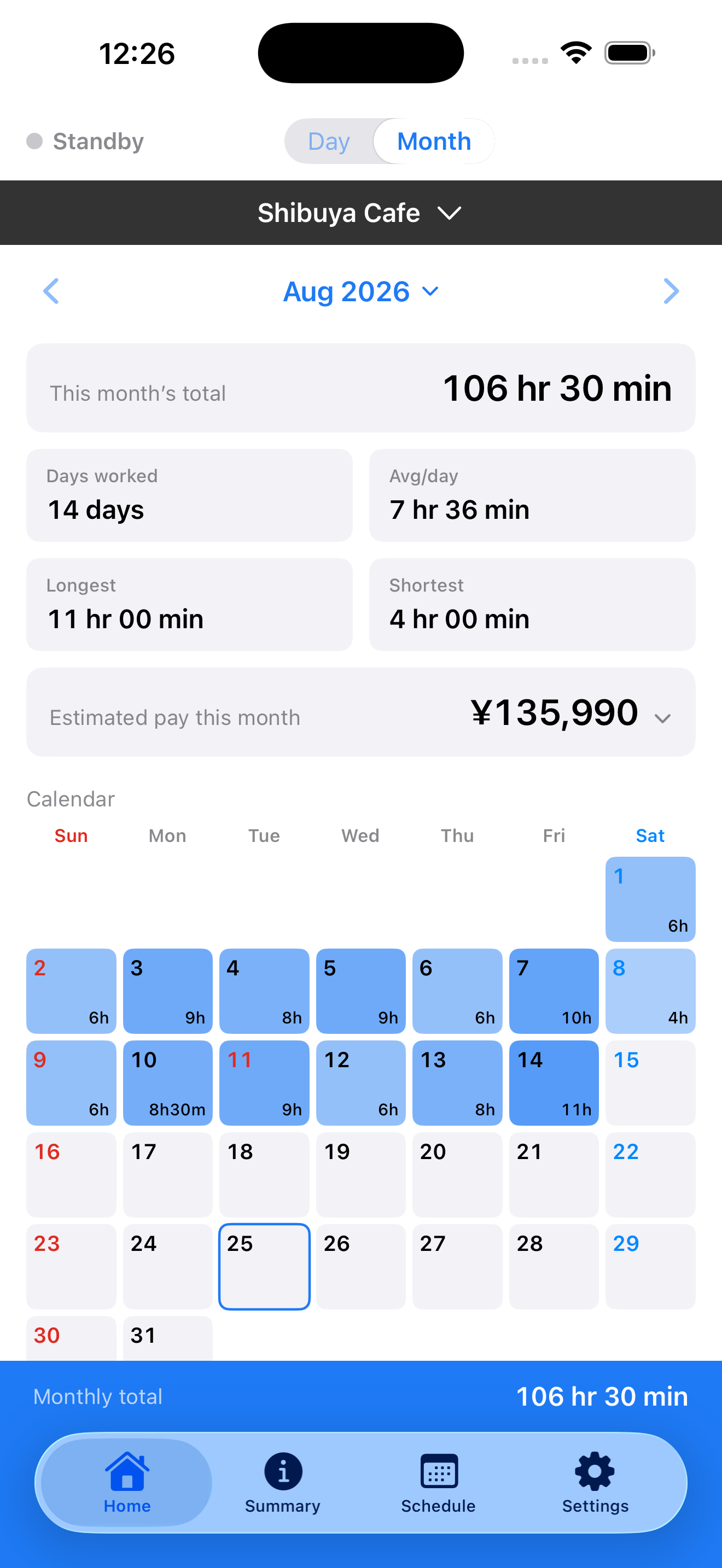
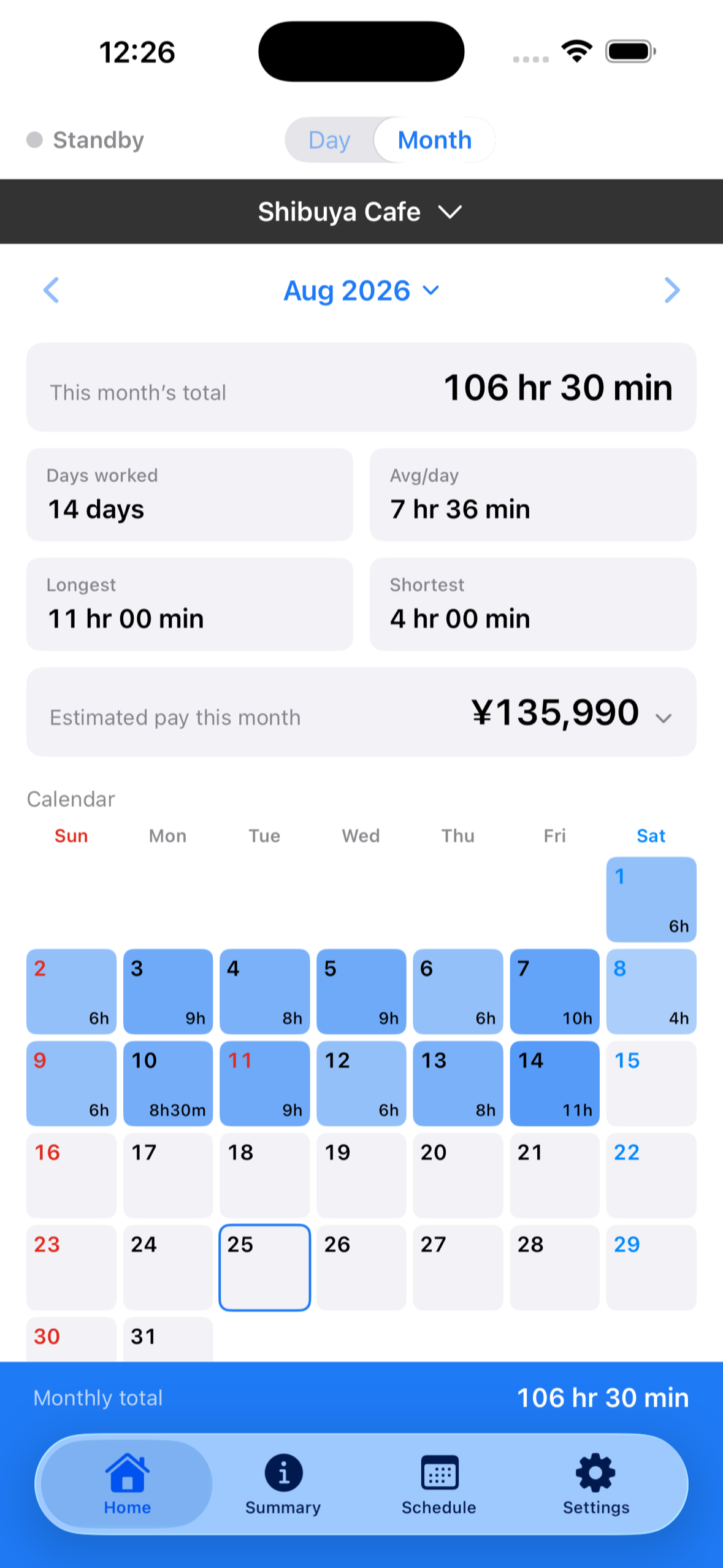
Home (Month): days at the workplace fill the calendar automatically, with the monthly total and estimated pay at a glance.
-
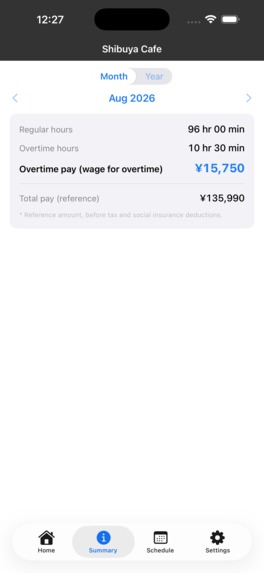
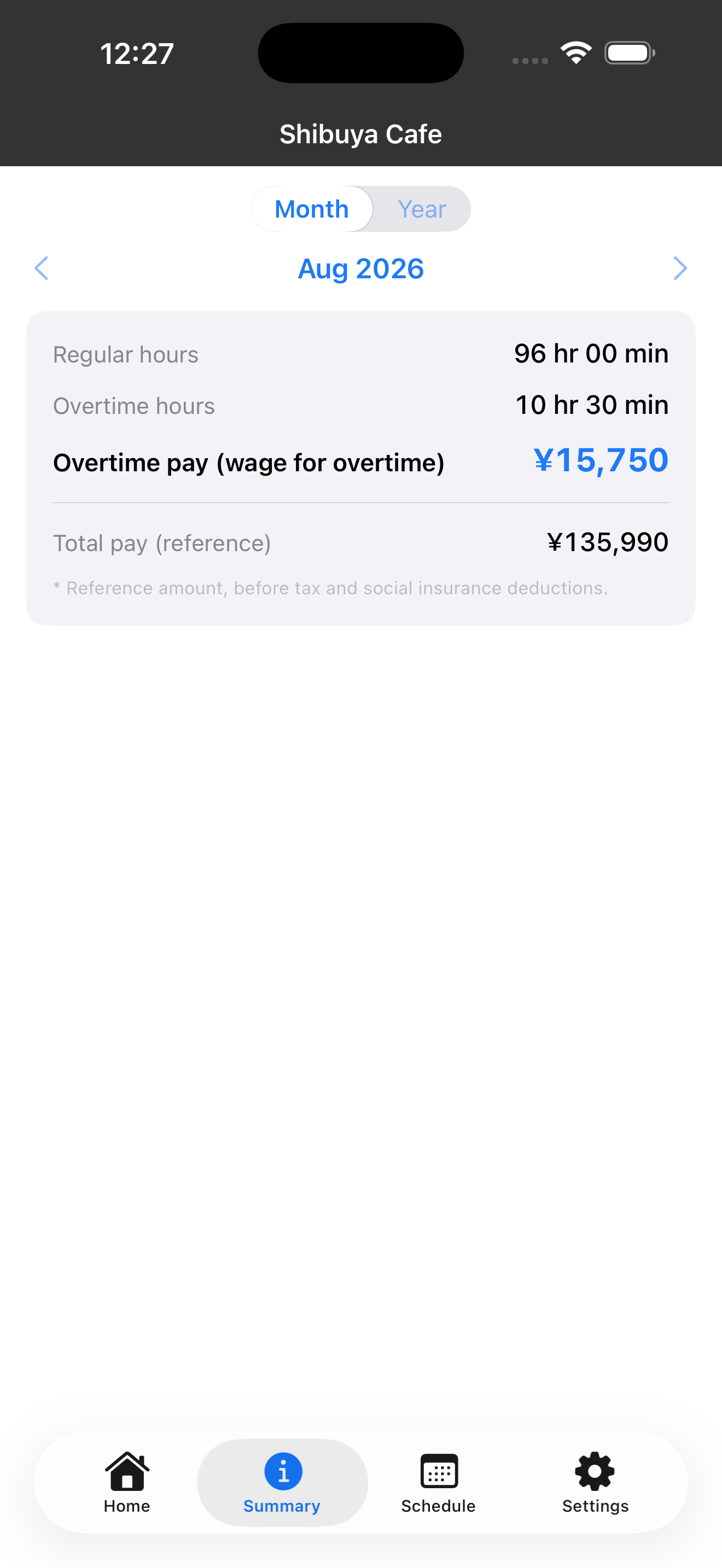
Summary (Pro): regular vs. overtime hours and overtime pay, calculated with Japanese premium rules. Reference only, before tax.
-
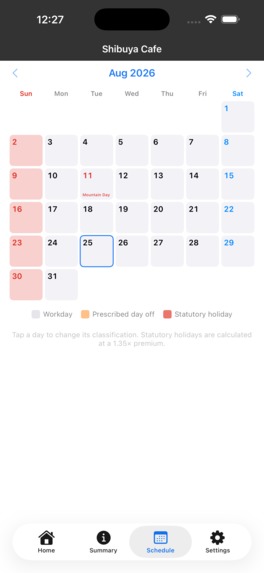
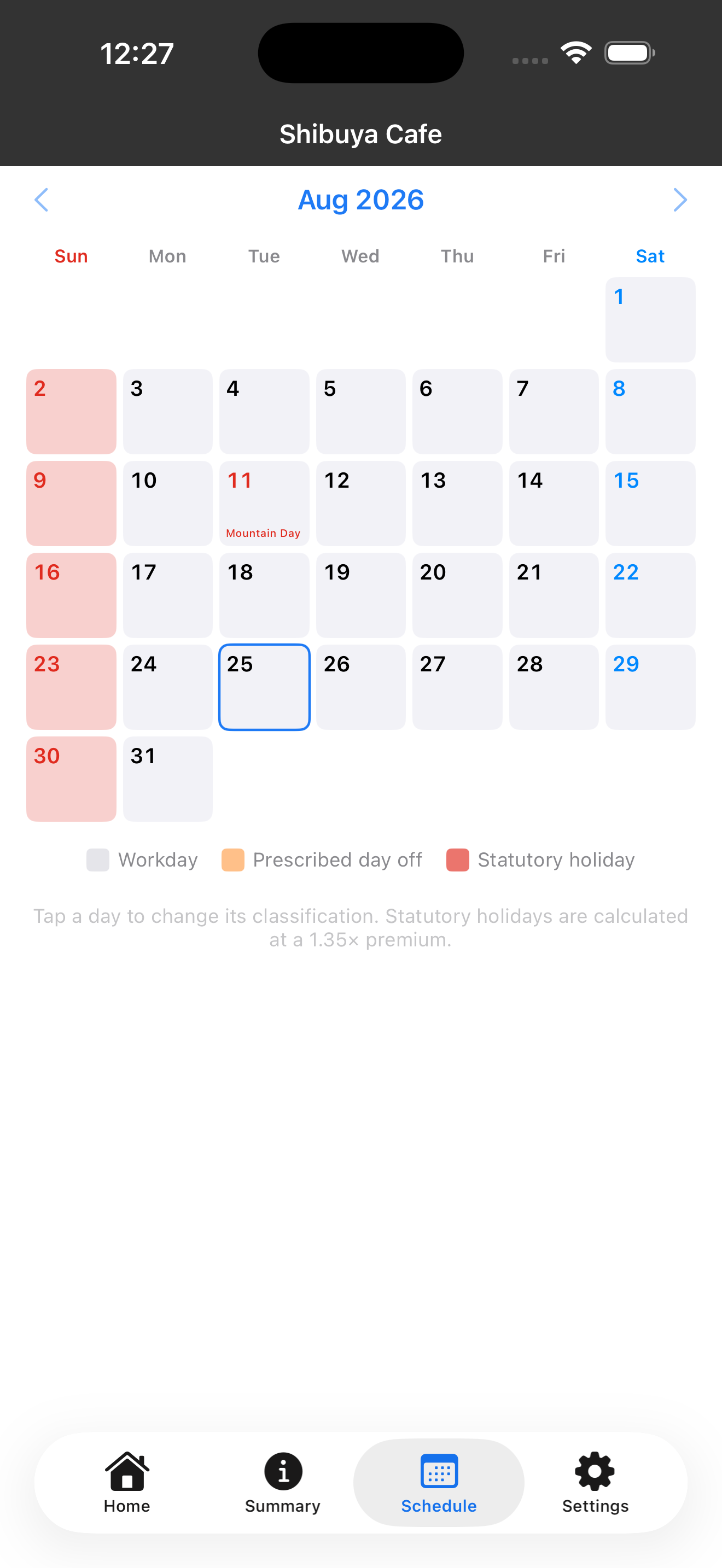
Schedule: mark workdays, prescribed days off, and statutory holidays. Japanese national holidays are built in.
-
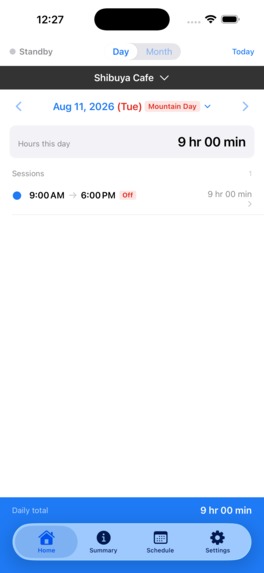
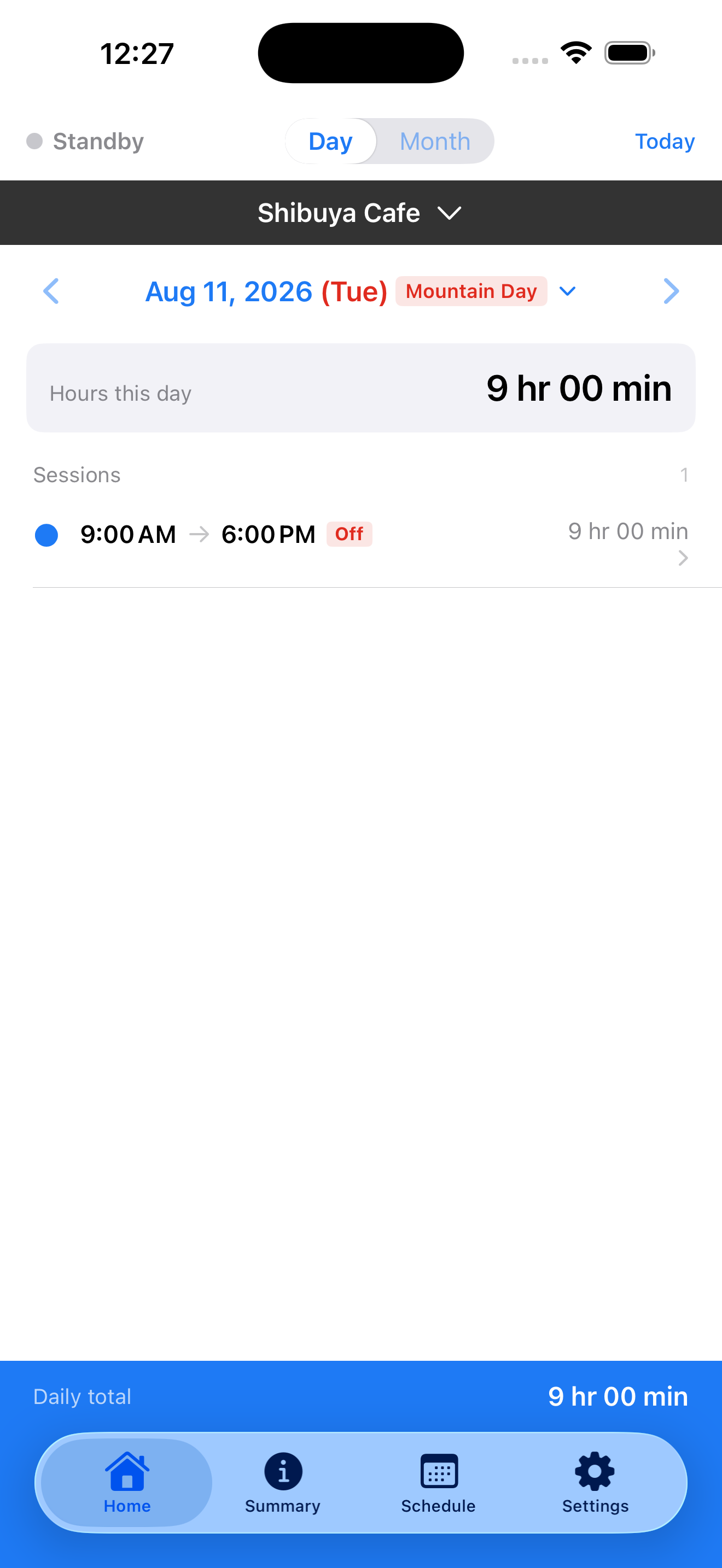
Home (Day): each arrival and departure is logged in the background by geofencing. No clock-in tap needed.
-
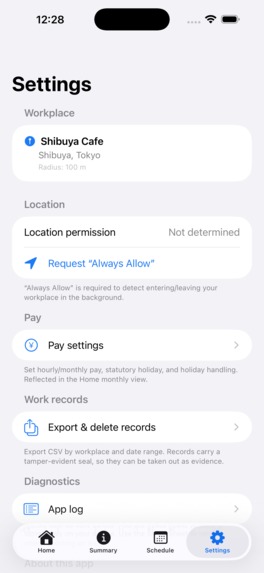
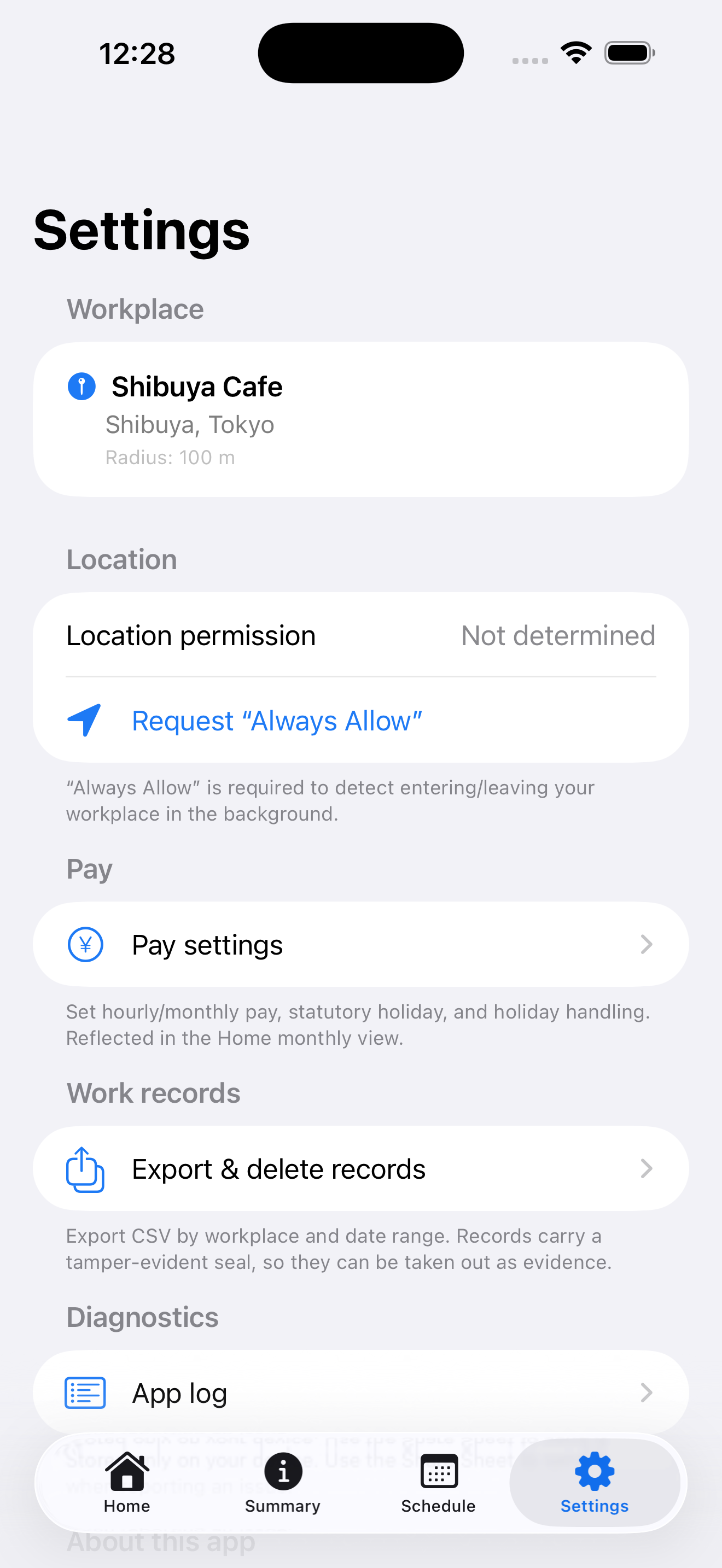
Settings: registered workplace, "Always Allow" location for background logging, pay settings, and CSV export.
-
App icon (1024 x 1024).
-
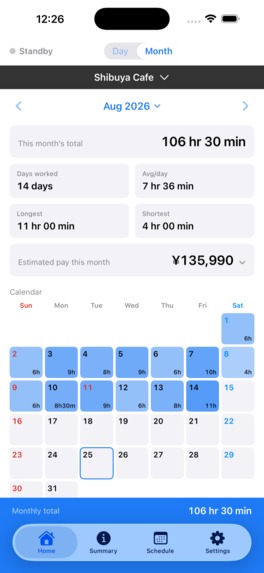
Screenshot (1179 x 2556, no device frame): monthly view with total hours, estimated pay, and the work calendar.
Inspiration
In Japan, unpaid overtime is so common that it has its own euphemism: sābisu zangyō — “service overtime.” Unpaid off-the-clock work like this is often described in English as wage theft.
Years ago, my wife worked part-time at a supermarket. After clocking out, she would sometimes continue working for another 30 minutes or even an hour. Those minutes never appeared in her time records, and she had no independent record of her own to look back on later.
Many workers face a similar problem. In many workplaces, the employer’s timecard is the only systematic record, while the worker may have little more than memory.
I built Hatara Kiroku — “work record” in Japanese — so workers can keep a record on their side, too.
What it does
Set your workplace once, and Hatara Kiroku uses geofencing to record arrivals and departures in the background — no clock-in tap or daily routine to remember.
- Background recording: geofencing detects when you arrive at and leave your registered workplace.
- Daily and monthly review: see each day’s time at the workplace on a calendar and add notes for context, such as “asked to stay for inventory.”
- CSV export: export your records for free whenever you choose, so you can keep your own copy or share it with someone you trust.
- Pro features: a one-time purchase unlocks pay and overtime estimates based on Japanese rules, including pay-period closing days, overtime premiums, and legal-holiday premiums.
- Private by design: no account is required. Work records and workplace locations are stored on the iPhone.
Hatara Kiroku records time at the workplace. It does not decide what legally counts as working time and does not provide legal advice. The record is intended to be reviewed together with other information.
Recording and CSV export are free because a worker should never need to pay simply to keep their own record. Pro is a one-time purchase: $1.99 in the US and ¥400 in Japan, with no subscription.
How we built it
Hatara Kiroku is a native iPhone app built with Swift and SwiftUI for iOS 17 and later.
- SwiftData stores work records locally on the device.
- Core Location region monitoring (
CLCircularRegion) detects arrivals and departures, with a foreground correction pass when the app is opened. - MapKit is used to choose the workplace on a map. Workplace coordinates are stored on-device; Hatara Kiroku does not operate a backend that collects location data.
- CryptoKit provides a SHA-256 hash chain over recorded events. This adds a local integrity check that can reveal later edits, deletions, or reordering. It is an on-device consistency check, not third-party proof.
- RevenueCat purchases-ios manages the one-time Pro purchase, restore flow, and entitlement status. Work records and workplace locations are never sent to RevenueCat.
- The app includes both Japanese and English UI, with fastlane and XcodeGen used for builds and App Store delivery.
Challenges we ran into
The biggest technical challenge was reliable background location detection.
iOS region monitoring requires “Always” location permission, and geofence events can sometimes be delayed or missed. We designed the onboarding carefully so users understand why the permission is needed, and we added a foreground correction pass when the app is opened.
Another challenge was trust. An app that asks for background location access must be very clear about what it records, what it does not record, and where the data goes. That is why Hatara Kiroku requires no account and keeps work records and workplace locations on the device.
Setup also proved harder than expected. When a relative tried the app in person, choosing a workplace on the map was the most confusing part. That feedback is now shaping our next improvements.
We also had to work through App Store In-App Purchase configuration during Shipaton before successfully shipping the Pro purchase flow.
Accomplishments that we're proud of
- We shipped Hatara Kiroku to the App Store during Shipaton.
- The app is available in both Japan and the United States.
- RevenueCat is running the real one-time Pro purchase and entitlement flow.
- My wife has been using the app at her current job for about two weeks without needing to manually clock in each day.
- Workers can use the core recording and CSV export features without paying.
- Sensitive work records and workplace locations remain on the user’s own iPhone.
Most importantly, Hatara Kiroku became a real product that someone can install and use today, rather than just a hackathon prototype.
What we learned
The hardest part was not the geofence. It was earning trust.
We learned that background location technology only becomes useful when people understand why it is needed, what the app can and cannot determine, and how their data is handled.
We also learned that small usability problems matter more than sophisticated technology if the person using the app is tired after a shift. Workplace setup, permission explanations, and clear wording turned out to be just as important as the location code itself.
What's next for Hatara Kiroku
- Measure missed and delayed arrival/departure events in everyday use and improve reliability.
- Make workplace setup simpler based on in-person feedback.
- Continue improving explanations around location permissions and privacy.
- Talk with labor law professionals about whether exported records can help workers prepare for an initial consultation.
- Build an Android version.
Hatara Kiroku does not replace the employer’s timecard.
It gives workers their side of the timecard.
Built With
- core-location
- cryptokit
- fastlane
- ios
- mapkit
- revenuecat
- storekit
- swift
- swiftdata
- swiftui
- xcode

Log in or sign up for Devpost to join the conversation.