Inspiration
Learning music is a fun hobby, but a really daunting one to start. For a beginner, reading sheet music, trying to learn notes and scales, and understanding music theory, are all a significant barrier to learning, preventing you from getting to the fun part (actually playing songs you like).
As a result we asked, what if we completely eradicated traditional notes and scales?. Some people are naturally gifted with perfect pitch, and the ability to play any song by ear. What if this was an ability that we could train? Instead of using notes, Harmonia subconsciously teaches relative pitch, allowing beginners to train and develop the ability to play any song by ear.
What it does
Harmonia is an ear-first music learning tool that helps users match pitch without relying on notes, scales, or sheet music.
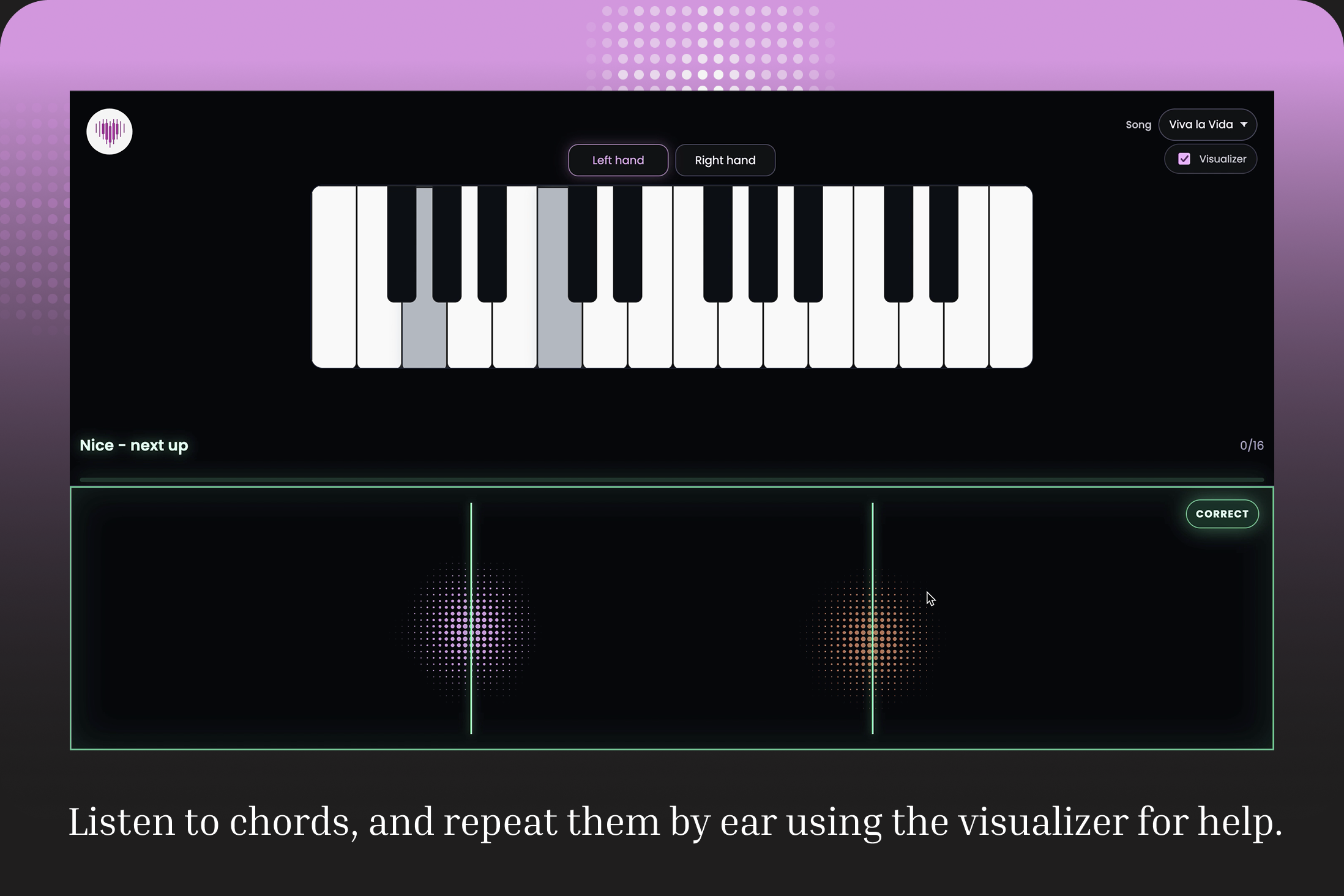
In the hackathon version, the experience is intentionally minimal. The user hears a short looping segment from a song, and tries to reproduce it on a piano. As they play, Harmonia analyzes their playing, and visualizes how close their pitch is using a spatial heatmap. Instead of telling you what note to play, the system gives continuous directional feedback:
If you're off, the indicator drifts away from center. As you get closer, it moves inward. When you match the pitch, it smoothly snaps into place and advances. The goal is to keep the indicator as close as possible to the center at all times.
There are no labels, scores, or instructions. The interaction is the teacher. Users learn by adjusting in real time, building an intuitive sense of relative pitch through repetition and feedback. The goal is that eventually, they train their ear and relative pitch well enough that they can quickly learn any known song with minimal use of sheet music/notes.
How We Built It
The initial idea for Harmonia was to build an application that could listen to a user playing a real piano and guide them in real time. We first tested a simple web app that used the device microphone to detect individual piano notes. For single notes, this worked surprisingly well. However, reliably detecting multiple simultaneous notes from one audio source, especially in real time, is still a difficult and unreliable problem. Polyphonic pitch detection is noisy, environment-dependent, and not dependable enough for the kind of instant feedback Harmonia needs.
We also explored using computer vision to detect which keys a user pressed on a real keyboard. That approach was technically possible, but it added too much setup and complexity for the prototype. It would require camera calibration, keyboard alignment, lighting assumptions, and more room for error. For a hackathon version, we wanted the core interaction to be immediate and frictionless.
Our final solution was to create a virtual piano keyboard. This lets the app identify played notes directly at the source, with no ambiguity. It also mirrors a realistic future path: users could eventually connect a real keyboard through MIDI and get the same direct note information. While microphone-based input is still part of the long-term vision because of its convenience, direct input gave us the reliability needed to prototype the learning experience.
We built a simple browser app with a built-in virtual keyboard. Piano keys are mapped onto computer keyboard keys, so users can start learning without owning an instrument. The app also works well on tablets and touch devices, where users can play directly on the screen.
The user selects a song, and Harmonia loads curated chunks of that song as notes and chords. The core loop is:
- The app plays a selected target note or chord.
- The user tries to reproduce it on the virtual piano.
- The app compares the played notes against the target.
- The difference is visualized on a spatial heatmap.
- If the attempt is wrong, the app periodically pulses the original sound again.
- If the attempt is correct, the user advances to the next target.
The progression is not strictly linear. We designed the chord order to support memory retention by revisiting earlier chords throughout the sequence, so users reinforce what they have already learned instead of immediately forgetting it.
The tech stack is intentionally minimal. Harmonia is built with plain HTML, CSS, and JavaScript running directly in the browser. We use the Web Audio API for synthesized piano sound, WebGL for the heatmap visualizer, and static song data for the prototype. There is no backend, no framework, and no external audio library.
Challenges We Ran Into
One of the biggest challenges was input detection. Our original goal was to let the app listen through a microphone while the user played a real piano. Single-note pitch detection worked reasonably well, but polyphonic pitch detection, identifying multiple simultaneous notes from one audio source, is still a difficult open research problem. Existing open-source tools are limited for reliable real-time use, especially in noisy environments.
Another major challenge was designing the visual feedback. We wanted the visualization to be helpful without becoming distracting or turning into another form of notation. If the feedback was too explicit, it defeated the purpose of ear training. If it was too abstract, users could not understand how to adjust. We went through many iterations before landing on the spatial heatmap approach, and there is still a lot of room to improve it.
We also had to balance simplicity with ambition. Harmonia has a broad long-term vision, but for the prototype we needed to focus on one clear interaction: listen, play, adjust, repeat.
Accomplishments That We’re Proud Of
We built a fully playable virtual piano that works with both computer keyboard input and touch interaction. This lets users try Harmonia immediately without needing a physical instrument, while still matching the future direction of MIDI keyboard support.
We are proud of the progression loop. The app does not simply move linearly through a song. It reintroduces earlier chords throughout the sequence to support memory retention, helping users build familiarity instead of forgetting previous material as they move forward.
We also built a real-time visual feedback system that avoids traditional musical notation. The heatmap gives users directional guidance without showing note names, sheet music, or theory labels. This keeps the experience aligned with Harmonia’s core goal: training the ear first.
Another accomplishment is how lightweight the prototype is. The app runs entirely in the browser with a minimal stack, using Web Audio for sound synthesis and WebGL for visualization.
What We Learned
We learned that ear-training interfaces require a careful balance between guidance and dependency. Feedback needs to help users correct themselves, but it should not become something they rely on instead of listening.
We also learned that the learning sequence matters as much as the detection system. A good practice loop needs repetition, pacing, and reinforcement. Simply giving users the next chord is less effective than intentionally revisiting earlier ones.
Finally, we learned that building a music-learning tool is not just a technical problem. It is also a design problem: the timing of audio prompts, visual feedback, success states, and retries all shape whether the user feels guided or confused.
What’s Next for Harmonia
The hackathon version focuses on one core interaction, but the broader vision is a full platform for learning music by ear.
Next steps include:
- Expanding from short practice segments to full songs with progressive breakdowns
- Using AI-driven segmentation to identify learnable chunks automatically
- Adding adaptive difficulty that responds to user performance
- Supporting MIDI input for real keyboards
- Improving pitch detection for microphone-based input
- Moving from single notes and dyads toward richer chord detection with multiple simultaneous indicators
- Adding more songs and user-uploaded music
Long term, Harmonia aims to make relative pitch a primary pathway into music. Instead of being a skill musicians develop later, it becomes the foundation beginners start with.


Log in or sign up for Devpost to join the conversation.