Inspiration
Keeping up with college is a second job. Deadlines live in Canvas, plans change in a group chat, a professor's email moves a quiz, and your shift schedule sits in a calendar that knows about none of it. We kept missing things, and each one was written down somewhere. No single place put them together.
Assistants that could put them together wanted all of our mail and messages in someone else's cloud. We wanted one that starts on our side of that line.
What it does
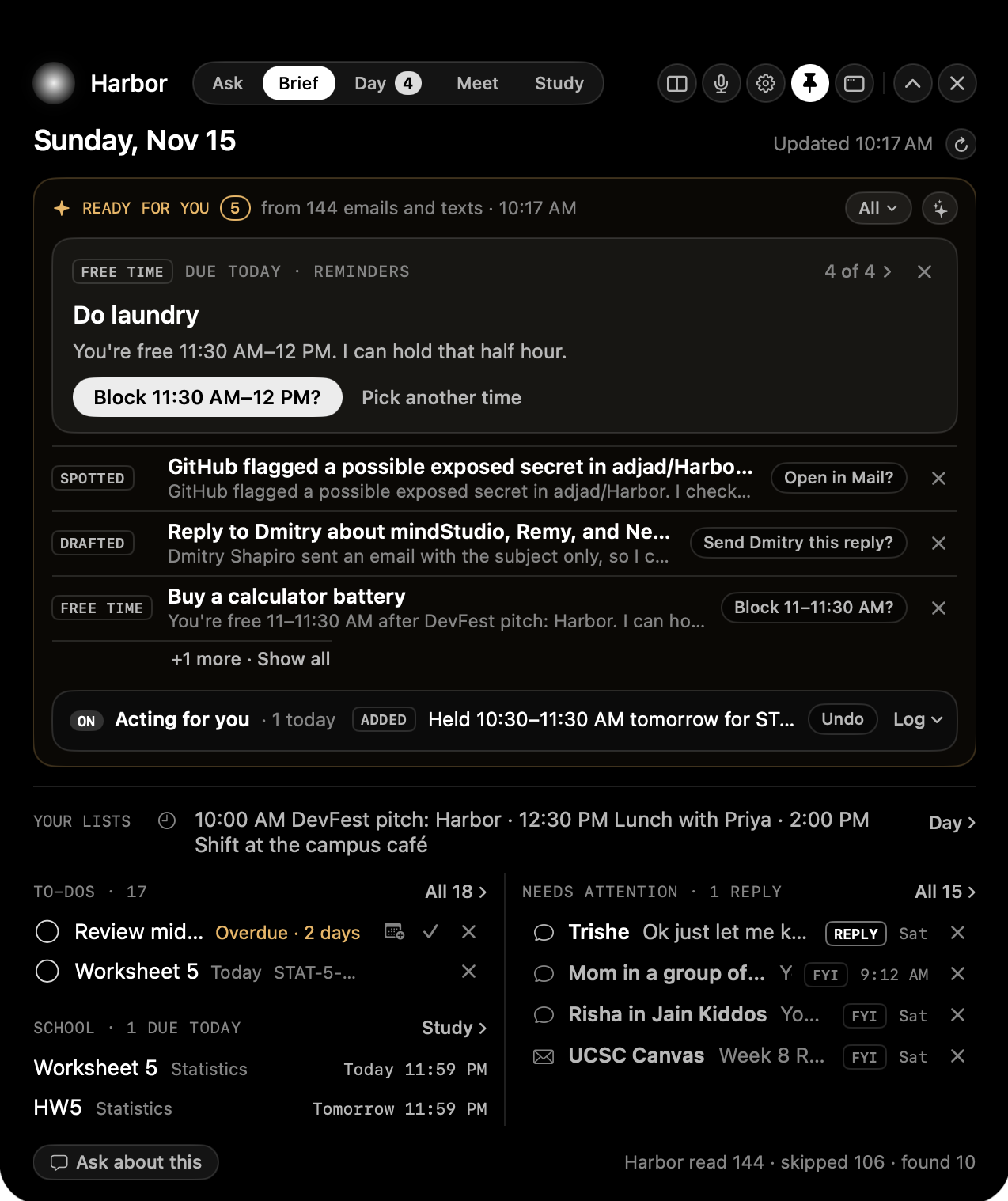
Harbor is a proactive assistant that lives in the Mac's notch.
- Brief leads with what Harbor got ready before you asked: a drafted reply to someone who is waiting, deadlines and bills it found in mail, and today's to-dos from every source.
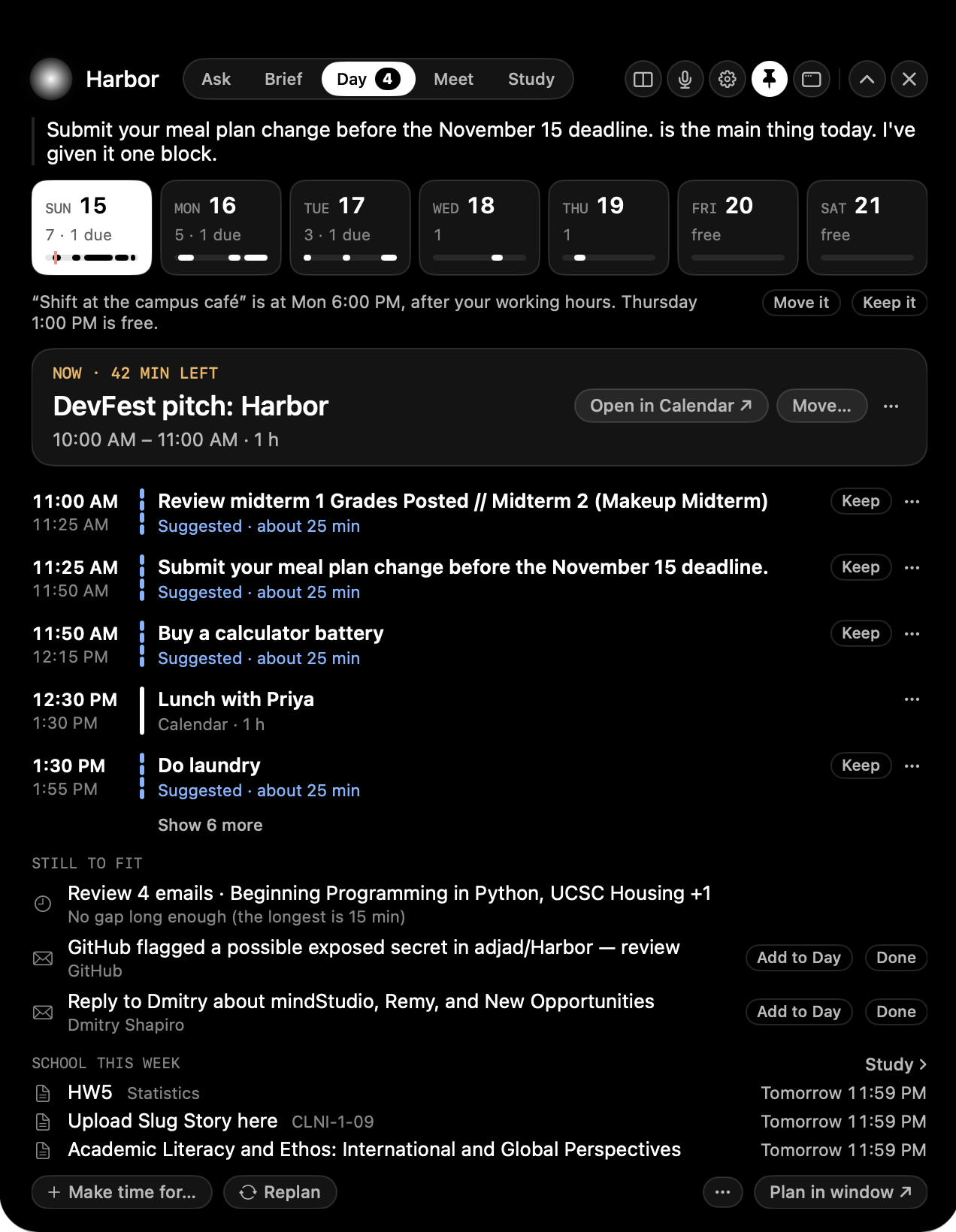
- Day puts the calendar first: the week at a glance, what's next, and study blocks placed in free gaps. One tap adds a block to your calendar, and Undo removes it.
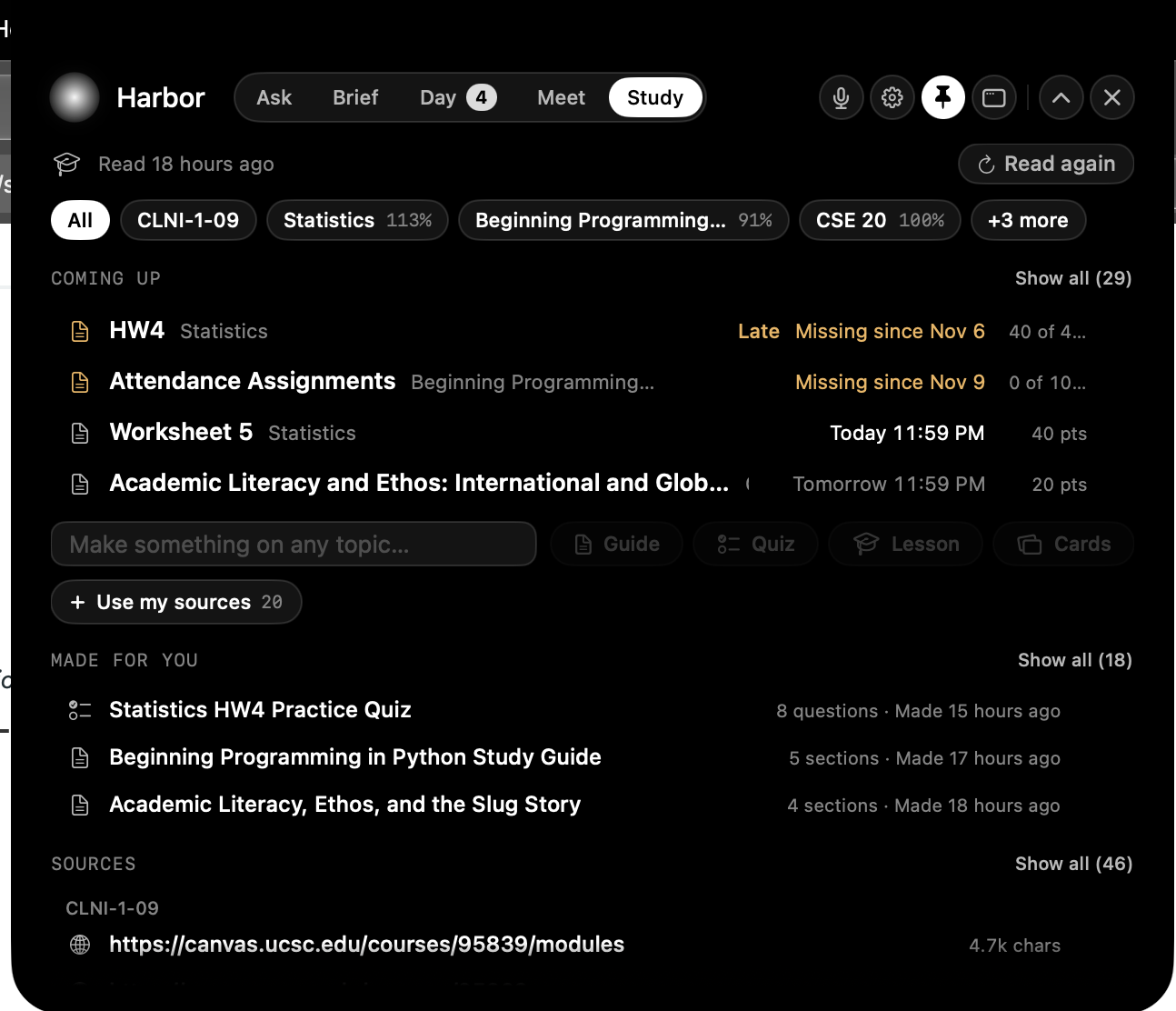
- Study reads the Canvas pages you have open, along with Google Docs, Slides and PDFs from Drive, and makes study guides, practice quizzes and flash cards from your real coursework.
- Ask answers by text or voice across mail, messages, calendar, reminders and notes, and can act. Sending and calendar changes wait for your yes.
How we built it
Harbor is a Swift app and a bundled Python (FastAPI) service that holds the tools, memory and model routing.
- Gemma on the Mac, by default. A local Gemma model runs on Apple silicon, so nothing leaves the computer unless you turn a cloud feature on.
- Gemini when you want more. One switch moves the work to the Gemini API with your own key. Tool calls use function calling, and Harbor returns Gemini's thought signatures unchanged within a turn, as the API requires.
- Gemini for coursework. Study asks Gemini for a response schema per kind of material and validates every result before showing it. A Drive deck or PDF is read page by page, so a quiz question can point to the slide it came from.
- Google APIs, read-only. One Google sign-in gives read-only access to Gmail, Calendar and Drive. Harbor cannot send, edit or delete anything in your account.
- School pages, read-only. Harbor reads Canvas through the macOS Accessibility API. It never clicks, types or submits on a school site, and it refuses to open tests, quizzes and graded work.
- Intel Macs cannot run the local model, so they get a cloud-only build that keeps your data, tools and approvals on the Mac.
Challenges we ran into
A small window. The local model works with about \(8{,}192\) tokens of context, and a Gemini model with roughly \(10^6\):
$$\frac{10^{6}}{8192} \approx 122$$
On the Mac, a single course doesn't fit. Tool descriptions alone used most of the window, so we cut them down, digested long emails, and capped what each tool returns. With Gemini, Study can read far more of a course in one request.
Privacy against capability. The powerful model is in the cloud and the private data is on the Mac. We made local the default, and made the cloud switch say exactly what it sends.
Being a safe guest on a school site. Walking a course to find materials means opening pages in a signed-in browser. We wrote the never-open rules first, checked every redirect against them, and closed only the tabs Harbor opened itself.
Renaming the app. Changing the name also changed where saved API keys were looked up, so an upgraded install suddenly couldn't find them. Fixing it taught us that tests must never be able to touch a real Keychain.
What we learned
- Proactive beats reactive. The useful moment is before you remember to ask.
- Trust comes from small guarantees you can see: an approval before anything is sent, an Undo on what Harbor adds, and a log of every action.
- A small local model and a large cloud model are complements. Each makes the other easier to justify.
- Say what was and wasn't tested. Our release notes list both.
What's next
- Learning from what you confirm and dismiss.
- Connecting people and projects across apps.
- An iPhone companion.
Built With
- claude
- javascript
- python
- swift-ui


