My Inspiration
I learned the sign language alphabet in second grade, and even now, some of my friends and I use it to communicate across long distances. However, as more and more people looked at us blankly when we communicated this way, not understanding what we were saying, I realized that this could be the case for people who actually spoke ASL. Having conversations with my friends has been a crucial part of my life and education, and without language, almost all aspects of our world today will be inaccessible. That’s why I created HandyTalk: to bridge this gap between people who speak ASL and English without constantly needing a human interpreter.
What HandyTalk does
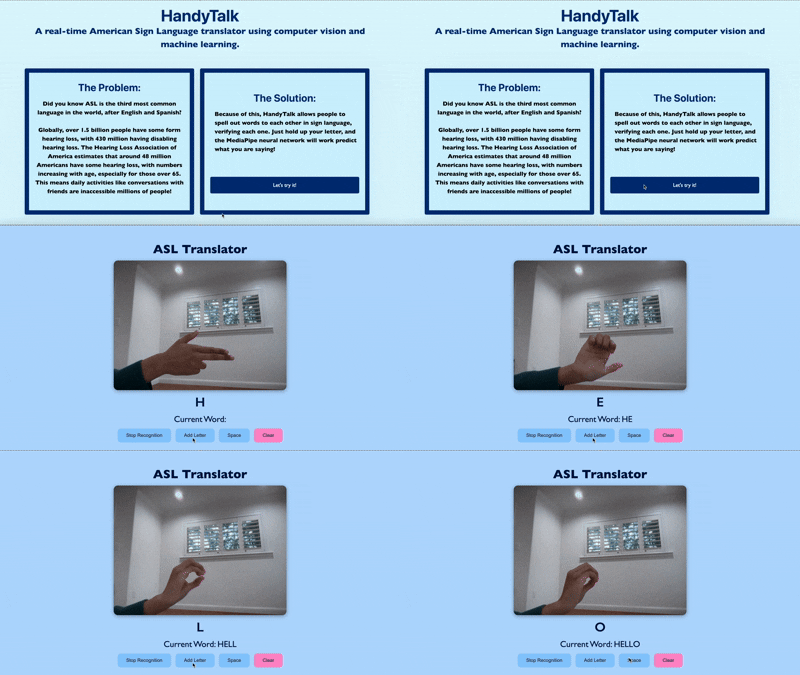
HandyTalk is a web app that uses computer vision and machine learning to translate ASL letters into English in real-time, helping the millions of ASL users who lack constant access to translators. After simply giving it permission to access the camera, all users have to do is start signing letters! Then, the buttons under the camera feed can be used to add letters, spaces, or clear a word. The goal is to allow users to communicate as efficiently and intuitively as possible.
How I Built HandyTalk
To build HandyTalk, I used a scikit-learn MLPClassifier, which is a type of feedforward neural network (multi-layer perceptron). I collected 7800 samples of my own data (300 per letter) using MediaPipe and OpenCV, which I used to train my model. I used Flask to create the backend of the web app, which manages the model, handles video input, and provides predictions via API routes. On the front-end, I used HTML, CSS, and JavaScript to build a simple, user-friendly interface where users can use buttons to start translation.
Challenges I Faced
One of the biggest challenges I faced was in collecting data for training. Some letters, especially A and S or I and J, were too similar to each other, and letters like J and Z are motions (you rotate your wrist for J and write out the letter Z for Z). Because of this, I had trouble figuring out how to record this in data, because if I recorded the entire motion, the letters would get mixed up. To fix this, for letters like A and S, I exaggerated the placement of fingers on my hand by moving my thumb in or completely out, and made sure I was capturing more unique angles for both of them. For letters like J and Z, I chose to focus on the middle portion of the motion, as that did not interfere with any of the other letters.
Accomplishments I’m Proud Of
I’m proud of my learning the entire alphabet in sign language and creating a custom dataset for the first time. This was also my first time exploring computer vision, and I’m glad I was able to seamlessly integrate MediaPipe, OpenCV, and Flask for HandyTalk. Overall, I’m proud I was able to prototype a tool of over 98% accuracy that increases accessibility and communication for the deaf and hard-of-hearing community.
What I Learned
I learned how to collect and preprocess real-time hand landmark data using MediaPipe and OpenCV. I also learned how to train a neural network (MLPClassifier) for multi-class classification with scikit-learn, and how to capture live video in the browser. I also integrated a machine learning model into a web application, and learned the importance of integrating the backend (using Flask) and front-end (with HTML, CSS, and JavaScript) components in a way that ensures a smooth user experience. Additionally, I gained insights into the challenges of deploying deep learning models in a real-world context and the importance of accessibility and customization (for this project, allowing the user to create their own dataset) to handle unpredictable inputs.
What's Next for HandyTalk
There is so much room for HandyTalk to grow! First, ASL also includes gestures, so I could add a tool that enables that. I could also add more languages to translate to (other than just English), and soon create a gesture-to-speech, not just to-text, application. To make the app more accessible, I could also develop a mobile version, making it more convenient for everyday use.
Built With
- css
- fetch-api
- flask
- html
- javascript
- joblib
- local-filesystem
- mediadevices-api
- mediapipe
- numpy
- opencv
- pico.css
- python
- scikit-learn
- web-browser

Log in or sign up for Devpost to join the conversation.