-
-

System flow architecture
-

Chrome extension internal architecture
-
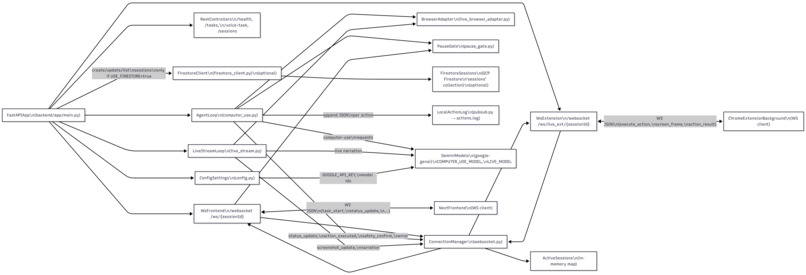
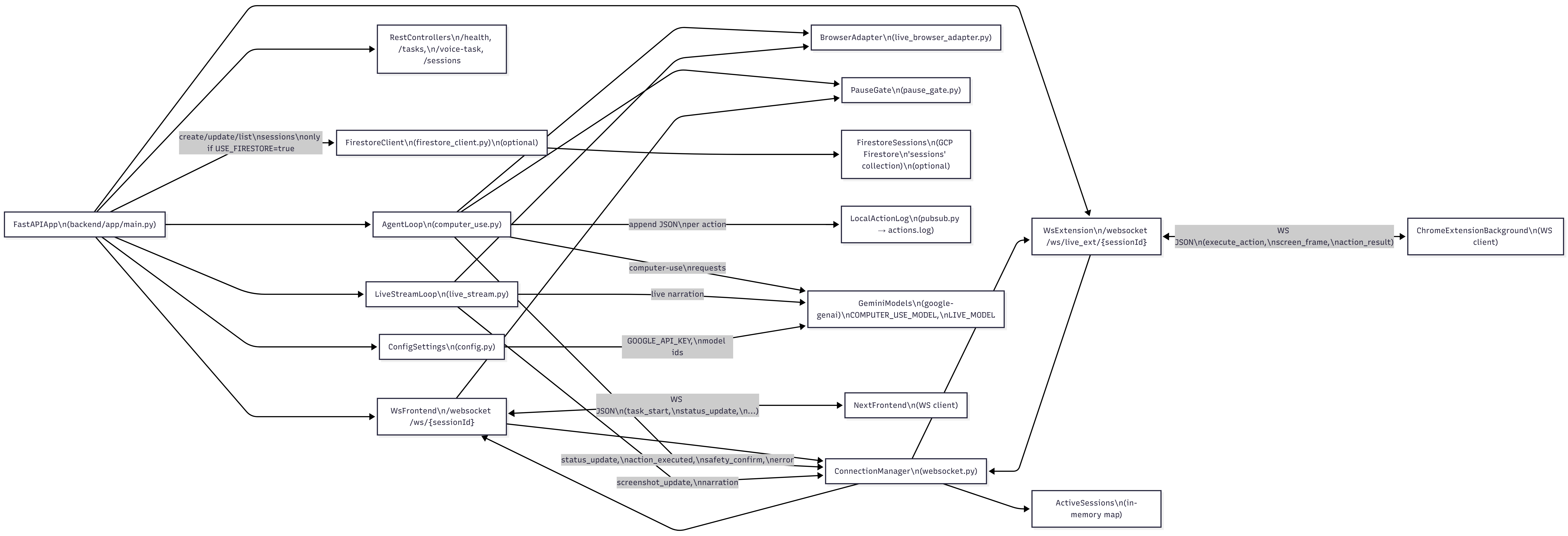
FastAPI & Google cloud backend architecture
-
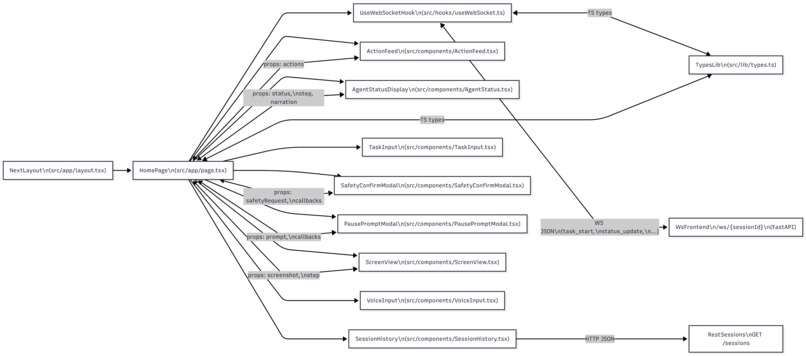
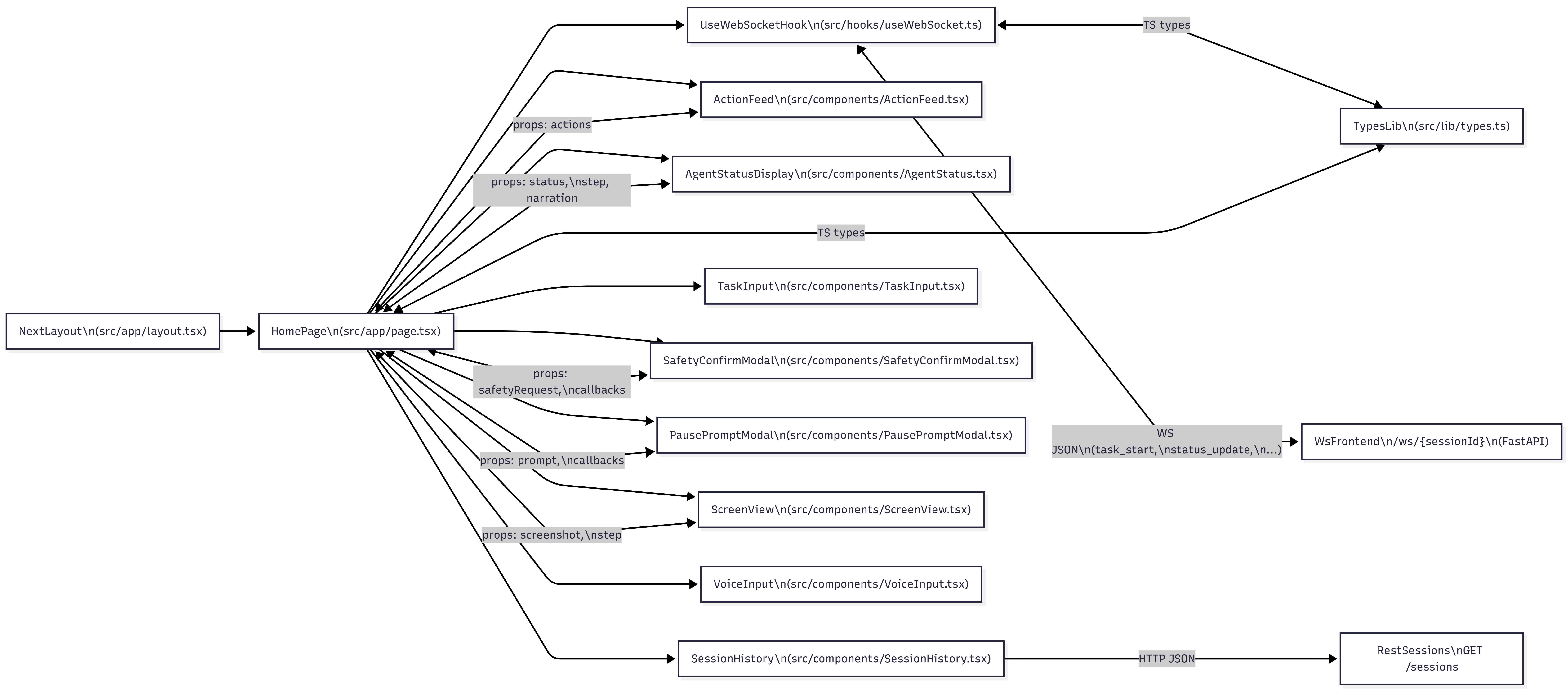
Next.js frontend architecture


Inspiration
A visually impaired student can't complete his university enrollment because the portal's dropdowns don't work with a screen reader. A man with Parkinson's disease can't click precisely enough
The web has 96.3% of homepages failing basic accessibility standards in 2025. Assistive technology patches the edges. Nobody fixes the centre.
We asked a different question: what if the AI didn't need the website to be accessible? What if it could just see the screen the way a sighted person does and act on behalf of someone who can't?
That question became HandOff.
What it does
HandOff is a multimodal AI agent that autonomously navigates any website on behalf of any user, using only a screenshot as its window into the world.
You speak or type a goal "Book me a train from Delhi to Mumbai next Friday" or "Refill my blood pressure prescription on CVS" and HandOff handles the rest. It sees the screen, decides what to click or type, executes that action with hardware-level browser events, verifies the result, and repeats until the task is done or it needs your permission to proceed.
How we built it
HandOff is a Triple-Node Real-Time Architecture connecting three independently-developed systems over a dual-WebSocket bridge.
The Backend: FastAPI Orchestrator
The brain lives in a Python 3.11 / FastAPI backend running two concurrent Gemini loops per session:
Action Engine (
gemini-2.5-computer-use-preview): Receives a screenshot and a growing history of completed actions, returns a single next action (click, type, scroll, navigate, orTASK_COMPLETE).Narration Engine (
gemini-2.5-flashvia Gemini Live API): Continuously streams plain-language commentary about what is happening on screen, independent of the action loop.
The core loop follows:
$$ \text{Screenshot} \xrightarrow{\text{Gemini Vision}} \text{Action} \xrightarrow{\text{Extension}} \text{DOM Event} \xrightarrow{\text{1s settle}} \text{New Screenshot} $$
A PauseGate (asyncio.Event) can block this loop indefinitely at any point,
holding the agent in suspension until the user responds.
The Extension: Manifest V3 Bridge
The Chrome Extension is the physical layer it does things to the real browser:
chrome.tabs.captureVisibleTabevery 500ms streams the live viewport as a Base64 PNG to the backend without injecting heavyweight scripts.content_script.jstranslates abstract pixel coordinates from the AI (on a 1000×1000 grid) to real viewport coordinates, then dispatchesPointerEvent,MouseEvent, andKeyboardEventsequences so websites respond as if a real human acted.- A Universal DOM Resolver with 4 fallback layers handles modern SPA patterns where React/Vue/Angular destroy and recreate input elements mid-interaction the root cause of the hardest class of agent failures on sites like ixigo.com, Google Flights, and MakeMyTrip.
The Frontend: Next.js 15 Dashboard
A real-time telemetry interface that consumes ~2 FPS screenshot streams,
action logs, narration text, safety confirmation modals, and pause prompts
all over a single WebSocket connection with exponential backoff reconnection.
The Cloud
Fully containerised for Google Cloud Run. Gemini API, Cloud Firestore
(optional, toggleable via USE_FIRESTORE), and a local fallback stack
for development without billing.
Challenges we ran into
The React Swap Problem
The hardest engineering problem we faced was what we call the React Swap: modern SPA frameworks destroy the DOM element a user just clicked on and replace it with an entirely new one before the agent's type command arrives sometimes within 50ms. Our saved reference to the clicked element was a ghost pointer to a node that no longer existed.
The solution required rethinking our entire input-targeting strategy.
Instead of tracking which element was clicked, we now track what role
is needed right now querying the live DOM fresh at type-time using a
priority-ordered selector chain covering every known framework modal pattern,
combined with a MutationObserver pre-armed at click-time to watch the
React render window. This became the Universal DOM Resolver: 4 layers,
framework-agnostic, handling React, Vue, Angular, Svelte, jQuery,
shadow DOM, and vanilla JS.
The Repeat Loop Bug
The agent kept repeating the same action typing the same search query,
clicking the same button indefinitely. The root cause was subtle:
Gemini has no persistent memory between API calls. The contents list
is its memory, and we were appending "Actions executed successfully"
a message that told it nothing about what it actually did. Combined with
a setTimeout(50ms) on the Enter keypress that fired after the
screenshot was already taken, Gemini always saw the search bar unsubmitted
and typed again.
The fix required changes on both sides of the system simultaneously:
rich action history in every Gemini prompt, synchronous Enter firing,
async sendResponse with return true in the message listener,
and a deduplication guard on consecutive identical action signatures.
The Timing Window
Every action in a browser agent is a race between the agent and the page. Press Enter how long before the results load? Click a button how long before the next form appears? We hard-coded sleeps that were too short on slow networks and too long for fast ones.
Patience Mode solved this architecturally: all timing constants became
config properties driven by a single PATIENCE_MODE flag, with per-property
slow/fast variants. No more scattered magic numbers.
Accomplishments that we're proud of
The DOM Resolver works on every framework we tested 10 sites, 6 different rendering architectures without a single framework-specific code path. The MutationObserver + priority-selector approach is genuinely framework-agnostic.
Grandparents Mode is real UX, not a font-size bump. The narration engine produces qualitatively different language warm, reassuring, jargon-free because the system prompt engineering is rigorous about what words are forbidden and what tone is required.
The Pause Gate has no timeout. We're proud of this architectural decision. Most agents give users 30 or 60 seconds to respond to a confirmation prompt. Ours waits forever because for an elderly user who needs to find their reading glasses, 60 seconds is nothing.
The entire backend is stateless and Cloud Run-ready. Session state lives in the WebSocket +
asyncio.Eventgate, not in the server. Scaling is a one-click deploy.
What we learned
Gemini is stateless. That is not a bug it is the entire design constraint.
Every architectural decision in HandOff flows from one fact: each Gemini
API call is a cold start. The contents list is the model's only memory.
Once we internalised this, the repeat-loop fixes, the action history design,
and the state machine architecture all became obvious.
We also learned that the extension is ground truth. The screenshot Gemini sees is taken by the backend after a fixed sleep. Every millisecond of DOM work that finishes after that sleep window produces a stale frame that sends the agent in the wrong direction. This insight that timing correctness in the extension is more important than prompt correctness in the backend fundamentally changed how we think about browser agents.
Finally: accessibility is not a feature you add at the end. Grandparents Mode and Patience Mode required us to audit every string, every timeout, every error message in the system. The narration copy, the overlay banner text, the confirmation modal language all of it needed to be redesigned for users who may be scared, confused, or simply slower than we assumed. That was humbling and clarifying.
What's next for HandOff: Hands-Free Web Navigator
Narration Engine: The platform will also narrate the actions it is taking in the background in a more human-like voice instead of tge current robotic version.
Caregiver Mode: A family member sets up the task from their own dashboard; HandOff executes it on the elderly person's machine; the caregiver receives a completion screenshot. The
PauseGatearchitecture already supports this the gate just needs to surface to a second WebSocket connection.Task State Machine: Replace the implicit loop state with an explicit four-state machine
NAVIGATING → INTERACTING → VERIFYING → COMPLETE. This prevents an entire class of bugs where the agent acts in the wrong phase and gives Gemini stronger constraints on what actions are valid at each stage.\( \$30B \) unclaimed benefits, one task at a time: We want to build pre-configured task templates for the highest-impact government portals SSA, Medicare, SNAP, HMRC so an elderly user can say "apply for my Extra Help" and the agent knows exactly which portal, which form, and which fields to complete.
Mobile — Android & iOS: The extension architecture is Chrome desktop-specific today. Two parallel paths expand this to mobile — the primary computing device for most Indian elderly users who never owned a laptop.
On Android (the priority for India — ~95% of the smartphone market):
Chrome for Android supports Manifest V3 extensions from Chrome 128 onwards,
making the existing extension largely portable. The deeper path is Android's
AccessibilityService API, which allows screen capture and UI interaction
system-wide — covering BHIM UPI, PhonePe, DigiLocker, WhatsApp, and every
native banking app that has no web equivalent, not just the browser.
On iOS/iPadOS: A Safari Web Extension port would bring Sahayak to iPhone and iPad — the dominant device in urban and semi-urban elderly households where a tablet is the household's only screen.
Together these two paths make the agent genuinely device-agnostic on the platforms the target users actually hold in their hands.
- Language Engine: Support for multiple languages across varios regions.
Built With
- chrome
- computer-use
- fastapi
- gemini
- google-cloud
- next.js
- playwright
- python
- tailwindcss
- typescript


Log in or sign up for Devpost to join the conversation.