-
-
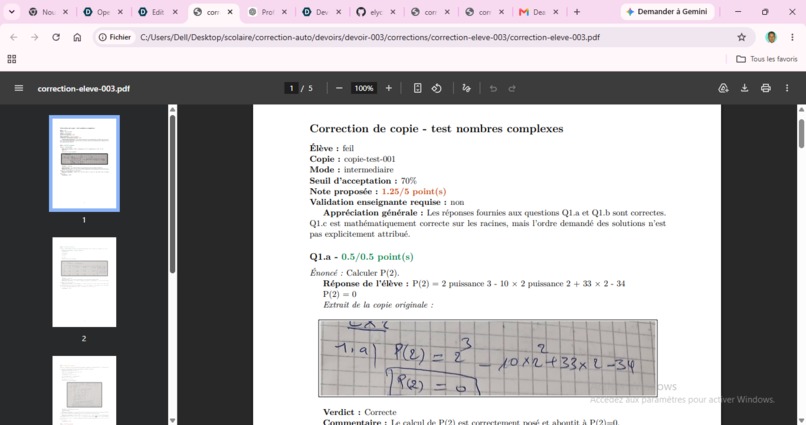
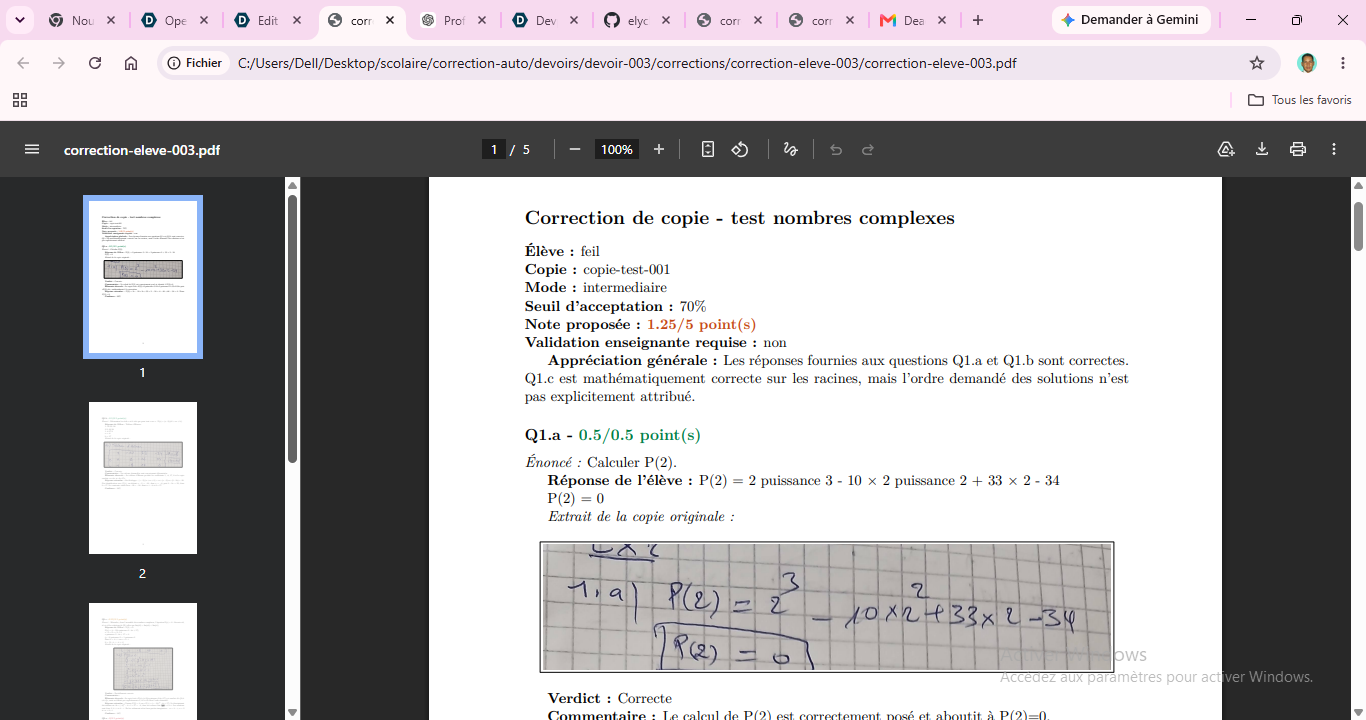
exemple of grade for hand writen answer
Inspiration
I've been a math teacher since 2010. For fifteen years, my evenings and weekends have included the same ritual: stacks of handwritten copies, a red pen, and the slow, repetitive work of checking whether a student correctly expanded $(a+ib)(a-ib) = a^2+b^2$ or made a sign error three lines into a proof. It's not that the work is hard — it's that it's long, and that length steals time I'd rather spend actually teaching.
When Codex became available with GPT-5.6, I finally had a way to fix the part of my job I'd been complaining about for over a decade — without giving up the part that matters most: my judgment as a teacher on what counts as a correct answer.
What it does
HandGrade AI (corrige-moi) lets a teacher import a photo or PDF of an exam subject, and a student's photographed handwritten answer sheet. Codex, running on GPT-5.6, then:
- classifies and reads the subject to extract questions and the grade scale,
- transcribes the student's handwriting into text,
- optionally drafts a model answer,
- proposes a grade for each answer, according to a strict / intermediate / lenient mode and an acceptance threshold $\tau \in [0,1]$ chosen by the teacher:
$$ \text{verdict}(s) = \begin{cases} \text{correct} & \text{if } s \geq \tau \ \text{partially correct} & \text{if } 0 < s < \tau \ \text{incorrect} & \text{if } s = 0 \end{cases} $$
where $s$ is the ratio of the answer's matched criteria. Every proposal — the extracted questions, the transcription, the grade — stays fully editable. The teacher reviews and validates each step before anything becomes final, and only then does a local, deterministic LaTeX engine (not the AI) render the graded PDF handed back to the student.
How we built it
I didn't start with the desktop app. I started by building corrige-moi as a Codex skill: a deterministic CLI engine with no external Python dependencies, driven by four structured prompts (analyze_subject, transcribe_copy, generate_model, grade_copy), each returning JSON validated against a schema. Getting that pipeline right — sujet in, structured JSON out, LaTeX/PDF out — was the foundation everything else stands on.
Once the skill worked reliably from the command line, I wrapped it in a Tkinter/ttk desktop application so a non-technical teacher could use it without ever touching a terminal: a dashboard, an assignment workflow, an image cropper for handwritten answer excerpts, a built-in PDF/image viewer, and an activity bar that narrates what Codex is currently doing. Codex CLI itself is called with shell=False, no API key, authenticated only through codex login, and confined to a minimal, read-only temporary sandbox per request — the app and the local skill engine remain the only things allowed to write files.
Challenges we ran into
The single hardest stretch was exactly that transition — from a working CLI skill to an equivalent desktop application. It sounds like "just add a UI," but it took a solid 2–3 hours of genuinely difficult, focused work: re-threading every skill operation through background jobs so the Tkinter UI never froze, keeping the desktop app's state (SQLite index, cropped image regions, validation flags) in sync with a skill engine that was never designed to be driven interactively, and making sure a long-running Codex call could be cancelled cleanly mid-flight without corrupting a partially written PDF.
Along the way I also had to get strict about LaTeX security — disabling shell-escape and rejecting file-access primitives in any AI-produced content, since the correction text is technically attacker-controlled input rendered into a document.
What we learned
The biggest lesson wasn't about Codex's capabilities — it was about how to work with it. Iterating in small steps beat trying to specify the whole desktop app in one shot; Codex is far more reliable when each step is scoped tightly enough to verify on its own. I also learned, the hard way, that for UI/UX work it pays to sketch the screens I already had in my head before asking Codex to build them, rather than describing a layout in prose and hoping the gap closes itself. And before adapting a working skill into a different technical shape (CLI → desktop app), it's worth explicitly discussing the target stack and its constraints up front — the migration would have taken far less than 2–3 hours if I'd settled the architecture questions before writing code instead of during it.
What stayed constant throughout, and what I care most about as a teacher: Codex proposes, but it never decides. Every grade a student receives passed through my own review first — which is exactly the balance I wanted from an AI tool built for a classroom.
What's next for HandGrade AI
web app version, more UX,..

Log in or sign up for Devpost to join the conversation.