-
-
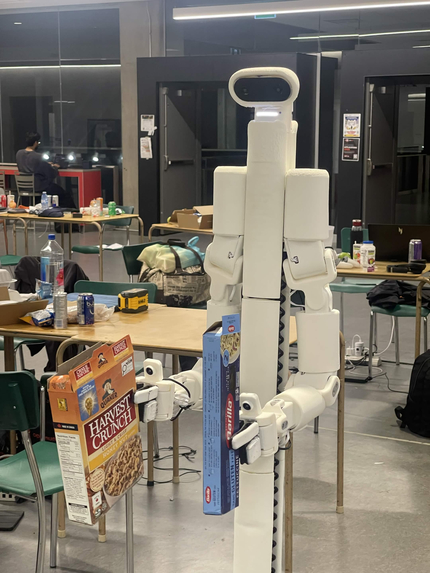
Hampy
-
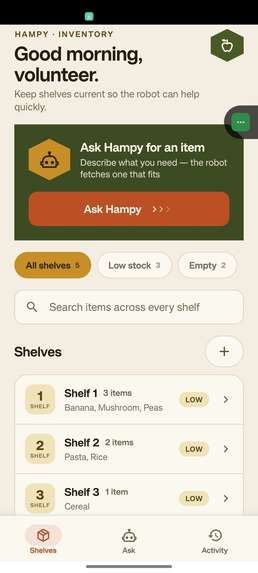
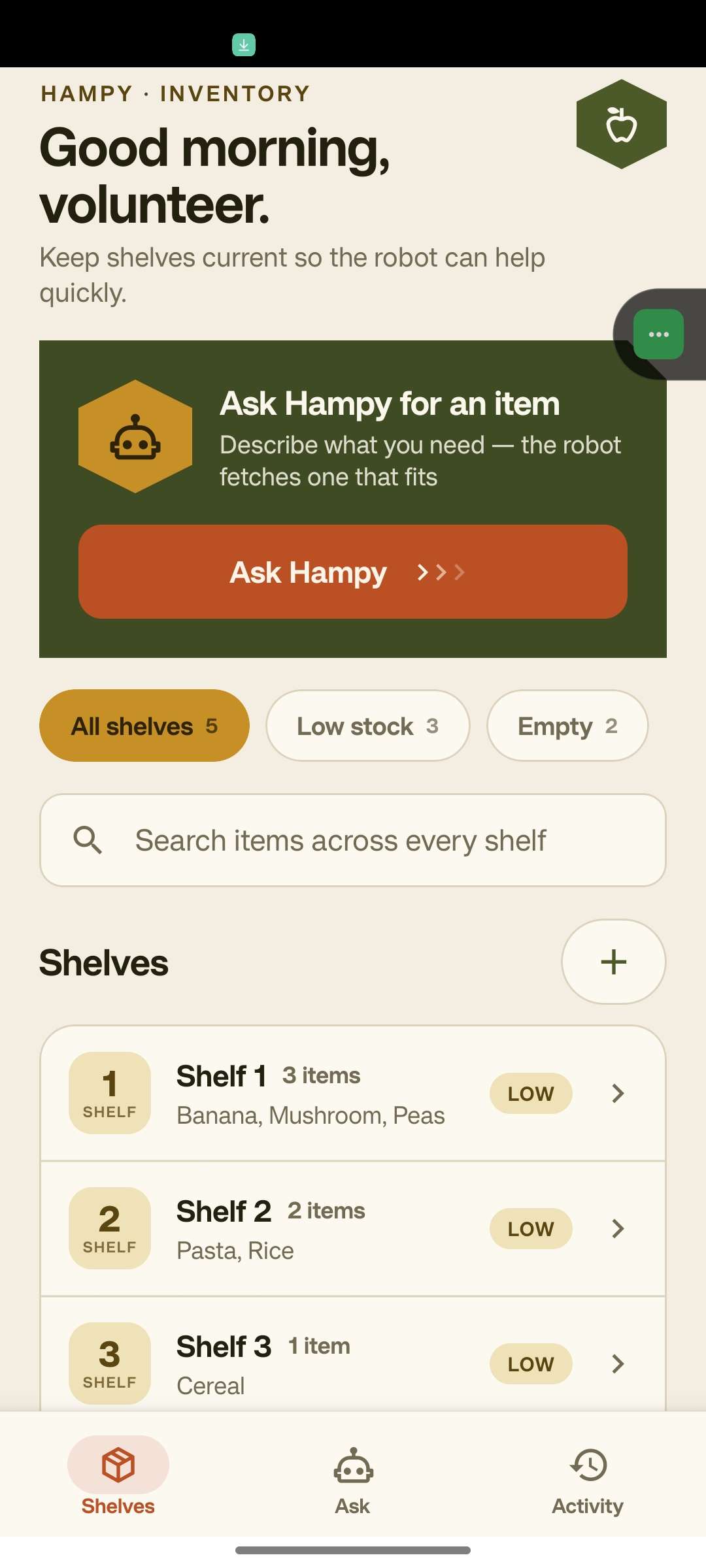
Home Screen
-
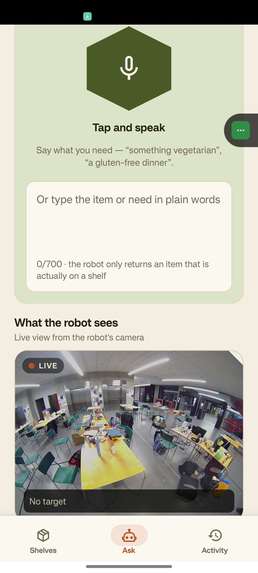
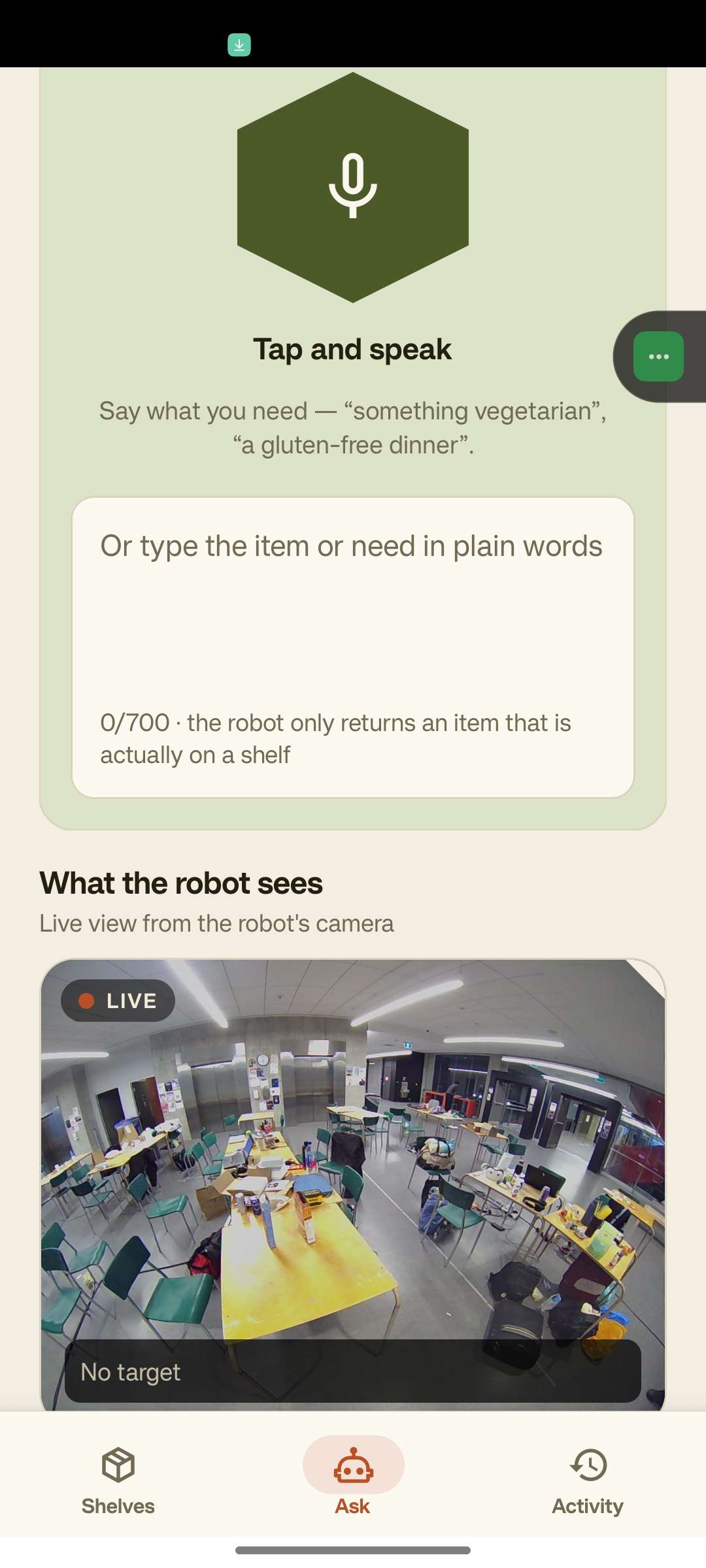
Ask Hampy Tab
-
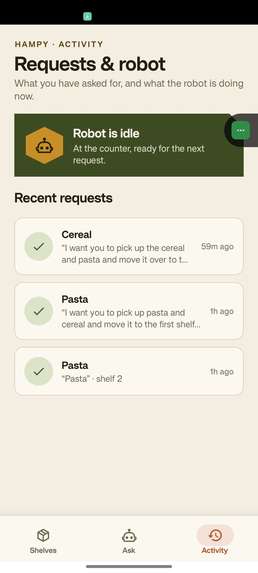
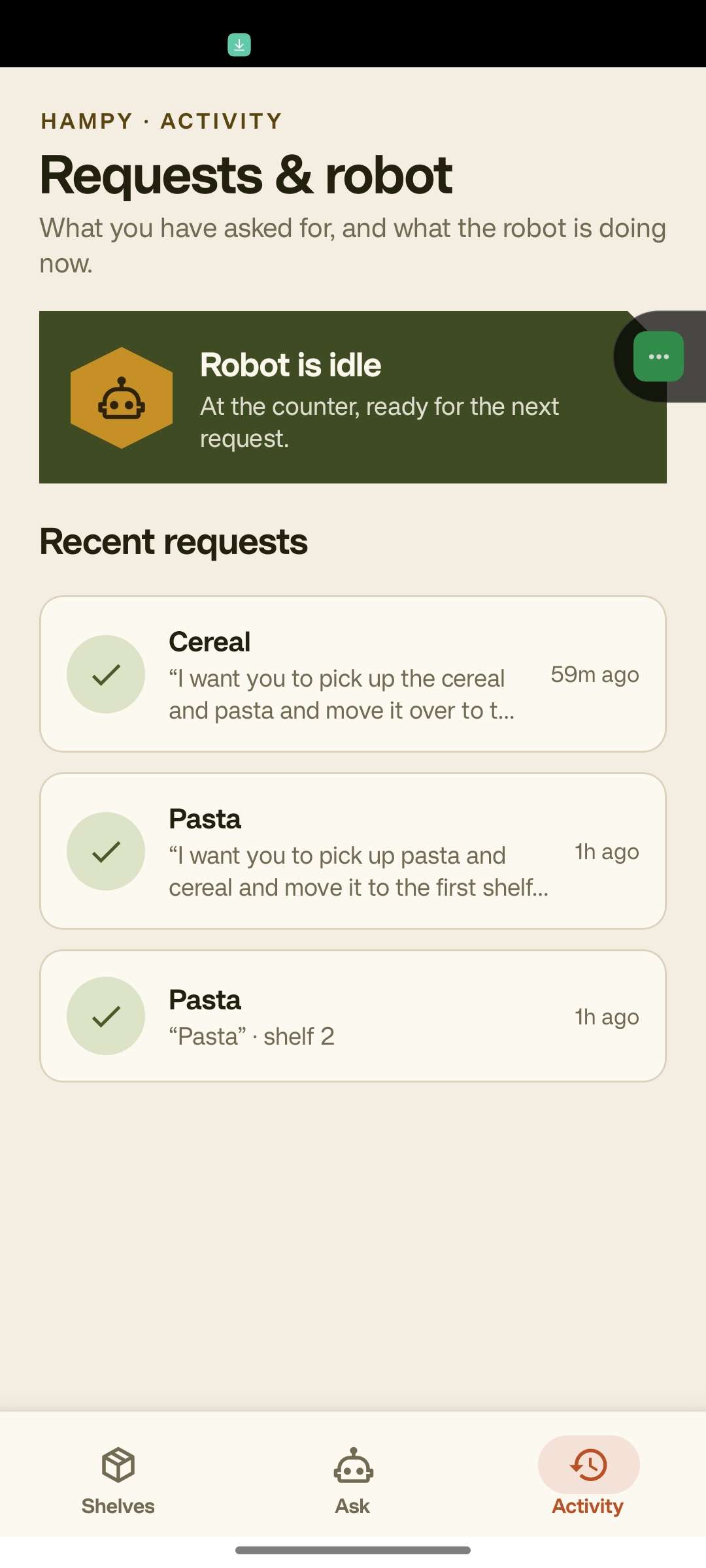
History
Inspiration
Since 2019, the demand for food banks has increased by more than 99% in Canada. Food banks run on volunteers, and volunteers are often older, in a hurry, and standing in a warehouse with their hands full. Two things slow them down every shift:
- Inventory drifts. Shelf lists live in someone's head or on paper, so nobody is sure what is actually in stock.
- Fetching is manual. Someone has to walk the aisles, find a suitable item for a person with a dietary need ("something vegetarian", "a gluten-free dinner option"), and carry it back.
We wanted a tool that keeps inventory accurate as an everyday habit, and that lets a volunteer ask for an item in plain language and have a robot go and get it, without ever sending the robot for something that isn't there.
What it does
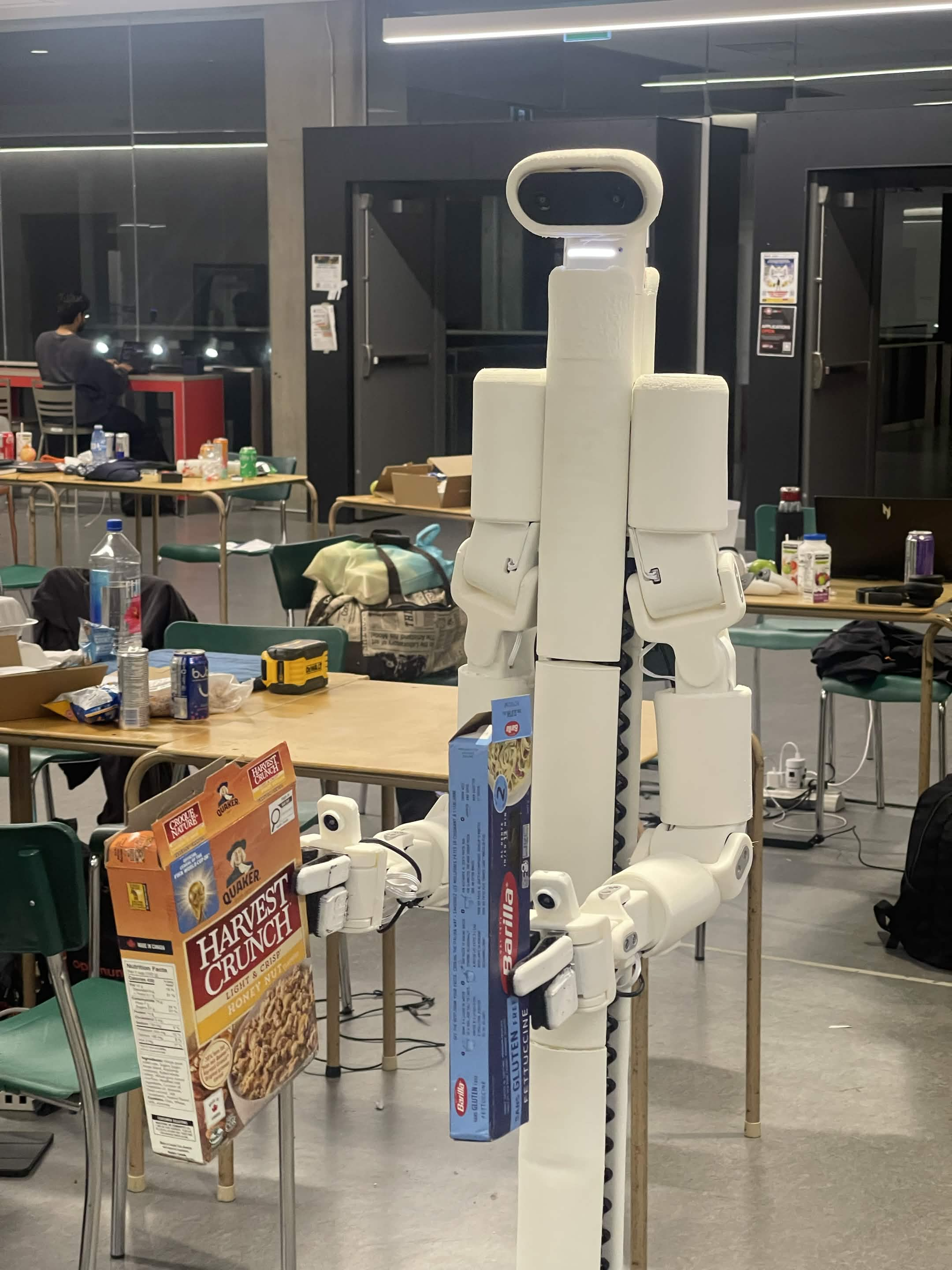
Hampy is a phone-first app backed by a small API and a BracketBot robot.
- A volunteer keeps shelf inventory current: browse shelves, search, add and remove items.
- They open Ask Hampy and hold the microphone or type a request in plain language.
- Speech is transcribed by Gemini and dropped into the same text field, so voice is just another way to fill in the request.
- Gemini chooses one real item from the live shelves (or two, in two-item mode) and returns it as structured JSON.
- The backend validates the pick against the inventory instead of trusting the model, so a hallucinated item never reaches the robot.
- The backend launches the robot workflow over SSH. The robot picks the item, drives to the drop-off table, releases it, plays a completion sound, and stops.
- The phone shows a live camera view and step-by-step progress that advances only when the robot reports it has reached each step.
- If anything goes wrong, the run stops on the step it failed at, in red, with the reason. It never pretends to finish.
The interface is deliberately calm and utilitarian: deep green, large 48 px touch targets, screen-reader labels on every control, and live-region announcements for async results.
How we built it
Stack
- Mobile app: Expo SDK 57, React Native 0.86, React 19, TypeScript, expo-router, NativeWind, Reanimated, expo-audio
- Backend: Python 3.14, FastAPI, Uvicorn, Pydantic Settings, httpx, Pillow
- Storage: atomic-write JSON repository (
storage.json), serialized behind a lock - AI: Google Gemini for structured-output item selection and audio transcription
- Robot: BracketBot (
bbos), workflow scripts run withuvover SSH - Testing: pytest with a fake Gemini client and a fake robot, so no API key, network, or hardware is needed
The phone only ever talks to the backend over REST. The backend is the one component that knows about Gemini, the robot, and the robot's camera, so a change in the robot's IP address is a .env edit, not an app rebuild.
Architectural workflow
High-level system architecture
+-------------------------------------------------------------------------+
|                       PHONE (Expo / React Native)                       |
|  Shelves screen | Ask screen (voice + text) | Progress + live camera    |
+-------------------------------------------------------------------------+
                                  |  REST (/api)
                                  v
+-------------------------------------------------------------------------+
|                            FASTAPI BACKEND                              |
|  +-----------+ +---------------+ +--------------+ +-----------------+  |
|  | shelves   | | recommend-    | | transcrip-   | | robot + camera  |  |
|  | router    | | ations router | | tions router | | routers         |  |
|  +-----+-----+ +-------+-------+ +------+-------+ +--------+--------+  |
|        |               |                |                  |           |
|  +-----v---------------v----------------v------------------v--------+  |
|  | StorageRepository | RecommendationService | RobotJobService       |  |
|  | GeminiClient      | RobotClient           | Camera proxy (Pillow) |  |
|  +-------------------------------------------------------------------+ |
+-------------------------------------------------------------------------+
        |                     |                          |
        v                     v                          v
+---------------+   +------------------+   +-----------------------------+
| storage.json  |   | Google Gemini    |   | BracketBot (SSH + HTTP)     |
| shelf items   |   | select + transcr.|   | transfer script, camera_web |
+---------------+   +------------------+   +-----------------------------+
Workflow 1: Voice to validated pick
How a sentence becomes a real item on a real shelf.
  Volunteer holds the mic: "something vegetarian"
                    |
                    v
  POST /api/transcriptions   (multipart audio, <= 10 MiB)
                    |  Gemini transcribes -> {"text": "..."}
                    v
  Text lands in the Ask textarea (editable before sending)
                    |
                    v
  POST /api/recommendations/app  {"user_input": "..."}
                    |
     +--------------+----------------------------------------+
     | GeminiClient.recommend(shelves, user_input, count)    |
     |   system prompt + live inventory                      |
     |   response_mime_type = application/json               |
     |   response_schema    = GeminiRecommendation(List)     |
     +--------------+----------------------------------------+
                    |
                    v
  _validate_against_inventory():
     shelf exists?  item (case-folded) is on THAT shelf?
        no  -> record "missing" failure, return error
        yes -> continue to the robot workflow
Why it matters: the model can be wrong; the shelves cannot. Validation makes Gemini a suggestion engine, not an authority. An invented item looks the same to a volunteer as one that has run out, so both are recorded as missing.
Workflow 2: Dispatch and stdout-driven progress
How the phone learns what the robot is actually doing.
  RecommendationService.recommend(send_to_robot=True)
       |
       |  1. jobs.start(...)   <- job must exist BEFORE the first line
       |  2. robot.send_pick_command(...)
       v
  RobotClient: ssh -o BatchMode=yes bracketbot@robot
       'export PATH=...; cd ~/bbapps/hampy_demo;
        uv run transfer_both.py --execute --yes --no-retreat'
       |
       |  stdout + stderr streamed line by line
       v
  Reader thread (also appends every line to robot-run.log)
       |
       |  _parse_stage_line(line):
       |    1. "HAMPY_STAGE: <key>"   -> jobs.advance(key)
       |    2. "HAMPY_FAIL:  <key>"   -> jobs.fail(key)
       |    3. prose fallback ("PICKUP COMPLETE",
       |       "TRANSFER COMPLETE", "NAVIGATION FAILED")
       v
  RobotJobService  (RLock, in-memory, one job + 20-entry history)
       |
       v
  GET /api/robot/job   -> phone renders the step list
Stages the robot can report:
- Single item:
picking(Initial pick up),driving(Driving to shelf),arrived(Ready to collect) - Two items:
queued(Request received),dropping_first,dropping_second,arrived - Failures:
missing,blocked,fault, shown in red on the step the run reached
Why it matters: progress is real, not a timer. If the robot stalls, the app stalls with it. Stages only move forward, so a repeated log line can't undo progress, and unknown lines are ignored rather than guessed at. If the script exits non-zero without reporting a failure, the job is marked fault.
Workflow 3: Live camera through the backend
How the phone sees what the robot sees without ever knowing the robot's address.
  Robot: camera_web.py --port 8082 --fps 6   (read-only, safe during runs)
       |  /snapshot/camera.head.jpeg.jpg   (2560x960 stereo pair)
       v
  Backend: GET /api/robot/camera.jpg
       |  httpx fetch  (timeout from settings)
       |  asyncio.to_thread(_left_eye)  -> crop to 1280x960, JPEG q=80
       |  Cache-Control: no-store
       v
  Phone: polls frames, double-buffers two stacked images,
         watchdog flags "SIGNAL STALLED" if a poll never resolves
Why it matters: the head camera is a side-by-side stereo pair. Shown as-is, it crops to the centre and leaves a seam down the picture. Cropping to the left eye on the backend fixes that and cuts each frame from roughly 401 KB to 193 KB, which is the difference between a feed that keeps up over a phone hotspot and one that doesn't. The decode runs on a worker thread so it never stalls the event loop.
Data model
storage.json
    shelves: { "1": ["mushroom", "peas", "banana"],
               "2": ["pasta", "rice"] }        <- flat list of strings

RobotJobService (in memory)
    current job : stages, stage_index, items[], failure, two_item,
                  simulated, elapsed_seconds
    history[20] : id, user_input, item, shelf_number,
                  succeeded, failure, created_at
Quantity is implicit: two bananas are the literal list ["banana", "banana"], and the UI groups and counts them at render time. Storage is written through an atomic file replacement.
Challenges we ran into
- Getting real progress from the robot. The robot's IP changes whenever someone rejoins the hotspot, so a callback wouldn't work. The backend already holds an SSH connection open, so the robot just prints
HAMPY_STAGE: <key>and the backend parses stdout. A prose-matching fallback means an un-updated robot still works. - Trusting an LLM near hardware. Gemini returns schema-constrained JSON, then every item is checked against
storage.jsonbefore any command is issued. - Misleading camera topics.
camera.leftandcamera.rightare wrist cameras pointed at the grippers. Onlycamera.headshows the room, and it's a 2560x960 stereo pair, so we crop the left eye server-side. - Drive controller contention. Starting the pickup script by hand while the backend launches it too makes both fight over
drive.ctrl. The backend is now the only launcher, andcamera_web.pyis read-only so it's safe alongside a run. - Non-interactive SSH has no PATH.
ssh host "cmd"skips the login shell, souvwasn't found. The backend prepends$HOME/.local/binbefore running anything. - A race between the job and the first stdout line. The reader thread needs a job to advance from its very first line, so the job is created before the command is spawned.
- Developing without hardware. With
ROBOT_ENABLED=falsethe backend only prints the command and the app marks the run as a rehearsal. The test suite uses a fake Gemini client and needs no key or network. - UI styling drift. Components carried both NativeWind classes and duplicate
StyleSheetblocks that had drifted apart, so we moved toward one shared token file and theme context.
Accomplishments that we're proud of
- End to end, for real. A spoken sentence becomes a validated pick, an SSH-launched robot run, and a live progress screen on a phone.
- Honest progress. Every step in the app moves only when the robot says it got there. Failures stop on the step where they happened.
- Never sends the robot for something that isn't there. Model output is verified against real inventory.
- Zero-configuration robot reporting. One printed line is the whole protocol, and it works over the SSH pipe that's already open.
- A live camera that survives a bad network. Stereo crop, double-buffered frames, and a stall watchdog.
- One switch for a bigger demo.
ROBOT_TWO_ITEM_MODEmakes Gemini pick two items and the app show a four-step tracker, with no other code changes. - Testable without hardware. The API and the robot workflow are covered by tests that need no key, network, or robot.
What we learned
- Treat the model as a suggestion. Constrain the output with a schema, then validate it against ground truth before anything physical happens.
- stdout is a perfectly good protocol. When you already own the pipe, printing a line beats building a service.
- Read the topic, not the name. Two camera topics sounded like room views and were actually wrist cameras. Verify against real frames.
- Real feedback beats animated feedback. A progress bar tied to the robot's own output is trusted; a timer isn't.
- Design for gloves and early mornings. Large targets, labelled controls, and voice as the primary input for someone holding a crate.
What's next for Hampy
- Dark mode. The palette is light-only today, and a warehouse at 6 am is a poor place for a white screen.
- Quantities and bulk entry. Replace repeat-add-one-item with a real quantity control and a fast restock flow.
- Item-level search. Point at the item, not the whole shelf that contains it.
- Cancel and recall. The robot has no stop command yet, so recall only clears the server's idea of the job.
- Persistent state. Move from JSON and in-memory jobs to a database so multiple workers and restarts are safe.
- Request history and robot status screens. History is already recorded server-side (last 20 requests).
- Multi-item runs by default. Finish the two-item transfer workflow on the robot and generalize beyond two.
- Dietary and category metadata. Let the model reason over more than an item's name.
Built With
- bracketbot
- c++
- elevenlabsapi
- expo.io
- oculus-gear-vr
- python
- react


Log in or sign up for Devpost to join the conversation.